


A tax correction in your favor is welcome news, especially when the email gives an exact amount. One short call supposedly completes the process.
The notice is written in French and sounds administrative rather than extravagant. Before dialing, look closely at what that call is meant to accomplish.
Overview
A €900.82 refund attributed to a tax calculation error
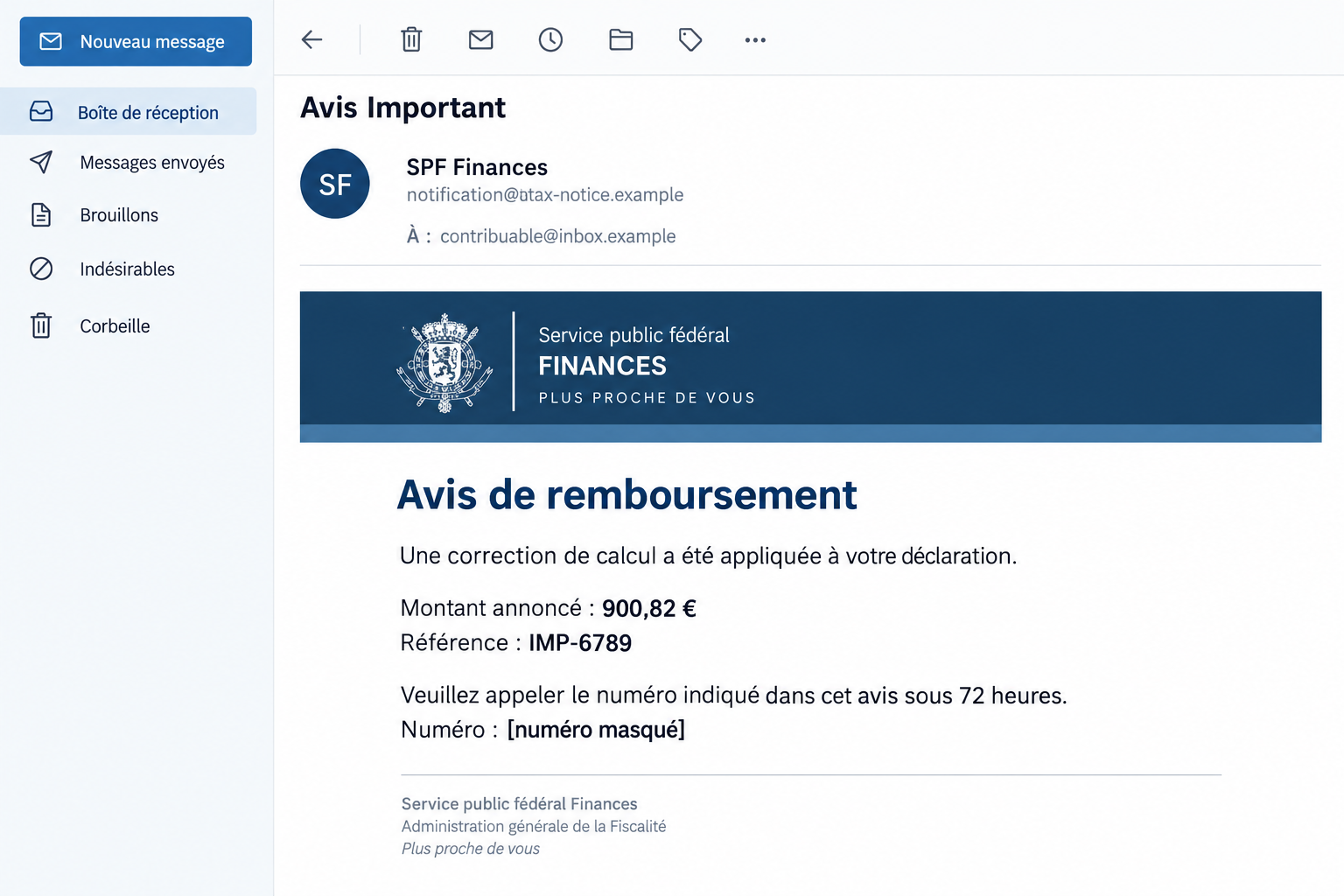
The SPF Finances refund email scam impersonates Belgium’s Federal Public Service Finance. The reported message uses the subject “Avis Important.”
It claims a correction to an earlier tax declaration has produced a €900.82 credit. A case reference, IMP-6789, gives the notice an official-looking detail.
Rather than directing the recipient to an independently verified tax document, it tells them to telephone a number supplied in the message.
A 72-hour limit pushes the recipient toward the phone
The email says the right to the refund will be forfeited unless the recipient responds within 72 hours. That threat belongs to the fraudulent notice.
The reported callback number is +32 496 78 57 77. Do not call it to claim the money or test whether the person answering sounds official.
SPF Finances is a real institution, not the scam operator. Its name is being used to introduce a phone-based impersonation attempt.
The risk is what the caller persuades you to disclose or approve
This is a callback lure, not simply a suspicious refund button. Speaking with someone can make later requests feel like part of an established administrative conversation.
- A specific amount makes the refund seem calculated.
- A case number suggests a file that has not been independently confirmed.
- The deadline threatens loss of money rather than an ordinary delay.
- The email chooses the telephone route used to verify its own claim.
- A supposed official can then explain away questions or resistance in real time.
The illustration uses fictional email addresses and masks the telephone field. It portrays the refund story without presenting a generated message as genuine government correspondence.
Why a Phone Number Can Feel Safer Than a Link
Many people have learned to avoid unknown website links. A telephone number can therefore seem like a reassuring alternative, especially for a tax question.
But calling a number chosen by the suspicious email does not provide independent verification. It moves the conversation to another channel controlled by the same unverified claim.
A polite answer, a department name, or knowledge of the case reference can reinforce that mistake. The caller may mistake consistency for proof of authority.
Consider the case number. If you read IMP-6789 to the person answering, they can repeat it back without ever opening a genuine tax file.
The same applies to the amount. Someone who already has the email template does not need access to government records to discuss its promised credit.
A Belgian country code also cannot establish a government role. Do not infer the operator’s identity, physical location, or nationality from that prefix.
The safer alternative is still a phone call if that suits you, but to a contact found independently on the real authority’s website or trusted documents.
You can ask about the alleged refund without first committing to the email’s route. A genuine entitlement does not depend on trusting that particular message.
How the SPF Finances Refund Email Scam Works
Step 1: The email presents a favorable tax correction
The initial claim sounds plausible because tax calculations can involve adjustments. A credit with two decimal places resembles an administrative result rather than a sweeping prize.
The message’s French wording fits an ordinary Belgian government context. Language and branding make it recognizable without authenticating who sent it.
The recipient may begin thinking about what they could do with the refund. That understandable reaction can move attention away from whether the underlying document exists.
Keep the two questions separate. Money would be useful, but the usefulness of a payment does not establish that anyone owes it to you.
Step 2: A reference and deadline make the next action feel necessary
The case number supplies apparent precision. The 72-hour condition then suggests that failing to act will cause the opportunity to disappear.
You may worry that an official inquiry will take longer than the deadline allows. That is exactly why the email makes its own number seem convenient.
Do not accept that trade-off. The deadline is part of the claim being assessed, not an independently established rule governing your tax account.
If a genuine tax document contains a deadline, address it through the real service. Rejecting the false notice does not mean ignoring authentic correspondence.
Step 3: The callback creates a conversation with a supposed official
The email asks the recipient to initiate contact. That can make the conversation feel safer than an unexpected incoming call, even though the destination remains unverified.
During phone impersonation, a caller can be guided through questions gradually. The person answering may describe each disclosure as necessary to locate a file or release funds.
No test call was made to this number, so a particular script or demand is not established here. The warning concerns the fraudulent callback invitation.
If you already called, judge the exposure by what actually happened. An unanswered call, a conversation, a shared banking credential, and an approved transfer need different responses.
Step 4: The refund story can be used to justify a financial request
A phone impersonator may seek confidential banking information, identity details, or an advance payment. These are possible follow-up patterns, not verified steps in every call.
The request may be framed as receiving money while the real banking screen describes something else. Read the genuine screen rather than accepting the caller’s translation.
Do not approve a transaction simply to verify eligibility for a refund. Do not send a fee because someone says a larger payment is waiting.
If the person resists independent checking, end the conversation. You can investigate a legitimate tax issue after disconnecting from an unverified caller.
How to Check the Refund Through the Real Tax Service
Look for the original document in MyMinfin
SPF Finances’ fraud guidance directs people to their genuine MyMinfin records when checking official documents. Reach the service independently of the message.
Compare the tax year, amount, and any requested action with the actual document. Do not stop at finding an unrelated refund or a vaguely similar heading.
A real credit elsewhere in your account would not authenticate this callback number. The email must still be assessed as a separate communication.
If an accountant handles your affairs, use the contact route you already share. Forward the question through that relationship rather than introducing a new caller into it.
Choose contact details outside the email
The authority’s official contact page provides assistance routes. Use the relevant service listed there, not a number embedded in the suspected notice.
Explain that you received a refund claim with a short deadline and want to verify it. You do not need to prove the caller’s identity yourself.
Do not assume caller ID authenticates a later return call. If an unexpected contact asks for sensitive action, reconnect using the independently established official route.
For someone helping a relative, keep them involved without sharing their secrets. Assistance should not require putting a bank PIN or code into another email.
Separate a call record from proof of who answered
Your call history can show which displayed number was dialed and when. It cannot by itself establish the legal identity or location of the person answering.
Preserve it for investigators rather than using it to identify someone publicly. A number may be reassigned, misrepresented, or used through arrangements you cannot determine from the email.
If the caller supplied a name or department, label it as their claim in your notes. Do not treat a confident introduction as a verified government role.
Record a promised callback time as well. If another person contacts you then, the scheduled timing shows continuity with the original approach, not independent authentication.
You remain free to end that conversation. Reaching the real authority through its established assistance route is the way to resolve the tax question.
Separate account details from banking authorization
Receiving a payment, changing an account record, signing into online banking, and authorizing a transfer are different actions. Tell your bank exactly which one occurred.
An account number is not the same exposure as a password or approval code. Avoid both extremes: assuming nothing matters or assuming every disclosure enables immediate withdrawal.
If the caller directed you through a banking app, record what its genuine prompts said. Those details can help the bank assess what was approved.
Do not repeat the process to obtain better evidence. Preserve what you already have and let the bank review its own records.
If You Called but Are Unsure Whether You Gave Anything Away
Write a short timeline while the conversation is fresh. Include when you called, what information was requested, and whether you opened another application.
Note any text messages, approval notifications, website addresses, files, or screen-sharing requests. These are useful facts even if you do not understand their technical purpose.
Do not include actual passwords or full codes in the timeline. Record the category of information and share sensitive evidence only through an appropriate private reporting channel.
If you only confirmed your name and phone number, that is different from authorizing a transfer. Still, expect possible follow-up calls using those details.
A stranger who knows the claimed refund amount may simply have the same script. Their knowledge does not make a later “bank security” or “refund recovery” approach genuine.
The exact callback ownership and any completed call outcome are not independently established here. The number is a campaign identifier, not a basis for accusing a country or subscriber.
What to Do If You Fell Victim
End contact with the refund operator. Do not call back to cancel, argue, or ask whether the email is genuine. Avoid new verification requests they send.
Keep the email and your call history. If the caller remains connected while asking for banking action, disconnect before contacting the real bank.
Contact the bank promptly about financial exposure. Use its genuine app, a trusted statement, or an independently verified number. Explain the details shared and approvals accepted.
If money was transferred, request an urgent fraud assessment and ask what recovery or protective steps are possible. Reversal is not guaranteed.
Protect any credentials or identity access involved. Replace an exposed password through the genuine service and address other accounts using the same secret.
If you approved an identity or bank action, tell the relevant provider. Do not describe an approval simply as “confirming the refund” if the real prompt said otherwise.
Verify the tax issue separately. Check MyMinfin or contact SPF Finances through its official assistance route. Ask whether the claimed correction and document exist.
Continue handling any independently confirmed tax requirement through the real service. There is no need to return to the fraudulent callback to finish it.
Preserve evidence and report the incident. Keep the original email, call times, claimed reference, transaction records, and any follow-up messages.
Use the authority’s published reporting guidance and make a police report when appropriate. The FTC’s recovery guidance also explains payment-specific first steps.
Assess software only if the encounter involved it. If a caller persuaded you to install a program or grant remote access, disclose that to the bank.
Malwarebytes can help investigate unwanted software. AdGuard may reduce exposure to malicious ads and known unsafe sites, but neither reverses a payment or revokes banking authorization.
Reject follow-up recovery fees. Do not pay someone who promises to retrieve the tax refund or recover the first payment after another charge.
Use existing institutional contacts and keep a trusted person informed if helpful. You can ask for assistance without giving another stranger control of your accounts.
Is Your Device Infected? Run a Free Malware Scan
Slow performance, constant pop-ups, or strange behavior? These are classic signs of a malware infection. The fastest way to find out is to scan your device with Malwarebytes Free — one of the most trusted malware removal tools available.
The free version detects and removes the most common threats, including:
- Adware — the cause of those annoying pop-ups
- Browser hijackers — unwanted redirects and changed homepages
- Trojans and spyware — hidden programs stealing your data
- Potentially unwanted programs (PUPs) — software you never asked for
👉 Select your device below — Windows, Mac, or Android — then follow the simple steps to download Malwarebytes, scan your system, and remove any threats it finds. The scan usually takes 5 to 20 minutes.
Run a Malware Scan with Malwarebytes for Windows
Malwarebytes is one of the most popular and trusted anti-malware tools for Windows — and it’s completely free for removing infections. It catches threats that many antivirus programs miss, including adware, browser hijackers, and trojans. Follow the steps below to scan and clean your PC in just a few minutes.
Download Malwarebytes
Click the button below to download the latest version of Malwarebytes for Windows from the official source. The free version is all you need — it will scan your computer and remove adware, browser hijackers, and other malicious software at no cost.
Download MalwarebytesOfficial installer for Windows 11 and 10. Your download starts right away.Want real-time protection? See Malwarebytes Premium Malwarebytes Free for WindowsScans and removes malware at no cost
-
Install Malwarebytes
When the download finishes, open your Downloads folder and double-click the MBSetup file. If Windows shows a User Account Control pop-up, click “Yes” to allow the installation.

Follow the On-Screen Prompts to Install Malwarebytes
The setup wizard will walk you through a few quick screens:
-
Choose where you’re installing the program — “Personal Computer” or “Work Computer” — then click Next.

-
Malwarebytes will now install on your device. This usually takes under a minute.

-
When installation is complete, the “Welcome to Malwarebytes” screen will open automatically.

-
On the final screen, click Open Malwarebytes to launch the program.

-
Enable “Scan for Rootkits”
Before scanning, turn on rootkit detection so Malwarebytes can find even the most hidden threats. Click the Settings gear icon on the left side of the screen.

In the settings menu, find “Scan for rootkits” and click the toggle so it turns blue.

Done? Click “Dashboard” in the left pane to return to the main screen.
Start the Scan
Click the blue Scan button. Malwarebytes will automatically update its virus database and start checking your computer for malware.

-
Wait for the Scan to Finish
The scan checks your entire system for browser hijackers and other malicious programs, so it can take 5 to 20 minutes depending on your computer. Feel free to do something else — just check back occasionally to see the progress.

-
Quarantine the Detected Threats
When the scan is done, you’ll see a list of everything Malwarebytes found — malware, adware, and potentially unwanted programs. Click the “Quarantine” button to remove all of them at once.

Malwarebytes will now remove the malicious files and registry entries and move them safely into quarantine.

-
Restart Your Computer
Some threats can only be fully removed after a reboot. If Malwarebytes asks you to restart, click Yes. Once you’re logged back in, Malwarebytes has finished removing the threats it found.

That’s it — your Windows PC is now clean of trojans, adware, and other malware, and should be back to running smoothly.
If you are still having problems with your computer after completing these instructions, then please follow one of the steps:
- Run a computer scan with ESET Online Scanner
- Ask for help in our Windows Malware Removal Help & Support forum.
Run a Malware Scan with Malwarebytes for Mac
Malwarebytes for Mac is a free on-demand scanner that removes the malware other security software tends to miss — adware, browser hijackers, and unwanted programs included. Cleaning an infected Mac with Malwarebytes has always been completely free, and it’s our go-to recommendation. Follow the steps below to scan and clean your Mac in just a few minutes.
-
Download Malwarebytes for Mac
Click the button below to download the latest version of Malwarebytes for Mac.
Download MalwarebytesOfficial installer for macOS. Your download starts right away.Want real-time protection? See Malwarebytes PremiumMalwarebytes Free for MacScans and removes malware at no cost -
Open the Malwarebytes setup file
When the download finishes, open your Downloads folder and double-click the setup file to begin the installation.

-
Follow the On-Screen Prompts to Install Malwarebytes
The Malwarebytes for Mac Installer will guide you through a few quick screens. Click “Continue” and keep following the prompts until the installation completes.



When the installation is complete, Malwarebytes opens to the Welcome to Malwarebytes screen. Click “Get started“.
-
Select “Personal Computer” or “Work Computer”
Malwarebytes will ask what type of computer you’re installing it on. Click either Personal Computer or Work Computer, whichever applies.

-
Start the Scan
Click the “Scan” button. Malwarebytes will automatically update its detection database and begin checking your Mac for malware.

-
Wait for the Scan to Finish
Malwarebytes will scan your Mac for adware, browser hijackers, and other malicious programs. This can take a few minutes, so feel free to do something else — just check back occasionally to see the progress.

-
Quarantine the Detected Threats
When the scan is done, you’ll see a list of everything Malwarebytes found. Click the “Quarantine” button to remove all the threats at once.

-
Restart Your Mac
Malwarebytes will now remove all the malicious files it found. Some threats can only be fully removed after a reboot — if Malwarebytes asks you to restart, allow it. Once you’re logged back in, your Mac is clean.

That’s it — your Mac is now free of adware, rogue browser extensions, and other potentially harmful software.
If you are still experiencing problems while trying to remove a malicious program from your computer, please ask for help in our Mac Malware Removal Help & Support forum.
Run a Malware Scan with Malwarebytes for Android
Malwarebytes for Android automatically detects and removes dangerous threats like malware and ransomware so you don’t have to worry about your most-used device being compromised. Aggressive detection of adware and potentially unwanted programs keeps your Android phone or tablet running smooth.
-
Download Malwarebytes for Android.
You can download Malwarebytes for Android by clicking the link below.
Get Malwarebytes for AndroidOpens Google Play in a new tab.Want real-time protection? See Malwarebytes Premium for AndroidMalwarebytes for AndroidScans your phone and removes malware at no cost -
Install Malwarebytes for Android on your phone.
In the Google Play Store, tap “Install” to install Malwarebytes for Android on your device.

When the installation process has finished, tap “Open” to begin using Malwarebytes for Android. You can also open Malwarebytes by tapping on its icon in your phone menu or home screen.

-
Follow the on-screen prompts to complete the setup process
When Malwarebytes will open, you will see the Malwarebytes Setup Wizard which will guide you through a series of permissions and other setup options.
This is the first of two screens that explain the difference between the Premium and Free versions. Swipe this screen to continue.
Tap on “Got it” to proceed to the next step.
Malwarebytes for Android will now ask for a set of permissions that are required to scan your device and protect it from malware. Tap on “Give permission” to continue.
Tap on “Allow” to permit Malwarebytes to access the files on your phone.
-
Update database and run a scan with Malwarebytes for Android
You will now be prompted to update the Malwarebytes database and run a full system scan.

Click on “Update database” to update the Malwarebytes for Android definitions to the latest version, then click on “Run full scan” to perform a system scan.

-
Wait for the Malwarebytes scan to complete.
Malwarebytes will now start scanning your phone for adware and other malicious apps. This process can take a few minutes, so we suggest you do something else and periodically check on the status of the scan to see when it is finished.

-
Click on “Remove Selected”.
When the scan has been completed, you will be presented with a screen showing the malware infections that Malwarebytes for Android has detected. To remove the malicious apps that Malwarebytes has found, tap on the “Remove Selected” button.

-
Restart your phone.
Malwarebytes for Android will now remove all the malicious apps that it has found. To complete the malware removal process, Malwarebytes may ask you to restart your device.
That’s it — your Android phone is now clean — no more malicious apps, adware, or browser redirects.
If you are still having problems with your phone after completing these instructions, then please follow one of the steps:
- Restore your phone to factory settings by going to Settings > General management > Reset > Factory data reset.
- Ask for help in our Mobile Malware Removal Help & Support forum.
Stay Protected: Block Ads and Malicious Sites
Now that your device is clean, keep it that way. Most infections start with a malicious ad or a fake download button — so blocking them at the source is your best defense.
We recommend AdGuard, which blocks malicious ads, phishing pages, and dangerous redirects before they can reach you.
👉 Download AdGuard and browse safely
Frequently Asked Questions
Is the €900.82 refund real?
The email does not establish entitlement to that amount. Check genuine tax documents independently rather than relying on the message or the person answering its number.
Do I lose the refund if I ignore the 72-hour demand?
That deadline is part of the fraudulent notice. Any real tax deadline should be confirmed in authentic records or with the actual authority.
Does the Belgian phone prefix make the number official?
No. A country code does not authenticate a department, individual, or government role. Find the relevant contact through the institution’s genuine website.
Why does the email include a case number?
A reference makes the story feel administrative. The person answering can repeat a number from the template without accessing a real tax file.
Did calling the number infect my computer?
A telephone call alone does not establish computer infection. Assess any software installation, remote access, credential disclosure, or approval that happened during the conversation separately.
Can a real tax authority ever contact me by phone?
Legitimate contact can occur. The problem is this unverified refund route. Confirm sensitive requests independently instead of using a blanket rule about every call.
The Bottom Line
Do not call the number in this SPF Finances refund email or pay to release its €900.82 credit. Verify the claim through genuine MyMinfin records.
If you shared banking access, approved an action, or sent money, contact your bank promptly. Preserve the notice and report the impersonation through official channels.

Join the discussion
0 commentsShare your experience or ask a question about this article.
Discussion
Start the conversation
Have a question or something useful to share? Add the first comment.