

An Account Protection warning says your account breached the terms of service. Incoming mail is already on hold, ticket #354086 is open, and only 24 hours remain to resolve the violation.
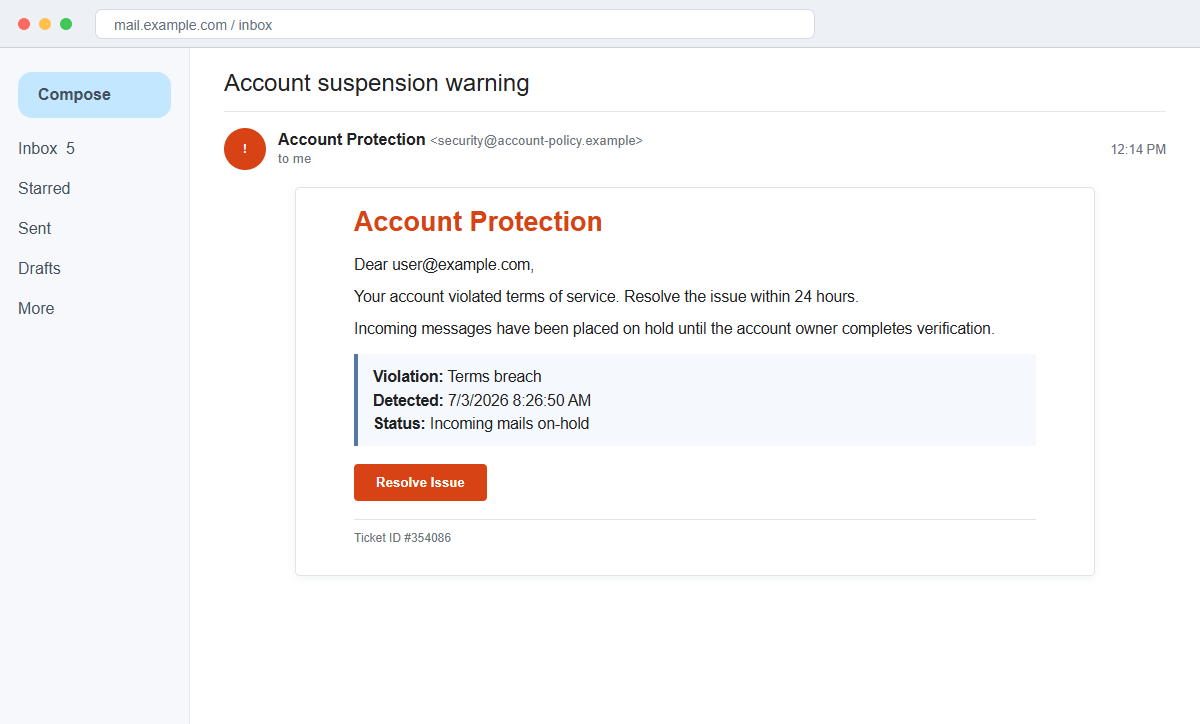
The Your Account Violated Terms of Service email scam does not explain a real policy breach. Its Resolve Issue button is a route toward a fraudulent login designed to collect the mailbox password.
A timestamp and ticket make the warning look connected to an automated enforcement system. They are static details inside the email and do not prove that the provider reviewed the account.
The destination linked in the documented campaign later became inactive. Future copies can use other hosts, so the safest check is always inside the real provider account reached independently.
Overview
The violation is serious but deliberately vague
The message lists Violation: Terms breach without naming a message, upload, recipient, policy section, or behavior. The recipient cannot understand or contest the allegation without clicking Resolve Issue.
That lack of detail is useful to the attacker. Almost anyone can imagine a forwarded file, mailing-list complaint, unusual login, or automated mistake that might have triggered an account review.
Ticket and timestamp create false precision
A detection time of 7/3/2026 at 8:26:50 a.m. and ticket ID #354086 resemble fields copied from a support system. The status says incoming mails are on-hold.
Numbers and dates are not authentication. A real ticket should appear in the provider's support or security history and should be retrievable without using the email's link.
Resolve Issue becomes a credential check
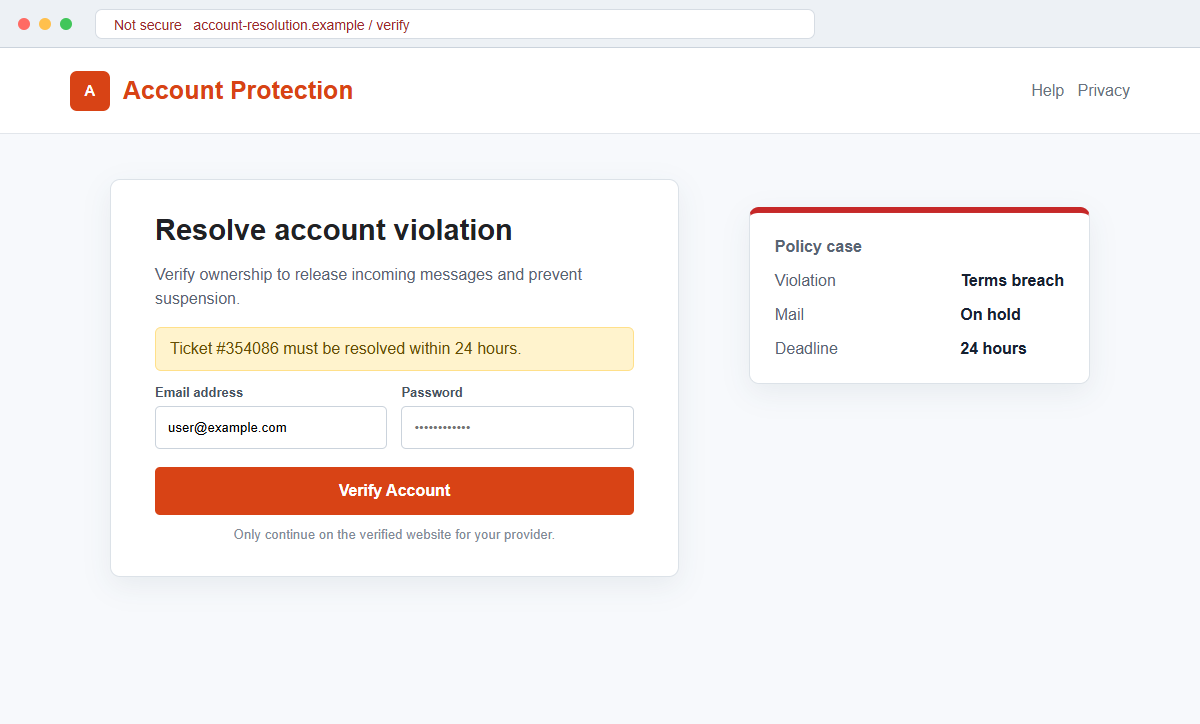
The embedded button is presented as the only way to restore delivery within 24 hours. The destination can imitate a generic webmail or provider login and ask for the email address and password.
Submitting those credentials does not release mail. It gives the operator access to the inbox and the services that rely on it for password recovery.
- The subject says Account suspension warning.
- Account Protection appears as the security department.
- A terms-of-service breach is alleged without details.
- Detection time 7/3/2026 8:26:50 a.m. is displayed.
- Incoming mails are said to be on hold.
- The recipient is given 24 hours.
- Resolve Issue opens an external page.
- Ticket ID #354086 cannot be confirmed independently.
Why a Vague Policy Violation Can Feel Personal
Terms of service documents are long and rarely memorized. A user may believe they accidentally crossed a rule without knowing which action caused it.
Email accounts also trigger real automated protections for spam, suspicious sign-ins, sending limits, and compromised passwords. The scam borrows that general possibility while withholding provider-specific evidence.
Holding incoming mail creates an invisible loss. The recipient cannot easily know whether a missing invoice, code, or reply is already waiting, so restoration feels urgent.
The 24-hour deadline discourages support contact. A user may fear that waiting for an answer will turn a temporary hold into permanent suspension.
Ticket #354086 completes the illusion by implying the case has already been logged. The recipient is invited to join an invented process rather than first prove that it exists.
How a Real Account Enforcement Notice Can Be Checked
Open the provider's official application or saved sign-in page. Real restrictions, storage limits, security events, and policy actions should appear inside the authenticated account.
Review the message center, help tickets, admin console, and recent activity. Search for the exact ticket, detection time, and claimed incoming-mail hold.
A genuine provider can identify the policy, affected content, appeal route, and account status. A generic message that names no provider and no conduct cannot establish a violation.
The campaign's original destination was no longer active during later review. That prevents confirmation of every requested field, but it does not change the verified intent to lead recipients into a credential-harvesting workflow.
Simply reading the email does not compromise the account. The critical events are submitting credentials, authorizing access, opening a file, or installing anything requested by the destination.
Mail delivery can be tested without trusting the alert. Send a harmless message from another account, check the provider's delivery log when available, and ask the administrator whether any queue or quarantine rule is active.
A true terms violation and a compromised account are different problems. The provider may require a password reset after suspicious activity, but that reset should begin inside the authenticated service rather than an anonymous policy email.
Business tenants often expose enforcement information to administrators. A staff member should send the warning to IT instead of entering a workplace password, because the administrator can inspect audit logs and organization-wide alerts.
The fake ticket can also be reused in follow-up messages. A caller who quotes #354086 may simply be reading the same campaign data, so knowledge of the number does not establish an independent support channel.
If real messages are missing, investigate storage, filters, blocked senders, routing, outages, and quarantine through official tools. The coincidence of a delivery problem does not authenticate the email's Resolve Issue button.
The safest response preserves evidence without engaging the operator. Headers, sender infrastructure, and the final link can help the provider block the campaign while the recipient continues account checks through a clean route.
How the Your Account Violated Terms of Service Email Scam Works
Step 1: A suspension warning reaches the inbox
The subject announces a serious account problem. The body may display a shield or Account Protection heading to resemble an automated security service.
No recognizable provider must be named. A generic template can adapt to the recipient's email domain after the click.
Step 2: A vague terms breach creates doubt
The recipient is told that the account violated terms of service. No policy clause, message, action, or evidence explains the allegation.
This ambiguity prevents direct checking while encouraging the user to open the case through the supplied button.
Step 3: A table supplies technical-looking details
The email lists a detection timestamp, on-hold status, and ticket #354086. These fields make the warning look generated by a monitoring system.
The values are ordinary text. They can be sent to every recipient without any connection to a real support database.
Step 4: A 24-hour deadline narrows the choices
The recipient is told to resolve the issue quickly or risk suspension. Incoming messages supposedly remain unavailable during the countdown.
A real provider account can be checked immediately through the normal application. There is no need to race through an unknown link.
Step 5: Resolve Issue opens a fake sign-in
The fraudulent page may copy webmail branding and prefill the target address. It asks for a password to verify ownership or release messages.
A password manager may not recognize the domain. Manually typing the password bypasses that important warning.
Step 6: Credentials are submitted to the operator
The form can capture the password before displaying an error, another prompt, or a message saying the violation was resolved.
A redirect to genuine webmail may follow. The successful login there does not validate the page that collected the first entry.
Step 7: The mailbox becomes a route to other accounts
The attacker can read private mail, add forwarding, request password resets, and send convincing messages from the real address.
Contacts may receive document shares, payment changes, or security alerts that appear to come from someone they trust.
Company and Checkout Checks
Open the provider independently
Use the normal application, saved bookmark, or manually typed address. Check whether the account is restricted and whether new messages are actually being held.
Do not use the warning to locate the sign-in page. The provider's account record is more reliable than the email.
Find ticket #354086
Search the real support center, message history, and administrator console for the ticket. Confirm the detection time and policy category.
If the ticket does not exist, the printed number cannot create one. Contact support through the official portal if clarification is needed.
Demand a specific policy explanation
A real enforcement process should name the service, rule, affected content, current restriction, and appeal method. Generic Terms breach wording is not enough.
Do not provide a password merely to learn what the accusation is. Authentication should remain on the provider's known domain.
Report the campaign
Use Report Phishing and send the headers to the provider or workplace security team. They can identify other recipients and block the route.
Preserve screenshots and the final link without revisiting it. Delete the message after reporting.
Warning Signs to Check Before You Act
- The provider is not clearly named.
- A terms breach is alleged without a policy section.
- No message or account action is identified.
- Incoming mail is supposedly on hold.
- The deadline is only 24 hours.
- Ticket #354086 exists only inside the email.
- A timestamp is used as proof of detection.
- Resolve Issue leads away from the known provider.
- The destination requests the current mailbox password.
- A password manager does not recognize the host.
- The real account shows no policy restriction.
- Official support cannot find the ticket.
A policy violation should become clearer when the official account is opened. This scam becomes less specific and more demanding, ending at a password form on an unverified page.
What to Do if You Have Fallen Victim to This Scam
- Change the exposed password immediately. Open the email provider's saved sign-in page or official application through a saved bookmark or its official application, not through the terms-of-service violation message. Retire the credential associated with that account-violated message completely. A unique replacement limits damage if the password stolen through that account-violated message is tested elsewhere.
- Recover the account through the real email provider, not through the message. Retire the credential associated with that account-violated message completely. A unique replacement limits damage if the password stolen through that account-violated message is tested elsewhere. The account involved in this account-violated case needs an MFA review. Delete recovery methods or app passwords that the owner cannot identify.
- End the access created through the terms-of-service warning. Sign out all other sessions from the real email provider, revoke unfamiliar OAuth grants, and reconnect trusted mail applications only after the password change. This closes tokens that can survive a simple reset.
- Review the mailbox for changes connected with the terms-of-service warning. Remove unknown forwarding addresses, delegates, inbox rules, filters, and automatic replies. Check folders an intruder might use after this account-violated incident, including sent, trash, deleted, and archive. Note unrequested recovery events.
- Protect the wider account chain. Prioritize email, cloud storage, and accounts recovered through the inbox. Map the accounts dependent on the inbox touched by that account-violated message. Replace credentials wherever that address approves password recovery.
- Protect the service impersonated by the email. Review mail delivery, active sessions, security events, forwarding rules, connected applications, and recovery settings through its official account and contact support through a verified channel. Review the real account named in this account-violated phishing attempt and remove unknown addresses, payment methods, documents, devices, or profile changes.
- Check the device used to open the terms-of-service warning. Run a complete Malwarebytes scan if this account-violated phishing attempt delivered a file, extension, or remote-support tool. Clean the device before changing sensitive passwords there.
- Reduce the chance of reopening a related page. AdGuard or another reputable DNS and content blocker may stop known phishing hosts and malicious advertisements tied to the terms-of-service warning. Blocklists may not recognize the next domain used for this account-violated incident. Verify every address before entering account information.
- Report the phishing message. Use the mail provider's Report Phishing control and notify your email provider, workplace security team, and the service named in the message. The raw headers from that account-violated message should be preserved before reporting. They are especially valuable when the campaign reached multiple inboxes.
- Warn mail administrator and recent correspondents through a separate channel. Explain that the terms-of-service warning may have exposed the account and ask them to distrust recent file shares, password requests, invoices, payment changes, or urgent replies until the timeline is confirmed.
- Expect follow-up fraud based on the terms-of-service warning. A supposed recovery expert mentioning that account-violated message may belong to the same operation. Work only with a professional you verify yourself. Choose recovery help for this account-violated case through organizations you contact independently. Avoid strangers who appear in messages or search ads.
Frequently Asked Questions
Is the terms-of-service violation email genuine?
No. The documented message invents a vague policy breach, 24-hour deadline, and incoming-mail hold to push recipients toward a phishing login.
Is ticket #354086 a real support ticket?
The number appears in the scam template. It is not evidence unless the independently opened provider account or official support can retrieve it.
Can an email provider really suspend an account?
Providers can enforce policies, but a genuine action should be visible inside the official account with a specific reason and appeal route.
Are my incoming messages actually on hold?
Check the authenticated account and ask the provider. The email itself cannot prove that delivery changed.
What if I clicked but entered no password?
Close the page, report the email, and inspect downloads. If no information was submitted and nothing was installed, account takeover is less likely.
What if I entered my password?
Change it through the real provider, revoke sessions, enable stronger authentication, inspect forwarding rules, and secure accounts that use the inbox for recovery.
The Bottom Line
The Your Account Violated Terms of Service email scam combines a vague accusation with precise-looking ticket and time fields. The 24-hour deadline exists to send the recipient into a fake login before the claim is checked.
Open the provider independently and look for the restriction, ticket, and held messages. If they are absent, report the warning as phishing.
A submitted password exposes far more than the inbox. Change it quickly, remove hidden access, and protect every account that depends on that email address.

Join the discussion
0 commentsShare your experience or ask a question about this article.
Discussion
Start the conversation
Have a question or something useful to share? Add the first comment.