

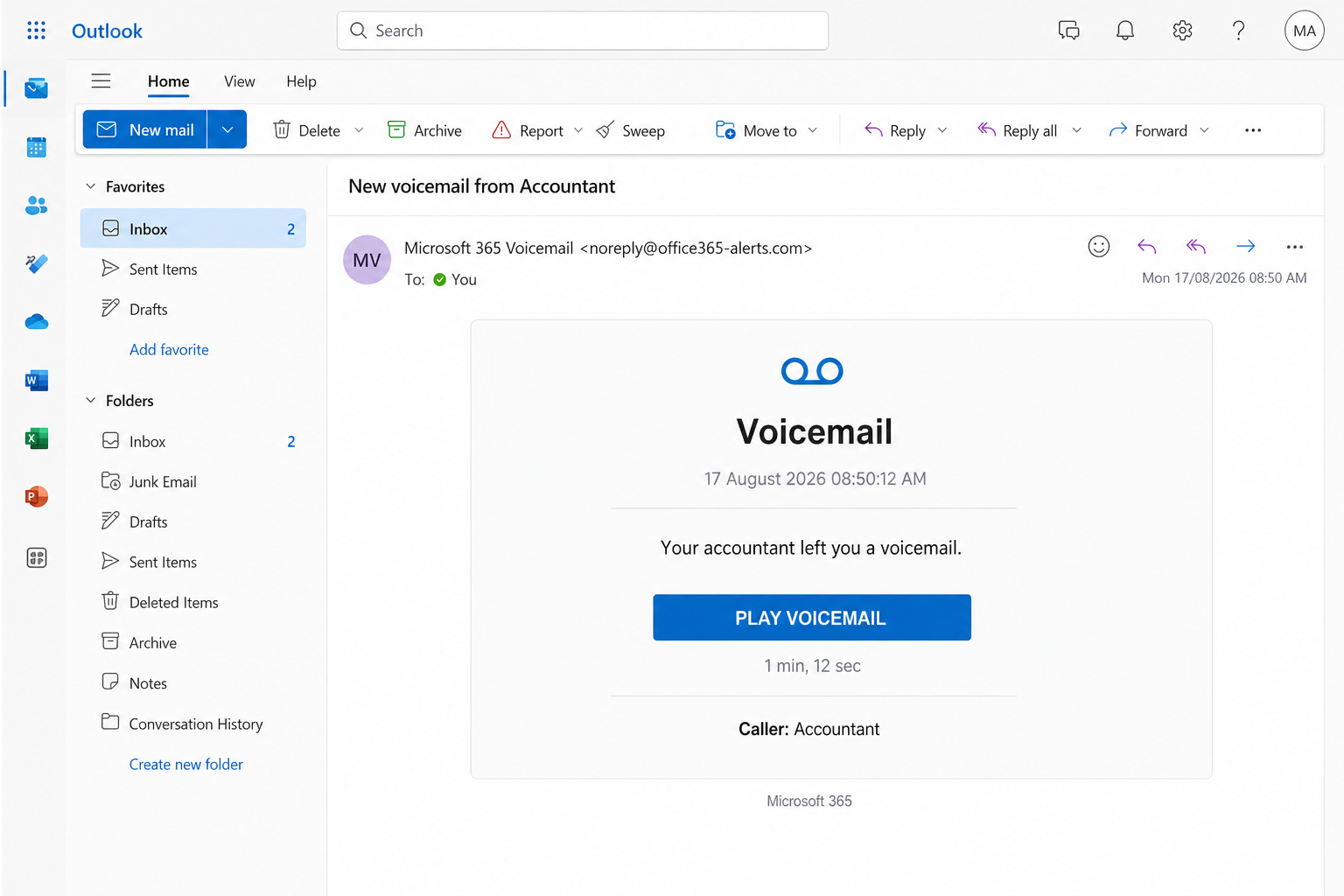
The subject is already doing the work. New voicemail from Accountant. You open it because tax season never really ends, because payroll is due, because the person who handles your books does not usually leave a 1 min, 12 sec message unless something is off. The card in the mail looks like Microsoft 365. There is a blue button that says PLAY VOICEMAIL. The date on the lure is 17 August 2026.
Overview
The trap is a fake Microsoft 365 voicemail card that uses an accountant as the caller so you will click Play before you think. The subject reads New voicemail from Accountant. The body says your accountant left you a voicemail. The duration is printed as 1 min, 12 sec. The caller line says Accountant. The date stamped on the lure is 17 August 2026. None of those details is a file you can take to a real bookkeeper.
Microsoft is real. People sign in to Outlook, Teams, OneDrive, and Word every morning on Microsoft 365. That is the point of the costume. A brand you already trust is doing the letterhead. A job title you already fear missing is doing the urgency. The Play button is doing the theft.
What they want is the Microsoft password, and often the extra code that lands on your phone a few seconds later. After that they want the inbox. An accountant lure is not random. The mailbox they are trying to wear is the one that sees invoices, tax packets, payroll files, and the “please pay this today” thread. Once they can send mail as you, the next victim is the person who already trusts your name.
The Microsoft 365 costume
The email is built to look like a product notice, not a letter from a stranger. A heading that simply says Voicemail. A timestamp. A short line of text. A wide blue button. A small Microsoft 365 mark at the bottom. If you are already inside Outlook on the web, the bars around the message do half the selling. It feels like office mail because you are standing in office mail.
Display names are cheap. Anyone can set a From line to read Microsoft 365 Voicemail. Microsoft’s own guide to spotting phishing tells you to treat mismatched email domains as a warning. A message that wears Microsoft’s name and arrives from a lookalike alerts address is not Microsoft talking to you. It is someone using the name because the name works.
Real Cloud Voicemail exists. Microsoft documents how to check voicemail in Microsoft Teams: you open Calls, then History, then Voicemail, and you listen there. You do not need a surprise card in the inbox to “unlock” audio with a fresh sign-in. If you want to know whether a real message is waiting, you open Teams or Outlook yourself. You do not let a blue button choose the website.
The accountant on the caller line
Caller: Accountant. That one word is doing more work than the Microsoft logo. An accountant is the person who can make a quiet Monday expensive. A missed call from that desk can mean a filing, a payroll run, a vendor who will not ship, a number the IRS already has and you do not. You do not need a long story when the job title already carries the bill.
The lure does not even bother with a first name. It does not say Maria from the firm. It does not name the practice. It says Accountant the way a system log would, as if a phone system tagged the call and moved on. That vagueness is useful. If your books are handled by a CPA, you fill in the face. If you are the person at work who pays invoices, you fill in the vendor. If you do not have an accountant at all, the word still sounds like money, and money still makes you click.
1 min, 12 sec is part of the same trick. A duration that specific feels like a real recording. It is long enough to be a problem and short enough to be “just a listen.” You tell yourself you will play it, get the number, and call back. The page never intended to give you audio. It intended to give you a login box while that story is still in your head.
The Play button
PLAY VOICEMAIL sits in the middle of the card like a player control. That is why people press it. It does not look like “Sign in to your account.” It does not look like “Reset your password.” It looks like the one thing you came to do. Hear the message. Then get back to work.
A voicemail notification should play audio, or it should take you into the app you already use. Microsoft’s phishing page is blunt about urgent buttons. Slow down when a message says you must click now. The accountant card is built so you will not. Tax, payroll, a missed call, and a timer under the button are there so you feel late before you have even hovered.
There is no honest reason for a Microsoft-looking voicemail player to live on a surprise page you reached from an unexpected email. If the recording were real, it would already be sitting in Teams or in Outlook. The Play button is not a player. It is a door.
The login that is not Microsoft
After Play, the next screen is often a sign-in page that borrows Microsoft’s layout. Your work email may already be sitting in the box. The logo looks familiar. The language is the language you see every morning. The address bar is the part they hope you do not read. Do not copy that address to look it up later. Those pages move, and a copied link is how the next person gets hurt. The habit is the tell. A voicemail that demands a Microsoft password is not a voicemail.
Microsoft’s support page says it plainly. If you worry a message might be real, open a new tab and go to the organization yourself. Type the official site. Use a saved favorite. Do not let the email choose the page. For Microsoft 365, that means opening Microsoft 365, Outlook, or Teams the way you always do, not through a Play button in a stranger’s card.
The FTC’s phishing guide describes the same story from the other side. A message that looks like a company you know. A problem you need to fix. A link that wants a password or a payment. The accountant voicemail is that story with a headset on. The Federal Trade Commission also says that if you already typed something, you treat it as lost information and you move, you do not wait to see if audio ever loads.
What they take after you type
The first prize is the password. The second prize is the extra code, the app prompt, or the “Are you trying to sign in?” tap that lands while you are still staring at a page that looks like work. If you approve that prompt because you think you are unlocking a 72-second recording, you have handed them the second key. Microsoft and the FTC both treat that code as a key, not as a courtesy.
After a sign-in, the mailbox is the office. They can read the threads you have with the real accountant. They can see who pays you, who you pay, and which invoice is already late. They can set a forwarding rule so a copy of every new message leaves with them. They can hide that rule in a folder you never open. They can send a new bill from your address that looks like last month’s bill, except the account number changed.
That is why the caller is Accountant and not a random first name. The lure is picking a desk that sits next to money. A compromised work inbox is not a nuisance. It is a way to move a payment without ever calling you again. If the account is a personal Microsoft account, they still get the mail that resets your bank, your tax software, and the other logins you tied to that address.
How The Scam Works
1. The email lands like office mail
It arrives in the same Outlook you already trust. The display name says Microsoft 365 Voicemail. The subject is New voicemail from Accountant. There is no long pitch and no attachment you have to open. The whole card fits on a phone screen. That is on purpose. A short notice is easier to believe than a letter that asks for a Social Security number in the first line.
If you are already signed in to Outlook on the web, the folders on the left and the search bar on the top make the fake card feel native. You are not visiting a strange site yet. You are reading mail. The costume only has to survive the three seconds between the subject and the button.
2. The accountant name makes you hurry
You do not get a novel. You get a job title and a clock. Your accountant left you a voicemail. 17 August 2026. 1 min, 12 sec. Caller: Accountant. Those lines are enough to invent the rest. A missed extension. A payroll question. A return that needs a signature before the window closes. People who would ignore a “Your account will be closed” threat will still press Play for a bookkeeper.
The date on this lure is part of that hurry. 17 August 2026 sits close enough to the present that it does not look like leftover spam from last year. It looks like this morning. A timestamp with seconds is there so the notice feels logged, not written.
3. Play does not play a recording
You click PLAY VOICEMAIL because that is what a player is for. The click is the moment the costume can drop. The next page is not an audio bar. It is a sign-in, a “verify it is you” wall, or a short hop that still ends at a password box. There is no transcript. There is no callback number from a firm you recognize. There is a request for the same credentials you use to open the inbox you are already sitting in.
That request is the tell. You are already in Outlook. A real voicemail would play, or it would open Teams. It would not ask you to prove you are you so you can hear 72 seconds of audio from “Accountant.” Microsoft’s own Teams page puts playback inside the app. The email button is a detour.
4. A Microsoft-looking sign-in asks for you
The page that follows is often dressed as Microsoft. It may use the same blue, the same word Sign in, the same field for the work address. It may say the voicemail is protected and that you need to authenticate to play it. That sentence is the whole product. There is no protected recording. There is a form.
Do not finish that form to “see if it is real.” A fake login does not become safer because you only wanted audio. Type the official Microsoft site in a new tab if you need to check the account. Open the Microsoft account security page yourself. Leave the Play tab alone. Close it. The address in that tab is not a clue you need to collect. It is a door you should stop using.
5. The password and the code leave with them
If you type the password, they have the first key. If a text, an authenticator prompt, or an email code arrives while that tab is still open, they want the second key too. The story will be helpful. Confirm so the file can play. Approve so the secure voicemail can load. Enter the code to verify your work account. Each line is the same request. Access.
Microsoft’s phishing page tells you to change the password on every affected account if you think you typed it on the wrong site, and to turn on multifactor authentication if it is not already on. The FTC says the same thing in consumer language. Treat the password as burned. Treat the code as burned. Do not reuse either one on the next page that promises to “unlock” the recording.
6. Your inbox becomes their desk
Once they can open the account, they are not hunting for a 72-second clip. They are hunting for money that already has your name on it. They read the last invoice you sent. They read the last invoice you received. They look for a thread with the real accountant, a payroll vendor, a bank, a client who pays by wire. Then they write the next message in your voice.
A bill that looks like last month’s bill is enough. A “new account, same firm” line is enough. A request to re-send a W-9, a voided check, or a routing number is enough. If they add a forwarding rule, they can keep a copy after you change the password, until someone deletes the rule. If they add a hidden folder, the replies that would have warned you never reach the inbox you still think you own.
7. The next message goes out as you
The last move is social. They have your From line. They have your threads. They can write to the real accountant as you, or to your clients as the accountant’s office, or to payroll as the person who always approves the file. The first email was a costume of Microsoft. The second email is a costume of you.
That is why a quiet “I already clicked, but I did not pay anyone” is not the end of the story. You may not have paid. The person who trusts you might. Tell the people who send you money and the people you pay. Tell the real accountant on a number you already have, not on a number that arrived after Play. A 30-second call from you is cheaper than a week of wires that look like your week.
What To Do If You Already Clicked Play
If you only opened the email and closed it, you are not finished, but you are not doomed. If you pressed Play and then typed, treat the account as touched and move in this order.
- Write down what you typed, then stop using that tab. Note the time, the subject New voicemail from Accountant, whether you entered a password, and whether you approved a code or an app prompt. Close the Play page. Do not keep “checking” it to see if audio appears.
- Open Microsoft yourself and change the password. Use a new browser tab. Type the official site, or use the app you already trust. Follow Microsoft’s steps to recover a hacked or compromised Microsoft account. Pick a password you have not used on anything else. If you cannot sign in, use the official reset path, not a link from the voicemail card.
- Sign out everywhere and turn the extra lock back on. On the Microsoft account security page, review recent activity and sign out of other sessions if that control is there. Confirm multifactor authentication is on. If you approved a prompt you did not start, assume that session is not yours until you kill it.
- Look for rules, forwarding, and mail that left without you. Check inbox rules, automatic forwarding, and the Sent folder. Look for a new mailbox delegate, a new app that can read mail, or a filter that hides replies. Delete what you did not create. If this is a work account, call IT before you spend an hour hunting. They can dump sessions and pull the audit faster than you can.
- Call the real accountant and the people who pay you. Use a number from a last year’s invoice, a card in the drawer, or a listing you already trust. Tell them a fake Microsoft 365 voicemail tried to take the mailbox, and that they should not honor a new account number or a rushed “updated wiring” note that arrives this week. If you handle payroll, say that out loud. The lure picked that word for a reason.
- Tell the bank if the mailbox sits next to money. If invoices, payroll, or tax software live in that inbox, call the bank and any payroll vendor the same day. Ask them to watch for a change-of-account request. A charge you did not make and a transfer you approved because “you” asked for it are different problems. Time still matters on both.
- Report the email, then scan the device if you downloaded anything. In Outlook, use Report and then Report phishing, the path Microsoft publishes on its phishing help page. Forward a copy to the Anti-Phishing Working Group at reportphishing@apwg.org. File at the FTC fraud report form. If a password, a bank account, or a Social Security number went into that page, use the government’s identity theft site for the next steps. If Play saved a file or pushed a player, run a full scan with Malwarebytes or the antivirus you already keep updated. The scan does not get a password back. The password change does that.
If someone forwarded you the card, send them this page instead of the Play button. These notices travel in office threads because they look like work. That is part of how they move.
The Bottom Line
A card that says New voicemail from Accountant, stamps 17 August 2026, prints 1 min, 12 sec, and offers PLAY VOICEMAIL is not a recording from the person who does your books. It is a Microsoft 365 costume with a login behind the button. Microsoft is real. The Play button is not how you reach Microsoft.
Open Teams or Outlook yourself if you need to know whether a real message is waiting. Call the accountant on a number you already have. If you already typed the password, change it on Microsoft’s own page, kill the other sessions, and tell the people who send you money before the next email goes out as you. The audio was never the point. The inbox was.

Reviews & discussion
0 commentsShare a firsthand experience, or ask a question.
Community reviews
Accountant Voicemail
Moderated reader experiences, not an editorial verdict.
Start the conversation
Have a question or something useful to share? Add the first comment.