

Have you seen ads for an app called AI Insider App that promises easy earnings through artificial intelligence? As persuasive as it may seem, steer clear of this scam designed to siphon money from unsuspecting users.
In this article, we uncover how the AI Insider App money-making app scam operates, analyzing the deceitful techniques it employs to dupe innocent people. You’ll learn how to recognize telltale signs of this fraud and protect yourself from such predatory schemes.
Overview of the AI Insider App Scam
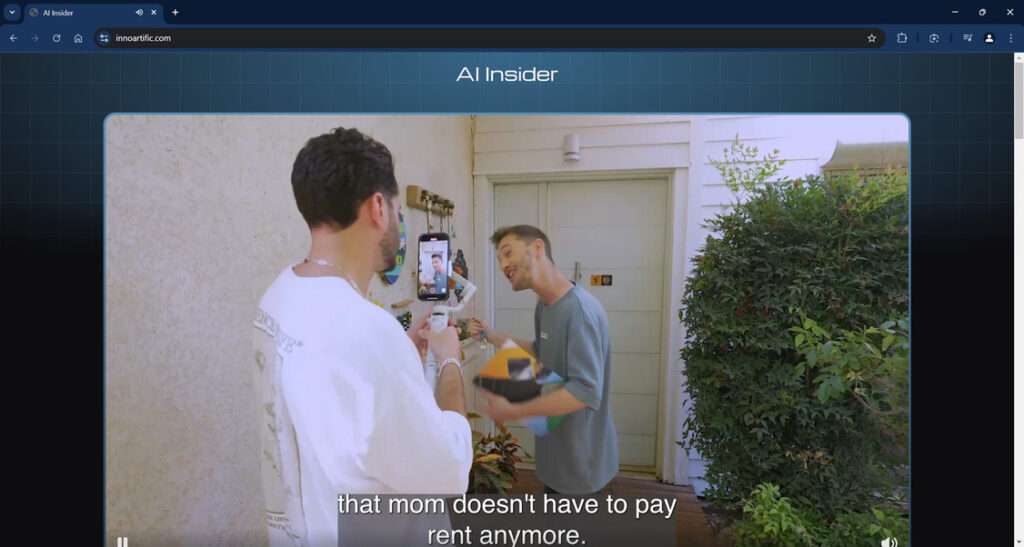
The AI Insider App scam operaThe AI Insider App scam typically begins with social media advertisements boasting incredible money-making abilities. The ads feature videos of people who have supposedly earned thousands in record time just by using the AI Insider App app. Common claims portray the app as an almost magical way to generate income for anyone through AI with minimal human effort required.
Intrigued viewers are led to websites like innoartific.com. These sites reinforce the notion that AI Insider App is a foolproof path to prosperity. Through further sensational videos and testimonials, visitors are assured that the app will start generating consistent commissions for them on autopilot.
To access the groundbreaking app, users must first pay a reasonable fee of $67. But unbeknownst to them, this payment enrolls victims into expensive recurring subscription plans that deduct up to $97 monthly from their accounts without authorization. The terms are often buried in fine print and intentionally confusing.
Despite promising access to advanced AI, victims merely receive generic training videos and PDFs containing no valuable insights. Needless to say, the earning potential touted in the ads remains completely unrealized. Requests for refunds are suppressed and ignored by anonymized customer support.

In essence, the AI Insider App scam utilizes exaggeration and deception to sell a mirage. The orchestrators hide behind fake identities and misleading claims while charging recurring fees for material lacking any unique value. A variety of unethical techniques are leveraged to perpetuate this fraud:
- Paid actors providing fictitious testimonials under pseudonyms
- Doctored payment evidence portraying false profits
- Made up limited-time offers to spur hasty purchases
- Refusal to issue refunds under dubious terms and policies
These manipulative tactics allow the masterminds behind AI Insider App to continuously generate illegal revenue from exploited victims. The promised effortless income through AI never comes to fruition.
In summary, the AI Insider App app scam preys on public hopes and ignorance regarding AI advancements. But behind the jargon and hype, it is merely another reiteration of familiar online frauds using exaggerated promises and hidden billing practices to fleece trusting individuals.
This scam has been also investigated by Jordan Liles on his YouTube channel, where he offers a detailed video on the subject. We recommend watching his content for a comprehensive understanding of the scam.
Next, let’s break down exactly how scammers carry out this scam from start to finish.
How the AI Insider App App Scam Works
Although ads promise quick money via simple AI apps, here are the dubious steps users actually experience:
Step 1: Lure with Outlandish Claims
Ads on social platforms tempt users with incredible claims of earning thousands per week through an AI phone app requiring minimal effort.
Step 2: Direct to Deceptive Websites
Intrigued users click on the ads and land on sites like innoartific.com that reinforce the exaggerated claims using fabricated proof.
Step 3: Get Users to Pay Initial Fee
After convincing visitors, the sites prompt them to pay a small one-time fee, usually $67, to unlock access to the AI money method.
Step 4: Auto-Enroll in Recurring Charges
Paying the $67 secretly signs up users for expensive recurring monthly subscriptions without consent, deducting up to $97 repeatedly.
Step 5: Provide Generic, Worthless Information
Users merely gain access to low-quality videos and PDFs with no exclusive information or profitable AI strategies.
Step 6: Refuse Refund Requests
Refund requests are ignored, often citing no refund policy on digital products, leaving victims stuck with unauthorized charges.
In summary, the AI Insider App scam relies on exaggerated promises, faked social proof, and intentionally confusing terms to profit from deceit rather than providing a real income solution.
Avoiding AI Money-Making Scams (Tips)
Here are some tips to protect yourself from predatory AI scams like AI Insider App:
- Verify unbelievable claims by seeking objective reviews outside the seller’s control.
- Check for transparency in the identities, contact information, and location of the sellers.
- Understand that making money online requires real effort rather than an overnight miracle app.
- Read all terms and conditions carefully before making payments to understand all charges.
- Avoid sites using pressure tactics or artificial scarcity to prompt quick purchases.
- Be skeptical of any guarantee of automatic passive income without hard work.
- Never pay unverified people upfront fees on the internet for unclear services.
Exercising caution and critical thinking is key to avoiding online scams misusing AI as a lure. If an offer seems too good to be true, it almost always is.
What to Do If You Already Paid
If you already fell victim to the AI Insider App scam, here are some immediate steps to take:
- Report Fraud – Alert relevant authorities about being deceived into paying a scam app. Provide all details available.
- Cancel Subscriptions – If signed up for monthly plans, look for fine print allowing you to halt upcoming automatic credit card charges.
- Initiate Refunds – Send formal refund requests via email to every contact, stating you were misled by them.
- Issue Chargebacks – If refund requests are ignored, contact your bank/card provider to report the charges as fraudulent.
- Leave Reviews – Post scam warnings for AI Insider App on consumer forums and app stores to protect other users.
- Monitor Accounts – Watch bank accounts and credit reports closely for any further suspicious charges.
Acting swiftly can help limit monetary losses from online scams. But avoiding such traps in the first place remains the ideal outcome.
FAQ: Uncovering the AI Insider App App Scam
1. What is the AI Insider App app scam?
The AI Insider App scam claims its app can make users easy money through artificial intelligence. In reality, it is a fraudulent scheme designed to charge victims recurring fees under false pretenses.
2. How does the AI Insider App scam work?
This scam uses fabricated social media ads and fake testimonials to convince people to visit sites like innoartific.com. After charging an initial $67 fee, monthly subscriptions around $97 are deducted without consent, providing nothing of value.
3. What claims are made about the AI Insider App app?
Ads boast the app lets anyone earn thousands per week by leveraging AI to automate online commissions. Doctored payment screenshots are showcased as proof of the systems profitability.
4. Are these claims true?
No, the promises of getting rich overnight through the AI Insider App app are completely false. All the testimonials, videos, and materials are fabricated to lure victims.
5. Who is behind the AI Insider App scam sites?
The real scammers hide behind site anonymity and redirects. They provide no real contact information and ignore refund requests, confirming the fraudulent nature of this scheme.
6. What are the costs of the AI Insider App scam?
Victims must pay a deceptive one-time fee of $67, which signs them up for expensive recurring monthly charges around $97, billed repeatedly without consent.
7. What do you get for your money?
You only get access to generic, copy-pasted videos and PDFs with no exclusive or profitable AI strategies. The hands-off income system promised does not actually exist.
8. Can an app really make you rich overnight?
No, the concept of an app generating automatic passive income overnight with no real effort is false. Any guarantee of easy earnings is a telltale sign of a scam.
9. How can I avoid the AI Insider App scam?
Be skeptical of “get rich quick” claims. Vet seller identities and sites through objective reviews. Understand legal terms before purchases. Never pay unverified people upfront fees online.
10. What should I do if I already paid the AI Insider App scammers?
If you already paid, contact your bank immediately about fraudulent charges. Demand refunds in writing citing deception. Leave negative reviews to warn others.
The Bottom Line
The AI Insider App app scam exploits public interest in artificial intelligence through social media ads and fabricated testimonials. But despite bold claims, it does not provide any real AI-powered money-making solution.
Victims lured by stories of easy earnings via AI end up paying repeated hidden fees for generic, worthless training information. The promised hands-off income never materializes.
View income claims involving apps or AI with skepticism. Scammers often hijack technological advancements as lures before they are mature or accessible. With vigilance and discretion, you can save yourself from such deceptions. Don’t let glossy AI promises convince you to ignore common sense.








