

The post says the drop is live. Restaked rollup rewards. RaaS builders and early users. $ALT waiting if you spun up a rollup, restaked, or missed an earlier window. One button. That is how a free claim arrives in a feed, not as infrastructure you already used, but as a window you are already late for.
The page is not handing out tokens. Connect Wallet opens a session a drain script can spend. Approve it and the wallet can empty in seconds. Blockchain transfers do not come with an undo button. Free $ALT is the costume. The wallet is the prize.
AltLayer is a real protocol for restaked rollups and rollup infrastructure, and $ALT is a real ticker people already hold. This article is not a review of that stack and it is not an accusation against the project. The trap is the fake eligibility or claim page that clones the look and asks you to connect a wallet. That is the only door this write-up is about.
Overview
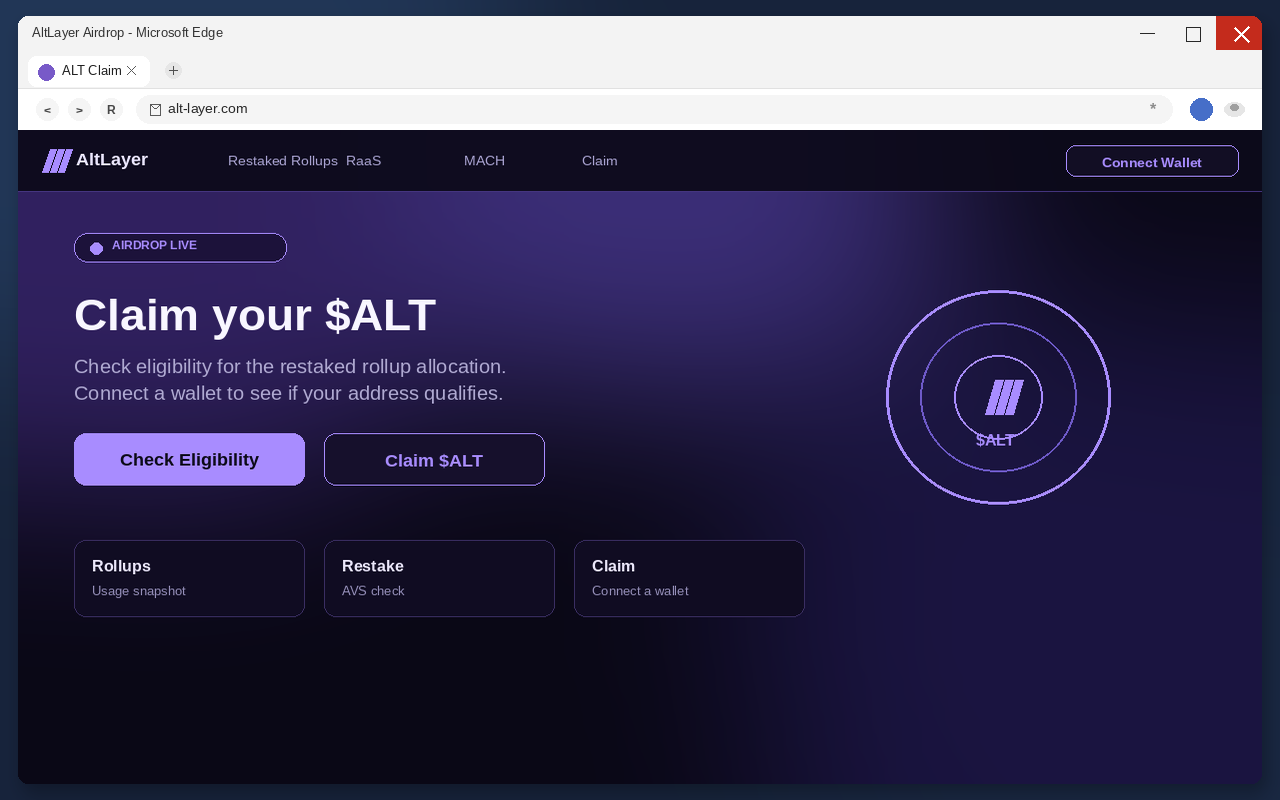
The $ALT airdrop scam is a fake claim pitch built to steal cryptocurrency. It presents a live, limited-time drop of free $ALT for wallets that used restaked rollups, touched a RaaS dashboard, held the token, restaked through related services, or somehow missed an earlier allocation. The only action that matters is Connect Wallet. That click is not an eligibility check. It is the handoff to a drainer.
One current example in this wave is alt-layer.com. Treat that address as a snapshot, not the story. The operators stand up throwaway claim hosts, push them for a few days, then move. The next page will not keep the same name. The tell is the clone-and-connect pattern, not the hostname you happened to see first.
Once a wallet is connected, a malicious approval can move assets to an attacker-controlled address. The transfer is public, fast, and final. Closing the tab does not claw the coins back. Changing a browser password does not either. If you already tapped Connect, treat that wallet as burned and work the recovery steps below before you do anything else.
The real protocol is not running these pages. Fake eligibility checkers, typo domains, impersonation accounts, and leftover-allocation stories show up around a genuine token the way they show up around every genuine token. The clones wear the purple, the ticker, and the restaked-rollup language. The clones are the trap.
Free $ALT is the bait, not a balance
Read the headline the way a tired person reads it between two other tabs. Claim your $ALT allocation. Eligibility is live. Restaked rollup users and RaaS builders can collect. Limited window for early users. Do not miss a MACH event. Every line is doing the same job. It makes a stranger’s button feel like a reward you already earned.
A real airdrop, when one exists, is boring on purpose. A snapshot. A published claim path on a site the project has used for months. A window that lasts long enough that you do not have to panic-click from a reply. Nobody who is actually sending you tokens needs you to treat a stranger’s claim page as a forfeiture.
These clone pages lean on the opposite feeling. Exclusive. Live. Closing. Allocation waiting. Free is the word that shuts down the part of your brain that asks who signed the contract. Free also hides the price. You are not paying in dollars. You are paying with whatever is already sitting in the wallet you connect.
That is why the pitch works on people who would never wire $500 to a stranger. Connecting a wallet feels like logging in, not like signing a check. The page never has to name a dollar amount. It only has to make Claim $ALT feel like collecting a coupon. The drainer names the amount later, on-chain, after the permission is already granted.
Restaked-rollup culture makes that coupon feel urgent. People already paid for RaaS spins, restaked for faster finality, and watched MACH, VITAL, and SQUAD talk land in the same feeds. A clone does not need you to learn a new stack. It needs you to believe the infrastructure you already used quietly set aside $ALT, and that waiting is how you miss the window.
Holders of real $ALT are a second audience. If you already received tokens in a genuine round, a leftover allocation checker sounds like housekeeping. Unclaimed supply. A second wave. A portal that will send what you missed. That story is useful to a thief because it targets people who already proved they will connect a wallet to collect $ALT.
Rollup teams and builders are a third audience. If your product used the RaaS path or restaked components, an allocation tied to that usage sounds like a grant you forgot to pick up. The clone spends that maybe. It does not need your codebase. It needs the wallet that paid for the spin.
Restaked language is the costume
Restaked rollups, RaaS, MACH, and allocation windows are doing sales work. They sound like founding rounds and infrastructure rewards you already should have seen. A snapshot. A dashboard. A notice that a drop you qualified for is finally open. Real networks have used that vocabulary for real distributions, which is the point. The muscle memory says you might still be on a list. The clone needs that maybe more than it needs a contract you can read.
A real rewards round does not live or die on a host you have never typed yourself. If the page cannot show your allocation without a live wallet session, it is not consulting a snapshot. It is asking for the session. Restaked chrome, in that layout, is an excuse with a nicer font.
Urgency also shows up without a printed clock. Live badge. Last chance. Claim now. Rewards close. Those phrases turn a permission request into a fire drill. Fire drills are how people sign things they would have declined at a desk, with a full address bar, on a second screen.
Do not race the badge. $ALT that a project actually owes you will still be there after you type the official host yourself and read the claim path on a channel you already follow. A clone cannot wait, because a clone has nothing to give. The restaked language exists so you do not notice that.
Typo chrome makes the fire drill feel like research. A page that almost spells the real project name, with a ticker in the headline and a Claim button under it, borrows the trust people put in muscle memory. You came to check a rumor. The page treats that check as consent to connect.
Claim is still a connect
Claim $ALT does not mint anything. Check eligibility does not either. Open allocation does not move tokens into your account. Those labels exist so the next window looks like a product step instead of a permission request. You have used Claim and Connect buttons on real apps. The muscle memory is the exploit.
The button is doing one job. It opens a wallet connection. After that, the page can ask for a signature, a token approval, a permit, or a spending permission dressed as a claim. None of those actions drops $ALT into your balance. All of them can let a script spend what you already hold.
Do not open a claim page to just look. On a phone the address bar is easy to ignore, and looking is how a Claim tap becomes a connected wallet. If a friend forwarded the link, tell them the same thing. The page is the attack, not a preview of an attack.
A second, quieter control often sits next to the filled button. Docs. RaaS. Learn More. Those labels are layout. They make Connect Wallet look like the serious choice, the way a real network site has a docs link beside a start button. Clicking them does not make the host official. The official part was supposed to exist before anyone asked you to connect.
Connect Wallet is the drain
The connection window looks like the one you have seen on real DeFi and rollup dashboards, which is the point. Familiar names lower the pulse. Your usual wallet is in the list so you do not bounce. Choosing it is not a verification of $ALT. It is you handing the page a live session with the account that holds your coins.
After the connect, the dangerous step is the approval. It may look like a simple sign-in. It may look like a claim signature. It may ask for unlimited token spend dressed as an eligibility check. Read the wallet prompt the way you would read a bank transfer. If you cannot name what is being spent and who can spend it, decline.
Hardware wallets are not magic here. A device still signs what you tell it to sign. If the prompt is a drain approval dressed as an allocation check, the device will do the harm you authorize. The metal box protects the key from malware on the computer. It does not protect you from saying yes to the wrong program.
Mobile wallets are worse for skimming. The address bar is smaller. The connect sheet covers more of the screen. A live badge next to Claim $ALT feels like product UI. Pause. Type the project host yourself on a desktop if you can. A free claim that cannot survive a slow read is not a claim.
The hostname will change
Do not memorize one fake host and call the problem solved. These operators rotate names the way they rotate Discord handles. Today it is one lookalike. Tomorrow it is a new subdomain, a new TLD, or a compromised site with a pasted claim iframe. Blocking a single address does not block the funnel.
A $ALT line on a price site does not baptize a random claim host. If you want the real project site, type altlayer.io yourself. Official channels do not hide on a disposable claim URL built for a one-week costume. People who already used the real restaked-rollup stack still should not connect a wallet to a page that showed up in a reply, a DM, or an ad.
The pattern to watch is simpler than the hostname. A stranger’s page. A free $ALT story. A Connect Wallet button that is required before you see any allocation. When those three sit together, leave. The next host will change. That trio will not.
How The Scam Works
The $ALT drain is a short funnel. A social or ad lure. A claim page that looks like the restaked-rollup dashboard you already trust. A wallet connect that feels like logging in. A drainer that spends the approval. Each stage exists to make the next one feel small.
The lure rides a real rollup stack
These pages do not wait for you to type $ALT into a search bar. They arrive as a post, a reply, a quote tweet, a Telegram forward, a group-chat alpha ping, or a paid ad that looks like coverage. The account may be stolen. It may be brand new with a rollup avatar and a few thousand fake followers. It may be a compromised influencer handle posting a claim link under a thread about restaked rollups, RaaS, or some other allocation rumor.
The Federal Trade Commission has already mapped that habit in broader crypto fraud. In its analysis of reports from January 2021 through March 2022, consumers reported losing over $1 billion in cryptocurrency to scams, about one out of every four dollars reported lost to fraud, or roughly 25% of that pool.
Nearly half of the people who reported a crypto-related scam said it started with an ad, post, or message on social media. $ALT is one more costume on that road, not a new invention.
The copy in those posts is always the same shape even when the allocation wording changes. Live now. Last hours. Check if you qualified. Claim your restaked share before the snapshot. A screenshot of a dark purple site and a Connect button. You are not being invited to read a RaaS explainer. You are being invited to tap before someone else does.
Rogue ads and pop-ups do the same work for people who never open crypto Twitter. A shady download site, a fake your wallet is eligible interstitial, a push notification from a page you should never have allowed to alert you. The destination is still a claim page. The story is still that a $ALT drop is live and you are late.
Group chats make the lure travel farther than the first account. One person pastes a link with this is live. The next person trusts the first person more than the URL. By the time the fifth forward lands, nobody remembers who found it. That is by design. The claim page does not need a famous domain if it can borrow a friend’s name, or the look of a rollup dashboard the whole chat already uses.
The lure is stronger because the real stack sits under other products. You can use a rollup that leans on restaked services and never open an AltLayer wordmark. That hidden plumbing is honest when the app is real. It is poison when a clone says your hidden history just unlocked a leftover allocation. People who never thought they were $ALT users still feel late.
The page copies a stack, not a project
When the link lands, the visitor sees a launch, not a warning. A live badge. A ticker. Large type that says claim your $ALT allocation. Under it, the limited-time line for eligible wallets and a rewards window. A filled Connect Wallet button where the eye already expects a dashboard.
What is missing is the boring proof a real allocation would drown you in. No published snapshot you can match to a known on-chain record. No official verification from a channel you already follow. No rules for who is eligible and who is not, beyond connect to see. The page asks you to believe the drop is live because the badge says live and the chrome looks like the restaked screen you used last week.
That emptiness is easy to miss after the word free, and easier still after restaked. Rollup users are trained to respect windows. Finality, sequencers, inclusion. The page spends that training.
It does not need a white paper you would actually read. It needs enough dark panels and purple marks to survive a three-second glance on a phone. Three seconds is enough to tap Connect. Three seconds is not enough to notice there is no checker behind the costume.
Social icons sit where a real community would sit. That is not verification. Icons are cheap. A Telegram logo does not mean the project has a Telegram. An X logo does not mean the account in the post is official. If you follow those icons, you often land on a second lure, not on a company.
The same costume works for other rollup and restaking stories. Swap the $ALT drop for another chain skin and the funnel still stands. This article stays on $ALT because that is the bait in front of you. The drain class is older than this ticker and it will outlive this host. The real protocol is not the operator. The clones are.
An eligibility check is not a statement
On a real distribution, eligibility is already sitting in on-chain history. Rollup usage. Restake held. Time spent using the infrastructure. You do not need a stranger’s page to invent that record. On these pages, check eligibility means start the wallet session. The phrase is doing sales work. It sounds like you are opening a statement that is already yours.
Nothing is already yours on that host. There is no allocation waiting behind the button. There is no snapshot of your address from last month living on that domain. There is no program quietly holding $ALT until you connect. The page needs you to believe that sentence so you do not read the permission the wallet is about to show.
Some visitors hesitate and look for a check eligibility step, hoping the site will say they do not qualify and leave them alone. That step is still a connect. Eligibility is the excuse. The wallet is the target. A page that cannot see your address without a connection is not checking a list. It is asking for the keys to the list.
Real eligibility for this stack, when it is discussed at all, is on-chain activity you can already see. It is not a connect-to-check page that showed up in a reply. A rollup protocol does not need you to arm a spender so it can count your RaaS usage.
If a later prompt says the claim failed, or that you need to unlock the allocation, or that gas must be paid from a token you do not hold, stop. Those lines are second bites. They exist to push another signature after the first one already opened the door. Close the tab. Do not try to finish a check that was never a check.
A restaked position can make the hesitation worse. People who already locked assets for faster finality do not want to miss a round tied to that stake. The clone spends that fear. It does not need you to deploy another rollup. It needs the wallet that signed the last restake to say yes one more time.
RaaS volume is a favorite excuse. The page pretends it will score your spin after connect, the way a real dashboard might show throughput. Scoring is a story. The connect is the product. If the only way to see a number is to approve a stranger, you are not viewing a statement. You are funding one.
The connect dialog is the permission
Tap Connect Wallet and the picker appears. It is the same family of connection UI used across legitimate apps, which is why it feels safe. You have connected wallets to real dashboards before. The habit is useful on a network you already trust. It is dangerous on a page that showed up this morning.
The list is often long on purpose. Ethereum wallets, other L1 wallets, hardware wallets, mobile wallets. A genuine eligibility view for one rollup stack does not need to greet every ecosystem in one breath. A drainer does. The operator does not care which chain you use. The operator cares that you approve something.
Read the prompt the way you would read a bank transfer. What is being spent. Which program is asking. Whether the permission is unlimited. Whether the action is a simple sign-in or a token approval. If you cannot answer those questions in one sentence, the answer is no. $ALT will not expire while you decline.
People lose coins here because the window feels like a login wall. Login walls are supposed to be boring. Drain approvals are not. A site that needs a signature to prove you own the wallet can also use that signature to move the wallet. Treat every prompt as a spending decision, even when the button says Check Eligibility or Claim $ALT.
Watch for permit and setApprovalForAll style wording dressed as an allocation check. Unlimited spend on a token you already hold is not how a statement loads. It is how a script walks the inventory. If the wallet UI shows a contract you cannot name, you are not verifying restaked activity. You are arming a drain.
Rollup users are extra exposed because one seed can hold balances on many chains. A clone that greets every network is not being helpful. It is shopping. Approve on one chain and the script can still hunt the others if the same key controls them. Decline the first prompt. Do not test the second.
The drainer is the product
After the connection, the page’s only remaining job is to empty the wallet. Drainers are built for this exact moment. They look for liquid balances, approvals they can spend, and assets they can transfer in one burst. The user still thinks they are waiting for an allocation panel to populate. The attacker is already broadcasting.
Speed is part of the design. Seconds, not hours. If you watch the wallet after a connect and see outbound transactions you did not build, that is not a glitch in the airdrop. That is the theft completing. Native coin, stablecoins, $ALT you already held, restaked receipts the script can reach, NFTs with open approvals, whatever sits in the account. The mix depends on what you held, not on what the claim page pretended to be.
Because confirmations are irreversible, the operator does not need you to stay on the page. You can close the laptop. You can reboot. You can delete the site from history. The chain does not care. The new owner of those coins is the address the drainer specified, and there is no AltLayer support desk that can freeze a transfer you signed on a clone.
Some drains leave a little dust so the wallet still looks alive. That leftover is not kindness. It is a hook for a second sweep, or for a recovery pitch that asks you to send more to unlock the rest. Do not feed the old address. Do not treat leftover dust as proof the first transfer was a mistake.
Restaked or delegated positions can sit behind extra steps. A drainer that cannot yank a locked stake on the first pass may still empty the liquid side, then wait. Treat that leftover lock as still at risk, not as proof the page was real. The clone already got what it could reach. The rest is a second appointment.
This is the same family of fake airdrop drains that has already worn other tickers and other throwaway hosts. The costume changes. The connect-and-empty step does not. $ALT is not a new kind of crime. It is a restaked-rollup sticker on a funnel that already works, which is why the recovery advice below is the same advice you should follow for any wallet you connected to a stranger’s Claim button.
The coins do not come back
There is no disputes team on a public chain. There is no chargeback. There is no AltLayer support that can reverse a confirmed transfer you signed on a fake host. Once the network includes the transaction, the coins belong to the new address. Closing the claim tab after that moment is hygiene, not recovery.
That finality is why the lure has to be free. If the page asked you to wire $2,000 to a stranger, more people would stop. If it asks you to check a $ALT claim, the cost is hidden until the explorer updates. The $ figure appears after the permission, not before it. By then the argument is over.
Exchanges can sometimes freeze funds that later land in a custodial account they control. That is a maybe, not a plan. It depends on speed, on the path the coins took, and on whether anyone can see that path from the hashes. It does not depend on a helper in DMs who wants a seed phrase. Save the transaction IDs first. Then file the reports. Then stop talking to strangers about the wallet.
A second crew hunts the same wallet
After a drain, the DMs arrive fast. People offering to trace the funds for a small fee. People who need you to share the seed so they can deploy a recovery program. People who want a USDT prepayment to unlock a case ID. People posing as exchange staff, law firms, or AltLayer support.
They are hunting the same wallet a second time. A drained address is a lead. It proves you will click, you held enough to steal, and you are now desperate. The recovery pitch is cheaper to run than the first claim page because you already did the hard part. You already connected once.
Nobody legitimate needs your recovery phrase. Nobody legitimate needs you to send more crypto to get the first batch back. A real investigator asks for transaction hashes you already have, through a form you typed yourself, not through a reply under the $ALT post. Block the helpers. Do not argue. The report you file is the only official path.
What To Do If You Have Fallen Victim to This Scam
If you connected a wallet to a fake $ALT claim page, assume the attacker can still spend what is left. Work in this order. Do not send more coins to the same address to unlock a claim. Do not paste a seed phrase into any site that offers to reverse the drain. Those are second scams that feed on the first.
- Disconnect and close the tab. In the wallet app, disconnect the site session. Revoke the connected dapp if the app has a connected-sites list. Then close the browser tab. This does not move coins back. It stops you from signing a second approval while you are still rattled. Stay off the claim page. Do not reload it to see if the $ALT allocation went through.
- Create a brand-new wallet. Generate a fresh recovery phrase on a device you trust, write it down offline, and never type those words into a website. The old wallet’s seed is still yours, but any dapp it approved may still be able to pull from the old address. A new wallet means a new seed. Do not import the compromised phrase into a clean app and call that a migration. Importing copies the risk.
- Revoke approvals on the old wallet. Use the official explorer tools for the chains that wallet used. On Ethereum-style networks, open the address in a block explorer and review token approvals. Revoke anything you do not recognize, anything granted today, and anything tied to a claim, airdrop, or restaked spender. Hardware wallet users should still revoke. The device does not cancel an approval you already signed. Check every chain that seed controls, not only the one the page named.
- Move remaining assets to the new wallet. After you revoke what you can, send what is left to the new address. Do this while you can. Drainers sometimes leave dust or a second sweep for later. Do not leave a little bit on the old address as a test. If a restaked position, a delegation, or another locked route cannot move until an unlock date, document it, revoke related spenders, and treat that position as still at risk until it can be migrated. Never fund the old wallet again.
- Preserve transaction IDs and screenshots. Copy every outbound hash from the time of the connect. Save the from address, the to address, the token, and the time. Screenshot the claim page URL only if you already visited it. Do not return to capture a prettier picture. Export the wallet activity if the app allows it. Those records are what an exchange, an investigator, or a report form can actually use. A vibe that AltLayer stole my coins is not a record.
- Report the theft. File at the FTC fraud report form if you are in the United States, and at the FBI Internet Crime Complaint Center. Add the TXIDs. If the coins passed through a centralized exchange you can identify from the explorer, use that exchange’s theft-report path with the same hashes. Tell your wallet vendor through its official support page, not through a reply guy under the $ALT post. Local police reports help some insurance and tax records even when the coins cannot be frozen.
- Ignore recovery agents. After a drain, the DMs arrive fast. People offering to trace the funds for a small fee. People who need you to share the seed so they can deploy a recovery program. People who want a USDT prepayment to unlock a case ID. People posing as exchange staff, law firms, or AltLayer support. They are hunting the same wallet a second time. Nobody legitimate needs your recovery phrase. Nobody legitimate needs you to send more crypto to get the first batch back. Block them. Do not argue. The report you already filed is the only official path.
If you signed nothing and only opened the page, disconnect any preview connection the wallet created and leave it there. Curiosity is not a crime, but it is how the next tap happens. If you shared the link in a group chat, go back and warn the thread. One quiet edit is worth more than a later apology.
Tax and recordkeeping are unglamorous and still worth a calendar reminder. Stolen crypto is still a transaction history you may need. Keep the TXIDs with the date you connected. If you use an accountant, send that packet once rather than piecing it together from memory in April. Do not pay anyone who promises to turn the hashes into a refund.
Going forward, keep airdrop hunting off the wallet that holds your rent, and off the wallet you use to spin rollups or restake. A burner address with a tiny balance can survive a bad click. The main wallet cannot. Official claims, when they are real, will wait for you on a site you already use. They will not need you to connect a stranger’s page because a live badge said a $ALT window was closing.
The Bottom Line
The $ALT claim on a throwaway page is not a live restaked-rollup drop. It is a wallet drain wearing RaaS chrome, an allocation story, a live badge, and a Connect Wallet button. Free tokens for people who used restaked rollups or spun a RaaS stack is the story. The connection is the product. Once that connection is approved, the coins can leave in seconds, and the chain will not give them back.
A $ALT ticker on a price site does not make a random claim host official. Typing the project host yourself is the check. The clones are the trap, not the real protocol. Official claims do not need you to panic-click Claim $ALT on a disposable URL. The hostname will rotate. The pattern will not.
If you already connected, disconnect, open a new seed, revoke, move what is left, save the hashes, file the reports, and hang up on anyone selling a recovery. The drop was never yours. The wallet still can be.

Join the discussion
0 commentsShare your experience or ask a question about this article.
Discussion
Start the conversation
Have a question or something useful to share? Add the first comment.