


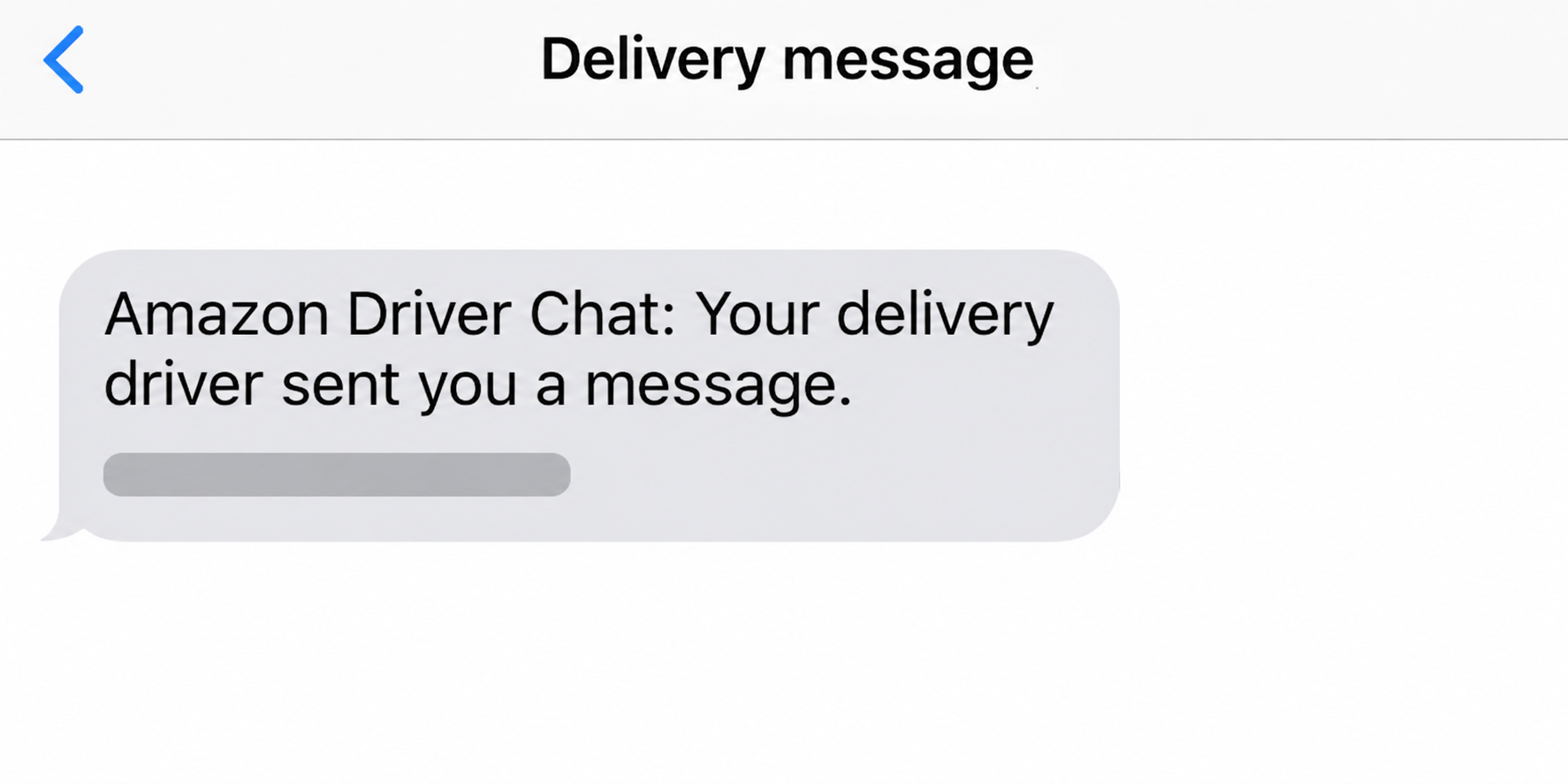
Your package is due today when an Amazon Driver Chat text lights up your phone. It looks like the sort of message worth answering before the truck moves on.
The timing might be right even when the request is wrong. Start with the delivery itself, then decide whether anyone needs an answer from you.
Overview
The text and the order are two separate things
Amazon can send delivery updates by text. That makes a driver message plausible, but it doesn’t make a message in your inbox a verified part of your order.
Open Amazon yourself and choose the order that should be arriving. The tracking screen gives you a way to investigate without making the message’s link your starting point.
A driver can need directions without needing your account
An apartment entrance, a locked gate, or a hard-to-find porch can explain why a driver wants help. None of those problems requires your Amazon password or card details.
Some deliveries do have a separate handover passcode. Check the instructions tied to that order instead of assuming every request for a code refers to the package.
Match your response to what you shared
Reading a text isn’t the same as handing over a sign-in code. If you already interacted, the details you entered matter more than how polished the page looked.
- Delivery question: Start with the matching order or its carrier’s official tracking.
- Password or sign-in code: Secure the account through Amazon’s own sign-in and support channels.
- Card details: Tell your card issuer exactly what you submitted.
- Handover passcode: Check the delivery status and report any mismatch to Amazon.
How to Check an Amazon Driver Chat Text Without Opening Its Link
Don’t start by searching the sender’s number. A search result may show who used a number before, but it can’t match today’s message to a particular shipment.
Use the Amazon app you already have or the site you normally use. If you manage more than one account, switch to the account that placed the order.
Go to Your Orders and choose the shipment due near the time of the message. Use the tracking details to check its status and which carrier has it.
A single checkout can produce several shipments. Open the one for the item you’re expecting, rather than treating a delivery on the same day as a match.
If the order is out for delivery, look for any delivery communication or instructions available there. If you can’t find the conversation, use Customer Service from inside Amazon.
Some orders are delivered by another carrier. If Amazon names one, use the carrier details from the actual order to check the shipment, not the number supplied by text.
If a family member placed the order, ask them to check it on their side. There’s no need to enter their credentials or ask them to forward a passcode.
A gift, a different household account, or an old contact number can explain why an unfamiliar delivery message arrived. Those possibilities still don’t establish that the link is safe.
Amazon’s package tracking guide explains where to check orders and what delivery features may appear. Not every shipment provides a map or stops countdown.
Amazon also describes a message verification feature in Alexa for Shopping for eligible U.S. customers. Use it from Amazon itself if available.
That tool can fail to match a communication. An uncertain result isn’t permission to use the text’s link; keep helping the driver through the order or Customer Service.
How the Fake Amazon Driver Chat Text Scam Works
Step 1: A delivery problem gives the message a deadline
Most people can picture a driver standing at the wrong entrance. A message about access or a missed delivery gives you a reason to act before checking anything.
A real order on the way makes the story feel personal. But a sender who guessed that you were expecting something hasn’t demonstrated access to that order.
A simple prompt to answer the driver can feel more routine than a threat that your account will be permanently closed. The pressure doesn’t have to sound dramatic.
Step 2: The conversation moves away from the order
The counterfeit notification sends you somewhere the sender chose. On a phone, a short link or an app-like landing screen can make that change hard to notice.
Even a familiar name above the conversation doesn’t link the message to a shipment. Think of it as a label presented to you, not a delivery receipt.
If you check the order independently, the sender loses control over the next screen. That still lets you resolve a genuine delivery problem before the driver leaves.
Step 3: A new request has nothing to do with the doorstep
The address question can turn into a sign-in screen. An alleged rescheduling request can turn into a payment form. Each asks you to give up something different.
A copy of a login page can collect the password you type. A later request for an account code can help someone finish a sign-in you didn’t start.
A small charge can be the pretext for collecting card information. The size of the amount on screen doesn’t limit what can happen after the details are exposed.
Amazon’s warning about suspicious texts distinguishes legitimate updates from requests for confidential details or payment. Use the order to check delivery claims independently.
Delivery Passcode or Sign-In Code? Check What the Code Approves
Both can arrive around delivery time. What matters is what the message says the code is for, and whether that purpose matches an action in your account.
| What the code authorizes | Where the request belongs | What to do |
|---|---|---|
| Handover of a specific package | Delivery instructions for that order | Verify the order and follow its handover instructions in person. |
| Account sign-in or password reset | The sign-in or recovery screen you opened yourself | Never read or forward it to the caller or texter. |
| A card purchase or bank authorization | Your card issuer’s independent confirmation | Reject any authorization for a transaction you didn’t start. |
Amazon Shipping UK describes a doorstep procedure in which a driver collects a passcode for a particular parcel. Follow the instructions for your own marketplace and shipment.
That kind of code is not a spare account password. Even so, sharing it before an actual handover can put you in a dispute about whether delivery happened.
If you aren’t there, don’t try to keep the route moving by texting the code to a stranger. Check the options for a missed attempt in your order.
Someone who asks for your account code may say it will release the package. Read the full notice that delivered the code, rather than trusting the caller’s description.
When a code says it approves a password change, that is the job it performs. It doesn’t become a delivery code because a caller says there was a mix-up.
A sign-in alert arriving during the conversation can be genuine while the caller remains fraudulent. Use Amazon’s security settings to check the sign-in attempt after you end the conversation.
When the Message Looks Convincing but the Order Doesn’t Fit
A delivery photo isn’t an identity check. An image forwarded in a text doesn’t establish who sent it. Compare any available delivery photo inside the order instead.
Check the status on the order itself. If a text says the truck is waiting but the order hasn’t shipped, don’t let the message create an emergency.
Don’t treat the timing as authorization. A fake message can reach you on a day with a real delivery. Answer only what the order itself confirms.
Good spelling isn’t a security feature. Real notifications can be terse, and a copy can be flawless. Use the order, not grammar, to decide where to respond.
Keep the delivery route separate from billing. If an actual order needs a payment update, use the available controls in your account, not a form reached from the message.
When you can verify a driver needs access, share only the instructions that solve that delivery problem. Avoid sending permanent door codes or identity documents through an unexpected chat.
If a message leads to a supposed Amazon agent by phone, end the call and open support yourself. The same person shouldn’t supply both the problem and the verification channel.
What If the Driver Can’t Reach You?
Say you’re in a meeting when a message claims a driver couldn’t enter your building. Open the order when you can and look for an attempted-delivery update.
If the order shows an attempt, check whether Amazon or the carrier gives you a next delivery date, a pickup option, or a place to update delivery instructions.
Some delivery details are saved at the address level. Before updating them, check whether the change is meant for future orders or can still affect the one in transit.
If there’s no place to adjust instructions for this shipment, ask official support what the carrier can do. A stranger’s fee request isn’t a workaround for missing order controls.
When a shipment says delivered, switch to the missing package process rather than trying to reopen the driver’s text. Check the delivery address, any photo, and whether someone accepted it.
Don’t let a real missing parcel validate an unrelated message. Give support the order information and ask about tracking; you don’t need to prove the text was fraudulent first.
A tracking number can help you look up a shipment, but it can’t authorize a charge. Reconcile any real delivery issue inside the account before deciding what to pay.
Keep a note of the official response if the status and the handover don’t agree. That will help you follow up without depending on the original text.
What to Do If You Replied, Entered a Code, or Paid
-
If you only read the message, check the order directly for any delivery change. Keep a copy if you want to report it, then ignore the sender.
A password reset, credit freeze, or factory reset doesn’t follow from simply receiving an unexpected text.
-
If you opened the page without entering anything, close it. Check whether you approved a download, installation, or browser permission before deciding whether any device action is needed.
If you also downloaded software or allowed remote access, stop using that session for account recovery. Use a separate trusted device to contact Amazon or your bank.
-
If you entered an Amazon password or sign-in code, use the app or known website to change the password immediately and review Login & Security.
Check orders, addresses, and account contact details for unexpected changes. Contact Amazon if you can’t sign in or if a code may have let someone through.
Change the same password anywhere else you used it, starting with the email account that handles Amazon recovery. Set up a passkey or two-step verification where available.
-
If you entered payment details, contact your card issuer from its app or the number on the card. Explain the page, amount shown, and whether you approved anything.
Ask how to secure the card and report transactions you didn’t authorize. Save any receipt, message, and statement entry, even if you never saw a confirmation screen.
-
If you shared the delivery passcode, check that exact shipment. If it shows delivered but you don’t have the package, tell Amazon how and when you shared it.
Preserve the tracking status and any delivery photo through your account. Treat this as a delivery problem unless you also exposed your login or noticed account changes.
-
If you report the message, use Amazon’s reporting instructions and avoid forwarding active codes, card numbers, or passwords. Keep your copy private if it contains your address.
U.S. readers can file a separate FTC fraud report. A report isn’t a substitute for contacting the issuer or securing your account promptly.
Frequently Asked Questions
Is an Amazon Driver Chat text always a scam?
Amazon sends delivery updates, and a driver can have a real question. Open the order independently before taking any action requested in the text.
Can I trust the link if it looks like Amazon?
Don’t use the text as your proof. A similar-looking address, a link preview, or a familiar logo can’t show that the message belongs to your shipment.
What if the driver needs my gate or apartment information?
Use the delivery options for the verified order. Supply the minimum directions needed to find your entrance, without sending login, payment, or identity information.
What if my Amazon account has no delivery listed?
Check the account used for the order and ask your household if appropriate. If you still can’t tie the text to a real shipment, leave it unanswered.
How do I handle a request for a one-time passcode?
Read what the code actually approves. Use a package handover code only according to verified order instructions, and never share a sign-in or bank authorization code.
What should I do if I entered a password but stopped before the code?
Change the exposed password anyway, since it may already have been captured. Review account changes and tell Amazon if you see activity you didn’t initiate.
The Bottom Line
Treat an Amazon Driver Chat text as a prompt to check the order, not as permission to use its link. Handle any genuine delivery issue from there.
If you already responded, identify what you handed over. A delivery code belongs with Amazon support, an account code needs account recovery, and exposed card details need your issuer.

Join the discussion
0 commentsShare your experience or ask a question about this article.
Community experiences
Did this happen to you?
Your experience could help someone recognize the same scam. Submit a private report for our team to review.
I experienced this tooReports are reviewed before publication. Sharing publicly is always your choice.
Discussion
Start the conversation
Have a question or something useful to share? Add the first comment.