


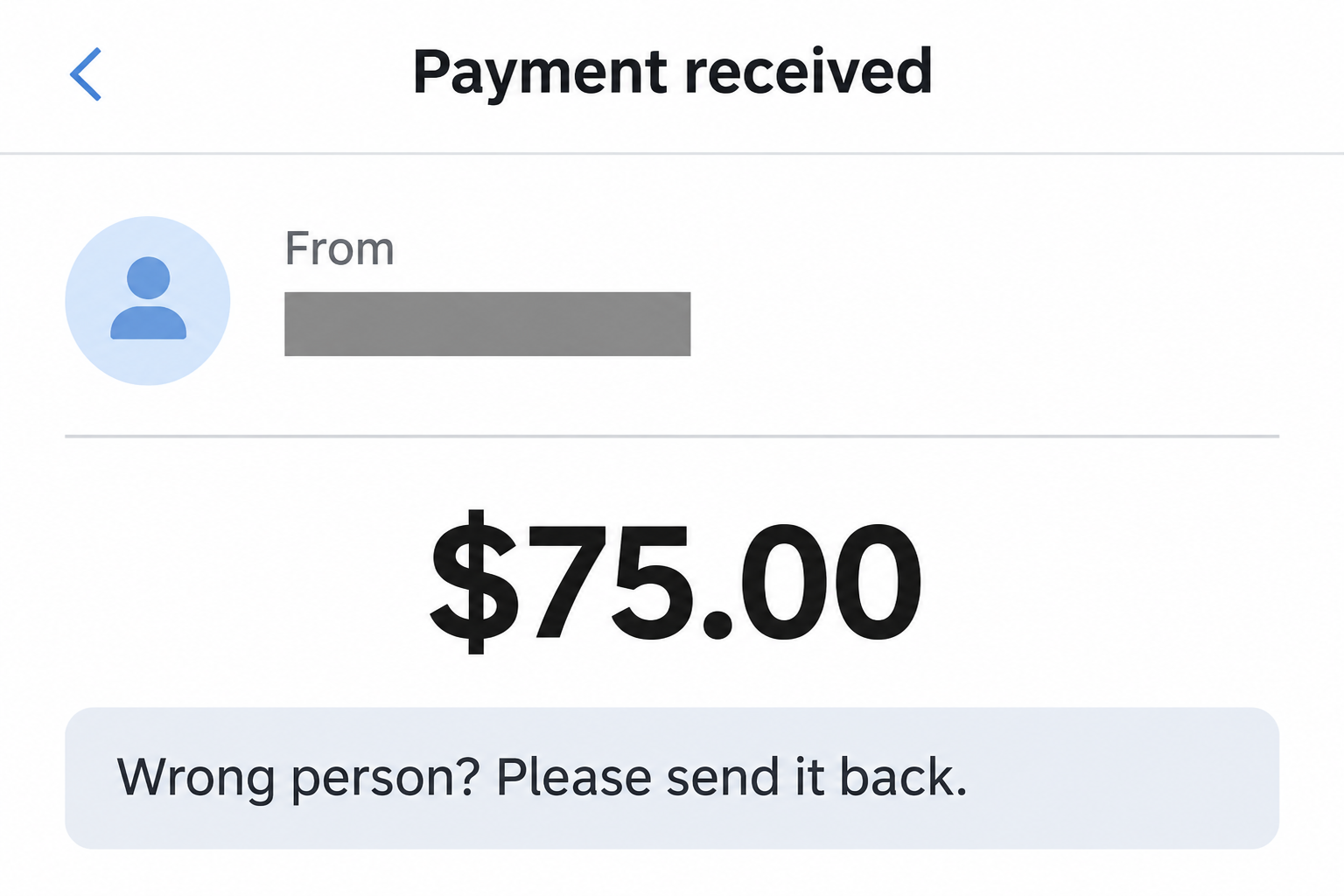
A Venmo payment from a stranger lands in your activity. Before you can work out who sent it, someone says they picked the wrong person.
It might be an honest mistake. The next move still matters, because the way you return money can create a new payment in your name.
Overview
A stranger’s payment is not evidence of a break-in
People sometimes choose the wrong Venmo profile. Money can appear in your activity without anyone signing in as you or changing your account.
It can also be the opening of the Venmo accidental payment scam. Leave the money in place while Support checks the incoming transaction.
A reversal and a new payment affect different entries
Venmo can review the incoming transaction. If you make a new payment to the sender, that separate transfer doesn’t cancel the one that brought money into your account.
The distinction remains even if you type the same amount and choose the same username. The payment you authorize exists independently of whatever happens to the first one.
The app tells you which problem you actually have
A payment notification isn’t the transaction ledger. Open Venmo as you normally would, and use your own activity to see whether money came in or somebody just requested it.
- Incoming payment: Leave the funds alone and contact Venmo about that entry.
- Unsolicited request: Decline it rather than paying to make it disappear.
- Email with no matching entry: Treat it as an unverified notification, not money owed.
- Unrecognized outgoing payment: Report possible unauthorized activity, not a mistaken deposit.
Read the Transaction Before You Answer the Sender
Open the app without using a link in an email or a message. Find the entry under your own activity and open its detail view.
Look at the direction of the transaction, the amount, and the account associated with it. Read the payment note separately: its words don’t determine what the app did.
A request can use the same amount and familiar profile photo as a payment. Accepting a request, however, is a decision to send your money.
If the only proof is a screenshot from the other person, you haven’t confirmed receipt. Don’t ask them for a clearer screenshot when your own account can settle that question.
A sender may be able to show a transaction from their account without showing whether it reached yours. Compare it to your activity before reacting to any demand.
If an incoming payment really exists, you still don’t need to decide whether the stranger is lying. Venmo’s instructions for recipients say to contact Support rather than moving it yourself.
Leave the amount available while Venmo reviews it. Don’t send it to another account, spend it on another payment, or transfer it to your bank to keep it separate.
For a request from an unexpected stranger, check the direction of the transaction before touching anything. Declining does not reverse an incoming payment because those are different actions.
An entry that truly shows money leaving your account and wasn’t initiated by you belongs in another category. Tell Support about the outgoing activity immediately.
How the Venmo Accidental Payment Scam Works
Step 1: A surprise transfer gives the sender a reason to contact you
Someone you don’t recognize appears in your payment history. Later, a note or message says they meant to send the money to another person with a similar name.
The story is believable precisely because real mistakes happen. You don’t need to accuse the sender of anything to insist on using Venmo’s process.
Venmo lists this pattern among its common scams. The deciding point is not that you saw a deposit, but that someone tries to get a separate payment out of you.
Step 2: The sender asks you to send a second transfer
In this version the stranger doesn’t wait for Support. They ask you to hit Pay, accept their request, or send the amount to another account they name.
The request sounds like the second half of a refund. The app sees it as a new instruction, funded by your account and directed to a recipient you chose.
A hurry-up message can make the safest channel sound unkind. But genuine senders also have access to Support, and don’t need you to accept an unrelated payment request.
Step 3: The original payment can be taken back independently
Venmo says it can reverse previously received funds in certain cases. One reason for action is payment using a stolen card or compromised account.
Seeing the original amount in a balance doesn’t remove that risk. The credit and the repayment can have different funding sources, different recipients, and different dispute histories.
If the first payment is reversed, your new payment doesn’t automatically return. You’ll have two entries to explain to Support, rather than one mistaken payment to resolve.
Follow the Two Entries, Not the Net Balance
Imagine a new profile sends you $75. The amount is an example, not a marker that identifies the scam. It could happen with a smaller or larger payment.
If you pay $75 back through a fresh transaction, it may look like you broke even. But there is still a $75 credit and a separate $75 debit.
| What happened | Change in the example | What to look for |
|---|---|---|
| Stranger’s payment arrives | +$75 | An incoming entry in your own Venmo activity |
| You make another payment | −$75 | A separate outgoing entry you initiated |
| Venmo reverses the initial credit | −$75 | An adjustment to the incoming payment, not your outgoing one |
In that example the final result is a $75 loss, assuming the new payment stands. The numbers explain one possible result, not a prediction for your account.
It doesn’t matter whether you think of the outgoing money as theirs. Once you authorize a separate payment, the reason you typed in its note doesn’t link the entries.
This is also why matching amounts are not enough to troubleshoot a dispute. Copy the date, status, and transaction details for both entries if you already sent the money.
If somebody tells you to initiate a third payment to fix the first two, stop. Ask the agent reviewing the transaction to explain the adjustment you actually see.
What an Honest Sender Can Do Instead
If you sent the payment by mistake, first check whether it is still pending because the recipient’s contact information isn’t registered. That can have a take-back option.
If it reached a stranger’s Venmo account, use Venmo’s wrong-recipient guidance. Provide the amount, date, recipient, and the person you meant to pay through Support.
These are instructions for the sender. They don’t conflict with the recipient’s instruction to leave unexpected money alone, and one side doesn’t need the other’s login to get help.
Completed transfers generally can’t be canceled from a personal activity screen. A pending label can mean different things, so check Venmo’s cancellation guidance for the reason displayed.
Don’t report a payment as unauthorized merely because you picked the wrong recipient. State what happened; a mistake, a scam-induced transfer, and an account takeover are materially different.
If the photo looks like a friend’s, call the number you normally use for them. Don’t let the account asking for money verify itself.
For a known friend who confirms a genuine mistake, Venmo describes a separate process. A lookalike photo and the same first name are not a known friend.
What to Preserve Before a Credit Disappears
Make a private note of what the activity screen shows before you respond. An email saying money arrived and an app entry confirming receipt are different pieces of evidence.
If a payment note contains the request, capture the detail screen that attaches the note to that entry. If the demand came later, preserve its separate timestamp.
Record the username as it appeared in the application, not just the sender’s display name. Similar labels can make it difficult to follow which profile was selected.
If someone directs you to another username, tell Support that the requested recipient differed from the incoming payment’s sender. Keep both names in your private report.
If funds disappear before you send anything, capture the updated status. A reversal of the original is not the same as a fresh charge to your funding account.
Check the linked statement only when it helps you explain an actual debit. The app balance and the bank balance won’t necessarily record an event at exactly the same time.
Document what you see without guessing whether Venmo withdrew funds, the sender disputed them, or a linked bank posted an adjustment. Ask the provider handling that entry to explain it.
How to Keep a Payment Dispute From Becoming a Second Scam
The stranger might message you with a support number of their own. Instead of calling it, reach an agent directly from the app you already use.
Don’t install a screen-sharing app so a supposed agent can find the transfer. The transaction date, amount, and recipient are enough to describe the problem through the real help channel.
If a supposed agent asks you to make a verification transfer, end the conversation. Keep the claim about the original payment separate from any demand to authorize another one.
For a marketplace sale, there is a related but different danger: somebody can show a payment notice that never existed. See our fake Venmo payment guide before releasing an item.
If you already made the fresh payment and can’t tell which entry to report, use Venmo’s dispute guidance or ask Support to identify the right procedure for each transaction.
Save the conversation with official support and return to that same channel. Don’t count on social accounts that show up later promising a refund faster than the provider can investigate.
What to Do If a Stranger Paid You or You Sent Money Back
-
Open your activity without following the message. Confirm whether there is a payment, a request, or nothing corresponding to the alert. Preserve the exact entry if one exists.
Capture the payment status, amount, date, and sender’s username. If they sent you messages elsewhere, save those privately without forwarding codes, full statements, or card details.
-
Leave the incoming funds in place. A repayment request is not an automatic reversal. Don’t create a new transfer, even to the account that sent the money.
You don’t have to argue about whether it was a mistake. If you choose to answer, tell the person you’re letting Venmo review the original payment.
-
Reach Venmo through the app’s Help menu. From Me, open Settings, then Get Help and Chat With Us. Tell the agent you’re reporting an unwanted incoming payment.
If you can’t get to the app, use Venmo’s official contact page. Don’t call a number supplied in the payment note or by someone messaging you about it.
-
If you already paid the sender, report both transfers. Tell the agent which one you authorized and why. Ask about available review options, without assuming the payment is recoverable.
If the original has already disappeared or a balance changed, save that update too. Check the bank or card statement if the second transfer used an outside funding source.
-
If you spot real unauthorized activity, act promptly. Report outgoing transfers or settings changes you did not approve to Venmo and notify the affected financial institution as appropriate.
If you shared your password or a security code with a fake agent, change the exposed credentials from the real service and tell Support about the exposure.
-
Keep the support record and end the pressure. Save the case reference and follow up there. Once you’ve preserved the messages, block a sender whose contact you don’t want.
Ignore any account offering to recover your money for a fee. An unknown service can’t promise the reversal of payments handled by Venmo or your bank.
Frequently Asked Questions
Is every accidental Venmo payment a scam?
No, a person can choose the wrong profile. That’s why the response does not require guessing their intent: leave the incoming transaction alone and contact Venmo.
Can I move the funds to my bank while I wait?
Venmo asks recipients not to move unexpected funds themselves. Leave the balance alone unless the service resolves the original payment or gives you specific instructions.
Does an incoming payment mean someone has my password?
An incoming payment alone doesn’t show that someone signed in as you. Unfamiliar outgoing payments, sign-ins, or changes to account information are different signals worth checking promptly.
What if I receive a request instead of a payment?
A request asks you to send money. Decline an unexpected request from a stranger and check the activity separately if the sender claims there was also a payment.
Should I pay a different account if the sender asks?
No, don’t route the money yourself. A different username is another recipient, and even paying the same profile would require a new outgoing payment.
Can Venmo guarantee a refund if I already sent it back?
Don’t assume the outgoing transfer can be recovered. Report it and give Support both transaction details so it can assess each entry with the right context.
The Bottom Line
If you get a Venmo payment from a stranger, don’t send a new payment or spend the deposit. Let Venmo handle the entry that already exists.
If you paid them back, give Support the details of both transfers. The amount may match, but a repayment you authorized isn’t the same transaction as the original credit.

Join the discussion
0 commentsShare your experience or ask a question about this article.
Community experiences
Did this happen to you?
Your experience could help someone recognize the same scam. Submit a private report for our team to review.
I experienced this tooReports are reviewed before publication. Sharing publicly is always your choice.
Discussion
Start the conversation
Have a question or something useful to share? Add the first comment.