


Your antivirus finishes scanning, but a password-protected ZIP remains on the skipped list. You recognize the filename and wonder what happened.
Perhaps the password arrived alongside an invoice, or the archive belongs to software already installed. Those situations deserve different questions before another click.
Overview
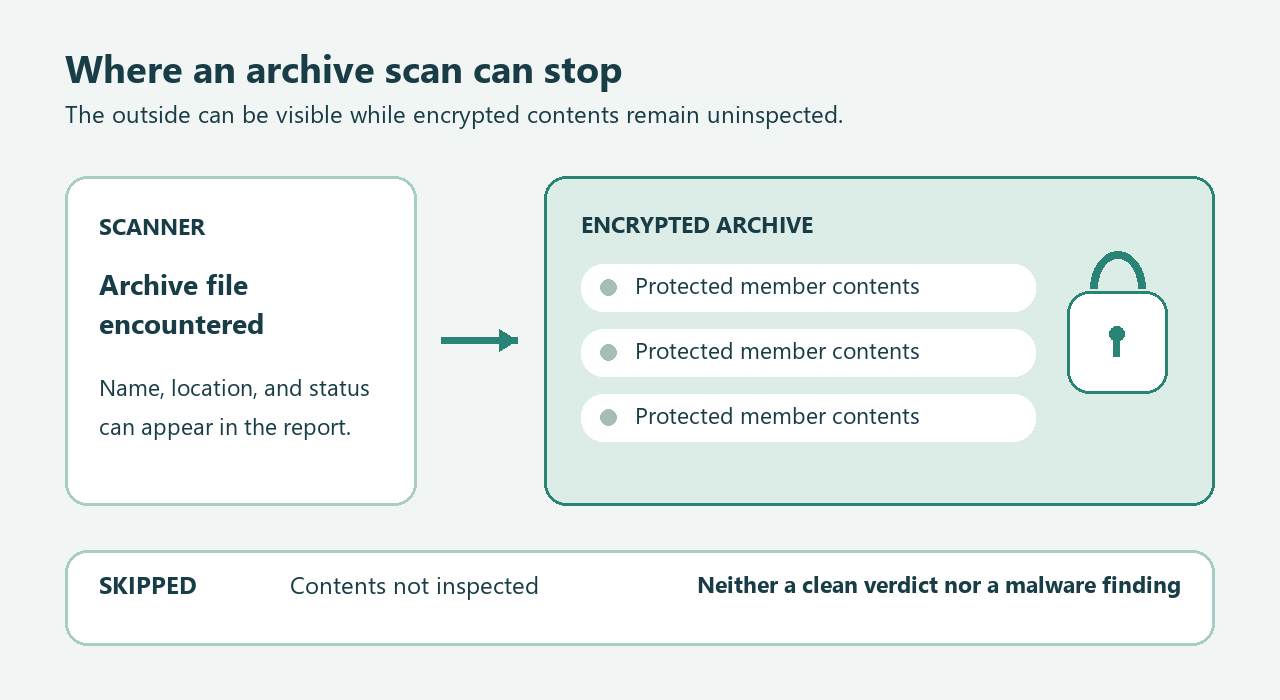
A skipped archive describes an inspection limit
When a report says an encrypted archive was skipped, it describes something the scanner could not inspect. That entry alone does not identify malware.
It also cannot certify the hidden contents. Read the entry alongside the report’s actual detections, rather than treating every listed object as equivalent.
The password does not authenticate the sender
A password can protect legitimate confidential documents, but anyone sending a harmful archive can supply one too. Its presence does not settle trust.
The useful question is whether an independently verified person or service was supposed to send that particular material through that particular channel.
Your next action depends on the exposure
- Received without opening: leave the attachment closed while verifying whether the message belongs to a real, expected transaction.
- Saved without opening: use the recorded location to identify the downloaded archive without extracting its contents for an experiment.
- Already opened or executed: document exactly what happened, then choose investigation or cleanup based on the actual actions and findings.
What the Scanner Could See, and What It Could Not
An archive is a container, not a single ordinary document. A scanner encountering that container may need additional access before inspecting the files inside.
Encryption changes the scanner’s access to contents. Seeing the outer file does not mean it decrypted every member or evaluated every nested layer.
Malwarebytes documents an archive-depth limit and says its archive scanning cannot inspect password-protected archives. Enabling archive scanning does not remove that limitation.
Capabilities also differ between individual security products. Bitdefender describes a password prompt, while Sophos documents an encrypted-archive restriction for right-click scans.
Therefore, do not turn one application’s result into a universal claim that every security service always handles encrypted files identically.
Read your product’s actual report and current documentation. A large scanned-file total cannot answer whether this particular archive’s protected contents were examined.
Nor does running the identical scan repeatedly necessarily add access. If the same encryption boundary remains, another progress bar may end at the same boundary.
Think of the report as an account of completed work, not a certificate covering inaccessible material. Its limits are part of its useful information.
Separate These Three Statements Before Deciding Anything
| Statement | What it establishes | What remains unanswered |
|---|---|---|
| The encrypted archive was skipped during scanning | The scanner reported an inspection limitation for that object | Whether its uninspected contents contain anything harmful |
| A named item was positively detected | The product identified a particular object under its detection rules | Whether that object ran or affected other files |
| You launched something from the archive | A separate user action changed the exposure requiring investigation | What actually executed and what consequences followed |
These statements can coexist without contradiction. An archive might be skipped during one scan while a separately saved file produces a later detection.
They can also describe different copies. A download folder, an email attachment, and an extracted working directory may contain related objects with different locations.
Record the full path privately, including any member name shown after the archive. A filename alone can make two distinct objects look identical.
Do not publish that full path unnecessarily. It might reveal your username, employer, client project, or the subject of confidential correspondence.
A Worked Example: Two Records, Two Different Conclusions
Imagine an unexpected billing message carrying a locked archive. The recipient saves it, and an on-demand scan lists the archive as password-protected and skipped.
That first record supports one narrow conclusion: the protected contents were not inspected through that scan. It does not establish that an infection occurred.
Now imagine the recipient previously extracted a different copy and launched a file. Later, protection identifies that extracted file as a threat.
The second record changes the investigation because it concerns an accessible object and an execution history. It does not retroactively make the first scan complete.
Write the events in order: message received, archive saved, file extracted, file launched, alert displayed. Leave genuinely unknown steps marked unknown.
If you only remember double-clicking something, do not guess which stage followed. An archive opening, document opening, and installer launch are not interchangeable descriptions.
A support specialist can use that uncertainty. A confident but invented timeline can send the investigation toward the wrong file or wrong account.
The timeline’s purpose is to separate inaccessible contents from later actions. You do not need to reproduce those actions with a suspicious attachment.
Check Provenance Without Opening the Suspicious Contents
Match the file to an expected task
Start with the transaction, not the display name. Were you expecting an invoice, a medical record, or project files from this organization today?
A familiar subject line is weaker evidence than a real task you can independently identify. An unexpected request remains unexpected even inside a believable conversation.
Use a previously established contact method, such as an existing supplier portal or known phone number. Do not rely on contact details inside the questionable message.
Ask what was sent, why encryption was used, and whether the contents can be provided through the organization’s normal secure document process.
This is not an invitation to upload the archive elsewhere. Private records should remain within a channel approved for their confidentiality and sensitivity.
Look for the requested behavior
An attachment asking you to disable protection, override a warning, install an unrelated viewer, or enable active content deserves an immediate pause.
The dangerous instruction matters more than the reassurance around it. A paragraph calling a file secure cannot justify weakening safeguards to open it.
Microsoft explains downloaded-file warnings and Protected View. Keep those protections intact while a file’s origin remains uncertain.
Do not rename extensions to persuade software to accept the file. Changing its label does not establish what its contents actually do.
Handle old software archives differently from new bait
A protected archive inside an established application’s installation directory has a different history from an unsolicited attachment saved ten minutes ago.
That history can guide verification without proving innocence. Check the application vendor’s documentation or support channel rather than deleting an unfamiliar internal component.
Conversely, a new file placed beside legitimate software does not automatically inherit that software’s reputation. Location is context, not an authentication mechanism.
When the Archive Contains Something You Actually Need
Urgency can make a poor workaround feel necessary. An overdue invoice or important record still does not make an unknown attachment a suitable experiment.
Separate the information you need from the container you received. Often the genuine sender can answer the question without delivering the same archive again.
For an invoice, confirm the account and transaction through the established supplier relationship. For an employment document, use the employer’s known recruitment channel.
For private records, request the organization’s approved secure access method. Do not ask a sender to remove confidentiality protections simply because your scanner skipped something.
If no independent contact or normal delivery route exists, that is a reason to pause. The password itself cannot fill that missing relationship.
When a security specialist must investigate, provide a concise record first: expected purpose, acquisition time, exact reported status, and any actions already taken.
Ask how the specialist accepts confidential material before transferring anything. A public file-sharing link may expose sensitive contents even when your immediate concern is malware.
Keep the message and report available through the approved process, but do not circulate additional copies among colleagues. More recipients create more opportunities for accidental opening.
If you cannot determine whether the archive is a necessary application component, ask its vendor. Do not delete protected program files to empty a skipped-items list.
A useful resolution can be a confirmed replacement, a vendor explanation, or a security-team decision. It does not require personally unlocking every archive.
Also avoid using scan totals as a shortcut. Sophos counts an archive as one file and omits encrypted files from its scanned count.
That documented counting convention illustrates why totals need context. A number beside a progress bar cannot authenticate a document you were not expecting.
Choose the Branch That Matches What Happened
The archive was received or saved, but nothing inside was opened
Keep it closed while checking the source. If it is unexpected and unnecessary, use the mail service’s reporting or deletion options without examining its contents.
On a work-managed device, report the message through your organization’s established process. Let security staff decide whether controlled analysis or preservation is appropriate.
A saved-only archive does not justify restoring settings, buying recovery software, or resetting every password. Those actions need their own evidence or exposure.
Files were extracted, but you did not intentionally launch them
Stop interacting with the extracted material and keep protection enabled. Save any alerts and tell support what extraction tool and actions were involved.
Extraction is not identical to intentionally launching a payload, but it is more exposure than receipt alone. Avoid declaring safety from memory alone.
Do not open each extracted file to discover its purpose. Escalate uncertain behavior, particularly if alerts, unexpected programs, or unexplained system changes followed.
You launched a file, enabled content, or installed something
Treat that as a potential device incident. For a managed computer, contact your security team before cleanup changes that could remove useful evidence.
For a personal Windows device, stop sensitive activity and follow the conditional cleanup procedure below. Use another trusted device for urgent account protection.
If files are being encrypted or an attacker appears active, disconnect network access and seek incident help. Do not attach backup drives to investigate.
What to Do About a Skipped Password-Protected ZIP
-
Open the installed security application independently and save the relevant report. Do not use a warning’s unfamiliar web link to reach supposed technical support.
-
Record the scan time, exact object, status, and any action already taken. Keep a separate note of whether you extracted or launched anything.
-
Verify the expected sender through an established channel. Ask for an approved delivery alternative when the original file remains unnecessary or its provenance remains uncertain.
-
Leave unknown contents closed and keep security protection enabled. Do not crack the password, add exclusions, or extract suspicious files simply to obtain a scan result.
-
Use the appropriate exposure branch above, not the file extension alone. An execution history or separate active finding warrants more investigation than a skipped entry.
-
Preserve the relevant scan report before routine retention removes it. In Malwarebytes for Windows, open Scanner and choose the Reports tab.
Find the matching date and scan type, then hover over that report and click its eye icon. Select Export, then Export to TXT.
If a zero-detection scan is missing, clear Hide reports with no detections and check again. That filter can hide a report without changing its results.
If Something From the Archive Ran on Windows
The procedure below concerns the Windows device, not permission to unpack the original archive. Keep the questionable container closed throughout cleanup.
Step 1: Pause the exposure and preserve your account of events
Close the suspicious material and stop sensitive activity. Record what you launched and retain the security reports before making changes to the computer.
For a work computer, follow your security team’s instructions instead. Keep backup drives disconnected, and use another trusted device for urgent account recovery.
Step 2: Download the legitimate Windows scanner
Use one of the download routes below. Keep the earlier suspicious file closed instead of returning to its download page for another installer.
Download the Malwarebytes Installer for Your Windows Computer
Open the Free Malwarebytes Scanner Download Page Instead
You can use manual scanning and quarantine without buying ongoing protection. A paid prevention plan is optional, not a requirement for this cleanup.
Compare Optional Malwarebytes Premium Protection for Windows Devices
MalwareTips may receive a commission through the affiliate links. You can still follow the free scanning procedure without purchasing the paid plan.
Open your Downloads folder and locate the MBSetup file obtained through the verified route. Do not select a similarly named file from an earlier download.

Step 3: Install the scanner and let it update
Open MBSetup and check the expected publisher before approving Windows’ permission prompt. Follow the setup screens to install the application on your personal computer.
Setup may offer additional products, a trial, or a subscription. Decline optional offers you do not want, using Skip where that choice appears.
Open Malwarebytes when installation finishes and allow available updates. If setup is blocked or fails, keep the error details and seek help.
Do not disable existing protection or obtain a replacement installer from an advertisement. On an organization-managed computer, let your security team choose the tools.
Step 4: Choose the free Custom Scan
On the Scanner tile, open the three-dot menu and choose Advanced Scan.
Expand the file finder and select your local Windows system drive, usually C:\. Include relevant local folders, but leave backup drives disconnected.
Set detections of PUPs and PUMs to be treated as malware. Choose Start Custom Scan and let the examination finish before reviewing its report.
Custom Scan is available without purchasing protection. If the dashboard offers a paid Threat Scan, return to the Custom Scan route instead of purchasing protection.
Use this menu path: Scanner tile menu > Advanced Scan > Custom Scan. This avoids the separate dashboard Scan button.
Step 5: Review the locations before taking action
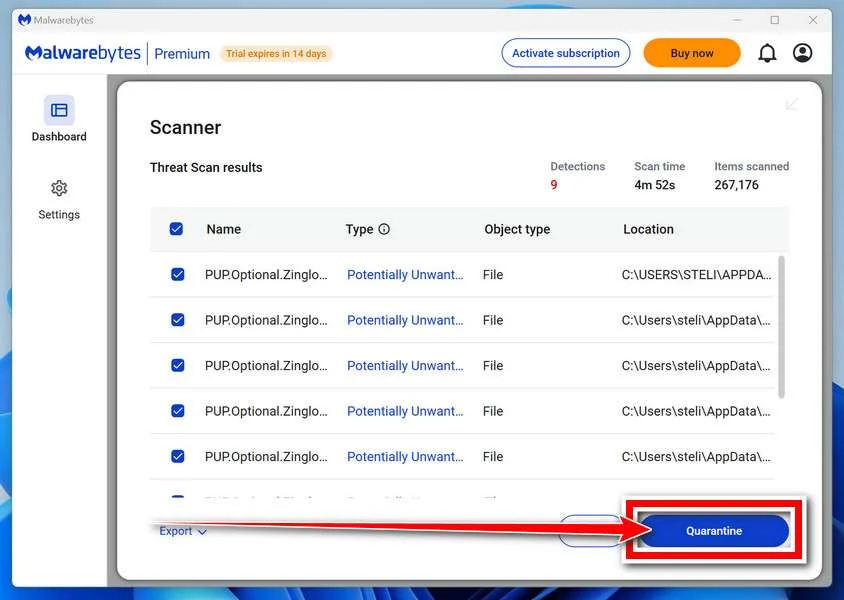
Read each detection’s name and file location. Keep confirmed malicious files selected for Quarantine, then save the report so you can compare later results.
If a finding affects irreplaceable data or remains uncertain, seek qualified help before changing it. Never restore an untrusted item merely to make an application work.
Step 6: Complete a requested restart and check again
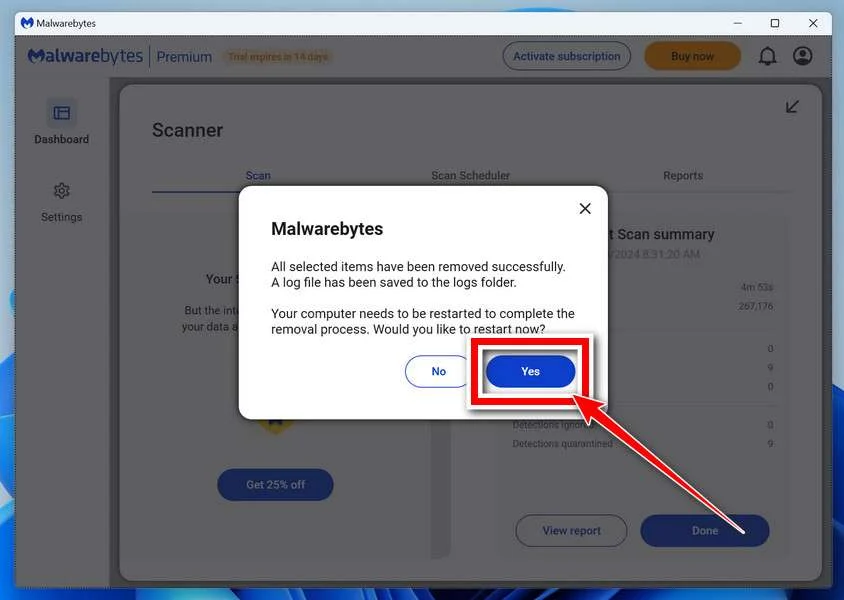
If Malwarebytes requests a restart, save open work and accept it. Reopen the application afterward and check whether any removal action still needs attention.
Run another updated scan and compare its findings with the saved report. New or recurring detections deserve investigation instead of repeated blind deletion.
A clean report cannot settle every account or recovery question. Continue the case-specific checks in this article, even when the original warning stops appearing.
Step 7: Escalate unresolved behavior without reopening the archive
If alerts return, the scanner cannot run, or unfamiliar programs remain, obtain help through the MalwareTips malware-removal support forum.
Share redacted reports and your timeline first, not the suspicious archive. Persistent symptoms may require specialist investigation or a planned rebuild rather than additional downloads.
Do not restore anything from quarantine to test whether the archive now works. Keep the original closed while resolving the separate account and document needs.
After Cleanup, Resolve the Separate Account and File Questions
A scan result does not reverse information already disclosed. If you entered credentials into a page associated with the message, address that account separately.
From another trusted device, use the service’s official recovery channel, change exposed credentials, and review active sessions and recovery information where the service supports this.
If you paid a supposed invoice, contact the relevant payment provider promptly with the transaction details. Removing a file cannot cancel or recover that payment.
If the file contained business or regulated information, tell the responsible organization what may have been exposed. Avoid forwarding the attachment through additional personal accounts.
For the archive itself, a trustworthy replacement is often more useful than endless rescanning. Ask the genuine sender to provide only the necessary documents.
Keep the replacement’s history separate from the original. A new delivery does not change what an earlier skipped report established about the earlier object.
Afterward, record the resolution in ordinary language: sender confirmed through the established channel, original discarded, or security team handling the device incident.
That record should describe an actual outcome, not a promise that every hidden member was harmless. Clear boundaries make later alerts easier to interpret.
Frequently Asked Questions
Does password-protected mean the ZIP contains malware?
No, encryption is used for legitimate purposes too. A skipped status establishes an inspection limit, while trust depends on provenance and other evidence.
How can I verify an invoice without forwarding the ZIP?
Contact the supplier through your established account or another independently known channel. Give the order or invoice reference, removing unrelated customer information from any screenshot.
Describe the sender, date, and request without forwarding the attachment. Ask the supplier to confirm the document’s purpose and provide its normal secure delivery route.
Should I extract the archive so my antivirus can scan it?
Do not extract an untrusted archive as a home experiment. Verify the source or use your organization’s security process while leaving the contents closed.
Does having the password prove the message is genuine?
No, the sender of a harmful file can supply its password. Verify the underlying request using a contact method independent of that message.
Why do different security products report the archive differently?
Products support different formats, access methods, and reporting conventions. Compare their documented capabilities before treating different object counts or statuses as conflicting malware verdicts.
What if I already ran a file inside it?
Stop interacting with the material and document the actions. Follow the device-incident branch, with separate account protection if credentials or sessions may be exposed.
The Bottom Line
Do not open a questionable password-protected ZIP just to resolve a skipped-scan entry. Verify the expected delivery, or leave unnecessary unknown contents unopened.
If you already launched something inside, investigate the device and protect exposed accounts separately. A skipped archive is neither a clean verdict nor a detected infection.

Join the discussion
0 commentsShare your experience or ask a question about this article.
Community experiences
Did this happen to you?
Your experience could help someone recognize the same scam. Submit a private report for our team to review.
I experienced this tooReports are reviewed before publication. Sharing publicly is always your choice.
Discussion
Start the conversation
Have a question or something useful to share? Add the first comment.