

A text that names a city, a precise charge, and an unfamiliar device can make an ordinary afternoon feel like a financial emergency. The message says Apple Pay stopped the payment, but only if you call before a short deadline.
The number 888-790-9590 has been reported in that exact kind of alert. The text is not a routine Apple security notice. It is an invitation into a fake support conversation where the real risk begins after the call is placed.
Overview
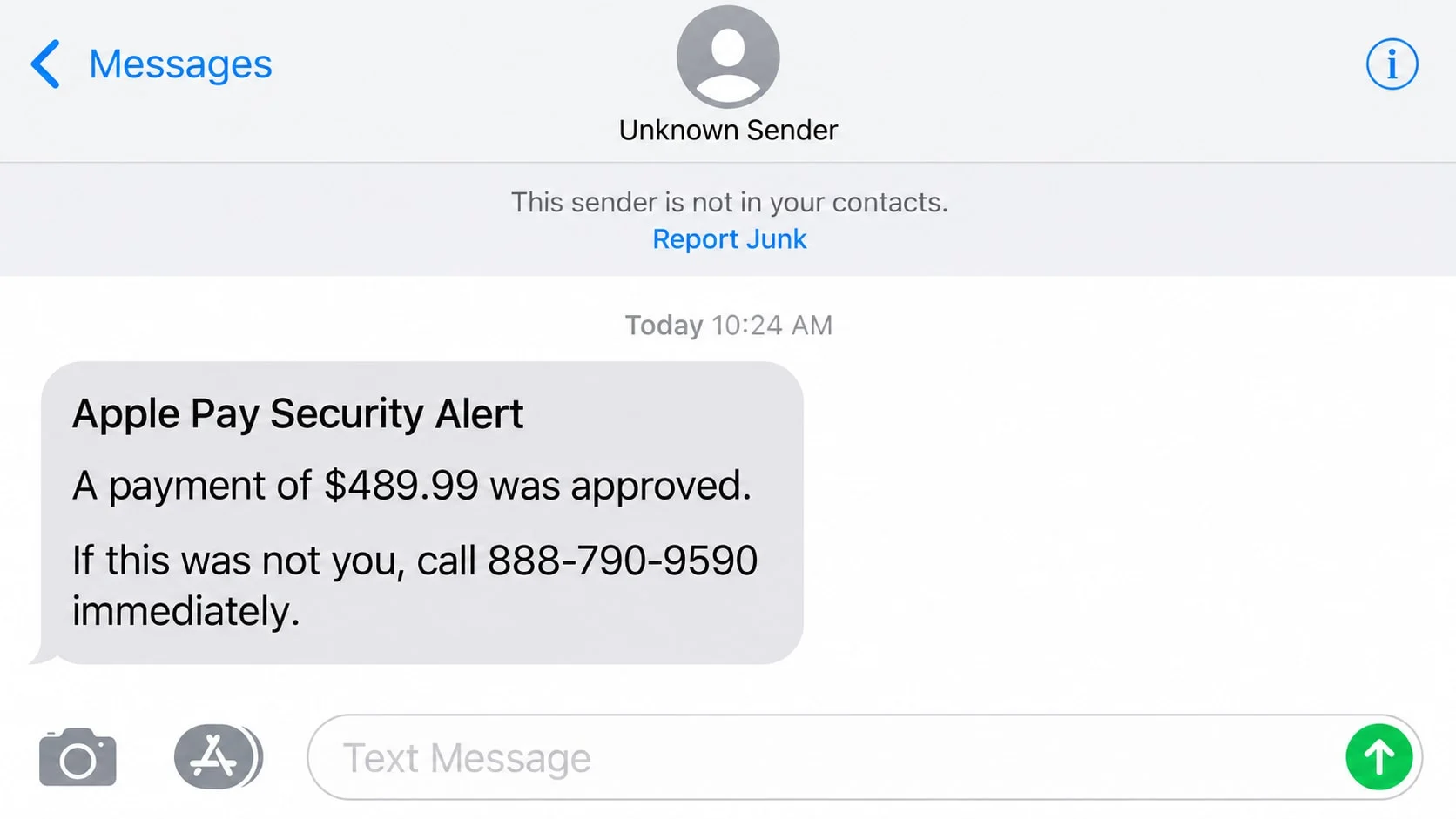
The message invents an Apple Pay payment that needs verification
Reported versions describe a payment of about $659.87 from Bellevue, Washington, made through a device that the account supposedly does not recognize. A reference number and temporary hold make the alert appear to come from an automated fraud system.
The amount, location, and wording can change. The constant feature is a direction to call 888-790-9590. Recipients should not assume a telephone number is safe because it begins with a toll-free area code.
The fraudulent charge is bait for a fake support call
The text does not need to take money directly. Its job is to make the recipient call. Once that happens, a person posing as Apple Support can guide the conversation, request information, and keep the victim from checking the claim independently.
A calm, professional voice is part of the disguise. Fraudsters can use scripts, hold music, case numbers, and multiple “departments” to imitate a real support center.
The end goal is account access or an irreversible payment
The caller may ask for an Apple Account password, card details, a one-time verification code, or remote access. Another variation tells the victim to move money to a safe account because the bank or Apple Cash balance is under attack.
Possible losses include:
- Apple Account takeover through a password or verification code.
- Unauthorized card purchases made with information provided by phone.
- Bank theft after remote-access software is installed.
- Money transferred to a payment app, crypto wallet, or supposed safe account.
- Identity fraud using personal details collected during the fake investigation.
What the 888-790-9590 Message Looks Like
One reported script says Apple Pay detected payment activity that requires verification. It claims a payment request came from an unrecognized device and that the transaction has been placed on hold while a review is completed.
The message says no action is needed if the recipient recognizes the payment. If not, it instructs the person to contact Apple Support at 888-790-9590 immediately. A 24-hour resolution window adds urgency.
This construction is deliberate. Telling people to ignore the message when they recognize the payment sounds balanced and security-conscious. Because the transaction is fabricated, nearly every recipient reaches the same conclusion: they must call.
A reference such as “9357146-DWKP” gives the agent something to ask for. It also creates the impression that the text and phone system share a real case database, even when the reference is simply part of a mass-produced template.
The sender may be an ordinary international number, a short code, or an alphanumeric name. Sender information can be spoofed. The destination number and the behavior requested by the message matter more than the label at the top of the conversation.
How the Apple Pay 888-790-9590 Scam Works
Step 1: The text creates a recognizable financial threat
Apple Pay is widely used and linked to cards that people care about protecting. A fraudulent payment alert therefore feels personally relevant, even when the scammer has no knowledge of whether the recipient uses the service.
The amount is large enough to cause concern but plausible enough to believe. A specific city and security reference add detail without requiring access to any real account.
Step 2: Urgency pushes the recipient toward the listed number
The message claims that the hold will expire or verification will continue automatically. That wording suggests the recipient could lose money by waiting, which discourages opening the Wallet app or contacting the card issuer first.
Calling feels safer than clicking a link, but the telephone number is the phishing route. The criminal controls the person who answers, the questions that are asked, and the explanation for every inconsistency.
Step 3: A fake Apple agent builds trust
The agent may ask for the reference number, then repeat the transaction amount and location from the original text. This does not prove access to Apple systems. Those details were already included in the scam script.
The caller can hear background office noise or be transferred to a fraud specialist. Some groups operate organized call centers. Professional presentation does not make the agent legitimate.
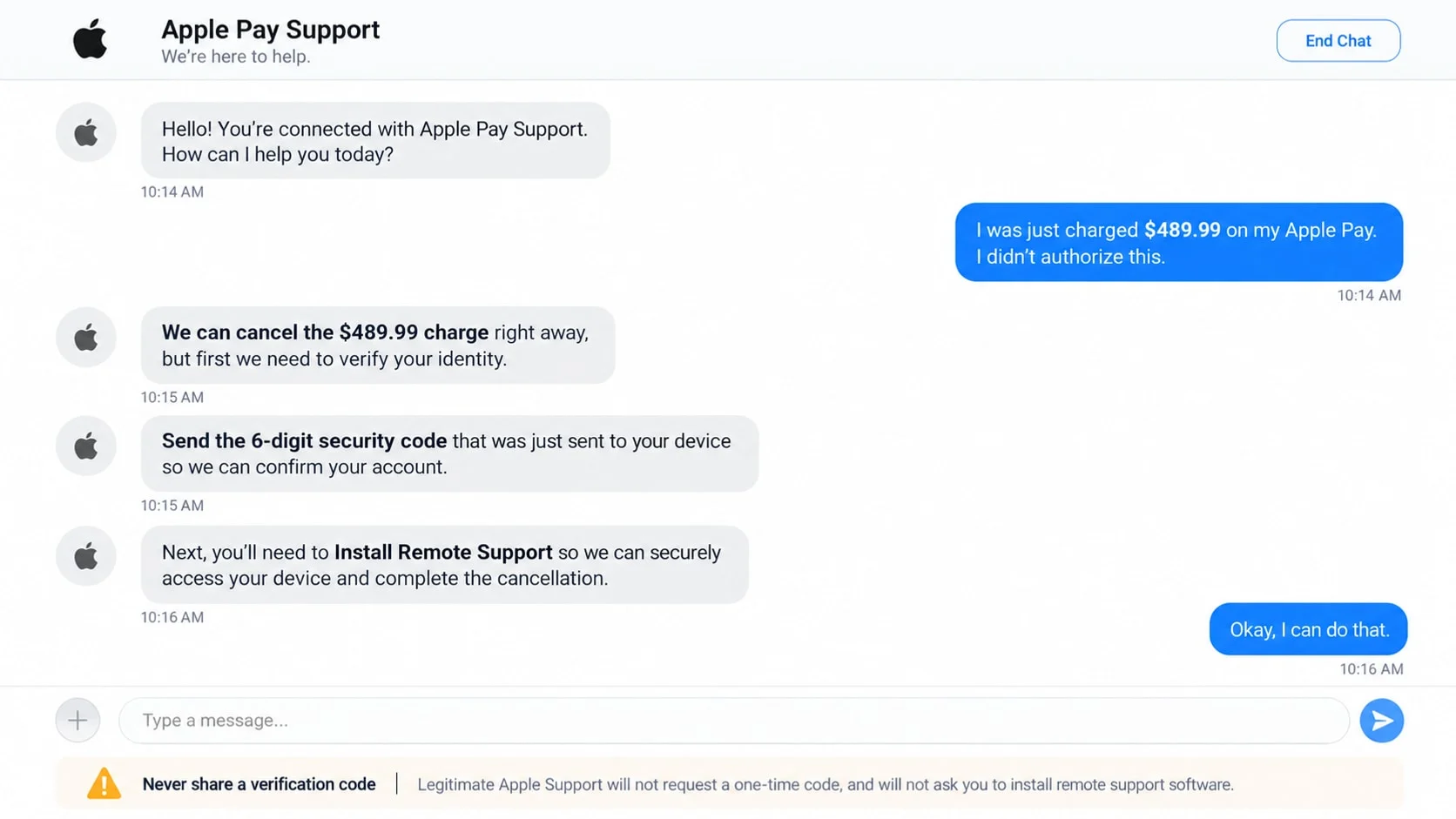
Step 4: The agent requests a code, login, or remote connection
The scammer may trigger a real password reset and ask the victim to read back the six-digit code. The code is described as proof that the charge can be canceled. In reality, it may authorize a password change or new sign-in.
Another script asks the victim to install remote-support software. Once connected, the criminal can view email, banking sessions, saved passwords, and incoming codes. They may blank the screen while moving money.
Step 5: A fake refund or safe-account procedure moves the money
The agent can claim the fraudulent payment has already affected a bank account. The victim is told to move funds to Apple Cash, a payment app, a crypto exchange, or a new account while an investigation is completed.
There is no safe account controlled by a support agent. A request to move personal funds is the theft mechanism. The transaction may be presented as reversible, insured, or temporary, but the receiving account belongs to the fraud network.
Step 6: The criminals exploit every account they reached
With an Apple Account, the attacker may access synced data, device information, purchases, and recovery options. With email access, they can reset other accounts. With card details, they can attempt purchases immediately.
Victims can also be targeted again. A later caller may pretend to be a bank investigator, Apple security manager, or recovery specialist who can reverse the loss for another payment.
Identity, Contact, and Payment Checks
Check Apple Pay activity inside Wallet
Do not use the message as your account record. Open Wallet directly and review recent activity for the relevant card. Then check the bank or card issuer’s official app because the issuer maintains the authoritative transaction history.
A text can claim a charge is pending even when no transaction exists. If the bank and Wallet show nothing, that is strong evidence that the message was fabricated to produce a call.
Reach Apple through a channel you start yourself
Use the Apple Support app or type Apple’s support address into the browser. Do not search only for a phone number because fraudulent ads and lookalike support pages can appear in results.
Apple advises users not to follow suspicious links, call numbers in unexpected messages, or share passwords and security codes. A genuine employee does not need your one-time code.
Confirm the charge with the card issuer
Call the number printed on the physical card or use secure messaging inside the official banking app. Ask whether the amount, merchant, location, or authorization exists. Do not call a bank number supplied by the alleged Apple agent.
If a real unauthorized charge appears, the issuer can block the card and begin its dispute process. Moving money at a caller’s instruction is not part of that process.
Evaluate what the agent asks you to do
A request for a password, verification code, remote-access download, gift card, crypto purchase, or safe-account transfer is enough to end the call. Do not let the agent talk you through security settings.
If the caller says disconnecting will make you liable for the charge, that is pressure, not policy. Hang up and continue verification through official apps.
Red Flags in the Fake Apple Pay Alert
The message can be grammatically clean, so spelling alone is a weak test. Look at the entire behavior:
- The alert arrives unexpectedly from a sender not already used by Apple.
- It claims a payment occurred but provides no verifiable merchant receipt.
- The recipient must call 888-790-9590 rather than review activity in Wallet.
- A short deadline suggests the payment will proceed unless the call happens.
- The agent asks for a six-digit code or Apple Account password.
- Remote-access software is described as necessary for cancellation.
- The victim is told to move funds to protect them from hackers.
- The caller resists contact with the bank or official Apple Support.
- The supposed investigation requires secrecy or continuous telephone contact.
- A refund is used to justify access to online banking.
Toll-free numbers are not identity credentials. Numbers can be obtained, forwarded, spoofed, or reassigned. Treat 888-790-9590 as part of the reported scam message, and verify any future alert through Apple and the card issuer.
How to Handle the Text Safely
Do not reply, even to say “stop.” A response confirms that the number reaches a person. Take a screenshot if you plan to report the message, then block the sender.
Forward the text to 7726, the spam-reporting short code supported by major U.S. carriers. Apple also accepts screenshots of suspicious text messages at reportphishing@apple.com.
Review Wallet and banking activity from apps you already installed. If nothing appears, no cancellation step is needed. If a real charge exists, deal directly with the card issuer.
Do not click a contact card, install an app, or accept a screen-sharing invitation sent during the call. Fraudsters may give the software a reassuring name such as security support or refund verification.
Tell family members about the number and script. These campaigns are sent widely, and another person in the household may receive a slightly different amount or city.
What to Do if You Have Fallen Victim to This Scam
- End the call and stop following instructions. Disconnect remote access, turn off screen sharing, and do not approve another prompt. Preserve the text, call log, phone number, receipts, and any applications the caller asked you to install.
- Contact the card issuer or bank immediately. Use the number on the card or the official app. Report any transfer or exposed card, ask for the fraud department, and follow its process for freezing accounts, replacing cards, and disputing transactions.
- Secure the Apple Account from a trusted device. Change the password, review trusted phone numbers and devices, remove anything unfamiliar, and verify that two-factor authentication and recovery contacts have not been altered.
- Protect email and other linked accounts. If the scammer saw email or received a code, change the email password too. Review forwarding rules, recent sessions, recovery methods, and sign-in alerts because email access can reset many other services.
- Remove remote-access tools and check the device. Uninstall software added during the call. Run a full Malwarebytes scan to look for unwanted programs, browser changes, and additional malware that may have arrived with the fake support session.
- Add protection against malicious links. AdGuard can reduce exposure to known phishing pages, malicious advertising, and tracking domains used in follow-up messages. Keep in mind that a filter cannot protect money voluntarily transferred during a phone call.
- Address identity theft risk. If you disclosed a Social Security number, ID image, or banking credentials, create a plan at IdentityTheft.gov. Consider credit freezes and watch statements for small test charges.
- Report the message. Send the screenshot to Apple, forward the SMS to 7726, and file a report at ReportFraud.ftc.gov. Include 888-790-9590, the sender number, amount, reference, and payment destination.
- Expect a second approach. Ignore anyone who claims they can recover the loss for a fee. The original group may pose as Apple, a bank, law enforcement, or a refund company after learning that the first script worked.
Frequently Asked Questions
Is 888-790-9590 an official Apple Support number?
Do not treat it as official. It has appeared in reported Apple Pay scam texts. Phone numbers can also be reassigned, so the safest rule is to contact Apple through the Support app or Apple’s website instead of any number in an unexpected alert.
Does Apple text users about suspicious Apple Pay payments?
Apple and card issuers may send legitimate security communications, but a real-looking message is not enough. Review activity directly in Wallet and the bank app. Never share a password or verification code with someone who calls or texts.
What if the amount and city match something I recognize?
Verify the transaction independently. Criminals use common locations and plausible amounts, while data from earlier breaches can make a message more specific. Matching detail does not make the listed phone number safe.
Can simply reading the text infect an iPhone?
Ordinarily, reading a standard SMS does not install malware. Risk increases when a recipient follows a link, installs a profile or app, shares credentials, approves a code, or grants screen access.
Why does the agent ask for a six-digit code?
The scammer may be attempting a password reset, new sign-in, card addition, or other protected action. The code is meant for the account holder only. Reading it aloud can give the attacker the approval they need.
Can Apple reverse money I sent to a safe account?
There is no legitimate support safe account. Contact the bank or payment service immediately and ask whether the transfer can be stopped or recalled. Recovery is not guaranteed, but rapid reporting offers the best chance.
The Bottom Line
The Apple Pay 888-790-9590 scam text uses a fake payment to make the recipient initiate contact with a fraudulent support center. The apparent security call is where passwords, codes, remote access, and money become vulnerable.
Do not call the number in the alert. Check Wallet, contact the card issuer, and reach Apple through a channel you opened yourself. A few minutes of independent verification can stop a manufactured charge from becoming a real loss.

Join the discussion
0 commentsShare your experience or ask a question about this article.
Discussion
Start the conversation
Have a question or something useful to share? Add the first comment.