

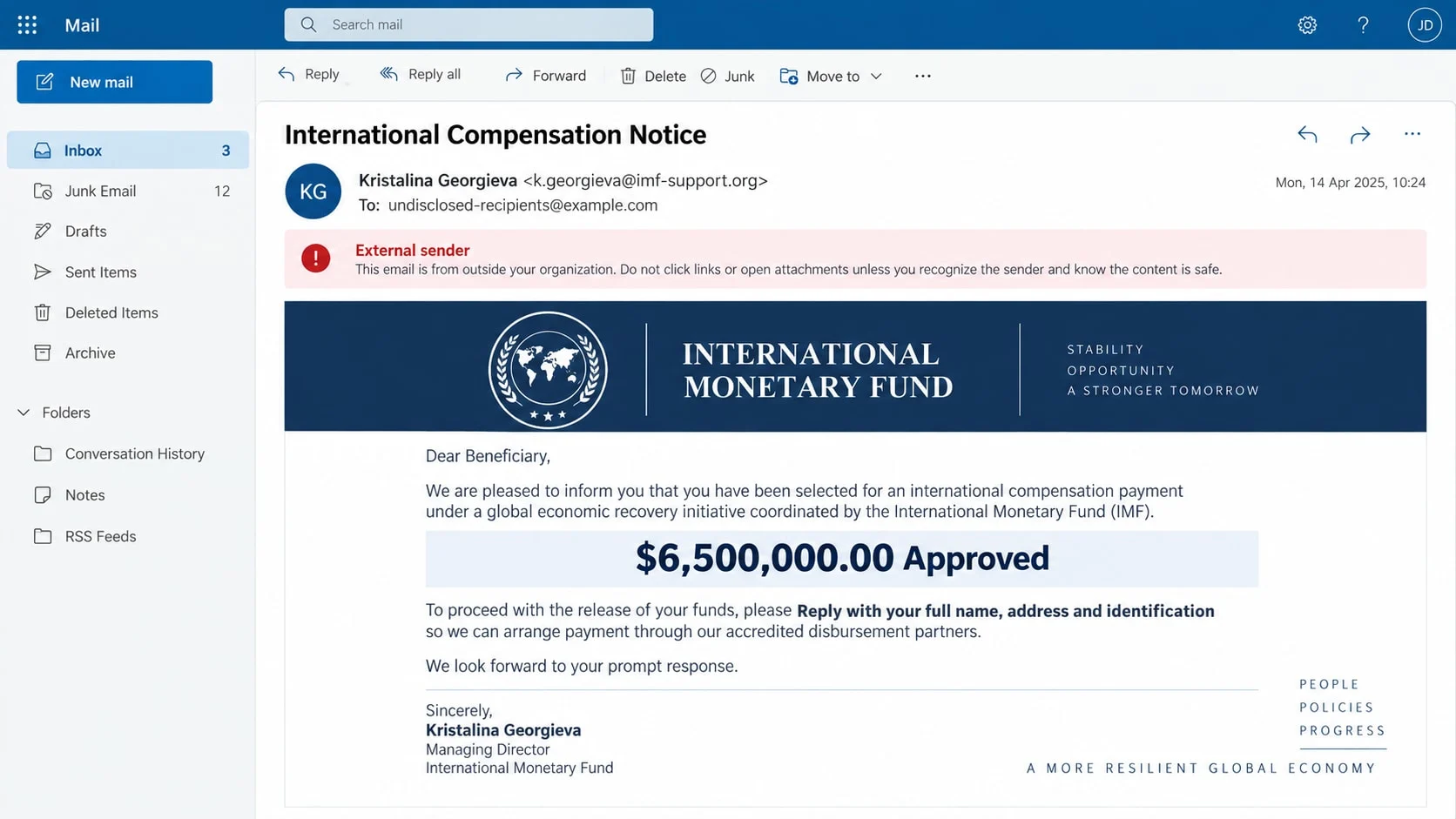
The email begins with a famous name and an impossible piece of good news. Kristalina Georgieva, presented as a senior International Monetary Fund official, has supposedly approved $6,500,000 in compensation for you.
Nothing in the message is a private act of generosity or an IMF payout program. The name and institution are being borrowed to give an old advance-fee fraud the weight of international authority.
Overview
The email impersonates Kristalina Georgieva and the IMF
The sender claims to be Kristalina Georgieva or an official acting through an IMF monetary-control department. Real titles, institutional language, and an IMF-style banner are used to make the message look important.
The address usually tells a different story. It may come from a free mailbox, an unrelated domain, or a lookalike address with words such as support, compensation, fund, or payment added to it.
A $6.5M compensation story targets hope and prior loss
The recipient is told that an investigation found their name among people who lost money through Western Union, MoneyGram, online fraud, or an unpaid contract. A large payment has supposedly been authorized to compensate them.
Other versions describe a grant, poverty-relief award, inheritance clearance, lottery payout, or dormant fund. The details change, but the recipient never applied through a verifiable process.
Replying starts a sequence of data requests and advance fees
The first message may ask only for a full name, age, address, occupation, telephone number, and identification. After a victim replies, a fake banker or payment officer introduces charges for certificates, taxes, insurance, or transfer approval.
The scam can cause several kinds of harm:
- Money lost to repeated processing, clearance, and transfer fees.
- Identity theft using passports, driver’s licenses, and personal records.
- Bank fraud after account details and signatures are collected.
- Email takeover through fake document portals or verification pages.
- Further targeting by recovery agents and other advance-fee criminals.
What the Fake Kristalina Georgieva Email Claims
A reported version addresses the recipient as “Beneficiary” and says an IMF investigation at Western Union and MoneyGram found their name on a list of scam victims. It also invokes the FBI and CIA to broaden the appearance of official cooperation.
The message says the World Bank approved $6,500,000 for each selected victim. It may claim that 19 people have already been paid and that the recipient is next, a form of invented social proof.
Another variation says the IMF is distributing a grant or clearing money held by an overseas bank. The victim is told that economic conditions, international finance rules, or anti-fraud reforms created the opportunity.
The names of real institutions are combined carelessly. The IMF, World Bank, law enforcement agencies, private transfer companies, and a supposed correspondent bank are presented as if they form one claims department.
That confusion helps the scammer. When a victim questions one detail, the sender can introduce another official-sounding person and claim the process has moved to a different department.
How the Kristalina Georgieva IMF Scam Works
Step 1: A mass email offers unexpected compensation
The scam begins with a generic greeting and a life-changing amount. The sender does not need to know whether the recipient previously lost money because many people have encountered fraud, bad investments, or disputed payments.
A real public figure makes the message searchable. When the recipient finds that Kristalina Georgieva is connected with the IMF, the true biographical detail can lend false credibility to the invented payout.
Step 2: The story borrows agencies that victims recognize
The email may cite the IMF, World Bank, FBI, CIA, Western Union, or MoneyGram. Each familiar name reduces the chance that the recipient pauses to ask which organization actually controls the alleged funds.
Logos and letterheads are copied from public websites. A seal or signature is an image, not proof that the named person wrote or approved the communication.
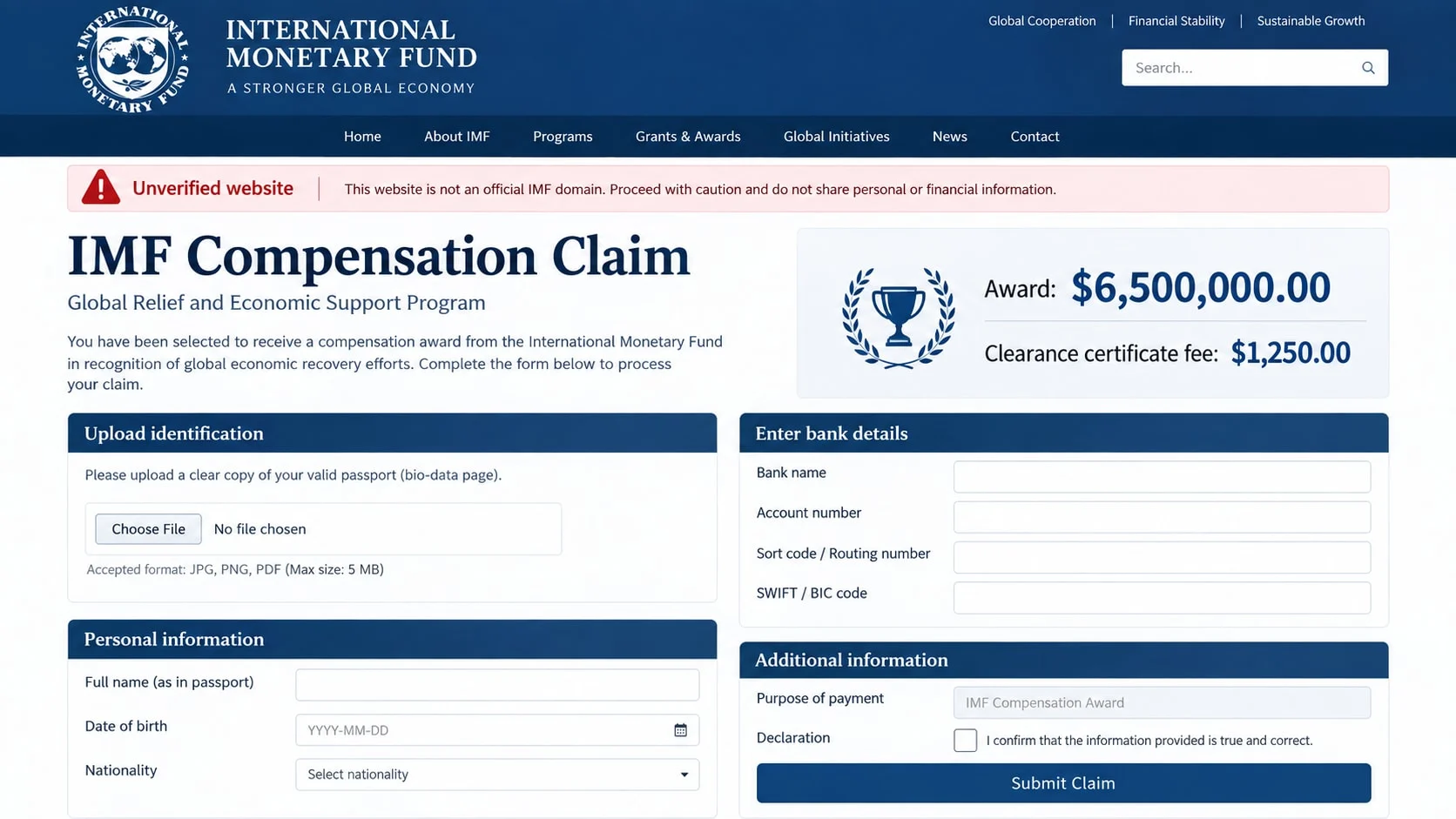
Step 3: The reply collects a complete identity profile
The recipient is asked to provide a name, address, age, occupation, marital status, phone number, and scanned identification. The request may be called know-your-customer verification or beneficiary registration.
Those details can be used to open accounts, pass security questions, impersonate the victim, or create more convincing scam messages. A passport image has value even if no fee is ever paid.
Step 4: A payment officer introduces the first fee
After the identity form is returned, another person claims the money is ready but cannot be released without a certificate, tax stamp, account activation, insurance policy, or courier payment.
A $1,250 clearance fee can appear small beside $6,500,000. The promised amount is intentionally enormous so each demand feels like a manageable final hurdle.
Step 5: The victim is moved to hard-to-reverse payment methods
The scammer prefers wires, cryptocurrency, gift cards, or cash because they offer limited recovery. Payments may be sent to private individuals described as agents, attorneys, cashiers, or international settlement officers.
Bank employees may question the transfer. The criminal prepares an answer, telling the victim to describe it as family support, a personal purchase, or a business deal. Instructions to mislead the bank are a clear sign of fraud.
Step 6: The payout remains blocked while fees multiply
Paying once leads to a new document, exchange charge, anti-money-laundering deposit, or customs problem. The scammer may send fake transfer receipts showing that millions are pending.
If the victim stops, a fake regulator or recovery lawyer may make contact. The second group offers to retrieve the previous payments for another advance fee, extending the same fraud under a new identity.
Identity, Contact, and Payment Checks
Compare the sender with an official IMF domain
Expand the full sender address and reply-to field. An official-sounding name before the @ symbol means nothing if the domain belongs to a free service, a misspelling, or a newly registered site.
Do not use links in the email to reach the IMF. Type imf.org yourself and locate its fraud guidance through the site’s own navigation.
Check whether the IMF offers payments to private individuals
The IMF warns that calls, emails, and messages offering grants or payments in exchange for information or advance fees are scams. Its operations are conducted with member countries, not private compensation claimants.
The organization does not clear inheritances, validate lottery winnings, or appoint strangers to distribute private funds. Any message built around those services is misusing the IMF name.
Verify the public figure without contacting the sender
A real person’s name can be pasted into a fake email. Search the official IMF leadership pages and public statements, but do not confuse proof that the official exists with proof that they contacted you.
Senior international officials do not personally select random email users for grants. A generic greeting and unexpected award contradict the formal processes such institutions use.
Follow the payment path
An international organization would not require gift cards or cryptocurrency for a certificate. It would not route a fee to a private individual, mobile wallet, or account with a beneficiary name unrelated to the IMF.
Refuse any request to keep the payment secret or describe it falsely to the bank. Secrecy protects the criminal, not the supposed beneficiary.
Why the Official Names and Documents Are Not Evidence
Real names are free credibility. Scammers choose senior officials because recipients can confirm the position in seconds. The search result validates the biography, while the invented compensation claim remains untested.
A letterhead can be recreated from a screenshot. Digital signatures, seals, serial numbers, and stamps are equally easy to add. Unless the communication can be confirmed through the institution’s own directory, those graphics are decoration.
Fake bank portals can display a balance of $6,500,000 and mark it “approved.” The number exists only on a page controlled by the scammer. A padlock shows an encrypted connection to that page, not that the funds exist.
The criminals may provide copies of identification for the supposed agent. Those documents may be stolen from another victim. Receiving an ID image from a stranger does not create accountability.
Some emails include anti-fraud warnings and say fees will never be requested. The demand then arrives from a supposed partner bank. Dividing the roles lets the first sender pretend the institution kept its promise.
A reference number does not make the offer traceable. Criminals generate official-looking case codes so later messages can repeat them and create the impression that several departments are following one legitimate file.
Warning Signs of the Fake IMF Compensation Offer
Look for the underlying pattern rather than one misspelled word:
- You receive a multi-million payment offer that you never applied for.
- The message uses a generic greeting such as beneficiary or account holder.
- Several unrelated institutions are described as one payment network.
- The sender address is not an official IMF domain.
- A passport or driver’s license is requested by ordinary email.
- A certificate, tax, bond, or insurance fee is required before release.
- The fee goes to a private person, crypto wallet, or unrelated company.
- The recipient is told to act immediately or lose the payment.
- The sender asks the victim to keep the award confidential.
- Every completed requirement produces another fee.
The size of the promised award is itself a warning. Institutions do not distribute millions to random people because their email appeared on an alleged list of previous fraud victims.
What to Do if You Have Fallen Victim to This Scam
- Stop replying and do not pay another fee. The next certificate or tax will not unlock the money. Preserve the complete email thread, attachments, sender addresses, telephone numbers, wallet addresses, bank instructions, and receipts.
- Contact the bank or payment service immediately. Tell its fraud team that an advance-fee impersonation scam caused the transfer. Ask about a wire recall, card dispute, crypto-exchange freeze, or other available recovery step.
- Secure the email account. Change its password from a trusted device, enable multi-factor authentication, review forwarding rules and recovery details, and sign out unfamiliar sessions. The scammer may use email access to intercept bank warnings.
- Respond to identity-document exposure. If you sent a passport, license, Social Security number, or signature, create a recovery plan at IdentityTheft.gov. Contact the issuing authority when replacement or an alert may be appropriate.
- Check devices and downloaded files. If you opened an attachment, installed software, or visited a portal, run a full Malwarebytes scan. Review extensions, recent downloads, saved passwords, and unknown applications before using the device for financial access.
- Block follow-up infrastructure. AdGuard can reduce access to known phishing pages and malicious advertising networks used by advance-fee campaigns. Continue to verify every financial message because new domains can appear before filters recognize them.
- Report the incident. Submit the evidence to IC3.gov and ReportFraud.ftc.gov. The IMF’s integrity guidance also directs recipients of impersonation scams to local authorities.
- Warn contacts if the account was misused. Criminals may email friends or colleagues from a compromised mailbox and repeat the grant story. A short warning can prevent others from trusting a message that appears to come from you.
- Reject paid recovery promises. An unsolicited investigator or lawyer who guarantees retrieval for a fee may be the same group returning under another name. Use institutions and professionals you locate and verify independently.
Frequently Asked Questions
Is Kristalina Georgieva really connected with the IMF?
Yes, she is a real public figure associated with the IMF. That fact does not authenticate the email. Scammers routinely borrow the names of real officials because recipients can find credible biographies online.
Does the IMF compensate individual scam victims?
Not through unsolicited emails, grants, or private payment agents. The IMF explicitly warns about people using its name to offer payments or grants in exchange for personal information or advance fees.
Why does the message mention Western Union and MoneyGram?
Those names are familiar from international transfers and earlier fraud losses. The scammer uses them to make the supposed investigation sound broad and official. Their appearance does not show that either company approved compensation.
Can I verify the award with the bank named in the email?
Do not use the phone number or contact person provided by the sender. A fake bank employee may be part of the same group. Contact the bank through its official website, but remember that a genuine bank cannot validate an invented IMF award.
What if no fee has been requested yet?
The first reply often focuses on identity information. Fees may appear only after trust has been built. Do not send documents or personal details simply because the opening email says the award is free.
Can an IMF seal or signed certificate be checked online?
A seal, signature, or serial number can be copied or invented. Verify the entire communication with the IMF through contact details on imf.org. Do not rely on a document database linked by the sender.
The Bottom Line
The Kristalina Georgieva IMF scam wraps a familiar advance-fee scheme in the language of global finance and victim compensation. The $6.5M award, official names, and formal documents are designed to earn a reply, not deliver money.
Do not send identification or pay a release charge. Confirm claims through the IMF’s official site, protect any information already shared, and remember that a legitimate institution will never require a private fee to release an unexpected fortune.

Join the discussion
0 commentsShare your experience or ask a question about this article.
Discussion
Start the conversation
Have a question or something useful to share? Add the first comment.