

AppPublishing.ai presents an appealing idea: use artificial intelligence to create simple mobile apps, publish them through Apple, and collect recurring income without learning to code. The website makes the process look accessible, inexpensive, and unusually fast.
Behind that polished pitch is a much more complicated and costly business opportunity. The free training funnel leads to programs priced from $997 to $21,600, while the income examples, refund promise, extra expenses, and contractual terms deserve careful scrutiny before anyone pays.
Overview
AppPublishing.ai, also presented as AI App Publishing Academy, sells training and assistance for people who want to make money from apps listed in Apple’s App Store. Its central message is that everyday people can use AI to handle most of the work and build a portfolio of simple apps that produces monthly revenue.
The offer is wrapped in familiar passive-income language. Visitors are told that AI does 90% of the work, that each new app creates another recurring income stream, and that the revenue can compound while the owner sleeps.
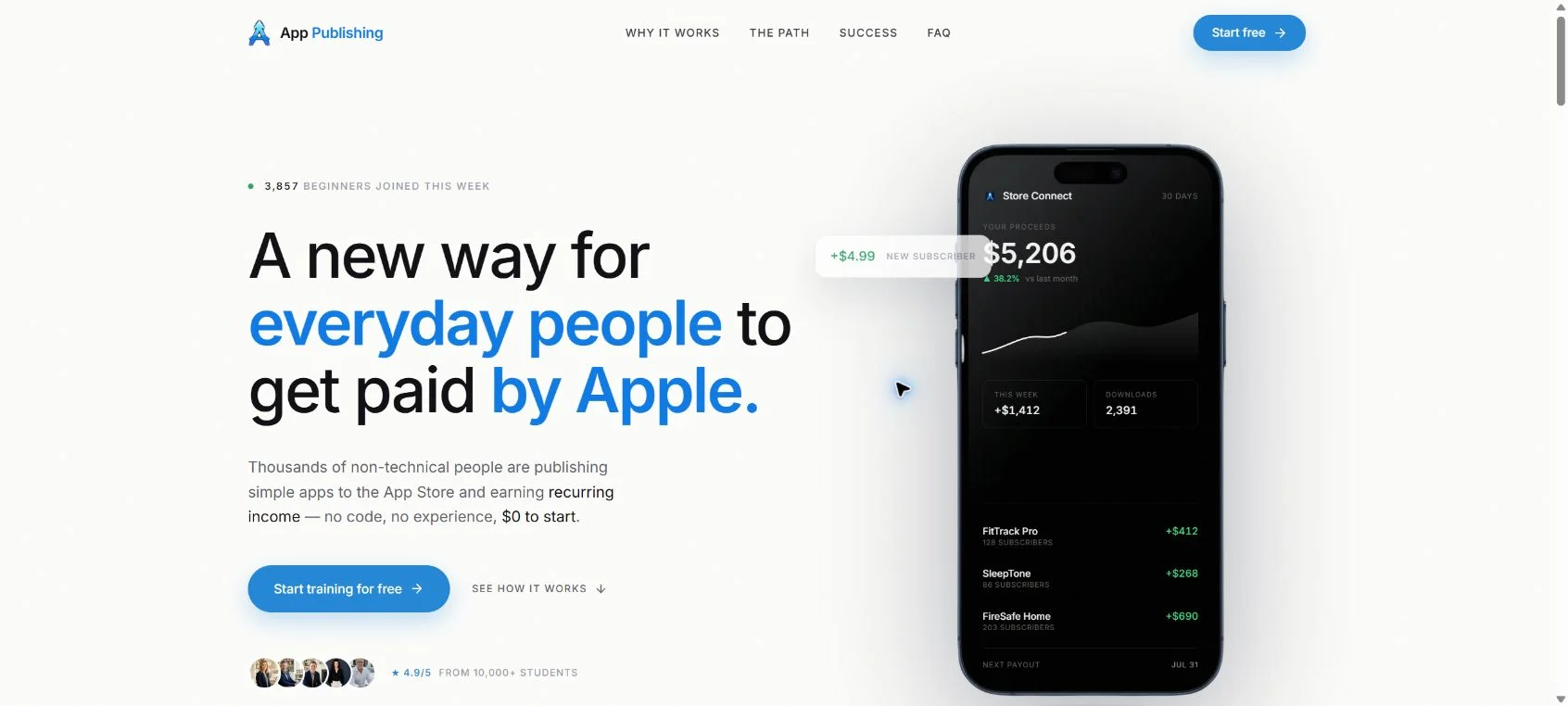
The homepage also displays a phone dashboard showing thousands of dollars in proceeds, claims a 4.9 out of 5 rating from more than 10,000 students, and features success stories describing results such as $600 in the first month, $2,000 per month, $10,000 in a month, and $50,000 within three months.
These examples are powerful sales material, but they are not the same as independently audited earnings data. The site does include a disclaimer saying results are not typical or guaranteed. That disclaimer matters because creating an app does not automatically create demand, downloads, subscriptions, or profit.
We also observed a counter saying that thousands of beginners had joined during the current week. The number increased while the website was being reviewed. A changing counter can create urgency and social proof, but it does not tell a visitor how the number is calculated, whether those people purchased anything, or how many earned a profit.
The phrase “get paid by Apple” can also give the wrong impression. Apple is not hiring participants or paying them simply for uploading an app. Developers earn money when customers buy an app, subscribe, or make eligible in-app purchases. Apple operates the marketplace, processes qualifying transactions, deducts applicable commissions and adjustments, and pays the remaining proceeds to the developer.
In other words, this is a business that depends on real customers. An app must be approved, attract users, provide enough value to keep them, handle support and privacy obligations, and earn more than its development and marketing costs.
The “no code, no experience, $0 to start” presentation also needs context. The free presentation may cost $0 to watch, but the paid academy shown at checkout costs $997. A version that includes a done-for-you app costs $1,994.
The academy’s Whop storefront lists even more expensive products. At the time of our review, a six-month bootcamp was displayed at $11,600 and a 12-month bootcamp at $21,600. These prices turn the offer into a significant financial decision, not a free experiment.
There are unavoidable platform requirements too. Apple’s official developer site lists the Apple Developer Program at $99 per membership year. Developers who qualify for the App Store Small Business Program may receive a reduced 15% commission rate on paid apps and in-app purchases. That still means gross sales are not the same as take-home profit.
Other possible costs include app-building software, AI subscriptions, hosting, databases, third-party services, design assets, privacy compliance, advertising, customer support, taxes, and future updates. The exact amount depends on the app, but calling the business virtually cost-free leaves out important variables.
Apple also reviews apps before distribution. Its App Review Guidelines say an app must offer adequate utility, lasting entertainment value, or meaningful functionality. Apple warns against copycats, repetitive submissions, and apps that are indistinguishable from products already widely available.
This is especially relevant to a strategy based on quickly producing many simple AI-assisted apps. AI can speed up research, writing, design, and prototyping, but it cannot guarantee App Store approval or customer demand. A generic timer, wallpaper tool, or lightly modified template may face rejection or simply disappear in a crowded category.
We found another serious concern at checkout. Buyers must agree to AI App Publishing Academy’s Terms of Service, but the linked file did not contain terms for the academy when inspected. It opened an unrelated personal PayPal account statement.
We are deliberately not reproducing the person’s name, email address, postal address, account identifier, or images from that document. The important point for a prospective buyer is that the checkout did not provide the contract it asked the buyer to accept.
This is more than a minor broken link. Without the actual terms, a buyer cannot properly review the refund conditions, service scope, intellectual property rights, dispute process, cancellation rules, or limitations attached to the advertised guarantee. Publishing someone else’s financial document also raises a separate and troubling data-handling concern.
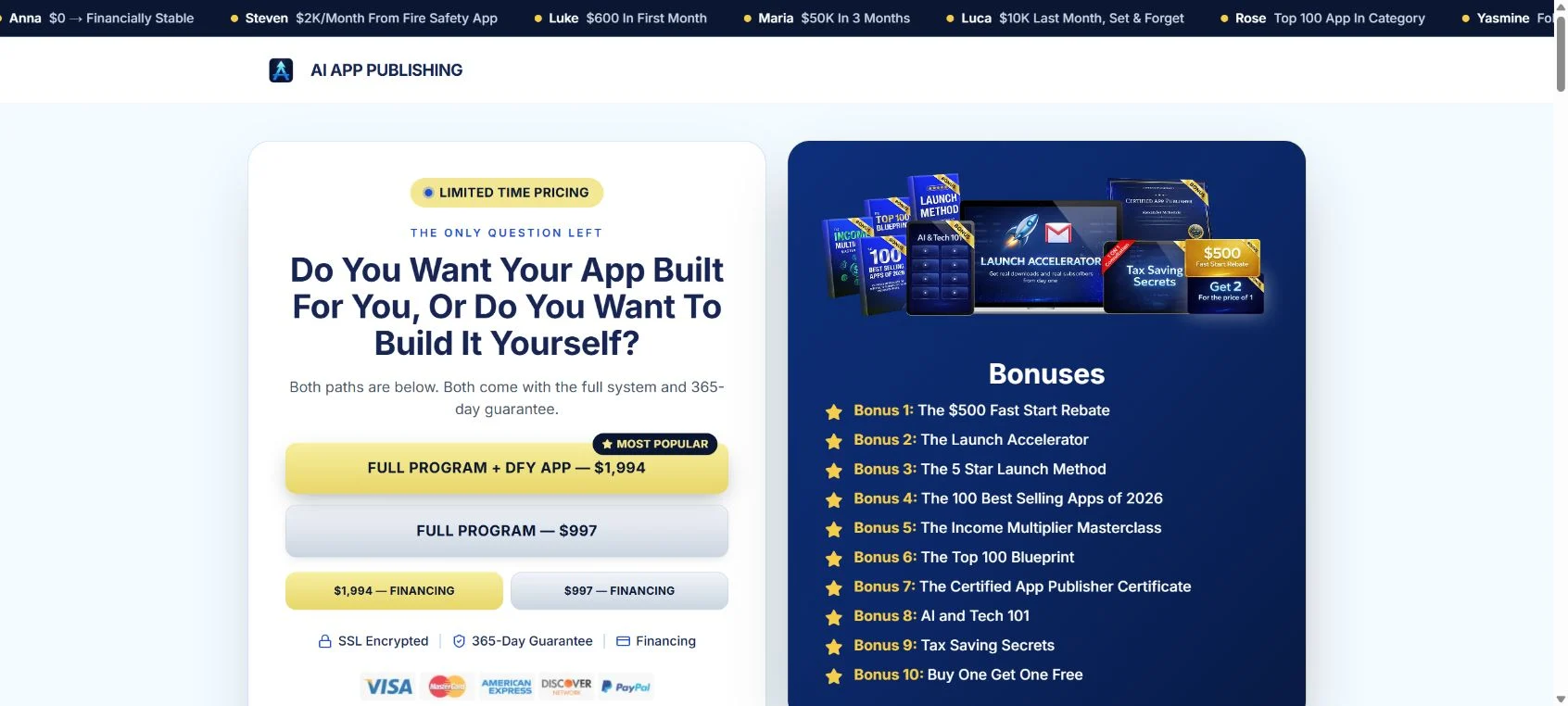
The checkout promotes a 365-day “Win Your Money Back Guarantee” and says customers who meet simple conditions can receive a full refund plus $500. However, a guarantee is only as useful as its written requirements. If those requirements are unavailable before payment, the customer cannot make an informed decision about whether the promise is realistically achievable.
Public feedback is limited. At the time checked, the AppPublishing.ai profile on Trustpilot contained only eight reviews and had a 3.6 out of 5 TrustScore. One recent one-star reviewer alleged that a sales call became intense and focused on a costly upsell. That is an individual allegation, not independently verified proof, but it is relevant when combined with the much larger bootcamp prices.
These findings do not prove that every customer receives nothing or that no participant can create a profitable app. They do show that the offer carries substantial financial and practical risk, and that its strongest marketing messages should not be treated as a reliable forecast of what a typical buyer will earn.
How The Operation Works
1. Advertising leads with an easy Apple income story
The funnel begins with a simple emotional hook. Apple is one of the most trusted technology brands in the world, AI is associated with speed and automation, and recurring income appeals to anyone looking for financial flexibility.
By combining those ideas, the promotion makes app publishing sound less like launching a competitive software business and more like switching on a digital income stream. Phrases about beginners, no coding, and a $0 start reduce the fear that normally comes with software development.
The message is not that a participant must invent an excellent product, study a market, serve customers, and run a company. The emphasis is that a proven process and AI will remove most of the difficulty.
2. The landing page builds confidence with dashboards and success stories
Once visitors arrive, they see earnings-style dashboard graphics, large student counts, high ratings, and multiple testimonials. Some stories describe modest early wins, while others describe five-figure results. This range can make the opportunity feel both believable and highly scalable.
However, a dashboard image cannot establish who earned the money, what costs were deducted, how long the result lasted, or how typical it was. A testimonial also cannot tell readers how many customers earned nothing or lost money.
For an earnings claim to be useful, buyers need broader evidence. That could include the total number of paying students, median net profit after expenses, the percentage who recovered the program cost, the time period measured, refund rates, and the assumptions behind the calculation.
The U.S. Federal Trade Commission advises consumers to be skeptical of business offers and coaching programs that promise guaranteed income, large returns, or a supposedly proven system. The FTC also says money-making opportunity sellers must have support for claims about what buyers can earn.
3. Free training collects the lead
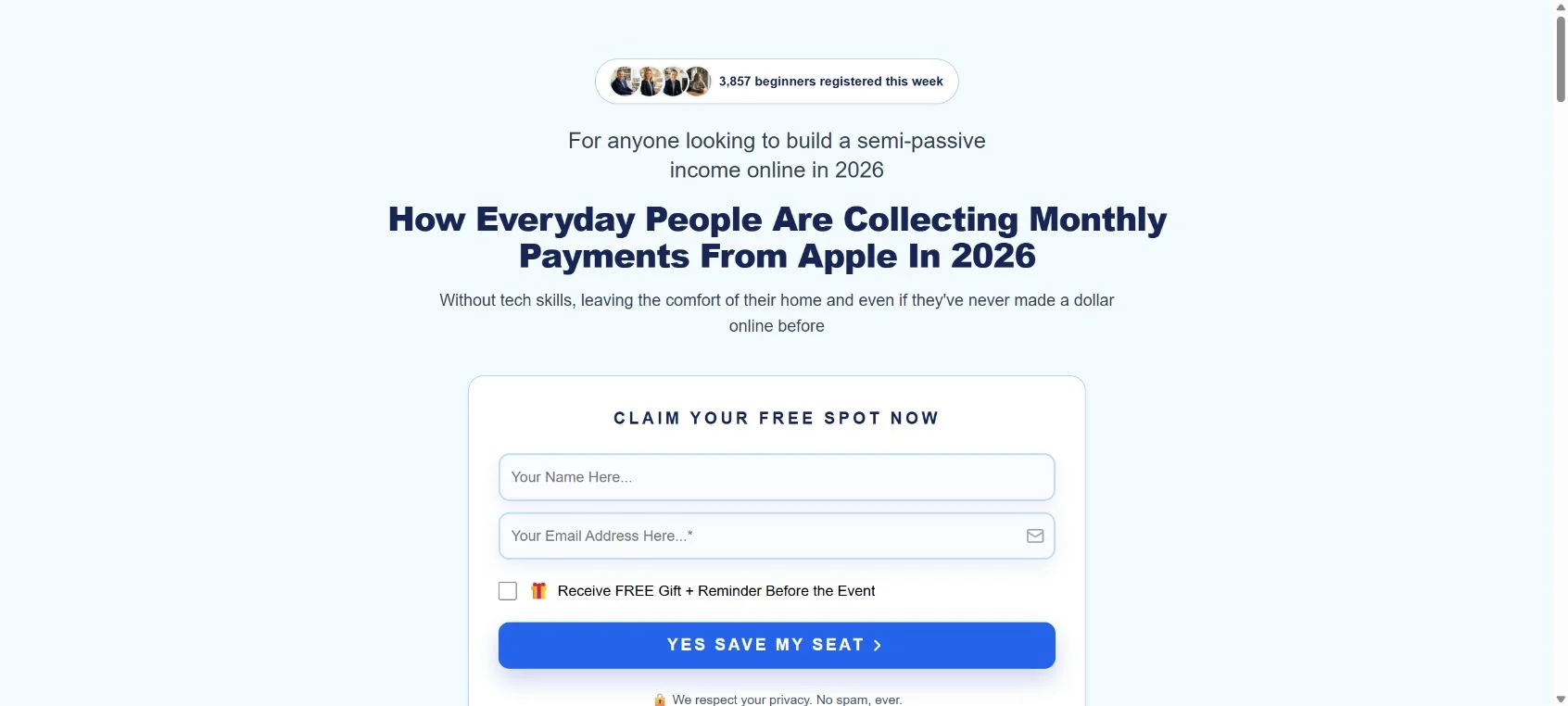
The next step is a training registration page. It asks for a name and email address and promises to explain how everyday people collect monthly payments from Apple. No payment card is required for this initial step.
This is a common sales-funnel structure. Free information attracts a larger audience and gives the operator permission to follow up. The training can then spend more time handling objections, presenting success stories, explaining the mechanism, and moving the visitor toward a purchase.
There is nothing inherently wrong with using a webinar or email funnel. The risk appears when free education is presented as the opportunity itself while the actual path depends on an expensive course, coaching package, financing agreement, or done-for-you service.
4. The free idea becomes a $997 or $1,994 purchase
The checkout reveals the immediate paid offers. The Full Program is advertised for $997. The Full Program plus a done-for-you app is offered for $1,994. Financing buttons are displayed, which can make a large price feel more manageable while creating a longer financial obligation.
The $997 package is framed as $12,000 in total value, producing a claimed saving of $11,003. It includes a series of bonuses with names such as Fast Start Rebate, Best Selling Apps, Income Multiplier Masterclass, and Buy One Get One Free.
Assigned values and large discounts are marketing tools, not proof of resale value. A digital bonus is worth what it helps the buyer accomplish, not necessarily the figure printed beside it.
5. Higher-ticket coaching creates another level of risk
The Whop listing shows that the funnel does not stop at $1,994. Six-month and 12-month bootcamps were listed for $11,600 and $21,600. A buyer who starts with an entry product may therefore encounter an offer costing many times more.
Before considering an upsell, ask for a written explanation of exactly what is new. Determine how many live coaching hours are included, who provides them, what happens if a coach leaves, whether app development is included, who owns the code, and what measurable deliverables are promised.
Do not let a financing option turn the decision into a monthly-payment comparison. The important number is the complete amount owed, including fees and interest, even if the program does not produce revenue.
6. The guarantee lowers resistance, but the conditions matter
A one-year money-back guarantee plus $500 sounds unusually protective. It can reassure a visitor who is uncertain about paying $997 or more. Yet the wording specifically says conditions must be met.
Conditions in coaching guarantees may require buyers to finish every lesson, attend calls, submit assignments, publish a certain number of products, follow specified marketing steps, meet deadlines, document their work, and request a refund within a narrow window. Missing one requirement may affect eligibility.
We cannot say which conditions apply here because the checkout’s Terms of Service link did not provide the academy’s contract. A buyer should not rely on a headline promise while the binding rules are missing.
Ask for the complete terms in a durable format before paying. The document should identify the legal seller, covered products, eligibility requirements, deadlines, refund method, processing time, dispute venue, and any exclusions. Save the exact version you are asked to accept.
7. The buyer still carries the business risk
Even excellent training cannot force Apple to approve an app or customers to install it. The participant remains responsible for choosing an idea, validating demand, creating a compliant product, maintaining it, responding to users, and funding any ongoing services.
Apple’s rules specifically address minimum functionality, copycats, and spam. Repeatedly submitting low-effort versions of common app ideas can result in rejection and may threaten a developer account. An AI tool does not transfer this responsibility away from the account holder.
The developer also needs accurate privacy disclosures. If an app collects data, uses analytics, displays advertising, supports accounts, or depends on third-party software, those elements must comply with Apple policies and applicable laws. A bug, policy change, expired service, or neglected update can interrupt revenue later.
Marketing is another missing part of the easy-income picture. The App Store contains a vast number of competing products. Publishing makes an app available, but it does not guarantee discovery. Paid promotion can be expensive, and organic growth usually requires research, optimization, reviews, retention, and ongoing improvement.
8. Revenue screenshots are not net profit
Suppose an app displays $1,000 in customer purchases. That is not automatically $1,000 in the owner’s pocket. Apple commission, taxes, refunds, advertising, software, hosting, contractors, support, and the training cost all affect the result.
A $997 customer must earn more than $997 after all expenses merely to recover the course price. A $21,600 coaching customer faces a much higher break-even point. Financing costs can push it higher again.
This is why gross dashboard numbers should never be used alone when evaluating a business opportunity. Ask for net figures, typical results, and the complete population behind the examples.
9. The real product may be education, not passive income
What the company can directly sell is access to training, tools, guidance, and services. It cannot directly sell customer demand or guaranteed App Store profit. Those outcomes depend on many factors outside the academy’s control.
Approach the purchase as an educational product. Ask whether the lessons and support are worth the full price even if your apps earn $0. If the answer is no, the decision is being driven by hoped-for earnings rather than the concrete product being delivered.
If You Have Bought This
If you already paid for AppPublishing.ai or AI App Publishing Academy, stay calm. Buying a program does not mean you have no options. Act promptly, keep communication in writing, and focus on preserving evidence.
- Save every part of the offer. Download or screenshot the sales page, checkout, receipt, guarantee, bonuses, webinar, emails, chat messages, and any claims made during a call. Record the date, price, salesperson’s name, and what you understood you were buying.
- Request the correct contract immediately. Tell support that the Terms of Service link at checkout led to an unrelated document and ask for the exact terms that applied at the moment of purchase. Do not accept a newly written policy without asking whether it is the same version you agreed to.
- Ask for the guarantee requirements in writing. Request a complete checklist, all deadlines, the refund address, required proof, and the rule governing the promised additional $500. Avoid relying on a verbal summary.
- Review the Whop receipt and payment authorization. Confirm whether the charge is one-time, installment-based, financed, or connected to future payments. Check the billing area for active memberships and save proof of any cancellation.
- Do not accept a larger upsell under pressure. A salesperson may argue that more coaching, a done-for-you app, or a bootcamp is necessary to make the original purchase work. Pause. Ask for the total price and deliverables, then evaluate them independently.
- Submit a clear refund request as soon as possible. State the purchase date, product, amount, and reason. If you were shown a guarantee, refer to its exact wording and attach evidence that you complied with the stated requirements. Ask for written acknowledgment.
- Contact the payment provider if the seller does not resolve the issue. Whop provides a transaction and platform record. Your card issuer or financing company may also have a dispute process. Explain the facts accurately, including missing terms or undelivered services, and meet all filing deadlines.
- Do not file a false chargeback. A disappointing result alone does not prove unauthorized billing. Describe what was promised, what was delivered, and where the material difference occurred. Evidence is more persuasive than broad accusations.
- Secure any accounts shared during onboarding. Change passwords for email, Apple Developer, app-building platforms, hosting, analytics, and code repositories if another party received access. Turn on two-factor authentication and remove unknown users, API keys, payment methods, and devices.
- Confirm ownership of your app and assets. Determine who controls the Apple Developer account, source code, domain, graphics, data, and subscriptions. Export copies where possible. Do not let a refund dispute leave your business assets locked inside someone else’s account.
- Monitor your statements. Watch for installment charges, renewals, or additional services. If you revoke authorization, do so through both the seller and the payment provider and keep confirmation.
- Report materially misleading earnings claims. U.S. consumers can report business opportunity and coaching concerns to the Federal Trade Commission at ReportFraud.ftc.gov. Consumers elsewhere can contact their national consumer protection agency. Include screenshots and avoid publishing private information.
If you financed the purchase, contact the financing provider separately. Canceling access to a course may not automatically cancel a loan or installment agreement. Ask what dispute rights apply and whether payments continue during review.
If you still want to build an app, separate that goal from the sales funnel. You can study Apple’s official documentation, validate one useful idea, calculate realistic costs, and test demand before spending thousands on coaching.
The Bottom Line
AppPublishing.ai sells a real category of education around AI-assisted app creation, but its marketing makes a difficult software business look far easier and more predictable than it is. The path promoted as beginner-friendly and $0 to start leads to offers of $997, $1,994, $11,600, and $21,600.
The changing social-proof counter, dramatic income testimonials, conditional guarantee, limited public review history, and missing contractual terms are substantial warning signs. The checkout’s Terms of Service link leading to an unrelated personal financial document is especially concerning.
Do not buy based on the phrase “get paid by Apple” or on revenue screenshots. Apple does not guarantee approval, downloads, subscriptions, or profit. Until AppPublishing.ai supplies the correct terms, substantiates typical net earnings, and explains every refund condition before payment, the safest choice is to avoid the program and keep control of your money.

Reviews & discussion
1 commentShare a firsthand experience, or ask a question.
Community reviews
apppublishing.ai
Moderated reader experiences, not an editorial verdict.
Seems so overwhelming but need to know. Don’t know where to start but I need a quick way to get on top of this nightmare. Not that tech savvy so I need help getting off this train.