

BeforeFlix.com promises something almost irresistible, instant early access to movies and shows before they hit major streaming platforms. The site looks sleek, the offer feels exclusive, and the messaging is crafted to make you believe you’ve stumbled onto a secret feature meant for a select few. But behind the polished design lies a deceptive scheme built to pull users into a maze of fake verifications, data harvesting, and profit-driven traps.
If you’ve seen BeforeFlix pop up on your screen and wondered whether it’s real, you’re not alone. Thousands of users encounter it every week, and many walk away confused, frustrated, or unknowingly exposed. Understanding how the scam works is the key to protecting yourself, and this guide breaks it all down in clear steps.
Scam Overview
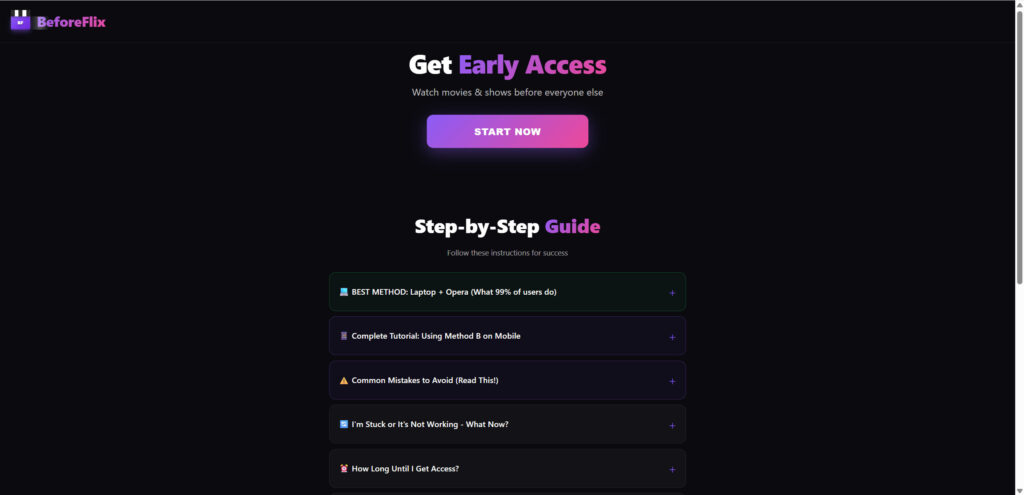
The BeforeFlix.com scam is built around a simple but powerful psychological hook: exclusivity. The promise of gaining early access to unreleased movies or premium streaming content is something many viewers find irresistible. For film enthusiasts, the idea of a private release or early preview feels both exciting and special. Scammers understand this pull and design their pages to amplify that sense of exclusivity.
When a visitor lands on BeforeFlix.com, they are greeted with a layout that seems sleek and modern. Bold typography, recognizable streaming colors, and confident wording all contribute to the illusion that this is part of an official entertainment promotion. The site claims that users can unlock an “Early Access Badge” that works like a VIP pass. This badge supposedly grants permission to watch unreleased content whenever new titles appear. This premise is the backbone of the scam.
The site leverages urgency in nearly every part of the interaction. Timers count down. Messages warn that limited access spots remain. Buttons are labeled with phrases like “Start Now” or “Verify to Unlock.” All of these elements are intentional. Scammers rely on the fact that rushed users make poor decisions and are more likely to provide personal information without thinking the process through.
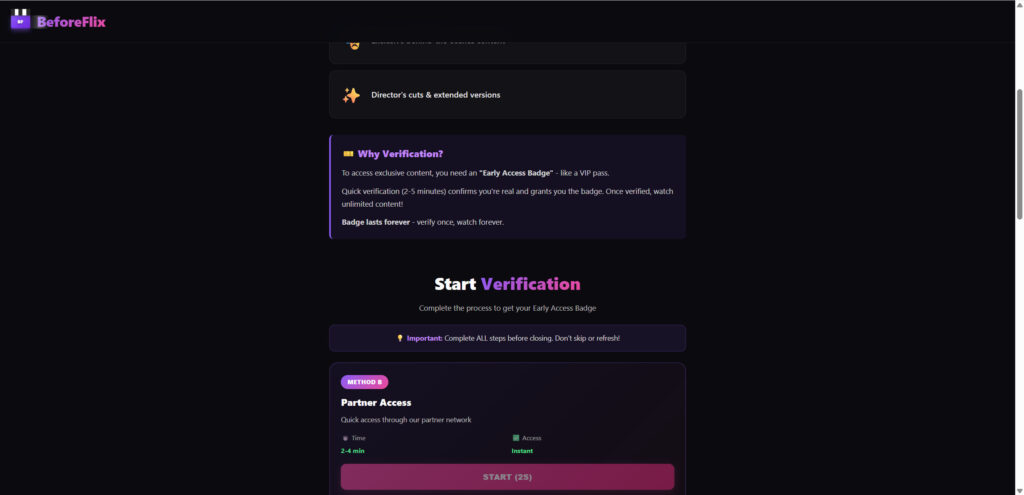
Once the urgency has been established, the scam begins layering on a sense of legitimacy. The BeforeFlix branding is designed with a purple-and-black theme that feels similar to real entertainment brands. The language on the site is casual and confident, creating the feeling that visitors have stumbled across a private feature.
Below the early access message, the site begins explaining why verification is needed. It claims the badge prevents bots or unauthorized users from abusing the platform. It states that verification only takes a few minutes and lasts forever. This messaging is not accidental. It exists because scammers know that users often hesitate when asked for personal data. The explanation serves to soften that discomfort, presenting verification as a normal step.
As users scroll further, they encounter fake testimonials and inflated success claims. Comments appear to show people thanking BeforeFlix for helping them watch movies early or win prizes. These comments, however, are fabricated. Many of them use generic profile pictures, recycled names, or vague compliments that could apply to any service. Their only purpose is to convince hesitant users that the offer is real.
Another important part of the scam’s design is the multiple-choice verification steps. These include small quizzes, such as answering questions about gender or preferences. These questions serve two purposes. First, they create a sense of engagement. Second, they collect bits of data that can later be used for targeted marketing or identity profiling.
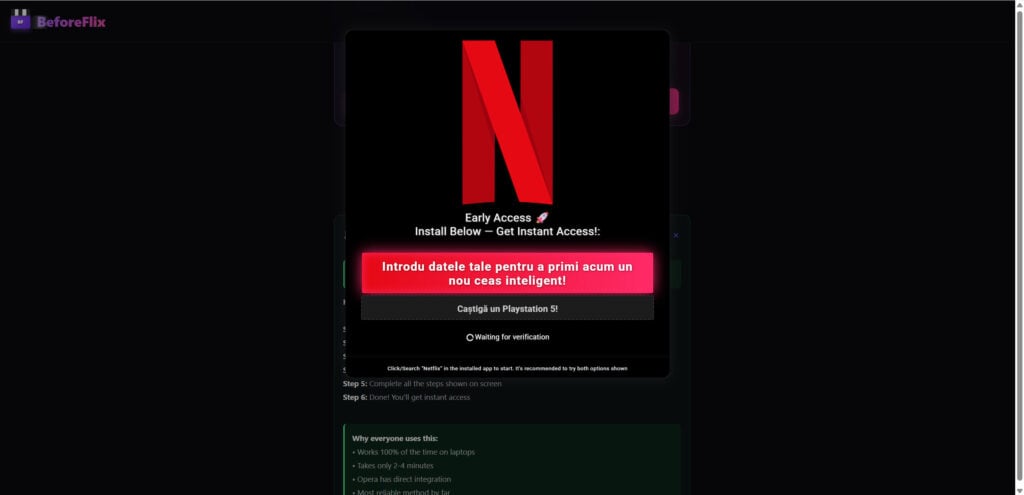
However, the real trap begins when the site directs users to the partner verification page. This page informs visitors that they must complete a set of external tasks to confirm their identity and unlock their badge. The tasks typically involve:
- Signing up for trial subscriptions
- Downloading apps
- Entering email or phone information
- Completing surveys
- Accepting promotional offers
- Providing payment details for “free” trials
These tasks are positioned as quick and harmless. The site repeatedly claims they take only a few minutes and will grant instant access. In reality, completing these tasks does not grant any reward. The verification is merely a front for affiliate-based monetization, where scammers get paid every time a user completes an offer.
This means BeforeFlix is not just a fake streaming opportunity. It is part of a broader pattern of deceptive funnel scams that manipulate people into generating revenue for marketers without receiving anything in return.
Another concerning element is how widely this scam spreads. It is not limited to a single URL. BeforeFlix-style funnels often run through multiple domains at once. Scammers use identical site templates but rotate the URLs to avoid detection and extend the lifespan of the fraud. This allows them to continuously redirect victims into new traps even after specific sites are reported or taken down.
The scam also heavily relies on fear of missing out. Messages about limited access, early opportunities, countdown timers, and exclusive content are crafted to increase psychological pressure. These tactics successfully push users into acting quickly, overriding caution.
Although the site claims that verification prevents abuse, the truth is the opposite. It enables abuse by extracting private information to sell or misuse. Some users report increased spam calls, relentless promotional emails, unauthorized subscriptions, or charges placed on their accounts after interacting with similar scam funnels.
Ultimately, the BeforeFlix scam is both simple and highly manipulative. It relies on persuasive design, recognizable branding, and psychological triggers to lead users through a funnel that profits from their personal information. Nothing about the promised early access is real. There is no badge, no streaming content, and no benefit for the user.
The next section breaks down the scam step-by-step to expose exactly what is happening behind the scenes.
How The Scam Works
To truly understand how BeforeFlix deceives users, it helps to examine its operation in sequential detail. The scam flows through a predictable pattern, with each phase designed to push visitors deeper into the funnel before they realize what is happening.
Phase 1: The Hook
The initial hook comes from targeted ads, pop-ups, or redirects from questionable websites. These sources often promise:
- Early movie access
- Unreleased streaming content
- Exclusive entertainment deals
- VIP features before public launch
The ads tend to look polished, making them easy to trust. Users click out of curiosity or excitement, and this click transports them directly to the BeforeFlix landing page.
Phase 2: The Welcome Page
Once on the site, users are greeted by a bold message encouraging them to start the early access process. Large buttons positioned at the center of the page guide users forward. The design is intentionally minimal to reduce distractions and focus attention on the call-to-action.
The layout is built to look like a legitimate entertainment portal. Bright graphics, bold fonts, and short persuasive phrases create an energetic atmosphere. The goal at this stage is simple, convince users that this could be real.
Phase 3: The Illusion of Legitimacy
Next, the site introduces a justification for verification. It claims that users must pass verification to receive the Early Access Badge. The reasoning is framed as security, but in reality this is the gateway into the scam.
To encourage trust, the page highlights quick verification times and assures users that the badge lasts forever. Fake comments, testimonials, and activity logs appear further down the page to strengthen credibility.
Phase 4: The Fake Quiz
This step often features multiple-choice questions that appear insignificant, such as asking for gender or age range. These questions do two things:
- They create the illusion of personalization
- They collect data points for marketing purposes
They also lower defenses. The user feels gradually committed to the process through small interactions, a psychological technique known as the foot-in-the-door method.
Phase 5: The Countdown Timer
A countdown timer appears during the quiz or verification explanation. It warns users that they have only a few minutes left to complete verification. This timer pushes users to act quickly rather than think critically. Scammers rely heavily on urgency to rush decision-making.
Phase 6: The Verification Trap
After completing the quiz, users are shown a page explaining that they must complete partner verification. It claims this is necessary to confirm they are human. The tasks usually include:
- Installing sponsored apps
- Signing up for trial services
- Participating in surveys
- Providing personal information
- Registering for promotional programs
Each task benefits the scammer financially. The more offers users complete, the more the scam earns.
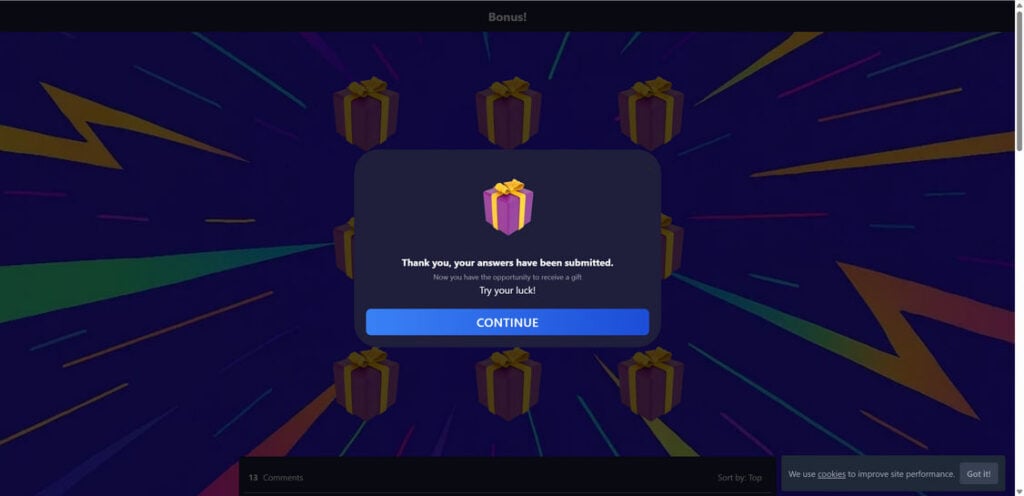
Phase 7: The Monetization Funnel
Every offer redirects users to a third-party marketing network. These networks operate on an affiliate model. The scammer gets paid a commission for each completed task. The visitor gets nothing in return.
This means BeforeFlix functions as a gateway for advertisers who pay for leads, sign-ups, or app installs. The scam’s entire structure exists to drive users toward these monetized tasks.
Phase 8: The Endless Loop
Even after completing several offers, users are never granted access. Instead, they are prompted to complete additional tasks. The system always indicates that verification is not yet complete. This loop continues until users give up.
Phase 9: Data Harvesting
During the process, scammers collect:
- Emails
- Phone numbers
- Names
- Device information
- IP address
- Behavior tracking data
This information can be used for targeted advertising or sold to data brokers. Some victims report spam messages and telemarketing calls after submitting information through similar scam funnels.
Phase 10: Potential Financial Loss
Some verification tasks involve signing up for trials that require payment details. Users may unknowingly enroll in recurring subscriptions. Others may expose their credit card information to malicious operators.
Phase 11: The Aftermath
Once users leave the site, they realize they never received anything. The early access badge does not exist. The exclusive content is fake. The entire process was built to mislead users into providing valuable information while the scammer collects revenue.
Understanding these phases makes the scam easier to avoid. By identifying how each step manipulates emotions, exploits curiosity, and applies pressure, users can avoid falling into similar traps in the future.
What To Do If You Have Fallen Victim to This Scam
If you interacted with BeforeFlix.com, do not panic. You can still take steps to protect yourself. Follow these actions carefully.
1. Stop engaging with the website
Close all tabs associated with BeforeFlix and avoid clicking its links again. Scammers often continue generating pop-ups to draw users back into the funnel.
2. Change any login credentials you used
If you entered an email and password combination you use elsewhere, change that password immediately. Reused passwords increase hacking risks.
3. Monitor your email for suspicious activity
Look for unexpected login attempts, password reset requests, or spam from unfamiliar senders. Consider enabling spam filters.
4. Block the domain and mark all related emails as spam
Prevent future communication by blocking BeforeFlix and any associated promotional senders.
5. Check your bank account for unauthorized charges
If you provided payment information for a trial offer, verify that no unfamiliar subscriptions or charges have been applied.
6. Cancel unwanted subscriptions
Some trial offers automatically convert into paid plans. Contact your bank or the service provider to halt recurring billing.
7. Use antivirus tools to scan your device
Some scam funnels distribute malware. A full device scan ensures your system remains secure.
8. Report the scam
Reports help reduce the scam’s reach. Consider notifying:
Your local cybercrime authority
Your bank or credit card company
Consumer protection organizations
9. Educate others to prevent further victims
Sharing your experience can keep friends and family safe from similar traps.
Is Your Device Infected? Run a Free Malware Scan
Slow performance, constant pop-ups, or strange behavior? These are classic signs of a malware infection. The fastest way to find out is to scan your device with Malwarebytes Free — one of the most trusted malware removal tools available.
The free version detects and removes the most common threats, including:
- Adware — the cause of those annoying pop-ups
- Browser hijackers — unwanted redirects and changed homepages
- Trojans and spyware — hidden programs stealing your data
- Potentially unwanted programs (PUPs) — software you never asked for
👉 Select your device below — Windows, Mac, or Android — then follow the simple steps to download Malwarebytes, scan your system, and remove any threats it finds. The scan usually takes 5 to 20 minutes.
Run a Malware Scan with Malwarebytes for Windows
Malwarebytes is one of the most popular and trusted anti-malware tools for Windows — and it’s completely free for removing infections. It catches threats that many antivirus programs miss, including adware, browser hijackers, and trojans. Follow the steps below to scan and clean your PC in just a few minutes.
Download Malwarebytes
Click the button below to download the latest version of Malwarebytes for Windows from the official source. The free version is all you need — it will scan your computer and remove adware, browser hijackers, and other malicious software at no cost.
Download MalwarebytesOfficial installer for Windows 11 and 10. Your download starts right away.Want real-time protection? See Malwarebytes Premium Malwarebytes Free for WindowsScans and removes malware at no cost
-
Install Malwarebytes
When the download finishes, open your Downloads folder and double-click the MBSetup file. If Windows shows a User Account Control pop-up, click “Yes” to allow the installation.

Follow the On-Screen Prompts to Install Malwarebytes
The setup wizard will walk you through a few quick screens:
-
Choose where you’re installing the program — “Personal Computer” or “Work Computer” — then click Next.

-
Malwarebytes will now install on your device. This usually takes under a minute.

-
When installation is complete, the “Welcome to Malwarebytes” screen will open automatically.

-
On the final screen, click Open Malwarebytes to launch the program.

-
Enable “Scan for Rootkits”
Before scanning, turn on rootkit detection so Malwarebytes can find even the most hidden threats. Click the Settings gear icon on the left side of the screen.

In the settings menu, find “Scan for rootkits” and click the toggle so it turns blue.

Done? Click “Dashboard” in the left pane to return to the main screen.
Start the Scan
Click the blue Scan button. Malwarebytes will automatically update its virus database and start checking your computer for malware.

-
Wait for the Scan to Finish
The scan checks your entire system for browser hijackers and other malicious programs, so it can take 5 to 20 minutes depending on your computer. Feel free to do something else — just check back occasionally to see the progress.

-
Quarantine the Detected Threats
When the scan is done, you’ll see a list of everything Malwarebytes found — malware, adware, and potentially unwanted programs. Click the “Quarantine” button to remove all of them at once.

Malwarebytes will now remove the malicious files and registry entries and move them safely into quarantine.

-
Restart Your Computer
Some threats can only be fully removed after a reboot. If Malwarebytes asks you to restart, click Yes. Once you’re logged back in, Malwarebytes has finished removing the threats it found.

That’s it — your Windows PC is now clean of trojans, adware, and other malware, and should be back to running smoothly.
If you are still having problems with your computer after completing these instructions, then please follow one of the steps:
- Run a computer scan with ESET Online Scanner
- Ask for help in our Windows Malware Removal Help & Support forum.
Run a Malware Scan with Malwarebytes for Mac
Malwarebytes for Mac is a free on-demand scanner that removes the malware other security software tends to miss — adware, browser hijackers, and unwanted programs included. Cleaning an infected Mac with Malwarebytes has always been completely free, and it’s our go-to recommendation. Follow the steps below to scan and clean your Mac in just a few minutes.
-
Download Malwarebytes for Mac
Click the button below to download the latest version of Malwarebytes for Mac.
Download MalwarebytesOfficial installer for macOS. Your download starts right away.Want real-time protection? See Malwarebytes PremiumMalwarebytes Free for MacScans and removes malware at no cost -
Open the Malwarebytes setup file
When the download finishes, open your Downloads folder and double-click the setup file to begin the installation.

-
Follow the On-Screen Prompts to Install Malwarebytes
The Malwarebytes for Mac Installer will guide you through a few quick screens. Click “Continue” and keep following the prompts until the installation completes.



When the installation is complete, Malwarebytes opens to the Welcome to Malwarebytes screen. Click “Get started“.
-
Select “Personal Computer” or “Work Computer”
Malwarebytes will ask what type of computer you’re installing it on. Click either Personal Computer or Work Computer, whichever applies.

-
Start the Scan
Click the “Scan” button. Malwarebytes will automatically update its detection database and begin checking your Mac for malware.

-
Wait for the Scan to Finish
Malwarebytes will scan your Mac for adware, browser hijackers, and other malicious programs. This can take a few minutes, so feel free to do something else — just check back occasionally to see the progress.

-
Quarantine the Detected Threats
When the scan is done, you’ll see a list of everything Malwarebytes found. Click the “Quarantine” button to remove all the threats at once.

-
Restart Your Mac
Malwarebytes will now remove all the malicious files it found. Some threats can only be fully removed after a reboot — if Malwarebytes asks you to restart, allow it. Once you’re logged back in, your Mac is clean.

That’s it — your Mac is now free of adware, rogue browser extensions, and other potentially harmful software.
If you are still experiencing problems while trying to remove a malicious program from your computer, please ask for help in our Mac Malware Removal Help & Support forum.
Run a Malware Scan with Malwarebytes for Android
Malwarebytes for Android automatically detects and removes dangerous threats like malware and ransomware so you don’t have to worry about your most-used device being compromised. Aggressive detection of adware and potentially unwanted programs keeps your Android phone or tablet running smooth.
-
Download Malwarebytes for Android.
You can download Malwarebytes for Android by clicking the link below.
Get Malwarebytes for AndroidOpens Google Play in a new tab.Want real-time protection? See Malwarebytes Premium for AndroidMalwarebytes for AndroidScans your phone and removes malware at no cost -
Install Malwarebytes for Android on your phone.
In the Google Play Store, tap “Install” to install Malwarebytes for Android on your device.

When the installation process has finished, tap “Open” to begin using Malwarebytes for Android. You can also open Malwarebytes by tapping on its icon in your phone menu or home screen.

-
Follow the on-screen prompts to complete the setup process
When Malwarebytes will open, you will see the Malwarebytes Setup Wizard which will guide you through a series of permissions and other setup options.
This is the first of two screens that explain the difference between the Premium and Free versions. Swipe this screen to continue.
Tap on “Got it” to proceed to the next step.
Malwarebytes for Android will now ask for a set of permissions that are required to scan your device and protect it from malware. Tap on “Give permission” to continue.
Tap on “Allow” to permit Malwarebytes to access the files on your phone.
-
Update database and run a scan with Malwarebytes for Android
You will now be prompted to update the Malwarebytes database and run a full system scan.

Click on “Update database” to update the Malwarebytes for Android definitions to the latest version, then click on “Run full scan” to perform a system scan.

-
Wait for the Malwarebytes scan to complete.
Malwarebytes will now start scanning your phone for adware and other malicious apps. This process can take a few minutes, so we suggest you do something else and periodically check on the status of the scan to see when it is finished.

-
Click on “Remove Selected”.
When the scan has been completed, you will be presented with a screen showing the malware infections that Malwarebytes for Android has detected. To remove the malicious apps that Malwarebytes has found, tap on the “Remove Selected” button.

-
Restart your phone.
Malwarebytes for Android will now remove all the malicious apps that it has found. To complete the malware removal process, Malwarebytes may ask you to restart your device.
That’s it — your Android phone is now clean — no more malicious apps, adware, or browser redirects.
If you are still having problems with your phone after completing these instructions, then please follow one of the steps:
- Restore your phone to factory settings by going to Settings > General management > Reset > Factory data reset.
- Ask for help in our Mobile Malware Removal Help & Support forum.
Stay Protected: Block Ads and Malicious Sites
Now that your device is clean, keep it that way. Most infections start with a malicious ad or a fake download button — so blocking them at the source is your best defense.
We recommend AdGuard, which blocks malicious ads, phishing pages, and dangerous redirects before they can reach you.
👉 Download AdGuard and browse safely
The Bottom Line
BeforeFlix.com is a polished but deceptive scam designed to lure users into a verification funnel that collects personal information and generates affiliate revenue. It promises early access to unreleased entertainment, but nothing about that offer is real. The site relies on urgency, fake legitimacy, and psychological manipulation to guide users toward completing tasks that only benefit the scammer.
FAQs
What is BeforeFlix.com?
BeforeFlix.com is a scam website that pretends to offer early access to unreleased movies and shows. It uses a sleek streaming-style design to convince visitors that they can unlock an exclusive “Early Access Badge.” In reality, there is no badge, no streaming library, and no legitimate entertainment service behind the site.
Is BeforeFlix.com affiliated with Netflix or other streaming platforms?
No. BeforeFlix.com has no connection to Netflix, Amazon Prime Video, Hulu, Disney+, or any legitimate streaming company. The scammers behind the site purposely design it to look similar to real entertainment brands to build trust and reduce suspicion.
How does the BeforeFlix scam make money?
The site funnels users into completing third-party offers such as surveys, app downloads, trial subscriptions, and marketing sign-ups. Each completed task generates an affiliate commission for the scammers. Users never receive anything in return, but the scam operators profit from every action taken during the verification steps.
Why does the site ask for verification?
The so-called verification process is fake. It claims to confirm that the user is not a bot and to activate an Early Access Badge, but its real purpose is to guide users through monetized offers. This verification page is the core of the scam’s profit system.
Are the testimonials real?
No. All reviews, comments, and success stories displayed on the BeforeFlix pages are fabricated. They are generic, vague, and often written using recycled names or AI-generated profile photos. Their only function is to make the site look trustworthy.
What information does BeforeFlix collect?
The site may collect:
- email addresses
- phone numbers
- demographic details
- device and IP information
- behavioral tracking data
Third-party offers may also request payment details, which puts users at risk of unwanted subscriptions or fraudulent charges.
What risks are involved with interacting with the site?
Users may experience:
- heavy spam emails
- telemarketing calls
- phishing attempts
- unauthorized charges from trial offers
- exposure of personal data to scam networks
Some victims also report malware risks from apps promoted during verification.
Why do countdown timers and urgent messages appear?
These urgency tactics are psychological tools. They pressure users into acting quickly before questioning whether the offer is real. Scammers use limited-time messages, flashing warnings, and fast-approaching timers to push impulsive decision-making.
Can BeforeFlix give my device a virus?
BeforeFlix itself usually does not install malware directly, but the sites it redirects users to may include unsafe downloads or suspicious apps. If you installed anything during the verification steps, running a full device scan is wise.
What should I do if I completed some of the verification steps?
If you submitted only basic information, expect increased spam and consider updating your email security settings. If you entered payment information, immediately review your bank account for unauthorized charges, cancel trial subscriptions, and contact your bank if needed.
How can I avoid scams like BeforeFlix in the future?
Look for these warning signs:
- unfamiliar domains with professional branding
- promises of exclusive or early access
- verification steps requiring offers or downloads
- lack of privacy policies or company information
- misleading urgency such as countdown timers
If an offer seems too good to be true or asks for too much personal information, it is usually a scam.
Does BeforeFlix ever deliver the early access it promises?
No. There is no early access badge, no unreleased content, and no streaming library. The entire promise is fabricated to lure users into completing monetized tasks.
Should I report BeforeFlix?
Reporting is helpful. You can notify the FTC, IC3, and your email provider to help reduce the scam’s reach. Sharing information with others can also prevent additional victims.

Reviews & discussion
0 commentsShare a firsthand experience, or ask a question.
Community reviews
beforeflix.com
Moderated reader experiences, not an editorial verdict.
Start the conversation
Have a question or something useful to share? Add the first comment.