


If you are a fan of Bed Bath & Beyond, you might have seen some ads or websites claiming to have a massive stock clearance sale for the popular home goods retailer. However, before you get tempted by the offers of up to 90% off on bedding, bath, kitchen, and other items, you should be aware that these are scam websites that aim to steal your money and personal information. In this article, we will explain what these scam websites are, how they operate, what to do if you have fallen victim, and how to avoid them in the future.
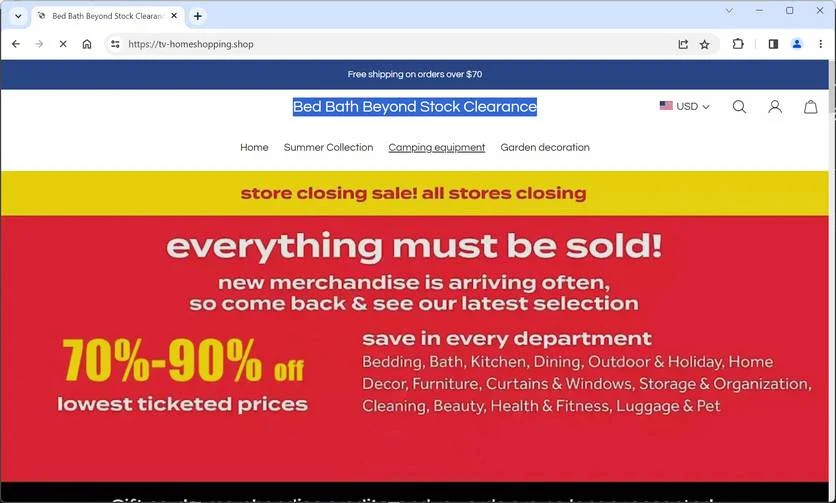
What are the Bed Bath & Beyond Stock Clearance Scam Websites?
The Bed Bath & Beyond stock clearance scam websites are fake online shopping sites that pretend to have a closeout sale for Bed Bath & Beyond. They use the name and logo of the legitimate company, but they have nothing to do with it. They also use domain names that are similar to the official website, such as bedbathandbeyondclearance.com, bedbathandbeyondliquidation.com, or bedbathandbeyondsale.com. However, these domains are not registered by Bed Bath & Beyond, and they are not secure or trustworthy.
How do the Bed Bath & Beyond Stock Clearance Scam Websites operate?
The scam websites lure customers with attractive prices and discounts on various products that are supposedly from Bed Bath & Beyond. They claim that they are having a store closing sale and that everything must be sold.
However, these statements are false and misleading. The products that are displayed on the scam websites are either stolen images from other sources or non-existent items that will never be delivered. The scam websites also ask customers to provide their credit card details, billing address, shipping address, email address, and phone number. However, this information is not used to process the orders, but to charge unauthorized payments or to sell them to other scammers.
What to do if you have fallen victim?
If you already entered your personal or credit card information into one of the fraudulent stock clearance websites, take these steps right away:
- Contact your credit card company to report fraudulent charges and have the card canceled and reissued. Monitor statements closely for further abuse of the stolen card number.
- Check your credit reports thoroughly for any signs of new accounts opened in your name or other identity theft. Place fraud alerts and freeze credit if needed.
- File complaints with the FTC, BBB, and IC3 reporting the fraudulent website you encountered. Provide screenshots and details.
- Search online to see if others were scammed by the same fake website and add your own reviews warning people.
- If you receive any suspicious packages not ordered, refuse delivery or mark return to sender. Don’t open merchandise never purchased.
- Change account passwords if you reused the same one across multiple sites, especially for financial accounts and emails.
Warning Signs of the Scam Websites
Here are some red flags to help spot the fraudulent stock clearance websites:
- The URL contains words like “clearance”, “liquidation”, or “closing” instead of the real “bedbathandbeyond.com”.
- Prices on items are abnormally low, like high-end products discounted 70%+ which is unrealistic.
- The domain name is slightly misspelled like “bedbathnbbeyond” or “bedbathandbeyond”.
- The site promotes a rushed liquidation sale ending very soon to create false urgency.
- No physical address or customer service contact information is provided.
- The product selection does not match Bed Bath & Beyond’s actual inventory.
- There are grammar, formatting, and spelling errors throughout the site.
- Customer reviews are completely absent.
If a website shows any of these signs, it can definitively be considered a fake. Do not enter payment information or attempt to place an order.
The Bottom Line
The Bed Bath & Beyond stock clearance scam websites are a common online shopping scam that targets unsuspecting customers who are looking for bargains. They use the name and reputation of a legitimate company to trick people into giving away their money and personal information. However, these websites are not affiliated with Bed Bath & Beyond, and they do not deliver any products or services. To avoid falling for this scam, you should always check the domain name and the security of the website before making any purchases online. You should also avoid clicking on ads or links that offer too-good-to-be-true deals or discounts. You should also verify the authenticity of the website by contacting the official customer service of Bed Bath & Beyond or by visiting their official website.

Join the discussion
0 commentsShare your experience or ask a question about this article.
Discussion
Start the conversation
Have a question or something useful to share? Add the first comment.