

The “Apple Pay Security Reminder” text message is a fake fraud alert designed to make people call a scam phone number. It usually claims there was an unusual Apple Pay transaction and tells the recipient to contact “Apple Support” if they did not authorize it.
This message is not a real Apple security alert. It is a phishing and tech support scam that can lead to stolen passwords, bank fraud, remote access abuse, and gift card theft.
What Is the Apple Pay Security Reminder Text Message Scam?
The Apple Pay Security Reminder Text Message Scam is a fake text alert that pretends to warn users about suspicious Apple Pay activity. The message often claims that Apple detected an unusual transaction, temporarily restricted it, and needs the user to call a support number to review the account.
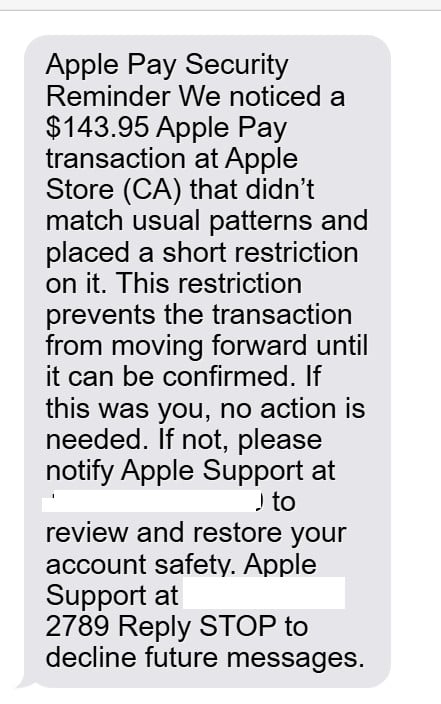
A common version of the scam says something like:
Apple Pay Security Reminder
We noticed a $143.95 Apple Pay transaction at Apple Store (CA) that didn’t match usual patterns and placed a short restriction on it. This restriction prevents the transaction from moving forward until it can be confirmed.If this was you, no action is needed. If not, please notify Apple Support at +1 888-821 2789 to review and restore your account safety.
Apple Support at +1 888-821 2789
Reply STOP to decline future messages.
The exact wording can change. Some versions mention Apple Store purchases. Others mention Apple Pay, Apple ID, iCloud, Target, Amazon, Walmart, Best Buy, or a fake invoice number.
The message may use different transaction amounts, such as $143.95, $198.99, $499.99, or even larger figures. The dollar amount is not the real issue. The goal is to create enough concern that the recipient calls the phone number in the message.
That phone number is the trap.
The scammers are not trying to help you cancel a real Apple Pay charge. They want to get you on the phone, pretend to be Apple Support, and convince you to share sensitive information or follow harmful instructions.
This scam is especially effective because it does not always look extreme at first. Many people are used to receiving legitimate fraud alerts from banks, card issuers, and payment services. Scammers copy that style to make the text feel familiar.
The message may sound calm and professional. It may say the transaction has been temporarily restricted. It may tell you that no action is needed if you recognize the charge. These details make the scam feel more believable.
But there are several serious warning signs.
First, the text includes a phone number and pressures you to call it. Real account security issues should always be checked through official channels, not through a random number sent by text.
Second, the wording is vague. It does not provide a safe way to verify the alert inside your Apple ID settings. Instead, it pushes you toward a direct call with the scammers.
Third, the phrase “Reply STOP to decline future messages” is suspicious in this context. Scammers often add that line to make their text look like a legitimate notification or marketing message. Replying can confirm that your number is active.
The scam may begin with Apple Pay, but it often turns into something more dangerous. Once the victim calls, the fake support agent may claim the Apple ID is compromised, the iPhone is infected, the bank account is at risk, or the victim must install a remote access app to fix the problem.
That is where the financial damage often begins.
Why the Message Looks Convincing
This scam works because it copies the structure of real fraud alerts. Many banks and payment providers send texts when a transaction looks unusual. Scammers understand that pattern and use it against people.
The “Apple Pay Security Reminder” message is built around several psychological triggers.
It Uses a Trusted Brand
Apple is a trusted name. Most iPhone users have an Apple ID, and many use Apple Pay, iCloud, App Store purchases, subscriptions, or saved payment methods.
When a message mentions Apple Pay, the recipient may immediately worry that their device, card, or Apple ID has been compromised.
That emotional reaction is exactly what scammers want.
It Uses a Believable Charge
A fake charge like $143.95 feels realistic. It is not so small that people ignore it, but it is not so large that it instantly feels fake.
A person might think it could be:
- An Apple Store accessory
- An App Store subscription bundle
- An AppleCare payment
- A repair-related charge
- A purchase made by someone else using their Apple ID
- A card transaction through Apple Pay
The amount feels possible, which makes the message harder to dismiss.
It Claims the Charge Was Restricted
The text often says the transaction was temporarily blocked or restricted. This makes the recipient feel there is still time to stop the payment.
That is a powerful manipulation.
The victim may think, “Apple caught the suspicious charge, but I need to call now to confirm it.”
In reality, the scammers are using urgency without making the message look too aggressive.
It Gives a Fake Sense of Safety
The line “If this was you, no action is needed” makes the message feel balanced and official. Real fraud alerts often ask users to confirm whether a transaction was theirs.
Scammers include this language to lower suspicion.
But the next instruction is the dangerous one: call the phone number.
It Avoids an Obvious Malicious Link
Many phishing scams use links. This one may not. Instead, it relies on a phone number.
That can make the message seem safer because people often associate scams with suspicious links. But phone-based scams can be just as dangerous, and sometimes more dangerous, because the scammer can manipulate the victim live.
How the Apple Pay Security Reminder Scam Works
The scam usually follows a predictable pattern. The text is only the first step. The real fraud happens after the victim calls the number.
Step 1: You Receive the Fake Apple Pay Text
The scam starts with a message claiming there was suspicious Apple Pay activity. It may mention a transaction at Apple Store (CA), a purchase amount, or an account restriction.
The message is designed to make you feel that something is wrong, but also that the problem can still be fixed.
This is the hook.
Step 2: You Are Told to Call Apple Support
The message says to contact Apple Support at the number provided.
This number does not connect you to real Apple Support. It connects you to scammers pretending to represent Apple.
They may answer the call professionally and use scripted language to sound legitimate.
They may say things like:
- “Thank you for calling Apple Support.”
- “I can help you secure your Apple Pay.”
- “We detected unusual activity on your Apple ID.”
- “The transaction is currently on hold.”
- “We need to verify your account before the restriction expires.”
The goal is to make you believe the text was real.
Step 3: The Fake Agent Asks Verification Questions
The scammer may ask for basic information first. This can include your name, phone number, email address, Apple ID email, device model, or billing ZIP code.
Some of these questions may seem harmless. But the scammer is collecting useful details.
They may use your answers to sound more convincing later. They may also use them to attempt account recovery, password resets, or identity theft.
Step 4: The Problem Suddenly Gets Bigger
After the call begins, the scammer may expand the story.
The original text may mention only one Apple Pay transaction. But the fake support agent may now claim there are multiple problems.
They may say:
- Your Apple ID was accessed from another location
- Someone added your card to Apple Pay on another device
- Your iPhone has been hacked
- Your iCloud account is exposed
- Your bank account may be connected to fraud
- Several transactions are waiting to clear
- Your account must be secured immediately
This is a common escalation tactic. The scammer wants you to feel overwhelmed and dependent on their help.
Step 5: They Ask for Apple ID Credentials or Security Codes
The scammer may ask for your Apple ID password or a verification code sent to your phone.
Never share these.
A two-factor authentication code is not just a confirmation number. It can allow someone to access or change your account. If a scammer asks you to read a code over the phone, that is a clear sign of fraud.
They may claim the code is needed to cancel the transaction, unlock your account, or confirm your identity. That is false.
Step 6: They Ask You to Install Remote Access Software
Many versions of this scam become fake tech support scams.
The fake Apple agent may tell you to install a remote access app such as AnyDesk, TeamViewer, UltraViewer, Zoho Assist, or similar software.
They may say they need remote access to:
- Cancel the Apple Pay transaction
- Secure your iPhone
- Remove hackers
- Check whether your device is infected
- Connect your bank to Apple’s refund system
- Restore your account safety
This is extremely risky.
Once scammers can see your screen, they may guide you into opening sensitive accounts, watch you enter passwords, view personal information, or manipulate what appears on your screen.
Step 7: They Push a Fake Refund or Bank Verification
The scammer may say they need to refund the suspicious Apple Pay charge. Then they may ask you to open your online banking app or website.
They may claim this is needed to verify that the refund was processed.
Apple does not need remote access to your bank account to cancel or review Apple Pay activity.
In some cases, scammers use screen tricks to make it look like they accidentally refunded too much money. Then they pressure the victim to send the difference back.
There was no real refund error. The victim is being tricked into sending their own money.
Step 8: They Ask for Gift Cards or Fast Payments
If the scammer reaches the payment stage, they may ask for gift cards, cryptocurrency, wire transfers, or payment app transfers.
Gift cards are especially common.
They may ask for:
- Apple gift cards
- Target gift cards
- Google Play gift cards
- Best Buy gift cards
- Walmart gift cards
- Visa prepaid cards
They may tell you to buy the cards and read the codes over the phone.
No legitimate Apple Support agent will ask for gift card codes to cancel a transaction, verify an account, process a refund, or secure Apple Pay.
Step 9: They Try to Keep You on the Phone
Scammers often tell victims not to hang up. They may say the case is urgent, confidential, or under investigation.
They may also tell victims not to speak to bank staff, store employees, family members, or anyone else.
This is a major red flag.
A real company will not isolate you from people who could help you think clearly.
Step 10: They May Keep Targeting You
If you call, reply, share information, or send money, the scammers may continue contacting you.
They may call from new numbers, send more Apple Pay alerts, or pretend to be your bank, a fraud department, or a recovery service.
This is why it is important to stop contact, block the number, secure your accounts, and report the scam.
Red Flags in the Apple Pay Security Reminder Text
This scam can look polished, but it still has warning signs.
Watch for these red flags:
- The message comes unexpectedly
- It mentions an Apple Pay transaction you do not recognize
- It tells you to call a phone number from the text
- It uses vague language like “usual patterns” or “account safety”
- It claims a restriction was placed on a transaction
- It does not direct you to check your Apple ID safely through Settings
- It includes “Reply STOP” even though it is supposedly a security alert
- The caller asks for passwords, codes, or banking access
- The caller asks you to install remote access software
- The caller asks for gift cards or money transfers
Any one of these signs should make you stop and verify the message independently.
What to Do If You Received the Text
If you received an Apple Pay Security Reminder text, do not call the number in the message.
Use these steps instead.
1. Do Not Reply
Do not reply to the message, even if it says “Reply STOP.”
Replying may confirm that your phone number is active.
2. Do Not Call the Number
The phone number in the message is not safe. It is the scammer’s main tool for pulling victims into the fraud.
3. Check Your Apple Account Directly
Open your iPhone settings and check your Apple ID from there.
Go to:
Settings > Your Name > Sign-In & Security
Review your trusted devices, payment methods, and recent account activity.
You can also check Apple purchases through your device settings or Apple’s official account tools. Do not use links or phone numbers from the message.
4. Check Your Bank or Card App
If the text claims there was an Apple Pay charge, open your bank or credit card app directly.
Look for the transaction yourself. If there is no charge, the text was only bait.
If there is an unfamiliar charge, contact your bank using the number on the back of your card or the bank’s official app.
5. Block and Report the Message
Use your phone’s built-in spam reporting feature.
You can also forward suspicious texts to 7726, which many mobile carriers use to collect spam reports.
What to Do If You Called the Fake Apple Support Number
If you called but did not share anything, hang up and block the number.
If you gave information, installed software, or sent money, act quickly.
1. Disconnect Remote Access
If you installed AnyDesk, TeamViewer, UltraViewer, or another remote access app, disconnect your device from the internet.
Then uninstall the app and restart your device.
If the scammer accessed a computer, run a full scan with trusted security software.
2. Change Your Apple ID Password
Change your Apple ID password from a clean device.
Then review:
- Trusted devices
- Recovery phone numbers
- Recovery email addresses
- Payment methods
- Family Sharing settings
- Recent purchases
- Security settings
Remove anything you do not recognize.
3. Change Your Email Password
Your email account is often the key to your other accounts. If scammers accessed it, they may be able to reset passwords elsewhere.
Change your email password and enable two-factor authentication.
4. Contact Your Bank
Contact your bank or card issuer immediately if:
- You opened your bank account during the call
- You shared card details
- You sent money
- You bought gift cards
- You noticed suspicious transactions
- The scammer saw your financial information
Ask the bank to review your account, block suspicious activity, and replace your card if needed.
5. Report Gift Card Fraud
If you gave gift card codes to the scammer, contact the gift card company immediately.
Provide:
- The receipt
- The card number
- The store where you bought it
- The time of purchase
- The scam phone number
- Screenshots of the text
If the balance has not been redeemed yet, the company may be able to freeze it.
6. Save Evidence
Keep screenshots, call logs, receipts, transaction records, and notes about what happened.
This information may help your bank, mobile carrier, gift card company, or law enforcement.
7. Watch for Recovery Scams
After a scam, you may be contacted by people claiming they can recover your money.
Be careful. Many of these are also scammers.
Do not pay anyone upfront to recover funds. Do not share more personal information with strangers who contact you unexpectedly.
How to Protect Yourself From Apple Pay Text Scams
The safest habit is to never trust contact details inside unexpected messages.
Use these rules:
- Do not call numbers from suspicious texts
- Do not click links in unexpected Apple Pay alerts
- Do not share Apple ID passwords
- Do not read verification codes to anyone
- Do not install remote access apps for unknown callers
- Do not open your bank account while someone is remotely connected
- Do not pay with gift cards
- Do not move money to a “safe” account
- Always verify through official Apple settings or your bank’s official app
A real security alert should never require panic.
Bottom Line
The Apple Pay Security Reminder Text Message Scam is a fake Apple Pay alert designed to make you call a fraudulent support number. The message may mention a suspicious transaction, a temporary restriction, an Apple Store purchase, or a fake support line.
Do not call the number in the text. Do not reply. Do not share passwords, verification codes, banking information, or gift card codes.
Check your Apple ID and bank account directly through official channels. If you already interacted with the scammers, secure your accounts, remove remote access tools, contact your bank, and report the scam.
FAQ
Is the Apple Pay Security Reminder text real?
No, the message is a scam if it tells you to call a random support number about an Apple Pay transaction. Always verify through your Apple ID settings or your bank’s official app.
Why does the text mention a specific Apple Pay charge?
The fake charge is used to make the message feel urgent and believable. Scammers often use realistic amounts to make people react quickly.
Should I call the Apple Support number in the text?
No. Do not call the number from the message. Use Apple’s official support channels or check your account directly through your device settings.
Should I reply STOP?
No. Do not reply. Block and report the message instead.
Can scammers steal my Apple Pay by sending a text?
Not from the text alone. The danger comes if you call, share information, provide verification codes, install remote access software, or follow payment instructions.
What if I gave them my Apple ID code?
Change your Apple ID password immediately, review trusted devices, and remove anything unfamiliar. Also check your recovery details and payment methods.
What if I installed AnyDesk or TeamViewer?
Disconnect from the internet, uninstall the app, restart your device, run a security scan if needed, and change important passwords from a clean device.
What if I bought gift cards?
Contact the gift card company immediately. Provide receipts and card details. Also report the scam to your bank or local fraud reporting agency if money was lost.

Join the discussion
0 commentsShare your experience or ask a question about this article.
Discussion
Start the conversation
Have a question or something useful to share? Add the first comment.