

Scammers are increasingly posing as law firms, attorneys, recovery agents, and government-linked investigators to contact people about supposed inherited, lost, frozen, or scammed funds.
One name reported in this type of scheme is “Kimel and Rowe” or “Kimmel and Rowe.” The message usually claims that a law firm can help recover money, release an inheritance, trace stolen funds, or settle a financial matter. In reality, this is a classic advance-fee recovery scam designed to steal more money from people who are already worried, confused, or previously victimized.

Scam Overview
The Kimel and Rowe Law Scam is a fake legal recovery scheme where fraudsters pretend to represent a law firm and claim they can help you recover money. The money may be described as inherited funds, abandoned assets, frozen bank transfers, lost cryptocurrency, investment losses, scam refunds, compensation payments, or funds supposedly held by a court, bank, government office, or foreign institution.
The scam often begins with an unexpected email, text message, phone call, social media message, or letter. The person contacting you may use legal-sounding language and claim to be an attorney, legal assistant, claims officer, probate representative, or recovery specialist.
They may say your name was found in a legal file. They may claim a deceased relative left money behind. They may say funds connected to a previous scam have been located. They may even claim that law enforcement, a bank, or a financial regulator has approved a payout but needs you to complete a few final steps.
Those final steps are where the fraud begins.
The scammer eventually asks for money upfront. The fee may be called a legal retainer, filing charge, court fee, tax, anti-money-laundering certificate, inheritance clearance fee, recovery bond, compliance payment, transfer fee, verification fee, or administrative cost.
No matter what name they use, the structure is the same: you are told to pay money now so you can receive a much larger amount later.
That is the heart of an advance-fee scam.
Victims may also be asked to provide sensitive personal information, including a passport copy, driver’s license, Social Security number, bank account details, cryptocurrency wallet address, date of birth, home address, phone number, or copies of previous scam reports. This information can be used for identity theft, financial fraud, account takeover attempts, or future scams.
The scam is especially dangerous because it targets people at moments of vulnerability. Someone who lost money in a crypto scam, romance scam, investment scam, fake broker platform, inheritance hoax, or online shopping fraud may desperately want to believe that a lawyer can recover the funds. Scammers exploit that hope.
Why the Name “Kimel and Rowe” Is Suspicious
Scammers often invent law firm names that sound professional, established, and trustworthy. They may use names that resemble real legal practices, combine common surnames, or slightly misspell legitimate-sounding names to avoid scrutiny.
A fake “Kimel and Rowe” or “Kimmel and Rowe” message may be designed to sound like a serious legal office. The name has the rhythm of a traditional law firm, which makes the approach feel more credible at first glance.
That does not mean every similar-sounding name belongs to scammers. Real law firms, attorneys, and businesses can be impersonated without their knowledge. Criminals frequently steal the names, addresses, registration numbers, logos, or website designs of legitimate organizations to make scams look authentic.
The safest way to evaluate this type of message is not to trust the name alone. Instead, examine the contact method, the claims being made, the payment request, the email domain, the pressure tactics, and whether the person can be independently verified through official legal directories or a known law firm website.
A real attorney will not randomly contact you with guaranteed access to hidden funds and then demand payment by gift card, cryptocurrency, wire transfer, money app, or unusual banking method.
How the Kimel and Rowe Law Scam Works
1. You Receive an Unexpected Legal Message
The scam usually starts with an unsolicited message. It may say something like:
“We are contacting you regarding recovered funds.”
“Our office has been appointed to assist with your inheritance claim.”
“You are listed as the beneficiary of dormant funds.”
“We have traced funds lost in a previous online investment fraud.”
“Our legal department can recover your stolen cryptocurrency.”
“You must respond within 48 hours to avoid forfeiture.”
The message may include fake legal references, file numbers, claim IDs, case numbers, seals, attorney names, or a professional-looking signature block.
The goal is to make the communication feel official enough that you reply.
2. The Scammer Builds Trust
Once you respond, the scammer begins building credibility.
They may send documents that appear to be legal agreements, affidavits, court orders, inheritance certificates, tax forms, recovery approvals, or law firm engagement letters. These documents may include official-looking stamps, fake bar registration numbers, copied logos, and legal terminology.
They may also reference details about a previous scam you experienced. This can feel convincing, but it does not mean they are legitimate. Fraudsters often buy, sell, and trade lists of scam victims. These lists may include names, phone numbers, email addresses, amounts lost, and the type of scam involved.
This is why many victims receive follow-up scams after losing money once.
3. You Are Told Money Is Available
The fake law firm claims there is money waiting for you.
It may be framed as:
- An inheritance
- Compensation from a lawsuit
- A refund from a scam platform
- Recovered cryptocurrency
- Funds frozen by a bank
- A government-approved payout
- A class action settlement
- A dormant account transfer
- Money seized from fraudsters
- A court-supervised restitution payment
The amount is often large enough to trigger excitement but not so unrealistic that every victim immediately rejects it. Some scams use amounts like $48,000, $143,000, $900,000, or several million dollars depending on the script.
The scammer wants you emotionally invested before revealing the fee.
4. A Fee Suddenly Appears
After several messages, the fake attorney says there is one obstacle.
You may need to pay a filing fee, transfer fee, court charge, compliance fee, release tax, retainer, or processing cost before the funds can be sent.
This is the clearest red flag.
Legitimate refunds, restitution programs, or legal processes do not work this way through random unsolicited contacts. Real legal services may involve fees, but a legitimate lawyer can be independently verified, will provide a proper engagement agreement, will not guarantee results, and will not pressure you to pay through suspicious channels.
Scammers often ask for payment through methods that are difficult to reverse, such as cryptocurrency, wire transfers, prepaid cards, gift cards, Zelle, Cash App, PayPal Friends and Family, or international money transfer services.
5. More Fees Follow
Once a victim pays the first fee, the scam rarely ends.
The scammer may invent new problems:
- The bank rejected the transfer.
- A tax certificate is missing.
- A court clearance is required.
- A compliance officer blocked the release.
- A larger deposit is needed to unlock the funds.
- An international transfer bond must be paid.
- A government stamp fee is required.
- The recovered funds are now “insured” but need activation.
- The victim must pay anti-money-laundering verification charges.
Each new payment is presented as the final step.
There is no final step. The scam continues until the victim refuses, runs out of money, or realizes the entire story was fake.
6. The Scammer Disappears or Changes Identity
After the victim stops paying, the fake law firm may vanish. Emails bounce. Phone numbers stop working. Websites disappear. Social media profiles are deleted.
In some cases, the same criminals return later under a different name. They may pretend to be another law firm, a government investigator, a bank official, a tax authority, or even a cybercrime unit investigating the first fake recovery company.
This is called re-victimization. It is one of the cruelest parts of recovery fraud.
Common Red Flags in the Kimel and Rowe Law Scam
The following signs strongly suggest that a message from “Kimel and Rowe,” “Kimmel and Rowe,” or any similar law firm name is a scam.
You Were Contacted Out of the Blue
Real lawyers do not usually contact random people about hidden inheritances, frozen funds, or recovered scam money unless there is a clear, verifiable reason. An unsolicited message claiming you are owed money should be treated with extreme caution.
The Message Mentions Money You Did Not Know About
Scammers often claim that funds have been found in your name. This may include inheritance money, abandoned accounts, compensation, or stolen funds recovered from a previous scam. These claims are designed to create curiosity and urgency.
They Ask for Upfront Payment
This is the biggest warning sign. If someone says you must pay a fee before receiving a larger payout, it is likely an advance-fee scam.
They Guarantee Recovery
No legitimate attorney can guarantee that lost funds, stolen cryptocurrency, scam payments, or inheritance claims will be recovered. Anyone promising guaranteed results should not be trusted.
They Use Pressure and Deadlines
The scammer may say you must act within 24 or 48 hours. They may claim your funds will be forfeited, reassigned, taxed, frozen, or returned to the government if you delay. Urgency is used to stop you from verifying the story.
The Email Domain Looks Wrong
A fake law firm may use Gmail, Outlook, Yahoo, Proton Mail, or a suspicious domain that was recently created. They may also use a domain that looks similar to a real firm but contains extra words, hyphens, unusual endings, or misspellings.
They Avoid Video Calls or Office Verification
Scammers may refuse to provide a verifiable office address, bar license number, direct office phone number, or live video meeting. They may give excuses about confidentiality, court restrictions, or security protocols.
They Request Sensitive Documents Too Early
Be cautious if you are asked to send your passport, ID, bank statement, Social Security number, tax number, or proof of address before any legitimate relationship has been established.
They Want Cryptocurrency or Gift Cards
No legitimate law firm should ask you to pay legal fees using gift cards, crypto wallets, prepaid cards, or unusual peer-to-peer transfers.
The Story Keeps Changing
A fake recovery process often becomes more complicated over time. New fees, new departments, new approvals, and new obstacles appear whenever the victim hesitates or pays.
Why Recovery Scams Are So Effective
Recovery scams work because they target emotion, not logic.
Many victims of financial fraud feel embarrassed, angry, and desperate. They may feel that banks, police, regulators, or platforms did not help enough. When someone claiming to be a lawyer appears with confidence and a professional tone, the victim may want to believe the offer is real.
Scammers understand this. They know that people who have already lost money may be searching online for help. They also know that victims may have posted complaints on forums, review sites, social media, or scam-reporting platforms. Criminals monitor these spaces and contact victims pretending to offer solutions.
Some scammers also have access to stolen victim lists. If you previously interacted with a fake broker, crypto platform, sweepstakes scam, romance scam, or investment scheme, your contact details may have been sold to other criminals.
That is why a fake law firm may know your name, phone number, email address, and even the amount you lost. This information makes the scam feel personal and credible, but it is often just data passed between fraud groups.
Fake Inheritance Angle
One version of the Kimel and Rowe Law Scam may claim that you are the beneficiary of an inheritance.
The scammer may say a distant relative died without a will, a dormant bank account was discovered, or a wealthy person with the same last name left behind unclaimed assets. You may be told that a law firm is handling the estate and needs your cooperation to release the money.
This type of inheritance scam usually involves fake probate documents, fake death certificates, fake bank letters, and fake legal forms. The victim is eventually asked to pay inheritance tax, document fees, transfer charges, or court costs.
Real inheritance matters are handled through verifiable courts, estate administrators, and licensed attorneys. You should be able to independently contact the court, verify the attorney’s license, and confirm the estate details through official channels.
Never pay a stranger who says you must send money to receive an inheritance you were not expecting.
Fake Crypto Recovery Angle
Another version claims that stolen cryptocurrency has been recovered.
The fake law firm may say it works with blockchain investigators, cybercrime agencies, or international regulators. It may claim that your crypto wallet was traced and that your funds are sitting in a recovery account.
This is especially common after fake trading platform scams, romance-investment scams, pig butchering scams, and fraudulent crypto exchanges.
The scammer may provide a fake blockchain report, fake transaction screenshots, or a fake portal showing a balance in your name. You may be asked to pay gas fees, wallet activation charges, tax clearance, smart contract fees, or anti-money-laundering certification.
In reality, cryptocurrency transactions are difficult to reverse, and no private recovery firm can simply unlock stolen crypto by collecting a fee from the victim. Some legitimate investigators can help document blockchain activity for law enforcement or civil litigation, but they cannot guarantee recovery.
Fake Government or Court Connection
Scammers may also claim that the law firm is working with a government agency, financial regulator, court, or law enforcement unit.
This is meant to make the scheme feel official.
You may see references to:
- Federal authorities
- International courts
- Tax departments
- Financial regulators
- Cybercrime units
- Central banks
- Anti-money-laundering offices
- Consumer protection agencies
- Class action administrators
These references are often fake or misused. Government agencies do not ask random victims to pay crypto, gift cards, or wire transfers to unlock recovered funds. They also do not require victims to pay a private “law firm” before receiving an official refund.
What To Do If You Receive a Message From “Kimel and Rowe”
Do not reply with personal information. Do not send documents. Do not click links. Do not download attachments. Do not call phone numbers listed in the suspicious message.
Instead, preserve the evidence.
Take screenshots of the message, email headers, phone numbers, payment instructions, wallet addresses, bank details, documents, and website links. Save everything in case you need to report the scam.
Search for the law firm independently. Do not use links or phone numbers provided in the message. Look for official bar association records, state attorney directories, court records, and the firm’s verified website.
Check whether the attorney exists and whether the contact information matches official records. Be careful with fake websites that appear only after you search the exact name. Scammers often create websites to support their fake identity.
Contact the alleged firm through independently verified contact details. Ask whether they contacted you. If the real firm says no, report the impersonation.
If the message claims to involve a previous scam, contact your bank, card issuer, crypto exchange, local law enforcement, or official reporting agency directly. Do not rely on the fake law firm’s instructions.
Is Your Device Infected? Run a Free Malware Scan
Slow performance, constant pop-ups, or strange behavior? These are classic signs of a malware infection. The fastest way to find out is to scan your device with Malwarebytes Free — one of the most trusted malware removal tools available.
The free version detects and removes the most common threats, including:
- Adware — the cause of those annoying pop-ups
- Browser hijackers — unwanted redirects and changed homepages
- Trojans and spyware — hidden programs stealing your data
- Potentially unwanted programs (PUPs) — software you never asked for
👉 Select your device below — Windows, Mac, or Android — then follow the simple steps to download Malwarebytes, scan your system, and remove any threats it finds. The scan usually takes 5 to 20 minutes.
Run a Malware Scan with Malwarebytes for Windows
Malwarebytes is one of the most popular and trusted anti-malware tools for Windows — and it’s completely free for removing infections. It catches threats that many antivirus programs miss, including adware, browser hijackers, and trojans. Follow the steps below to scan and clean your PC in just a few minutes.
Download Malwarebytes
Click the button below to download the latest version of Malwarebytes for Windows from the official source. The free version is all you need — it will scan your computer and remove adware, browser hijackers, and other malicious software at no cost.
Download MalwarebytesOfficial installer for Windows 11 and 10. Your download starts right away.Want real-time protection? See Malwarebytes Premium Malwarebytes Free for WindowsScans and removes malware at no cost
-
Install Malwarebytes
When the download finishes, open your Downloads folder and double-click the MBSetup file. If Windows shows a User Account Control pop-up, click “Yes” to allow the installation.
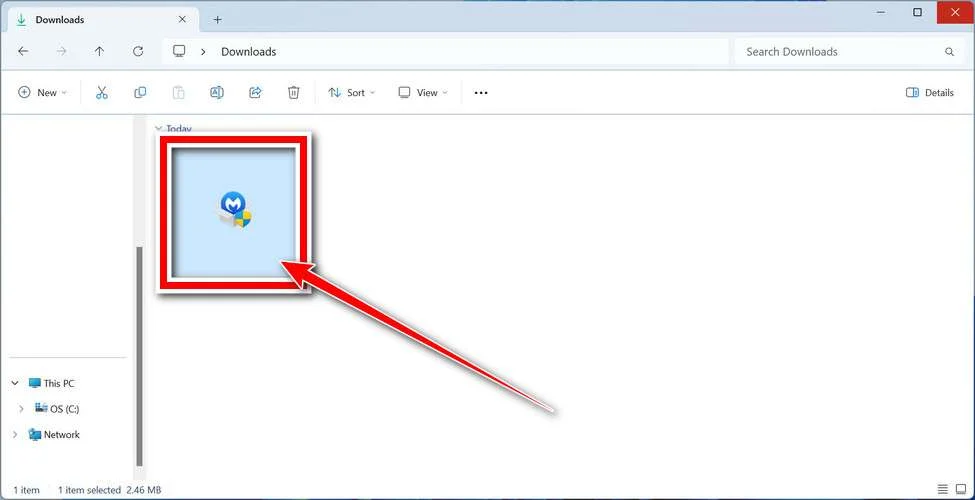
Follow the On-Screen Prompts to Install Malwarebytes
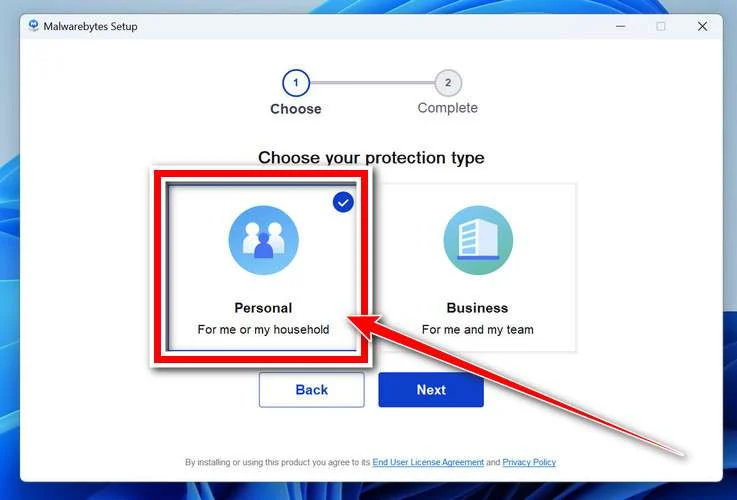
The setup wizard will walk you through a few quick screens:
-
Choose where you’re installing the program — “Personal Computer” or “Work Computer” — then click Next.
-
Malwarebytes will now install on your device. This usually takes under a minute.

-
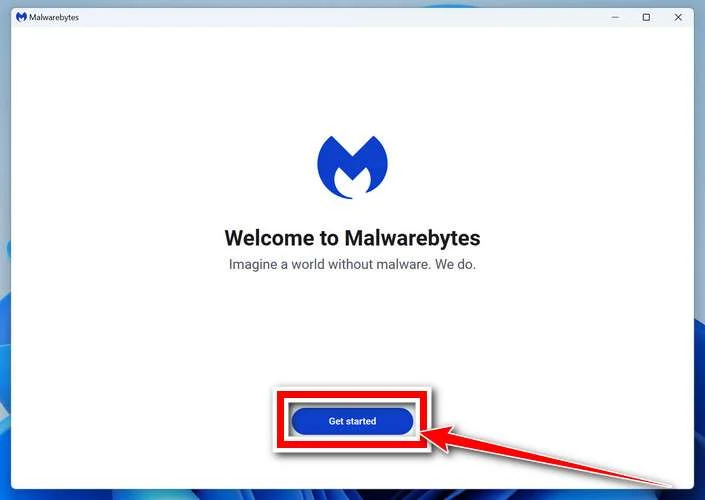
When installation is complete, the “Welcome to Malwarebytes” screen will open automatically.
-
On the final screen, click Open Malwarebytes to launch the program.

-
Enable “Scan for Rootkits”
Before scanning, turn on rootkit detection so Malwarebytes can find even the most hidden threats. Click the Settings gear icon on the left side of the screen.
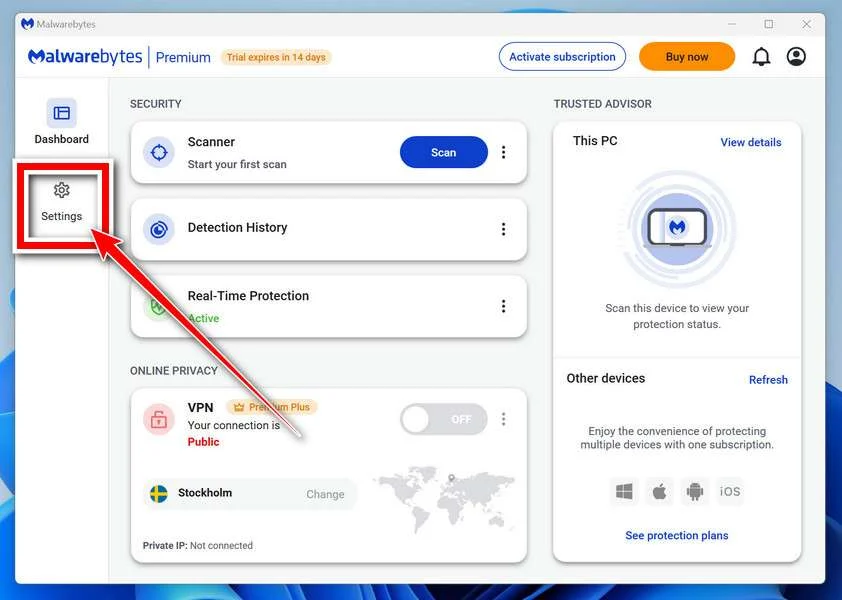
In the settings menu, find “Scan for rootkits” and click the toggle so it turns blue.

Done? Click “Dashboard” in the left pane to return to the main screen.
Start the Scan
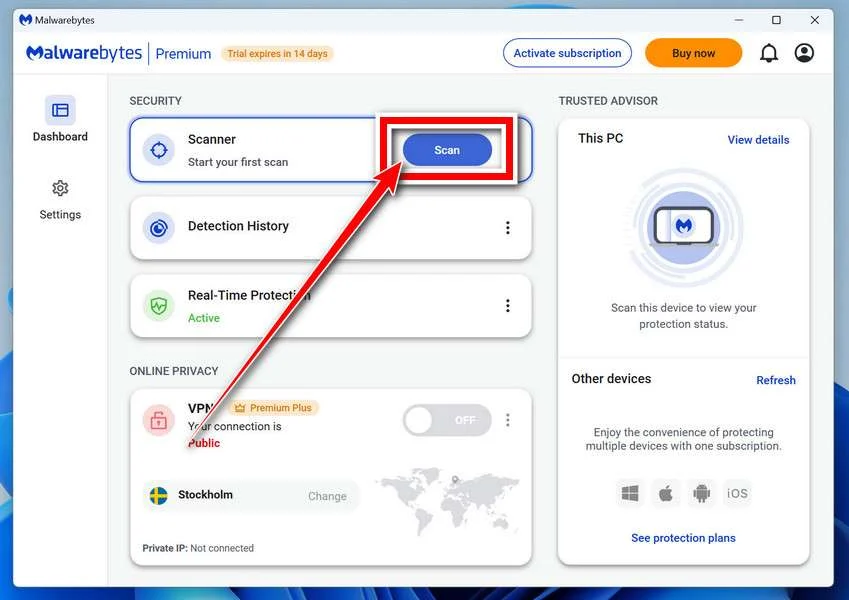
Click the blue Scan button. Malwarebytes will automatically update its virus database and start checking your computer for malware.
-
Wait for the Scan to Finish
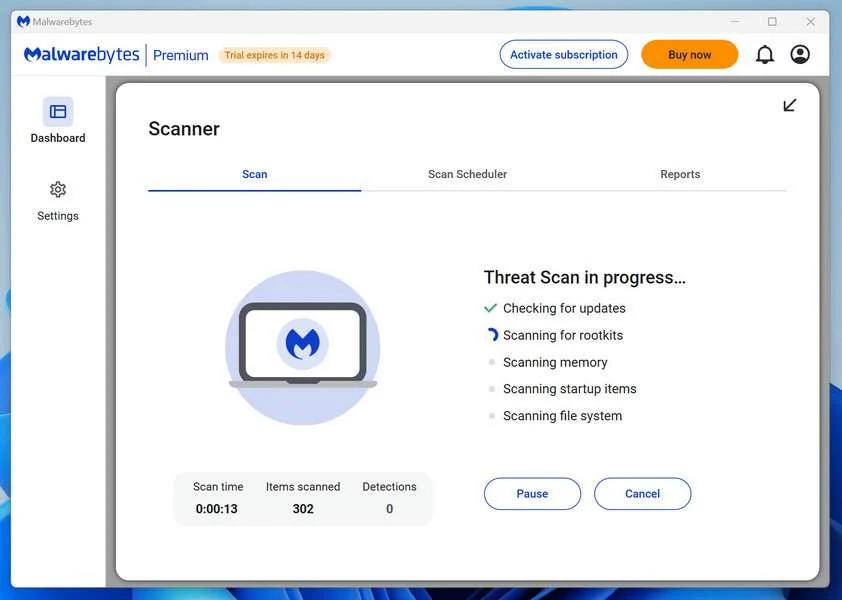
The scan checks your entire system for browser hijackers and other malicious programs, so it can take 5 to 20 minutes depending on your computer. Feel free to do something else — just check back occasionally to see the progress.
-
Quarantine the Detected Threats
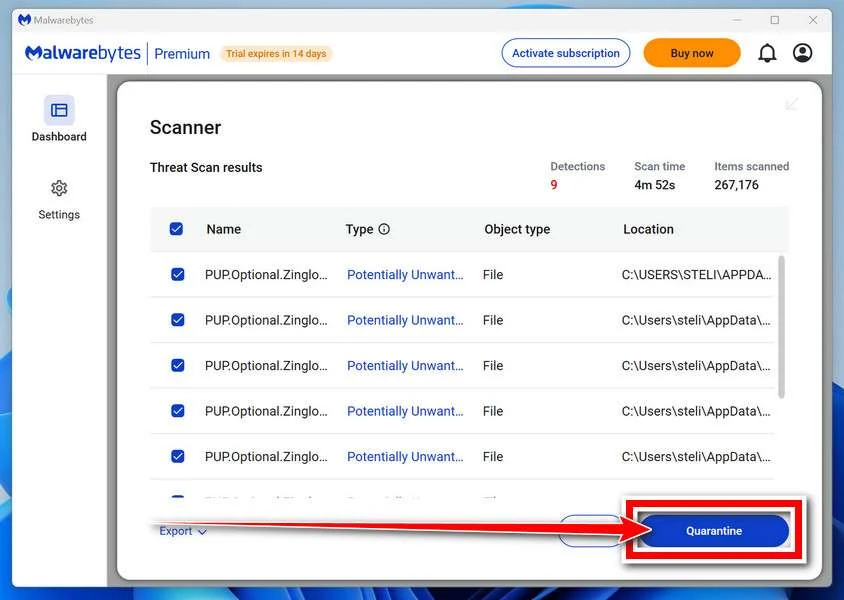
When the scan is done, you’ll see a list of everything Malwarebytes found — malware, adware, and potentially unwanted programs. Click the “Quarantine” button to remove all of them at once.
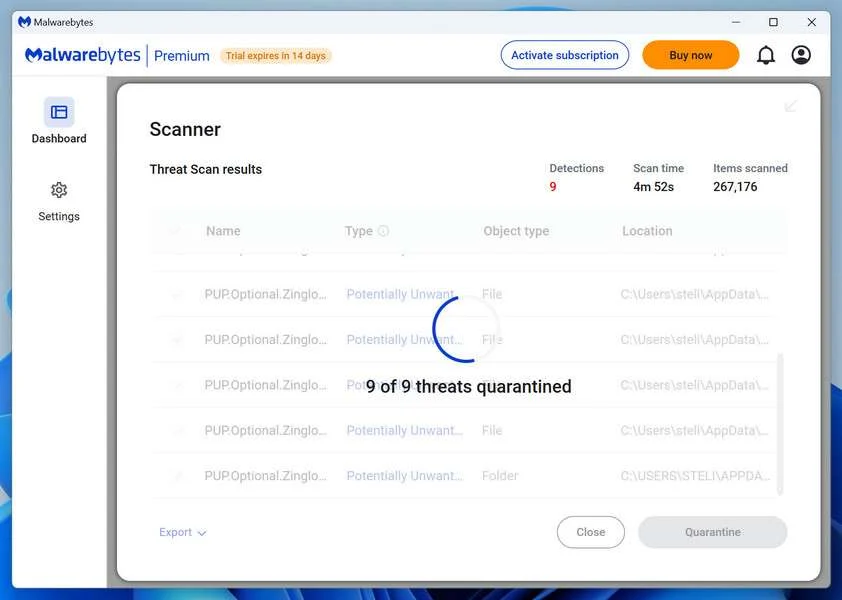
Malwarebytes will now remove the malicious files and registry entries and move them safely into quarantine.
-
Restart Your Computer
Some threats can only be fully removed after a reboot. If Malwarebytes asks you to restart, click Yes. Once you’re logged back in, Malwarebytes has finished removing the threats it found.
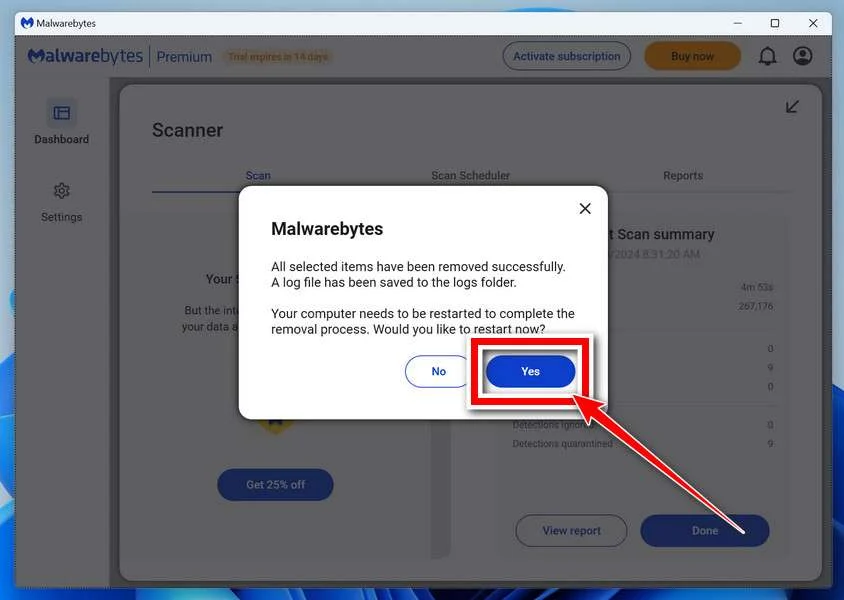
That’s it — your Windows PC is now clean of trojans, adware, and other malware, and should be back to running smoothly.
If you are still having problems with your computer after completing these instructions, then please follow one of the steps:
- Run a computer scan with ESET Online Scanner
- Ask for help in our Windows Malware Removal Help & Support forum.
Run a Malware Scan with Malwarebytes for Mac
Malwarebytes for Mac is a free on-demand scanner that removes the malware other security software tends to miss — adware, browser hijackers, and unwanted programs included. Cleaning an infected Mac with Malwarebytes has always been completely free, and it’s our go-to recommendation. Follow the steps below to scan and clean your Mac in just a few minutes.
-
Download Malwarebytes for Mac
Click the button below to download the latest version of Malwarebytes for Mac.
Download MalwarebytesOfficial installer for macOS. Your download starts right away.Want real-time protection? See Malwarebytes PremiumMalwarebytes Free for MacScans and removes malware at no cost -
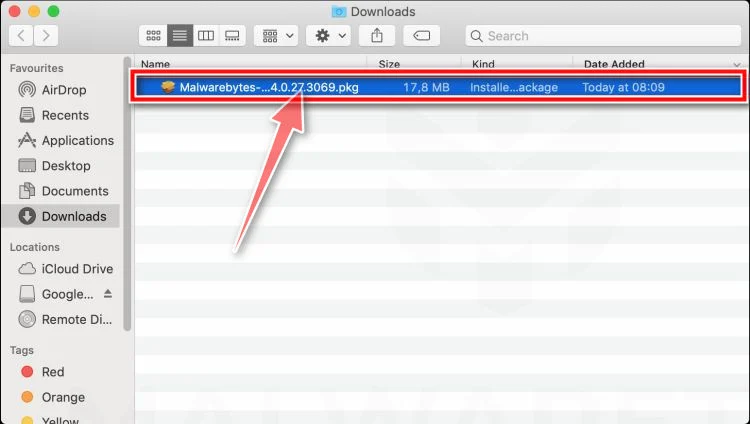
Open the Malwarebytes setup file
When the download finishes, open your Downloads folder and double-click the setup file to begin the installation.
-
Follow the On-Screen Prompts to Install Malwarebytes
The Malwarebytes for Mac Installer will guide you through a few quick screens. Click “Continue” and keep following the prompts until the installation completes.
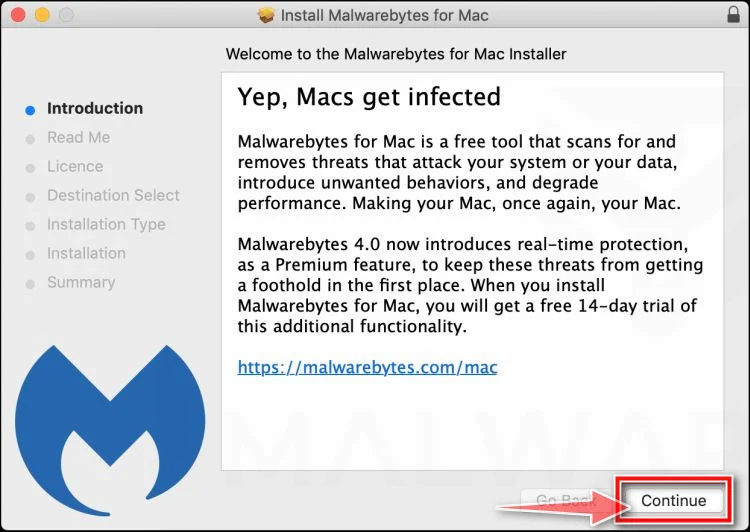
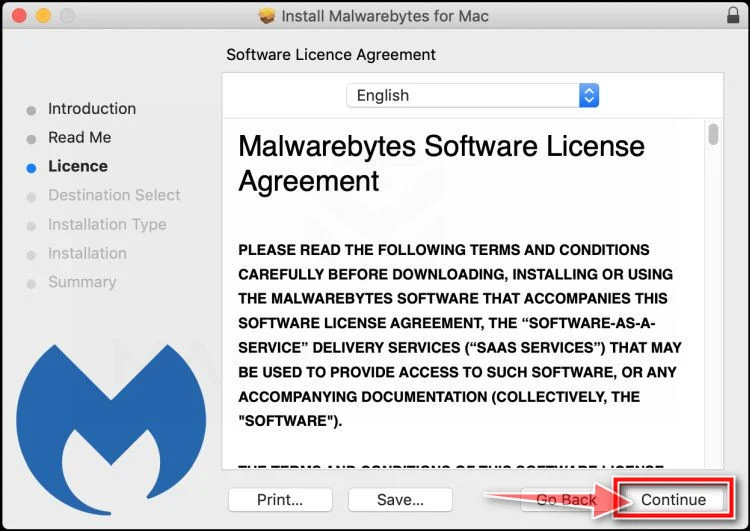
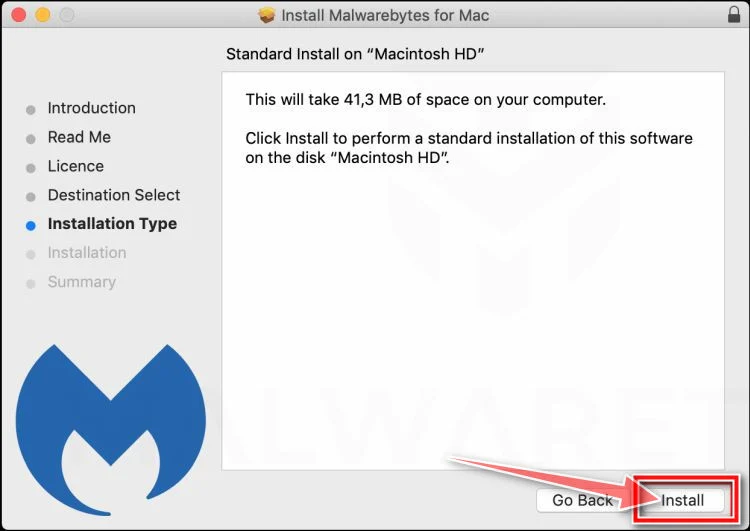
When the installation is complete, Malwarebytes opens to the Welcome to Malwarebytes screen. Click “Get started“.
-
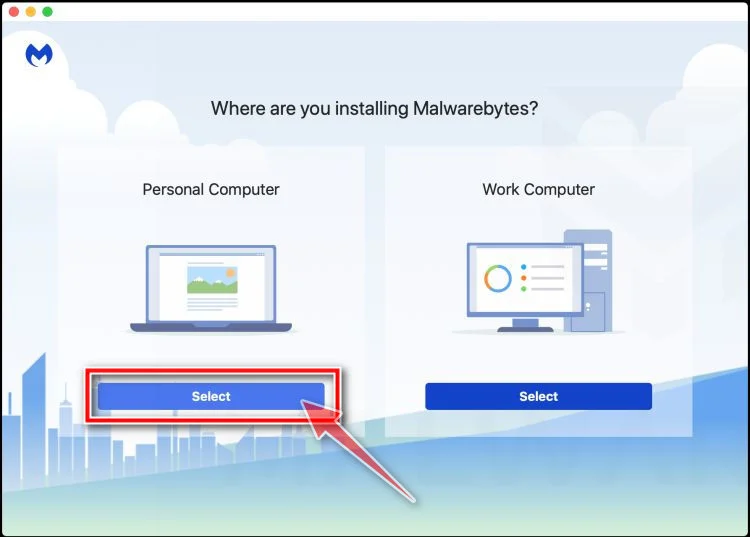
Select “Personal Computer” or “Work Computer”
Malwarebytes will ask what type of computer you’re installing it on. Click either Personal Computer or Work Computer, whichever applies.
-
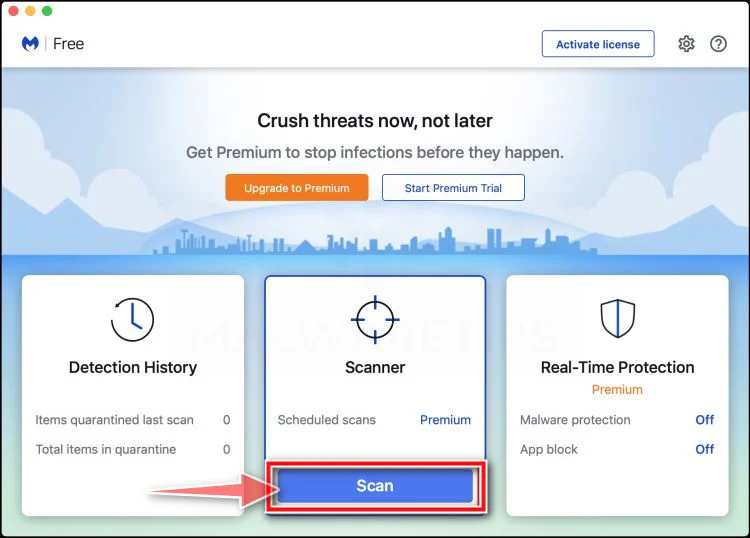
Start the Scan
Click the “Scan” button. Malwarebytes will automatically update its detection database and begin checking your Mac for malware.
-
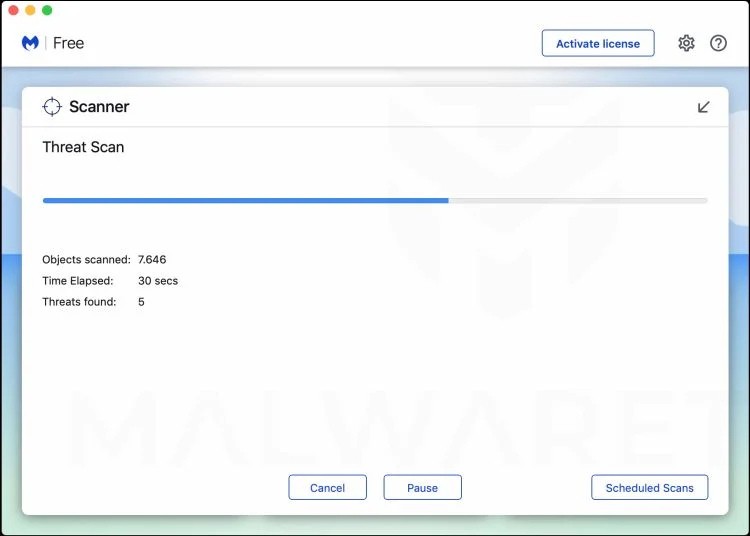
Wait for the Scan to Finish
Malwarebytes will scan your Mac for adware, browser hijackers, and other malicious programs. This can take a few minutes, so feel free to do something else — just check back occasionally to see the progress.
-
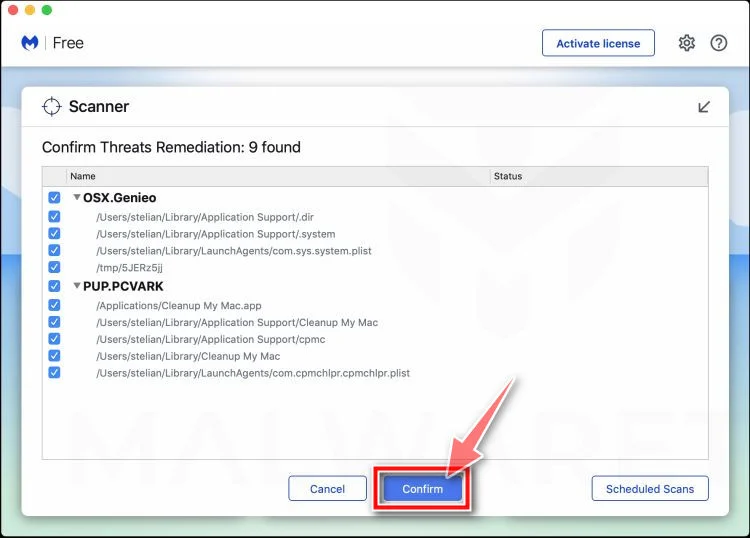
Quarantine the Detected Threats
When the scan is done, you’ll see a list of everything Malwarebytes found. Click the “Quarantine” button to remove all the threats at once.
-
Restart Your Mac
Malwarebytes will now remove all the malicious files it found. Some threats can only be fully removed after a reboot — if Malwarebytes asks you to restart, allow it. Once you’re logged back in, your Mac is clean.
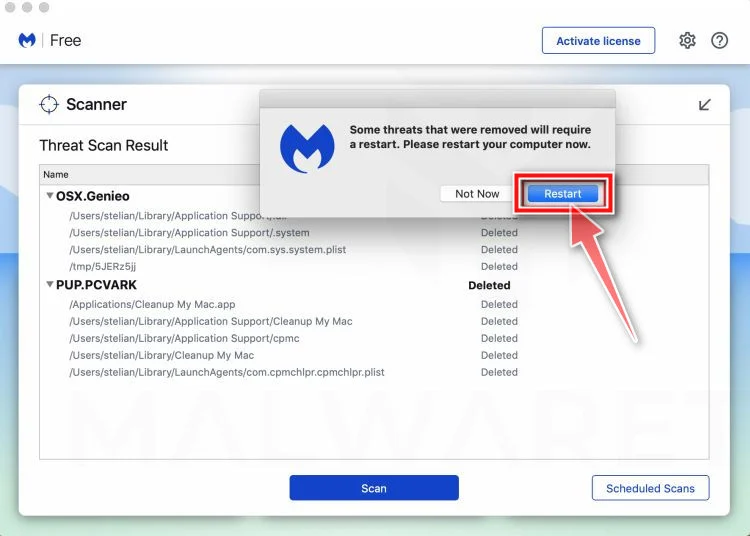
That’s it — your Mac is now free of adware, rogue browser extensions, and other potentially harmful software.
If you are still experiencing problems while trying to remove a malicious program from your computer, please ask for help in our Mac Malware Removal Help & Support forum.
Run a Malware Scan with Malwarebytes for Android
Malwarebytes for Android automatically detects and removes dangerous threats like malware and ransomware so you don’t have to worry about your most-used device being compromised. Aggressive detection of adware and potentially unwanted programs keeps your Android phone or tablet running smooth.
-
Download Malwarebytes for Android.
You can download Malwarebytes for Android by clicking the link below.
Get Malwarebytes for AndroidOpens Google Play in a new tab.Want real-time protection? See Malwarebytes Premium for AndroidMalwarebytes for AndroidScans your phone and removes malware at no cost -
Install Malwarebytes for Android on your phone.
In the Google Play Store, tap “Install” to install Malwarebytes for Android on your device.

When the installation process has finished, tap “Open” to begin using Malwarebytes for Android. You can also open Malwarebytes by tapping on its icon in your phone menu or home screen.

-
Follow the on-screen prompts to complete the setup process
When Malwarebytes will open, you will see the Malwarebytes Setup Wizard which will guide you through a series of permissions and other setup options.
This is the first of two screens that explain the difference between the Premium and Free versions. Swipe this screen to continue.
Tap on “Got it” to proceed to the next step.
Malwarebytes for Android will now ask for a set of permissions that are required to scan your device and protect it from malware. Tap on “Give permission” to continue.
Tap on “Allow” to permit Malwarebytes to access the files on your phone.
-
Update database and run a scan with Malwarebytes for Android
You will now be prompted to update the Malwarebytes database and run a full system scan.

Click on “Update database” to update the Malwarebytes for Android definitions to the latest version, then click on “Run full scan” to perform a system scan.

-
Wait for the Malwarebytes scan to complete.
Malwarebytes will now start scanning your phone for adware and other malicious apps. This process can take a few minutes, so we suggest you do something else and periodically check on the status of the scan to see when it is finished.

-
Click on “Remove Selected”.
When the scan has been completed, you will be presented with a screen showing the malware infections that Malwarebytes for Android has detected. To remove the malicious apps that Malwarebytes has found, tap on the “Remove Selected” button.

-
Restart your phone.
Malwarebytes for Android will now remove all the malicious apps that it has found. To complete the malware removal process, Malwarebytes may ask you to restart your device.
That’s it — your Android phone is now clean — no more malicious apps, adware, or browser redirects.
If you are still having problems with your phone after completing these instructions, then please follow one of the steps:
- Restore your phone to factory settings by going to Settings > General management > Reset > Factory data reset.
- Ask for help in our Mobile Malware Removal Help & Support forum.
Stay Protected: Block Ads and Malicious Sites
Now that your device is clean, keep it that way. Most infections start with a malicious ad or a fake download button — so blocking them at the source is your best defense.
We recommend AdGuard, which blocks malicious ads, phishing pages, and dangerous redirects before they can reach you.
👉 Download AdGuard and browse safely
What To Do If You Already Paid
If you already sent money to someone claiming to be from Kimel and Rowe or a similar law firm, act quickly.
Contact your bank, card issuer, wire transfer company, crypto exchange, or payment app immediately. Ask whether the payment can be stopped, reversed, frozen, or traced. The sooner you act, the better your chances.
If you paid by credit card, dispute the charge. If you paid by bank transfer or wire, ask your bank’s fraud department to initiate a recall. If you paid by cryptocurrency, contact the sending exchange and provide the wallet address, transaction hash, and all communication.
Change passwords for any accounts you discussed with the scammer. Enable two-factor authentication on your email, banking, crypto, and financial accounts.
If you sent identity documents, place a fraud alert or credit freeze if available in your country. Monitor your credit reports, bank statements, and online accounts for suspicious activity.
Report the scam to the appropriate authorities. In the United States, online fraud can be reported to the FBI’s Internet Crime Complaint Center, the FTC, and relevant financial regulators. You can also report the impersonation to the state bar association where the fake lawyer claims to operate.
Do not pay another company that promises to recover the money for a new upfront fee. That may be another recovery scam.
How To Verify a Real Law Firm
A legitimate law firm should be independently verifiable.
Look for the attorney’s name in the state bar directory. Confirm the license status, office address, phone number, and disciplinary history if available. Compare that information with the message you received.
Check the firm’s official website by typing the address yourself or finding it through a trusted directory. Be cautious with sponsored search results, newly registered domains, and websites with limited history.
Call the firm using the number listed in an official bar directory or on a long-standing verified website. Ask whether the attorney or staff member who contacted you actually works there.
Review the engagement agreement carefully. A real lawyer should clearly explain the scope of representation, fee structure, risks, limitations, and realistic expectations.
Be especially cautious if the lawyer claims to be licensed in another country, refuses to provide bar registration details, or pressures you to keep the matter secret.
How To Protect Yourself From Follow-Up Scams
Once your information reaches scammers, you may be contacted again.
Be skeptical of anyone who says they can recover money lost to a scam, especially if they contacted you first. Do not post detailed personal loss information publicly, including transaction IDs, phone numbers, wallet addresses, or full names.
Use a separate email address for scam reports if possible. Avoid sharing identity documents unless you are dealing with a verified institution.
Warn family members if you suspect your information was exposed. Scammers may contact relatives or business associates using details they gathered from you.
Keep a written record of all scam-related contacts. This helps you identify patterns and avoid being manipulated by a second or third fraud attempt.
Final Verdict: Is the Kimel and Rowe Law Message a Scam?
A message from “Kimel and Rowe,” “Kimmel and Rowe,” or a similar law firm name offering to recover inherited, lost, frozen, or scammed funds should be treated as highly suspicious.
The strongest warning signs are unsolicited contact, guaranteed recovery, legal-sounding pressure, requests for upfront fees, demands for personal documents, and payment instructions involving cryptocurrency, wires, gift cards, or money apps.
This appears to fit the pattern of an advance-fee recovery scam. These scams are designed to exploit people who have already been scammed or who are tempted by the possibility of sudden funds.
Do not pay. Do not send documents. Do not trust links or phone numbers in the message. Verify independently, report the contact, and protect your accounts.
A real recovery path may involve banks, card issuers, law enforcement, regulators, courts, or properly verified attorneys. It will not begin with a stranger promising guaranteed money in exchange for a suspicious upfront fee.
FAQ
Is Kimel and Rowe a real law firm?
The name may be fake, misspelled, or used as part of an impersonation scam. Scammers frequently invent law firm names or copy details from real organizations. Always verify any attorney through official bar association records and independent contact information.
Why did they contact me specifically?
You may have been targeted because your contact information appeared in a scam victim list, public complaint, leaked database, or previous fraud interaction. Scammers often target people who have already lost money because they know those victims may be looking for help.
Can a lawyer recover stolen crypto or scam funds?
A legitimate lawyer may help with reporting, documentation, civil claims, or legal strategy, but no lawyer can guarantee recovery. Be cautious of anyone promising guaranteed results, especially if they demand payment before showing verifiable credentials.
Is an upfront legal retainer always a scam?
Not always. Real attorneys may charge retainers. However, an unsolicited “law firm” that promises recovered funds and demands urgent payment through suspicious methods is a major red flag. Verification is essential before paying anything.
What payment methods are most suspicious?
Cryptocurrency, gift cards, prepaid cards, wire transfers, money apps, and international transfer services are common in scams because they are difficult to reverse.
What documents should I avoid sending?
Do not send passport scans, driver’s license photos, Social Security numbers, tax IDs, bank statements, account screenshots, crypto wallet details, or proof-of-address documents to an unverified contact.
What should I do first if I paid?
Contact your bank, payment provider, card issuer, wire company, or crypto exchange immediately. Then report the scam to authorities and preserve all evidence.
Can I get my money back?
It depends on how you paid and how quickly you act. Credit card payments may be disputable. Bank wires may sometimes be recalled if reported immediately. Cryptocurrency payments are usually much harder to recover.
Should I confront the scammer?
No. Confronting the scammer may lead to more manipulation, threats, or attempts to extract additional money. Preserve evidence and report the scam instead.
How can I avoid this scam in the future?
Treat unsolicited recovery offers as suspicious. Verify attorneys independently. Never pay upfront to unlock a larger payout. Do not trust legal-looking documents alone. Use official reporting channels and speak with verified professionals only.

Join the discussion
0 commentsShare your experience or ask a question about this article.
Discussion
Start the conversation
Have a question or something useful to share? Add the first comment.