

FortMux.com is one of several recent websites connected to the promise of checking a Fortnite locker, estimating an account’s value, or revealing game-related statistics. The concept sounds harmless, but it creates the perfect excuse for an unknown website to ask a player to connect an Epic Games account.
FortMux belongs to a Fortnite account phishing pattern in which a fake valuation or cash-out offer gives visitors a reason to connect an Epic Games account. The ultimate target is the victim’s login information, not the contents of a harmless locker report.
Overview
Fortnite locker checkers appeal to a natural question: how rare or valuable is my collection? A player may have accumulated skins, emotes, pickaxes, wraps, and battle pass rewards over many years. Videos on social media often turn those collections into dramatic dollar estimates.
Epic Games does not operate an official marketplace where players can sell complete accounts. Its terms prohibit selling, giving away, trading, or otherwise transferring an Epic account. A third-party page that promises a cash value or a quick account sale is therefore not offering an official Epic service.
The offer works because it turns years of Fortnite activity into a supposed financial opportunity. A player sees rare cosmetics translated into large dollar figures and is encouraged to believe that an unknown website can reveal or unlock that value.
Those numbers are not an official Epic balance. Epic Games does not provide a marketplace where a player can cash out a complete account, and its rules prohibit selling, giving away, trading, or transferring accounts.
FortMux therefore cannot deliver the straightforward, official payout implied by the locker-value story. The dollar total is a persuasion device that makes the next request, connecting an Epic account, feel reasonable.
The page may initially request only a username, platform, or locker scan. After showing an impressive result, it can claim that signing in is necessary to confirm ownership, synchronize cosmetics, or release payment.
That sequence hides the real purpose inside an apparently useful process. The visitor thinks the login is one step in calculating or collecting value, while the operator gains an opportunity to capture account credentials.
The surrounding network makes the purpose clear. FortMux shares the locker-value story with FortImpact.com, while FortLobby exposes the campaign’s fake Fortnite service and copied Epic Games login page.
Public domain records show a creation date of May 1, 2026, making FortMux a very young site with little established reputation. A recently created domain is not proof by itself, but it is an important warning when the site hides its content and attempts to borrow trust from Fortnite and Epic Games.
A new domain is not automatically fraudulent. Every legitimate business starts somewhere. The problem is the combination: a young address, unsupported Fortnite account valuations, an account-sale promise, and a close resemblance to a network where one member openly imitates Epic’s authentication page.
The connection between FortMux, FortImpact, and FortLobby
FortMux and FortImpact use the same broad account-value concept. Both rely on the idea that rare Fortnite cosmetics can be converted into an immediate payout through an unknown third-party website.
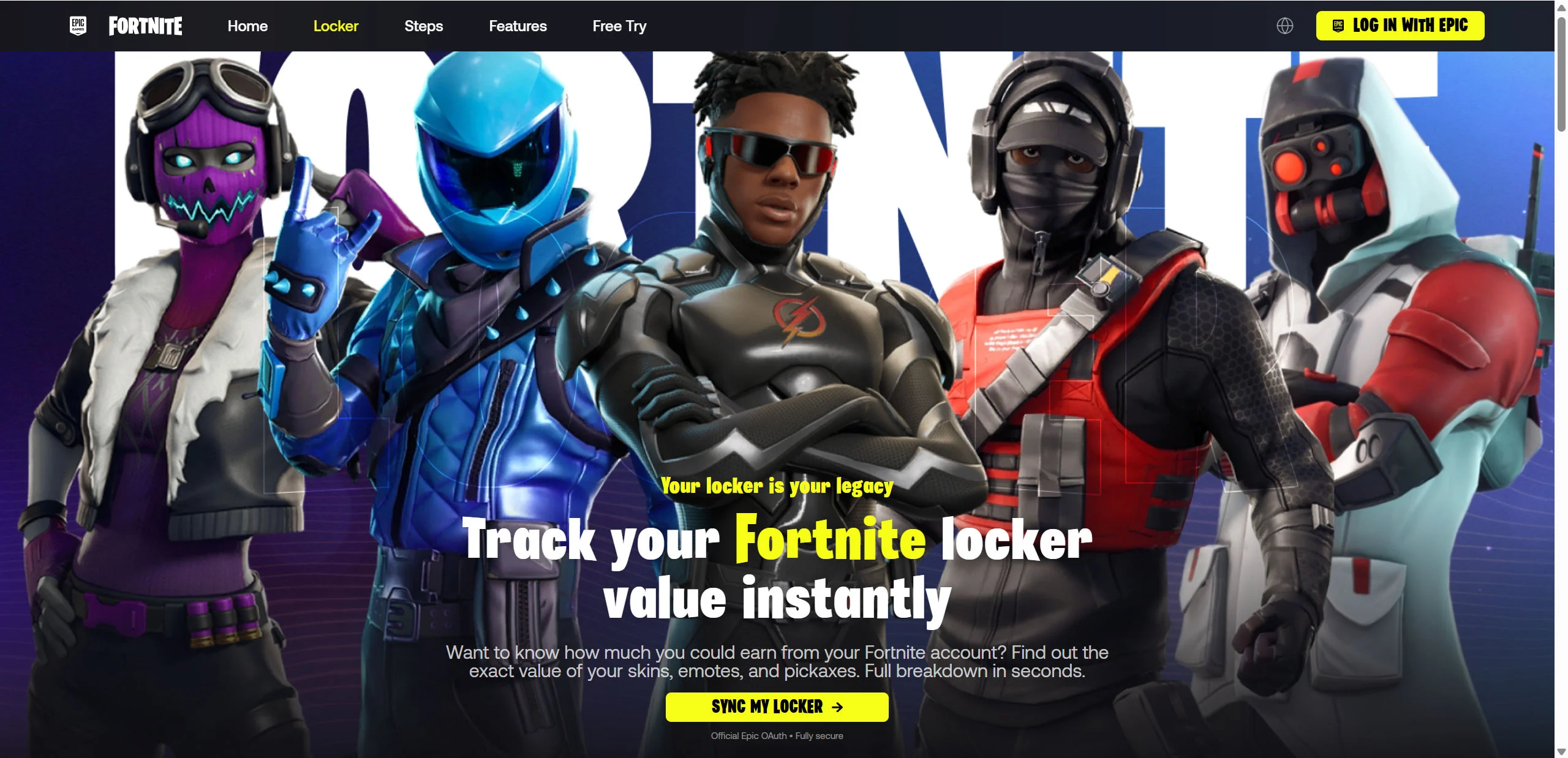
FortLobby is more openly visible. Its homepage promises to “Track your Fortnite locker value instantly,” displays large counters and high valuations for popular skins, and promotes a “Cash Out” option. The page claims the process uses “Official Epic OAuth.”
However, clicking its Epic login button opens a copied Epic Games sign-in form on `fortlobby.com/id/login`. The browser remains on FortLobby’s domain. That is a classic and serious phishing warning because a legitimate Epic password should be entered only on an official Epic-controlled page or application.
Shared branding and timing do not automatically prove the same person legally controls every site. The repeated locker-value story is the important warning for visitors, while FortLobby provides a concrete example of how that lure can end in credential theft.
Warning signs visitors can recognize
- The site has a short history. Public records indicate the domain was created in May 2026.
- The operator is not transparent. No clearly identifiable company explains why it should be trusted with an Epic account.
- The valuation is unsupported. There is no official Epic market establishing the displayed cash value.
- The cash-out promise conflicts with Epic’s rules. Epic accounts cannot be legitimately sold or transferred through this type of website.
- The sign-in request benefits the operator. The supposed locker report creates an excuse to ask for valuable Epic credentials.
- FortImpact repeats the same lure. The campaign can change domain names without changing the underlying account-value story.
- A related locker lure impersonates Epic. FortLobby’s login page copies Epic branding while remaining on an unrelated domain.
A polished page is not proof of legitimacy
Modern phishing pages can copy an official design with remarkable accuracy. Logos, fonts, backgrounds, console icons, password recovery links, and legal text can all be reproduced. HTTPS only encrypts the connection to the current website. It does not certify that the operator is Epic Games.
The most reliable clue is the registered domain in the browser’s address bar. If a page asks for an Epic password while the address ends in `fortmux.com`, `fortlobby.com`, `fortimpact.com`, or any other unrelated domain, stop immediately.
How The Operation Works
These campaigns commonly begin with social media videos, comments, messages, or advertisements that promise a surprising locker valuation. The steps below explain the FortMux phishing funnel from promotion to account takeover.
1. The promotion focuses on account value
A short video or post may show an impressive Fortnite locker and claim that a website calculated a surprisingly high price. Rare skins and discontinued cosmetics are used to make the result feel exclusive.
The viewer is not asked to purchase anything initially. They are invited to discover something about their own account. This lowers suspicion and creates a strong reason to click.
2. A disposable domain receives the traffic
Rather than building a long-term brand, the campaign can launch several domains with related themes. If one address becomes blocked or receives warning articles, ads and social posts can point visitors toward another.
This is why focusing only on a single name is not enough. A new domain can reuse the same images, unsupported valuations, wording, and account connection flow within hours.
3. The page calculates an impressive locker value
The website can present a list of rare skins, attach dramatic prices to individual cosmetics, and add them into a large total. The result is designed to feel personal even when the figures are generated from unsupported assumptions.
The supposed valuation changes the visitor’s mindset. Instead of asking why a stranger needs access to the account, the player begins thinking about how to claim the displayed amount before the opportunity disappears.
4. Fortnite artwork builds confidence
Once inside, a locker-checker page can feature familiar characters, Epic-style navigation, security language, and supposed activity counters. The goal is to borrow credibility from Fortnite without providing independent evidence of authorization.
Claims such as “fully secure,” “official OAuth,” or “millions of lockers checked” should never be accepted at face value. A real authorization process must occur on an official Epic-controlled domain.
5. The site creates a reason to sign in
The page may say it needs to synchronize the locker, fetch inventory details, confirm ownership, or calculate value. Each explanation leads to the same high-risk moment: the visitor is asked to connect an Epic account.
A legitimate OAuth process sends the user to an official Epic page and returns only an approved authorization result. It does not place an Epic password form directly on an unknown locker-checker domain.
6. A copied Epic page collects account details
The exposed FortLobby flow shows exactly how convincing this stage can look. Its fake page includes Epic branding, email and password fields, console options, social login buttons, and account recovery links.
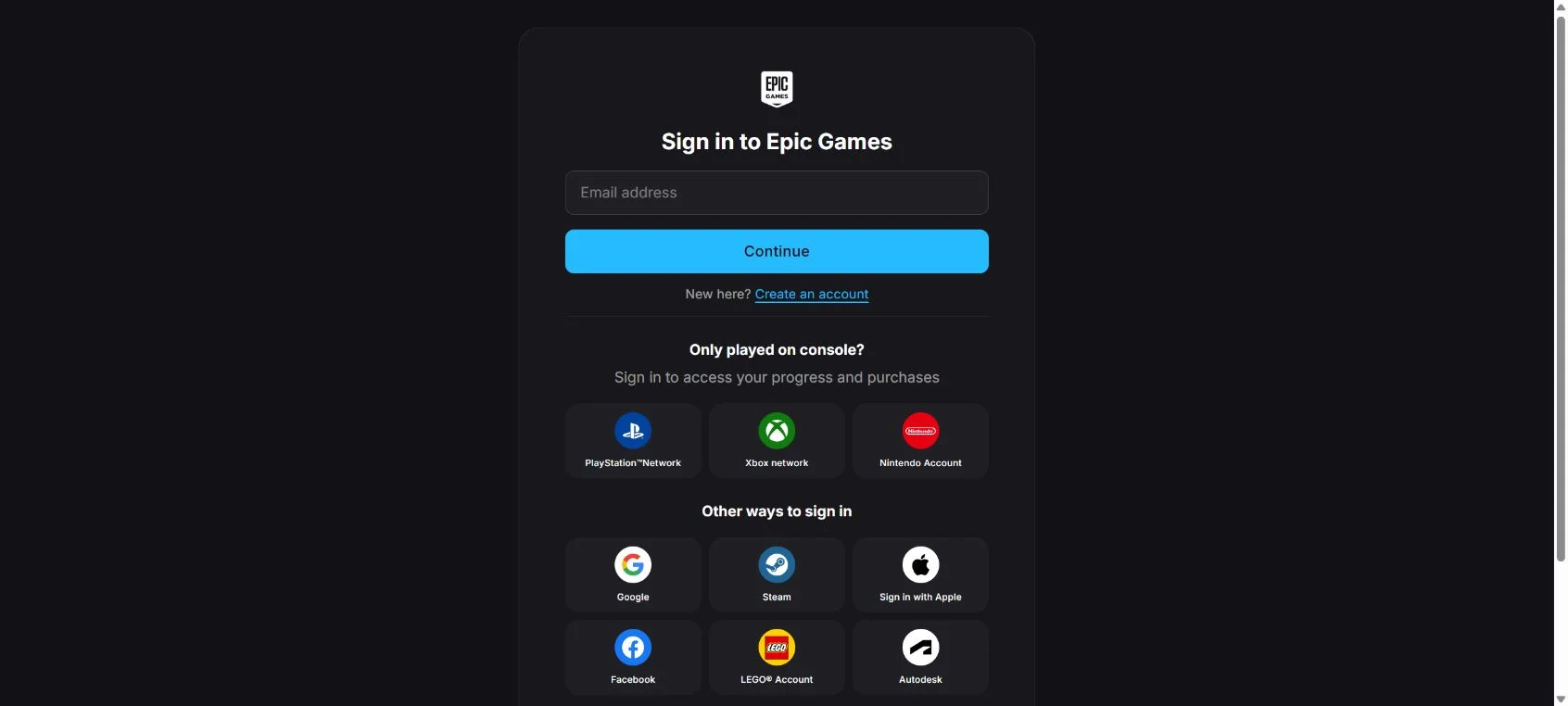
The important detail is the address bar. The form is not hosted by Epic. If a victim submits credentials, the unknown operator may receive them before the browser shows an error or redirects elsewhere.
7. The flow may request a live security code
Two-factor authentication can stop an attacker who has only a password. A real-time phishing kit may therefore request the code sent by email, SMS, or an authenticator app.
The page might describe this as ownership confirmation. In reality, the attacker can be attempting to sign in at that exact moment. Never submit a security code to a third-party Fortnite tool.
8. The account can be taken over and repurposed
After gaining access, an attacker may change recovery information, unlink consoles, spend available funds, or lock the owner out. They may also message the victim’s friends with the same locker checker, using trust in the compromised account to spread the campaign.
Accounts with rare items may be resold through unauthorized channels. Victims can lose years of progress even if no immediate card charge appears.
9. Redirects can produce additional risks
Some versions of the campaign may also route people to survey offers, notification prompts, affiliate pages, fake downloads, or unrelated scams.
Do not install a browser extension, allow notifications, download a file, or paste a command because a locker checker says it is required. Those actions are unrelated to reading a Fortnite inventory and can expose the device to malware.
10. The operator abandons the address when exposure grows
Fresh domains are inexpensive and templates are easy to copy. When one site accumulates blacklist entries and warning articles, the operation can replace it while keeping the same advertising material.
Remember the core pattern: a Fortnite account value, an unknown domain, a cash-out promise, and an Epic account login request. That combination remains dangerous regardless of the name displayed at the top of the page.
If You Have Used This Site
Your next steps depend on how far you went. Someone who only opened FortMux has a different risk level from someone who entered a password, approved a code, downloaded a file, or provided payment details.
- Stop interacting with FortMux. Close the page. Do not grant notification permission, download an unknown tool, or follow instructions that open Windows Run, PowerShell, Terminal, or Command Prompt.
- Open Epic Games independently. Type the official address yourself or use the Epic Games Launcher. Never return to Epic through a button or link supplied by FortMux or a message promoting it.
- Change the Epic password if you typed it anywhere suspicious. Choose a password you have never used on another site. A quick change can prevent takeover if the stolen credentials have not yet been used.
- Protect the connected email account. Change its password if necessary, enable two-factor authentication, and check recent activity. Review forwarding rules and recovery settings because an attacker controlling email can undo other account recovery steps.
- Review Epic sessions and security settings. Sign out unknown sessions, confirm the account email, and check whether profile or recovery information changed.
- Enable two-factor authentication directly with Epic. An authenticator app is a strong option when available. Do not approve prompts you did not initiate and do not share a current code.
- Inspect every linked gaming account. Check PlayStation, Xbox, Nintendo, Steam, Google, Apple, Facebook, and other linked services. Remove unknown connections and secure those accounts with unique passwords.
- Look for unauthorized purchases or gifts. Review Epic receipts, saved payment methods, V-Bucks activity, and email confirmations. Preserve screenshots of anything unfamiliar.
- Call the payment provider when a charge is unauthorized. Use a trusted number from your statement or card. Ask the provider to stop further charges and explain that a gaming account may have been compromised.
- Start official Epic recovery if access is lost. Epic recommends securing the email account first. Then submit the recovery request through Epic Support and provide accurate ownership information.
- Replace every reused password. If the FortMux flow received a password used elsewhere, assume attackers may test it against email, social media, shopping, streaming, and financial accounts.
- Scan the device after any download or pasted command. Run a full scan with reputable security software. If an unknown program was executed, avoid banking and password changes on that device until it has been checked.
- Remove suspicious browser permissions. Check notification permissions, installed extensions, downloads, and site data. Block or remove anything connected to FortMux or a redirect it opened.
- Tell friends if your account sent links. Warn them that the locker checker is unsafe and ask them not to enter credentials. Delete malicious posts only after control of the account is restored.
- Report the promotion. Report the video, advertisement, profile, or message on the platform where it appeared. Include the domain and a screenshot when possible.
If you only opened the website
Simply opening a promotional page does not directly give someone your Epic password. If you entered no account data, downloaded nothing, ran no command, and approved no permission, the immediate risk is limited.
Close the tab, clear the site’s stored data, and check that browser notifications were not allowed. Be cautious of unexpected new tabs, messages, or redirects.
If you approved an Epic connection
Open your Epic account settings through the official site and review applications, connections, and linked accounts. Revoke anything you do not recognize. A genuine authorization still grants specific access, so it should be removed when the requesting service is not trusted.
The Bottom Line
FortMux.com should not be trusted with an Epic Games account. The Fortnite locker valuation is the lure, and the account connection is the point at which the operation can capture valuable login information.
The scam’s purpose is account takeover. Stolen Epic credentials and two-factor codes can be used to change recovery details, spend V-Bucks, access linked services, or resell an account containing rare skins. Do not sign in, do not try to sell or cash out an account, and never enter an Epic password unless the browser is clearly on an official Epic-controlled domain.

Join the discussion
0 commentsShare your experience or ask a question about this article.
Discussion
Start the conversation
Have a question or something useful to share? Add the first comment.