

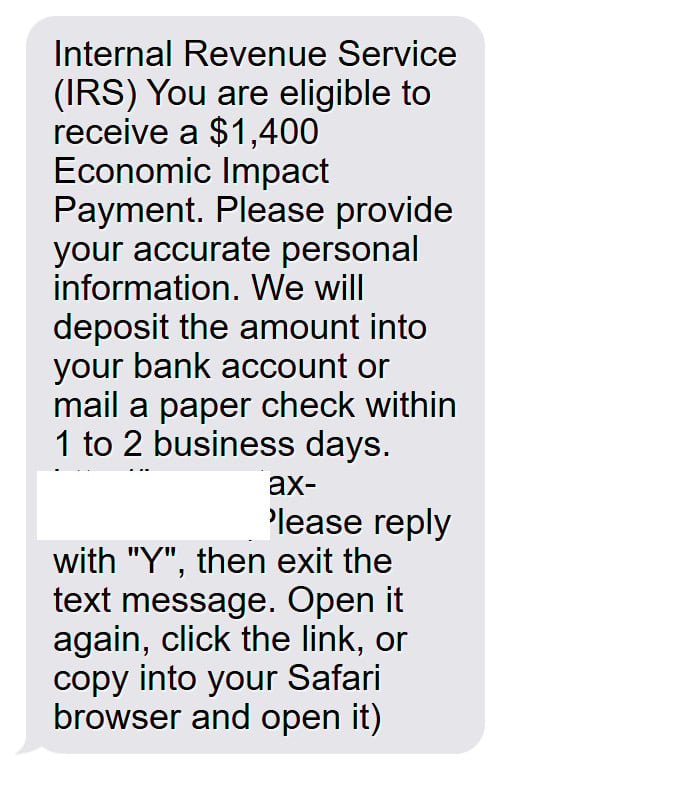
In recent weeks, many Americans have reported receiving scam text messages that appear to be from the IRS, informing them that they are eligible for a $1,400 Economic Impact Payment. The message then directs victims to a fraudulent website, irs.gov.tax-mond.com, and tricks them into providing personal and financial information.
This clever scheme has already fooled countless innocent citizens, resulting in stolen identities, compromised bank accounts, and great financial loss. In this comprehensive article, we will uncover everything you need to know about the irs.gov.tax-mond.com scam texts – how the scammers operate, what to do if you are victimized, and how to protect yourself moving forward. Forewarned is forearmed against this sinister threat.
Overview of the Scam
The irs.gov.tax-mond.com scam begins with an authentic-looking text message informing the recipient that they qualify for a $1,400 Economic Impact Payment. This immediately grabs the victim′s attention, as $1,400 is the exact amount distributed in the third round of federal stimulus checks.
The text includes specific instructions to reply “Y” and click on the attached link to provide personal information in order to receive the promised payment. However, the URL leads to a fake website designed to mimic an official IRS domain.
Victims are asked to enter personal details like their name, date of birth, home address, phone number, and bank account information. In some cases, they are told this data is required to deposit the funds directly or mail a check.
In reality, the scammers behind irs.gov.tax-mond.com are phishing for personal and financial particulars. The schemes rely on deceiving victims into surrendering private data under the guise of receiving a $1,400 stimulus payment.
How the Scam Works
The irs.gov.tax-mond.com scam is quite technologically sophisticated, from the initial text message to the mock IRS site. Let’s break down the step-by-step process used by these cybercriminals to trap unwitting victims:
The Hook – Stimulus Payment Text
The scam starts with a text message sent en masse to cell phone numbers across the United States. The contents of the text appear reputable, with language stating the recipient is “eligible to receive a $1,400 Economic Impact Payment.”
Cybersecurity experts believe the scammers use automated technology to send thousands or even millions of these texts simultaneously. The broad distribution increases the chances of reaching people anxiously awaiting details about a third stimulus check.
The Link – irs.gov.tax-mond.com
The initial text includes a link to what appears to be an official IRS domain – irs.gov.tax-mond.com. However, this URL is completely fraudulent, created by scammers to mimic legitimate government sites.
When victims click the link on a mobile device, it bypasses the usual website preview. Instead, the site immediately launches, lending credibility to the ruse that it is the actual IRS website.
Requests for Personal Information
Upon landing on the fake IRS site, users are prompted to enter personal and financial information to process the $1,400 payment. The portal insists users provide:
- Full name
- Home address
- Email address
- Phone number
- Bank account details
The scam site claims this data is required to directly deposit the Economic Impact Payment into the victim’s account or mail them a paper check. In reality, it is a means to steal identities and drain bank accounts.
Phishing for Financial Data
In the most egregious version of this scam, the fake irs.gov.tax-mond.com site requests extensive financial information beyond just bank account numbers. Scammers brazenly ask for:
- Bank routing numbers
- Credit card numbers
- Social security numbers
- Images of drivers licenses
This takes identity theft and financial fraud to the next level. And the site is designed to dupe victims into thinking their sensitive data will only be used to process stimulus payments.
What to Do If You Are Victimized
If you entered any personal or financial information into the irs.gov.tax-mond.com site, take the following steps immediately to protect yourself:
- Contact banks and credit card companies: Alert your financial institutions that your information may be compromised. They can monitor your accounts for suspicious activity and potentially freeze accounts.
- Check credit reports: Request credit reports from Equifax, Experian and TransUnion to check for accounts opened in your name. Consider putting a credit freeze in place to restrict access.
- Change account passwords: Update passwords for email, banking, credit cards and other accounts. Make the new passwords unique and strong.
- Watch for additional phishing attempts: Scammers may follow up a successful phishing attack with more texts or emails attempting more theft. Be hyper-vigilant.
- Report the scam: File a complaint with the IRS, FTC and FCC about the irs.gov.tax-mond.com scam. This helps authorities track and stop these criminal operations.
- Contact the Social Security Administration: If you divulged your SSN, contact the SSA to monitor for potential misuse.
Move quickly if you shared any data with the scammers. This limits the timeframe fraudsters have to exploit your compromised information. Remain cautious of future attempts to steal your identity or drain your accounts.
Frequently Asked Questions about the Irs.gov.tax-mond.com Scam
1. What is the irs.gov.tax-mond.com scam?
The irs.gov.tax-mond.com scam is a phishing scam where victims receive a text message claiming they are eligible for a $1,400 Economic Impact Payment from the IRS. The text contains a link to a fake website impersonating the IRS that steals personal and financial information.
2. How does the irs.gov.tax-mond.com scam work?
The scammers send a text message stating the victim can claim a $1,400 stimulus check by clicking a link and providing personal details. The link goes to a fraudulent website dressed up to look like the real IRS site. Victims then enter sensitive info like social security numbers and bank account info, allowing the criminals to steal identities and money.
3. What details do the scammers ask for?
The fake IRS site asks for full name, home address, email, phone number, bank account numbers, credit card numbers, social security number, driver’s license images and other valuable identity theft data.
4. What do the scam text messages say?
The text messages read:
“Internal Revenue Service (IRS) You are eligible to receive a $1,400 Economic Impact Payment. Please provide your accurate personal information. We will deposit the amount into your bank account or mail a paper check within 1 to 2 business days.
http://irs.gov.tax-mond.com/”
5. Are the text messages real from the IRS?
No, the IRS never initiates contact by text message. Any text claiming to be the IRS related to stimulus checks or tax refunds is a scam.
6. What should I do if I got the irs.gov.tax-mond.com text scam?
Do not click the link or reply. Delete the text immediately. Do not provide any personal or financial details. File an IRS scam report and talk to your phone carrier about blocking the sender.
7. I entered my info into the scam site – now what?
Contact banks, credit cards and the SSA immediately. Check credit reports and consider a credit freeze. Change online account passwords. Watch for additional phishing attempts and report the scam to authorities.
8. How can I protect myself from the irs.gov.tax-mond.com scam?
Do not reply to suspicious texts about stimulus checks or taxes. Do not click links or provide info to any third-parties claiming to be IRS. Only visit IRS.gov directly if you need info. Use caution providing data over phone, text or email.
9. Where can I report the irs.gov.tax-mond.com scam?
File a complaint with the IRS at https://www.irs.gov/privacy-disclosure/report-phishing. You can also report to the FTC at https://reportfraud.ftc.gov/ and the FCC at https://consumercomplaints.fcc.gov/.
10. How can I stay updated on new IRS scams?
Check the IRS scam alert page regularly for updates at https://www.irs.gov/newsroom/tax-scams-consumer-alerts. You can also sign up for scam alert emails directly from the IRS.
The Bottom Line
The irs.gov.tax-mond.com scam texts are an aggressive and devious attempt to capitalize on the rollout of Economic Impact Payments. Do not reply to these texts or enter any information into linked sites to avoid falling victim.
Remember, the IRS does not initiate contact by text message, nor does it request sensitive data to issue stimulus checks. Cut off the irs.gov.tax-mond.com schemes immediately by deleting any scam texts.
Remain vigilant against phone calls, texts or emails related to the IRS, stimulus payments or tax refunds. Only visit IRS.gov directly if you need to access agency resources. With caution, awareness and wisdom, we can guard against these criminal operations seeking to do us financial harm.








