

In the rapidly changing world of cryptocurrency, scams are becoming increasingly sophisticated. Recently, fraudsters have exploited the bankruptcy proceedings of Bittrex, a well-known cryptocurrency exchange, to deceive users. These scammers send urgent emails, purportedly from Bittrex, informing recipients of unclaimed funds and prompting immediate action. The emails often contain links to phishing websites designed to steal personal information or credentials.
In this comprehensive article, we will explore the specifics of the Bittrex email scam, explain how it operates, and provide essential steps for victims to recover and protect themselves.
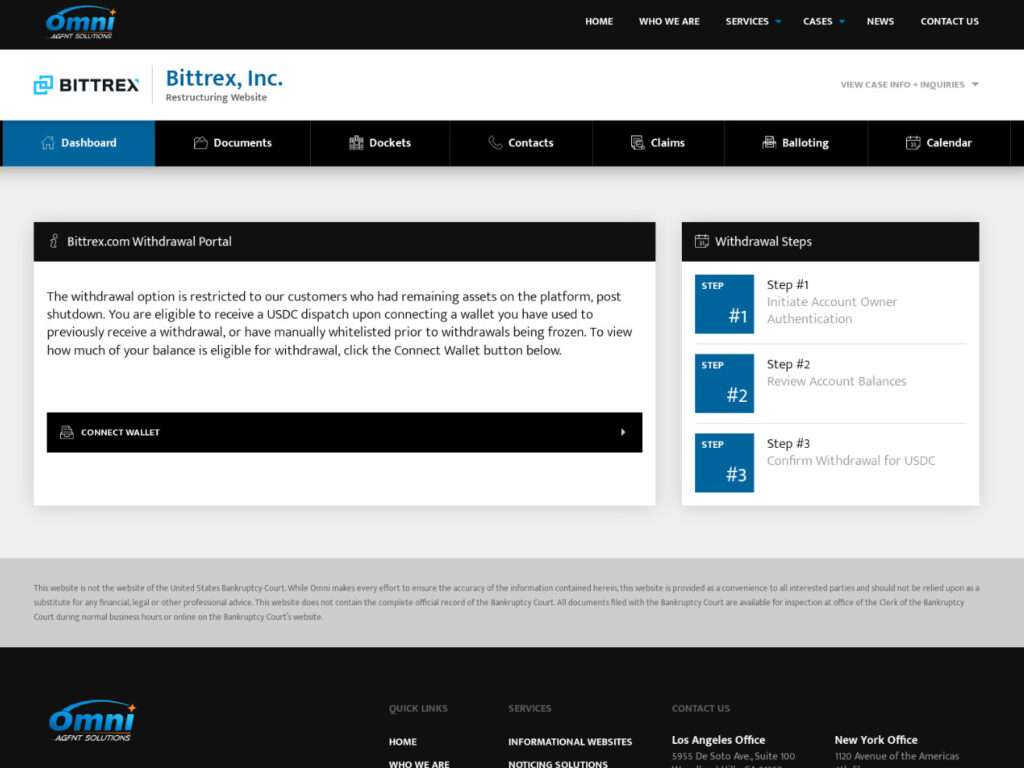
Scam Overview
Recently, cryptocurrency holders have become prime targets for scammers due to the irreversible, anonymous, and decentralized nature of digital assets. Among these scams, the Bittrex Email Scam stands out due to its clever use of urgency, legitimate-looking communication, and emotional manipulation.
What is the Bittrex Email Scam?
The Bittrex Email Scam involves cybercriminals sending out emails impersonating official communications from Bittrex Global, a legitimate cryptocurrency exchange. These fraudulent emails claim urgent scenarios requiring immediate action from the recipient, typically relating to platform closure, bankruptcy, or asset forfeiture.
The emails are designed to appear extremely professional, often including realistic logos, branding, disclaimers, and language closely resembling genuine communications from Bittrex. Scammers may use email spoofing techniques to make the sender’s address appear legitimate and trustworthy.
Common Variants of the Bittrex Email Scam
There are several known variants of this scam, each with slightly different wording but similar objectives:
- Withdrawal due to Platform Closure:
Scammers inform users of an urgent need to withdraw remaining funds due to bankruptcy or platform shutdown. Users are directed to click on links and follow authentication steps, ultimately connecting their crypto wallets to fraudulent websites. - Asset Access Notification:
Users receive messages claiming remaining balances are accessible for a limited time, prompting them to verify personal details and enter wallet information on a fake portal. - Final Mass Notification:
This variant claims accumulated funds require immediate withdrawal, prompting users to contact fake support numbers or “help desks,” where scammers then attempt to manipulate victims into revealing sensitive information or sending gift card codes.
Here are a few variants of this scam:
BITTREX GLOBAL
Dear Bittrex User,We hope this message finds you well. We are writing to inform you about an URGENT concern. As you may already know, Bittrex has made the difficult decision to shut down our exchange services after filing for bankruptcy. However, it’s come to our attention that before platform shutdown, the account registered with your email addres [your email] had a remaining balance greater than $4,750 USD, and we want to ensure a smooth process for you to withdraw these funds. Failure to withdraw will result in a complete forfeiture of all remaining assets held by Bittrex.
Withdrawal Process:
To withdraw remaining assets, please follow these steps:
1. Head over to the Bittrex withdraw portal found in this email.
2. Initiate the account owner verification steps.
3. Enter the withdrawal amount and the destination address (if applicable).
4. Review the withdrawal details and confirm the transaction.Withdrawal Period: The withdrawal window will be open for a limited time, and it is crucial that you initiate your withdrawal as soon as possible. The withdrawal period begins on 03/20/2025 and ends on 03/26/2025.
To get started, simply click the button below to visit the withdrawal page and begin the withdrawal process:
Initiate Withdrawal
Please be aware that after the withdrawal period expires, your remaining funds will become inaccessible, so it is crucial to complete your withdrawals within the specified time frame.
BITTREX GLOBAL
Dear Bittrex User,
We hope this message finds you well. We are writing to inform you about an URGENT concern. As you may already know, Bittrex has made the difficult decision to shut down our exchange services after filing forbankruptcy. However, it’s come to our attention that before platform shutdown, the account registered with your email address had a remaining balance of above $1,250 USD, and we want to ensure a smooth process for you to access these funds. Failure to access will result in a complete forfeiture of all remaining assets held by Bittrex.
Access Process:
To access remaining assets, please follow these steps:
1. Head over to the Bittrex access portal found in this email.
2. Initiate the account owner verification steps.
3. Enter the access amount and the destination address (if applicable).
4. Review the access details and confirm the transaction.Access Period: The access window will be open for a limited time, and it is crucial that you initiate your access as soon as possible. The access period begins on 03/20/2025 and ends on 03/27/2025.
To get started, simply click the button below to visit the access page and begin the access process:
Initiate Access
Please be aware that after the access period expires, your remaining funds will become inaccessible, so it is crucial to complete your access within the specified time frame.
BITTREX
We hope this message reaches our former users from the early dawns of our time in the space & loyal members of our community that have long awaited our approval by the S.E.C to begin full allocations to our clients.
You have remainders with us that have accumulated heavily since your last login, Please remove everything today as this is a needed procedure.
Details:– Access will be processed to destination addresses provided by the client.
– All remainders will be distributed evenly and fairly.Ensure your destination is valid and previously used with us.
Smoothly Leave Platform!
Initiate Your Leave:
To start the process, please follow these steps:Confirm Your identity.
Approve the required prompts.
Confirm and complete your leave.Good luck with your future journeys.
You will be notified of any changes to the status.
Re-sends of this exact email may be sent to confirm you are paying attention to updates given to you.
Security: [scam phone number]
IT Help Desk: [scam phone number]
HRAssist: [scam phone number]
Help Desk: [scam phone number]
How Scammers Manipulate Victims
Scammers exploit human psychology by creating urgency and fear of loss. They emphasize strict deadlines, convincing victims that failure to act swiftly will lead to total forfeiture of their crypto assets. This manipulative tactic is coupled with professional language and convincing branding to lower victims’ defenses.
Furthermore, scammers often use personalized details, such as partially obscured email addresses, account balances, or user names, to lend credibility to the scam. Recipients who recognize these details are more likely to believe the legitimacy of the scam email, increasing their vulnerability.
How The Scam Works
Understanding precisely how the Bittrex Email Scam operates is crucial to avoiding it. Below is a detailed, step-by-step breakdown:
Step 1: Victim Receives a Fake Email
The victim receives an email appearing to be from “Bittrex Global,” stating an urgent situation such as bankruptcy proceedings, platform shutdown, or the need to withdraw or access remaining funds immediately.
Bittrex Inc. has been granted permission by the United States Bankruptcy Court to allow customers who meet the necessary regulatory requirements to access their accounts and withdraw any remaining assets.
Based on our records, as of February 27th, 2025 your Bittrex account holds an estimated value of $3,231You have until March 27h, 2025 to withdraw your remaining assets or file a Proof of Claim (more info below). However, we strongly suggest you withdraw your funds as soon as possible to give our customer support team sufficient time to resolve any unforeseen issues.
Affected Creditor Withdrawal
You have been identified as an substantially affected creditor during Bittrex’s chapter 11 bankruptcy proceedings, Which they were mishandling customer funds It is possible that you did not file a Proof of Claim prior to the deadline, however, you are still eligible to withdraw ALL assets entitled to you that Bittrex withheld, and the market gains from those assets, the debtor , still possesses.In order to begin the claims process, enter the email address associated with your Bittrex account and then connect and verify with an eligible previously used with Bittrex, crypto wallet.
Step 2: Creating Urgency
The scam email imposes strict deadlines, typically giving victims only a few days to act. Urgency prompts panic and quick decision-making without thorough assessment.
Step 3: Clicking Malicious Links
Victims are instructed to click buttons or links embedded within the email, directing them to fake websites that look almost identical to the legitimate Bittrex exchange portal. These fraudulent websites use similar domain names, often with slight misspellings or extra characters.
Step 4: Fake Verification Process
Once on the fake site, victims are asked to undergo a mandatory “verification process,” involving entering login credentials, wallet addresses, seed phrases, or private keys. In many cases, victims are asked to “connect their wallet,” often via popular wallet plugins (like MetaMask or Trust Wallet), unknowingly granting scammers full access.
Step 5: Stealing Crypto Assets
With access to victims’ wallet credentials and private keys, scammers can instantly transfer all cryptocurrency holdings from victims’ wallets to their own anonymous crypto addresses. Victims typically realize this fraud only after noticing their crypto wallets are empty.
Step 6: Fake Support Line Scams
In some cases, victims are provided fake customer support numbers. Calling these numbers connects victims directly to scammers who masquerade as Bittrex support agents. These criminals then use sophisticated manipulation tactics to either gain direct wallet access or persuade victims to purchase and send gift card codes as “verification fees.”
Step 7: Laundering Stolen Funds
After the theft occurs, scammers swiftly move stolen crypto funds through decentralized exchanges, mixers, and privacy-focused coins to obscure the money trail, making it nearly impossible for victims or law enforcement to recover stolen assets.
What to Do if You Have Fallen Victim to this Scam
If you suspect you have fallen victim to the Bittrex Email Scam, take the following immediate actions:
1. Cease All Further Communication
Immediately stop interacting with the scammers. Do not click on any further links, and avoid engaging with fake support numbers or responding to scammer emails.
2. Secure Your Remaining Crypto Assets
If you still have funds in other wallets or exchanges, immediately transfer them to secure hardware wallets or reputable exchanges with robust security protocols. Always enable multi-factor authentication (MFA).
3. Report the Scam
Report the fraudulent email and website to authorities:
- FTC Complaint Department: ftc.gov/complaint
- FBI Internet Crime Complaint Center (IC3): ic3.gov
- Local law enforcement agencies
4. Alert Your Bank and Financial Institutions
Inform your bank about the potential compromise. Consider freezing accounts or changing passwords to prevent unauthorized access.
5. Change All Your Passwords
Immediately update passwords for your email accounts, crypto exchange accounts, and any interconnected financial platforms.
6. Monitor Your Credit and Identity
Closely monitor your bank statements, credit reports, and financial activities for suspicious transactions or identity theft signs.
7. Warn Others
Share your experience to warn others. Inform friends, family, and online cryptocurrency communities to raise awareness and prevent further victims.
8. Seek Professional Assistance
Contact cybersecurity professionals or crypto asset recovery firms immediately. Though challenging, professional investigators may help trace stolen transactions and assist in recovery efforts.
Frequently Asked Questions
1. What is the Bittrex Email Scam?
The Bittrex Email Scam is a deceptive scheme where scammers send fake emails pretending to be from the cryptocurrency exchange Bittrex, urging users to withdraw or access cryptocurrency assets immediately due to alleged platform closures or bankruptcy. These emails lead to fake websites or fraudulent customer support numbers, resulting in stolen crypto assets or financial losses.
2. How do I recognize a fake Bittrex email?
Fake emails often:
- Create urgency (limited withdrawal/access period).
- Include spelling, grammar, or formatting errors.
- Use email addresses that closely mimic but don’t exactly match official Bittrex addresses.
- Request sensitive information like private wallet keys or seed phrases.
- Contain suspicious links or unfamiliar phone numbers.
Always verify emails directly with official Bittrex channels.
3. Is Bittrex actually shutting down?
Yes, Bittrex Global announced on November 20, 2023, that it would wind down its operations. Trading on the platform ceased on December 4, 2023, after which only withdrawals were permitted. This decision came months after Bittrex’s U.S. arm shut down due to regulatory challenges and settled with the U.S. Securities and Exchange Commission (SEC) for $24 million over alleged securities laws violations.
4. I clicked on the scam link. What should I do now?
- Immediately disconnect your wallet from the scam site.
- Transfer any remaining funds to a secure, uncompromised wallet immediately.
- Change your passwords and enable two-factor authentication (2FA).
- Report the incident to authorities (FTC, FBI IC3, local police).
5. I already shared my wallet seed phrase. Can I recover my crypto?
Unfortunately, cryptocurrency transactions are usually irreversible. Still, you should:
- Immediately transfer any remaining crypto to a secure wallet.
- Report the theft to law enforcement and cybercrime authorities.
- Contact cybersecurity professionals or recovery experts to explore limited recovery options.
6. Can law enforcement help me recover stolen crypto assets?
Recovery is difficult due to the anonymous nature of cryptocurrencies. However, reporting helps authorities track scammers, potentially preventing further crimes. Sometimes, authorities or cybersecurity experts can trace transactions and assist in recovery.
7. How can I protect myself from cryptocurrency scams in the future?
- Never share private keys or wallet seed phrases.
- Always verify communications through official channels.
- Use hardware wallets to store crypto assets securely.
- Enable multi-factor authentication (MFA) wherever possible.
- Stay informed about common scams and cybersecurity best practices.
8. Does Bittrex ever contact users via email regarding urgent withdrawals?
Legitimate companies rarely create extreme urgency or demand sensitive information via email. Always confirm directly through the official Bittrex website or verified support channels before taking any action.
9. What details should I include when reporting this scam?
When reporting to authorities include:
- Screenshots or copies of scam emails.
- Scam website URLs.
- Transaction IDs and wallet addresses involved.
- Any phone numbers scammers provided.
- Any other relevant evidence.
10. Are there other crypto exchanges targeted by similar scams?
Yes, scammers often impersonate popular cryptocurrency exchanges like Coinbase, Binance, Kraken, and others. Always verify official communications carefully, regardless of the platform mentioned.
The Bottom Line
The Bittrex Email Scam is a sophisticated and dangerous deception targeting unsuspecting cryptocurrency users through convincing emails and fraudulent websites. Understanding the tactics scammers use, recognizing red flags, and implementing preventative measures are essential to safeguarding your crypto assets. Always verify official communications carefully, never share your private keys or seed phrases, and ensure your cryptocurrency holdings are protected by robust security measures like hardware wallets and multi-factor authentication. If you fall victim, promptly reporting the incident and seeking professional assistance can mitigate further damage. Ultimately, staying informed and vigilant is your best defense against these increasingly sophisticated crypto scams.








