


Five messages are waiting, and the guests supposedly haven’t heard back. For someone taking over a hotel’s front desk, that sounds like a shift handover problem.
The number is specific enough to feel useful. Before you make it the next job on your list, check whether there’s anything waiting in your usual inbox.
Overview
A message meant for the person who answers guests
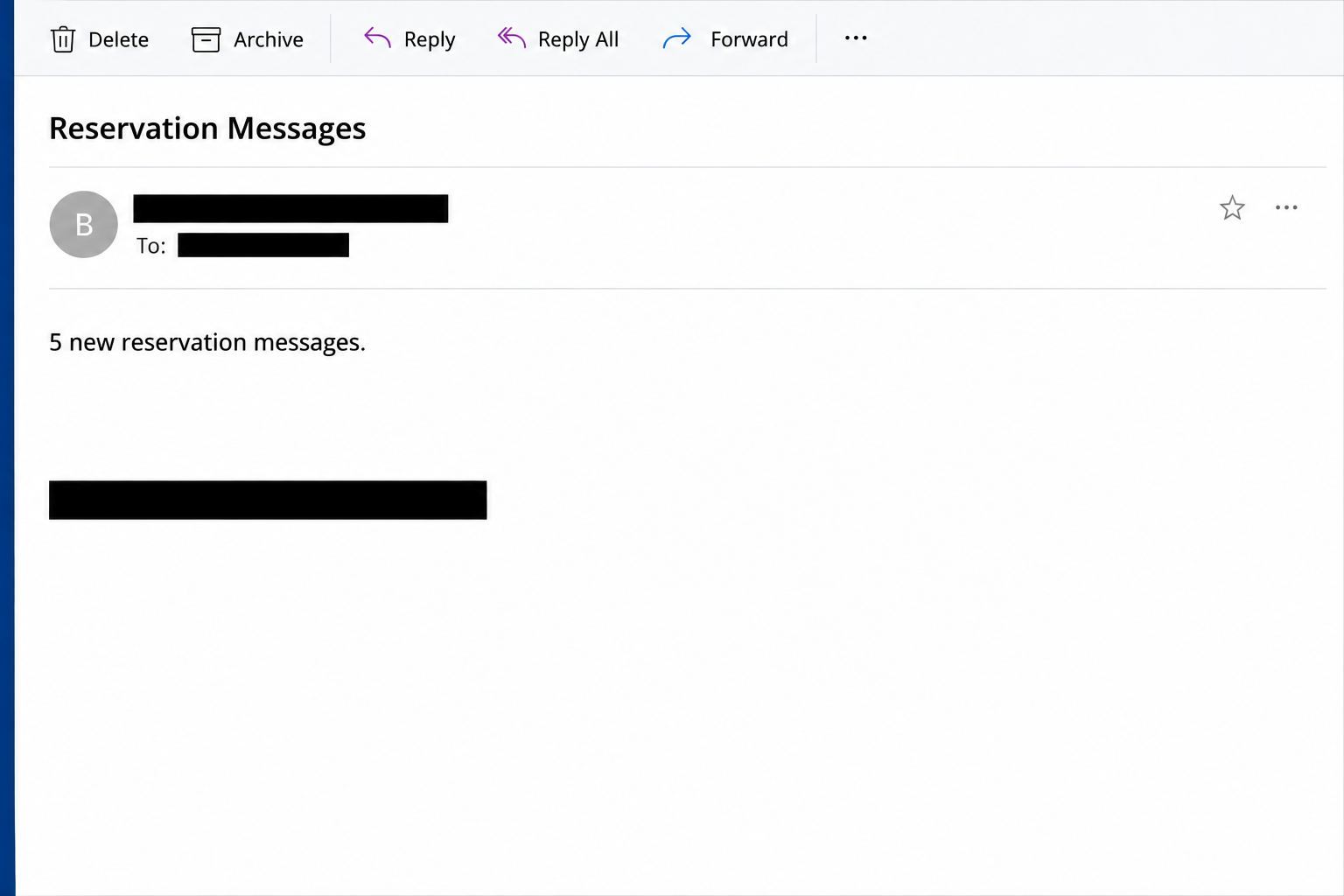
The Booking.com Reservation Messages email scam claims that five inquiries need a response. The documented subject called it a new customer message, lending urgency to normal front-desk work.
Inside, it showed a partially hidden confirmation number. The recipient was directed to a “Reservation Details” button to catch up on the messages.
The direction of the conversation is important. This lure asks a property worker to answer potential guests. It isn’t the traveler-facing message that demands another card payment.
A second reported version used the subject “Trip For 8 People March 2027.” It supplied an eight-person stay and a stated $3,500 amount as details of a supposed booking.
The quoted amount is part of the bait. It isn’t a verified bill, charge, payment already made, or legitimate booking held by the property.
The image above recreates the five-message version’s wording. It doesn’t show an actual guest record or a screenshot from a property’s account.
A blurred spreadsheet sits between the staff member and the messages
The link in the five-message version took the reader to a page resembling an obscured spreadsheet. An Excel-style logo in the foreground introduced a supposed verification prompt.
That prompt asked for the recipient’s email credentials. It wasn’t an ordinary view of the property’s Booking.com Extranet inbox and didn’t show verified messages waiting there.
The storefront of the scam changes along the way. The email looks like a reservation service, then the next screen looks like a protected document.
The blurry content explains why the actual guest messages can’t be read yet. It also prevents you from seeing anything specific enough to compare with the live reservation record.
This was a webpage impersonating a document view. The reported sample didn’t establish that a genuine spreadsheet downloaded or that opening the page ran malware.
The inbox matters more than the brand in the subject line
The immediate target is the email login the page asks you to enter. Whether that login also leads to other hotel systems depends on how the property manages access.
An exposed mailbox may hold guest correspondence or password-reset messages. It may also let someone send follow-up requests from a familiar address if they gain working access.
That risk isn’t proof of a Booking.com breach. The impersonation email doesn’t establish which accounts someone reached or what information they saw.
For anyone on a reservation desk, a quick routing check is more helpful than trying to identify the email template:
- Check guest messages in the existing Extranet session or the official property app, not through a fresh link in the notice.
- Compare any reservation number with your property’s own records before calling it a match.
- Treat a request for your work email password outside your usual identity service as a separate problem.
- If a booking exists, respond in the genuine reservation thread. If it doesn’t, there is no need to dismiss the claim on the fake page.
- Ask the shift lead to review suspicious messages when a shared inbox covers several properties or different teams.
How The Scam Works
Step 1: The note fits into a busy handover
Guest requests pile up during check-in, when staff answer phones and handle arrivals. An email promising to collect five pending threads sounds like it might save time.
The message does not ask a worker to break a policy outright. It frames the task as something the worker is already supposed to do well.
The count offers an easy measure of what’s left to finish. A real queue, though, exists independently of an email that says it’s there.
At handover, ask who was monitoring the platform and open the known inbox. You can still handle the live workload while avoiding the unfamiliar shortcut.
Step 2: Specific reservation details make the job feel assigned
A masked confirmation number looks like the output of an automated system. The partial format makes the message feel discreet without giving a recipient much to verify.
The eight-person version adds the size of the group, a date range, and a price. Those details make a missed booking seem commercially important.
Neither version proves the details came from a real reservation. A mention of an attractive stay may matter to the business without identifying anything that exists in its account.
If some detail happens to match, don’t discard the rest of your checks. A real guest or date wouldn’t authenticate the URL that carried the claim.
Step 3: The button puts the reservation somewhere unexpected
It is natural to expect a booking thread after pressing something labeled “Reservation Details.” An unfamiliar page instead appears to hold the information behind a privacy check.
That’s where the story stops making sense. Staff can answer guests through the property account without proving control of a mailbox to an unfamiliar spreadsheet.
Treat the unexpected document as a new request. Ask who owns it, what account it expects, and why it is separate from the reservation system.
You can answer those questions without typing anything into the page. Close it and look for the corresponding guest in the channel you already know.
Step 4: The spreadsheet disguise asks you to verify your mailbox
The blur makes the content seem close enough to reach. A verification box then implies that the only obstacle is the password you use all day.
A recognizable Excel logo doesn’t authenticate the form. Logos can be displayed on pages that have no relationship to the software or identity provider they imitate.
Submitting a mailbox password can hand it to the form’s operator, even if no reservation opens. An error doesn’t necessarily mean the credentials went nowhere.
If your workplace uses single sign-on, compare with the route you normally take to sign in. Don’t wait for a second prompt before telling IT about an unexpected one.
Step 5: A real mailbox may become the next point of trust
If someone gets into the mailbox, they can look for context. Real contact names, complaints, check-in details, and supplier conversations can make later approaches more believable.
An intruder might be able to read confirmation emails or learn what other services the staff member uses. Their actual reach depends on permissions, protections, and account recovery settings.
A guest payment request from a compromised communications channel would be a separate incident. The five-message email itself is not evidence that such a request went out.
That is why the response needs to include both the identity administrator and, if appropriate, the reservation platform. Each controls different records and can help determine who did what.
What to Do if You Have Fallen Victim to This Scam
-
Stop using the page and check the real queue. Open the property’s usual reservation tools from your own bookmark or managed device.
Resolve messages that appear independently in the actual queue. If the supposed group booking isn’t there, don’t create a new reservation just because the notice says it exists.
-
Notify the shift lead or property manager. Give them the subject, delivery time, shared inbox affected, and what action you took.
Mark the original as phishing using the workplace’s reporting process. Don’t circulate a live link in a staff chat or ask the next shift to investigate by clicking.
-
Tell your mail administrator promptly if you entered a password or approved a prompt. Have them secure the exposed identity through its usual recovery and incident process.
If that password was reused, tell them which accounts may need separate resets. Don’t send the password itself with your report.
Ask about session revocation, recent sign-ins, new forwarding rules, recovery settings, delegated access, or unfamiliar connected applications. Different platforms have different controls.
-
Check the property’s Extranet separately. Compare guest messages, account changes, staff users, and payout information with records you trust.
Follow Booking.com’s safety guidance for partners if you suspect unauthorized access. Use an official contact route that you find apart from the email.
If any person was added or a payout destination changed, record when you noticed it and escalate immediately. Don’t send payouts or refunds to test the new details.
-
Work out whether guests need to be warned. Check genuine reservation messages and mailbox activity with the property manager and the platform.
If a guest needs a warning, contact them through a trusted route and identify the message to ignore. Keep their personal details out of bulk notifications.
If a guest actually supplied card information or sent money to a fraudster, advise them to contact their card issuer or bank through its own verified number.
-
Report any separate file or installation to IT. The recorded scam used a counterfeit webpage, but a variant or subsequent message could present a different kind of risk.
If a program ran or a file opened unexpectedly, stop and tell security what happened. Deleting an email won’t determine whether a device was affected.
-
Leave a clear note for the next shift. Identify the fake subjects and the real place to check. Record which contacts and account changes still need review.
Keep guest details and internal incident records out of public screenshot posts. A short warning about the false process is enough for other people to recognize it.
A Desk Procedure That Makes the Email Less Persuasive
Keep one agreed route for guest messages
Staff shouldn’t have to figure out where the inbox is while a line forms at the desk. Put the official property route in the handover instructions and support new starters.
Use separate users and appropriate permissions where your systems support them. One shared password makes it harder to know which sign-in was exposed and who still needs access.
A shift note can mention that real requests should be answered from the platform. That lets somebody handle a real booking without needing the notice that pointed them toward it.
If staff disagree about whether a guest wrote, settle it against the actual message record. Asking a colleague to open the same link doesn’t provide a second source.
Decide how to handle access on a busy day
Keep the identity administrator’s contact and the platform’s support route somewhere the duty manager can reach even if the work mailbox is locked.
Agree who checks for unusual guest messages or changes if a login is exposed. Credential recovery and the guest-facing response can take place in parallel.
Where you have an automated notification workflow, test how it normally presents guest activity using a safe internal exercise. Don’t test a suspected phishing page against a live account.
The useful habit isn’t identifying every copy of a logo. It’s knowing where a normal task can be completed without depending on an unexpected attachment or link.
Don’t confuse access to the mailbox with access to every system
List what the affected person can actually open using that identity. Compare the mailbox, property software, and reservation platform rather than assuming they all share a password.
A shared desk computer can have different people’s sessions open. Record which identity was entered into the form and which services are actually accessible from that workstation.
A mailbox that received the original lure may not be the account whose password was submitted. Someone working a shared queue might enter their own company email instead.
Make that distinction in the incident report. It saves time for the administrator and reduces the chance that the property resets the wrong user while leaving the affected one exposed.
If the notice reached multiple hotels under the same management, check each property’s real queue separately. A recorded example from one location cannot establish that another received the same message.
Frequently Asked Questions
Is Booking.com itself the scam?
No. The documented emails impersonate Booking.com. Their use of the company’s name does not make them legitimate platform notifications.
Do the five messages prove my property has reservations waiting?
No. The count is part of the claim. Open the genuine Extranet or approved property app and check the queue there.
Is the blurred Excel screen actual guest data?
The reported page used a blurred spreadsheet as a disguise for a sign-in form. Its appearance doesn’t establish that a real workbook or guest record was there.
What if I used a personal email password on a work device?
Secure the personal account through its provider and tell your workplace if policy requires it. The affected password matters, irrespective of who owns the computer.
Is this the same as a traveler being asked to re-enter their card?
No. This sample tries to reach the property worker’s email credentials. Other scams target travelers directly or use a real account after a separate compromise.
Can I delete the email once I report it?
Follow your property’s reporting policy. If administrators need the original headers or message, let them preserve those before you clear the inbox.
The Bottom Line
The five pending messages and the eight-person trip are reasons invented to send staff outside the normal reservation inbox. The reported destination wanted an email login.
Check requests in the real platform and handle any disclosed credential through its provider. A genuine guest can still receive a reply without anybody opening that page.

Reviews & discussion
0 commentsShare a firsthand experience, or ask a question.
Community reviews
booking.com
Moderated reader experiences, not an editorial verdict.
Start the conversation
Have a question or something useful to share? Add the first comment.