

A government website in a search result usually feels like a safe place to find an official answer. That instinct can be exploited.
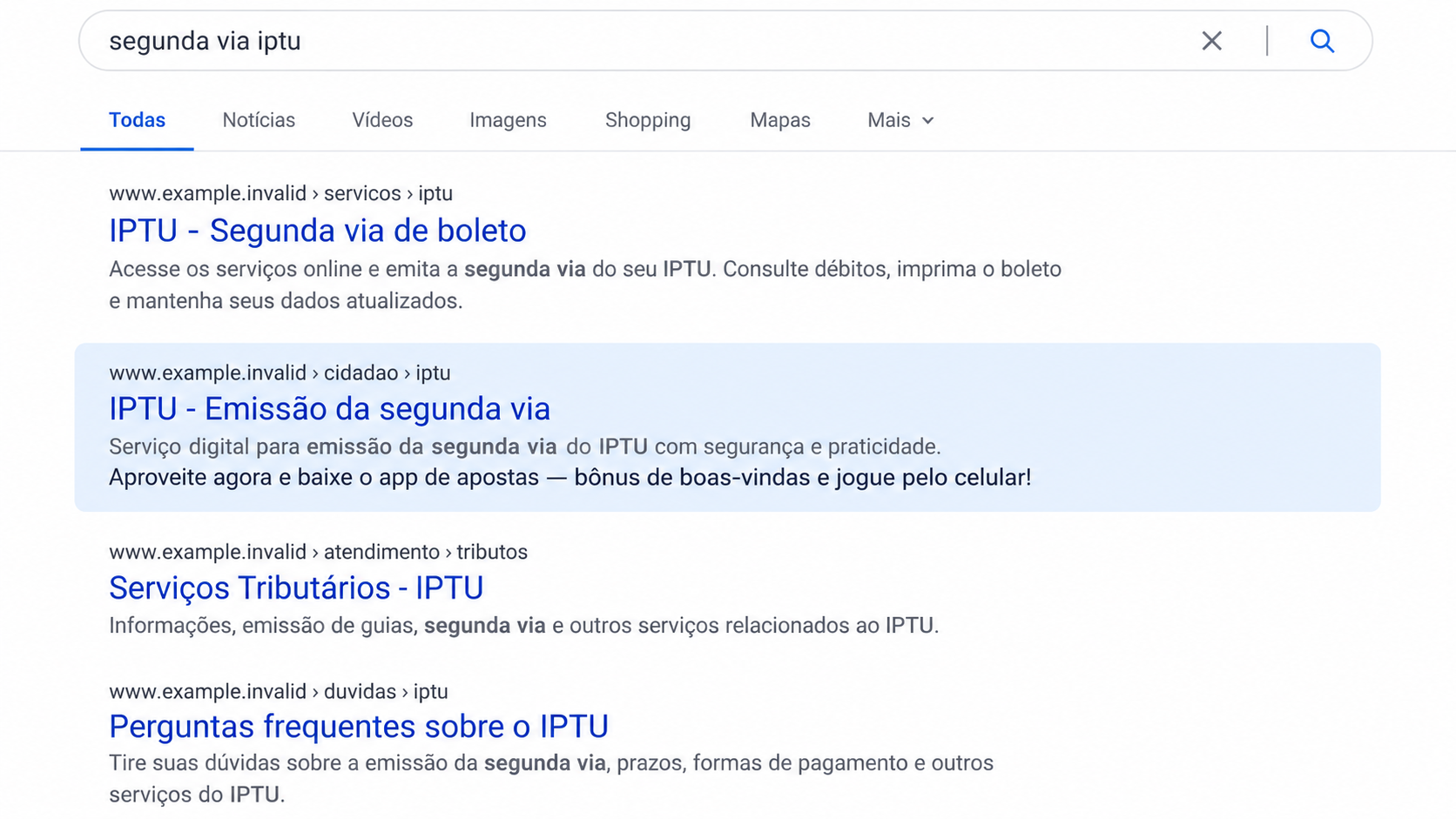
Researchers found a campaign that made trusted-looking results lead toward gambling pages. The unusual part was where those pages appeared to come from.
Overview
Trusted domains became part of a gambling funnel
Check Point Research documented a campaign against Brazilian organizations, including government and education websites, beginning around mid-2025.
After compromising web servers, the operators made some paths serve attacker-controlled content. The pages borrowed the reputation of legitimate domains while promoting gambling.
The researchers called the group Gambling Goblin and linked it to a broader Chinese-speaking cybercrime cluster with medium-to-high confidence.
The important reader-facing issue is simpler: a result on a trusted domain can be manipulated when the server behind it has been compromised.
These findings come from Check Point Research’s technical investigation, not from a claim that Brazilian public institutions endorsed betting apps.
Fake app-store styling helped sell the redirect
Many attacker pages resembled app stores such as Google Play or the Microsoft Store. Their tiles and links steered visitors toward gambling and sports-betting destinations.
The operation also connected numerous compromised high-reputation sites. That web of links helped push its content into search results.
A visitor looking for a public service, an app, or a betting platform could encounter a result whose domain looked reassuring while the page content did not belong there.
The deceptive content was placed through a compromise. It should not be mistaken for a legitimate government offer or a genuine app-store listing.
The observed harm has limits
The investigators found phishing-style pages, search manipulation, and a large toolkit on affected servers. They did not establish that the app pages were already delivering malware to visitors.
They warned that the infrastructure could be changed to do so. That is a future risk, not a documented current outcome for every visitor.
The research did not prove exactly how the attackers first entered each server. Nor did it publish a verified count of ordinary users who lost money.
Readers can still act on the evidence: verify an unexpected result and avoid installing software merely because it appears under a respected domain.
- Compromised Brazilian sites supplied credible-looking web addresses.
- Server modules relayed selected traffic to attacker-controlled pages.
- The pages imitated app catalogs and promoted gambling offers.
- Links among trusted domains amplified search visibility.
- Direct malware delivery to ordinary visitors was a stated risk, not an observed fact.
How the Fake Gambling Search Result Scam Works
Step 1: Attackers obtain access to a trusted web server
The campaign began with compromised organizations. Check Point examined government, educational, and commercial sites that served content the real owners did not intend.
Researchers found scanning and intrusion tools in the operation, but they did not directly observe the initial entry into each victim.
That uncertainty is important. An unpatched service, stolen password, or another weakness may explain some breaches, but the report does not prove one universal path.
Once inside, the operators could use the server’s existing reputation. A public-sector domain has history, search visibility, and a familiar address.
The institution’s name became cover, not a partner in the scheme. Visitors should distinguish a compromised site from an institution deliberately advertising gambling.
Website owners need independent monitoring of files, modules, and unexpected paths. A homepage that looks normal does not prove every URL is clean.
Step 2: A server module serves different content on selected paths
Check Point found malicious Apache modules on compromised servers. They could proxy certain requests to pages controlled by the attacker.
The browser might still show the respected site’s address while the content came from somewhere else. That combination is especially confusing for visitors.
The module also relaxed browser security headers for the relayed content. That made it easier for injected scripts and outside assets to render.
Not every page on the domain changed. Selective paths help an intrusion stay unnoticed when administrators check only the main site.
For a reader, the practical clue is a mismatch between the domain’s purpose and the page’s content. A municipal service should not suddenly push a betting app.
For site owners, the clue may be new Apache modules, unexplained proxy behavior, or search-indexed URLs nobody on the team created.
Step 3: Fake app-store pages borrow familiar design
The attacker-controlled pages used app-store-like layouts and branding cues. Some pulled genuine production assets associated with familiar technology services.
That visual familiarity can be persuasive. A grid of app tiles, ratings, and download-style controls looks like a place to evaluate software.
Yet the page is not an official store just because it imitates one. The actual host, publisher, and installation destination must be checked separately.
The Brazilian pages focused on gambling and sports betting. Researchers also found related templates in Vietnamese, Spanish, and English.
The language variations suggest a reusable model, not a single local misconfiguration. The same visual trick can be adapted for different audiences.
Do not install an app from an unfamiliar catalog or grant it permissions based on a link found inside a surprising government-domain result.

Step 4: High-reputation links push the pages into search
Search engines use many signals to decide what to show. A trusted domain with numerous inbound links can help content appear credible and visible.
The operation linked attacker pages through many legitimate-looking Brazilian domains. Some of those sites were public institutions whose reputation the attackers borrowed.
A person scanning results may notice the government-style address and skip the usual skepticism. The search listing itself becomes a trust cue.
However, ranking does not mean a page has been reviewed by the government, the search engine, or a genuine app store.
Look at the page’s topic, language, and navigation after clicking. Sudden betting promotions on an unrelated service path indicate the result may be hijacked.
Search engines and site operators can remove bad pages, but cached results and new paths may persist. Readers still need to verify the destination.
Step 5: Visitors encounter an offer under borrowed authority
The destination invites the visitor to explore gambling or betting material. The exact pitch can change across sites and languages.
The danger is not a claim that every gambling app is fake. It is that this offer was presented through infrastructure the actual site owner did not control.
A visitor may trust the address more than the offer because it resembles an official domain. That is precisely the borrowed-authority effect.
Check whether the app has an identifiable publisher, official store listing, clear legal jurisdiction, and independent customer support before registering or paying.
Do not use the contact details on a hijacked page as proof of legitimacy. They may belong to the operator who placed the content there.
If a public-service page asks for a betting deposit or download, close it and reach the institution through its verified homepage or phone number.
Step 6: The infrastructure can rotate and expand
Check Point found systems that generated fresh domains and related pages outside Brazil. Rotation can complicate blacklists and takedowns.
The same server-side access supported a wider toolkit, including backdoors and credential-stealing components aimed at compromised hosts.
That toolkit matters for the institutions, but it should not be confused with a proven malware download to every person who saw a page.
Researchers assessed the fake app-store setup as capable of shifting toward direct malware distribution if the operators changed it. That possibility warrants caution.
Meanwhile, the verified tactic is search manipulation that funnels visitors through compromised, high-trust addresses toward attacker-controlled content.
Report a suspicious result to the institution and the search provider. A precise URL and screenshot can help identify which path needs removal.
Why a Trusted Address Can Show Untrusted Content
Most people learn to check the website address before entering information. That advice remains useful, but it is not complete.
If the server itself is compromised, the correct domain can host a wrong page. The browser cannot know whether the institution approved each piece of content.
Here, the Apache module made selected requests behave differently. Visitors could see a recognizable domain while content was relayed from another source.
That is why context matters. A government site discussing services, taxes, or public notices is plausible. A sudden gambling-app catalog is not.
Links in search snippets can also be stale or manipulated. Open the institution’s homepage independently and use its normal navigation to find the needed service.
If the suspicious page has no path from the official site’s menus, treat it as unverified until the institution confirms it.
What Website Operators Should Check
Administrators should review installed Apache modules and compare them with approved configuration. Unexplained modules or hooks warrant urgent investigation.
Search-index reports can reveal betting or app-store paths that staff never published. Examine both content and server behavior, not only the visible homepage.
Preserve logs and a copy of altered configuration before removing components. Incident responders need to understand when access began and what else was exposed.
Patch internet-facing services, rotate credentials after containment, and review SSH access. These are sensible controls, even though this campaign’s initial entry was not fully established.
Restore clean pages and request search-index cleanup. Without fixing the underlying access, removing one gambling path may only buy time.
Communicate clearly with visitors if a public service was affected. A short notice can prevent people from mistaking a deleted result for an official offer.
What This Case Does Not Prove
It does not prove that a public agency created the betting promotions. The key finding is that unauthorized code made the agency’s domain useful to outsiders.
It does not prove that every person who visited a manipulated page lost money. The public report focuses on infrastructure and distribution, not a victim ledger.
It also does not prove that every app promoted on those pages contained malware. The researchers described direct malware delivery as a feasible future change.
Those distinctions do not make the pages harmless. Deceptive search placement can still send users to gambling operators they never intended to visit.
Nor should the report be used to accuse a particular licensed betting service without evidence. The abuse lies in the unauthorized funnel and false app-store context.
Finally, no single initial breach method was established for all affected servers. Repeating a specific password or software-flaw story would outrun the evidence.
Clear boundaries make the warning stronger. Readers can act on the observed manipulation without needing an invented infection or financial-loss figure.
How to Find the Real Service You Wanted
If you were trying to reach a government service, start again from the institution’s independently verified homepage. Navigate through its menu or service directory.
Compare the service name, language, and contact information. A legitimate property-tax or appointment page should not suddenly ask you to install a betting app.
For an app, search the official platform directly and inspect the publisher’s identity. Do not trust a download button because it appears inside a search result.
When the official path is unclear, call the published service desk. A short verification call can prevent an account signup or payment through the wrong page.
What to Do if You Visited a Hijacked Result
- Leave the suspicious page. Do not download software or create a betting account through an unexpected public-service URL. Save the address for a report.
- Check what you actually did. Viewing a page is different from entering credentials, paying, or installing an app. Record each action and the approximate time.
- If you submitted information, secure the account. Change reused passwords from a trusted device, review sessions, and enable multifactor authentication where available.
- If you paid, contact your payment provider. Explain that the offer appeared on a compromised-looking result. Preserve receipts, transaction details, and the page address.
- If you installed software, stop using it. Ask a security professional to review the device. Malwarebytes can help scan, but the research did not prove every page served malware.
- Report the exact URL. Send it to the institution whose domain appeared, your browser’s safe-browsing report, and the search engine. Avoid reposting a live link to friends.
- Reduce repeat exposure. AdGuard can block some risky pages or ads, but it cannot authenticate a compromised government server. Keep independent verification in the process.
Frequently Asked Questions
Were Brazilian government agencies running these gambling pages?
The research describes compromised sites used without their owners’ approval. A trusted domain in the chain is not evidence of institutional endorsement.
Does a government web address guarantee page safety?
No. A legitimate server can be breached and made to display attacker content on selected paths while the main site appears normal.
Did the pages definitely install malware on visitors?
Check Point warned that the infrastructure could be adapted for malware delivery. Its report did not establish that as the observed visitor-facing outcome.
Why would search engines show a hijacked page?
Compromised high-reputation domains and a network of links can make attacker content visible. Search rank is not a guarantee of ownership or safety.
Is every sports-betting app a scam?
No. This case concerns unauthorized promotion through compromised sites. Evaluate any app’s publisher, licensing, distribution, and payment terms separately.
What if I only opened the search result?
Record the URL and report it. Without a download or information submission, the response differs from a confirmed device or account compromise.
The Bottom Line
This operation turned the reputation of compromised sites into a search funnel for gambling pages disguised with familiar app-store styling.
A trustworthy-looking domain is only one signal. When the content does not fit the institution, stop, verify independently, and report the unexpected page.

Join the discussion
0 commentsShare your experience or ask a question about this article.
Discussion
Start the conversation
Have a question or something useful to share? Add the first comment.