

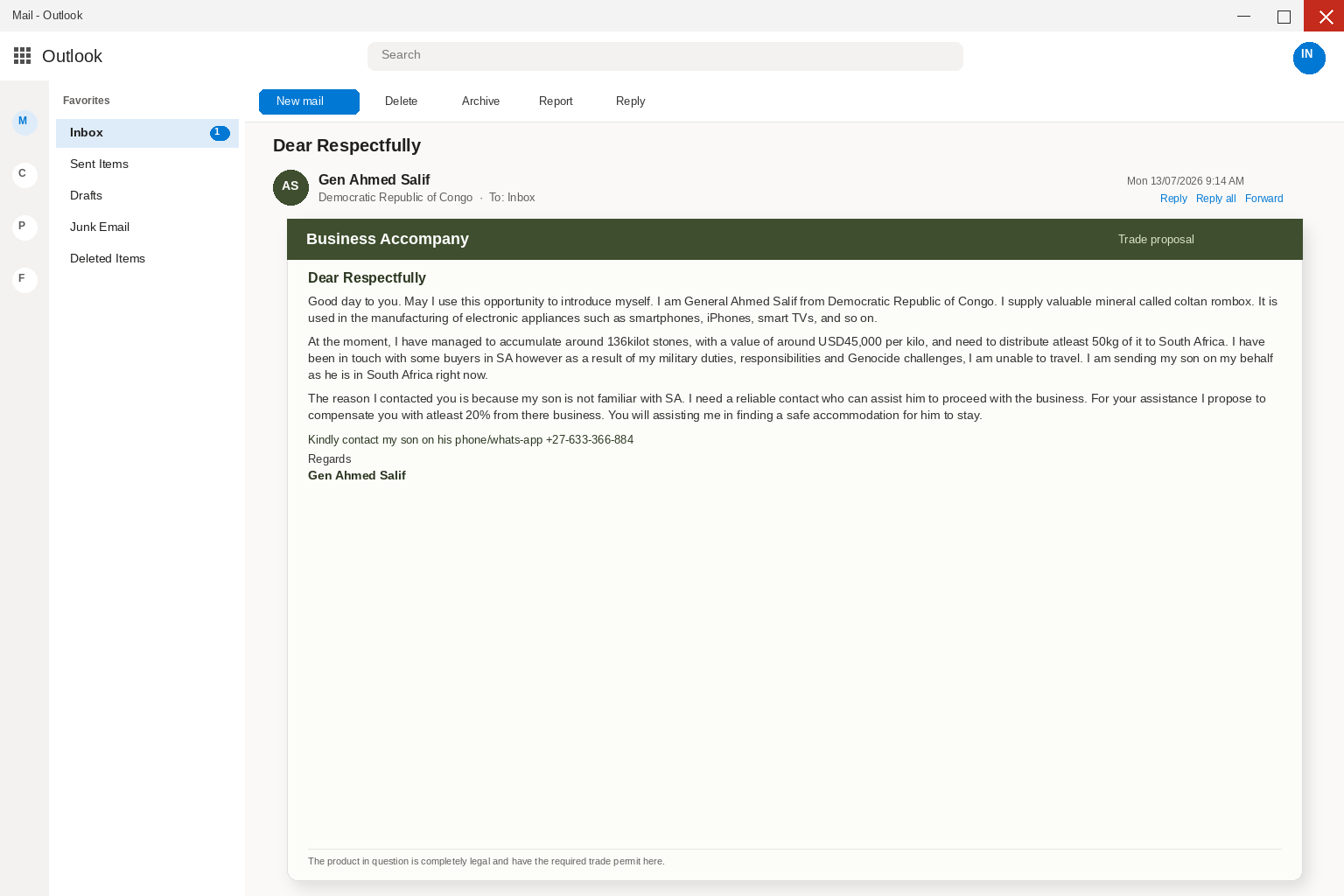
This Business Accompany email presents a personal trade proposal rather than a typical spam blast. It promises commission for help with an alleged coltan sale.
The story is designed to pull the recipient into a private conversation. Once trust is established, it creates reasons to surrender money, documents, and information.
Overview
The personal story is part of the sales pitch
The sender presents himself as a military general who cannot travel and says a son needs local help.
Those details create sympathy while making the recipient feel specially chosen.
The commission makes a risky deal feel worthwhile
A promised 20% share can distract from the absence of independent contracts, verified buyers, export records, or a legitimate broker.
The commission is a lure, not proof of a transaction.
The later fees are the expected end point
Accommodation, permits, transport, customs, insurance, and clearance can all be framed as temporary obstacles. In an advance-fee scam, each payment tends to produce another demand.
You are looking at an advance-fee letter that borrowed the language of a mining partnership so a surprise errand would feel like a share of a sale,
rather than a bill.
The pitch writes as General Ahmed Salif, a military officer who cannot travel because of duties and hardship, and who wants you to accompany a son who,
is supposedly already near the buyers.
Ahmed Salif is the lure name on this copy, and anyone can type it onto a From line without that proving a living officer wrote to you.
The sale never has to happen, because a cargo that does not exist never needs a buyer, a hotel, or a customs stamp you paid to unlock.
The letter names coltan as the cargo, which is a real mineral used in smartphones, iPhones, and smart televisions, and that is why the word feels like,
industry rather than like a stranger.
It claims a stockpile of around 136 kilot stones, a value of around $45,000 per kilo, and a need to move at least 50kg toward buyers in South Africa.
For that errand the letter offers a 20% share of any completed sale, which is a figure large enough to keep a careful person reading and quiet,
enough that it still sounds like a commission.
There is no general sitting on a legal stockpile, there is no son waiting with a trade permit, and there is no mineral sale that needs a,
stranger from a cold inbox to book a hotel.
The Democratic Republic of Congo is a real country with a real mining industry, which is why those words are useful costume, not because a living officer,
mailed you a partnership.
A tidy rank does not prove a cargo, a son, or a buyer holding funds for you, and a legal-sounding permit line does not turn a surprise,
letter into a contract.
money or personal information and often invent a problem or an opportunity that is not actually there.
A mineral partnership that can only continue after you answer a stranger is that story with a general’s rank on it, and a fee that must be,
paid before a sale can close is the same demand wearing trade clothes.
unexpected message, which is why a printed chat line inside a cold proposal is a poor place to start a check.
in email, and not to follow a surprise message into a payment or a document request.
a customs charge can begin.
The letter even offers a WhatsApp number so you can reach the supposed son before you have answered, which is a second door rather than a proof of trade.
The number printed in the copy is +27-633-366-884, and a reachable chat is not a bill of lading, a customs stamp, or a buyer you can verify,
on a page you type yourself.
A real mineral desk would not need a stranger from a blast list to confirm that a son exists, and it would not ask you to keep,
the conversation inside a private thread the sender already controls.
The rank is cheaper than a company
Republic of Congo already sounds like a place where mineral trade is a real industry.
box gets a chance.
People who would ignore a threat about a closed account will still answer a military officer who says he cannot travel, because missing a kindness for a,
traveler feels different from missing a scare.
The body leans on that feeling with language about military duties, responsibilities, and hardship, which are ordinary public words a reader already recognizes from news rather than,
from a private contract.
pressure and then treat the errand as help.
Help is a much cheaper trick than inventing a real cargo with published buyers, and it is a much quieter one than a demand for a wire,
in the first sentence.
a living command is on the other end of the thread.
The son is already on the road
The letter says the officer cannot travel and is sending a son who is already in the destination, which is a useful clock because it makes the,
errand feel unfinished rather than invented.
A traveler who is already waiting needs a hotel tonight, needs a local contact who knows the city, and needs someone who can walk into a buyer,
meeting without looking lost.
any buyer actually exists.
You cannot accompany a person who is not there, and an inbox is not a logistics desk just because a letter asks you to find safe accommodation.
A household that never agreed to host a trader, never signed a contract, and never met a buyer is not sitting on a pending commission, no matter,
how gently the note talks about a legal permit.
or the permit office yourself.
The wording stays vague on purpose, because it does not name a mine, a buyer firm, a permit number, or a hotel you could call without help from the sender.
Once you have filled in your own map, the reply starts to look like a kindness instead of a request for the mailbox sitting under the letter.
A share of a sale is the bait
You are being invited to accompany a traveler and meet buyers on someone else’s behalf, which is a polite sequence that still tells you something is already,
in motion and waiting on you.
a reservation that can be checked.
The $45,000 per kilo figure is doing a second job, because a specific price sounds logged, and logged feels like a real desk wrote it between other shipments.
A real desk that actually held that cargo would usually know a buyer name, a lot number, and a permit you could match without answering a stranger.
This letter knows an address and a mineral story, which is enough for a blast and not enough for a real sale, and that gap is the whole costume.
Reply is the door they need
has had time to land.
a buyer, or a permit on a site you type yourself.
a fee has a name.
The FTC is blunt about requests in unexpected mail, because you do not answer them to see if they are real, and you verify a claim on,
a path you already trust.
For a trade, that path is a site you type, a phone number from a listing you already keep, or a government page that talks about imposter,
and advance-fee fraud in public.
How The Scam Works
Step 1: A business-accompany letter lands
It arrives in the same inbox you already trust, with the subject Dear Respectfully sitting among the rest of the morning mail.
The body is dressed as a mineral partnership rather than a pitch from a stranger, with a general’s rank, a son already waiting, and a request that,
you accompany him to the buyers.
Step 2: The rank copies a Congo general
A reader who has followed mineral news, a person who has hosted a visitor, and a mailbox that already answers polite mail all fit inside that one display name.
call a number you already have.
Step 3: The trip is already waiting
You have been asked to find safe accommodation and to walk him to the buyers, which is a polite sequence that still tells you something is already,
in motion and waiting on you.
Waiting then feels like becoming the host who left a traveler in a city he does not know, which is a much stronger push than a threat,
a booking a real desk would already hold.
Step 4: A reply proves the mailbox is live
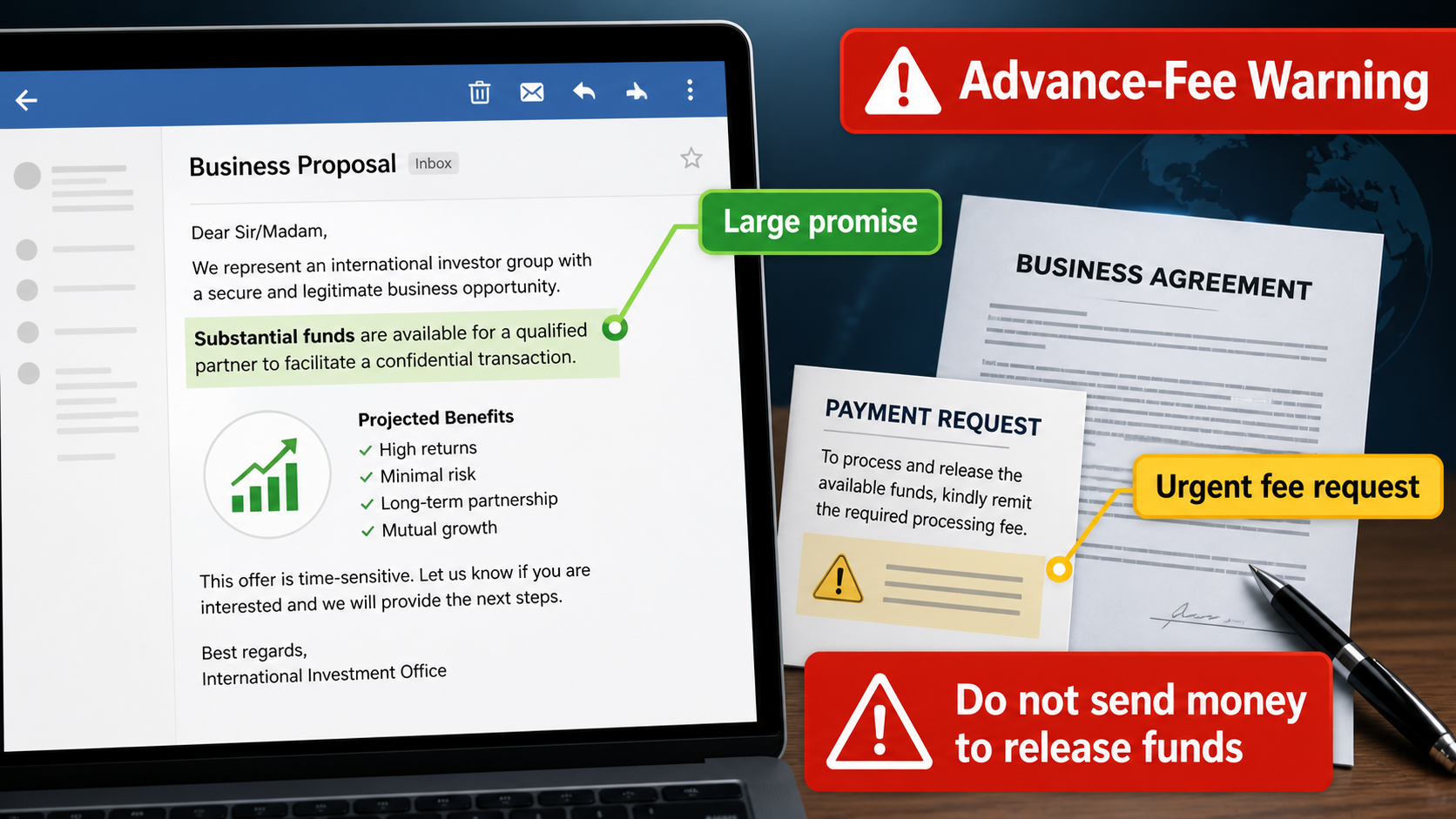
It is a request to cover a hotel, a transport permit, a customs clearance, or another supposed fee so a cargo that does not exist can supposedly,
move, which is a door rather than a partnership.
customs office or a bank could finish a job.
a missing shipment real.
Step 5: The fees start after you answer
The story will be helpful: a hotel that needs a deposit, a transport permit that was delayed, a customs letter that has to be settled before the cargo can move.
Step 6: They want IDs and bank details
A conversation that already feels like a partnership is an easy place to ask for a passport, a national ID, or a bank statement, because those papers,
sound like the KYC a real desk would collect.
The letter’s own next step, once a victim stays on the thread, is to request copies of identity documents or bank details, which can be used for,
identity theft or to target the same person again.
Unlike a password, a scanned passport cannot be replaced with a new string the same afternoon, which is why the papers are as valuable as the first,
fee and sometimes more valuable.
There is no honest reason for a mineral sale that found you in a cold inbox to need your identity file before a buyer you have never,
met can finish a job.
A real trade that needed KYC would send you to a page you type yourself, a bank you already keep, or a counsel you already hired, not,
through a private thread that began with Dear Respectfully.
Handing those copies over does not unlock a cargo, and it does give the people on the thread a durable file they can reuse long after the,
hotel story goes quiet.
Step 7: A second crew hunts the same mailbox
and a second crew buys the file and comes back as help.
The FTC warned about that second pitch in its August 2026 alert on recovery scams, where it says people who already lost money are hunted by strangers,
who claim they can get the money back for a fee.
while the person who trusts you might, and the crew that buys the thread later might.
Why the Mineral Story Can Keep a Conversation Going
The proposal is written like a private opportunity rather than a mass advertisement. A detailed personal story can make the recipient feel selected for something unusual.
Named countries, a mineral commodity, and a commission figure give the message texture. Those details can be invented without any lawful shipment or buyer behind them.
The sender expects curiosity to do the work. Once a person replies, the story can expand into travel, permits, family obligations, and supposed deadlines.
The unusual nature of the offer is not evidence of value. It is a reason to demand more independent proof before sharing money, travel plans, or documents.
A Claimed Title Does Not Create Authority
Military titles and official-sounding signatures are easy to type into an email. They do not establish ownership of mineral stock or authority to arrange international trade.
Real commodity transactions involve identifiable companies, contracts, export rights, and checks that can be reviewed by qualified professionals. A personal email cannot replace that record.
The proposal may encourage private communication through chat applications. Moving the discussion away from formal channels makes it harder for others to spot inconsistencies.
No one should accept a stranger’s role or inventory claim at face value. Verification must start with independent trade, legal, and regulatory sources.
Each Fee Is Presented as the Last Obstacle
The first demand may concern accommodation, customs, permits, security, or transport. It is presented as a temporary cost standing between the recipient and a large reward.
After payment, the story commonly changes. Another office, clearance, document, or emergency expense is said to require immediate attention.
The sequence creates commitment. A person who has already spent money can feel pressure to pay again rather than admit the deal was never real.
A legitimate trade does not depend on an unverified contact collecting personal advance payments. Stop before the first transfer instead of negotiating the fee lower.
Professional Verification Is the Only Useful Test
Serious mineral transactions can be checked through independent counsel, due-diligence professionals, and reputable trade contacts. The sender should not control every source of confirmation.
Documents need to be assessed for more than attractive letterhead. Export licenses, assay records, counterparties, and ownership claims must be capable of outside verification.
Never arrange a trip or meeting based solely on the proposal. Physical travel can add personal safety risks to an already questionable financial arrangement.
If the offer collapses when independent scrutiny begins, that is the answer. A genuine opportunity can survive careful questions before it asks anyone to pay or travel.
Company, Address, and Fulfillment Checks
A dramatic title does not verify a trader
A claimed military role, a named mineral, and a personal story do not prove that the sender has authority to sell anything.
Do not treat an email signature as a business credential.
A mineral deal needs independent records
Legitimate cross-border trade requires verifiable counterparties, contracts, licenses, export documentation, assays, and professional due diligence. An unsolicited request to assist a stranger is not a substitute.
The contact route must be independently confirmed
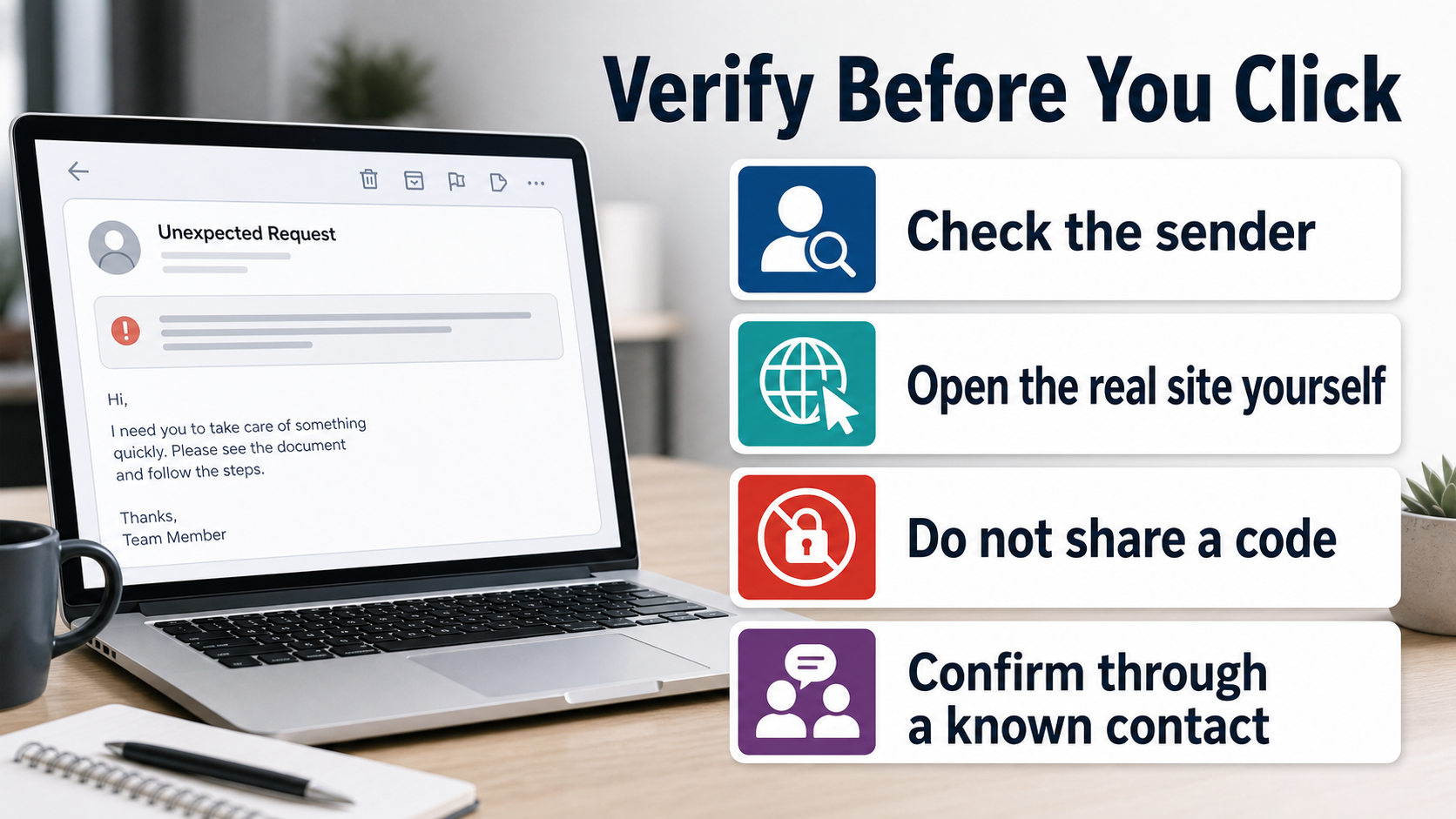
Do not use a WhatsApp number, email address, or intermediary chosen by the proposal to verify it. Find reputable legal, trade, and regulatory contacts separately.
The payment request is the red flag to follow
The scam works only if the recipient sends a fee or shares documents.
A genuine trade opportunity does not require an unverified stranger to pay first for supposed logistics.
What to Do if You Have Fallen Victim to This Scam
- End the conversation without paying any final release, customs, hotel, permit, or insurance charge. Preserve emails, attachments, payment instructions, and chat messages as evidence.
- Contact the bank, card provider, wire service, or cryptocurrency platform immediately if money was sent. Ask about recall, reversal, or fraud reporting options while the transaction is still recent.
- Secure your email and messaging accounts if you gave the sender passwords, codes, identity documents, or company information. Replace reused passwords and remove unfamiliar sign-ins.
- Do not meet an alleged representative or share travel details. An invented trade arrangement can create physical safety as well as financial risk when the recipient is pressured to visit or host someone.
- Tell colleagues, family members, or business partners who may be contacted next. The same personal story can be reused against anyone connected to the original target.
- Use Malwarebytes to scan any device where you opened attachments, downloaded documents, or installed a suggested tool. AdGuard can limit future exposure to malicious ads and scam landing pages.
- Report the fraud to the relevant financial and law-enforcement channels, then ignore companies that promise to recover the money for an upfront charge. Recovery offers often repeat the same tactic.
Is Your Device Infected? Run a Free Malware Scan
Slow performance, constant pop-ups, or strange behavior? These are classic signs of a malware infection. The fastest way to find out is to scan your device with Malwarebytes Free — one of the most trusted malware removal tools available.
The free version detects and removes the most common threats, including:
- Adware — the cause of those annoying pop-ups
- Browser hijackers — unwanted redirects and changed homepages
- Trojans and spyware — hidden programs stealing your data
- Potentially unwanted programs (PUPs) — software you never asked for
👉 Select your device below — Windows, Mac, or Android — then follow the simple steps to download Malwarebytes, scan your system, and remove any threats it finds. The scan usually takes 5 to 20 minutes.
Run a Malware Scan with Malwarebytes for Windows
Malwarebytes is one of the most popular and trusted anti-malware tools for Windows — and it’s completely free for removing infections. It catches threats that many antivirus programs miss, including adware, browser hijackers, and trojans. Follow the steps below to scan and clean your PC in just a few minutes.
Download Malwarebytes
Click the button below to download the latest version of Malwarebytes for Windows from the official source. The free version is all you need — it will scan your computer and remove adware, browser hijackers, and other malicious software at no cost.
Download MalwarebytesOfficial installer for Windows 11 and 10. Your download starts right away.Want real-time protection? See Malwarebytes Premium Malwarebytes Free for WindowsScans and removes malware at no cost
-
Install Malwarebytes
When the download finishes, open your Downloads folder and double-click the MBSetup file. If Windows shows a User Account Control pop-up, click “Yes” to allow the installation.

Follow the On-Screen Prompts to Install Malwarebytes
The setup wizard will walk you through a few quick screens:
-
Choose where you’re installing the program — “Personal Computer” or “Work Computer” — then click Next.

-
Malwarebytes will now install on your device. This usually takes under a minute.

-
When installation is complete, the “Welcome to Malwarebytes” screen will open automatically.

-
On the final screen, click Open Malwarebytes to launch the program.

-
Enable “Scan for Rootkits”
Before scanning, turn on rootkit detection so Malwarebytes can find even the most hidden threats. Click the Settings gear icon on the left side of the screen.

In the settings menu, find “Scan for rootkits” and click the toggle so it turns blue.

Done? Click “Dashboard” in the left pane to return to the main screen.
Start the Scan
Click the blue Scan button. Malwarebytes will automatically update its virus database and start checking your computer for malware.

-
Wait for the Scan to Finish
The scan checks your entire system for browser hijackers and other malicious programs, so it can take 5 to 20 minutes depending on your computer. Feel free to do something else — just check back occasionally to see the progress.

-
Quarantine the Detected Threats
When the scan is done, you’ll see a list of everything Malwarebytes found — malware, adware, and potentially unwanted programs. Click the “Quarantine” button to remove all of them at once.

Malwarebytes will now remove the malicious files and registry entries and move them safely into quarantine.

-
Restart Your Computer
Some threats can only be fully removed after a reboot. If Malwarebytes asks you to restart, click Yes. Once you’re logged back in, Malwarebytes has finished removing the threats it found.

That’s it — your Windows PC is now clean of trojans, adware, and other malware, and should be back to running smoothly.
If you are still having problems with your computer after completing these instructions, then please follow one of the steps:
- Run a computer scan with ESET Online Scanner
- Ask for help in our Windows Malware Removal Help & Support forum.
Run a Malware Scan with Malwarebytes for Mac
Malwarebytes for Mac is a free on-demand scanner that removes the malware other security software tends to miss — adware, browser hijackers, and unwanted programs included. Cleaning an infected Mac with Malwarebytes has always been completely free, and it’s our go-to recommendation. Follow the steps below to scan and clean your Mac in just a few minutes.
-
Download Malwarebytes for Mac
Click the button below to download the latest version of Malwarebytes for Mac.
Download MalwarebytesOfficial installer for macOS. Your download starts right away.Want real-time protection? See Malwarebytes PremiumMalwarebytes Free for MacScans and removes malware at no cost -
Open the Malwarebytes setup file
When the download finishes, open your Downloads folder and double-click the setup file to begin the installation.

-
Follow the On-Screen Prompts to Install Malwarebytes
The Malwarebytes for Mac Installer will guide you through a few quick screens. Click “Continue” and keep following the prompts until the installation completes.



When the installation is complete, Malwarebytes opens to the Welcome to Malwarebytes screen. Click “Get started“.
-
Select “Personal Computer” or “Work Computer”
Malwarebytes will ask what type of computer you’re installing it on. Click either Personal Computer or Work Computer, whichever applies.

-
Start the Scan
Click the “Scan” button. Malwarebytes will automatically update its detection database and begin checking your Mac for malware.

-
Wait for the Scan to Finish
Malwarebytes will scan your Mac for adware, browser hijackers, and other malicious programs. This can take a few minutes, so feel free to do something else — just check back occasionally to see the progress.

-
Quarantine the Detected Threats
When the scan is done, you’ll see a list of everything Malwarebytes found. Click the “Quarantine” button to remove all the threats at once.

-
Restart Your Mac
Malwarebytes will now remove all the malicious files it found. Some threats can only be fully removed after a reboot — if Malwarebytes asks you to restart, allow it. Once you’re logged back in, your Mac is clean.

That’s it — your Mac is now free of adware, rogue browser extensions, and other potentially harmful software.
If you are still experiencing problems while trying to remove a malicious program from your computer, please ask for help in our Mac Malware Removal Help & Support forum.
Run a Malware Scan with Malwarebytes for Android
Malwarebytes for Android automatically detects and removes dangerous threats like malware and ransomware so you don’t have to worry about your most-used device being compromised. Aggressive detection of adware and potentially unwanted programs keeps your Android phone or tablet running smooth.
-
Download Malwarebytes for Android.
You can download Malwarebytes for Android by clicking the link below.
Get Malwarebytes for AndroidOpens Google Play in a new tab.Want real-time protection? See Malwarebytes Premium for AndroidMalwarebytes for AndroidScans your phone and removes malware at no cost -
Install Malwarebytes for Android on your phone.
In the Google Play Store, tap “Install” to install Malwarebytes for Android on your device.

When the installation process has finished, tap “Open” to begin using Malwarebytes for Android. You can also open Malwarebytes by tapping on its icon in your phone menu or home screen.

-
Follow the on-screen prompts to complete the setup process
When Malwarebytes will open, you will see the Malwarebytes Setup Wizard which will guide you through a series of permissions and other setup options.
This is the first of two screens that explain the difference between the Premium and Free versions. Swipe this screen to continue.
Tap on “Got it” to proceed to the next step.
Malwarebytes for Android will now ask for a set of permissions that are required to scan your device and protect it from malware. Tap on “Give permission” to continue.
Tap on “Allow” to permit Malwarebytes to access the files on your phone.
-
Update database and run a scan with Malwarebytes for Android
You will now be prompted to update the Malwarebytes database and run a full system scan.

Click on “Update database” to update the Malwarebytes for Android definitions to the latest version, then click on “Run full scan” to perform a system scan.

-
Wait for the Malwarebytes scan to complete.
Malwarebytes will now start scanning your phone for adware and other malicious apps. This process can take a few minutes, so we suggest you do something else and periodically check on the status of the scan to see when it is finished.

-
Click on “Remove Selected”.
When the scan has been completed, you will be presented with a screen showing the malware infections that Malwarebytes for Android has detected. To remove the malicious apps that Malwarebytes has found, tap on the “Remove Selected” button.

-
Restart your phone.
Malwarebytes for Android will now remove all the malicious apps that it has found. To complete the malware removal process, Malwarebytes may ask you to restart your device.
That’s it — your Android phone is now clean — no more malicious apps, adware, or browser redirects.
If you are still having problems with your phone after completing these instructions, then please follow one of the steps:
- Restore your phone to factory settings by going to Settings > General management > Reset > Factory data reset.
- Ask for help in our Mobile Malware Removal Help & Support forum.
Stay Protected: Block Ads and Malicious Sites
Now that your device is clean, keep it that way. Most infections start with a malicious ad or a fake download button — so blocking them at the source is your best defense.
We recommend AdGuard, which blocks malicious ads, phishing pages, and dangerous redirects before they can reach you.
👉 Download AdGuard and browse safely
Frequently Asked Questions
Is every overseas mineral proposal a scam?
No. Legitimate international trade exists, but it requires verifiable parties and formal due diligence. An unsolicited personal request with a commission promise deserves particular skepticism.
Why does the email mention coltan?
Specific trade language makes the message sound informed and valuable. It does not prove the sender controls a mineral supply or has a lawful right to sell it.
What is a 419 or advance-fee scam?
It is a fraud in which the target is promised a larger payment or opportunity but must first send smaller fees that never lead to the promised result.
Should I pay a small fee to test whether the deal is real?
No. Small initial payments are often used to establish trust and make later, larger requests feel harder to refuse.
Can identity documents be misused?
Yes. Copies of IDs, company records, and banking details can support impersonation or additional fraud, even if no money was sent.
Why do follow-up messages become more urgent?
Urgency is used to prevent careful verification. New excuses, deadlines, and emotional appeals are common once the recipient begins to hesitate.
The Bottom Line
The Business Accompany email uses a dramatic mineral-trade story and a commission promise to start an advance-fee relationship.
The story can sound personal while still leading to the same predictable request for money.
Do not pay to unlock a deal, release cargo, or help a stranger with travel and customs.
Verify any serious business opportunity through independent professional channels before sharing money or documents.

Join the discussion
0 commentsShare your experience or ask a question about this article.
Discussion
Start the conversation
Have a question or something useful to share? Add the first comment.