

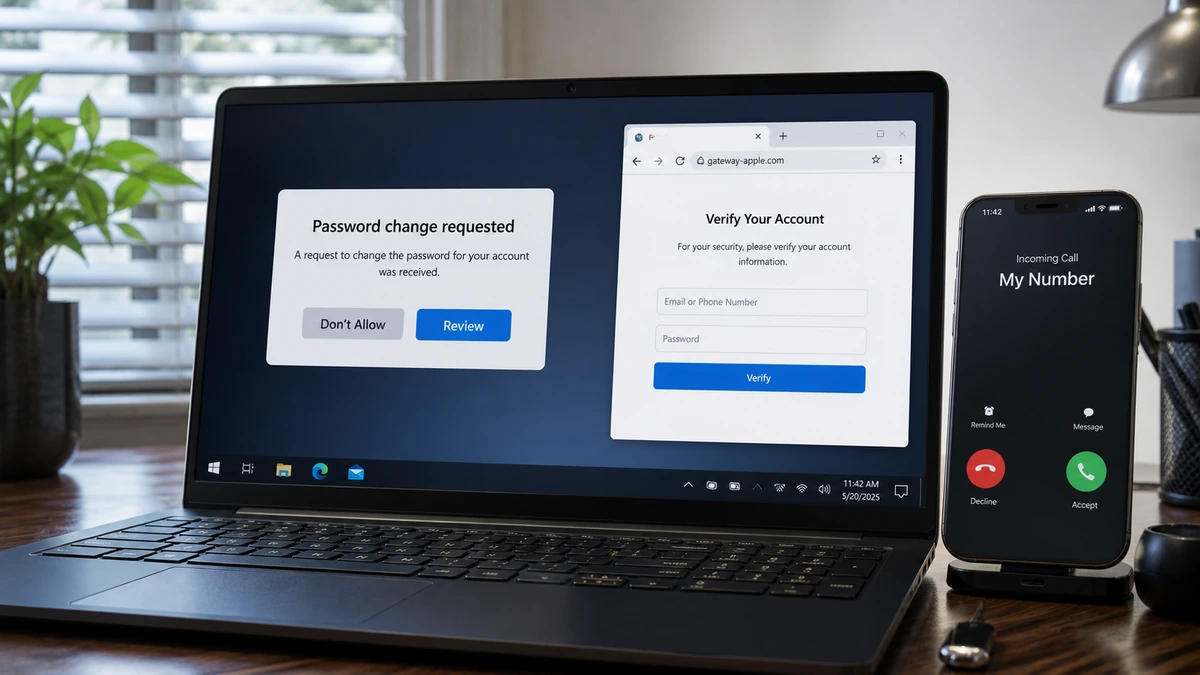
Your Mac shows a password-change alert you did not request. A moment later, the phone rings, and the caller ID displays the one number you would never expect to see: your own.
The caller knows Apple terminology and offers sensible security advice. That helpful beginning is what makes the final instruction so dangerous.
Overview
A real alert can be used to support a fake call
In the case examined here, a password-change notification appeared on a Mac and was declined. Seconds later, a call arrived displaying the recipient’s own telephone number.
An automated voice said an Apple password change had been requested and told the target to press 1 if it was unauthorized. A later call from an 888 number continued the supposed support process.
The account prompt may have been genuine. Anyone who knows the Apple Account email can try to start a recovery flow. That does not make the person who calls afterward an Apple employee.
Good security advice is used to build trust
The caller reportedly knew devices connected to the Apple Account. They discussed changing the password, checking two-factor authentication, and confirming a recovery contact.
Those are reasonable actions when you perform them independently. During the call, they worked as a confidence-building exercise and kept the target following the agent’s sequence.
Device names are not an employee badge. They can come from earlier account access, synced information, phishing, exposed records, or details the victim supplies without noticing.
The last step leads away from Apple
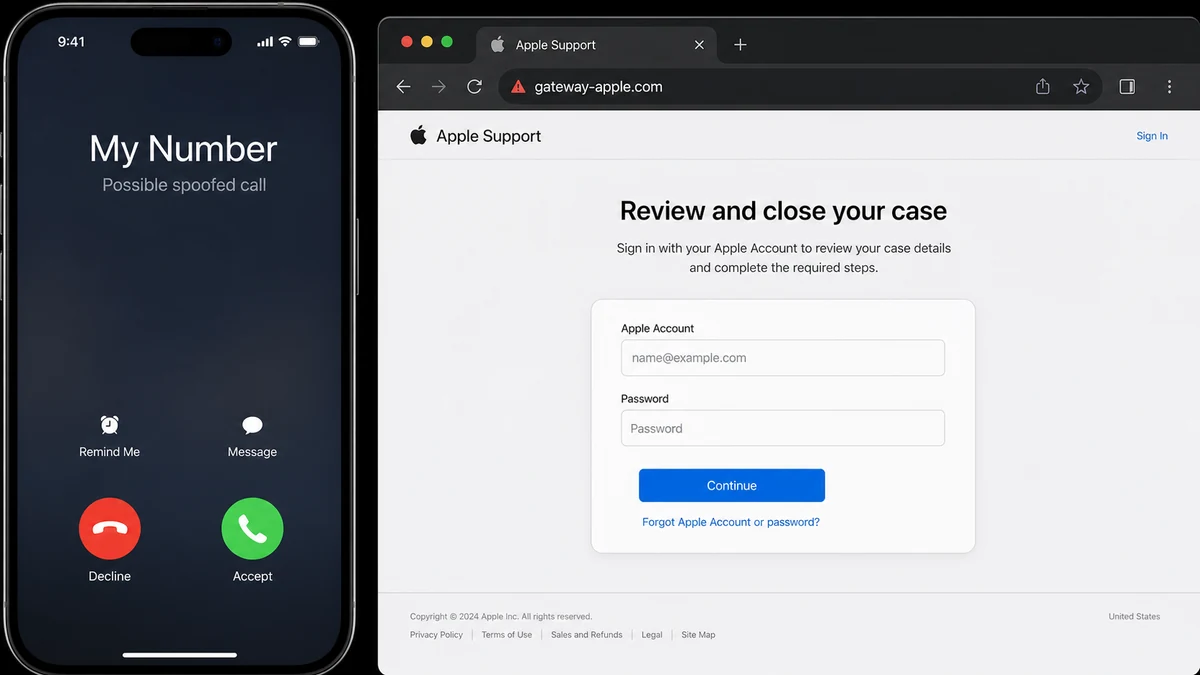
After the helpful checks, the caller directed the target to gateway-apple.com. The page was presented as a support portal where the user could sign in, review the case, and restore normal account access.
The target refused. That was the right move. gateway-apple.com is a separate registered domain, not an Apple subdomain. A legitimate Apple hostname ends in apple.com before the first slash.
The strongest warning signs are:
- An account alert immediately followed by a support call.
- Caller ID displaying the recipient’s own number.
- An automated prompt asking the person to engage.
- A caller who knows real device or account details.
- Useful security advice mixed with urgent instructions.
- A claim that the account is temporarily restricted.
- A domain ending in
-apple.cominstead ofapple.com. - A request to sign in while the caller stays connected.
How the Fake Apple Support Call Works
Step 1: An Apple Account alert creates a real emergency
The target receives a password-reset prompt, sign-in notification, or two-factor request. Because the alert appears on an Apple device, the risk feels immediate and legitimate.
The scammer does not need to fake that screen. Triggering a real recovery request can create it, then the caller pretends to be the team responding to the same incident.
Step 2: Caller ID is manipulated for shock value
Seeing your own number as the caller is unsettling. The operator can describe it as evidence that the phone, SIM, or Apple Account has been cloned.
Caller ID is not a secure identity certificate. The incoming call only claims to originate from that number, and providers can be abused to send false display information.
Step 3: The agent proves they know something
The caller names devices, email fragments, locations, or account features. Some details may come from earlier compromise, data brokers, breaches, or ordinary guesses.
Other facts are gathered during the call. “Your laptop” becomes “your MacBook Pro” after the target corrects the agent, but the conversation makes it feel as though the caller knew all along.
Step 4: Helpful instructions lower resistance
The agent recommends two-factor authentication, a stronger password, or a recovery contact. None of those topics is suspicious by itself.
The danger is who controls the timing. The caller can trigger prompts, watch for reactions, and describe every new notification as a normal part of the fix.
Step 5: A restriction keeps the victim on the line
The target is told the account cannot be fully restored until a case is reviewed or closed. Hanging up supposedly leaves devices, purchases, or personal data at risk.
Urgency prevents independent contact with Apple. A real support issue does not become worse because you pause and reopen it through the Support app or an official Apple page.
Step 6: The lookalike page collects the login
The fake portal copies Apple’s colors, typography, icons, and account language. Its address is designed for a quick glance while attention stays on the caller.
A password entered there can go directly to the operator. A second screen may request a live verification code while the scammer attempts the real login in parallel.
Step 7: Recovery details are changed
With the password and a current code, an attacker may add a trusted number, change recovery options, access iCloud data, review saved information, or target connected services.
The reported target stopped before entering credentials. That refusal mattered more than any convincing detail that came earlier.
Why Your Own Number Can Appear on Caller ID
Phone networks pass caller information between providers. That information can be falsified or transmitted through services that do not reliably verify the originating number.
Your phone matches the incoming number to the contact card stored on the device. If the number matches your own entry, the screen may label it “Me” or display your name.
The operator then supplies the frightening explanation: your phone was cloned, a new line was created, or criminals now control the account. The unusual display becomes a prop.
Blocking your own number does not solve the underlying problem. The important response is to end the call and treat related account prompts as potentially attacker-generated.
Do not press numbers on an unexpected robocall to reach “security.” Engagement confirms the line is active and moves you to the person trained to continue the script.
Start any real Apple contact through the Support app, device settings, or a page you reach from apple.com. Do not use a number from the call, notification, message, or search ad.
How to Read gateway-apple.com Correctly
Read the hostname from the end toward the left. In gateway-apple.com, the registered domain is the entire hyphenated name. Apple does not control it because “apple” appears before .com.
A real Apple subdomain places a dot before apple.com. For example, a service name can appear to the left of .apple.com. A hyphen does not create that relationship.
Ignore the path until the hostname is understood. Words such as /support, /case, or /secure-account can be placed after the slash on any domain.
A padlock is not proof of Apple ownership. It means the browser encrypted the connection to the domain shown in the address bar, including a fraudulent one.
The public registry record checked for this case showed that gateway-apple.com was registered in August 2026. A short history is not proof by itself, but it matters beside the Apple imitation and credential request.
Apple’s social-engineering guidance warns about fake support calls, spoofed caller ID, urgent account stories, and fraudulent sites that request credentials or verification codes.
What to Check in Your Apple Account
Use a trusted Apple device and open Settings. Review every device associated with the account and remove anything unfamiliar after changing the password.
Check trusted phone numbers, recovery contacts, email addresses, and security keys. An unknown recovery method can let an attacker return after the immediate password change.
Look at recent sign-in alerts, App Store purchases, Apple Pay activity, iCloud changes, and Family Sharing. Save screenshots of anything suspicious before removing it.
Reject two-factor prompts you did not initiate. Never read a verification code to a caller or enter it on a page reached through an unsolicited call.
Change the password through Settings or by typing account.apple.com yourself. If that password was reused, change it everywhere else too.
Secure the email address tied to the Apple Account. A compromised mailbox can intercept recovery messages and help an attacker regain access.
Apple’s compromised-account checklist includes unknown devices, unrequested codes, changed details, and purchases the owner does not recognize.
What a Fake Apple Portal May Collect
The first page usually asks for the Apple Account email and password. The data can be transmitted before the page displays an error, so a failed sign-in does not mean nothing was stolen.
A second page may request a two-factor code or ask the user to approve a sign-in on a trusted device. That live code can complete the attacker’s real login.
Billing questions can collect card details, security codes, addresses, and phone numbers. The fields may be described as proof that the victim owns the account.
A “case document” can request a driver’s license or passport. Those files create a separate identity-theft risk even if the Apple password is changed quickly.
The page may offer a configuration profile, diagnostic tool, browser extension, or remote-support application. Installing any of them can expand a phishing incident into device compromise.
If data was entered, write down the full sequence before memory fades. A password, code, card, document, and downloaded file each require different recovery steps.
Warn close contacts if the account controls iMessage, FaceTime, shared albums, or family services. An attacker may use the familiar Apple identity to send convincing requests to people who already trust it.
Do not revisit the domain to investigate it. A suspended page can return, redirect elsewhere, or deliver a different payload to repeat visitors.
Company, Address, and Fulfillment Checks
Apple is real, but the caller was not verified
The operator borrowed a real company name and discussed real account features. No independently started Apple Support session connected that person to Apple.
Professional language and correct device details cannot replace an official support route.
gateway-apple.com is a separate domain
The hostname is not part of apple.com. Its registry history and the reported credential request make it unsafe to treat as an Apple portal.
Public registration records do not identify the caller, so the technical warning should remain separate from unsupported attribution.
No verifiable Apple address supported the case
The process happened through telephone calls and a website. The target was not given an independently confirmed employee record, office, or case inside an official Apple channel.
A real Apple address copied into a footer would not prove that the page belongs to the company.
“Closing the case” meant surrendering credentials
The promised outcome was restoration of normal account access. The required action was signing in on the caller’s chosen domain.
Real recovery should be visible through Apple settings and official pages, not confirmed solely by the person who created the emergency.
What to Do if You Have Fallen Victim to This Scam
- End the call. Do not continue with the person who directed you to the site.
- Change the Apple Account password. Use Settings on a trusted device or type
account.apple.com. - Reject unrequested prompts. Never approve a sign-in or share a verification code.
- Review trusted devices and numbers. Remove unfamiliar entries and confirm every recovery method.
- Secure the connected email. Change its password, end unknown sessions, and inspect forwarding rules.
- Check purchases and payment methods. Report unauthorized activity through trusted Apple, bank, and card contacts.
- Run a full Malwarebytes scan. Do this if the site delivered a profile, extension, file, or remote tool.
- Use AdGuard as preventive support. It can block many phishing domains, but it cannot make a spoofed call trustworthy.
- Contact the mobile carrier. Add an account PIN and port lock if phone information or codes were exposed.
- Replace exposed cards or documents. Treat payment and identity data as separate from the Apple login.
- Report the incident. Preserve the URL, call logs, alerts, timestamps, and send appropriate evidence to Apple and the FTC.
- Ignore paid recovery contacts. Apple Account recovery should use official Apple channels, not a stranger offering access.
Frequently Asked Questions
Can Apple call from my own telephone number?
Treat that display as spoofed. Caller ID is not reliable proof, and an unsolicited support call should be ended.
Is gateway-apple.com an Apple website?
No. It is a separate registered domain, not a subdomain of apple.com. Do not enter credentials there.
What if the password-change alert was real?
An attacker can trigger a real alert. Decline it and secure the account independently without trusting the person who calls afterward.
Does knowing my device list prove the caller has access?
It raises concern but does not show how the information was obtained. Review devices, recovery details, and recent activity yourself.
What if I entered the password but not the code?
Change the password immediately everywhere it was reused. End sessions and never approve a later code request.
Does the browser padlock make the portal safe?
No. The padlock encrypts the connection to the displayed domain. It does not prove that Apple owns or approves that domain.
The Bottom Line
This fake Apple Support call is effective because it begins with an account alert, an impossible-looking caller ID, real device details, and advice that sounds responsible. The phishing page appears only after trust is built.
Never close an Apple case by signing into a domain supplied during an unexpected call. End the contact, open Apple settings or an official Apple page yourself, and recover the account there.

Join the discussion
0 commentsShare your experience or ask a question about this article.
Discussion
Start the conversation
Have a question or something useful to share? Add the first comment.