


An email says Chase has locked your access to online banking. It arrives with the familiar language of a security alert, not a sales offer.
Then it mentions a one-time code. Before deciding whether to follow the notice, it’s worth asking who would really be sending that code, and why.
Overview
The alert claims a lock on online access
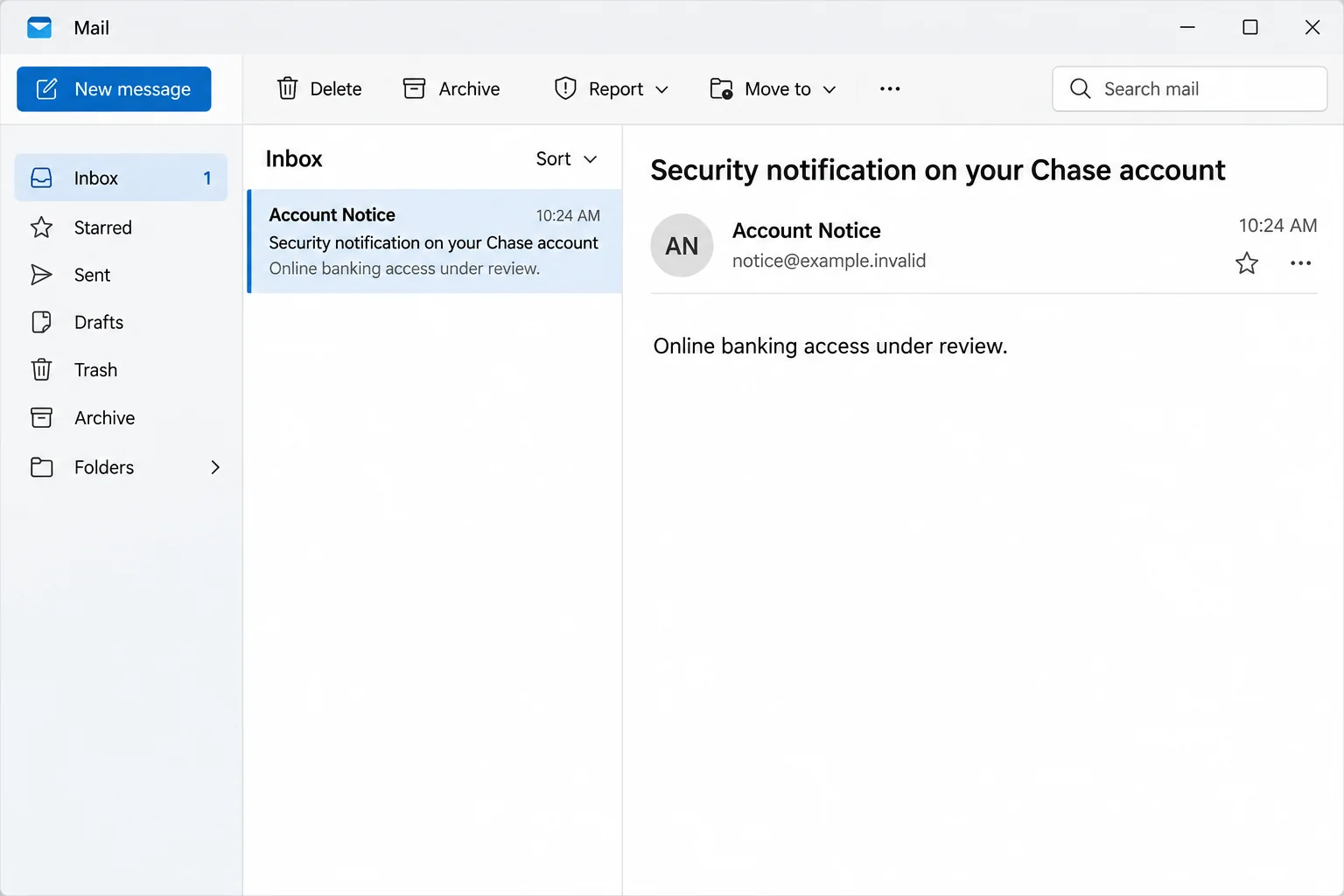
The Chase Bank Account Security Check email tells you your online banking access is under review. It offers a route back in through a link labeled View Details.
The copy says a login will lead to a one-time code sent to the mobile number on file. That may look reassuring if you’ve seen a real bank challenge before.
Loss of access to online banking is not the same as a frozen card or cancelled transfer. The email invites you to treat the claim as established before checking anything.
In the documented example, following the link took visitors away from Chase to an unrelated site with a counterfeit Chase sign-in screen.
The first confirmed request is for banking credentials
The imitation had fields for a username and password. The email mentioned a code, but the evidence doesn’t establish a second screen collecting that code.
That distinction matters if you’ve responded. Tell the bank exactly what you submitted rather than assuming every possible follow-up happened.
The message impersonates Chase. It isn’t a disclosure that the real bank was compromised, and it doesn’t show that your own account has already been accessed.
The image recreates the subject and lockout language without showing a bank form or representing an actual message from Chase.
If you have actual evidence of unauthorized activity, tell Chase separately. A false email and a genuine fraud problem can occur in the same week.
You can check the account without opening the alert
Use the app you already have or the bank address you normally use. If neither works, take your card or statement and call the number printed there.
Three details matter much more than the bank logo:
- Whether you can access your account independently of the email.
- Whether you recognize activity, payees, and changes to your account.
- Whether a bank representative you reached independently confirms a restriction.
Don’t use a phone number that a new caller reads out or that the message supplies. Dial the independently sourced number yourself rather than accepting a transfer.
An alert shouldn’t put you in charge of proving its own authenticity. If your online access is truly restricted, the bank has another way to help you verify that.
How the Chase Account Security Check Scam Works
Step 1: The email presents the problem as a protective action
The bank-lock story feels plausible if you’ve faced an extra check when signing in on a new device or using your card somewhere unusual.
Here, the sender uses that sensible precaution as the explanation for an urgent interruption. It puts the reader in a hurry to get back to ordinary banking.
The email may arrive on the day you were going to check a balance, pay a bill, or move money. That coincidence doesn’t authenticate it.
Step 2: The code story borrows a real security habit
Many people expect a code during a genuine sign-in. The mention of one can make the email seem safer, even though you haven’t independently started a session with Chase.
Receiving a real code after an unexpected message would not suddenly authenticate the page you have open. It may mean someone tried to sign in or approve an action.
Read the message accompanying any banking code. If it describes a transaction or login you didn’t initiate, pause and contact the bank through a known route.
Step 3: The link trades the real bank for a lookalike
The reported site used a counterfeit banking form. A bank logo, password field, and footer are not evidence that Chase is operating the page.
The hostname was unrelated to Chase. You don’t need to inspect or revisit the domain yourself to resolve an account question. Go to the real app or call.
A browser showing a padlock can mean the connection to the current site is encrypted. It doesn’t tell you that the current site is your bank.
Step 4: Entering a password changes the response
Someone who gets your banking credentials can try to sign in. Extra controls may block the attempt, but don’t wait to find out whether they do.
Report the password compromise even if no transfer is visible. The bank can check more than the list of posted charges you see in the app.
If a follow-up caller says they need you to move money to a safe location, hang up. Call the independently verified fraud number instead.
How to Check for a Genuine Chase Restriction
Open the account on your own terms
Open Chase Mobile from the home screen, not through the email. On a computer, use your saved bookmark or type the address you already know.
Check alerts, recent transactions, and the account you expected to use. A card feature can be unavailable even when online banking itself is working.
If the real app locks you out too, use its recovery option or call the number on your card. Don’t go back to the email.
Call the department that matches the problem
The Chase fraud reporting page lists different routes for personal checking, cards, and business accounts. Choose according to the affected product.
Give the representative the time and nature of the interaction. A report about a banking password needs different handling from a dispute about a single card purchase.
Tell them if someone convinced you to approve or send a payment yourself. That fact can change the bank’s response, and it isn’t a reason to delay reporting.
Use the bank’s reporting address only to report the message
Chase lists a route for suspicious email on its security guidance. Verify it there, not in a footer of the message you received.
Don’t attach account statements, screenshots with complete card details, or a freshly generated login code to a phishing report. The original message and timing are enough to start.
If the security line is busy, keep your place or use another official option. Don’t accept unsolicited callbacks claiming they can move you to the front of the queue.
What to Do if You Have Fallen Victim to This Scam
-
If you only received the alert, leave the link alone. Check your account through Chase Mobile. Send the suspicious message using the bank’s official reporting directions.
Don’t reply to challenge the sender. Use the report function in your email app as well, especially if other copies appear.
-
If you saw the fake login but didn’t enter anything, close it. Write down the time and what it displayed. Don’t open the page a second time for proof.
Reaching a lookalike page isn’t the same as giving it access. If something downloaded or you installed software, have that device assessed separately.
-
If you entered banking credentials, contact Chase immediately. Tell the bank which account was involved and whether you shared a code or approved a prompt.
Follow its reset instructions through a trusted device. If the password was reused, replace it elsewhere too, starting with email and services that help you recover the bank login.
-
Report funds movement or new account details promptly. Identify transactions, unfamiliar payees, notification changes, or contact information you didn’t authorize.
Save the case number, amounts, dates, and confirmed instructions. Don’t pay anyone who promises to reverse a transfer outside the bank’s official process.
-
Keep checking as the bank advises. Review new activity and ask whether additional restrictions, card replacement, or account changes are appropriate.
If you also supplied identity documents or a Social Security number, ask about identity-theft recovery. A new banking password doesn’t change information you’ve already disclosed.
Pay Attention to What Happened After the Email
An actual passcode is not an instruction to share it
If a code arrives unexpectedly, read what service and action it refers to. Don’t relay it to a person who says they’re proving you own the account.
Tell the fraud team if a code showed up immediately after you tried to use the counterfeit page. The time can help them compare the code with sign-in attempts.
The observed example doesn’t prove that every recipient gets a call or code. Treat those events as separate clues about your particular exposure.
A card lock isn’t a complete remedy for a stolen login
Chase may give you controls for an individual card. Use them if the bank advises it, but still tell Chase about the online banking credential.
A stolen account login can affect settings, payments, and other accounts visible through the same profile. The bank can tell you which controls it has applied.
Start from the affected service rather than assuming that deleting the phishing message, switching browsers, or replacing a card closes everything.
Help a family member without taking over their account
If someone asks for your help, show them how to reach the app or bank number they already use. Don’t have them send you their password or a verification code.
Encourage them to say exactly what they entered. Fear of being blamed can make a person leave out the one detail the bank needs.
If they can’t use the app or call independently, help them find a branch or another official support route. Don’t make a payment on their behalf to supposedly secure funds.
What to Have Ready When You Reach the Bank
Give the representative a short timeline
Start with the time you received the notice, then distinguish the time you opened it from the time you entered anything. Approximate times are useful if you label them honestly.
Describe the page without reciting your password. The representative can work from whether you entered a username, a password, a code, or approved a separate action.
If you use several Chase products, identify the one you meant to access. A personal credit card and a business checking account can have different teams and controls.
Write down the case number and how the bank will contact you. If a new caller mentions the same incident, verify through the number you originally used.
Separate attempted payments from completed ones
If you’re looking at unexpected activity, note whether the app lists it as pending or posted. Don’t assume an item is harmless merely because it’s not final.
If the fraud team asks about a transfer you made, explain whether a caller or page directed you to it. Let the bank classify the transaction.
Review recent contact and notification changes too. If your email address or phone number was modified, ask how to verify future bank communications while the issue is being handled.
Ask whether you should speak with other financial institutions if the same login information was reused. Don’t wait for that wider review to report the Chase exposure itself.
Keep your own record without circulating sensitive details
Save the original notice and any relevant bank messages in a secure place. A short private record is more useful than a public screenshot that exposes account information.
If you involve a trusted relative, share the case number and confirmed callback plan, not the account password. Nobody helping you needs to relay a one-time code.
If a payment is disputed, keep the bank’s written directions together with the messages. That will help you distinguish official next steps from informal offers to recover the money.
If the incident involves a joint account, explain which person’s login was exposed. Ask the bank whether the other account holder needs to check activity or take separate action.
Frequently Asked Questions
Did Chase send the “Account Security Check” email described here?
The documented message linked to a counterfeit page, not Chase. The bank can separately confirm whether a real restriction exists.
Does seeing the Chase logo make a sign-in page safe?
No. Logos can be copied. Sign in through Chase Mobile or your independently opened Chase account rather than judging the logo in the linked page.
Does the email prove somebody already signed in as me?
No. The claim about your access is the lure. If you entered credentials, ask the official fraud team to check your specific account activity.
What if I received a genuine one-time code?
Don’t share or enter it in the context of an unsolicited message. Tell Chase what action the code described and whether you authorized it.
Can I report a suspicious email even if I don’t bank with Chase?
Yes. Use the bank’s official suspicious-email reporting instructions. Don’t create an account or provide personal information to investigate the message.
Should I dispute a transaction if it doesn’t appear in the app yet?
Contact the bank promptly if you think your credentials or money are at risk. Ask how it wants you to report pending activity and keep the case number.
The Bottom Line
Don’t use the Chase Account Security Check email to unlock online banking. Verify access through the real app or by calling the independently confirmed fraud number.
If you entered your credentials or provided a code, contact Chase now. Give the bank what happened and when rather than waiting for a charge to post.

Join the discussion
0 commentsShare your experience or ask a question about this article.
Discussion
Start the conversation
Have a question or something useful to share? Add the first comment.