

If you are looking for a reliable online store to buy furniture or dresses, you might have come across Chatham Furniture Outlet, a website that claims to offer high-quality products at low prices. But is this website legit or a scam? In this blog post, we will examine the Chatham Furniture Outlet scam and how to spot it.
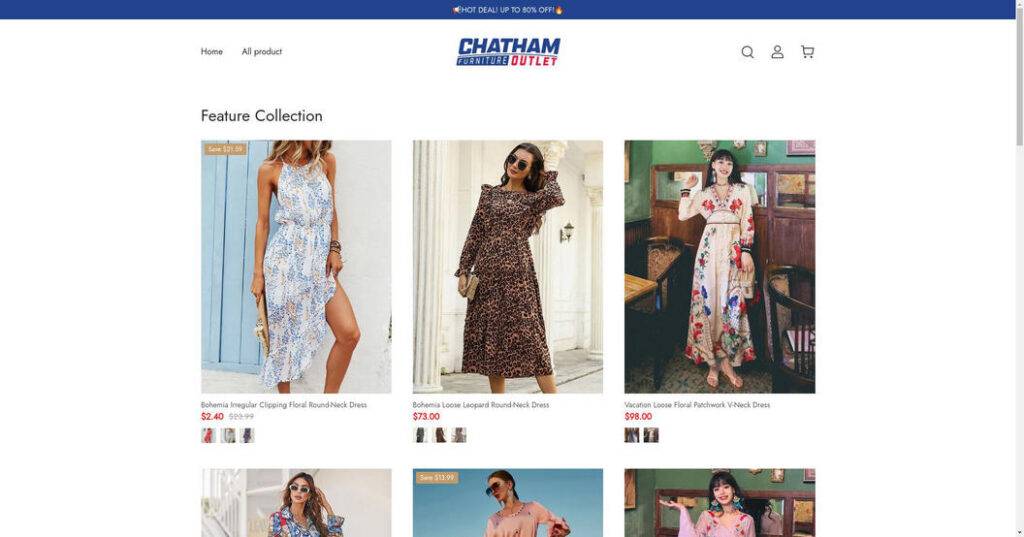
What is the Chatham Furniture Outlet scam?
The Chatham Furniture Outlet scam is a fraudulent scheme that involves creating fake online stores that use the name and logo of Chatham Furniture Outlet, a legitimate furniture retailer based in Chicago. These fake stores lure unsuspecting customers with attractive discounts and offers, but they either deliver counterfeit or inferior products, or nothing at all. The customers who fall victim to this scam end up losing their money and personal information, and have no recourse to get a refund or compensation.
How to spot the Chatham Furniture Outlet scam sites?
There are several red flags that can help you identify the Chatham Furniture Outlet scam sites and avoid them. Here are some of them:
- The domain name. The fake stores use domain names that are not related to Chatham Furniture Outlet, such as putoly.shop, nxznews.com, planetofreviews.com, etc. These domains are usually registered recently and expire soon, indicating that they are disposable and temporary.
- The contact information. The fake stores do not provide any physical address or phone number for customer service. They only have an email address that is either generic or does not match the domain name. They also do not respond to customer inquiries or complaints promptly or professionally.
- The product images and descriptions. The fake stores use stolen product images and descriptions from other websites, such as Amazon, Wayfair, etc. They do not have any original or unique content on their site. They also do not provide any details about the product specifications, dimensions, materials, warranty, etc.
- The customer reviews. The fake stores either have no customer reviews at all, or they have fake reviews that are copied from other sources or generated by bots. They do not have any verified purchase badges or ratings from third-party platforms, such as Trustpilot, BBB, etc.
- The payment methods. The fake stores only accept payment methods that are not secure or traceable, such as credit cards, PayPal friends and family, wire transfers, etc. They do not offer any guarantees or protections for the customers in case of disputes or issues.
- The security measures. The fake stores do not have any security measures to protect the customers’ personal and financial information. They do not have any SSL certificates, encryption protocols, privacy policies, terms and conditions, etc. They are vulnerable to hackers and identity thieves who can steal and misuse the customers’ data.
What should you do if you have shopped from Chatham Furniture Outlet Scam Site?
- Contact your bank or financial institution: If you have paid with your credit card or debit card, you should contact your bank or financial institution as soon as possible and request them to cancel the transaction and refund your money. You should also report the website as a fraudulent site and ask them to block any future charges from it.
- Change your passwords: If you have created an account on Chatham Furniture Outlet Scam Site or used the same password for other online accounts, you should change your passwords immediately. You should also enable two-factor authentication for your accounts if possible. This will prevent hackers from accessing your accounts and stealing your personal information.
- Beware of phishing emails: You might receive emails from Chatham Furniture Outlet Scam Site or other sources claiming to be related to your order or offering you discounts or refunds. These emails are likely to be phishing attempts that aim to trick you into clicking on malicious links or downloading attachments that can infect your device with malware or steal your information. You should delete these emails and do not open any links or attachments from them.
- Use a browser-based content blocker, like AdGuard : Content blockers help stop malicious ads, Trojans, phishing, and other undesirable content that an antivirus product alone may not stop.
- Scan your device for malware. If you suspect your device is infected with malware, you can run a scan with Malwarebytes Anti-Malware Free.
Conclusion
The Chatham Furniture Outlet scam is a serious threat that can cause financial and emotional harm to online shoppers. Therefore, it is important to be vigilant and cautious when shopping online for furniture or dresses. Always check the legitimacy and credibility of the website before placing an order. Do not trust websites that offer too-good-to-be-true deals or discounts. Do not share your personal or financial information with unknown or suspicious websites. Do not pay with unsecure or untraceable methods. If you have already shopped from a Chatham Furniture Outlet scam site, contact your bank or credit card company immediately and report the fraud. You can also file a complaint with the Federal Trade Commission (FTC) or the Internet Crime Complaint Center (IC3).

Join the discussion
0 commentsShare your experience or ask a question about this article.
Discussion
Start the conversation
Have a question or something useful to share? Add the first comment.