

If you are a Costco fan, you might be tempted by the online stores that claim to sell Costco Wholesale Planter Box products at unbelievable prices. However, you should be aware that these sites are part of a scam that aims to rip you off and steal your personal information. In this blog post, we will explain what the Costco Wholesale Planter Box scam is, how to spot the fake sites, and what to do if you have fallen victim to it.
What is the Costco Wholesale Planter Box scam?
The Costco Wholesale Planter Box scam is a fraudulent scheme that involves creating fake online stores that mimic the appearance and logo of Costco, a well-known wholesale retailer. These sites offer various products, such as apparel, furniture, garden products and tools, at extremely low prices, sometimes even hidden from the homepage or category pages. The goal of these sites is to lure unsuspecting customers into placing orders and providing their credit card details, only to receive nothing in return or counterfeit goods of poor quality. Moreover, these sites may also use the customers’ personal and financial information for identity theft or other malicious purposes.
How to spot the Costco Wholesale Planter Box scam sites?
There are several signs that can help you identify the fake Costco Wholesale Planter Box sites and avoid falling for their tricks. Some of these signs are:
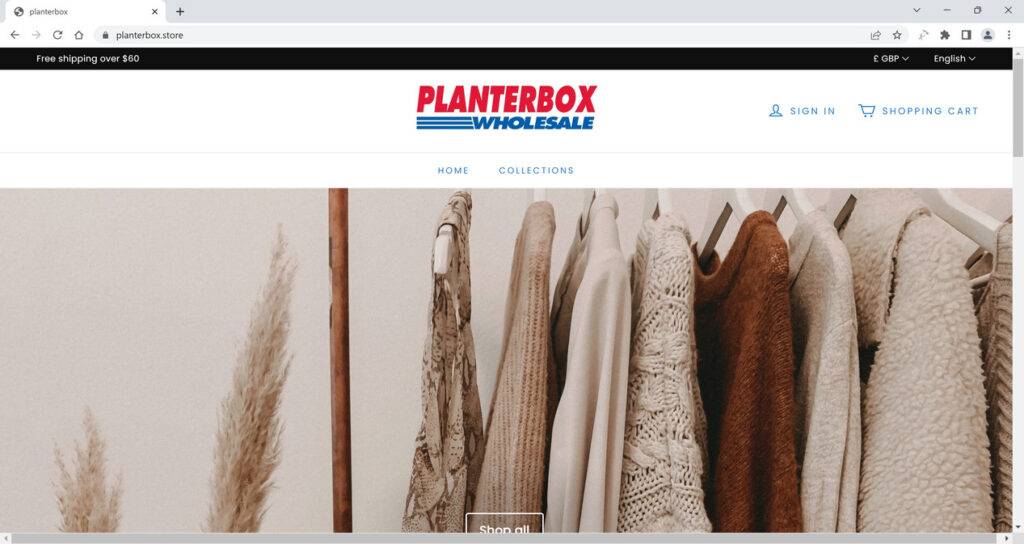
- The website design is simple and unprofessional. The site looks like it was created using a basic template, with no attention to detail or quality. The site’s logo is strikingly similar to Costco’s emblem, displaying the word “planterbox” in red letters and the word “WHOLESALE” beneath it. This imitation raises red flags for potential customers, as it seems to be an attempt to deceive users into thinking the site is affiliated with the well-established and trusted brand, Costco.
- The domain name is suspicious and does not match Costco’s official website. The fake sites use domain names that end with .store, such as planterbox.store, which is not a common extension for online stores. Moreover, the domain name does not include the word “Costco” or any variation of it, which is another indication that the site is not legitimate. A quick check on Whois reveals that the domain name was registered only recently, on April 6th, 2023, and is set to expire next year. This short lifespan is a significant red flag, as legitimate online stores typically register their domain names for longer periods.
- The prices are too good to be true. The fake sites offer products at unrealistically low prices, which are hard to believe. For example, a Multifunctional Luxury Tool Chest that costs $1,999 on Costco’s official website is sold for only $99 on planterbox.store. Some of these products are even hidden from users accessing the site on a computer, using JavaScript code to obscure them from view. As a result, mobile device users will see a product page, while computer users will encounter an empty page. This tactic is used to avoid detection and attract more customers who are looking for bargains.
- The customer reviews are nonexistent or negative. A search for customer reviews of planterbox.store yields no positive results, with some reviewers even claiming the site to be a scam. The absence of positive feedback and the use of hidden, heavily discounted products as bait for customers serves as a warning sign for potential buyers.
- The contact information is missing or fake. The fake sites do not provide any contact information, such as a phone number, an address, or an email address, except for a generic Gmail account: planterbox@gmail.com. This lack of transparency and professionalism shows that the site owners do not care about customer service or satisfaction and are only interested in collecting money and personal data.
What should you do if you have shopped from Costco Wholesale Planter Box Scam Site?
- Contact your bank or financial institution: If you have paid with your credit card or debit card, you should contact your bank or financial institution as soon as possible and request them to cancel the transaction and refund your money. You should also report the website as a fraudulent site and ask them to block any future charges from it.
- Change your passwords: If you have created an account on Costco Wholesale Planter Box Scam Site or used the same password for other online accounts, you should change your passwords immediately. You should also enable two-factor authentication for your accounts if possible. This will prevent hackers from accessing your accounts and stealing your personal information.
- Beware of phishing emails: You might receive emails from Costco Wholesale Planter Box Scam Site or other sources claiming to be related to your order or offering you discounts or refunds. These emails are likely to be phishing attempts that aim to trick you into clicking on malicious links or downloading attachments that can infect your device with malware or steal your information. You should delete these emails and do not open any links or attachments from them.
- Use a browser-based content blocker, like AdGuard : Content blockers help stop malicious ads, Trojans, phishing, and other undesirable content that an antivirus product alone may not stop.
- Scan your device for malware. If you suspect your device is infected with malware, you can run a scan with Malwarebytes Anti-Malware Free.
Conclusion
The Costco Wholesale Planter Box scam is a fraudulent scheme that involves creating fake online stores that mimic the appearance and logo of Costco and offer products at extremely low prices. These sites are designed to scam unsuspecting customers into placing orders and providing their credit card details, only to receive nothing in return or counterfeit goods of poor quality. Moreover, these sites may also use the customers’ personal and financial information for identity theft or other malicious purposes.
To avoid falling victim to this scam, you should always check the website design, domain name, prices, customer reviews, and contact information before making any purchase online. You should also be wary of any site that offers hidden products or requires you to complete surveys or share posts on social media to receive rewards or discounts.

Join the discussion
0 commentsShare your experience or ask a question about this article.
Discussion
Start the conversation
Have a question or something useful to share? Add the first comment.