

A Verizon billing notice says a recent payment could not be processed. The account number is partly hidden, service interruption is mentioned, and one button promises to fix the payment method before the phone line is affected.
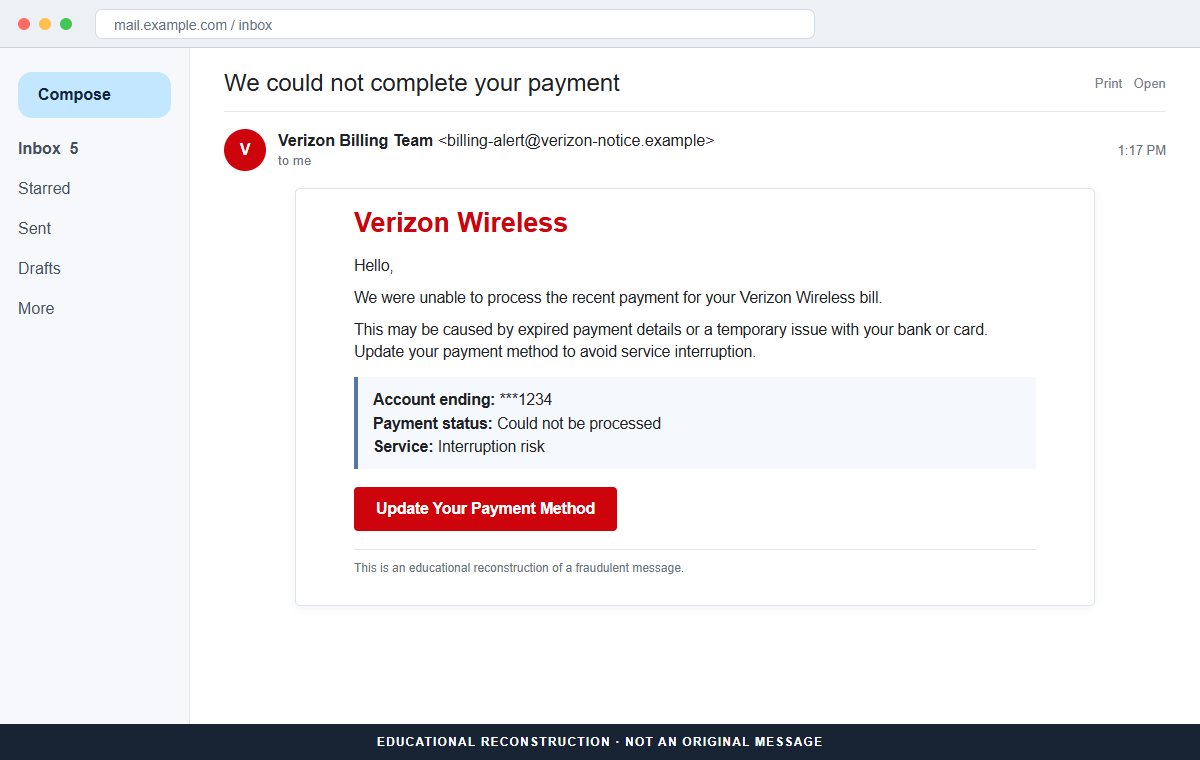
The Verizon Bill Payment Failed email scam is not an account notice from Verizon. It uses a believable billing problem to send recipients toward a fraudulent page that may request a My Verizon login, email credentials, or card and banking information.
The destination observed with this campaign was no longer active when it was examined. That does not make the email safe. Phishing links are frequently replaced, redirected, or configured to show different forms according to the visitor, device, location, or email address.
Verizon has no connection with the campaign. A copied logo, masked account ending, and familiar payment language cannot prove who sent the message or who receives the information entered after a click.
Overview
The message turns a routine payment problem into an emergency
The subject says We could not complete your payment. The body claims a recent Verizon Wireless bill could not be paid because the stored details expired or the bank or card encountered a temporary problem.
That explanation is broad enough to fit almost anyone. Cards expire, issuers decline charges, balances change, and automated payments occasionally fail, so the recipient may assume the message describes an ordinary account issue.
A masked account ending adds false familiarity
The email displays only a partly hidden account number. Masked digits are common in genuine billing messages, but attackers can invent them or copy details exposed in an earlier breach, data sale, invoice, or compromised mailbox.
A familiar last digit sequence can increase confidence, but it still does not authenticate the sender. The balance, due date, payment status, and account number must be checked inside My Verizon reached without the email link.
The update button can lead to several kinds of theft
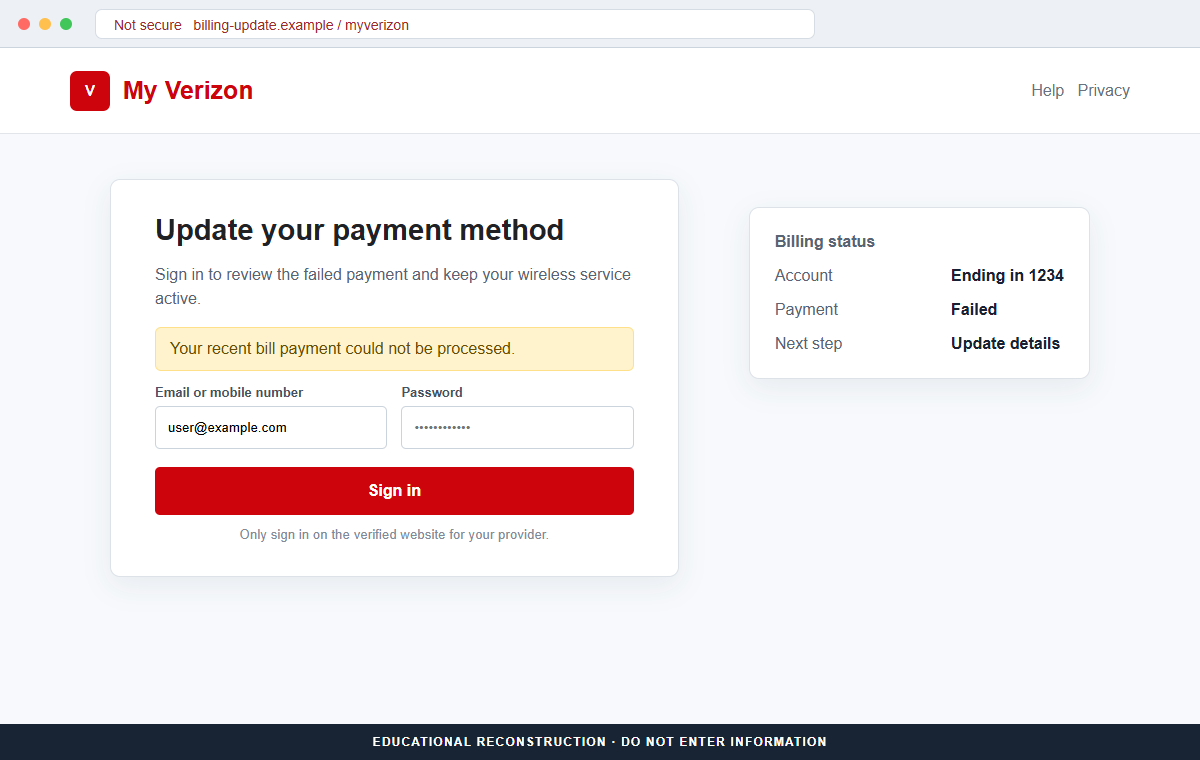
Update Your Payment Method appears to be the quickest way to prevent interruption. The linked page may imitate Verizon, present a generic email-provider login, or ask directly for card and bank details.
Any information submitted can be collected by the operator. Depending on the version, the loss may include a Verizon username and password, an email password, card number, expiration date, security code, billing address, telephone number, or account PIN.
- The subject says We could not complete your payment.
- Verizon Wireless branding is used without permission.
- A partly masked account number makes the notice appear personalized.
- Expired payment details or a temporary bank issue are blamed.
- Service interruption is used as the consequence of waiting.
- Update Your Payment Method is the main call to action.
- The destination may imitate Verizon or an email sign-in.
- The form can collect login credentials, card data, or both.
Why a Failed Verizon Payment Alert Is Easy to Believe
Wireless service is closely tied to work, family, banking codes, travel, and emergency communication. The possibility of losing it creates more pressure than an ordinary marketing message, especially when the recipient depends on the same number for account recovery.
Automatic payments also run quietly in the background. A customer may not remember the card on file, its expiration date, or the exact billing day. The scam uses that uncertainty to make an unexpected failure seem plausible.
The message does not need to know whether the recipient is a Verizon customer. Large campaigns send the same lure widely, knowing that a portion of recipients will use the brand and some will currently have a payment due.
A masked account number imitates normal privacy practice while avoiding verifiable detail. The email can look personal without revealing the full account, current balance, real due date, plan, device, or payment method.
Finally, the button offers a complete solution in one click. That convenience discourages the safer route, which is to close the message, open My Verizon independently, and inspect the billing page where the real status is already recorded.
What Verizon's Official Phishing Guidance Establishes
Verizon explains that phishing messages impersonate trusted organizations to obtain usernames, passwords, card details, bank information, and other personal data. Urgency, unusual sender addresses, and requests for sensitive information are major warning signs.
The company says it will not ask customers to provide personal or account information through an unsolicited email or text. A message that turns a billing warning into a login or payment-data form should therefore be treated as suspicious.
Verizon directs customers to use the My Verizon app for secure account access and communications. Opening the app or typing verizon.com independently separates the account check from the sender's chosen link.
Suspicious emails claiming to be from Verizon can be forwarded to phishing@verizon.com. Verizon also advises people who submitted information to contact the company and any financial institution or service that may have been affected.
The campaign's fraudulent destination was inactive during later examination, so its exact form could not be preserved. The email's purpose and unsafe redirection remain clear, while the requested fields can vary across deployments and future copies.
How the Verizon Bill Payment Failed Email Scam Works
Step 1: A fake billing notice reaches the inbox
The email uses Verizon colors, a familiar brand name, and a transactional subject instead of an obvious prize or promotion. It looks like a message generated after an automatic payment attempt.
The visible sender name may say Verizon Billing Team or Verizon Wireless even when the underlying address belongs to an unrelated domain. Display names are editable labels, not proof of ownership.
Step 2: A believable reason explains the failed charge
The message says the payment details may have expired or the bank or card may be experiencing a temporary issue. Both explanations sound reasonable and require no specific knowledge about the account.
The scam does not need to know why a real payment might fail. It only needs the recipient to recognize one possible explanation and continue before comparing the claim with the official billing record.
Step 3: Service interruption creates pressure
The notice warns that wireless service may be interrupted if the payment method is not updated. A recipient can imagine missed calls, lost mobile data, and difficulty receiving security codes.
A real balance still exists inside My Verizon and can be handled there. The threat of interruption does not make the email's button or destination trustworthy.
Step 4: The update button leaves the trusted account route
Update Your Payment Method is framed as a direct billing shortcut. The link can pass through a tracking service, compromised website, newly registered domain, or cloud-hosted page before the form appears.
The final address matters more than the logo displayed on the page. HTTPS only encrypts the connection to that address; it does not certify that Verizon owns or approves the site.
Step 5: A convincing form asks for sensitive information
One version may copy the My Verizon sign-in and request an email address, mobile number, password, or account PIN. Another may imitate the victim's email provider to capture the mailbox credential first.
A payment-focused version can request a card number, expiration date, security code, billing address, telephone number, and bank details. The fields may change because phishing kits are reusable and remotely configured.
Step 6: Submitted information is collected
When the visitor presses Sign In, Continue, or Update, the form can send the values to the campaign operator immediately. A loading screen or error after submission does not undo the exposure.
The page may ask for the password again, claim the card was declined, or request a second payment method. Each additional prompt gives the attacker another credential or financial account to test.
Step 7: The data supports account and payment fraud
A captured Verizon login may expose billing history, saved addresses, device information, plan controls, and account-management options. An email password can enable resets for Verizon and many unrelated services.
Card data may be used for unauthorized purchases or sold to other criminals. Personal details collected beside it can help pass identity checks, create more convincing calls, or target the victim with a follow-up recovery scam.
Company and Checkout Checks
Open My Verizon without the email link
Close the message and launch the saved My Verizon app, use a trusted bookmark, or type verizon.com yourself. Review the billing page, recent payments, amount due, due date, and saved payment method.
If the account shows no failure, the email's story is false. If a payment really failed, correct it inside the authenticated account rather than returning to the message.
Compare the sender and final destination
Expand the From details and inspect the address after the at sign. Preview the button destination without opening it, then compare both domains with Verizon's official website.
A domain containing words such as verizon, billing, wireless, secure, or payment can still belong to someone else. Spelling around the final registered domain determines ownership.
Check the billing details for consistency
A genuine account alert should agree with the real balance, account ending, billing date, and recent transaction. Vague or mismatched information is a reason to stop, not a reason to supply more data.
Do not call a number printed in the suspicious email. Use the My Verizon app, an official statement, or Verizon's independently located contact page.
Forward the message to Verizon
Verizon asks customers to forward suspicious emails to phishing@verizon.com. Preserve the original message and headers so investigators can examine its sender and links.
Use the email provider's Report Phishing control as well. If card or bank information was entered, contact the issuer through the number on the physical card or an official banking app.
Warning Signs to Check Before You Act
- An unexpected email says a Verizon payment could not be completed.
- The sender address does not use a verified Verizon domain.
- A masked account ending is the only personalized detail.
- The message gives no verifiable balance or billing history.
- Expired details and bank problems are offered as vague explanations.
- Wireless service interruption is used to create urgency.
- The recipient is pushed to one Update Your Payment Method button.
- The link passes through an unfamiliar or unrelated domain.
- A copied My Verizon page asks for a password or account PIN.
- A generic email login appears during a Verizon billing task.
- Card or bank details are requested outside My Verizon.
- The claimed failure does not appear in the independently opened account.
A failed payment can be real, but an email cannot choose the safe place to fix it. The decisive check happens inside My Verizon opened independently. If the account and message disagree, trust the account and report the email.
What to Do if You Have Fallen Victim to This Scam
- Change the exposed password immediately. Open the My Verizon app or verizon.com opened independently through a saved bookmark or its official application, not through the Verizon failed-payment message. Create a strong, unique password and replace it anywhere the same or a similar password was reused.
- Enable stronger multi-factor authentication. Prefer a passkey, hardware security key, or authenticator app when available. Review the methods already registered and remove telephone numbers, recovery addresses, app passwords, or security keys you do not recognize.
- Revoke active sessions and connected applications. Sign out other sessions and inspect OAuth access, browser sessions, mail clients, and third-party applications. A criminal may retain access through an issued token even after the primary password has changed.
- Inspect mailbox rules and forwarding settings. Remove unknown forwarding addresses, delegates, filters, automatic replies, and rules that hide security messages. Review sent mail, trash, deleted messages, and account-recovery notifications for activity you did not initiate.
- Secure accounts that use the mailbox for recovery. Prioritize banking, payment services, cloud storage, shopping, social media, workplace tools, and password managers. Change credentials wherever the compromised inbox could receive a reset link or approval request.
- Protect the service impersonated by the email. Review billing activity, saved payment methods, account profile, devices, and wireless-service changes through its official account and contact support through a verified channel. Remove unknown addresses, payment methods, documents, devices, or profile changes associated with the scam's story.
- Scan the device if anything was downloaded. Run a complete scan with Malwarebytes or another trusted security product if the page delivered a file, browser extension, or remote-support tool. Remove unfamiliar software and install operating-system and browser updates.
- Add a blocking layer for future attempts. AdGuard or another reputable DNS and content blocker can stop some known phishing pages and malicious advertising from loading. Continue checking addresses because new campaign domains may appear before blocklists update.
- Report the phishing message. Use the mail provider's Report Phishing control and notify Verizon at phishing@verizon.com, your email provider, and your card issuer if payment data was submitted. Preserve the full message and headers first, especially if multiple employees or customers received the same lure.
- Warn contacts if the account was misused. Contact colleagues, customers, friends, and vendors through another channel. Ask them to ignore recent links, password requests, file shares, shipment notices, or payment instructions sent during the possible compromise window.
- Reject unsolicited recovery offers. A caller or email sender who promises to recover the account or lost money for an advance payment may be extending the fraud. Work only with the provider, financial institution, employer, police, or a verified incident-response professional.
Is Your Device Infected? Run a Free Malware Scan
Slow performance, constant pop-ups, or strange behavior? These are classic signs of a malware infection. The fastest way to find out is to scan your device with Malwarebytes Free — one of the most trusted malware removal tools available.
The free version detects and removes the most common threats, including:
- Adware — the cause of those annoying pop-ups
- Browser hijackers — unwanted redirects and changed homepages
- Trojans and spyware — hidden programs stealing your data
- Potentially unwanted programs (PUPs) — software you never asked for
👉 Select your device below — Windows, Mac, or Android — then follow the simple steps to download Malwarebytes, scan your system, and remove any threats it finds. The scan usually takes 5 to 20 minutes.
Run a Malware Scan with Malwarebytes for Windows
Malwarebytes is one of the most popular and trusted anti-malware tools for Windows — and it’s completely free for removing infections. It catches threats that many antivirus programs miss, including adware, browser hijackers, and trojans. Follow the steps below to scan and clean your PC in just a few minutes.
Download Malwarebytes
Click the button below to download the latest version of Malwarebytes for Windows from the official source. The free version is all you need — it will scan your computer and remove adware, browser hijackers, and other malicious software at no cost.
Download MalwarebytesOfficial installer for Windows 11 and 10. Your download starts right away.Want real-time protection? See Malwarebytes Premium Malwarebytes Free for WindowsScans and removes malware at no cost
-
Install Malwarebytes
When the download finishes, open your Downloads folder and double-click the MBSetup file. If Windows shows a User Account Control pop-up, click “Yes” to allow the installation.

Follow the On-Screen Prompts to Install Malwarebytes
The setup wizard will walk you through a few quick screens:
-
Choose where you’re installing the program — “Personal Computer” or “Work Computer” — then click Next.

-
Malwarebytes will now install on your device. This usually takes under a minute.

-
When installation is complete, the “Welcome to Malwarebytes” screen will open automatically.

-
On the final screen, click Open Malwarebytes to launch the program.

-
Enable “Scan for Rootkits”
Before scanning, turn on rootkit detection so Malwarebytes can find even the most hidden threats. Click the Settings gear icon on the left side of the screen.

In the settings menu, find “Scan for rootkits” and click the toggle so it turns blue.

Done? Click “Dashboard” in the left pane to return to the main screen.
Start the Scan
Click the blue Scan button. Malwarebytes will automatically update its virus database and start checking your computer for malware.

-
Wait for the Scan to Finish
The scan checks your entire system for browser hijackers and other malicious programs, so it can take 5 to 20 minutes depending on your computer. Feel free to do something else — just check back occasionally to see the progress.

-
Quarantine the Detected Threats
When the scan is done, you’ll see a list of everything Malwarebytes found — malware, adware, and potentially unwanted programs. Click the “Quarantine” button to remove all of them at once.

Malwarebytes will now remove the malicious files and registry entries and move them safely into quarantine.

-
Restart Your Computer
Some threats can only be fully removed after a reboot. If Malwarebytes asks you to restart, click Yes. Once you’re logged back in, Malwarebytes has finished removing the threats it found.

That’s it — your Windows PC is now clean of trojans, adware, and other malware, and should be back to running smoothly.
If you are still having problems with your computer after completing these instructions, then please follow one of the steps:
- Run a computer scan with ESET Online Scanner
- Ask for help in our Windows Malware Removal Help & Support forum.
Run a Malware Scan with Malwarebytes for Mac
Malwarebytes for Mac is a free on-demand scanner that removes the malware other security software tends to miss — adware, browser hijackers, and unwanted programs included. Cleaning an infected Mac with Malwarebytes has always been completely free, and it’s our go-to recommendation. Follow the steps below to scan and clean your Mac in just a few minutes.
-
Download Malwarebytes for Mac
Click the button below to download the latest version of Malwarebytes for Mac.
Download MalwarebytesOfficial installer for macOS. Your download starts right away.Want real-time protection? See Malwarebytes PremiumMalwarebytes Free for MacScans and removes malware at no cost -
Open the Malwarebytes setup file
When the download finishes, open your Downloads folder and double-click the setup file to begin the installation.

-
Follow the On-Screen Prompts to Install Malwarebytes
The Malwarebytes for Mac Installer will guide you through a few quick screens. Click “Continue” and keep following the prompts until the installation completes.



When the installation is complete, Malwarebytes opens to the Welcome to Malwarebytes screen. Click “Get started“.
-
Select “Personal Computer” or “Work Computer”
Malwarebytes will ask what type of computer you’re installing it on. Click either Personal Computer or Work Computer, whichever applies.

-
Start the Scan
Click the “Scan” button. Malwarebytes will automatically update its detection database and begin checking your Mac for malware.

-
Wait for the Scan to Finish
Malwarebytes will scan your Mac for adware, browser hijackers, and other malicious programs. This can take a few minutes, so feel free to do something else — just check back occasionally to see the progress.

-
Quarantine the Detected Threats
When the scan is done, you’ll see a list of everything Malwarebytes found. Click the “Quarantine” button to remove all the threats at once.

-
Restart Your Mac
Malwarebytes will now remove all the malicious files it found. Some threats can only be fully removed after a reboot — if Malwarebytes asks you to restart, allow it. Once you’re logged back in, your Mac is clean.

That’s it — your Mac is now free of adware, rogue browser extensions, and other potentially harmful software.
If you are still experiencing problems while trying to remove a malicious program from your computer, please ask for help in our Mac Malware Removal Help & Support forum.
Run a Malware Scan with Malwarebytes for Android
Malwarebytes for Android automatically detects and removes dangerous threats like malware and ransomware so you don’t have to worry about your most-used device being compromised. Aggressive detection of adware and potentially unwanted programs keeps your Android phone or tablet running smooth.
-
Download Malwarebytes for Android.
You can download Malwarebytes for Android by clicking the link below.
Get Malwarebytes for AndroidOpens Google Play in a new tab.Want real-time protection? See Malwarebytes Premium for AndroidMalwarebytes for AndroidScans your phone and removes malware at no cost -
Install Malwarebytes for Android on your phone.
In the Google Play Store, tap “Install” to install Malwarebytes for Android on your device.

When the installation process has finished, tap “Open” to begin using Malwarebytes for Android. You can also open Malwarebytes by tapping on its icon in your phone menu or home screen.

-
Follow the on-screen prompts to complete the setup process
When Malwarebytes will open, you will see the Malwarebytes Setup Wizard which will guide you through a series of permissions and other setup options.
This is the first of two screens that explain the difference between the Premium and Free versions. Swipe this screen to continue.
Tap on “Got it” to proceed to the next step.
Malwarebytes for Android will now ask for a set of permissions that are required to scan your device and protect it from malware. Tap on “Give permission” to continue.
Tap on “Allow” to permit Malwarebytes to access the files on your phone.
-
Update database and run a scan with Malwarebytes for Android
You will now be prompted to update the Malwarebytes database and run a full system scan.

Click on “Update database” to update the Malwarebytes for Android definitions to the latest version, then click on “Run full scan” to perform a system scan.

-
Wait for the Malwarebytes scan to complete.
Malwarebytes will now start scanning your phone for adware and other malicious apps. This process can take a few minutes, so we suggest you do something else and periodically check on the status of the scan to see when it is finished.

-
Click on “Remove Selected”.
When the scan has been completed, you will be presented with a screen showing the malware infections that Malwarebytes for Android has detected. To remove the malicious apps that Malwarebytes has found, tap on the “Remove Selected” button.

-
Restart your phone.
Malwarebytes for Android will now remove all the malicious apps that it has found. To complete the malware removal process, Malwarebytes may ask you to restart your device.
That’s it — your Android phone is now clean — no more malicious apps, adware, or browser redirects.
If you are still having problems with your phone after completing these instructions, then please follow one of the steps:
- Restore your phone to factory settings by going to Settings > General management > Reset > Factory data reset.
- Ask for help in our Mobile Malware Removal Help & Support forum.
Stay Protected: Block Ads and Malicious Sites
Now that your device is clean, keep it that way. Most infections start with a malicious ad or a fake download button — so blocking them at the source is your best defense.
We recommend AdGuard, which blocks malicious ads, phishing pages, and dangerous redirects before they can reach you.
👉 Download AdGuard and browse safely
Frequently Asked Questions
Is the Verizon payment-failed email genuine?
No. The documented campaign impersonates Verizon, claims a bill payment could not be processed, and directs recipients toward a fraudulent page that can steal credentials or financial information.
Can Verizon really interrupt service after a failed payment?
Billing problems can affect an account, but the status and available payment options should be checked inside My Verizon or through official support, never through an unexpected email link.
Why does the email show part of an account number?
Masked digits imitate legitimate billing notices. They may be invented, copied from exposed data, or coincidentally familiar, so they do not authenticate the sender.
What information can the fake page steal?
Depending on the version, it may collect a Verizon login, email password, account PIN, card number, expiration date, security code, billing address, telephone number, or bank details.
What if I clicked but entered nothing?
Close the page, report the email, and review browser downloads. If no information was submitted and nothing was installed, direct account or card theft is less likely.
Where should I report a fake Verizon email?
Forward it to phishing@verizon.com and use your mail provider's phishing control. If you submitted payment information, also contact the card issuer or bank immediately.
The Bottom Line
The Verizon Bill Payment Failed email scam turns an ordinary billing possibility into a route for credential and card theft. Its masked account ending and service-interruption warning are persuasion tools, not proof of a real account event.
Open My Verizon independently and compare the balance, recent payments, and saved method. Never enter a password, PIN, card number, or bank information on a page reached through an unsolicited billing alert.
If information was submitted, secure the Verizon and email accounts, revoke sessions, contact the financial institution, monitor transactions, and forward the original message to phishing@verizon.com.

Join the discussion
0 commentsShare your experience or ask a question about this article.
Discussion
Start the conversation
Have a question or something useful to share? Add the first comment.