

A Cloudbeds-branded email presents a confirmed reservation, a guest name and a $720 payment. The button appears to let hotel staff review the card authorization before arrival.
The reservation does not exist. The message is phishing designed to capture payment information, property-management credentials or the recipient’s email password.
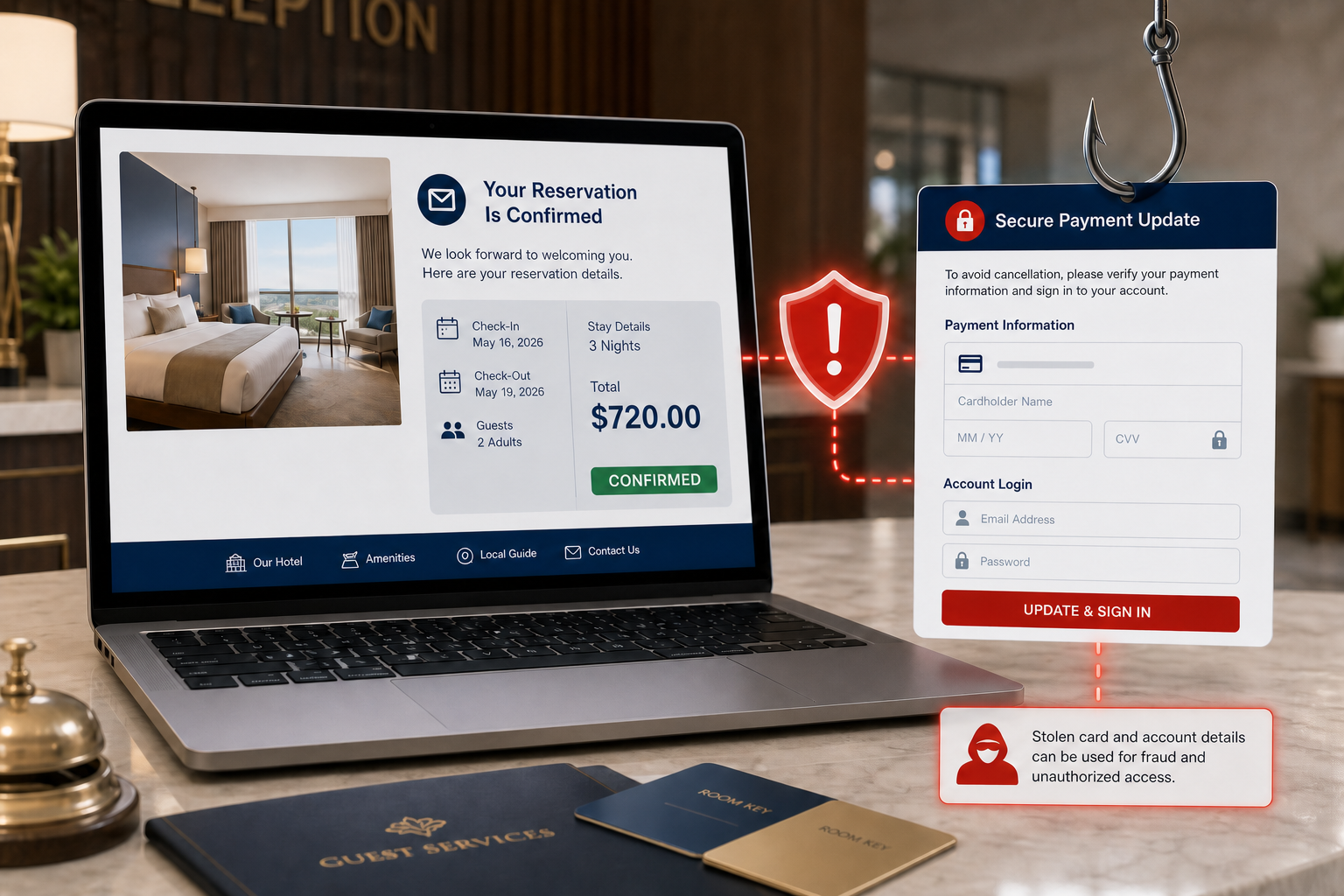
Cloudbeds Payment Details Email Scam Overview
The email uses the subject Cloudbeds Payment Details and copies the appearance of a reservation notification. It lists a partially masked guest name, a payment reference such as CB-72298729, an arrival time, three nights, two adults and a total of $720.00. A green or reassuring Confirmed status makes the transaction appear ready for routine processing.
This detail is aimed at hotel owners, front-desk staff, reservation teams and property managers who handle unfamiliar guest names every day. Unlike a consumer who would immediately know no trip was booked, a hospitality employee may believe the message belongs to another shift, a new channel or a reservation that has not yet synchronized with the property’s normal dashboard.
The button labeled View Payment Details & Confirm opens a fraudulent website rather than the property account inside the real Cloudbeds platform. The page may imitate a Cloudbeds login, a card authorization form or the recipient’s email provider. It can ask for a username and password, card number, expiration date, security code, billing address or several of these items in sequence.
Submitting the form gives the data to the attackers. Stolen Cloudbeds or email credentials could expose guest records, reservation messages and operational information. Payment-card details can be used for unauthorized transactions or sold. If the criminals gain access to a business mailbox, they can impersonate the property, contact guests and send additional payment requests from a trusted account.
The email’s polished layout does not prove that it originated with Cloudbeds. Criminals can copy logos, colors and reservation terminology in minutes. Reference numbers and guest names can be generated or taken from previous data leaks. The decisive checks are whether the sender and destination use official domains and whether the reservation exists inside the independently opened property-management account.
Cloudbeds is a legitimate hospitality platform and has no connection to this attack. The message should be treated as confirmed phishing. Staff should avoid the button, open the real dashboard through a bookmark and search for the reservation reference there. A transaction that exists only inside an unsolicited email must not be trusted.
How the Cloudbeds Payment Details Scam Works
Step 1: The email targets reservation workflows
The message arrives as a routine payment notification rather than an obvious prize or threat. This makes it well suited to busy hospitality environments.
A subject that names Cloudbeds can bypass skepticism when the property actually uses the service or recognizes it as an industry brand.
Step 2: A fabricated booking creates a believable task
Guest details, a payment reference, arrival time, length of stay and $720 total make the booking look complete.
The Confirmed label lowers suspicion while the instruction to confirm payment still creates a reason to click.
Step 3: The button leaves the official platform
View Payment Details & Confirm points to a domain that is not part of the real Cloudbeds account environment.
Redirects and cloud-hosted pages may conceal the final phishing destination from simple mail filters.
Step 4: The fake page asks for valuable information
The destination can imitate a property login, email sign-in or credit-card authorization page depending on the campaign version.
A professional design and HTTPS padlock cannot establish that Cloudbeds operates the site.
Step 5: Credentials or card data reach the criminals
Every field submitted on the fraudulent page can be recorded. The victim may be redirected or shown a fake processing error afterward.
Repeated prompts may collect both business credentials and personal payment details.
Step 6: The stolen access enables follow-up fraud
Attackers can attempt account takeover, card fraud, guest impersonation or phishing from the compromised property mailbox.
Because hotel communications often involve payments and travel changes, messages from a real account can be unusually convincing.
Red Flags in the Fake Cloudbeds Reservation
- The reservation does not appear in the property dashboard opened independently.
- The sender address or button destination is not an official Cloudbeds domain.
- A confirmed payment inexplicably requires confirmation through an email link.
- The greeting is generic and the property name or internal booking context is missing.
- The destination asks for an email password or full card details outside the normal workflow.
- The guest and reference data cannot be matched to an internal record.
- The message creates a new task without a verifiable booking source.
What to Do If You Submitted Card or Login Details
- Close the page and open the real platform directly. Do not return through the email link.
- Change exposed business and email passwords. Use unique replacements and revoke active sessions.
- Contact the card issuer immediately. If card details were entered, request monitoring, a block or replacement as advised by the issuer.
- Notify the property manager and IT team. Preserve the email and fraudulent URL for investigation.
- Inspect reservations and account users. Look for modified bookings, added accounts, exports or unfamiliar settings.
- Review the mailbox. Remove unknown forwarding rules, delegates and recovery methods.
- Warn affected guests if necessary. A compromised property account may be used for targeted payment requests.
- Monitor financial activity. Report unauthorized charges or changes without delay.
How Hospitality Teams Can Reduce This Risk
Require staff to open reservations from the bookmarked property dashboard instead of email buttons. A reference number in a message should be searched inside the real system before any payment or login action occurs.
Use multi-factor authentication, unique staff accounts and the minimum permissions required for each role. Shared mailbox or platform passwords make it harder to determine whose access was abused and allow one stolen secret to affect an entire property.
Create a clear escalation path for unusual payment messages. Front-desk and reservation staff should know exactly whom to call when a booking cannot be matched, without relying on contact details supplied by the suspicious email.
Why Hospitality Payment Lures Can Be So Convincing
Hotels routinely receive reservations from people they have never contacted before, often through several booking channels. An unknown guest name therefore does not automatically look suspicious. Attackers take advantage of that reality by supplying the kind of data staff expect to see: arrival time, stay length, number of guests and a payment reference.
Busy teams also work across shifts. A recipient may assume that another employee created the booking or that a delayed integration has not yet displayed it. The confirmed status lowers concern, while the request to review payment introduces just enough uncertainty to trigger action.
A strong verification rule prevents the email from controlling the workflow. Search the reference in the official reservation system, then contact a supervisor or payment processor through a known channel if it cannot be found. Never move card data or staff credentials into a page supplied by an unsolicited message.
Frequently Asked Questions
Does a real guest reservation ever arrive by email?
Yes, but the record should also exist in the property’s official reservation system. Open that system independently and confirm the reference before handling payment details.
Is Cloudbeds responsible for this email?
No. The legitimate company’s name and visual identity are being impersonated. The fraudulent sender and website are controlled by criminals.
The Bottom Line
The Cloudbeds Payment Details email is confirmed phishing built around a fabricated $720 reservation. Its guest data, reference number and Confirmed label are designed to make a fraudulent payment button feel routine.
Do not use the button. Verify the booking inside the real property dashboard, and if any credentials or card data were entered, secure the accounts, contact the issuer and alert the organization immediately.
Here are signs that this email is a scam, even though it looks like it comes from a company you know — and even uses the company’s logo in the header:- A generic greeting is used in place of a name (eg. “customer,” “account holder,” or “dear”).
- The sender’s email address is not associated with a legitimate domain name
- The email invites you to click on a link to resolve an issue. Most reputable organizations will not ask users to disclose sensitive information (e.g. credit card numbers) by clicking on a link.
- There is a time limit or uncharacteristic sense of urgency
- Poor grammar, spelling, and sentence structure may hint that an email is not from a reputable source.

Join the discussion
0 commentsShare your experience or ask a question about this article.
Discussion
Start the conversation
Have a question or something useful to share? Add the first comment.