

A parent moving into town needs childcare immediately. They sound organized, offer to pay in advance, and seem grateful that someone can help during a stressful transition. The childcare overpayment scam turns when the check arrives for far too much.
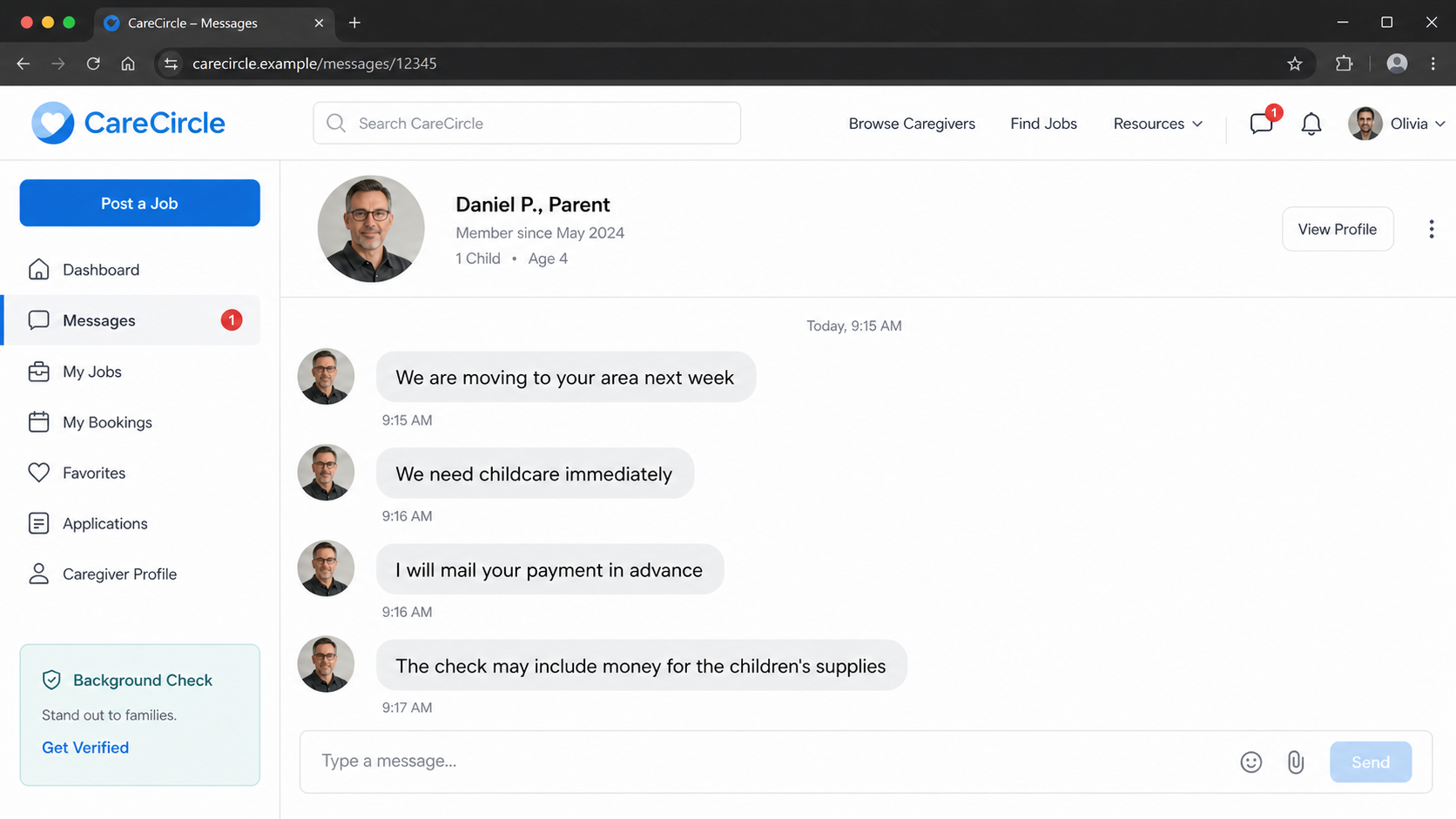
The Federal Trade Commission warned in 2026 that scammers were approaching childcare providers through email, text, social media, and caregiving platforms. The supposed parents often claimed they were moving from overseas.
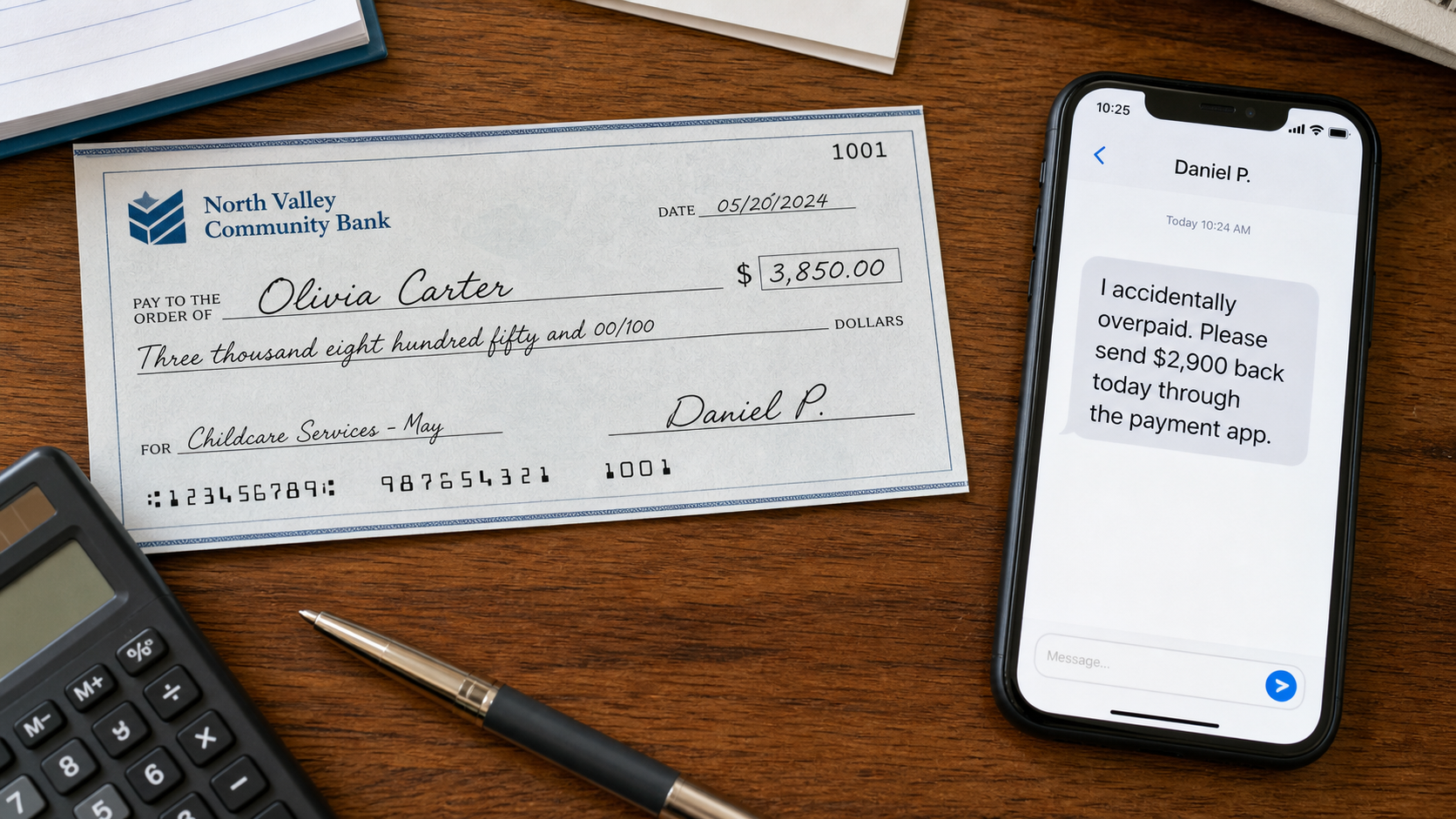
The payment was sent before the family and caregiver met. It exceeded the agreed fee, and the sender asked for the difference through a wire transfer, payment app, gift cards, or cryptocurrency.
A bank may show the deposit as available before it has fully verified the check. When the counterfeit or unauthorized check is returned, the caregiver owes the bank for the money sent to the scammer.
Overview
The parent calls it an innocent mistake and asks the caregiver to send the extra money back before the bank discovers that the original payment was never real.
The fake parent creates a believable reason to skip normal hiring steps
A family relocating from another city or country cannot easily meet in person. The story explains why the parent needs help quickly, communicates only online, and wants to secure the caregiver before arrival.
The job can include realistic details about children's ages, schedules, allergies, school pickups, or supplies. Specificity makes the conversation feel like a genuine childcare arrangement.
Urgency is the hidden problem. The caregiver is pushed to accept payment before a video call, signed agreement, verified address, emergency contacts, or an in-person meeting.
The overpayment turns the caregiver into the source of real money
The check may include the first week's pay plus funds for toys, a wheelchair, groceries, a moving service, or another supposed vendor. The total is much larger than the childcare fee.
The sender then changes the instructions. The caregiver must forward part of the deposit to a supplier or return an accidental overpayment through a fast payment method.
The criminal does not need the fake check to become permanently valid. They need the bank to display provisional funds long enough for the victim to send real, irreversible money.
An available balance is not proof that the check cleared
Banks often make deposited funds available under account rules before the check completes every verification step. A sophisticated counterfeit can take days or longer to be identified and returned.
When the check bounces, the deposit is reversed. If the caregiver already sent $500, $1,500, or more, that outgoing transfer came from the caregiver's actual balance.
The bank may also charge a returned-check fee, freeze the account, or investigate suspicious activity. Depositing a fake check can create serious problems even when the victim did not know it was fraudulent.
- A new client claims to be moving into the area and needs care urgently.
- The family avoids a live meeting or verifiable local contact.
- A check arrives before any childcare is provided.
- The amount is higher than the agreed fee.
- The sender asks for the difference through a fast payment method.
- The original check is later returned, leaving the caregiver responsible for the loss.
Why the Bank May Show Money From a Fake Check
A deposited check starts a collection process. The receiving bank may credit part or all of the amount before the paying bank confirms that the account, signature, routing information, and available funds are legitimate.
That early availability is a customer convenience, not a guarantee. The screen may say available balance even though the check can still be reversed after fraud is detected.
Some fake checks copy information from a real company or bank account. The numbers may initially route correctly, delaying the discovery that the check was altered, duplicated, or issued without authorization.
Mobile deposit makes the scheme easier to run remotely. The scammer can email an image and tell the caregiver to photograph it through the banking app, avoiding questions from a teller.
The outgoing payment is different from the incoming check. A payment-app transfer, wire, gift card, or cryptocurrency transaction uses real funds and may be difficult to reverse once the recipient collects it.
This mismatch is the scam's engine: provisional credit enters slowly, while the victim's real payment leaves quickly. The fake parent disappears before the two systems catch up.
The Pattern Reported by Childcare Providers
The FTC said scammers were posing as parents across email, text, social media, and online caregiving platforms. The contact did not depend on one specific website or application.
The supposed parent often said the family was moving to the caregiver's area, sometimes from overseas, and needed immediate care. That story accounted for distance and urgency at the same time.
The sender offered advance payment by check. The amount exceeded the childcare fee, and the parent later described the excess as accidental or connected to supplies.
Reported instructions asked caregivers to return or forward the extra money using wire transfers or payment apps. The FTC also warns that gift cards and cryptocurrency are common in fake-check schemes.
The decisive sign is not poor grammar or a strange check design. It is the request to send money because a new client supposedly overpaid by check.
How the Childcare Overpayment Scam Works
Step 1: A parent contacts a caregiver with an urgent move story
The message says the family found the caregiver's profile and needs help as soon as it arrives in town. The pay can be attractive, and the schedule may fit the caregiver's availability perfectly.
The parent may claim to be traveling, working offshore, serving in the military, receiving medical treatment, or relocating from overseas. Each explanation makes an in-person meeting difficult.
The profile photo and family details may be stolen. A completed profile and friendly messages do not establish that the person controls the identity shown.
Step 2: The scammer accelerates the hiring process
Normal questions about references, emergency contacts, custody, location, and a video meeting are postponed. The parent says the caregiver can handle everything after the family arrives.
The sender offers advance pay to hold the dates. That generosity is framed as respect for the caregiver's time, making caution feel ungrateful.
A genuine family should welcome identity checks and a clear agreement. Pressure to exchange money before basic verification is a reason to stop.
Step 3: A check arrives for more than the agreed amount
The caregiver receives a mailed check, cashier's check, business check, or digital image. The amount can be several times the expected first payment.
The parent says the extra portion is for children's supplies, equipment, a driver, a mover, or another service. The caregiver is asked to act as a temporary payment coordinator.
The story gives the overpayment a purpose before the victim questions it. There is no legitimate reason a new childcare client cannot pay a separate supplier directly.
Step 4: The bank displays provisional funds
After mobile or branch deposit, the account may show the money as pending and then available. The scammer tells the caregiver that this status proves the payment is safe.
Bank employees and automated systems may not detect the counterfeit immediately. Availability rules can release funds while verification continues between institutions.
Do not spend or return any part of an unexpected check. Contact the bank's fraud department and explain the entire job conversation before relying on the balance.
Step 5: An urgent refund or vendor payment is demanded
The parent suddenly needs the extra amount sent back, or asks the caregiver to pay a supposed supplier. The request often arrives immediately after the deposit appears available.
The chosen method is fast and difficult to reverse: payment app, wire transfer, gift cards, cryptocurrency, or cash. The recipient may use a different name from the parent.
Excuses about hospital bills, travel delays, or a waiting delivery create emotional pressure. The caregiver is told that the family's move depends on immediate cooperation.
Step 6: The check is returned and the fake parent vanishes
The paying bank eventually rejects the check because it is counterfeit, altered, duplicated, drawn on a closed account, or unauthorized. The deposit disappears from the caregiver's account.
The real money sent through the payment app or wire does not automatically return. The caregiver must repay any negative balance and may face fees or account restrictions.
The scammer blocks messages, removes the caregiving profile, and abandons the phone number. The fictional family never arrives.
Step 7: A recovery scam may follow the original loss
Victim information can be sold to another criminal who claims to be an investigator, bank specialist, or recovery agent. The new person promises to retrieve the transfer for an upfront fee.
Real banks and law enforcement do not guarantee recovery in exchange for gift cards, cryptocurrency, or a private payment. Do not send more money to unlock a refund.
Keep communicating only through verified bank, platform, and law-enforcement channels. A second urgent payment usually compounds the first loss.
Company, Address, and Fulfillment Checks
The family profile is not a verified employer identity
A profile name, photo, and child description can be copied from social media. Even a platform verification badge may cover an email or payment method without proving the entire family story.
Request a live video conversation, local address, written agreement, emergency contacts, and references appropriate to the role. Verify information independently instead of using only contacts supplied by the stranger.
Do not send identity documents directly to a new parent. Use the caregiving platform's approved verification tools and share only what is necessary.
The address on the check may belong to an innocent business
Fake checks often copy a real company's name, bank, routing details, or street address. That innocent organization may have no connection to the childcare offer.
A matching address found online does not authenticate the check. Call the bank through a number obtained independently and speak with your own bank's fraud team before taking action.
Do not visit the printed address or accuse the named company without evidence. The check can be counterfeit even when every visible business detail is real.
The parent avoids support channels once payment is questioned
Scammers try to move conversations off the caregiving platform into text, email, or a private messaging app. That reduces moderation and makes the profile easier to abandon.
Keep the original conversation on the platform and report the account. Support can preserve logs, suspend related profiles, and warn other caregivers.
A genuine client will not threaten the job because you called the bank. Anger, guilt, or a sudden emergency after reasonable verification questions is another warning.
The payment and childcare arrangement have no traceable fulfillment path
A real childcare engagement leads to a family meeting, service agreement, schedule, care location, and payment for completed or clearly scheduled work. The scam ends at a money transfer to a stranger.
The supposed supplier may be another account controlled by the same operator. No toys, equipment, or moving service are delivered because the vendor is part of the payment story.
Never act as a financial middleman for a new client. Parents should purchase supplies directly and pay only the agreed childcare amount through a verified method.
How to Verify a Childcare Job Before Accepting Payment
Begin with a live video call and a clear discussion of the children, schedule, location, duties, rate, emergency contacts, and start date. A moving family can still participate in real-time verification.
Keep communication and payment inside the caregiving platform when it provides protected tools. Moving off-platform removes records and safeguards that may help during a dispute.
Use a written agreement that limits payment to childcare services. Decline checks that include money for suppliers, equipment, travel, or refunds to third parties.
If a check arrives unexpectedly, do not deposit it merely to see what happens. Show it to the bank's fraud department with the complete conversation and ask how the institution wants it handled.
Most importantly, never send money because someone who paid by check says they overpaid. Ask them to stop payment and issue a correct amount after the original item is formally resolved.
Warning Signs to Watch For
- A family needs childcare urgently but cannot join a live video call.
- The parent offers unusually high pay before an interview.
- A check is sent before the family arrives or any care is provided.
- The payment includes money for supplies or another vendor.
- The check amount exceeds the agreed fee.
- The caregiver is asked to return money through an app or wire.
- The sender says an available balance proves the check cleared.
- Questions about identity or payment trigger anger and new emergencies.
A stranger who pays too much by check and asks you to send money elsewhere is not creating a childcare job. They are creating a transfer from your real balance.
What to Do if You Have Fallen Victim to This Scam
- Do not send any part of the check amount. Stop communicating about refunds or vendors. Do not purchase gift cards, send cryptocurrency, wire funds, or use a payment app for the supposed parent.
- Contact the bank's fraud department now. Explain that the deposit came from a suspected fake-check job scam. Ask whether funds were released, whether the check was returned, and how to protect the account.
- Report any outgoing transfer immediately. Contact the payment app, wire service, gift-card issuer, or cryptocurrency platform and request a fraud hold or reversal. Recovery is not guaranteed, but speed matters.
- Preserve the entire job conversation. Save the profile, messages, phone numbers, email addresses, check images, envelope, deposit receipt, transfer details, and names used by the supposed vendor.
- Report the profile to the caregiving platform. Ask the platform to preserve account data and remove related listings. Tell support if the scammer moved the conversation to another service.
- Protect identity documents and accounts. If you sent a driver's license, Social Security number, bank details, or tax forms, follow a recovery plan at IdentityTheft.gov and consider a credit freeze.
- Scan files received from the fake parent. If the stranger sent a PDF, app, contract, or check viewer that required installation, delete unknown software and run a full Malwarebytes scan.
- Reduce exposure to more fake job ads. AdGuard can block many malicious ads, redirect chains, and scam pages. It cannot validate an employer, so continue to verify every family and payment separately.
- Report the fraud and reject recovery agents. File reports with the FTC at ReportFraud.ftc.gov, the platform, bank, and local police when advised. Do not pay anyone who promises guaranteed recovery.
Frequently Asked Questions
Can a fake check appear in my available balance?
Yes. Banks can make funds available before a check completes final verification. The deposit can still be reversed later.
What if the check says cashier's check?
Cashier's checks can be counterfeited. Verify it through your bank and the issuing bank using independently obtained contact information.
Should I return the accidental overpayment after it clears?
Do not send money. Ask the sender to stop the original check and issue the correct amount after your bank confirms the situation is fully resolved.
Why does the parent want me to pay a supplier?
The supplier is often another account controlled by the scammer. A real parent can buy children's supplies directly without using a new caregiver as a payment middleman.
Will the bank refund money I sent through a payment app?
It depends on the method, timing, and facts. Report the transfer immediately, but do not assume an authorized payment will be recoverable.
Can I trust a childcare-platform profile with reviews?
Reviews and profile details help, but accounts can be fake or compromised. Verify the family live and never accept an overpayment-and-refund arrangement.
The Bottom Line
The childcare overpayment scam begins with a believable family and ends with a simple demand: send part of a check deposit to someone else. The check is temporary, but the money leaving your account is real.
Do not let an urgent move story replace a proper interview and payment agreement. Never accept extra funds for supplies, and never return an overpayment from a new client's check.
If you deposited or forwarded money, contact the bank and payment provider immediately, preserve every message, secure exposed identity information, and report the fake profile.

Join the discussion
0 commentsShare your experience or ask a question about this article.
Discussion
Start the conversation
Have a question or something useful to share? Add the first comment.