

An elegant invitation appears with the name of someone you recognize. There is no event address in the email, just a button promising to reveal the host, date, and guest list. The fake party invitation login scam lets curiosity do the work that fear usually does in phishing.
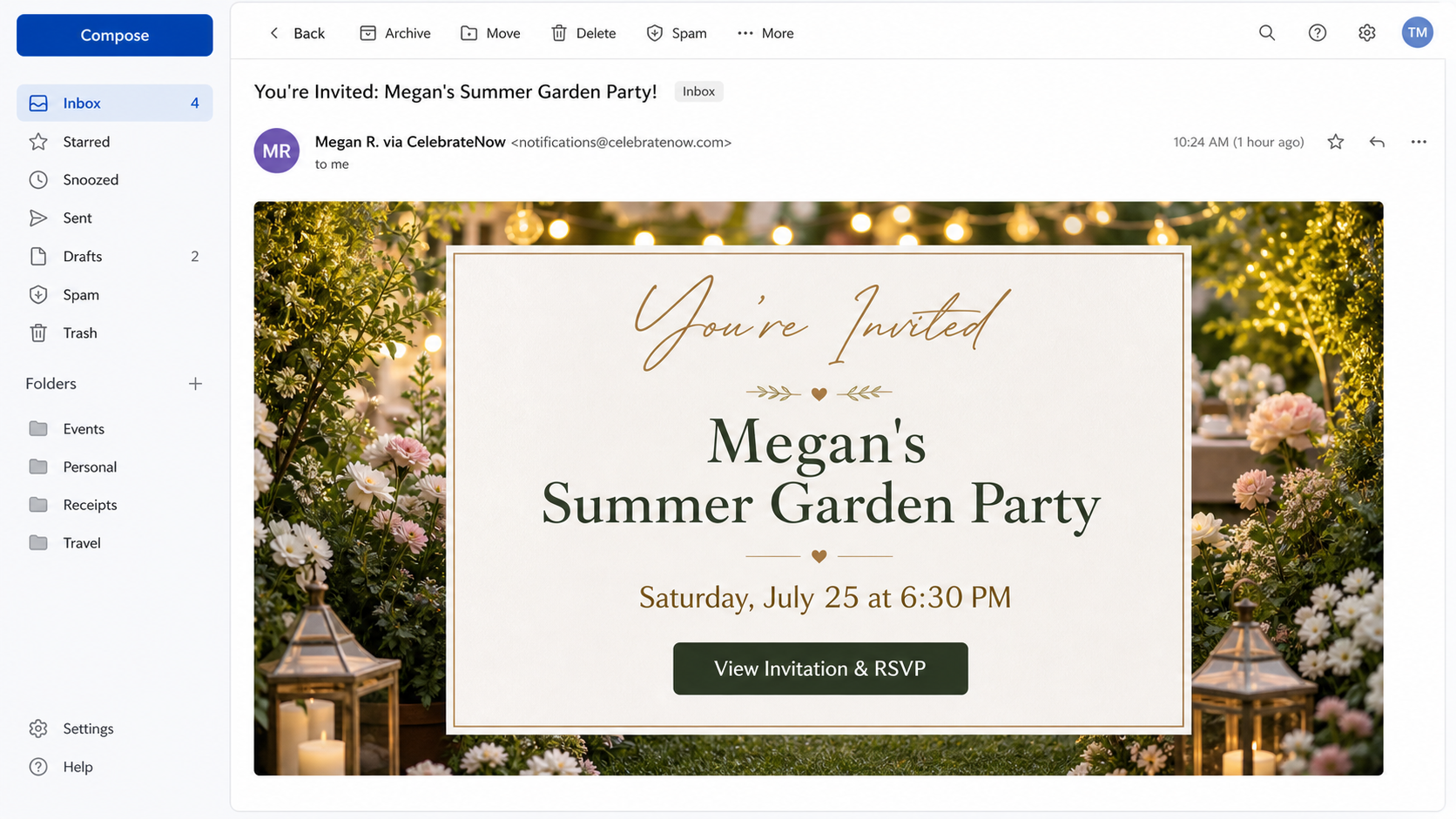
The Federal Trade Commission warned in 2026 about unexpected You Are Invited emails and texts that imitate popular invitation services such as Evite and Paperless Post. Some messages name a real acquaintance as the host.
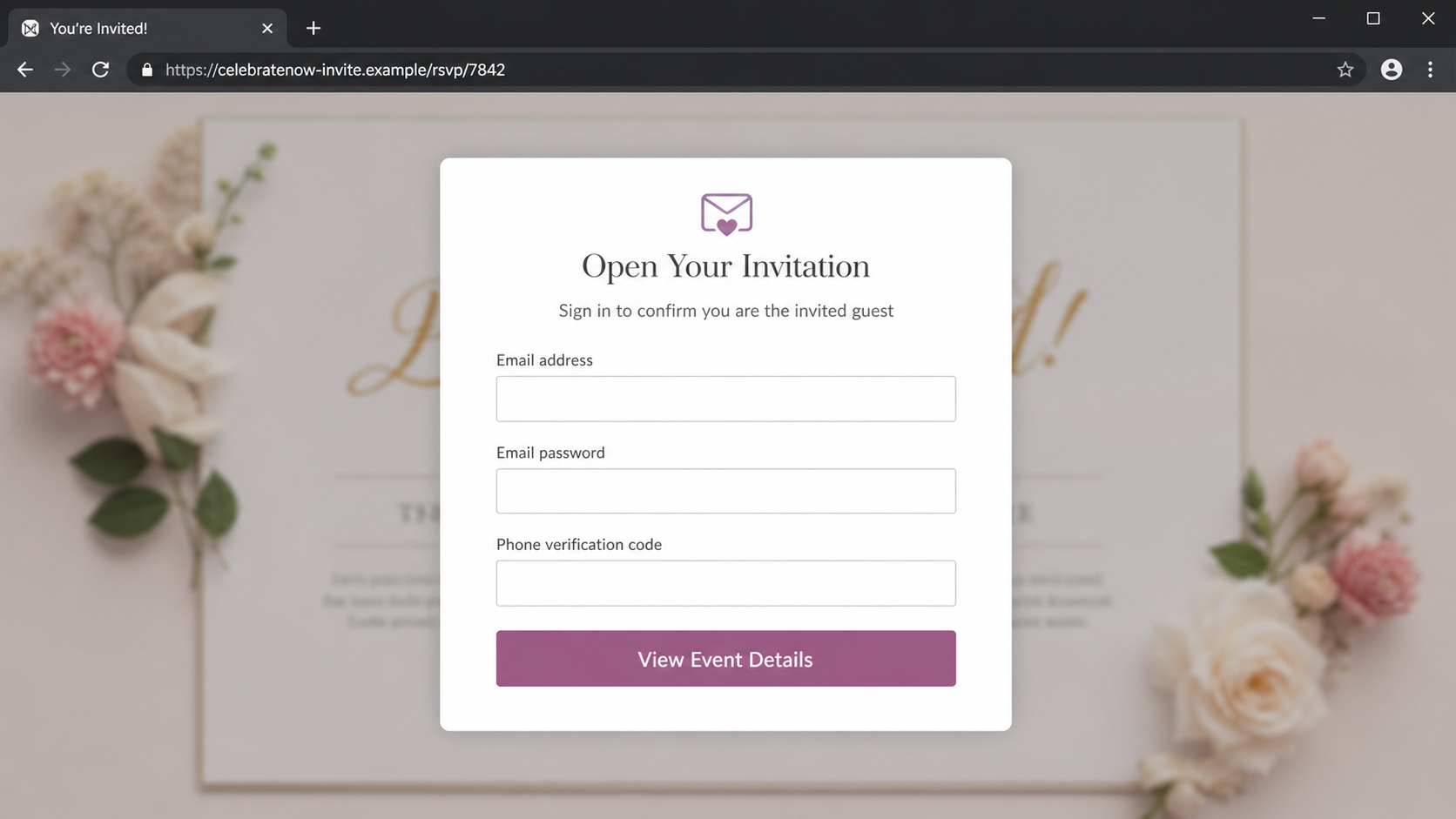
The linked page says credentials are needed to open the invitation. Other versions request a phone number and a special code to complete the RSVP, which can actually help the criminal reset or enter an account.
A real invitation service may ask you to confirm an email address, but it should not need the password to your email account. The password belongs only on the email provider's genuine login page.
Overview
By the time the page asks for an email password or phone code, the recipient is already focused on finding out who invited them.
The hidden guest list turns curiosity into pressure
Party invitations are personal. The recipient wants to know whether the event is a wedding, graduation, birthday, reunion, or work gathering, and whether ignoring it could embarrass the host.
Scammers exploit that uncertainty by withholding details until after a click. A familiar first name, attractive design, and approaching date can make the message feel too specific to be random.
The best response is simple: ask the supposed host through a known phone number or separate message. A genuine friend will not object to a quick verification.
The fake page asks for secrets no invitation needs
Some pages ask for an email username and password, claiming the service must verify that the visitor is the intended guest. That explanation has no technical need behind it.
Other versions request a phone number and a one-time code. The code may come from an email provider, social network, or messaging service and can authorize a password reset or new-device login.
The page may show a blurred invitation behind the form so the secret event feels one step away. The blurred preview is decoration, not evidence that an invitation exists.
A stolen account spreads the same lure through real contacts
Once criminals control an email or social account, they can search the address book and send invitations that genuinely come from the victim's mailbox. The next recipients see a person they know.
The attacker can also read travel plans, receipts, personal conversations, and password-reset messages. That information supports identity theft and more tailored fraud.
The scam therefore grows socially. One curious click can turn a trusted account into the distribution channel for invitations sent to family, friends, colleagues, and clients.
- An unexpected invitation withholds event details behind a button.
- The message may name someone you know as the host.
- The linked page copies a well-known invitation platform.
- The page asks for an email password or phone verification code.
- The code can authorize a reset or login rather than an RSVP.
- A compromised account sends the same scam to trusted contacts.
Why a Party Invitation Is Such an Effective Phishing Lure
Many phishing emails use panic. Invitations use a softer emotion: curiosity mixed with social obligation. The recipient does not want to miss an event or appear rude by ignoring the host.
Invitation platforms also vary in how much information appears in an email. Some genuine notices show only a host and event title until the recipient opens the official page, so the scam does not feel obviously abnormal.
Seasonal timing helps. Graduation, wedding, holiday, reunion, and summer-party seasons create a period when an unexpected invitation is plausible even if the recipient was not expecting one that morning.
A compromised contact account adds another layer. The sender address can be authentic because a criminal is using the real mailbox, even though the event and link are fraudulent.
The attractive design discourages technical scrutiny. People examine the flowers, venue photo, date, and RSVP button while the sender domain and link destination receive only a glance.
The scam can shift from email to text, direct message, or calendar invitation. The protective rule remains the same: an invitation never needs the password or verification code for another account.
What the FTC Said the Fake Invitation Messages Request
The FTC said unexpected texts and emails were imitating recognized invitation platforms. Some messages listed a person known to the recipient as the host, increasing the pressure to open them.
One path asked recipients to enter an email username and password to see the event details. That input would give the attacker direct credentials for the victim's mailbox.
Another path asked for a phone number and special code to RSVP. A legitimate one-time code explains which service requested it and warns the user not to share it.
The FTC warned that criminals who gain access may take over the email account and send the same invitation scam to the victim's contacts.
The official advice is to resist the unexpected link and check with the host independently. That simple verification breaks the scam before any credentials are involved.
How the Fake Party Invitation Login Scam Works
Step 1: The invitation arrives at a believable time
The message appears near a holiday, graduation season, wedding season, or weekend. It may refer to a birthday, garden party, reunion, or private celebration.
The sender line can imitate an invitation platform or show a known person's name. In some cases, a previously compromised account sends the message from the real contact.
The email reveals enough to create curiosity but not enough to verify the event. The address, full guest list, and host message remain behind the View Invitation button.
Step 2: The button opens a copied invitation page
The landing page uses premium fonts, event photography, RSVP language, and a countdown to make it resemble a legitimate invitation service. The domain is different from the platform being imitated.
On a phone, the browser may hide most of the address bar after scrolling. The recipient sees the event design, not the full destination.
The page can use a blurred invitation card or spinning loading message to create the impression that private details already exist and simply need to be unlocked.
Step 3: Verification becomes an email-password request
The page says the host restricted the invitation to approved guests. It asks for the recipient's email address and email password as proof of identity.
An invitation provider has no reason to know the password for Gmail, Outlook, Yahoo, or another mailbox. Only the genuine email provider should process that password.
Submitting the form sends the secret to the phishing operator. The page may display an incorrect-password message and ask again, collecting multiple possible passwords.
Step 4: A phone code completes the account takeover
If multifactor authentication blocks the first login, the fake RSVP page may ask for a special code sent to the victim's phone. The wording hides which account the code protects.
The criminal attempts a real login or password reset at the same time. The genuine service sends the victim a code, and the victim unknowingly types it into the attacker's form.
Never share a code merely because a page asks for it. Read the full SMS or notification, including the service name, location, and warning about disclosure.
Step 5: The mailbox reveals a map of the victim's life
The attacker can read contacts, conversations, receipts, travel confirmations, tax records, and account alerts. Search makes it easy to locate valuable services connected to the address.
Password resets for other accounts arrive in the same mailbox. The criminal can attempt to take over shopping, social, cloud-storage, and financial profiles one by one.
Forwarding rules or recovery settings may be changed so that the attacker keeps receiving messages after the victim changes the password.
Step 6: Real contacts receive the next round of invitations
The criminal sends the lure to the address book or replies inside existing conversations. A message within a real thread is more convincing than a cold email from a new account.
Contacts may be told that event photos, an updated venue, or a private guest list are waiting. The story changes while the credential form remains the same.
Some recipients contact the victim by another channel, which is often the first sign that the mailbox has been abused. Fast warnings can stop the chain.
Step 7: The invitation theme rotates to another occasion
Blocked domains are replaced, and the event becomes a wedding, graduation, funeral memorial, holiday dinner, or work celebration. The same kit can imitate several invitation brands.
The host name may come from public social media or the compromised account's contacts. That personalization does not prove an event exists.
Remember the impossible request: no invitation needs your email password, and no RSVP needs a code that authorizes another account login.
Company, Address, and Fulfillment Checks
The invitation brand can be copied in minutes
Evite, Paperless Post, and other services are real companies, but a familiar logo or template does not prove the message originated from them. The sender and linked domain must match their documented channels.
Scammers can also invent a platform with a professional name. A new invitation site has no reason to request the password for an unrelated email provider.
Open the known invitation platform independently and search for the event in your account. Do not create an account through the suspicious link merely to check.
The event address is hidden because there may be no event
A real invitation identifies a host, venue, date, or contact method that can be verified. The phishing page keeps those details blurred until after credentials are submitted.
A street address on the final page could be copied from a real venue or residence. Confirm it with the host instead of treating the map as proof.
The web domain is the more useful address during analysis. Preserve it, but do not reopen the page after recognizing the credential request.
The supposed host must be reached outside the invitation
Replying through the fake page sends the message to the criminal. Call, text, or message the host using contact information you already had before the invitation arrived.
Ask a concrete question such as whether they sent an invitation for Saturday. Do not forward the suspicious link to them as a way of explaining it.
If the host's real account was compromised, tell them to secure it and warn other contacts. The absence of an event does not mean the sender address itself was forged.
The invitation trail should never end in another service's credentials
A legitimate workflow can use a unique RSVP link or ask a guest to sign into the invitation platform. It should not collect the password for the guest's email, social network, or phone account.
Privacy terms, support, domain ownership, and event context should be visible before sensitive information is requested. A blurred card is not a substitute for accountability.
When the platform identity, host, event, and credential destination cannot all be verified, leave the page and treat the invitation as hostile.
How to Verify an Invitation Without Ruining a Real Surprise
Use a separate channel and keep the question narrow. Ask the named host whether they recently sent a digital invitation, without revealing guessed event details or clicking the link.
Check the sender address and destination against the invitation platform's official help pages. Do not assume a misspelled or added word is a special event subdomain.
If the host wants to preserve a surprise, they can still confirm that the message is genuine. They do not need to reveal the venue or occasion.
A real invitation may ask you to create a platform account, but navigate to the platform yourself. Your email password should only be entered at the email provider's known domain or official app.
Finally, pause before entering any one-time code. The genuine message that delivered the code tells you what action it approves. If that description is not an RSVP, stop.
Warning Signs to Watch For
- The invitation is unexpected and event details are hidden.
- A familiar contact is named, but they have not mentioned the event elsewhere.
- The sender domain differs from the invitation platform's official domain.
- The landing page asks for an email account password.
- A phone verification code is required to reveal the venue.
- The code message mentions a login, reset, or new device.
- The page repeatedly says the password or code was incorrect.
- The invitation cannot be found by opening the official service directly.
The design can be beautiful and the host name can be familiar. The request for an email password or account code makes the invitation unsafe.
What to Do if You Have Fallen Victim to This Scam
- Stop interacting and save the invitation. Capture the message, sender, linked domain, fake sign-in page, host name, and time. Do not keep testing the form or forward the active link.
- Change the email password immediately. Use the provider's official app or type the known address yourself. Create a unique passphrase that is not used on any other service.
- Sign out unknown sessions and devices. Review recent logins, connected apps, recovery phone numbers, backup addresses, passkeys, and trusted devices. Remove anything you do not recognize.
- Inspect forwarding and inbox rules. Criminals may silently forward mail or hide security alerts. Delete unauthorized rules and check sent, deleted, archive, and trash folders.
- Secure accounts that rely on the mailbox. Prioritize banking, shopping, social media, cloud storage, workplace access, and any service where the email account can reset the password.
- Warn the named host and your contacts. Contact them through a separate channel. If your account sent invitations, tell recipients not to click and provide the approximate sending time.
- Scan devices if a file or extension was installed. A normal invitation does not need software. Remove unknown downloads and browser add-ons, then run a full Malwarebytes scan.
- Block malicious pages during recovery. AdGuard can reduce known phishing pages, redirects, and aggressive ads. It cannot remove stolen credentials, so finish every account and session check.
- Report the phishing message. Send it to the email or phone provider, the impersonated invitation service, the Anti-Phishing Working Group at reportphishing@apwg.org, and the FTC at ReportFraud.ftc.gov.
Frequently Asked Questions
Do real invitations ever require a login?
Some services use accounts, but you should open the official platform independently. They should not ask for the password to your separate email account.
Why was a real friend's name listed as the host?
The name may come from public information, stolen contacts, or a compromised account. Verify with the friend through a known channel.
What if I entered only my email address?
Expect more targeted phishing and secure the account if the password was reused elsewhere. An address alone usually does not grant access.
What if I shared the phone verification code?
Treat the protected account as compromised. Change its password, remove unknown sessions and recovery changes, and contact the provider immediately.
Can the invitation steal information just from opening the email?
Most versions require a click and submitted information. Avoid loading remote content when possible, but the main reported risk is the fake login or code form.
How do I tell whether the sender account was hacked?
Ask the sender outside email. A genuine address can still be controlled by a criminal, especially when the message appears inside an existing conversation.
The Bottom Line
The fake party invitation login scam turns a pleasant surprise into an account-takeover funnel. It hides event details until curiosity pushes the recipient toward an impossible verification request.
Ask the host separately and open the invitation service on your own. Never give an invitation page the password or verification code for another account.
If you submitted either secret, secure the mailbox immediately, inspect recovery settings and rules, warn contacts, and protect every important account that depends on that email address.

Join the discussion
0 commentsShare your experience or ask a question about this article.
Discussion
Start the conversation
Have a question or something useful to share? Add the first comment.