

If you received a payment email or bank deposit tied to ClearPath Payments and Apple, it is smart to pause before clicking anything.
The reason is simple: real class action payouts often arrive in ways that look exactly like phishing. Generic sender names, “digital check” links, and unfamiliar payment processors can all trigger the same red flags you are trained to watch for.
In this case, ClearPath Payments is widely being associated with distributions from the Lopez v. Apple Siri settlement, a court-approved class action settlement fund. For people who filed an eligible claim on time, the payment can be legitimate. For everyone else, a message that “looks official” may be nothing more than opportunistic spam riding the news cycle.
That is where most confusion starts.
Some recipients are seeing deposits labeled with settlement-related descriptions. Others are getting emails offering direct deposit, digital checks, or mailed checks. And because payout amounts vary, it is hard to know what “normal” looks like, even if you did everything correctly.
This guide cuts through the uncertainty.
You will learn what ClearPath Payments is doing in the payout process, who actually qualifies for money, why payment amounts differ, and how to verify a message safely without exposing your personal or banking information. You will also see the most common scam patterns that copy real settlement language, so you can spot a fake before it costs you.
What “ClearPath Payments” actually means in this settlement
First, an important distinction:
ClearPath Payments is not the settlement. It is not a lawsuit, a legal entity suing Apple, or a “new Apple program.” It is best understood as a payment delivery layer that some claimants see when receiving money electronically.
In other words, the settlement is Lopez v. Apple Inc. ClearPath Payments is showing up because a portion of electronic payments and digital checks appear to be routed through systems that display that name (or use that domain in the email sender). That is why people are seeing emails from an address on the First Horizon domain and getting nervous.
If you filed a claim, ClearPath can appear as:
- The sender name for a digital check email
- The branding on a digital check portal
- A behind-the-scenes vendor name tied to payment processing
This is also why you will see conversations online where people say, “I got paid, but who is ClearPath?” The vendor name is unfamiliar, and the message format can look sketchy even when it is legitimate.
The quick truth: is the ClearPath Payments Apple settlement email legit?
Here is the most accurate “yes, but”:
It is legitimate if all of this is true:
- You submitted a valid claim for the Lopez v. Apple Siri settlement by the deadline.
- Your claim was approved and matched the settlement administrator’s records.
- The payment references the settlement (often as “Lopez Voice Assistant” in banking descriptions).
It is not legitimate if:
- You never filed a claim and still got an email demanding bank details.
- The message asks for your Apple ID password, MFA codes, or payment by gift card (classic scam patterns).
- The sender address is slightly different or misspelled, or the link goes to a look-alike domain.
Also note the hard reality that trips people up:
Not everyone qualifies. If you did not submit a claim by July 2, 2025, you are generally not getting a payout.
The lawsuit behind the payout: what Lopez v. Apple is about
The settlement traces back to a class action lawsuit filed in federal court in California, alleging that Apple’s voice assistant, Siri, captured private or confidential communications during unintended activations and that parts of that data were shared with third parties. Apple denied wrongdoing, and the settlement resolves the claims without the court deciding the case on the merits.
A few core points that matter for understanding the payout:
- The case is commonly described as a Siri privacy or Siri eavesdropping settlement.
- The settlement fund is $95 million.
- Payments go to eligible class members only if they filed claims (this is not an automatic refund).
If you are wondering why this settlement exists in the first place, it helps to remember the broader public discussion around voice assistants and inadvertent recordings. Even if you personally never cared about the headlines, this case became one of the most visible “voice assistant privacy” class actions tied to consumer devices.
Who was eligible (and why the deadline matters so much)
Most confusion around ClearPath Payments comes from people who never filed a claim and assume payouts are automatic.
They are not.
According to the claim form and settlement notice, eligibility generally required:
- Being a current or former owner or purchaser of a Siri-enabled Apple device,
- Residing in the U.S. or its territories,
- Experiencing an unintended Siri activation during a conversation intended to be confidential or private,
- During the class period: September 17, 2014 through December 31, 2024.
The claim deadline:
Claims had to be submitted online or postmarked by July 2, 2025 (the claim form spells out the timing and method).
That deadline is not a suggestion. It is the gate.
If you did not file by that date, you can still read about the settlement, but you are typically outside the payout group. And that is exactly why scammers love piggybacking on big settlements: they know many people will Google the name after receiving a random email.
What devices were included
This settlement focused on Siri-enabled devices, and the claim documentation lists typical eligible categories such as iPhone, iPad, Apple Watch, MacBook, iMac, HomePod, iPod touch, and Apple TV.
The practical point: eligibility was not limited to one product line. Many households had multiple qualifying devices, which is why you will see some people receiving higher totals than others.
How much money people are getting (and why the math varies
The settlement created a simple headline number that everyone remembers:
Up to $20 per Siri device.
But the number most people are actually seeing is smaller.
The cap vs. the real payout
The claim form explains that eligible claimants receive a pro rata portion of the net settlement amount, up to a cap of $20 per Siri device, and that the amount can increase or decrease depending on the number of valid claims submitted and the number of devices claimed.
That pro rata structure is why two people can both be legitimate claimants and still get different amounts.
What “pro rata” looks like in real life
Once the administrator tallies valid claims, the available pool is divided across approved claimants. If many people filed, the per-device amount goes down. If fewer people filed (or fewer claims are approved), the per-device amount can rise, but still cannot exceed the cap.
In late January 2026, major news coverage reported many recipients seeing deposits in the single digits per device, often roughly around $8 per device, with totals that scale based on how many devices were included.
So if you claimed:
- 1 device, you might see a small single-device payout
- 2 to 3 devices, you might see a midrange total
- 5 devices (the maximum allowed), you might see a higher total, but still far below the theoretical $100 max if the per-device amount landed closer to $8 rather than $20
How many devices could you claim?
The claim form states that you could submit claims for up to five Siri devices.
That maximum is another reason you see certain totals repeating in online reports: a lot of people claimed 5 devices, so their payout often clusters around “five times whatever the per-device amount ended up being.”
When payments started going out
A key detail that calms people down is timing.
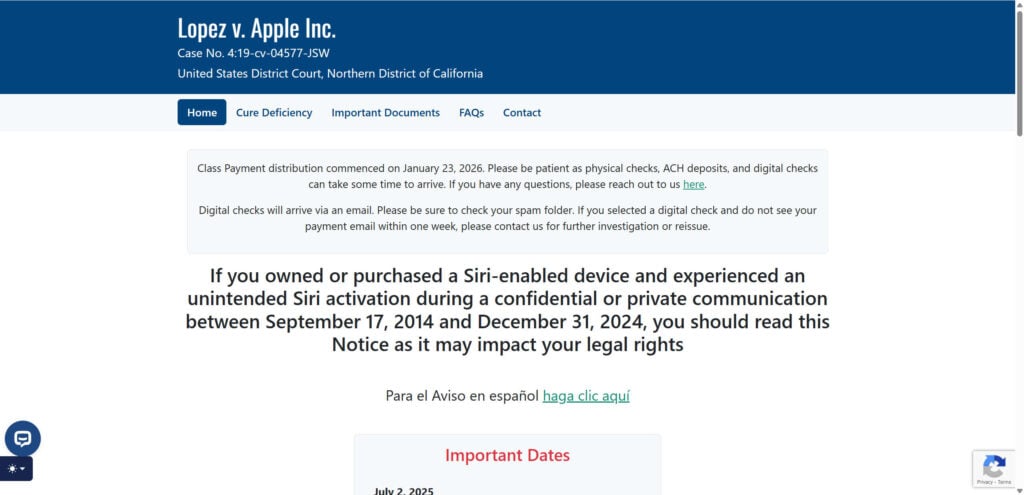
The official settlement site indicates that class payment distribution commenced on January 23, 2026, and also notes that physical checks, ACH deposits, and digital checks can take time to arrive.
News coverage similarly described payouts beginning in late January 2026, with some payments appearing as direct deposits and others arriving as emailed digital checks or physical mail.
So if you are seeing something around that timeframe, it fits the real distribution timeline.
How payouts are delivered: direct deposit, digital check, physical check
The claim form and notice describe common payout channels, including:
- ACH direct deposit
- Digital (electronic) checks
- Physical checks mailed to your address
If you selected electronic delivery, your experience may include an email that provides access to a digital check and a deposit workflow.
And this is where ClearPath Payments often enters the story.
Why ClearPath Payments emails look like scams (even when they are real)
Let’s be blunt: many legitimate settlement payout emails are designed in a way that trains people to ignore them.
When recipients describe the email as “spammy,” they are usually reacting to a few things:
- A generic “noreply” sender
- A button that says “deposit” or “claim payment”
- A digital check image embedded in an email
- A portal that asks for routing and account numbers
Those are the same signals people associate with phishing.
That is why this particular settlement has generated so many “Is this real?” threads.
In online discussions, people have shared that the digital-check option can arrive from an address associated with ClearPath Payments on a First Horizon domain. Some also report contacting the settlement administrator and being told that the digital check email is legitimate if it comes from that sender.
How to verify a ClearPath Payments email safely (without guessing)
If you want the safest approach, do not start by clicking.
Start by verifying from independent anchors you control.
Step 1: Confirm you actually filed a claim
Ask yourself:
- Did you submit a claim before July 2, 2025?
- Do you still have the confirmation email with a claimant ID and confirmation code?
If you never filed, treat the message as suspicious by default. The settlement is not an automatic payout.
Step 2: Cross-check the sender and context
Recipients and consumer tech commentary often point to legitimate digital-check emails coming from a ClearPath Payments sender on the First Horizon domain, but scammers can spoof names and copy templates.
So do not rely on appearance alone.
Instead:
- Compare the email to the earlier settlement communications you received (same email address chain, same subject patterns).
- Look for matching case references: Lopez et al. v. Apple Inc., Case No. 4:19-cv-04577 (N.D. Cal.) is listed on the claim form and is a consistent identifier.
Step 3: Verify via the official settlement website (typed manually)
Rather than clicking the email link, manually navigate to the official settlement website by typing it into your browser. Major media outlets pointed claimants to the official site for claim status and details.
From there, you can look up official contact options and confirm what payment methods were used.
Step 4: If still unsure, contact the settlement administrator directly
The claim form and notice include official contact channels (phone and email) for the settlement administrator.
If you are uncomfortable entering bank details into any portal that originated from an email, contact the administrator and ask about:
- Payment status
- Whether your payment was issued
- Whether you can request a reissue or a different method (for example, a mailed check)
Do not use contact details provided inside a suspicious email. Use those found on the official settlement documentation.
“Lopez Voice Assistant” deposit in your bank account: what that usually means
Some claimants never saw an email at all. They just saw a deposit appear.
Consumer news coverage explained that some direct deposits show up labeled “Lopez Voice Assistant” (or similar variants) and are tied to this settlement distribution.
If that deposit arrived around the distribution window and aligns with your claim submission, it is usually a strong sign that you are looking at a legitimate settlement payout.
Why not everyone got paid (even if they owned Apple devices)
This is the second major point of confusion.
Many people owned eligible devices during the class period.
But the settlement required claim submission.
Coverage emphasized that only those who filed valid claims by the deadline are included for payment.
So if you missed the July 2, 2025 claim deadline, you are not in the payment queue.
And that “missed deadline” reality is exactly what scammers exploit.
They send emails to broad lists knowing many recipients will think, “I owned an iPhone back then, so maybe this is mine.”
The legal timeline
People often ask why a settlement announced in early 2025 is paying out in early 2026.
A simple explanation:
- The parties reached a proposed settlement and requested preliminary approval.
- The court scheduled a final approval process and set a final approval hearing (initially listed for early August 2025 in court documentation, with later updates showing scheduling changes).
- After final approval (reported as occurring in October 2025 by legal and news sources), the administrator still had to validate claims, calculate pro rata amounts, and execute distribution.
- Payments began rolling out in late January 2026.
That timeline is normal for class actions. It feels slow to consumers, but it is typical for settlement administration.
The scam angle: how criminals piggyback on real settlements
Even when ClearPath Payments and the settlement payout are legitimate for valid claimants, scammers can still weaponize the situation.
Here are the most common settlement-themed scam plays:
1) “You are eligible” messages sent to people who never filed
The scammer counts on the fact that most people vaguely remember the headlines but did not file.
2) Fake “deposit portal” look-alike sites
They copy the visual design of a deposit page and harvest routing/account numbers.
3) Requests for Apple ID credentials or verification codes
A real settlement administrator does not need your Apple ID password.
4) “Pay a small fee to release your settlement”
Real class action payouts do not require you to pay a fee to receive your money.
If any message mixes the Lopez v. Apple settlement with urgent threats, fees, gift cards, or credential requests, treat it as hostile.
Safety tips if you want the money but do not want the risk
If you are a legitimate claimant and you are still uncomfortable, the goal is to reduce exposure while staying within legitimate channels.
Consider safer behaviors such as:
- Verify first, then act: confirm via the official settlement site or official contact channels rather than trusting the email.
- Avoid entering sensitive info from an email click: manually visit known official sources.
- Use a separate receiving account: some people prefer using a secondary bank account or a fintech direct-deposit account number instead of their primary checking, simply to reduce blast radius. (This is a personal risk decision, not a requirement.)
- Watch for follow-up scams: once a big settlement pays out, “recovery scammers” and fake “support” accounts often appear in comment sections offering to “help you get more.”
What to do if you filed a claim but have not received payment
If you are sure you filed and you are in the eligible group, a few realistic reasons you might still be waiting:
- Payment method processing delays (ACH timing, email filtering, mail delivery time).
- Your email provider routed the digital check to spam or promotions.
- Address changes for physical checks.
- Payment needs reissue due to bank rejection or outdated info.
The settlement site messaging and news coverage both encourage patience during the rollout window and suggest contacting the administrator if your payment has not arrived.
Use official settlement documentation to locate contact options.
Frequently asked questions
Is ClearPath Payments a scam?
Not inherently. In this settlement, ClearPath Payments appears as a payment-processing name connected to legitimate payouts for approved claimants, and some recipients report that the settlement administrator confirmed digital-check emails from that sender as legitimate.
But scammers can imitate anything, so you still need to verify.
Why does the email look so unprofessional?
Because many settlement administrators and payment vendors use generic templates and automated mail systems that resemble mass marketing. That design choice is unfortunate, but it does not automatically mean fraud.
What if I never filed a claim?
Then you are almost certainly not receiving money from this settlement. Claims had to be submitted by July 2, 2025.
If you get an email anyway, treat it with high suspicion.
How much is the payout supposed to be?
The settlement capped payments at $20 per Siri device (up to five devices), but actual payouts depend on pro rata allocation.
News coverage in early 2026 reported many recipients seeing amounts around $8 per device.
Why does my bank statement say “Lopez Voice Assistant”?
That label has been reported as the descriptor used for some direct deposits tied to the settlement.
When did payments start?
The settlement website indicated distribution commenced on January 23, 2026.
Bottom line
ClearPath Payments is showing up because it is part of the payment plumbing for some Lopez v. Apple Siri settlement payouts, not because there is a new lawsuit or a random “Apple payment program.”
If you filed a valid claim by the July 2, 2025 deadline, it is entirely plausible that your payment will arrive by direct deposit, digital check, or physical check during the late January 2026 distribution window.
At the same time, the emails can look like phishing, and scammers can copy them.
So treat verification as the first step, not an afterthought:
confirm you filed, verify through official settlement channels you navigate to yourself, and never hand over sensitive information just because a message uses the right keywords.
If you want, paste the exact subject line and the sender address you received (no personal details), and I’ll help you sanity-check the signals and the safest verification path.

Join the discussion
6 commentsShare your experience or ask a question about this article.
Discussion
Is info@lopezvoiceassistant settlement.com a legitimate email address?
In reply to Mgm
Hi! Yes, info@lopezvoiceassistantsettlement.com is the legitimate email address for the official settlement administrator. It is being used to notify eligible participants in the Lopez v. Apple Inc. (Siri) class action.
You can verify this information and check your status at the official website: lopezvoiceassistantsettlement.com. As a safety precaution, always ensure the sender’s address is spelled exactly correctly and never provide your Apple ID password or pay any “fees” to receive a payout.
I have not received my settlement payment
In reply to Darla McGowan
Hi Darla, if you filed a valid claim, the best next step is to check the official settlement email notices and the payment method you selected when you submitted your claim. Some settlement payments go out in batches, so not everyone receives them at the same time.
If you have a claim confirmation email or claim number, keep it handy and use only the official settlement contact details listed in that notice. Do not share personal claim details publicly in the comments.
I received an email that showed a basic check that was for direct deposit and they want my bank account routing number, etc. thats what is scaring me. (Lopez et al.v. Apple Inc., Case No. 4:19-cv-04577 (N.D. Cal.) has sent a payment for $16.04)
In reply to Sewanee Kracalik
Sewanee, you’re right to be cautious.
Yes, people are getting paid for the Lopez v. Apple Siri settlement right now, but an email asking you to send your bank routing and account number is a major red flag. If you chose direct deposit when you filed your claim, you usually entered those details during the claim process, not later by replying to an email.
Do not reply with any banking information and do not click links in that message. Instead, type the official settlement website into your browser yourself and use the contact info there to verify your payment status. If you didn’t file a claim, treat the email as a scam and delete it.