

Have you seen ads on social media or received texts offering the chance to become an Aritzia or Shine product reviewer? While it may sound tempting to get paid to test out clothes from the popular women’s fashion brand, scammers are using these fake offers to lure in victims and profit from their personal information.
This article will provide an in-depth look at how the Clientelehaul.com scam works, what to watch out for, and most importantly, how to protect yourself.
An Overview of the Clientelehaul Scam
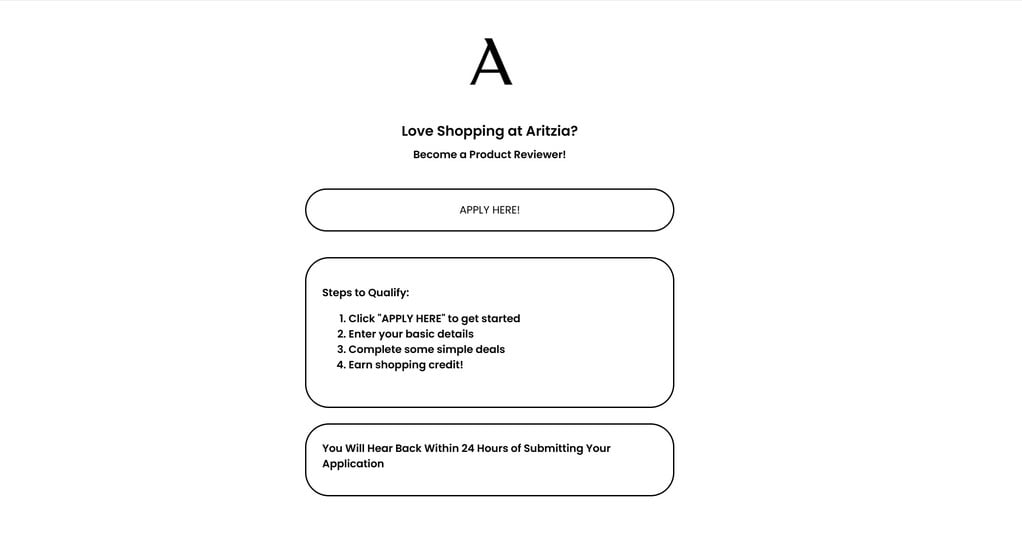
The scam works by directing unsuspecting social media users and recipients of text message spam to websites like Clientelehaul.com. These pages promise the chance to become an Aritzia product reviewer in exchange for store credit or a gift card. The website displays the Aritzia logo and text reading:
“Love Shopping at Aritzia? Become a Product Reviewer! Steps to Qualify: Click ‘APPLY HERE’ to get started, Enter your basic details, Complete some simple deals, Earn shopping credit! You Will Hear Back Within 24 Hours of Submitting Your Application.”
It all seems straightforward enough. Just provide some basic personal information, complete a few simple tasks, and then wait to receive a hefty Aritzia gift card in return. However, clicking that apply button leads victims down a deceptive rabbit hole designed to profit from their data and personal information.
In reality, there is no product reviewer position or gift card. The scammers do not represent or work with Aritzia in any capacity. Their only goal is to collect personal details and generate affiliate marketing commissions through deceptive offers.
Once victims click the call-to-action button, they are redirected to survey and offer websites like RewardsGiantUSA.com. Here, they are instructed to complete 15 “deals” in order to qualify for a $500 Aritzia gift card.
These “deals” consist of online surveys, downloading specific apps, signing up for subscriptions, or purchasing products. Each completed task earns the scammers affiliate commissions. Meanwhile, victims are providing sensitive information like their phone number, email, physical address, and more.
At no point do victims ever receive a gift card or product reviewer position. The Clientelehaul.com website simply earns money by redirecting people to offer websites under the false pretense of a reward. This is a textbook affiliate marketing scam designed to profit from unsuspecting social media users and those vulnerable to text message spam.
How the Clientelehaul Scam Actually Works
Now that you understand the general premise of the scam, let’s break down exactly how it works step-by-step:
1. You See an Ad or Receive a Text
The scam starts with an ad on social media or a text message sent to your phone. These ads are designed to mimic legitimate Aritzia promotions and target women who fit the brand’s demographic. Examples include:
- Facebook/Instagram ads with the Aritzia logo offering a chance to become a product tester.
- Tweets sharing a similar fake product tester opportunity.
- Texts stating something like “Aritzia Product Reviewer: You’ve been selected for a $500 shopping credit. Click here to redeem.”
The goal is to grab your attention as a fan of Aritzia and make the offer appear credible. But the reality is that these ads and texts come from scammers, not the actual company.
2. You Click The Call-To-Action Link
Intrigued by the chance to earn $500 in free clothes from Aritzia, you click the call-to-action button or link in the ad or text. This immediately redirects you away from social media to a scam website like Clientelehaul.com.
These scam sites use the Aritzia logo and imagery to appear legitimate. However, they are completely unaffiliated with the real company. Their only purpose is to funnel victims into the scam.
3. You Are Instructed To Complete “Deals”
The scam website displays text promising the chance to become an Aritzia product reviewer and earn gift cards. It instructs you to click “Apply Now” or “Get Started” to begin qualifying for the offer.
Doing so redirects you again to a different website, often something along the lines of RewardsGiantUSA.com. This secondary scam site explains that you must complete 15 “deals” to earn a $500 Aritzia gift card.
These deals include surveys, downloading apps, signing up for subscriptions, or buying products. Each completed “deal” earns the scammers affiliate marketing commissions.
4. You Provide Personal Information
In order to complete the deal tasks, you have to hand over personal information like your name, email address, phone number, zip code, and sometimes even credit card details.
This data helps scammers identify potential victims, re-target them for future scams, sell to other fraudsters, or use in identity theft. Many of the apps you download also require intrusive permissions that could put your data at risk.
5. You Complete The Deals Without Receiving a Reward
After completing some or all of the required deals, you wait for the promised $500 Aritzia gift card. But unsurprisingly, it never arrives.
You’ve provided scammers with personal information and helped them generate affiliate commissions through surveys and offers. In return, you receive nothing.
The Clientelehaul.com website and its “deals” partners have no intention of sending gift cards or assigning product reviewer positions. The entire premise is a ruse to profit from your data and participation in affiliate offers under false pretenses.
6. The Scammers Disappear or Try Again
At this point, the scammers behind Clientelehaul.com have what they wanted. They move on to targeting new potential victims.
You may also notice an increase in spam calls, texts, and emails after providing your information. Scammers often share or sell data within fraud rings to help facilitate future scams.
Some victims report receiving more texts days or weeks later with similar fake Aritzia product tester offers. Persistent scammers may attempt to string you along with additional deals, still dangling the promise of a gift card that never materializes. Their goal is to scam you out of as much time, information, and money as possible.
What To Do If You Are a Victim of the Clientelehaul Scam
If you suspect you have fallen for the Clientelehaul.com scam, there are a few important steps to take right away:
- Report it. File a scam report with the FTC at ReportFraud.ftc.gov. You can also report the scam ads or texts to the social media platforms where you saw them. The more reports that come in, the quicker these scams will be shut down.
- Contact your bank or credit card company. If you provided any financial information or made purchases as part of the “deals”, report these fraudulent transactions to your bank or credit card company immediately. They can help reverse the charges and block future unwanted charges.
- Change passwords. If you used the same email address/password combination on survey and deal sites that you use for financial or other sensitive accounts, change those passwords immediately. Scammers can use credential stuffing techniques to test stolen logins across other sites.
- Warn others. Share your experience and warn friends, family members, and your wider social media network about the scam. Posting about it can help prevent others from falling victim too.
- Watch out for future scams. Sign up for the FTC’s scam alerts at ftc.gov/scams to stay updated on the latest frauds. Be extra cautious about text messages, emails, and social media ads going forward. Scammers often target those who already fallen victim since they know they’re willing to engage.
- Monitor your accounts. Keep an eye out for any suspicious charges or activity on your accounts in the coming weeks. Ongoing monitoring helps detect fraud and identity theft early. Consider signing up for a credit monitoring service as well.
- Seek legal counsel. For serious cases of fraud, legal action may be warranted. An attorney can advise you on options like pressing charges or recovering lost money.
Falling victim to scams leads to feelings of anger, embarrassment, and vulnerability. But try not to blame yourself. These scammers are experts in manipulation and prey on people’s trust. With the right precautions, you can avoid these traps and help stop others from being scammed too.
Is Your Device Infected? Run a Free Malware Scan
Slow performance, constant pop-ups, or strange behavior? These are classic signs of a malware infection. The fastest way to find out is to scan your device with Malwarebytes Free — one of the most trusted malware removal tools available.
The free version detects and removes the most common threats, including:
- Adware — the cause of those annoying pop-ups
- Browser hijackers — unwanted redirects and changed homepages
- Trojans and spyware — hidden programs stealing your data
- Potentially unwanted programs (PUPs) — software you never asked for
👉 Select your device below — Windows, Mac, or Android — then follow the simple steps to download Malwarebytes, scan your system, and remove any threats it finds. The scan usually takes 5 to 20 minutes.
Run a Malware Scan with Malwarebytes for Windows
Malwarebytes is one of the most popular and trusted anti-malware tools for Windows — and it’s completely free for removing infections. It catches threats that many antivirus programs miss, including adware, browser hijackers, and trojans. Follow the steps below to scan and clean your PC in just a few minutes.
Download Malwarebytes
Click the button below to download the latest version of Malwarebytes for Windows from the official source. The free version is all you need — it will scan your computer and remove adware, browser hijackers, and other malicious software at no cost.
Download MalwarebytesOfficial installer for Windows 11 and 10. Your download starts right away.Want real-time protection? See Malwarebytes Premium Malwarebytes Free for WindowsScans and removes malware at no cost
-
Install Malwarebytes
When the download finishes, open your Downloads folder and double-click the MBSetup file. If Windows shows a User Account Control pop-up, click “Yes” to allow the installation.
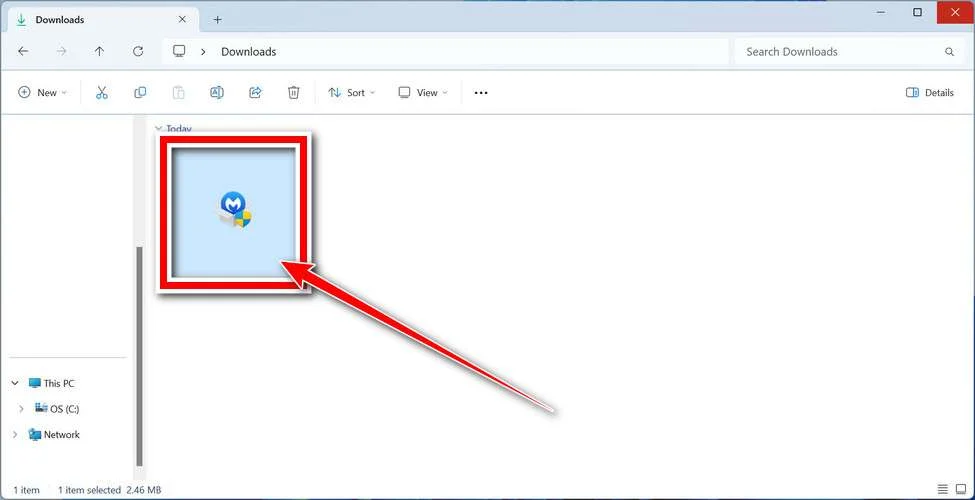
Follow the On-Screen Prompts to Install Malwarebytes
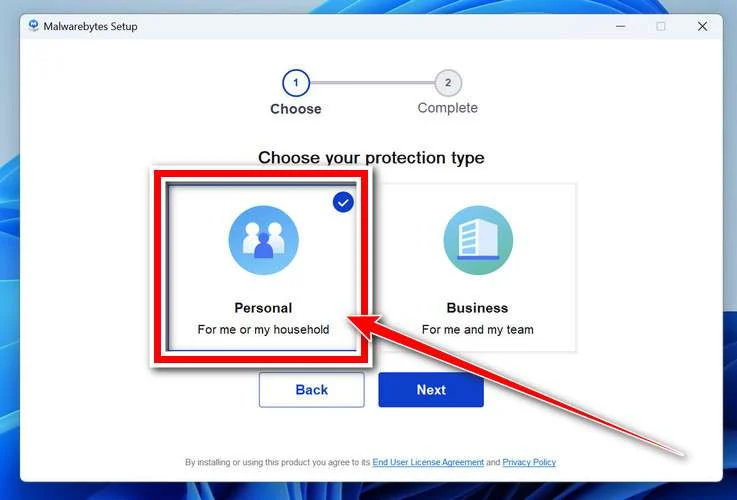
The setup wizard will walk you through a few quick screens:
-
Choose where you’re installing the program — “Personal Computer” or “Work Computer” — then click Next.
-
Malwarebytes will now install on your device. This usually takes under a minute.

-
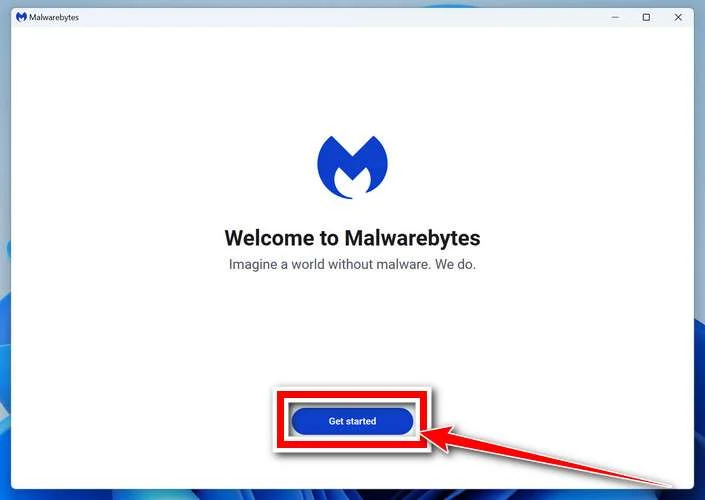
When installation is complete, the “Welcome to Malwarebytes” screen will open automatically.
-
On the final screen, click Open Malwarebytes to launch the program.

-
Enable “Scan for Rootkits”
Before scanning, turn on rootkit detection so Malwarebytes can find even the most hidden threats. Click the Settings gear icon on the left side of the screen.
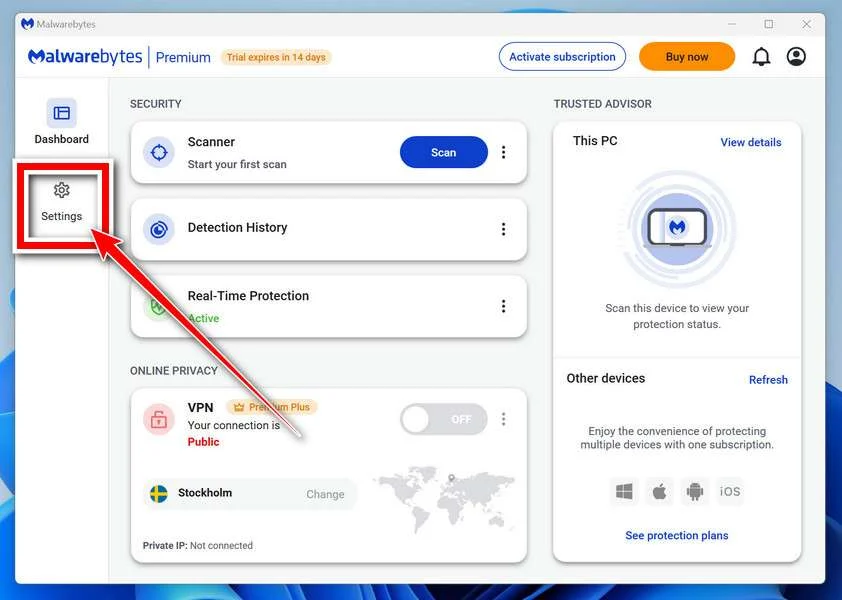
In the settings menu, find “Scan for rootkits” and click the toggle so it turns blue.

Done? Click “Dashboard” in the left pane to return to the main screen.
Start the Scan
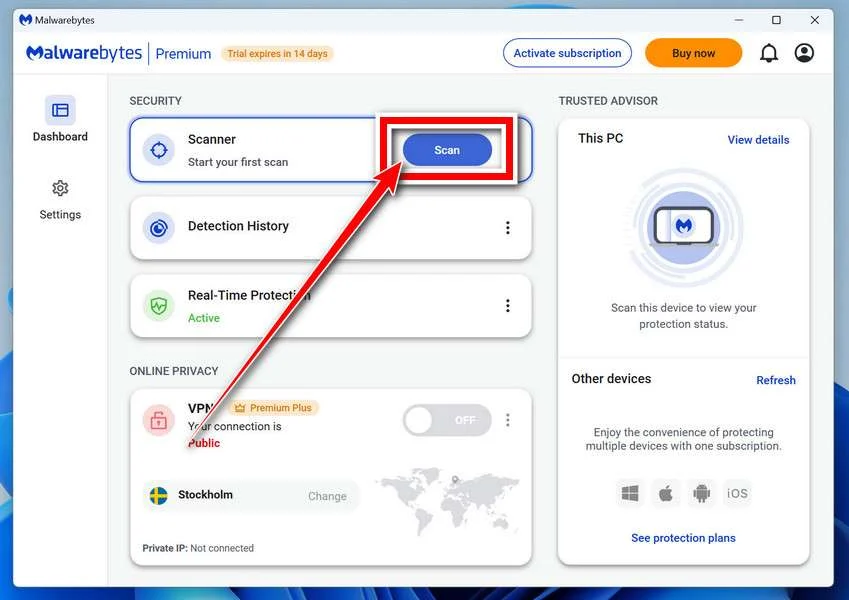
Click the blue Scan button. Malwarebytes will automatically update its virus database and start checking your computer for malware.
-
Wait for the Scan to Finish
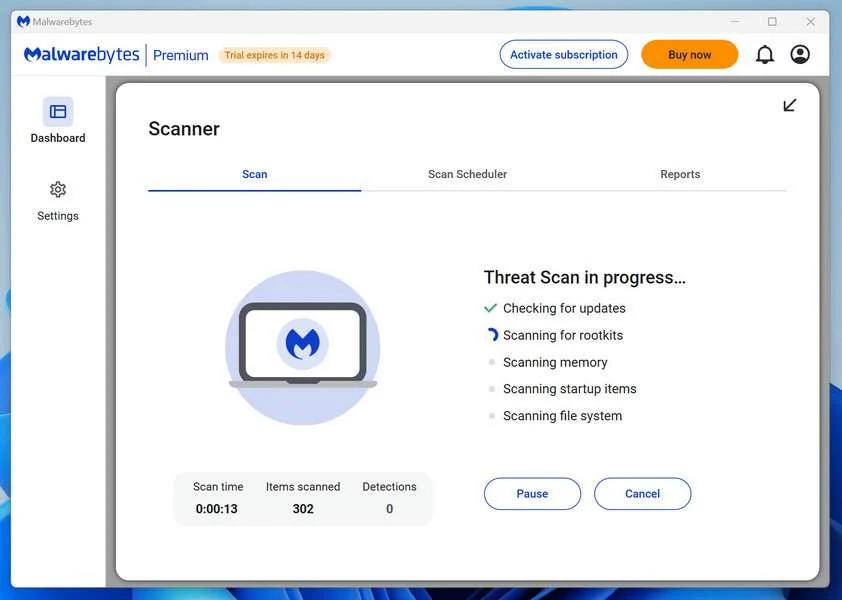
The scan checks your entire system for browser hijackers and other malicious programs, so it can take 5 to 20 minutes depending on your computer. Feel free to do something else — just check back occasionally to see the progress.
-
Quarantine the Detected Threats
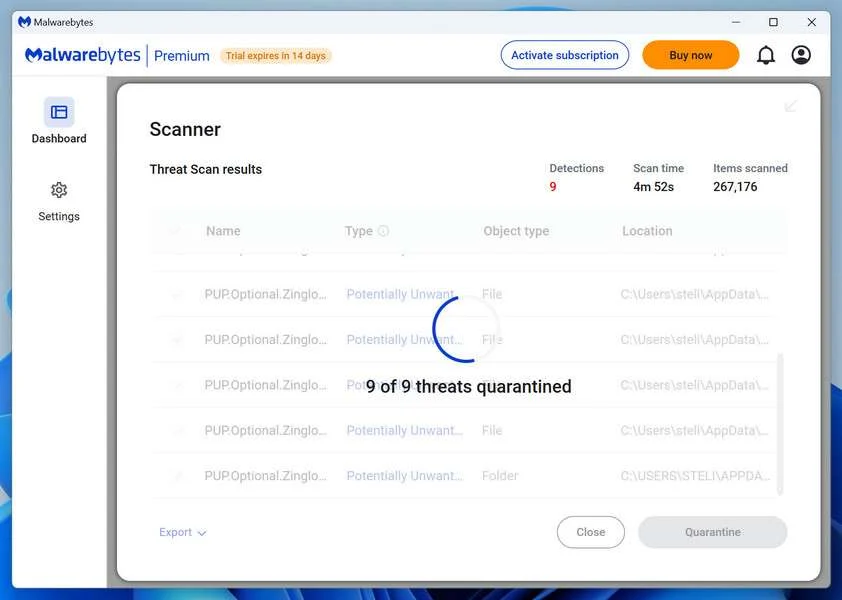
When the scan is done, you’ll see a list of everything Malwarebytes found — malware, adware, and potentially unwanted programs. Click the “Quarantine” button to remove all of them at once.
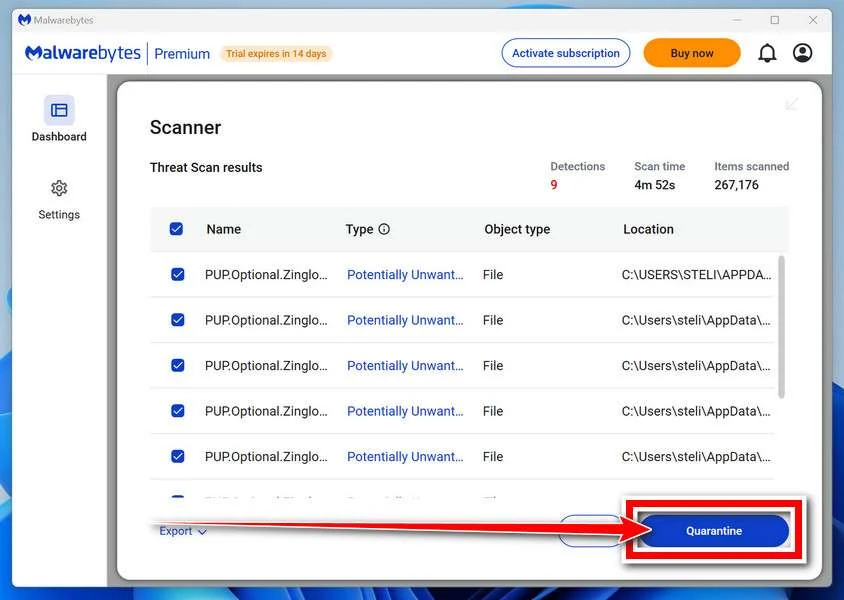
Malwarebytes will now remove the malicious files and registry entries and move them safely into quarantine.
-
Restart Your Computer
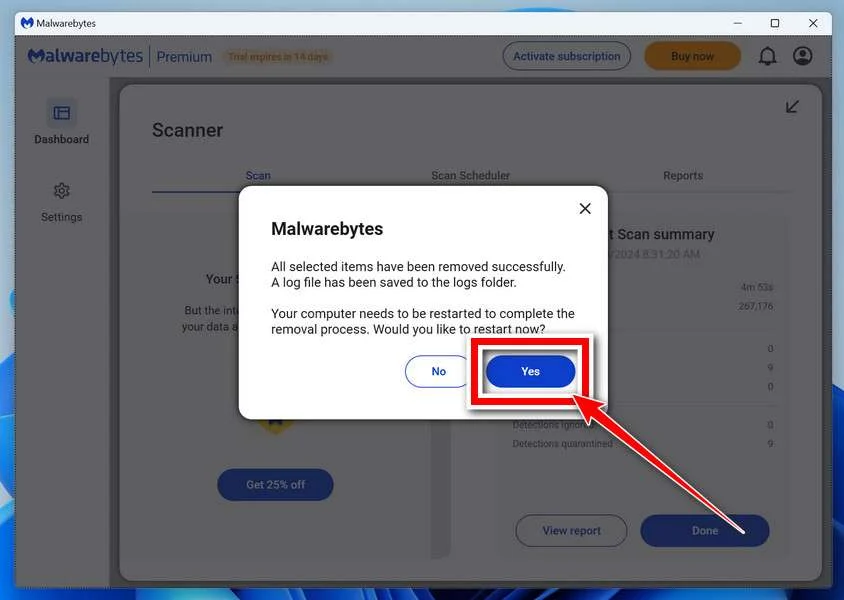
Some threats can only be fully removed after a reboot. If Malwarebytes asks you to restart, click Yes. Once you’re logged back in, Malwarebytes has finished removing the threats it found.
That’s it — your Windows PC is now clean of trojans, adware, and other malware, and should be back to running smoothly.
If you are still having problems with your computer after completing these instructions, then please follow one of the steps:
- Run a computer scan with ESET Online Scanner
- Ask for help in our Windows Malware Removal Help & Support forum.
Run a Malware Scan with Malwarebytes for Mac
Malwarebytes for Mac is a free on-demand scanner that removes the malware other security software tends to miss — adware, browser hijackers, and unwanted programs included. Cleaning an infected Mac with Malwarebytes has always been completely free, and it’s our go-to recommendation. Follow the steps below to scan and clean your Mac in just a few minutes.
-
Download Malwarebytes for Mac
Click the button below to download the latest version of Malwarebytes for Mac.
Download MalwarebytesOfficial installer for macOS. Your download starts right away.Want real-time protection? See Malwarebytes PremiumMalwarebytes Free for MacScans and removes malware at no cost -
Open the Malwarebytes setup file
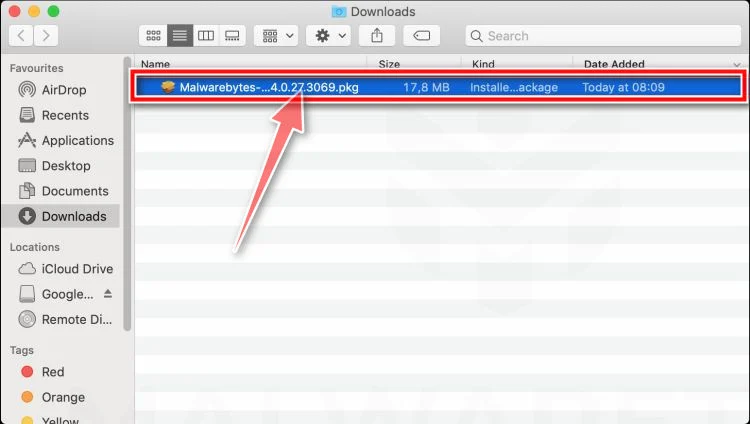
When the download finishes, open your Downloads folder and double-click the setup file to begin the installation.
-
Follow the On-Screen Prompts to Install Malwarebytes
The Malwarebytes for Mac Installer will guide you through a few quick screens. Click “Continue” and keep following the prompts until the installation completes.
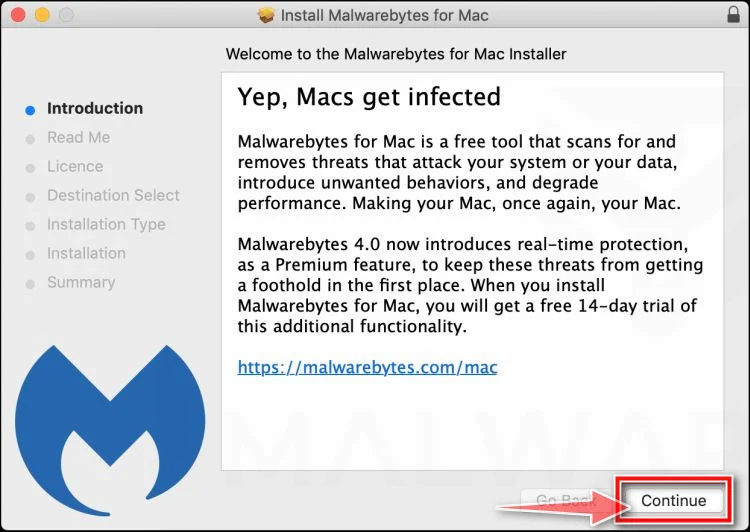
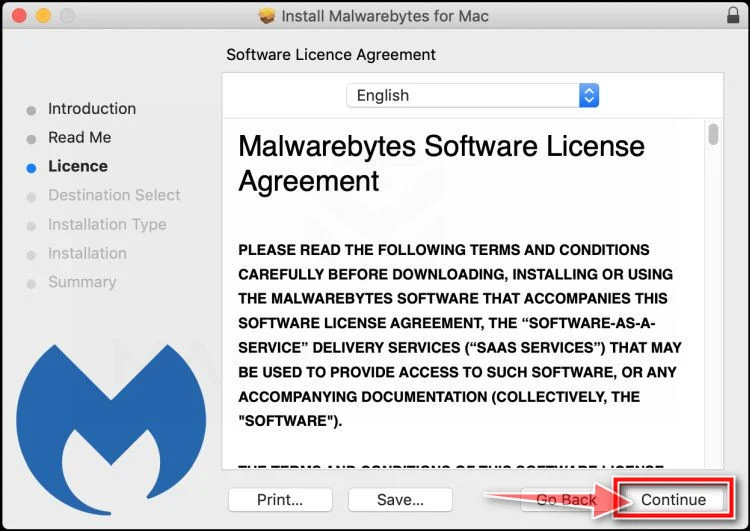
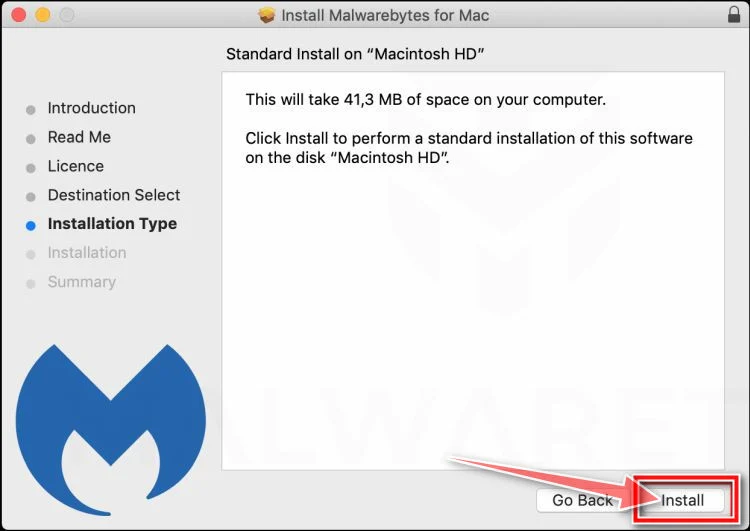
When the installation is complete, Malwarebytes opens to the Welcome to Malwarebytes screen. Click “Get started“.
-
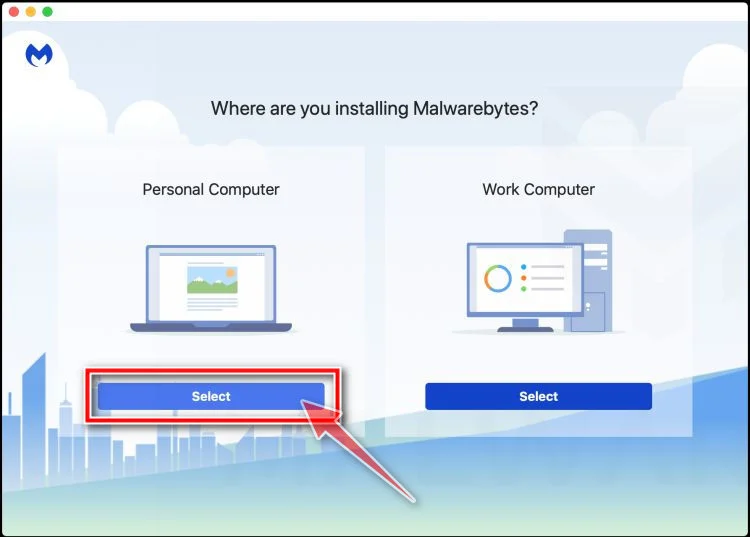
Select “Personal Computer” or “Work Computer”
Malwarebytes will ask what type of computer you’re installing it on. Click either Personal Computer or Work Computer, whichever applies.
-
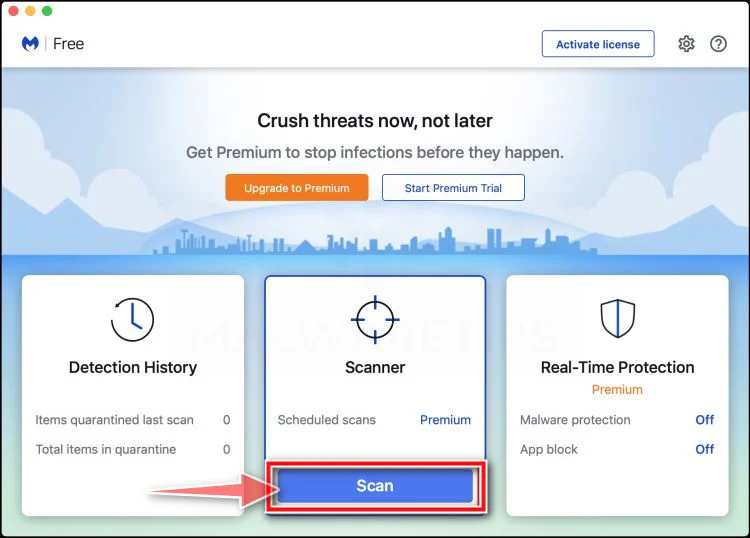
Start the Scan
Click the “Scan” button. Malwarebytes will automatically update its detection database and begin checking your Mac for malware.
-
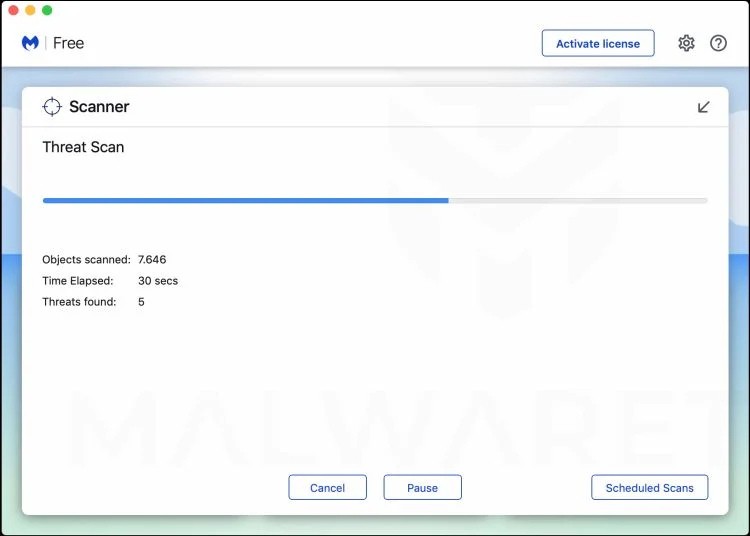
Wait for the Scan to Finish
Malwarebytes will scan your Mac for adware, browser hijackers, and other malicious programs. This can take a few minutes, so feel free to do something else — just check back occasionally to see the progress.
-
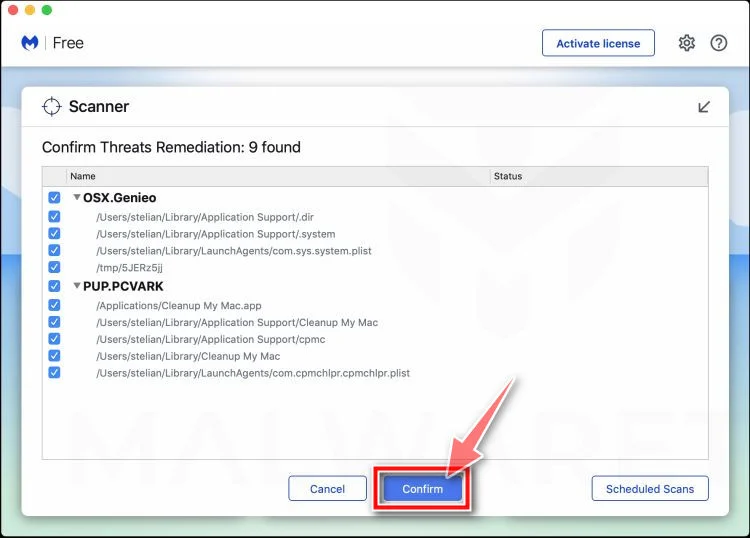
Quarantine the Detected Threats
When the scan is done, you’ll see a list of everything Malwarebytes found. Click the “Quarantine” button to remove all the threats at once.
-
Restart Your Mac
Malwarebytes will now remove all the malicious files it found. Some threats can only be fully removed after a reboot — if Malwarebytes asks you to restart, allow it. Once you’re logged back in, your Mac is clean.
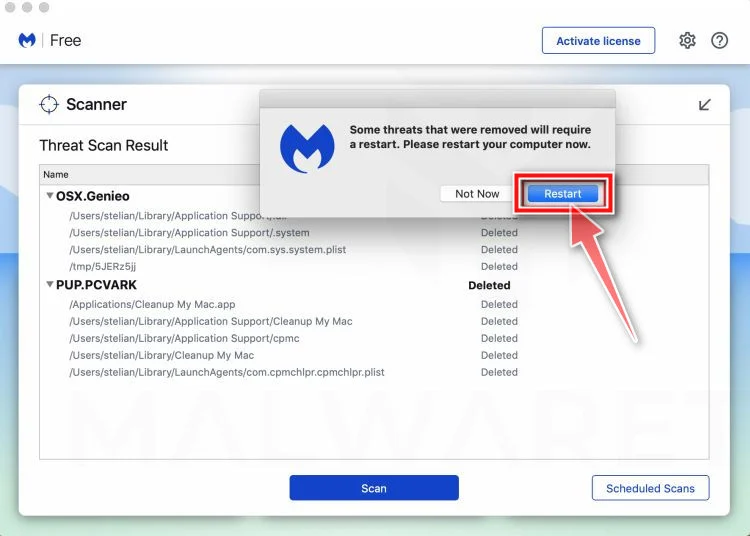
That’s it — your Mac is now free of adware, rogue browser extensions, and other potentially harmful software.
If you are still experiencing problems while trying to remove a malicious program from your computer, please ask for help in our Mac Malware Removal Help & Support forum.
Run a Malware Scan with Malwarebytes for Android
Malwarebytes for Android automatically detects and removes dangerous threats like malware and ransomware so you don’t have to worry about your most-used device being compromised. Aggressive detection of adware and potentially unwanted programs keeps your Android phone or tablet running smooth.
-
Download Malwarebytes for Android.
You can download Malwarebytes for Android by clicking the link below.
Get Malwarebytes for AndroidOpens Google Play in a new tab.Want real-time protection? See Malwarebytes Premium for AndroidMalwarebytes for AndroidScans your phone and removes malware at no cost -
Install Malwarebytes for Android on your phone.
In the Google Play Store, tap “Install” to install Malwarebytes for Android on your device.

When the installation process has finished, tap “Open” to begin using Malwarebytes for Android. You can also open Malwarebytes by tapping on its icon in your phone menu or home screen.

-
Follow the on-screen prompts to complete the setup process
When Malwarebytes will open, you will see the Malwarebytes Setup Wizard which will guide you through a series of permissions and other setup options.
This is the first of two screens that explain the difference between the Premium and Free versions. Swipe this screen to continue.
Tap on “Got it” to proceed to the next step.
Malwarebytes for Android will now ask for a set of permissions that are required to scan your device and protect it from malware. Tap on “Give permission” to continue.
Tap on “Allow” to permit Malwarebytes to access the files on your phone.
-
Update database and run a scan with Malwarebytes for Android
You will now be prompted to update the Malwarebytes database and run a full system scan.

Click on “Update database” to update the Malwarebytes for Android definitions to the latest version, then click on “Run full scan” to perform a system scan.

-
Wait for the Malwarebytes scan to complete.
Malwarebytes will now start scanning your phone for adware and other malicious apps. This process can take a few minutes, so we suggest you do something else and periodically check on the status of the scan to see when it is finished.

-
Click on “Remove Selected”.
When the scan has been completed, you will be presented with a screen showing the malware infections that Malwarebytes for Android has detected. To remove the malicious apps that Malwarebytes has found, tap on the “Remove Selected” button.

-
Restart your phone.
Malwarebytes for Android will now remove all the malicious apps that it has found. To complete the malware removal process, Malwarebytes may ask you to restart your device.
That’s it — your Android phone is now clean — no more malicious apps, adware, or browser redirects.
If you are still having problems with your phone after completing these instructions, then please follow one of the steps:
- Restore your phone to factory settings by going to Settings > General management > Reset > Factory data reset.
- Ask for help in our Mobile Malware Removal Help & Support forum.
Stay Protected: Block Ads and Malicious Sites
Now that your device is clean, keep it that way. Most infections start with a malicious ad or a fake download button — so blocking them at the source is your best defense.
We recommend AdGuard, which blocks malicious ads, phishing pages, and dangerous redirects before they can reach you.
👉 Download AdGuard and browse safely
Frequently Asked Questions About the Clientelehaul.com Scam
1. What is Clientelehaul.com?
Clientelehaul.com is a scam website that pretends to offer a chance to become an Aritzia product reviewer and earn gift cards. It uses fake ads and texts to lure victims into providing personal information and completing affiliate offer “deals”. There is no actual product reviewer opportunity or rewards.
2. How does the Clientelehaul.com scam work?
The scammers behind Clientelehaul.com run fake ads on social media and send text spam that mimic real Aritzia promotions. When victims click on these, they are redirected to Clientelehaul.com. This site promises a $500 gift card in exchange for applying to become a product reviewer. Applicants are then sent to secondary scam sites and instructed to complete surveys, downloads, subscriptions and purchases in order to earn the supposed gift card. In reality, it’s just an affiliate marketing scam to generate commissions and harvest personal information. No gift card is ever provided.
3. What are some examples of Clientelehaul.com ads?
Some examples of Clientelehaul.com scam ads include:
- Facebook and Instagram ads with the Aritzia logo offering a product tester position.
- Tweets sharing a similar fake Aritzia product tester opportunity.
- Text messages stating “Aritzia Product Reviewer – You’ve been selected for a $500 shopping credit. Click here to redeem.”
4. What happens when you click on Clientelehaul.com ads?
Clicking on a Clientelehaul.com ad redirects you to the Clientelehaul.com website. This site uses Aritzia’s logos and imagery illegally to appear credible. It offers an application to become a product tester. Starting the application sends you to secondary scam websites that require completing multiple “deals”. These deals earn scammers commissions but never results in a gift card reward.
5. What types of deals do they require you to complete?
The Clientelehaul.com scam tricks people into completing deals like:
- Online surveys that collect personal information
- Downloading specific mobile apps
- Signing up for subscriptions
- Making purchases
Each deal completed earns affiliate commissions for the scammers. But no reward is ever provided.
6. What personal information do these scammers obtain?
To complete the deal tasks, victims must provide information like:
- Full name
- Email address
- Phone number
- Home address
- Credit card details
This sensitive data is used to facilitate identity theft or sold to other scammers. The downloaded apps also can access contacts, messages, and other data.
7. Why does Clientelehaul.com specify Aritzia in their scam?
Clientelehaul.com uses Aritzia’s brand because they know the company has a large following among their target demographic. Aritzia fans are more likely to engage with offers related to the brand rather than general rewards programs. Spoofing real companies makes the scam appear credible.
8. How can I spot Clientelehaul.com scam ads?
Warning signs of the Clientelehaul.com scam include:
- Ads and texts offering free gifts or rewards from specific brands.
- Use of logos and branding without permission.
- Vague language about becoming a product tester.
- Requirements to complete multiple deals or offers.
- Requests for personal information.
9. What should I do if I suspect a Clientelehaul.com scam ad or text?
If you suspect a scam ad or text related to Clientelehaul.com, you should:
- Avoid clicking on any links or call-to-action buttons.
- Report the ad or text to the appropriate social media platform.
- Warn friends and followers about the scam.
- Monitor accounts closely for any suspicious activity just to be safe.
10. How can I protect myself from Clientelehaul.com scams in the future?
To avoid falling victim to Clientelehaul.com and similar scams:
- Be wary of unsolicited texts or social media ads with free gift offers.
- Do not click on suspicious links or provide personal information to unfamiliar sites.
- Use strong passwords and two-factor authentication on all accounts.
- Monitor bank statements routinely for any unauthorized charges.
- Set social media profiles to private to limit data access.
- Stay informed about the latest online scams and threats.
The Bottom Line on the Clientelehaul Scam
The bottom line is that Clientelehaul.com and any other website promising rewards or gift cards in exchange for completing deals should be avoided. They do not represent or work with Aritzia in any way.
These scammers only goal is to generate affiliate commissions and collect personal data under false pretenses. The ads and texts are designed to manipulate fans of brands like Aritzia who may find the offers appealing. But no product reviewer job or gift card will ever materialize.

Reviews & discussion
0 commentsShare a firsthand experience, or ask a question.
Community reviews
clientelehaul.com
Moderated reader experiences, not an editorial verdict.
Start the conversation
Have a question or something useful to share? Add the first comment.