

The thought of losing years of photos and documents can overpower ordinary caution. The Cloud Subscription Paused Email Scam uses that fear to make an invented billing problem feel like a seven-day countdown to permanent data loss.
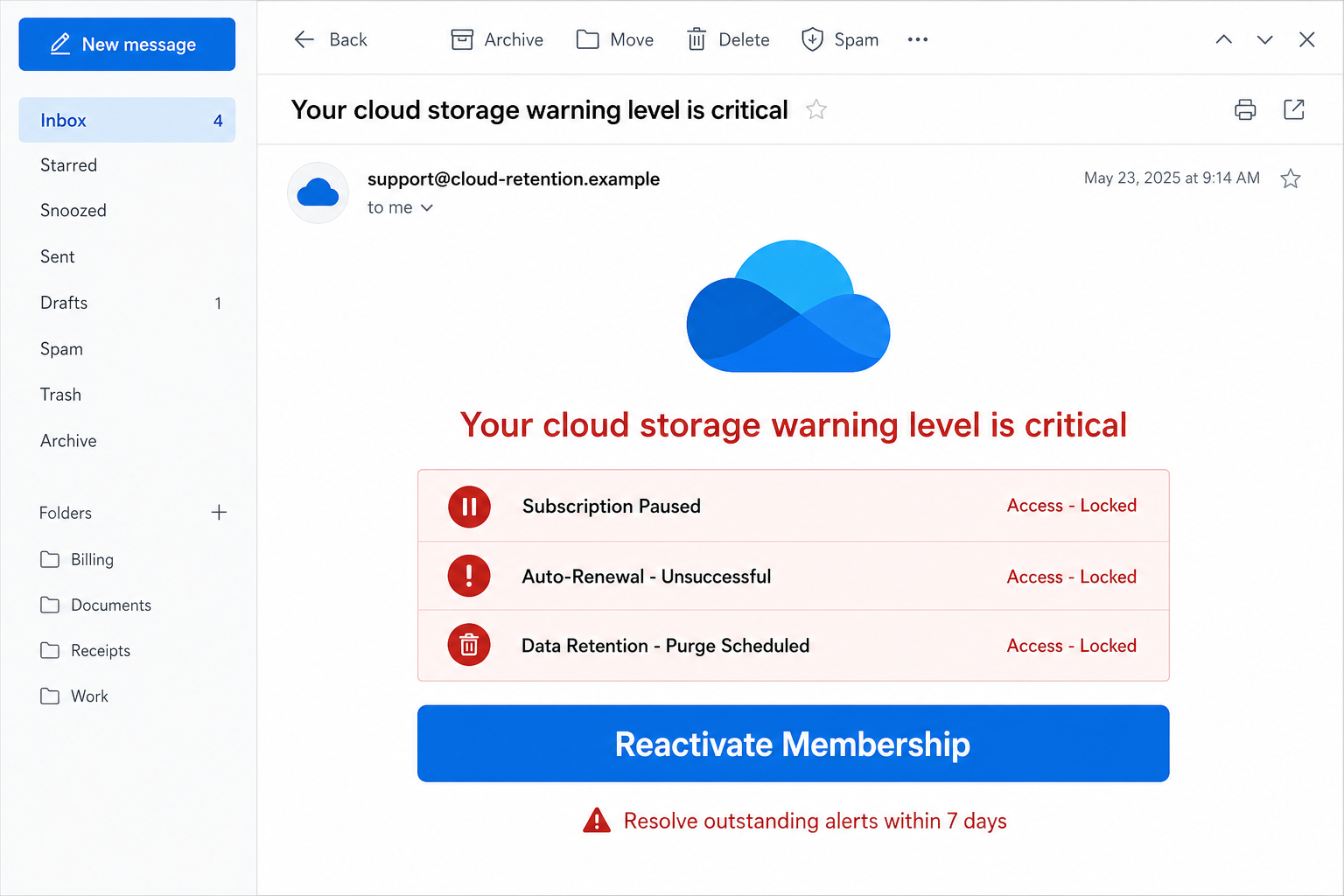
The message avoids naming a recognizable provider and refers only to Cloud storage. It claims an automatic renewal failed, access is locked, and a scheduled purge will erase files unless the recipient updates the subscription.
The button does not lead to a normal billing page for iCloud, Google Drive, OneDrive, Dropbox, or another service the recipient can identify. It moves through warning pages designed to keep the visitor clicking until a commercial offer appears.
In the observed pattern, that offer may be a real paid product sold through deceptive affiliate marketing.
The product can exist while the email and deletion threat remain completely fabricated. The promoter earns a commission when frightened recipients subscribe.
Overview
A Generic Cloud Warning That Fits Almost Anyone
The Cloud Subscription Paused Email Scam is deliberately vague about which account is affected.
Millions of people store files online, so the word Cloud is enough to make many recipients wonder whether the warning concerns their phone, email account, work files, or photo library.
Labels such as Access Locked, Auto-Renewal Unsuccessful, and Data Retention Purge Scheduled make the notice look technical.
Yet it may omit the provider name, account address, plan, storage amount, invoice number, and failed payment method that would make a real billing notice traceable.
The Seven-Day Purge Is an Emotional Deadline
The strongest claim is that stored data will be deleted in seven days. That short deadline is not there to explain a real retention policy. It is there to prevent the recipient from calmly opening each cloud account and checking the subscription status independently.
Photos, tax files, family videos, and work documents have emotional or practical value that is difficult to replace.
Scammers know that a person who imagines those files disappearing may accept an unfamiliar renewal flow, a surprise trial, or a paid security offer without checking who sent it.
The Funnel Can End at a Real Product and Still Be Deceptive
Not every fraudulent campaign ends with a counterfeit login page. This one can push visitors through fake storage warnings and redirects before presenting a legitimate paid service from an unrelated company.
The service is not proof that the earlier claims were genuine.
This is deceptive affiliate marketing: the promoter invents a crisis, hides the real seller until late in the journey, and receives compensation for conversions.
The buyer may authorize a recurring subscription that has no connection to cloud storage and does nothing to stop the imaginary purge.
- False claim: a generic cloud subscription was paused after automatic renewal failed.
- Pressure tactic: access is supposedly locked and a data purge is scheduled within seven days.
- Missing evidence: no clear provider, plan, invoice, account, or failed payment reference.
- Likely route: multiple warning pages and affiliate redirects leading to a paid service.
- Main risks: unwanted recurring charges, disclosed personal data, and additional scam targeting.
Why the Cloud Data Deletion Warning Is Misleading
A Real Provider Identifies the Account and Plan
A genuine billing notice should make it possible to understand which provider, account, and subscription are involved without pressing a promotional button. Even then, the safest confirmation comes from opening the provider’s official app or bookmarked website.
The generic Cloud label lets the same email reach Apple, Google, Microsoft, Dropbox, and other users. A sender that cannot identify the service allegedly holding the files has not established that any subscription exists.
A Billing Failure Does Not Justify a Random Product Funnel
If a payment for cloud storage fails, the corrective path should remain inside that provider’s billing system.
A chain that jumps between unrelated domains, dramatic scan screens, countdowns, and a different company’s checkout is not a normal account-recovery process.
The final merchant may provide its legal name and terms only near the payment form. Read those details carefully. A real checkout can process a real charge even though every reason used to get the visitor there was false.
Affiliate Disclosure Cannot Repair a Fabricated Threat
Affiliate marketing is common and can be legitimate when the relationship and offer are explained honestly. It becomes deceptive when a promoter invents file deletion, impersonates a provider, or disguises an unrelated sale as a required cloud renewal.
A small disclosure in checkout terms does not validate the earlier warning. The essential question is whether the recipient’s actual storage account shows the same problem when opened independently. If it does not, the purge story should be treated as fabricated.
How the Cloud Subscription Paused Email Scam Works
Step 1: A Broad Email Claims the Subscription Is Paused
The campaign begins with a subject about cloud storage, renewal failure, or critical account status. The wording is broad enough to feel relevant to almost anyone who owns a smartphone or uses webmail.
The visible sender may use a support-style name, but the underlying address is unrelated to the major storage providers. Generic branding reduces the chance that the sender will contradict a specific company’s design too obviously.
Step 2: The Message Invents a Failed Automatic Renewal
Inside, a status panel says Auto-Renewal Unsuccessful or Access Locked. The recipient is encouraged to assume that an expired card, bank decline, or forgotten subscription caused the problem.
No reliable transaction reference is needed because uncertainty does the work. A person may remember recently replacing a card and mentally connect that unrelated event to the warning.
Step 3: A Seven-Day Data Purge Creates Urgency
The email warns that files will be purged after a short retention period. It may mention photos, documents, backups, or contacts so the reader imagines personally meaningful losses.
Legitimate providers publish retention and billing policies inside their services. A countdown displayed only in an unsolicited email or on a marketing page is not evidence that data deletion has been scheduled.
Step 4: The Button Opens a Fake Storage Warning
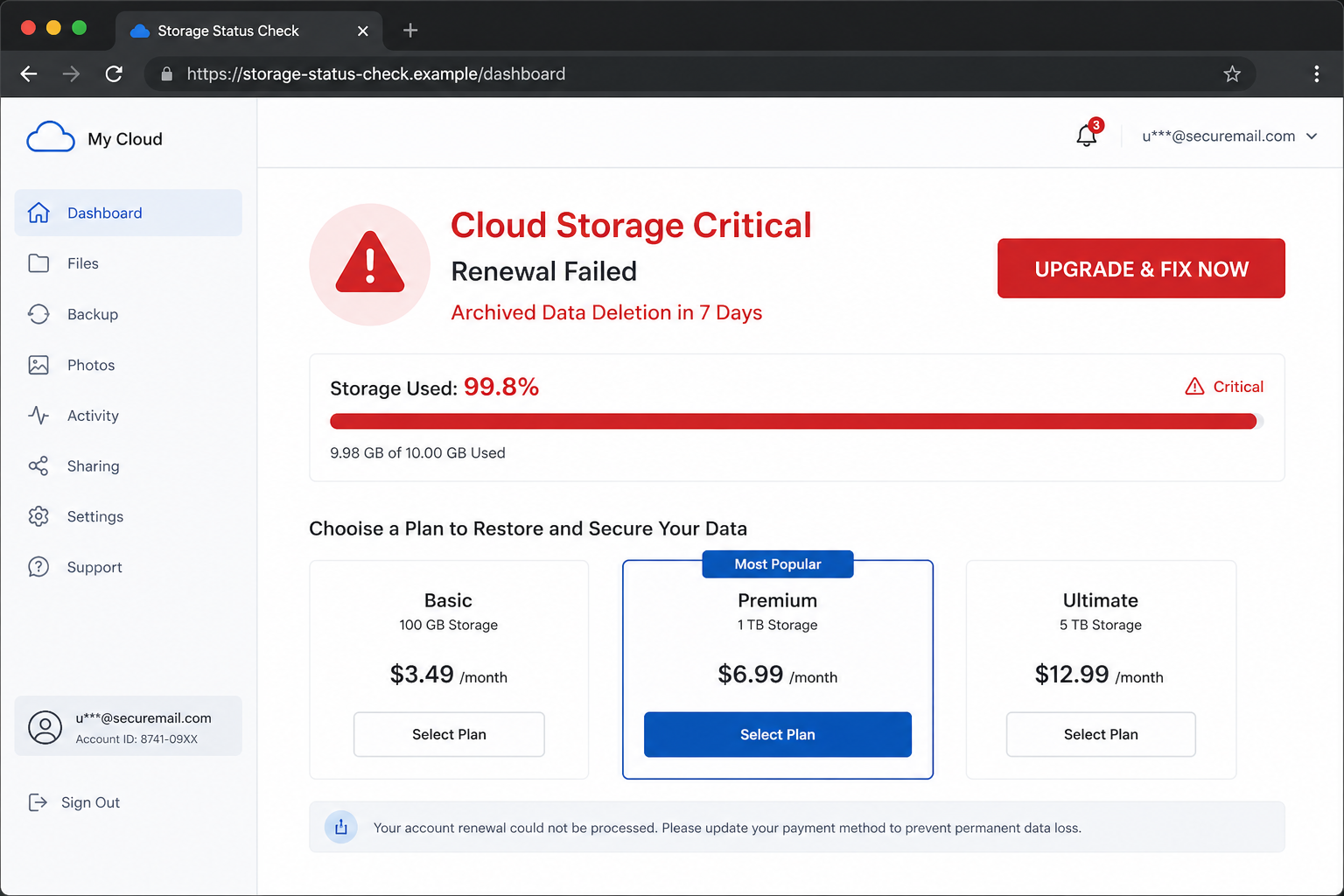
A renewal, restore, or protect button leads away from any recognizable provider. The landing page repeats the critical status, may animate a scan, and tells the visitor that immediate action is required.
The page is a bridge rather than an account portal. It often cannot display the user’s real files, storage quota, invoices, devices, or billing history because it has no authenticated connection to the supposed account.
Step 5: Redirects Hide the Real Commercial Destination
The visitor may pass through tracking links, survey-style questions, or additional warnings. Each redirect records the affiliate source and makes it harder to see which site began the journey.
This layered route also prevents simple comparison. By the time the product page appears, the recipient may be thinking about saving files rather than asking why a cloud renewal suddenly became a different security, utility, or subscription offer.
Step 6: A Paid Offer Converts Fear Into Commission
The final page can sell a genuine service with a trial or recurring plan. The affiliate receives compensation if the visitor completes the order, even though the product seller did not pause the recipient’s cloud subscription.
Payment details, name, address, email, and telephone number may be collected at checkout. Those details create a real billing relationship and can also make future promotions or impersonation attempts more convincing.
Step 7: Recurring Charges and Follow-Up Offers Continue
A low introductory price can renew at a higher rate or cover a product the buyer never intended to purchase. Canceling may require contacting the actual merchant, not replying to the original email.
People who respond to fear-based campaigns may be marked as valuable leads.
New messages can claim device infections, expired antivirus, package problems, or additional storage emergencies because the sender already knows the address attracts engagement.
Company, Address, and Fulfillment Checks
Provider: Identify Which Account Is Supposedly Affected
Do not guess from the word Cloud. Open iCloud, Google Drive, OneDrive, Dropbox, or another service through its official app or a saved address and inspect the storage and billing status there. A real problem should be visible inside the relevant account.
Domain: Follow Every Redirect Before Trusting the Page
Check the registered domain at each stage. A hostname containing cloud, storage, renewal, files, or security can still belong to an unrelated promoter. Multiple unrelated domains are a strong sign that the flow is marketing rather than account administration.
Seller: Read the Checkout Before Entering Payment Data
Find the merchant’s legal name, product name, trial length, renewal amount, cancellation method, refund policy, and customer-service contact. If the seller is not the storage provider named or implied earlier, the offer cannot renew that storage plan.
Subscription Trace: Compare the Claim With Real Records
Search the genuine account for invoices, failed payments, quota warnings, and retention notices. Also check card statements for an existing charge from the actual provider. A claim that leaves no matching record should not be solved through the email link.
Warning Signs in a Cloud Subscription Paused Email
The campaign relies on generic familiarity rather than account-specific proof. These clues reveal that the supposed renewal is a sales funnel.
- The message says Cloud but never clearly identifies the storage provider.
- No account address, plan, quota, invoice, or failed payment is shown.
- A seven-day deletion threat appears before any verifiable billing detail.
- The button opens an unrelated domain instead of the provider’s account portal.
- The page shows warnings or scan animations without displaying any real stored files.
- Several tracking redirects separate the email from the checkout.
- The final paid product is unrelated to the cloud subscription described at the start.
- Recurring terms or the merchant identity are disclosed only near the payment form.
The clearest test is simple: if the real provider account is healthy, a third-party page cannot prove that files are scheduled for deletion. Close the funnel and manage subscriptions only inside the service that stores the data.
What to Do if You Have Fallen Victim to This Scam
The correct response depends on whether you only clicked, disclosed contact information, or completed a purchase. Work through the steps that match what happened.
- Open the real cloud account independently. Check storage, billing, recovery details, recent sign-ins, and deletion notices inside the official app or website. Do not return through the email button.
- Identify the merchant that charged you. Read the receipt and card-statement descriptor rather than the name used in the email. Record the product, amount, renewal schedule, and customer-service details.
- Cancel any unwanted recurring subscription. Follow the merchant’s official cancellation process and obtain written confirmation. Take screenshots of the terms and cancellation result in case billing continues.
- Ask for a refund and contact the card issuer if necessary. Explain that the purchase followed a misleading data-deletion warning. The issuer can explain dispute rights and whether the card number needs monitoring or replacement.
- Secure any account whose password you entered. If a page requested cloud or email credentials, change the real password, end other sessions, remove unknown recovery methods, and enable a passkey or authenticator app.
- Monitor statements for small and renamed charges. Affiliate funnels can introduce trials or add-ons. Review several billing cycles and report any amount you did not authorize.
- Run a Malwarebytes scan after downloads or installations. A commercial offer does not rule out malicious redirects. Scan the device if a file, extension, application, or remote-support tool was installed.
- Use AdGuard to reduce malicious redirects and advertising. It can block many known tracking and scam domains, although independent account verification remains essential when a new domain has not yet been classified.
- Preserve the complete path as evidence. Save the email, headers, screenshots, redirect addresses, checkout terms, receipt, and card descriptor. These records help the merchant, bank, and consumer-protection agency understand the deception.
- Expect follow-up storage and security messages. Treat new warnings skeptically, especially if they mention the same email address or purchase. Do not pay a recovery service to prevent a deletion that never appeared in the real account.
Frequently Asked Questions
Is the Cloud Subscription Paused email real?
The campaign described here is not a reliable provider notice. It uses generic branding and a deletion threat to route recipients toward unrelated offers. Verify the account through its official app.
Will my files be deleted after seven days?
The email does not prove that any files are scheduled for deletion. Check the actual storage account and its published retention policy. Do not rely on a countdown hosted by an unrelated site.
Can the final service be legitimate?
Yes, a real service can be sold through a deceptive affiliate funnel. Product availability does not make the fabricated cloud warning or hidden commission relationship honest.
Why does the scam use a real checkout?
A real checkout can collect valid payment authorization and create recurring revenue. The deception occurs earlier, when an invented emergency pushes the visitor toward a purchase they did not seek.
What if I clicked but did not buy anything?
Close the pages and avoid further contact. Clear any downloads, scan the device if something opened, and check the real storage account. A click alone does not create a cloud subscription.
How can I prevent legitimate cloud billing failures?
Keep recovery information current, review subscriptions inside the provider, enable account alerts, and use a payment method you monitor. Reach billing settings from the app rather than an unsolicited message.
The Bottom Line
The Cloud Subscription Paused Email Scam turns the fear of losing personal files into a deceptive sales journey. The failed renewal, locked access, and seven-day purge are pressure claims, not proof that a real storage provider has taken action.
Open the actual cloud account and inspect billing there. If the email led to a purchase, identify the real merchant, cancel unwanted renewal terms, monitor the payment method, and preserve evidence of the misleading route.

Join the discussion
0 commentsShare your experience or ask a question about this article.
Discussion
Start the conversation
Have a question or something useful to share? Add the first comment.