

A bounce message normally arrives just after something went wrong, so people are conditioned to read it quickly.
The Email Delivery Failure Notification Scam copies that routine format and adds one dangerous invention: a button that supposedly needs the mailbox password to fix delivery.
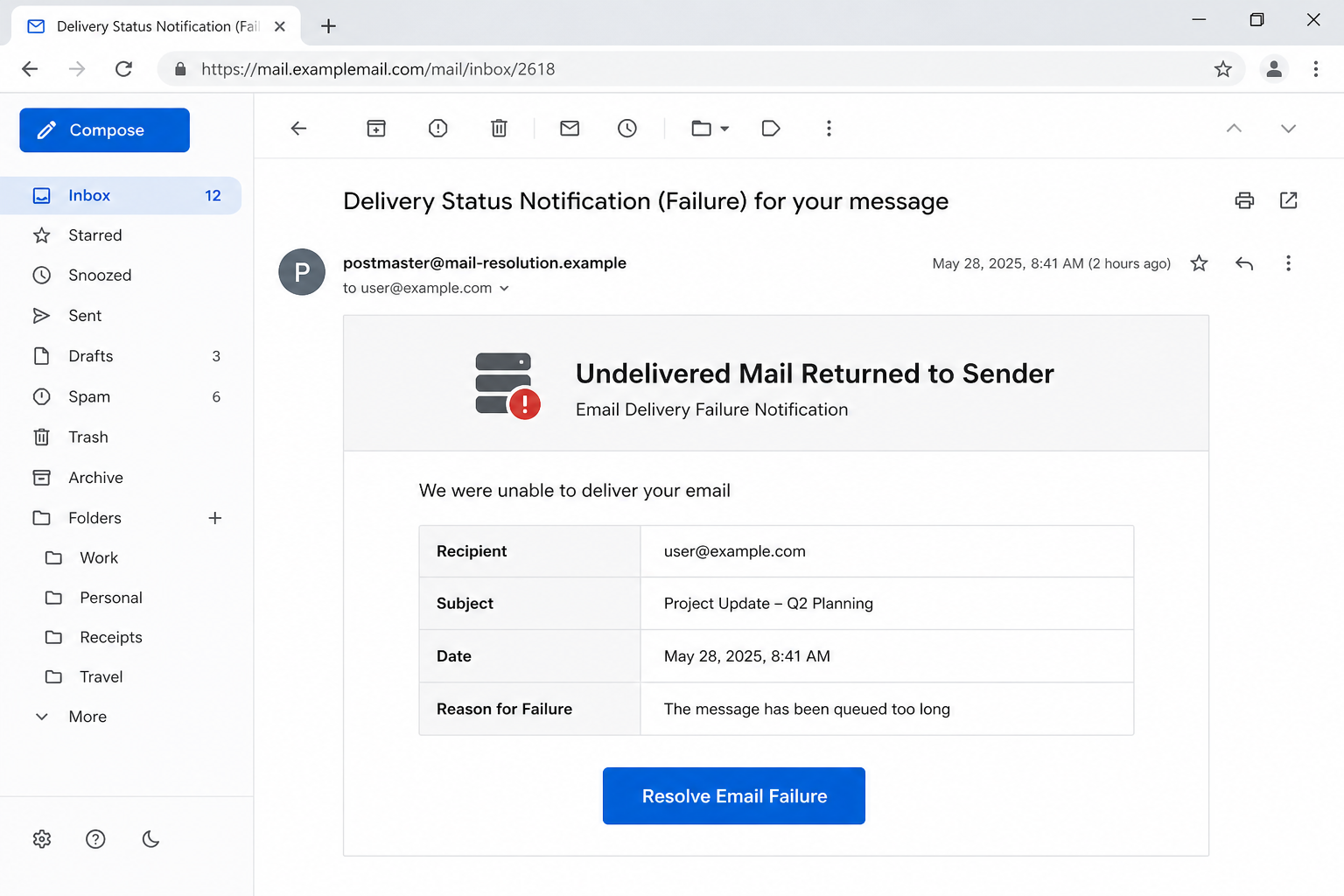
The email may use the subject Undelivered Mail Returned to Sender and show a timestamp, recipient, message subject, and reason for failure. A Resolve Email Failure button appears beneath the table.
A real nondelivery report explains why a message failed and may suggest checking the address or trying again. It does not require the sender to sign in through an unfamiliar third-party domain to release a queued message.
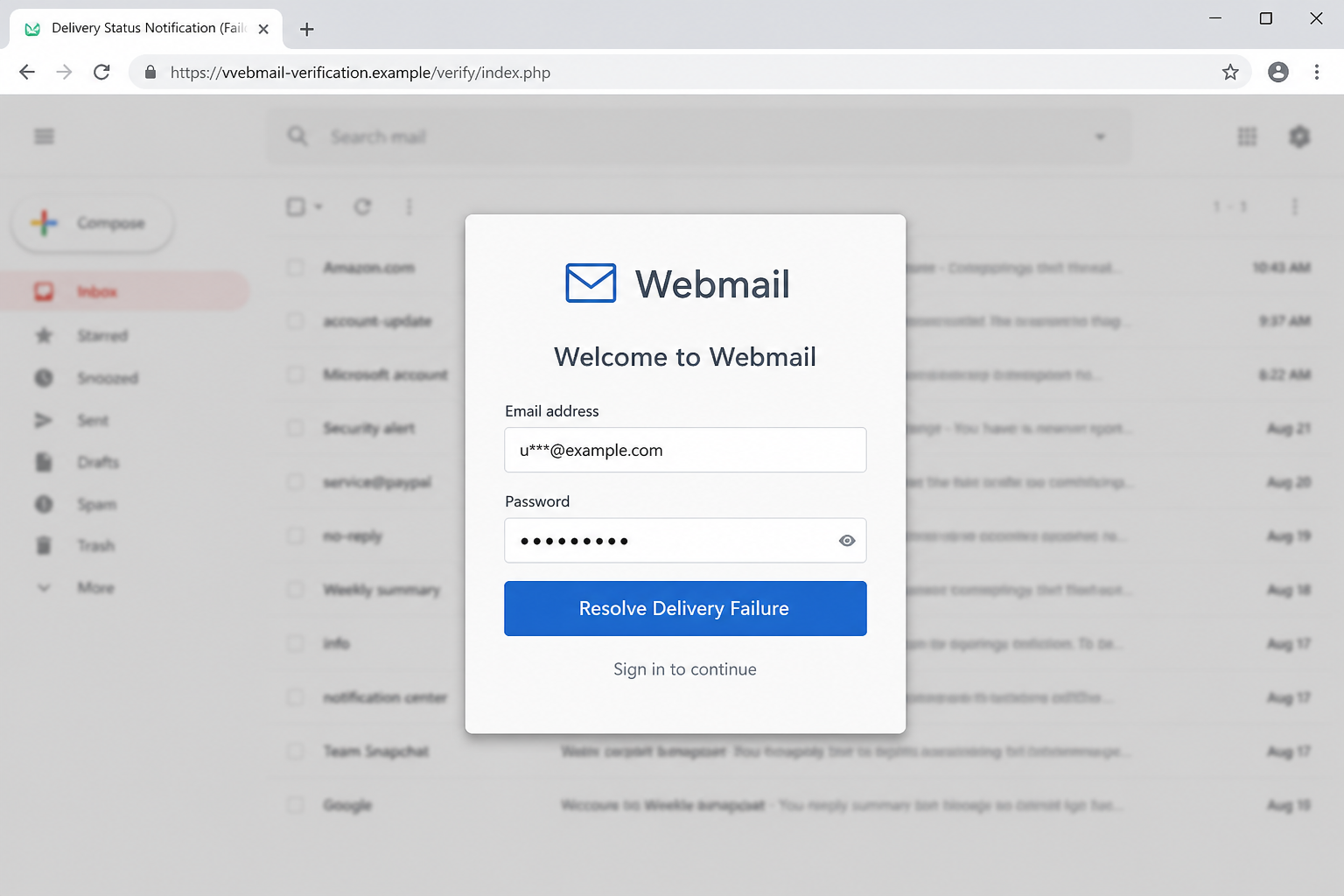
The fake page can overlay a generic Welcome to Webmail dialog on a blurred Gmail-style background. Prefilling the address makes the form feel connected to the mailbox, but the password is delivered to the scammer.
Overview
A Fake Bounce Built From Familiar Mail Language
The Email Delivery Failure Notification Scam is presented as an automated mail-server bounce or nondelivery report.
The lure starts with a familiar mail problem, then adds urgency until pressing its embedded button feels like routine troubleshooting instead of a risky login.
The message uses the subject Undelivered Mail Returned to Sender and Email Delivery Failure Notification and directs the recipient toward a Resolve Email Failure button.
The details are staged to look specific, yet they do not establish that the recipient’s mail service sent the email or that the claimed event exists.
The Resolve Button Is the Trap
The action behind a Resolve Email Failure button leaves the trusted route and opens a generic Webmail login hosted on an unrelated verification domain.
The unfamiliar destination is the strongest technical warning. Copying a provider's design does not give the attacker control of the provider's genuine web address.
The page is designed to obtain the full email address and mailbox password. Information submitted there is delivered to the operator of the phishing kit, not to the recipient’s mail service, the recipient’s mail provider, or another organization named in the story.
One Mailbox Password Unlocks a Wider Account Chain
A stolen mailbox is valuable far beyond the messages it contains. An intruder can study private mail, pose as the owner, trigger password resets, find invoices, and exploit familiar conversations when approaching colleagues, relatives, vendors, or customers.
The Email Delivery Failure Notification Scam can therefore become an account-takeover chain. The intruder can reset linked accounts, monitor private conversations, and send convincing fraud from the victim's real address.
The delivery-failure email is only the entry point. The deeper damage depends on the accounts, conversations, documents, and reset links available through the stolen inbox.
- Disguise: an automated mail-server bounce or nondelivery report.
- Subject or claim: Undelivered Mail Returned to Sender and Email Delivery Failure Notification.
- Call to action: a Resolve Email Failure button.
- Fraudulent destination: a generic Webmail login hosted on an unrelated verification domain.
- Information at risk: the full email address and mailbox password.
How a Real Delivery Failure Differs From This Phishing Email
A Real Nondelivery Report Follows a Message You Actually Sent
The visible sender name can say the recipient's mail service, Postmaster, Security Team, or another trusted label while the actual address belongs to unrelated infrastructure.
Anyone can choose a reassuring display name, and a familiar avatar proves nothing about who actually sent the notice.
Verification should begin through the email provider's bookmarked sign-in page or the organization's mail administrator. A genuine delivery event should appear after an independent sign-in or be confirmable through a support channel you already know and trust.
The Diagnostic Details Should Explain the Failure
The message combines recognizable details with inconsistencies. The observed phishing destination used a domain resembling vvebmail verification and displayed a generic Webmail box over a Gmail-like background, mixing two different systems.
Inconsistent details matter because credential-stealing templates often combine headers, icons, footers, and login elements copied from unrelated services.
Polished grammar cannot make an unexpected password request safe, and modern phishing emails do not always contain obvious spelling errors.
Judge the sender's domain, the actual destination, and the surprise request for credentials more heavily than the email's visual polish.
Fixing Delivery Does Not Require a Third-Party Password Form
A legitimate workflow does not need the recipient to disclose a complete mailbox password on a generic Webmail login hosted on an unrelated verification domain.
A legitimate mail provider already has its own authentication route and does not need an unrelated website to collect the user's sign-in details.
If a sign-in is genuinely required, navigate from the email provider's bookmarked sign-in page or the organization's mail administrator rather than from the email.
Moving to an independently opened service breaks the operator's control of the journey and reveals whether the same delivery event exists in the genuine mailbox.
How the Email Delivery Failure Notification Scam Works
Step 1: A Familiar Administrative Message Arrives
The campaign starts with Undelivered Mail Returned to Sender and Email Delivery Failure Notification. Because the wording resembles an automated delivery report, the mailbox owner may process it as ordinary system traffic instead of an untrusted email.
Logos and time stamps make the delivery alert look routine, while its short wording gives the reader little reason to pause and question the story. The Email Delivery Failure Notification Scam needs only one believable reason for the reader to continue.
Step 2: Specific-Looking Details Lower Suspicion
The email adds a sent time, recipient address, subject line, queue status, and a vague host-not-found explanation. A table, masked address, attachment name, or delivery error code can make a mass-produced phishing template appear tailored to one mailbox.
Those personalized details may be invented, copied from public sources, or inserted automatically from the address that received the phishing email. Specific formatting is not the same as independent verification.
Step 3: The Button Promises a Fast Resolution
The recipient is directed to a Resolve Email Failure button. The notice promises a one-click fix and warns that delay may affect a message, document, payment, or the mailbox itself.
A safer route is intentionally absent from the design. The operator wants the target to stay inside the prepared flow, not open a trusted bookmark, contact known support, or ask an administrator to verify the alert.
Step 4: The Browser Opens an Unrelated Domain
After the click, the browser loads a generic Webmail login hosted on an unrelated verification domain. The page may borrow the colors of the recipient’s mail service or adapt its background to resemble the visitor’s email provider.
The padlock shows only that the browser has an encrypted connection to the site currently open. Encryption does not establish that the web address belongs to the mail provider named in the delivery notice.
Step 5: The Fake Login Captures the Password
The page requests the full email address and mailbox password. Some fake forms arrive with the email address already filled in, creating a false sense of continuity while leaving only the mailbox password for the target to supply.
Submitting the form sends the values to the attacker. The delivery-failure page may show a loading spinner, reject the first password, or open a genuine site afterward. Those reactions can disguise the theft and persuade the target to enter the credential again.
Step 6: The Attacker Tests the Credentials
The operator can test the captured credential against the genuine mailbox almost immediately.
When the stolen credential works, the intruder may add a recovery method, create hidden forwarding, authorize an application, or capture an already authenticated browser session.
The intruder can reset linked accounts, monitor private conversations, and send convincing fraud from the victim's real address.
Multifactor authentication may stop the stolen password, but the same fake page or a follow-up caller can ask for the one-time code or push approval as well.
Step 7: The Compromised Inbox Fuels New Fraud
Once inside, the attacker searches for useful relationships and financial conversations. Mail sent from the compromised inbox carries genuine history and identity, making a later invoice, shared file, payment change, or reset request far more believable.
The Email Delivery Failure Notification Scam may therefore affect people who never received the original lure.
Changing the exposed password quickly, ending active sessions, and warning likely contacts can limit the damage that follows the initial mailbox theft.
Company, Address, and Fulfillment Checks
Identity: Confirm the Organization Independently
Contact the recipient's mail service or the relevant administrator through the email provider's bookmarked sign-in page or the organization's mail administrator.
Avoid telephone numbers, reply addresses, and support links contained in the delivery-failure email itself. Find a trusted contact route independently.
Domain: Inspect the Registered Address
Read the browser address before entering information. The presence of words such as secure, encrypted, webmail, payment, delivery, or the does not make an unrelated domain official.
Support: Use a Known Portal or Number
A legitimate issue can be checked without the email. Use a saved bookmark, the provider's official application, or a verified telephone number to investigate. Describe the failed-delivery claim without disclosing passwords or security codes.
Traceability: Look for the Same Event in the Real Account
Authentic mail events usually leave evidence inside the real service, including sent items, delivery diagnostics, security notices, payment records, or a support case number.
If the supposed delivery problem appears nowhere except the linked page, close it and report the message as phishing.
Warning Signs in an Email Delivery Failure Notification Scam
The Email Delivery Failure Notification Scam can look polished, but its workflow contains clues that a legitimate administrative message should not require.
- You did not send the message identified by the supposed bounce.
- The recipient, subject, or timestamp is vague or unrelated to Sent Items.
- A button claims the delivery problem can be fixed only by signing in.
- The link points outside the normal email-provider domain.
- A generic Webmail box is displayed over branding from a different provider.
- The address is prefilled to make the page appear personalized.
- The notice lacks useful SMTP diagnostics but creates immediate pressure.
Treat an unexpected password form as the decisive warning. Close it and restart through the email provider’s bookmarked sign-in page or the organization’s mail administrator before continuing.
What to Do if You Have Fallen Victim to This Scam
A hijacked inbox can cause damage quickly, so recovery should follow a clear sequence rather than a series of rushed guesses.
Restore control of the mailbox first. Next remove hidden access, protect services linked to the inbox, and alert people who might receive convincing messages from the intruder.
- Change the mailbox password through the real provider. Use a bookmark or manually typed address on a clean device and create a password that is not used anywhere else.
- Sign out every other session. Revoke unknown browsers, mail clients, app passwords, OAuth grants, and recovery methods because a stolen token can survive a normal password change.
- Remove malicious forwarding and rules. Inspect delegates, filters, automatic replies, blocked senders, sent mail, trash, and deleted security alerts for activity you did not create.
- Check whether the referenced message exists. Compare the recipient, subject, and time with Sent Items. Ask the real mail administrator to review delivery logs rather than using the Resolve Email Failure button.
- Secure accounts recovered through the mailbox. Prioritize banking, cloud storage, work tools, shopping, social media, and password managers that can send reset links to the compromised address.
- Warn recent correspondents. Tell coworkers, customers, friends, and vendors to distrust unexpected files, invoices, delivery notices, or payment changes sent during the compromise window.
- Run a full Malwarebytes scan if anything downloaded. Scan for malicious files, extensions, or remote-access tools and update the browser and operating system before signing back into sensitive services.
- Add AdGuard for another layer of protection. It may block known phishing domains and malicious redirects, but new verification sites can appear before blocklists update.
- Save and report the phishing evidence. Preserve the original message, headers, URL, screenshots, and login alerts. Report it to the email provider, employer, and appropriate fraud channels.
- Reject follow-up recovery messages. No legitimate technician needs gift cards, crypto, remote access, or an advance fee to restore a mailbox or recover messages.
Frequently Asked Questions
Is every delivery failure email a scam?
No. Real mail systems send nondelivery reports, but they normally correspond to a message you sent and provide diagnostic information without sending you to an unrelated password form.
Why was my email address already filled in?
The link can include the address as a parameter. Prefilling it creates the illusion that the page is connected to the provider, but it does not authenticate the site.
Does a real bounce have a Resolve Email Failure button?
Providers may offer help links, but a third-party button requesting the mailbox password is not a normal way to fix a recipient address, oversized attachment, or server rejection.
What if I entered an incorrect password?
Change the real password anyway if the incorrect value resembles a current or reused credential. Attackers may test variations across other services.
Can the scam install malware?
The observed route focuses on credential theft, but malicious email links can also deliver files. Scan the device if anything downloaded or requested installation.
How can I verify a genuine delivery problem?
Open Sent Items, check the recipient address, read the diagnostic code in the real provider, and contact the mail administrator through a known route.
The Bottom Line
The Email Delivery Failure Notification Scam copies the look of a routine bounce, then invents a password-based repair process. The Resolve Email Failure button does not repair mail delivery; it opens a path to account theft.
Check Sent Items and the provider’s real diagnostics. If a password was submitted, reset it immediately, revoke sessions, inspect forwarding rules, and warn contacts before the compromised mailbox is used for a second wave of fraud.
An administrator can also confirm the true delivery event from trusted server logs.

Join the discussion
0 commentsShare your experience or ask a question about this article.
Discussion
Start the conversation
Have a question or something useful to share? Add the first comment.