

It looks official for a split second.
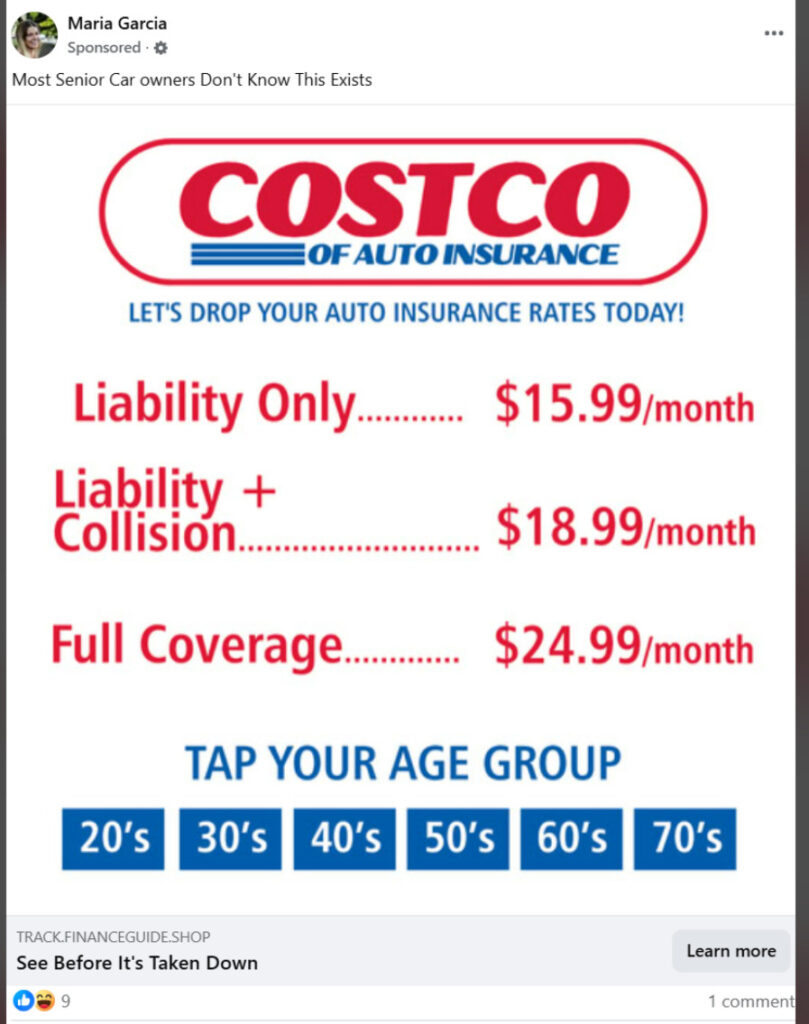
A “Costco car insurance” ad slides into your feed with a promise that hits you right in the gut: full coverage for as low as $19/month, and “approved” like it is already waiting for you. The price list looks clean, simple, and strangely confident. Almost like Costco negotiated it for everyone.
You hesitate. Then you wonder if you should tap your age group, just to see.
That tiny moment of curiosity is exactly what the ad is built for.
Scam Overview
The “Costco Car Insurance” scam ads are a widespread impersonation and lead-generation scheme that uses Costco branding to lure people into submitting personal information on unrelated websites.
These ads show up across major platforms, including YouTube, Facebook, TikTok, and Instagram. They often look like a normal sponsored post or short video ad, and they typically push a dramatic promise: extremely cheap car insurance, sometimes framed as a limited-time deal or a “senior savings” discovery.
The key detail is simple but critical:
These ads are not from Costco, and the websites they send you to are not Costco.
What the ads commonly claim
The scam ads typically use bold, confidence-building phrases that feel like they came from a real corporate promotion. Some of the most common hooks include:
- “Save up to $550 a year on Car Insurance”
- “Car Insurance $19 Full Coverage Approved”
- “Let’s drop your auto insurance rates today!”
They also present a fake price menu that looks official and “pre-negotiated,” such as:
- Liability only: $15.99/month
- Liability + collision: $18.99/month
- Full coverage: $24.99/month
These numbers are not realistic in today’s insurance market for most drivers, and the ads present them as if approval is already guaranteed. That is the psychological trick: they are trying to short-circuit your normal skepticism by making it feel like you have already qualified.
What the websites really are
In most cases, the ads lead to a rotating set of websites that are not insurance companies. They are lead-generation pages.
A lead-generation site is built for one purpose: collect your data and monetize it.
Sometimes that monetization is “legal but deceptive” marketing. Other times it crosses into outright fraud, aggressive harassment, or identity theft risk. Either way, the user experience is designed to feel like you are getting an instant quote, when in reality you are entering a funnel.
These sites often:
- Ask you to “tap your age group” or “select your state”
- Request your ZIP code to make it feel localized
- Ask for vehicle details to appear legitimate
- Push you toward a big button like “View Rates,” “Check Eligibility,” or “Get Quote”
And then, as you continue, the form starts asking for highly sensitive personal data.
What personal information they try to collect
These scam flows commonly prompt users to enter:
- ZIP code
- Vehicle details (make, model, year, sometimes VIN)
- Date of birth
- Full name
- Home address
- Email address
- Phone number
That is an unusually rich package of personal data to give to an unknown website that you reached from a social media ad.
Even if you never enter a credit card, this information has value. It can be used to:
- Build a marketing profile that follows you across services
- Flood you with calls, texts, and emails from “partners”
- Trigger targeted scams that use your real details to sound convincing
- Attempt account takeovers using identity-based verification prompts
- Create a higher risk of identity theft attempts, depending on what you submitted
The “buried consent” trap most people miss
A major red flag in these campaigns is that the real disclosure is often hidden in small text that most people never read.
Buried in that fine print, the site typically states that by clicking “View Rates” (or a similar button), you agree to receive:
- Automated phone calls
- Pre-recorded voice messages
- SMS and MMS text messages
- Emails from marketing partners
This is the turning point where many victims realize something is wrong, but only after they have already entered their phone number.
Within hours, or sometimes minutes, the spam begins.
Why Costco branding is so effective for scammers
Costco is a trust amplifier.
A scammer could run the same ad with a generic “cheap insurance” logo and it would perform poorly. But when the ad uses a household name, it borrows credibility instantly.
Costco branding also triggers a specific belief: that members get special rates.
That concept is real in many categories of retail and services, so it feels plausible that Costco might offer an unusually good insurance price. Scammers lean hard into that expectation and add urgency so you act before you think.
Common persuasion elements include:
- “Most people don’t know this exists”
- “See before it’s taken down”
- “Approved rates” language that implies pre-qualification
- Big, simple price tags that feel like a menu, not a quote
Why the prices are a giant warning sign
The price list is one of the clearest tells.
Car insurance premiums depend on a long list of variables, including:
- Driving history and claims
- Age and experience
- Location
- Vehicle type, repair cost, theft rate
- Coverage limits and deductibles
- Credit-based insurance scoring (in many places)
- Annual mileage and usage
Because of that complexity, legitimate insurers do not publish a universal “Full coverage: $24.99/month” menu as if it were a streaming subscription.
When an ad shows ultra-low prices as a simple list with no conditions, it is almost always a lure.
Where the operation often points next
Based on many reports of similar lead-gen scams, a common pattern is that the data is routed into call centers, sometimes offshore, and victims then receive phone calls that feel like “insurance agents” trying to close a deal.
In your case, you specifically noted a pattern consistent with India-based operations: after collecting data, they either sell it onward to other companies that can provide service, or they call victims directly with “offers” that include a markup.
That can show up as:
- A caller claiming they can “lock in” the Costco rate if you act now
- A caller pushing a different insurer entirely while implying affiliation
- A caller asking for additional details to “confirm eligibility”
- Pressure tactics to get payment information or a deposit
- Repeated calls from different numbers, even after you say no
This is why the scam is more than just a “fake ad.” It is a data capture machine that can lead to relentless harassment and higher-stakes fraud attempts.
Why the landing pages keep changing
Another classic trait: the ads lead to different websites.
Scammers rotate domains and pages because:
- Platforms remove reported ads and accounts
- Domains get flagged by browsers and security tools
- Bad reviews and warnings start ranking in search results
- Payment processors and hosting providers shut them down
So the scam adapts by constantly changing the URL, the design, and the “brand story,” while keeping the same core funnel.
If you ever clicked an ad and noticed a strange domain name that has nothing to do with Costco, that is not a minor detail. It is the detail.
A legitimate Costco-related service does not need to hide behind random, disposable web addresses.
How The Scam Works
Below is a step-by-step breakdown of how these “Costco car insurance as low as $19 per month” scam ads typically operate, from the first impression to the follow-up calls and data resale.
Step 1: The ad grabs you with a familiar logo and a shocking number
The first job of the scam is not to steal your money immediately.
The first job is to stop your scroll.
That is why the ad usually includes:
- The Costco name or Costco-like branding
- The words “auto insurance” in big, simple lettering
- A promise of savings like “Save up to $550 a year”
- A price that seems impossible, like $19/month
- “Approved” language that implies you already qualify
This is also why the ads are often targeted toward older age groups or people who are especially motivated to reduce monthly bills. Some versions even explicitly reference seniors.
Step 2: The ad pushes you to click with curiosity and urgency
Many versions use lines like:
- “Most people don’t know this exists”
- “Tap your age group”
- “See before it’s taken down”
That last one is particularly manipulative. It suggests the offer is being “hidden” or “suppressed,” which makes you more likely to click because it feels like you are discovering something exclusive.
Step 3: You land on a page that looks like a quote tool, but it is a data funnel
The landing page is designed to feel like a normal insurance quote start screen.
It often includes:
- Age group buttons (20’s, 30’s, 40’s, 50’s, 60’s, 70’s)
- A ZIP code field
- A big button like “View Rates”
- A headline repeating the low monthly prices
- A Costco-like color palette or layout
The goal is to make the first step feel harmless. Entering a ZIP code feels normal.
But once you take the first small step, people tend to keep going. That is called commitment momentum, and scammers rely on it.
Step 4: The form escalates into high-value personal data collection
After the ZIP code, the funnel usually asks for:
- Vehicle year, make, model
- Date of birth
- Full name
- Address
- Phone number
This is where the scam becomes dangerous.
Even if the site claims it needs this to “match rates,” what it is really doing is building a lead record that can be sold.
And your phone number is the prize.
Once they have your number, they can monetize it repeatedly through:
- Outbound call attempts
- Text campaigns
- Partner marketing lists
- Retargeting and follow-up funnels
- Resale to other brokers or scam-adjacent operations
Step 5: The fine print turns your click into “permission” to spam you
Right near the final button, the page often contains tiny disclosure text.
It typically says that by clicking “View Rates” (or similar), you agree to receive:
- Automated calls
- Pre-recorded messages
- SMS and MMS texts
- Emails
- Contact from marketing partners
This is a consent trap.
It creates a legal shield for aggressive marketers by claiming you opted in, even though the disclosure was easy to miss and the page implied you were interacting with Costco.
Many victims only notice after they start getting hit with:
- Multiple calls per day
- Texts that look like “agents” or “eligibility specialists”
- Emails from unrelated “insurance partners”
Step 6: Your information is routed to brokers, call centers, or lead buyers
Once your form submission is complete, one of several things typically happens:
- Your data is sold to lead buyers.
This can include real insurance brokers, shady marketing networks, or companies that will resell the lead again. - You receive calls from someone posing as an “agent.”
They may not mention Costco directly at first, but they will often reference your ZIP code, vehicle, or age to sound legitimate. - You are pushed toward a different offer.
This is where the bait-and-switch happens. The $19/month “full coverage” was never real. It was bait to get your contact details. - The caller adds markup and pressure.
If the operation is running the “we will handle it for you” angle, they may quote something higher, present it as still a huge deal, and pressure you to pay or commit immediately.
Step 7: The follow-up playbook uses pressure, confusion, and repetition
Once the calling starts, the script often includes tactics like:
- “I’m calling about the quote you requested”
- “We can lock this in today”
- “Rates changed, but I can still get you a discount”
- “I just need to verify a few details”
- “What is your driver’s license number?”
- “What is your current insurer and policy number?”
Not every caller will ask for the same data. But the pattern is consistent: they keep trying to extract more.
And because they already have some of your information, the call feels real.
That is what makes this so effective. It is not a random cold call. It is a call that knows your name and location.
Step 8: Some victims are redirected to additional scams
After a successful lead capture, victims can be targeted with other scams that build on the same trust and urgency patterns, such as:
- “You qualify for a special savings program”
- “You need to pay a small fee to activate your rate”
- “We need a deposit to bind coverage”
- “We can bundle with roadside assistance for an extra $X”
In the worst cases, victims may be pushed into handing over payment details, identity documents, or account access under the promise of “finalizing” insurance.
Step 9: The ad disappears, the domain changes, and the cycle repeats
After enough reports, platforms may remove the ad.
But the scam does not stop. It simply reappears under:
- A new account name
- A new domain
- A slightly different graphic
- A new “approved” headline
- The same fake price list
That is why you can see it on multiple platforms at once, all leading to different websites. The rotation is part of the design.
What To Do If You Have Fallen Victim to This Scam
If you clicked one of these ads and entered your information, do not panic. You are not alone, and you can reduce the fallout quickly.
Below is a calm, practical checklist that covers the most important actions.
- Stop engaging with the calls, texts, and emails
Do not argue and do not “confirm” details. Every response teaches the system that your number is active. Let unknown numbers go to voicemail. - Take screenshots of the ad and the website you landed on
Save:
- The ad image or video
- The page showing the Costco branding and prices
- The URL (domain name) of the site
This helps if you report it to the platform or need proof later.
- Report the ad on the platform where you saw it
Use the built-in report tools on YouTube, Facebook, TikTok, or Instagram. Choose options like:
- Scam
- Fraud
- Misleading
- Impersonation
Reporting does not fix everything, but it helps reduce reach.
- Block the numbers that contact you, but expect new ones
Blocking helps your sanity, but many operations rotate numbers constantly. If calls become nonstop, consider:
- Enabling “Silence unknown callers” features on your phone
- Using a call-filtering app from a reputable provider
- If you entered your phone number, prepare for heavy spam for a while
This is normal with lead-gen scams. The volume usually spikes early, then fades over days or weeks. The best move is consistent non-engagement plus filtering. - If you entered your address and date of birth, tighten your identity safety
You do not need to assume the worst, but you should raise your defenses:
- Update passwords on your email account first (email is the reset key for many services)
- Turn on 2-factor authentication for email, banking, and key accounts
- Watch for unusual password reset emails or login alerts
- If you shared vehicle or policy details, contact your real insurer directly
If you accidentally gave out:
- Current insurer name
- Policy number
- Driver info
Call your insurer using the phone number on your policy documents or official site. Ask if they see any unusual activity or changes.
- If you gave payment information, act immediately
If you entered a card number or banking details on any page linked from the ad:
- Contact your bank or card issuer right away
- Dispute unauthorized charges
- Request a new card number
The faster you act, the easier it is to limit damage.
- Consider a credit freeze if you shared enough identity data
If you shared your full name, address, and date of birth, a credit freeze can help prevent new accounts being opened in your name. It is a strong defensive step, especially if you are seeing other suspicious activity. - Watch for follow-up scams that reference Costco, insurance, or “quotes”
Once your data is in circulation, you may get messages like:
- “Your insurance quote is ready”
- “Final step to activate your savings”
- “You qualify for a special plan”
Treat these as suspicious by default. Do not click links. Do not call back numbers from texts.
- If you feel overwhelmed, change your phone number as a last resort
Most people do not need to do this, but if the calls are relentless and you cannot function normally, a number change can reset the problem. Before doing that, try call filtering and silence-unknown settings first. - Only use official channels if you want real Costco-related insurance information
If you are genuinely interested in Costco-related insurance offerings, do not use social media ads. Start from Costco’s official website or your official Costco member services channels, then navigate to insurance services from there.
The Bottom Line
The “Costco car insurance $19 per month” ads are designed to look official, feel exclusive, and push you into handing over personal data before you have time to question it.
The prices are the bait. The Costco branding is the disguise. The real product is your information.
If you clicked, do not beat yourself up. These ads are built to catch people in a normal moment of curiosity. Focus on the practical steps: stop engaging, lock down your accounts, filter the calls, and keep a closer eye on identity and payment security if you submitted sensitive details.
And going forward, treat any too-good-to-be-true insurance price list with the caution it deserves, especially when it comes from a sponsored post that sends you to a random website instead of an official brand channel.
FAQ
Is Costco really offering car insurance for $19/month?
No. Ads claiming “Costco car insurance $19/month” or listing prices like $15.99/month to $24.99/month are not realistic and are commonly used as bait in lead-generation scam campaigns. Treat those ads as untrustworthy, especially when they send you to a random website.
Why do these ads use Costco branding?
Because Costco is a trusted brand. Scammers use familiar logos and wording to lower your guard and increase clicks. It is a credibility shortcut designed to make you submit information before you question it.
What happens after I enter my details on those websites?
In most cases, your information is captured and used for marketing and sales funnels. You may receive automated calls, pre-recorded messages, texts, and emails. Your data can also be sold to third parties, which is why spam can come from many different numbers and companies.
Are these websites actual insurance companies?
Usually not. They are commonly lead-generation pages posing as quote tools. They often do not underwrite insurance or issue policies themselves. Their main goal is to collect and monetize your personal data.
What personal data do these scam ads try to collect?
They commonly ask for:
- ZIP code
- Vehicle details
- Date of birth
- Full name
- Home address
- Email address
- Phone number
That is enough information to create risk for aggressive spam, targeted scams, and identity-related abuse.
I clicked “View Rates.” Did I accidentally agree to be contacted?
Possibly. Many of these pages hide consent language in small text stating that clicking the button authorizes automated calls, pre-recorded messages, SMS/MMS texts, and emails from marketing partners. That is why the spam often starts quickly.
Why am I getting calls from “agents” with different offers after I submitted info?
Because the low price was bait. After they capture your information, they route it to brokers, call centers, or marketing partners who try to sell you unrelated insurance or other products. Some callers may add markup or use pressure tactics.
Is this scam run from India?
Some campaigns appear to be tied to offshore call centers, including India-based operations, but it can vary. Regardless of where the calls originate, the behavior pattern is the same: impersonation-style ads, data capture, then aggressive outreach.
Can they steal my identity with just my name, address, and date of birth?
That combination can increase your risk, especially for targeted phishing and account takeover attempts. It may also help scammers answer security questions or craft convincing messages. It is not guaranteed identity theft, but it is enough to justify tightening your security.
What should I do if the calls and texts won’t stop?
Use a layered approach:
- Do not respond or “confirm” anything
- Block repeat numbers
- Enable “silence unknown callers” or similar settings
- Use reputable call filtering
- Expect number rotation for a while
If it becomes unmanageable, changing your number is a last resort.
What if I gave them my driver’s license number or insurance policy details?
Call your real insurer using the official number on your policy documents and explain what happened. Ask them to note your account and watch for unauthorized changes. If you shared a lot of identity information, consider additional monitoring steps.
What if I entered my credit card or banking information?
Act immediately:
- Contact your bank or card issuer
- Dispute any unauthorized charges
- Cancel the card and get a replacement
- Monitor statements closely for several weeks
The faster you move, the easier it is to limit losses.
Should I freeze my credit?
If you submitted full name, address, date of birth, and especially any additional identity data, a credit freeze is a strong protective step to help prevent new accounts being opened in your name. It is a practical option if you want maximum protection.
How can I tell a real insurance offer from a fake one?
Red flags include:
- Unrealistically low “menu pricing” for full coverage
- “Approved” language before any underwriting questions
- A strange domain name unrelated to the brand
- Pressure to enter a phone number early
- Fine print that authorizes automated marketing contact
Real insurers typically provide quotes through known official domains and do not promise universal rates without detailed rating factors.
How do I report these ads?
Report them directly on the platform where you saw them (YouTube, Facebook, TikTok, Instagram) as impersonation/scam/misleading. If you have the URL, include it in the report and keep screenshots in case the ad disappears.
If I still want legitimate Costco-related insurance, what is the safest way to check?
Do not use social media ads. Start from Costco’s official website or official member services channels, then navigate to any insurance-related services from there. Avoid clicking sponsored links that lead to unrelated domains.








