

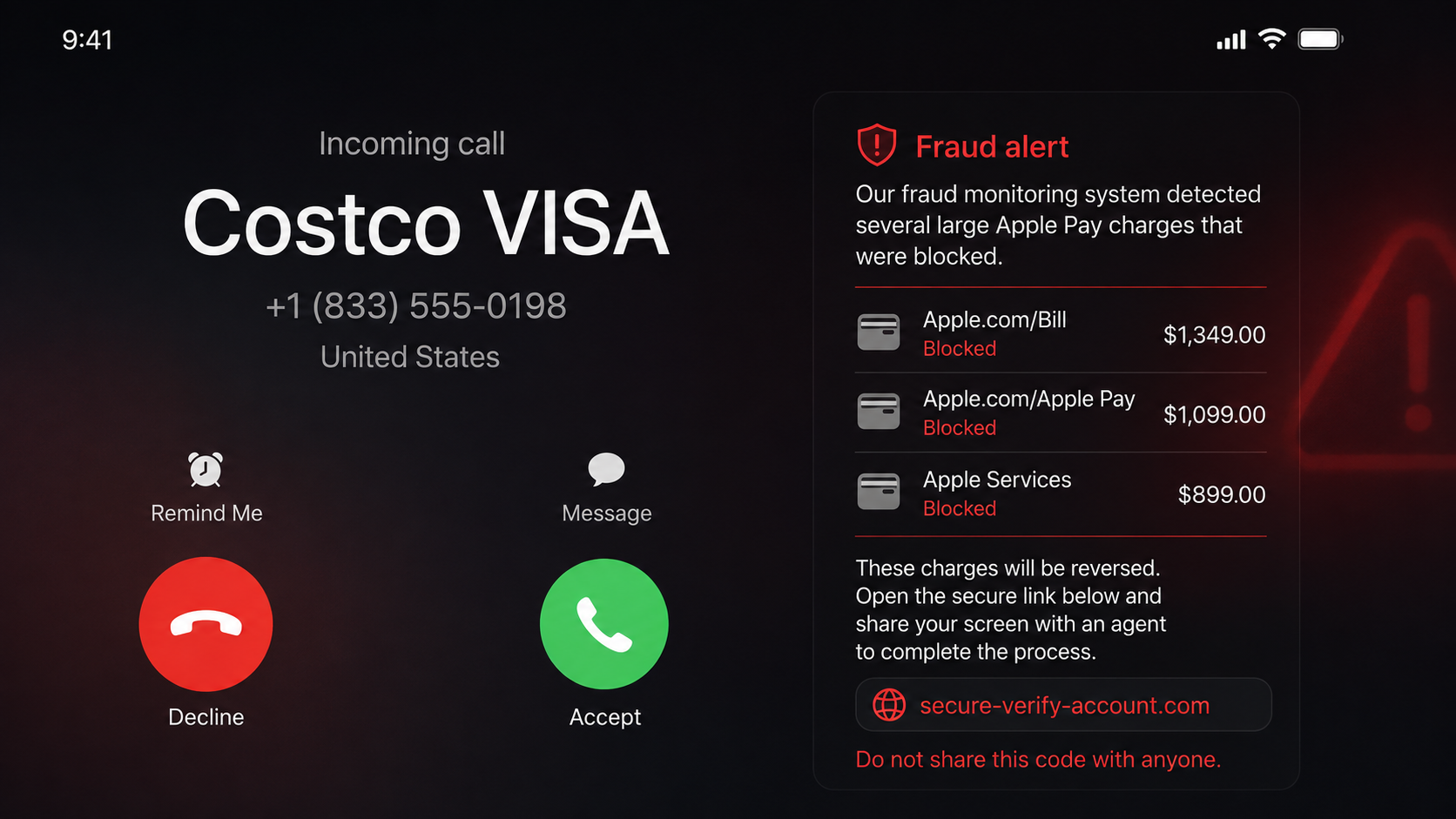
Your phone says “Costco VISA,” and the caller already knows which card you carry. They say several expensive Apple Pay charges were blocked and offer to fix the problem before any money leaves your account.
It sounds like the kind of call a careful card issuer should make. Then the agent asks you to open a link, sign in, show your screen, or read back a security code.
That change from warning you to directing you is the moment the Costco Visa fraud call scam reveals itself.
Overview
The caller ID is part of the disguise
The Costco Visa fraud call scam is a vishing attack that impersonates a card fraud department. The incoming call may display “Costco VISA,” Citi, a local Costco warehouse, or a phone number the victim recognizes from a genuine website.
Caller ID is not authentication. Internet calling services allow criminals to replace the displayed name and number with information that supports their story. The call can look as if it came from the back of a card even though the real connection began somewhere else.
Costco’s fraud-prevention page confirms that fraudulent calls use spoofing software and may display a local warehouse number while attempting to collect personal information.
Fake Apple Pay charges create a believable emergency
The operator says card monitoring stopped several large transactions, often from another country or through Apple Pay. The victim is invited to deny the charges, which feels like a normal security check.
Next comes the trap. The supposed agent says the customer must help reverse the transactions, remove a wallet token, verify the account, or secure the card. A link arrives by text, or the caller asks the victim to open a banking app and share the screen.
A real fraud department can block a card and investigate charges without watching a customer type a password. It does not need the security code that proves a new login or wallet enrollment belongs to the customer.
The goal is account access, not fraud prevention
Depending on what the victim reveals, the criminal may capture a card login, Costco account credentials, a one-time code, card details, or a live view of the mobile wallet. The attacker can use that information to add a card to another device, reset an account, or authorize transactions.
The Federal Trade Commission warns that a caller claiming to protect an account should never receive a verification code. The FTC also advises calling the real institution using a number from a statement or the card, not a number supplied by the caller.
Warning signs include:
- The call is unexpected but displays a trusted brand.
- The agent asks whether you use Apple Pay or another wallet.
- You are told to reverse charges yourself.
- A text link arrives while the caller keeps you on the line.
- The caller wants you to share the screen.
- A password, PIN, CVV, or one-time code is requested.
- The agent discourages you from hanging up and calling back.
- The caller invents a deadline before the money becomes unrecoverable.
- The official app shows no matching fraud alert.
How the Costco Visa Fraud Call Scam Works
Step 1: The attacker prepares a credible customer profile
The criminal may know a name, phone number, email address, retailer membership, card type, or last few digits from breached data, phishing, previous scam interactions, or commercial records. They can also ask broad questions and let the victim supply missing facts.
“Do you have the Costco Visa?” sounds like confirmation, but a yes answer tells the operator that the guess was correct. Every response improves the script.
Step 2: Caller ID is spoofed
The attacker configures the call to display a trusted label or number. Because many people use caller ID as the first safety check, the familiar name gets the conversation past the hardest moment.
Calling that number back later may reach the real organization. That does not prove the incoming call came from it. The displayed identity and the actual route are separate.
Step 3: The caller announces expensive blocked charges
Several purchases are described in quick succession. They may involve Apple Pay, an overseas merchant, electronics, or gift cards. The amounts are high enough to create urgency but are presented as blocked, giving the agent the role of rescuer.
The victim is asked to confirm that the charges are unauthorized. This harmless answer creates cooperation before any sensitive request appears.
Step 4: A fake reversal process begins
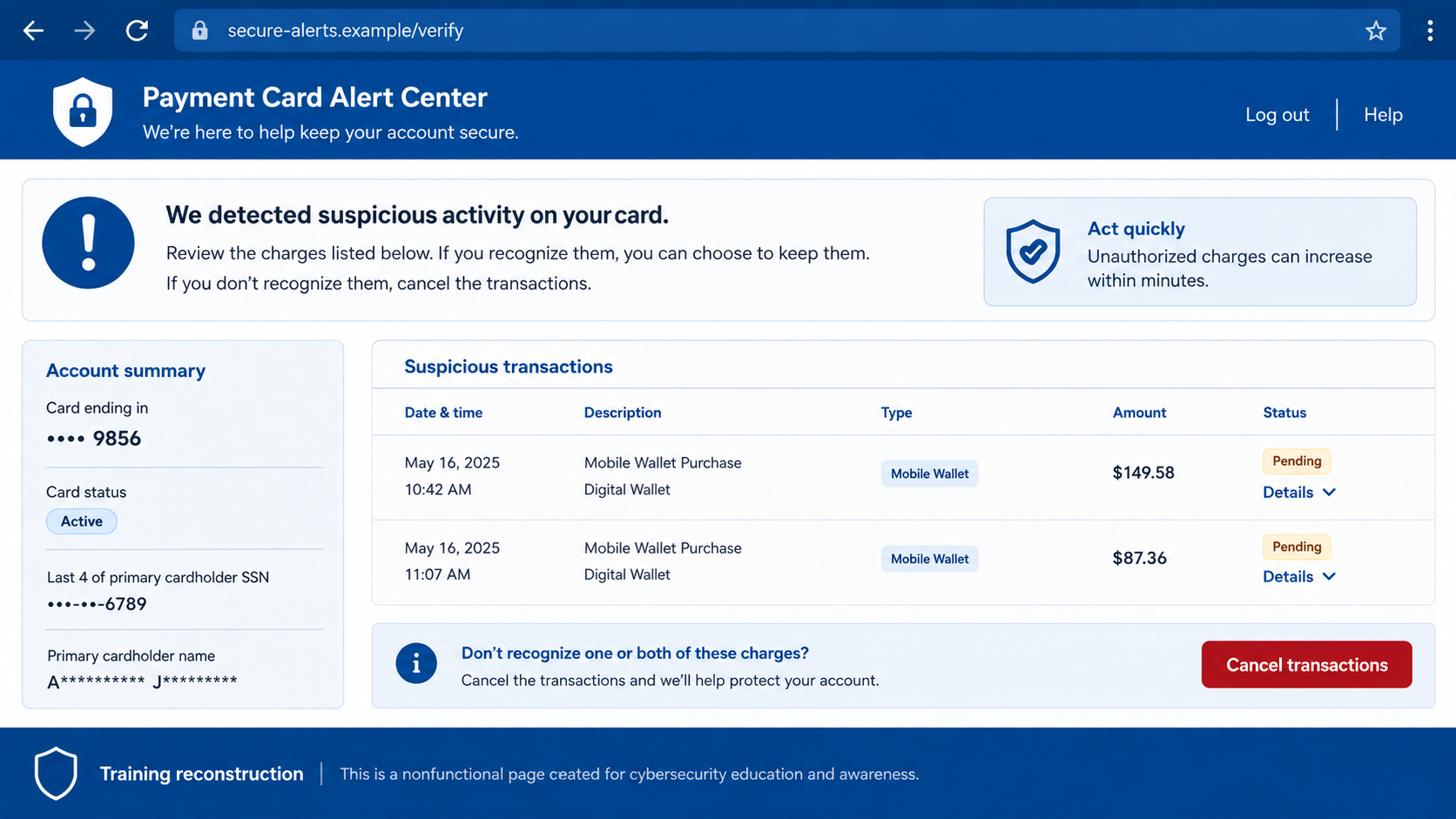
The agent says the customer must complete a secure process to remove the charges. A phishing link may copy a card login page, or the caller may ask the victim to open the legitimate app while sharing the screen.
The language is deliberately technical: reverse token, validate wallet, secure device, or synchronize the fraud block. None of those phrases explains why a stranger needs to observe private account information.
Step 5: Real security prompts are mislabelled
The attacker attempts a login, password reset, card enrollment, or wallet addition using details collected during the call. The real company sends a one-time code or approval prompt.
The caller says the code cancels the fraudulent charge. In reality, the message may state that it authorizes a login or device. The victim’s approval completes the attacker’s action.
Step 6: Screen sharing exposes more than one card
If the target shares the screen, the operator can see balances, account numbers, notification previews, saved cards, and security messages. The caller may direct the victim to move between apps while recording the session.
A screen share can also reveal codes before the victim reads the warning. Closing it quickly is important, but anything already displayed must be treated as exposed.
Step 7: The criminal monetizes access and calls again
With credentials or an authorized wallet token, the attacker can attempt purchases and transfers. A second caller may pose as a supervisor, bank investigator, Apple specialist, or recovery agent to keep the victim cooperating.
If the first attempt fails, the number and profile may be passed to another scam team. Engagement itself shows that the target owns the relevant account and answers security calls.
What a Real Card Fraud Contact Looks Like
A legitimate fraud alert may ask whether you recognize a transaction. It may let you answer through an official app, automated system, or a call-back number printed on the card.
The safe path remains the same even when the alert is real: end the incoming call and start a new contact yourself. Open the issuer’s app directly or dial the number on the physical card or recent statement.
Do not search quickly and call the first sponsored support result. Search ads can lead to impersonators. The card, statement, and official app are better sources.
A real representative may need to verify identity, but they will not ask for a full online password, PIN, CVV, or one-time code that the message says not to share. They do not need remote access to reverse a card transaction.
Caller ID Is a Label, Not an Identity Check
The name displayed on an incoming call is supplied through telephone systems that criminals can manipulate. Seeing Costco, Citi, Visa, or even the number printed on the back of a card does not prove who is speaking.
Spoofing is especially effective here because the victim may search the number while still on the call and see a genuine result.
The safest response to an unexpected fraud call is deliberately simple: hang up, wait a moment, and start a new call from the number printed on the physical card or inside the banking app. Do not let the caller transfer you to a supposed security department. A transfer keeps you inside the same fraudulent call.
A real bank representative may ask identity questions after you call an official number, but should not need your complete online-banking password, a one-time passcode, remote access to your screen, or a transfer to a safe account. Those requests do not reverse fraud. They give the caller the missing pieces needed to complete it.
Pay close attention to the text of every bank notification. If an alert says a card is being added to Apple Pay, a new device is being enrolled, or money is being sent, that is the action the code approves.
A caller cannot change its meaning by calling it a cancellation number. Decline the prompt and tell the bank what appeared on your screen.
The same rule applies if the caller already knows your name, address, last four digits, or recent purchases. Personal data can come from earlier breaches, stolen mail, compromised accounts, or data brokers. Knowledge creates credibility, but only a call that you initiate through a trusted number establishes the channel.
Company, Address, and Fulfillment Checks
Separate Costco from the card issuer
The retail brand and financial institution have different roles. A caller who blends them vaguely or cannot identify which account department owns the case deserves extra scrutiny. Use the contact details printed on the card.
Ignore the displayed number as evidence
Write it down for a report, but do not use caller ID to authenticate the speaker. Spoofed calls can display a real Costco, Citi, or local number without reaching you from that organization.
Check the account through an independent session
Close links received during the call. Open the issuer’s app from your device menu or type its known address. Look for alerts and transactions there, then contact support from inside that session.
Demand a process that survives a callback
A legitimate fraud case will still exist after you hang up. A criminal often insists that the same call must continue because independent contact breaks control of the conversation.
What to Do if You Have Fallen Victim to This Scam
- End the call and stop screen sharing. Do not let a second “supervisor” continue the session.
- Contact the issuer from the card or official app. Explain that a spoofed Costco Visa caller may have obtained information. Ask the fraud team to review logins, wallet tokens, transactions, and profile changes.
- Lock or replace the card. A new card number may be necessary if the full number, expiration date, or security code was visible or entered.
- Report every code or approval. Tell the issuer the exact wording and time of any message you read, typed, or displayed during screen sharing.
- Remove unfamiliar digital wallets and devices. Ask the issuer to invalidate tokens, not only the plastic card, and verify that the replacement card will not automatically update an unauthorized wallet.
- Change affected passwords from a clean device. Start with email, then the card account, Costco account, Apple account, and any reused login. Sign out other sessions and enable strong multifactor authentication.
- Review the phone for remote-access software. Remove unknown screen-sharing, support, profile, or device-management apps. If anything was installed, run a complete Malwarebytes scan or use another trusted security product.
- Preserve evidence. Save call times, screenshots, voicemails, the displayed number, text links, transaction alerts, and case references. Do not revisit a phishing site to collect more.
- Report the impersonation. Notify Costco, the card issuer, your mobile provider, and the FTC at ReportFraud.ftc.gov. Report unauthorized transactions immediately.
- Block repeat attempts. After cleanup, AdGuard can reduce exposure to known phishing pages, while carrier spam tools can help with repeat calls. Neither can verify a caller’s identity.
- Watch for recovery scams. Ignore anyone who asks for money, gift cards, crypto, or another code to recover the stolen funds.
Frequently Asked Questions
Can caller ID really show the number on my card?
Yes. Spoofing can replace the displayed identity with a real company number. Always end the incoming call and dial the number yourself.
Would a real fraud agent ask me to reverse charges?
No legitimate agent needs you to visit a text link, expose your screen, or provide a security code to reverse a transaction. The issuer controls its own investigation and card block.
What if the caller knew my last four digits?
Partial card data can appear in breaches, receipts, compromised accounts, and previous phishing records. It is persuasive information, but it does not authenticate the caller.
Is screen sharing safe if I hide the password?
No. Notifications, account numbers, balances, recovery details, QR codes, and one-time prompts can appear elsewhere. A stranger claiming to be a fraud agent should never watch your financial apps.
Should I call back the number in the recent-calls list?
Do not rely on the recent-calls entry. Dial the number printed on the card, use the official app, or use a recent statement.
Can replacing the physical card leave a stolen wallet active?
Digital-wallet tokens and automatic card updates can complicate recovery. Ask the issuer specifically to remove unknown wallet enrollments and explain how replacement credentials will be provisioned.
The Bottom Line
The Costco Visa fraud call scam uses two things people are trained to trust: a familiar caller ID and a helpful fraud warning. Neither proves who is on the line.
A real alert can wait while you make an independent call. Hang up, use the number on the card, and never share a password, screen, or security code with someone who contacted you first.

Join the discussion
0 commentsShare your experience or ask a question about this article.
Discussion
Start the conversation
Have a question or something useful to share? Add the first comment.