

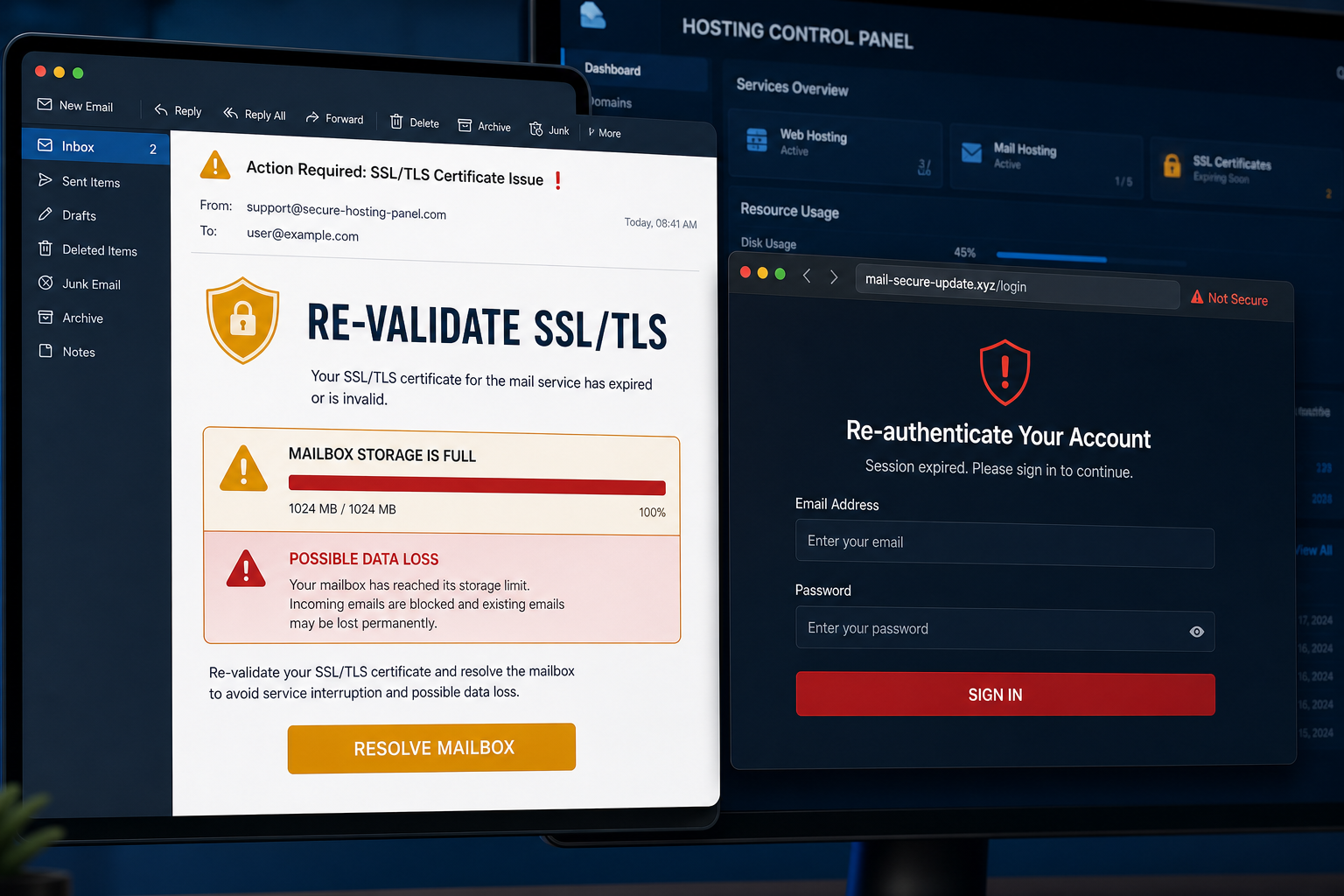
A mailbox at 100% capacity and an expiring SSL/TLS certificate sound like two serious problems. This phishing email combines both warnings because the confusion makes its Resolve Mailbox button feel urgent.
The message is not from cPanel. Its button opens a counterfeit re-authentication page on an unrelated website, where any email address and password entered are handed to the scammers.
Overview
The cPanel Re-validate SSL/TLS email scam is a credential-phishing campaign disguised as a hosting or webmail system alert. It claims that the recipient’s mailbox has reached its storage limit and that SSL/TLS must be revalidated to prevent data loss.
The campaign has used the subject EMAIL SIZE ALERT: Upgrade Your Mailbox. Inside, a supposed system daemon says that a manual reset is required through a cPanel Secure Gateway. The recipient is directed to a prominent Resolve Mailbox button.
Clicking it leads to a page hosted on gardinen-kother[.]de, a domain that does not belong to cPanel or the recipient’s email provider. The page displays a fake Re-Authentication Required dialog and asks for an email address and password to continue the supposed repair.
There is no mailbox repair. The form is built to capture credentials. Once criminals control an inbox, they can read private conversations, request password resets, impersonate the victim and search for invoices or payment information.
cPanel is a legitimate hosting-management platform and is not involved in this campaign. Its name and familiar technical terms are being misused to make an external login request appear trustworthy.
The contradiction at the center of the message is important. Mailbox storage warnings concern space used by messages and attachments, while SSL/TLS certificates secure connections. Revalidating a certificate would not increase a mailbox quota, and a hosting company would not fix either issue by collecting the user’s webmail password on a third-party domain. The attackers combine unrelated technical phrases because they sound serious to non-technical recipients.
- Claims the mailbox storage quota is full
- Adds an unrelated SSL/TLS revalidation problem
- Threatens service interruption or permanent data loss
- Uses a Resolve Mailbox button instead of a normal hosting dashboard
- Sends credentials to a third-party domain
Is the cPanel Re-validate SSL/TLS Email Real?
No. This specific warning is a confirmed phishing scam. A real storage limit and an SSL certificate are separate issues, and neither should require you to enter webmail credentials on an unfamiliar website.
If you administer a genuine cPanel account, open the hosting panel through your saved bookmark or provider dashboard. The official interface will show the actual mailbox usage and certificate status without relying on the email link.
How the cPanel SSL/TLS Phishing Scam Works
Step 1: The email invents two technical emergencies
The message says the mailbox is full while also demanding SSL/TLS revalidation. Combining unrelated problems makes the alert sound advanced and discourages non-technical recipients from questioning it.
Step 2: The threat of data loss creates pressure
The recipient is warned that incoming mail may be blocked or existing messages may disappear. That fear pushes people to act before checking their hosting account.
Step 3: Resolve Mailbox hides the real destination
The button appears to launch a secure gateway. In reality, it opens a domain unrelated to cPanel, the hosting company or the user’s mail service.
Step 4: A fake repair dialog requests credentials
The phishing page claims re-authentication is required to continue the repair. Asking for an email address and password makes the theft look like a normal security step.
Step 5: The password is sent to the attacker
Submitting the form gives the credentials to the campaign operator. A fake error or redirect can follow so the victim assumes the repair failed rather than realizing the password was stolen.
Step 6: The inbox is used for more fraud
Attackers can monitor correspondence, add forwarding rules and send convincing messages from the compromised account. Business mailboxes are especially valuable because they contain supplier and payment conversations.
Red Flags in the Fake cPanel Alert
- The sender address does not match your hosting provider
- Mailbox capacity and SSL/TLS status are presented as one problem
- The message uses generic placeholders rather than an identifiable service ticket
- The footer contains awkward security language, including an unrelated secure-gateway reference
- The button points to gardinen-kother[.]de or another unrelated domain
- The linked page asks for your mailbox password to repair storage
What to Do If You Received the Email
- Do not click Resolve Mailbox or reply to the sender
- Open cPanel or webmail directly through your provider’s official dashboard
- Check the real mailbox quota and SSL certificate status there
- Report the message as phishing to your provider or IT team
- Delete it after reporting
What to Do If You Entered Your Password
- Change the email password immediately from the legitimate service
- Sign out of all active sessions and revoke unfamiliar app passwords
- Enable multi-factor authentication
- Review recovery addresses, recent sign-ins and connected applications
- Remove unknown inbox rules and forwarding addresses
- Check sent, deleted and archived folders for unauthorized messages
- Warn your IT team and contacts if the account was used to send mail
- Change the password anywhere else it was reused
If you only opened the phishing page
Close it and clear the site’s cookies. If no password was entered and no file was downloaded, the account credentials were not submitted through the form. Report the original email and remain alert for follow-up messages.
How to Verify a Genuine Hosting Alert
- Use your saved hosting-dashboard address, not a link in the warning
- Contact support through the provider’s official website
- Confirm quota information inside the mailbox-management screen
- Check certificate status in the SSL/TLS section of the real control panel
- Use a password manager, which will not autofill on an unrelated domain
Frequently Asked Questions
Can a full mailbox require SSL/TLS revalidation?
No. Mailbox storage and certificate validation are different functions. Placing them together is part of the scam’s technical disguise.
Is cPanel responsible for the message?
No. cPanel is being impersonated. The phishing domain and credential form are not part of the legitimate platform.
Does reading the email infect the computer?
No. The main danger is clicking the link and entering credentials. Avoid any download offered by the linked site and scan it if a file was saved or opened.
The Bottom Line
The cPanel Re-validate SSL/TLS email is a confirmed password-stealing scam. Its full-mailbox meter, certificate warning and data-loss threat are props leading to a counterfeit login page.
Open your hosting panel directly, not through Resolve Mailbox. If you entered a password, change it immediately, revoke active sessions and inspect the inbox for hidden forwarding or impersonation activity.

Join the discussion
0 commentsShare your experience or ask a question about this article.
Discussion
Start the conversation
Have a question or something useful to share? Add the first comment.