

Vantanetworktin.com is not checking whether you are a robot. Its black-screen CAPTCHA is a trick that turns the browser’s Allow button into permission for a stream of deceptive notifications.
The resulting alerts may say a license expired, a login was compromised or the PC must be cleaned. Those are fabricated advertising messages, not security findings from your browser.
Overview
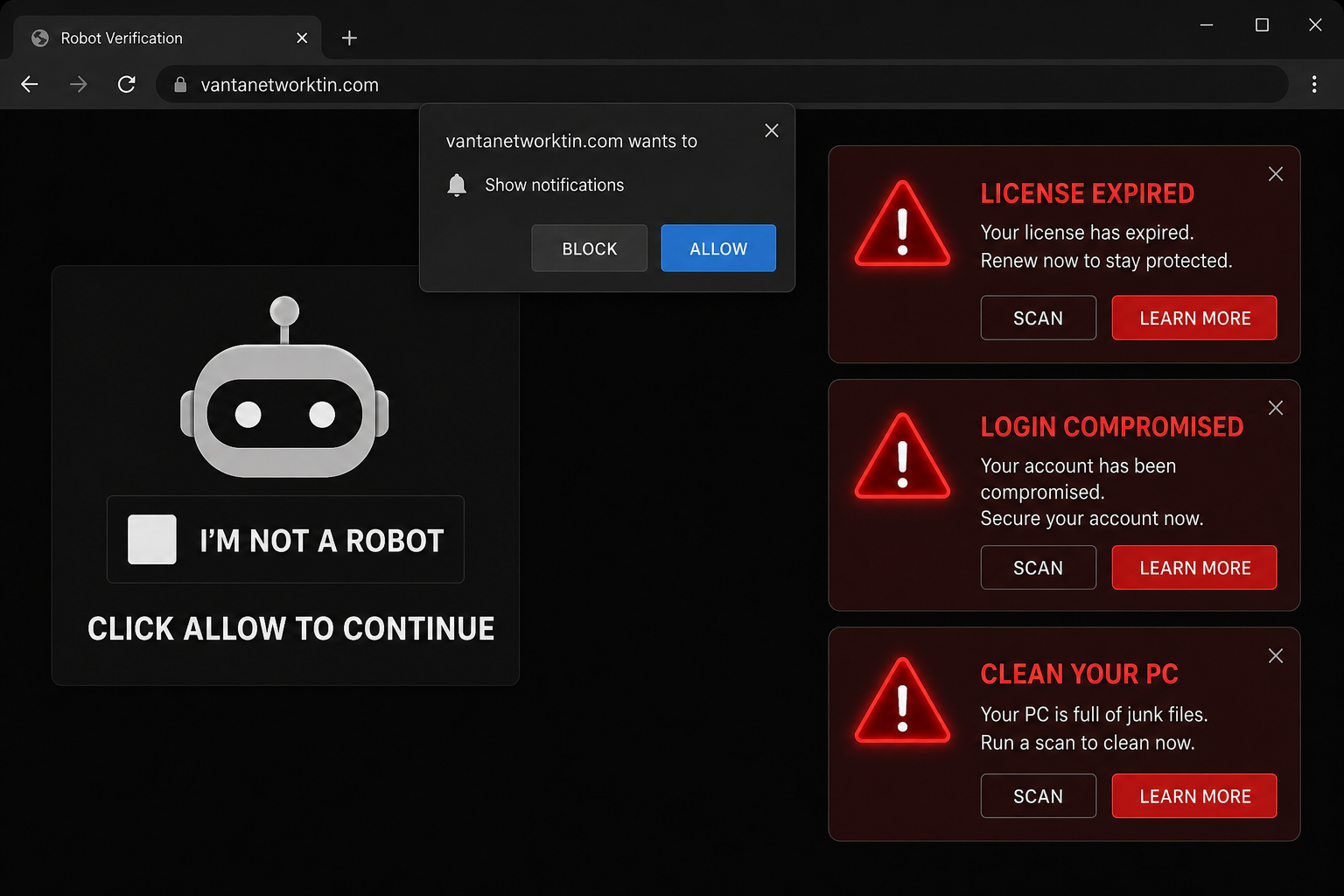
Vantanetworktin.com is a rogue notification-spam site. It usually presents a dark page with a fake robot-verification widget and the instruction Click Allow to confirm that you are not a robot. Clicking Allow does not complete any verification.
The prompt belongs to the browser and has a precise meaning: it authorizes the website to send notifications. Once permission is stored, Vantanetworktin.com can push alerts to the desktop even after the original tab has been closed.
Observed notifications imitate browser or security warnings. They may display License expired, claim a Google login was compromised, urge the user to clean the PC before a problem spreads, and present Scan or Learn more buttons.
The claims are false. The site has not scanned the device or checked an account. Clicking the notifications can open fake security subscriptions, phishing forms, technical-support scams and pages promoting unwanted applications. Some destinations may also attempt to deliver malware.
The domain can serve different content through changing subdomains and URL paths. That does not alter the fix: remove every unfamiliar Vantanetworktin entry from the browser’s notification allow list.
These pop-ups can look unusually convincing because they appear outside the original webpage and may use the browser’s own notification design. That does not make them system alerts. The sending website is normally shown inside the notification, and it has no ability to know whether a software license expired or a Google account was breached. The goal is to turn a single mistaken permission into a persistent stream of alarming, profitable clicks.
- Fake robot verification on a black page
- Instruction to click the browser’s Allow button
- Notifications that appear after the page is closed
- Fabricated license, login and PC-cleaning warnings
- Redirects to risky sales, phishing or support pages
Is Vantanetworktin.com a Virus?
Vantanetworktin.com is not a self-installing virus. It is an untrustworthy website that abuses a notification permission voluntarily granted through deception.
Its ads can still cause harm. They lead users toward password theft, payment scams, unwanted subscriptions and potentially unsafe downloads. Persistent redirects outside notifications can also indicate adware or a rogue extension.
How the Vantanetworktin Notification Scam Works
Step 1: An advertising redirect opens the page
Rogue ad networks on torrent, illegal-streaming, adult and low-quality download sites commonly send visitors to pages like this. Adware or another spam notification can also produce the redirect.
Step 2: A fake CAPTCHA explains the permission request
The robot checkbox gives the visitor a familiar task. The page falsely says Allow is necessary to continue, watch content or prove they are human.
Step 3: The browser records permission
Allow adds the domain to the browser’s notification list. This is a genuine browser feature, but the site has lied about why it needs access.
Step 4: Alarming notifications begin
The site sends messages that resemble urgent security alerts. Their system-level placement can make them look more trustworthy than ordinary webpage advertising.
Step 5: Scan and Learn More open other sites
The buttons do not launch a trustworthy local scan. They route the browser to whatever advertiser or scam page the campaign is promoting at that moment.
Step 6: The destination tries to monetize fear
The next page may demand payment, request account details, display a fake helpline or push software. The exact offer can change, but the warning used to get the click remains fabricated.
How to Remove Vantanetworktin.com Notifications
Google Chrome on Windows or macOS
- Open Settings → Privacy and security → Site settings
- Select Notifications
- Find Vantanetworktin.com and unfamiliar related subdomains
- Choose Block or Remove
Google Chrome on Android
- Open Chrome → Settings → Site settings
- Tap Notifications
- Open the unwanted domain entry
- Turn notifications off or choose Clear & reset
Microsoft Edge
- Open Settings → Cookies and site permissions
- Select Notifications
- Find the domain under Allow and choose Block or Remove
Mozilla Firefox
- Open Settings → Privacy & Security
- Under Permissions, select Settings beside Notifications
- Block or remove the unwanted domain and save the changes
Safari on macOS
- Open Safari → Settings → Websites
- Select Notifications
- Set the unwanted site to Deny or remove it
What to Do If You Clicked an Alert
If you only opened the destination
Close the page without entering information, calling a number or installing software. Clear its cookies if it keeps reopening or remembers personal details.
If you entered a password or card details
Change the password on the real service, end active sessions and enable multi-factor authentication. Contact the card issuer immediately if payment information was submitted or a charge was made.
If you installed software
Remove unfamiliar applications and extensions, then run a full security scan. Never grant remote-control access to a person reached through one of these notifications.
Check for Adware If Redirects Continue
Removing notification permission should stop the pushed alerts. If unrelated pages continue opening, check recently installed programs, browser extensions, the startup page and the default search engine.
Repeated redirects across many websites can indicate adware. In that situation, reset affected browser settings and perform a complete malware scan.
Frequently Asked Questions
Why do ads appear after Vantanetworktin is closed?
The browser stored notification permission. The site does not need to remain open to send messages.
Did the site really detect a compromised login?
No. The alert is a lure. Check account activity by opening the provider’s official site directly.
Is clicking Block safe?
Yes. Block refuses notification access and is the correct response to fake CAPTCHA pages.
The Bottom Line
Vantanetworktin.com is a notification scam, not a real robot check or security scanner. Allow gives it the power to send deceptive license, login and PC-cleaning alerts.
Remove the domain from notification settings, ignore every alert it produced and scan the device if unwanted redirects or installed software remain.

Join the discussion
0 commentsShare your experience or ask a question about this article.
Discussion
Start the conversation
Have a question or something useful to share? Add the first comment.