

A cPanel temporary system failure email says incoming mail is stuck. If your business depends on that inbox, the warning can interrupt everything else you were doing.
There is a prominent release button and a quieter option for stopping notifications. Before choosing either, look at what this unexpected message actually establishes.
Overview
The system failure story is a phishing pretext
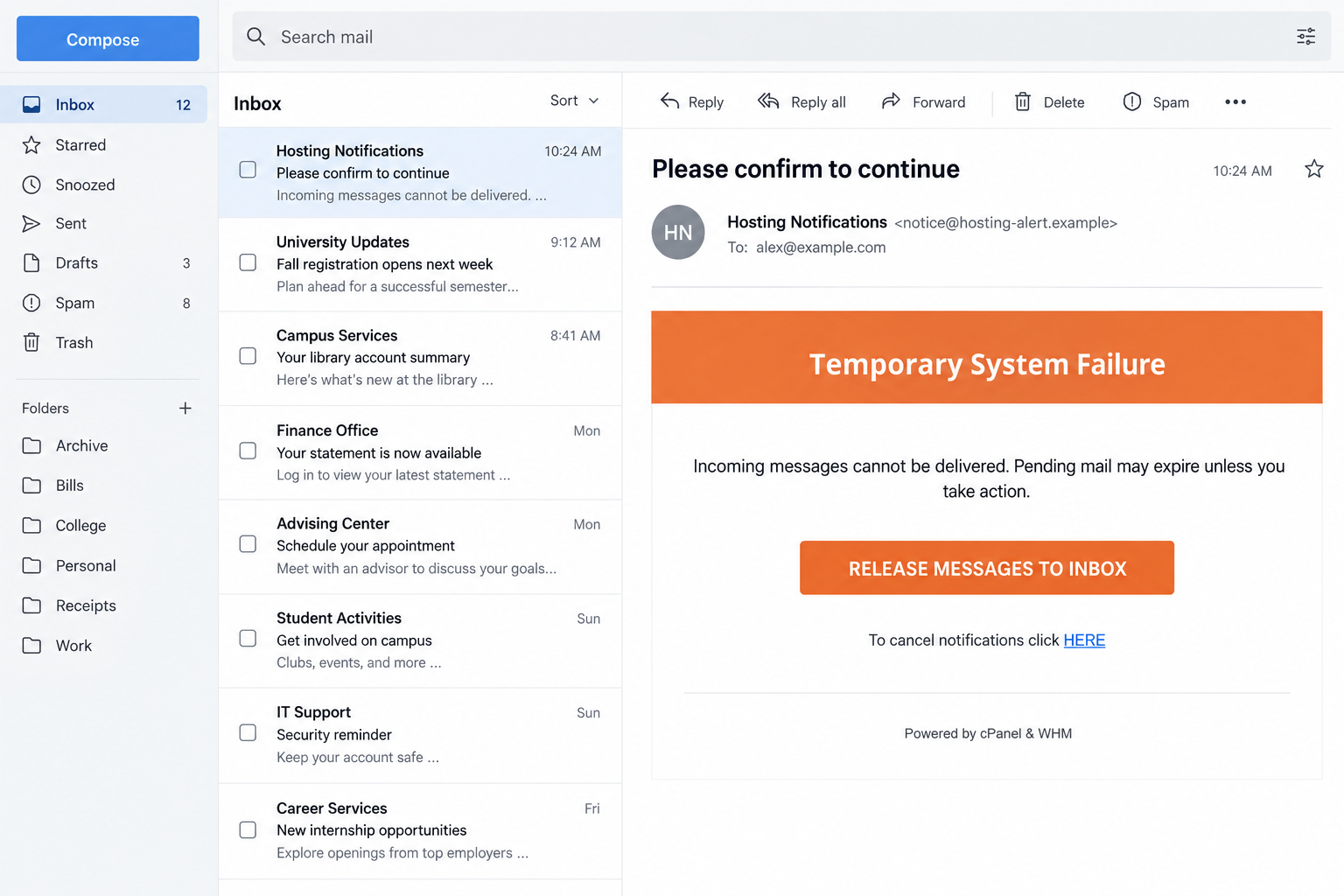
The cPanel temporary system failure email scam impersonates a hosting notification. It claims incoming messages cannot arrive and encourages the recipient to release them through its link.
The notice is not proof of an outage. Its purpose is to send a worried mailbox owner toward an unverified destination associated with credential theft.
A version documented in October 2026 warns that pending messages may expire. That possibility turns an ordinary support question into a task the reader feels compelled to finish.
cPanel and WHM are genuine hosting products. The impersonation is the scam, not the software, your hosting plan, or every notification mentioning a mail queue.
Both choices inside the email can lead into the trap
The message contains a large mail-release button and a smaller link for canceling notifications. The reported example uses both to direct readers to a fraudulent website.
That second route is easy to miss. Someone who distrusts the warning might still click the cancellation link, thinking it is the sensible way to stop nuisance mail.
- The subject asks the recipient to confirm something to continue.
- A vague system failure supposedly prevents incoming delivery.
- Pending messages are said to face expiry unless the reader acts.
- Release and notification-cancellation controls remain inside the same untrusted message.
The email gives the reader two apparent choices without offering independent evidence that either one belongs to the hosting provider.
The destination was unavailable, so its exact form remains unverified
The previously reported linked page was inaccessible when examined. We therefore cannot describe its exact fields, branding, scripts, or current behavior as directly observed facts.
A counterfeit hosting or webmail login is a plausible next stage given the lure. It is not an authenticated capture of the unavailable destination.
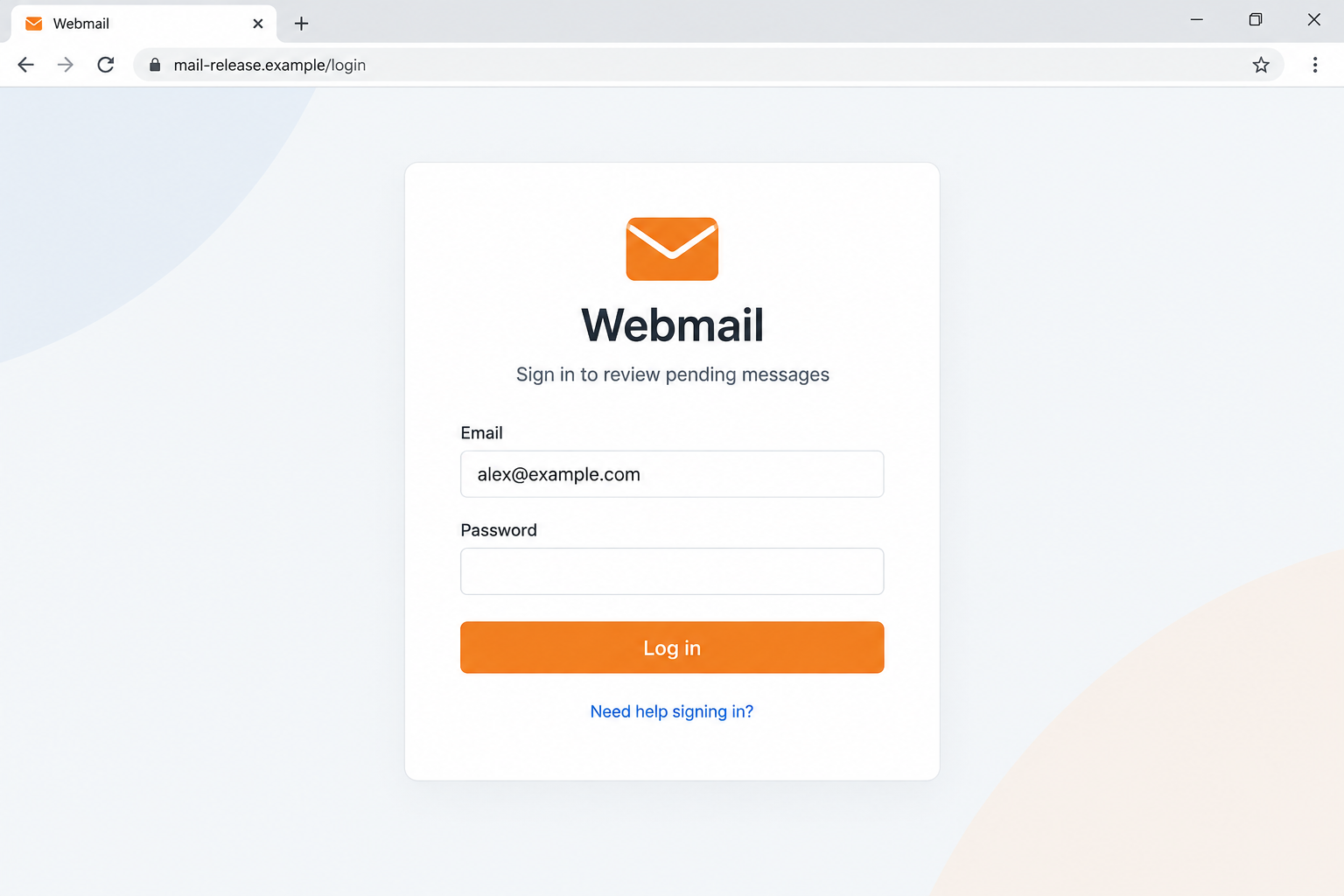
Our images use fictional addresses to illustrate the email and a possible login handoff. They do not show a real customer’s account or a working phishing link.
If you submitted a valid password through this notice, treat that credential as exposed. If you only received it, there is no established account compromise.
Why a Hosting Warning Can Catch a Careful Reader
Missing correspondence already creates uncertainty
An unanswered quotation or delayed purchase order can make this message seem timely. You already have a problem to explain before the warning supplies its explanation.
Imagine waiting for a client reply and then seeing a claim about stalled delivery. That is an illustrative situation, not evidence the sender knows your conversations.
You may connect the two events automatically. The attacker benefits from that assumption without having to identify the client, subject, or message that supposedly failed.
The useful question is narrower: can your actual host confirm a delivery incident affecting this mailbox? A stranger’s diagnosis does not answer it.
A familiar footer substitutes for a verified relationship
Many hosting customers recognize cPanel even when another company sells their hosting. The familiar product name can make an unfamiliar sender feel like an internal administrator.
A footer naming cPanel and WHM is ordinary text. It does not demonstrate that the developer, your host, or your server generated the email.
Likewise, an account address displayed in the notice may simply be the address that received it. Personalization is not evidence of administrative access.
Your hosting provider remains the appropriate contact for an account incident. Find that provider through an existing billing relationship or trusted portal, not through the notice.
The cancellation link can feel safer than the main button
Readers have learned to unsubscribe from unwanted email. A small cancellation option borrows that habit and may receive less scrutiny than an urgent orange button.
Within this reported scam, cancellation is not an independent escape route. It is another clickable element supplied by the same unverified sender.
That does not make every unsubscribe link dangerous. The relevant distinction is between a known subscription and an unsolicited message already showing signs of impersonation.
Use your mail application’s reporting and blocking controls for suspicious mail. You do not need to visit the sender’s website to stop engaging with it.
How the cPanel Temporary System Failure Email Scam Works
Step 1: An automated-looking notice invents a delivery problem
The message arrives as an account notification rather than a sales offer. It presents the failure as something the hosting environment has already detected.
No independent diagnostic record accompanies that claim. The recipient is expected to accept the sender’s explanation before asking whether any mail is actually delayed.
This is an important change of responsibility. Instead of an administrator investigating the server, the mailbox owner is told that a personal click will resolve the issue.
A genuine service can experience delayed mail. That fact makes the pretext believable, but it does not authenticate this particular sender or button.
Keep the notice separate from your troubleshooting. Check normal mail access and contact known support without allowing the email to select your next destination.
Step 2: Possible message expiry supplies the pressure
The warning suggests pending mail could fail permanently if no action is taken. That is more persuasive than a vague inconvenience because lost correspondence sounds difficult to recover.
A business reader may picture an invoice, an order, or a customer complaint. The message does not need to name those items for the fear to work.
The claim should still be testable. An actual host can identify an incident, explain the affected service, and discuss what delivery records show.
Do not assume every message was lost because this notice mentions expiry. Only your provider’s records or a confirmed sender can establish what happened to specific mail.
The urgency belongs to the solicitation. It does not shorten the time you are allowed to spend verifying who is asking for access.
Step 3: Release and cancellation keep the reader inside the sender’s route
The obvious choice is the mail-release control. Its label makes it sound like opening an existing queue, rather than following an unknown external link.
The alternative cancellation link may catch a reader who has decided not to release anything. Both options can lead away from the trusted mailbox interface.
Review a link’s destination without visiting it where your application allows that. The displayed label and actual address may describe completely different services.
Even a tidy address deserves verification. A domain containing “mail,” “cpanel,” or “support” is not automatically controlled by your provider.
Do not click the smaller link as an experiment. Reporting the notice from your inbox avoids both prepared routes.
Step 4: A supposed repair can become an authentication request
A phishing operator can place a login form behind the promise of releasing mail. The reader expects the account password to authorize a helpful administrative task.
For this specific notice, the unavailable destination prevents confirmation of that screen. The pictured form demonstrates the risk without asserting that every recipient saw identical fields.
If a page requests a hosting password, mailbox password, or authentication code, stop. Verify the hostname and required action through the account route you already trust.
These credentials are not interchangeable. A mailbox login normally has a different scope from a hosting control-panel login, even if a customer has reused the password.
An encrypted connection does not settle the question. HTTPS protects communication with the site you reached, including a site operated by someone impersonating your host.
Step 5: Exposed access can affect more than the missing mail
A working mailbox password can expose correspondence and recovery emails. A working hosting login may allow broader changes within the permissions assigned to that account.
Possible hosting consequences include altered website files or email settings. They depend on the account’s access, and are not confirmed outcomes for every person receiving this notice.
Additional authentication may block a stolen password. Do not undo that protection by approving an unexpected prompt or sharing a code with someone claiming to repair delivery.
Closing the form after submission does not retrieve information already sent. A failed login message also does not prove that a counterfeit form discarded your entry.
Response should match what was disclosed. Secure the affected account first, then investigate settings or services that the exposed credential could actually control.
Check the Real Mail Service Without Using Either Link
Start from the hosting relationship you already have
Open your provider’s saved portal or the webmail bookmark you normally use. If necessary, locate the provider on an existing invoice that predates the suspicious message.
cPanel’s official login documentation describes account and server access. Your provider determines the hostname and credentials appropriate to your installation.
Do not replace that hostname with an address from the warning. A login page that resembles your usual page can still be hosted somewhere unrelated.
Check published service status or open a support ticket from the genuine account. Include the notice’s subject and arrival time, not your password.
A real queue can be investigated without a surprise password handoff
Mail servers can hold messages for legitimate reasons. Queue information belongs to the responsible administrator and the provider’s normal management process.
The WHM Mail Queue Manager documentation explains how administrators inspect and attempt delivery of queued messages. It is not a universal release link for every mailbox owner.
Ask support whether the claimed interruption exists. If a sender says a particular message bounced, request the relevant error through an established conversation.
A working inbox does not rule out every delivery problem. Equally, a delayed reply does not prove the warning’s invented system failure.
Do not turn troubleshooting into unnecessary account changes
Avoid deleting mail accounts, changing server values, or disabling authentication simply because the notice urges a repair. Those changes can create a real problem.
Keep a record of genuine errors displayed by your normal application. Specific observations help support far more than a generic claim about pending messages.
For workplace hosting, involve the person responsible for the domain. A receptionist or salesperson should not have to guess whether a server-wide task is legitimate.
If coworkers receive similar warnings, report the pattern internally. Do not forward a clickable “fix” to everyone as though the message itself were an instruction.
What to Do if You Have Fallen Victim to This Scam
- Stop using the notice and record what you did.
Identify whether you clicked release, clicked cancellation, entered a password, supplied a code, or downloaded anything. Each action creates a different level of exposure.
Save the original email and available screenshots. Do not reopen the suspected destination to recreate an interaction that has already ended.
- Secure the particular login you disclosed.
Change it through the genuine provider portal. Use a unique replacement, and protect other accounts that shared the exposed value.
If access is lost, use official recovery or existing hosting support. Reject help offered through replies to the suspicious notice.
- Review sessions and account recovery controls.
End unfamiliar sessions where supported. Check recovery contacts, authentication methods, linked applications, and application passwords with your provider or administrator.
Enable available multifactor protection. An unexpected approval request during recovery should be treated as suspicious, not accepted to make the warning disappear.
- Inspect mail settings and, if relevant, hosting changes.
Look for unauthorized forwarding, filters, new mailbox users, or altered recovery details. Examine sent and deleted folders for correspondence you did not initiate.
If hosting credentials were exposed, ask the host to review account logs, website files, and other changes within that account’s scope.
- Warn people affected by actual account misuse.
Notify colleagues if business mail was involved. Contact customers separately if messages from your address requested payments or changed invoice details.
Distinguish confirmed suspicious activity from possible exposure. That helps recipients respond appropriately without assuming every past conversation was fraudulent.
- Check the device when there was more than a login.
If you ran a repair download or encounter persistent redirects, scan with updated Malwarebytes and inspect browser extensions and notification permissions.
AdGuard can reduce some deceptive ads and known malicious-page exposure. It cannot restore mailbox access or undo credentials sent to a counterfeit form.
- Report the impersonation through trusted channels.
Use your provider’s phishing process and your workplace reporting route. Include headers and the visible destination if available, without publishing private correspondence.
Block further messages through your mail application. Do not use the scam’s cancellation link to finish cleaning up.
Frequently Asked Questions
Is cPanel responsible for this temporary failure email?
No. The reported notice misuses cPanel and WHM branding. A product name in its footer does not establish authorization from the developer or your host.
Can the smaller cancellation link also be unsafe?
Yes. In the documented example, both the release button and notification-cancellation link point into the fraudulent route. Report or block the email from your application instead.
Does a pending-mail warning prove my server is down?
It does not. Check service status and ask your actual hosting provider whether an incident affects this mailbox or the claimed messages.
Was the exact phishing login page available for inspection?
The reported destination was unavailable. Its precise form is unverified, so the login illustration is hypothetical rather than a capture of that destination.
What if I clicked but did not provide anything?
Close the page and check for downloads or permissions you accepted. A click alone does not establish that the attacker obtained your password.
Should I change my website password or only my email password?
Secure whichever credential you disclosed, plus accounts sharing it. Ask your host to assess broader access if the exposed login controls hosting rather than one mailbox.
The Bottom Line
The cPanel temporary system failure email scam offers two routes into an unverified website. Neither releasing mail nor canceling notifications should begin with that sender’s link.
Check the incident through your real host. If you disclosed credentials, repair account access and inspect relevant changes before returning to ordinary work.

Join the discussion
0 commentsShare your experience or ask a question about this article.
Discussion
Start the conversation
Have a question or something useful to share? Add the first comment.