

If you’ve ever been startled by a pop-up warning you that your computer is infected, urging you to act fast to “remove viruses,” you’re not alone. These fear-inducing alerts are not just annoying—they’re often the first step in a sophisticated scam. One such trap leads unsuspecting users to a website called Cyberguardsolutions.shop, a professional-looking platform that pretends to sell legitimate McAfee antivirus software. But behind its slick interface lies a dangerous operation aimed at stealing your money and your data.
In this article, we’ll dissect the Cyberguardsolutions.shop scam in full detail. You’ll learn how it works, why it’s effective, what happens if you fall for it, and most importantly—what you can do to protect yourself.
What is Cyberguardsolutions.shop Really Selling?
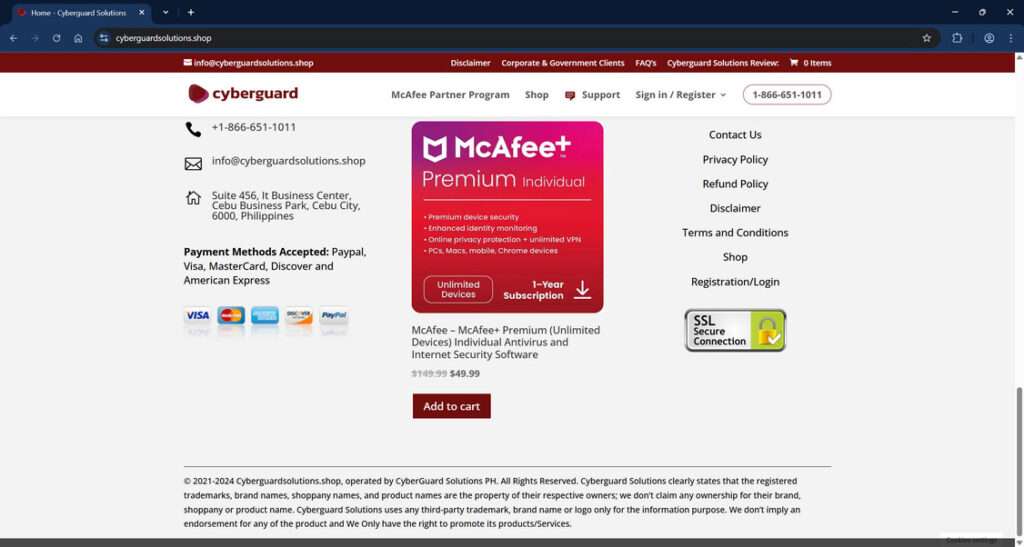
At first glance, Cyberguardsolutions.shop looks like a standard cybersecurity e-commerce platform. It boasts discounted prices on various McAfee antivirus software packages, offers multiple subscription lengths, and includes a full-featured shopping cart and customer support section. The website even displays SSL encryption badges and a customer service number—features that typically suggest legitimacy.
However, this is where the illusion begins and the deception unfolds.
Domain Registration and Ownership
A WHOIS lookup of the domain reveals several red flags:
- Recently registered: The domain was created in November 2024, a strong indicator of a throwaway or temporary scam website.
- Hosted on Cloudflare: While this isn’t inherently suspicious, scammers often use Cloudflare to hide their real server IP addresses.
- Registered via Namecheap: A common registrar used by malicious actors due to its minimal verification process.
These elements don’t confirm malicious intent alone, but when taken together with other indicators, they point to a highly suspicious operation.
Fake McAfee Products and Pricing
The products listed on Cyberguardsolutions.shop are visually identical to authentic McAfee packaging. They offer extremely steep discounts, often reducing a $199 product to under $50. This is a common scam technique designed to bypass skepticism with the allure of saving money.
For instance:
- McAfee Total Protection (5 Devices) is advertised at $22.99 (marked down from $104.99).
- McAfee Premium Individual (Unlimited Devices) is listed at $49.99, supposedly discounted from $149.99.
These prices are too good to be true—and that’s because they are.
Illegitimate Business Identity
Cyberguardsolutions.shop claims to be run by “CyberGuard Solutions PH” and lists an address in Cebu City, Philippines. However, searches for this business yield no credible records or affiliations. The email domain (@cyberguardsolutions.shop) also doesn’t correspond with any verified business listings or support networks affiliated with McAfee.
The Real Cost: Malware and Data Theft
Victims who proceed to purchase these “products” often report the following:
- Download links that install malware, spyware, or keyloggers
- Phishing attempts disguised as account registration or activation forms
- Unauthorized charges on their credit cards
- Immediate slowdowns, crashes, or strange behaviors on their devices after “installation”
Rather than securing your device, this site opens it up to cybercriminals.
Online Reputation and User Reports
Scamwatcher and similar forums list multiple complaints regarding Cyberguardsolutions.shop. Common themes include:
- Users redirected to the site from fake virus pop-ups
- Non-existent customer support
- Stolen financial data
- Devices infected shortly after interaction
Despite appearing professional, Cyberguardsolutions.shop is a scam operation masquerading as a cybersecurity solution.
How the Scam Works
This scam doesn’t rely on just a single trick—it’s a well-constructed sequence designed to manipulate and deceive. Here’s a detailed look at how it unfolds:
Step 1: Fake Virus Alert Pop-Ups
The scam begins with malicious advertisements or browser hijackers. These generate pop-ups that look like legitimate alerts from antivirus providers, Windows Security, or even your operating system.
Typical messages include:
- “Your computer is infected!”
- “3 viruses detected—click here to remove them now.”
- “Your McAfee subscription has expired—renew now to stay protected.”
These alerts use system logos and realistic formatting to scare users.
Step 2: Redirection to Cyberguardsolutions.shop
Clicking the pop-up leads users directly to Cyberguardsolutions.shop. The site is clean, responsive, and branded with McAfee’s color schemes and logos, giving it an immediate aura of trustworthiness.
Step 3: Social Engineering through Fear
Once on the site, the user is subjected to more urgent messages:
- Countdown timers
- “Only X licenses left!” urgency
- “Activate now to clean your PC” banners
All designed to induce panic and prompt impulsive purchasing decisions.
Step 4: Payment and Credential Collection
Users who fall for the scam are asked to provide:
- Full name and billing address
- Credit card details
- Email and phone number
Not only does this result in a fake transaction, but all entered data is now in the hands of cybercriminals.
Step 5: Malware Delivery
After payment, users receive a download link or are redirected to a fake installation screen. The file—presented as a McAfee installer—typically contains:
- Trojan horses
- Remote access tools (RATs)
- Spyware
- Keyloggers
These programs enable attackers to remotely control your device, monitor activity, or steal sensitive files.
Step 6: Continued Exploitation
Even after the initial attack, the scam doesn’t stop:
- Victims may be re-targeted via email or phone with further scams
- Devices may be used in botnets or as platforms for more infections
- Saved login credentials may be exploited for identity theft or account takeovers
What to Do If You’ve Fallen Victim to Cyberguardsolutions.shop
If you’ve interacted with this site or entered any personal information, act quickly to limit the damage. Here’s what you need to do:
1. Disconnect the Infected Device
Immediately take your device offline to prevent further data transmission or remote control.
2. Run a Full Malware Scan
Use a legitimate antivirus program such as Malwarebytes, Norton, or Kaspersky to detect and remove malware. Avoid free or unknown antivirus tools—many are scams themselves.
3. Change Your Passwords
Change all passwords, starting with:
- Email accounts
- Banking and financial platforms
- Cloud storage (Google Drive, OneDrive)
- Any site using the same credentials as those entered during the scam
Use strong, unique passwords for each account.
4. Notify Your Bank or Credit Card Company
- Dispute the transaction
- Request a chargeback if possible
- Cancel the compromised card and request a new one
- Monitor for any unusual or unauthorized activity
5. Report the Scam
Help others by reporting the scam to:
- FTC (ReportFraud.ftc.gov)
- Internet Crime Complaint Center (IC3): www.ic3.gov
- McAfee (official support page)
- Your country’s cybersecurity authority
6. Install a Real Antivirus Solution
Once your system is cleaned, invest in a reputable antivirus software from a known vendor. Avoid third-party resellers unless they are verified affiliates.
7. Consider Identity Theft Protection
If you provided personal details (especially Social Security Numbers, phone numbers, or ID scans), consider subscribing to an identity theft protection service.
8. Spread Awareness
Warn others, especially non-tech-savvy friends and family, about the scam. Sharing knowledge is one of the best defenses against cybercrime.
The Bottom Line
Cyberguardsolutions.shop is not a cybersecurity provider—it’s a sophisticated digital trap. From fake virus pop-ups to malware installations and stolen identities, this scam is designed to exploit fear and technical inexperience.
Always be skeptical of urgent warnings and unbelievable deals, especially involving cybersecurity. Real antivirus companies do not use pop-ups to sell software or scare users into buying protection.
If you’ve been targeted, you’re not alone—and you’re not helpless. Take swift action, clean your system, protect your accounts, and help stop the spread of this dangerous scam.
Stay safe. Stay informed. And always double-check before you click.

Reviews & discussion
0 commentsShare a firsthand experience, or ask a question.
Community reviews
cyberguardsolutions.shop
Moderated reader experiences, not an editorial verdict.
Start the conversation
Have a question or something useful to share? Add the first comment.