

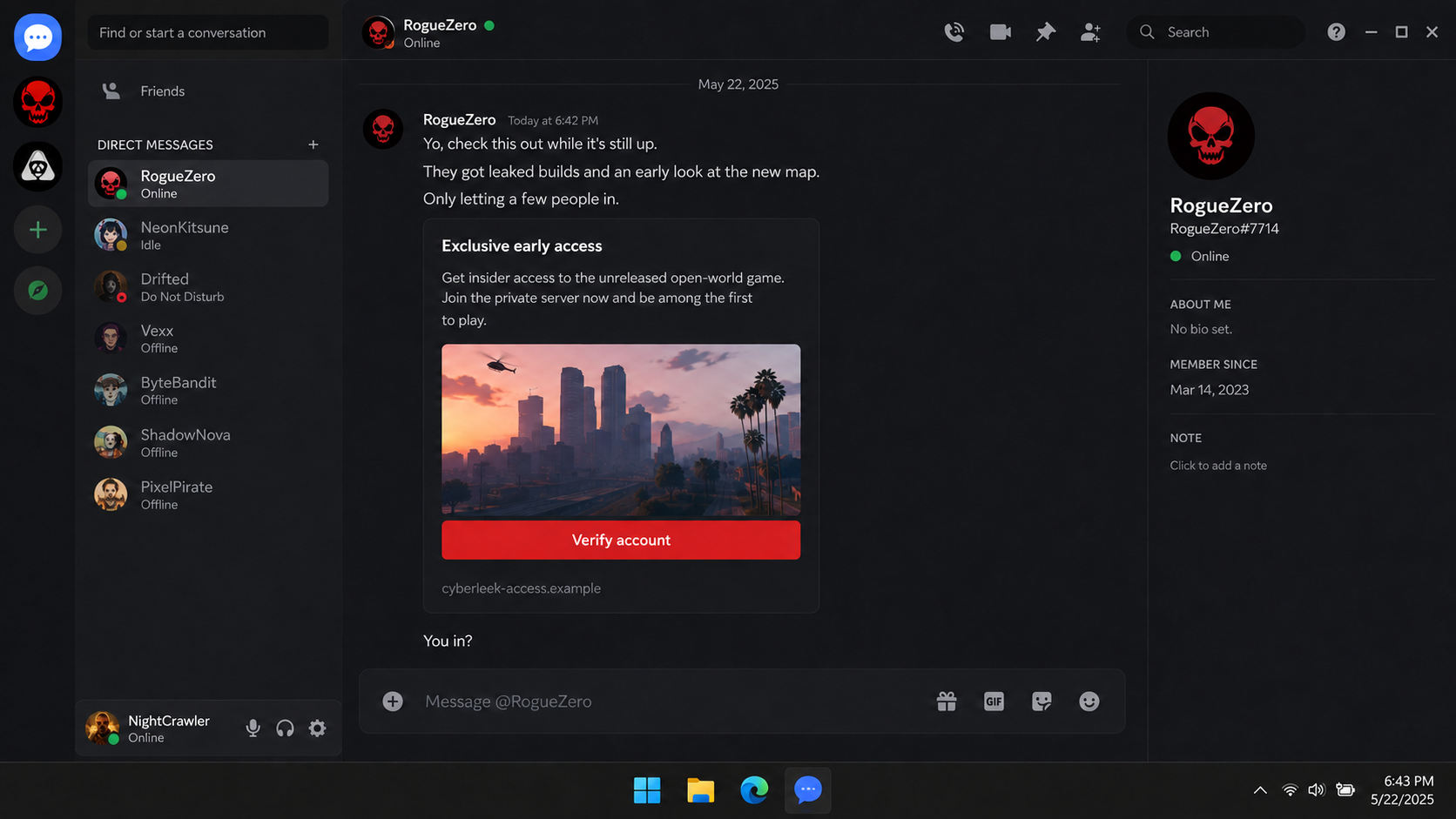
A message from a gaming friend says an invitation is disappearing fast. A private server supposedly has an unreleased build, a new map, or access to footage everyone else is trying to find.
The invite looks more believable because the sender is not a stranger. Their account may have years of history, mutual servers, and conversations that feel impossible for a scammer to fake.
The CyberLeek Discord verification scam begins where curiosity meets borrowed trust, and the most important detail is hidden behind the button marked “Verify.”
Overview
The leaked-game story creates instant credibility
CyberLeek became a recognizable name during the rush around leaked Grand Theft Auto VI material. That attention created a ready-made disguise for unrelated scammers. Copycat servers and messages can claim they hold exclusive clips, maps, demos, or early access without having to invent a new story.
The scam is not simply a questionable fan server. Its dangerous versions push visitors toward an outside verification page, a QR code, a login form, or a download. The promised content is the lure. The requested account action is the attack.
That distinction matters. A real leak and a fake invitation can circulate at the same time. The existence of authentic unauthorized footage does not make a random server, payment demand, executable, or account check legitimate.
A familiar account may already be compromised
The invitation often arrives from someone the recipient knows. That account may have been stolen in an earlier round of the same campaign. The attacker reads the visible context, sends the link to friends, and lets the victim’s reputation do the convincing.
Once another person enters credentials or approves a QR login, the chain continues. Friends see a normal username and avatar, not the criminal controlling them. This is why asking the sender through a different channel is more useful than studying the profile picture.
Server size is not proof either. A community can be filled with bots, compromised members, copied announcements, and scripted chat. Activity can be manufactured much faster than a trustworthy organization can be built.
Verification is used to steal more than one gaming login
A fake page may collect a Discord password, email login, game-platform credentials, or a one-time code. A QR code can authorize a live session without showing a conventional password form. A download can go further by stealing saved passwords and browser sessions.
Malwarebytes documented a current network of fake GTA 6 demo pages that delivered the Vidar information stealer. Its analysis found attempts to take saved credentials, cookies, browsing data, and other browser information. The campaign shows why an unofficial game download deserves more than ordinary skepticism.
Warning signs include:
- A friend suddenly promotes a leak server without a normal conversation.
- The invitation promises a playable build that the publisher has not released.
- A server requires an outside website before channels become visible.
- The verification page asks for a password or one-time code.
- A QR code is described as proof that the visitor is human.
- A tiny executable is presented as a modern game or access tool.
- The page mixes authentic artwork with an unofficial download button.
- Moderators create urgency by claiming access will close within minutes.
- Payment is requested for leaked footage, a role, or early access.
- Questions about the operator are deleted or answered with more pressure.
How the CyberLeek Discord Verification Scam Works
Step 1: Real gaming news supplies the bait
The operator waits for a moment when searches and social feeds are full of one unreleased game. Leaked clips, takedown notices, rumors, and genuine publisher announcements blur together. The criminal only needs to add one tempting claim: “There is more inside this server.”
CyberLeek gives the invitation a timely label, but the mechanism is older than the name. The same structure has appeared around betas, tournament rewards, rare cosmetics, free game currency, and private testing programs.
Step 2: A stolen account sends the invitation
A compromised account posts in a server or sends direct messages to friends. Some messages are brief because that looks natural. Others mention an expiring invite, limited places, or footage that will be removed after a copyright complaint.
The sender may not answer follow-up questions correctly. The attacker often wants the link to carry the conversation. If the message comes from a real friend, contact them by phone, another account, or another platform before opening anything.
Step 3: The server hides the promised content
After joining, the visitor sees locked channels and a verification bot. The server may display rules, member counters, reaction buttons, and copied messages that make it feel established. None of those elements proves who controls it.
The visitor is told verification prevents raids or confirms game ownership. Real Discord servers can restrict posting through native settings, but an unknown server does not need your password, browser token, email login, or executable to let you read a channel.
Step 4: The fake check captures access
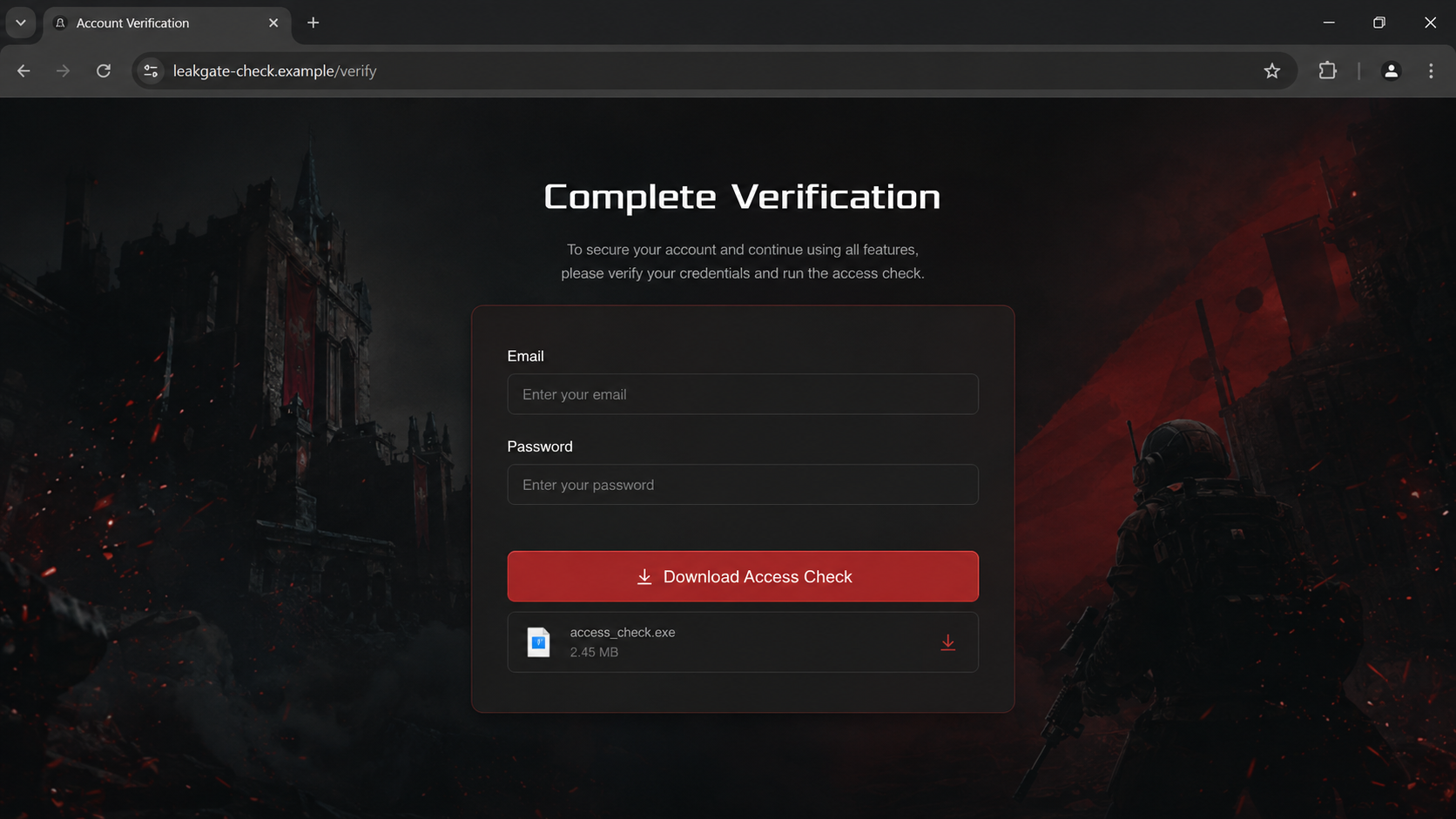
The verification button can lead to a lookalike login form. When the victim enters an email and password, the page sends them to the operator. A convincing error may then ask for a fresh one-time code before it expires.
Another version displays a QR code. Discord warns that its QR scanner is used to log in. Approving a code supplied by a stranger may therefore authorize the attacker’s session rather than verify a server membership.
Step 5: A download turns phishing into device compromise
Some pages claim a launcher, anti-bot tool, map viewer, or access check must run locally. The file may be far too small to contain the advertised game. Once executed, an information stealer can take credentials and active session cookies from multiple browsers.
Malwarebytes found a fake GTA 6 installer that produced no useful window and installed nothing a victim would normally notice. Silence after a launch is not evidence the file failed. A stealer can finish its job quickly and disappear from view.
Step 6: The stolen session bypasses normal expectations
Changing one password helps, but stolen session cookies can remain valuable. A session was created after authentication, so an attacker may reuse it without repeating the same login or two-factor challenge. Sign out everywhere and revoke unfamiliar devices, not just the visible chat session.
The criminal may also enter email, gaming, social, and shopping accounts saved in the browser. A single fake game tool can therefore become an account takeover incident far beyond Discord.
Step 7: The victim’s identity recruits the next targets
After gaining control, the attacker sends the same invitation to the victim’s contacts. It may delete warnings, change recovery details, create webhooks, or use a moderator account to reach an entire community.
Friends trust the new message because they trust the person whose account was stolen. The campaign grows without buying a large advertising audience. Every compromised profile becomes both a target and a delivery channel.
What Is Real About the GTA 6 Story?
The surrounding news is real enough to make the trap effective. Malwarebytes reported that footage and map material circulated under the CyberLeek name in August 2026. Take-Two also sought records connected with Discord and Microsoft during its investigation.
That does not authenticate a private invitation. Criminals routinely build phishing pages beside a real event because searchers are already primed to believe new material exists. The current CyberLeek Discord verification scam should be judged by what it asks the visitor to do.
The publisher has not announced a playable GTA 6 demo. Malwarebytes found fake sites advertising an official download even though no demo existed. It also noted that no PC version had been announced at the time of its analysis.
An official video, trailer, or extended look is something to watch. It does not require an unknown Windows executable, a Discord password, a cryptocurrency payment, or a third-party account check. Those added steps are not proof of exclusivity.
Copied artwork deserves no weight. Logos, screenshots, trailers, and release dates can be lifted from official sources in minutes. Verify the offer through the publisher’s own website and established stores, not through the page that wants the credential.
Why “Just Looking” Can Still Be Risky
Joining an unknown server does not automatically surrender an account, but it exposes the user to direct messages, social pressure, fake moderators, and malicious links. Leaving before completing verification is the correct move when the process asks for sensitive actions.
A preview in a search result can also be misleading. Attackers can buy ads and optimize pages around fast-moving news. A high position, polished certificate, or HTTPS lock only shows that a connection is encrypted. It does not identify an honest operator.
Do not upload a game library screenshot, purchase receipt, identity document, or account-export file to prove eligibility. Those records can reveal names, email addresses, order numbers, and details useful in later impersonation.
Do not test the installer on the computer that holds saved passwords. A virtual machine is not a practical safety plan for most readers, and unknown malware may attempt to detect analysis environments. The simple consumer answer is not to run it.
If curiosity is only about footage, wait for reporting from established outlets or official publisher channels. No unreleased clip is worth turning every active browser session into a potential entry point.
Company, Address, and Fulfillment Checks
The CyberLeek name does not identify the message sender
A server title, display name, or copied avatar can be created by anyone. Do not assume the sender is the person or group discussed in leak coverage. The safer description is a copycat campaign exploiting the name unless independent evidence proves control.
The verification domain should stand on its own
Expand the full destination before visiting. Misspelled chat domains, newly created addresses, free hosting, and unrelated subdomains are serious warnings. Even a clean-looking domain cannot override a request for credentials or an unofficial executable.
There is no legitimate fulfillment path
A leaked build has no normal purchase receipt, store listing, license agreement, support desk, or refund channel. That absence is exactly why the operator can invent access fees and private rules that cannot be checked outside the server.
Copied moderation tools prove nothing
Bots, member roles, ticket channels, and security language can be reproduced in an afternoon. Verify a bot through its official developer and approved listing. Never grant administrator access because a new server promises content in return.
What to Do if You Have Fallen Victim to This Scam
- Stop interacting with the server. Do not send another code, scan another QR image, run a second file, or pay for a supposed fix. Preserve the invite, usernames, message links, domains, and timestamps first.
- Change the Discord password from the real app or discord.com. A password change invalidates the current account token. Review the email address, phone number, authorized applications, connections, and active devices.
- Sign out everywhere else. If a file ran, revoke sessions for email, game stores, social networks, payment services, and other important accounts. Use a clean device and start with the primary email account.
- Replace reused passwords. Give every account a unique credential. A password manager makes that practical. Enable an authenticator app or passkey where supported and save recovery codes offline.
- Scan the affected computer. If you launched an installer, archive, script, or browser extension, disconnect from sensitive work and run a full Malwarebytes scan. Remove detections before changing more credentials on that device.
- Use web protection as another barrier. AdGuard can block many known malicious pages and advertising routes. It cannot make an unknown executable safe or reverse a QR login, so complete the account and device response too.
- Warn contacts without repeating the link. Tell friends that the earlier invitation came from a compromised account. Post a plain-text warning in affected servers and ask moderators to remove the malicious message.
- Audit servers you manage. Check administrators, roles, webhooks, bots, integrations, deleted channels, and recent moderation actions. Remove unknown access and require two-factor authentication for moderators.
- Report the account and message. Use Discord’s reporting process and include the message link. Report malicious domains to the hosting provider and downloaded files to the relevant security vendor.
- Contact financial services if you paid. Tell the card issuer, payment app, exchange, or bank that the transaction followed a phishing scheme. Ask about reversal options and replace exposed card details.
- Ignore recovery offers. Anyone promising to recover the account, cryptocurrency, or gaming inventory for an upfront fee may be targeting victims a second time.
Frequently Asked Questions
Is every CyberLeek server a scam?
A name alone is not enough to classify every community. The scam version is identifiable by the outside verification, credential request, QR login, download, or payment demand. Treat copycat invitations as untrusted.
Can a Discord QR code steal my account?
Approving an unknown login QR code can authorize another session. If you scanned one, change the Discord password immediately and review account access from the real app.
Does two-factor authentication stop an information stealer?
It helps protect new logins, but stolen authenticated session cookies may bypass the normal login step. Remove malware, sign out everywhere, revoke sessions, and change credentials from a clean device.
Is there an official GTA 6 demo?
No playable demo had been announced in the current official information cited by Malwarebytes. Verify any future release through Rockstar Games and established console or game stores.
What if I joined but did not verify?
Leave the server, block unsolicited messages, and report the invite. If you did not scan, sign in, download, approve a bot, or provide information, the exposure is usually much narrower.
Should I message the friend who sent it?
Yes, but use another trusted channel. The account sending the invitation may still be controlled by the attacker, who can imitate the friend and ask for another action.
The Bottom Line
The CyberLeek Discord verification scam borrows a current leak story and a familiar person’s account to make an unsafe request feel exclusive. Real news around a game does not validate an outside login, QR code, payment, or executable.
Do not verify through the invitation. Confirm the sender elsewhere, use official publisher channels, and leave any server that needs credentials or software before showing its content. If you already complied, treat the incident as a wider account and browser compromise, not merely a lost chat login.

Join the discussion
0 commentsShare your experience or ask a question about this article.
Discussion
Start the conversation
Have a question or something useful to share? Add the first comment.