

The Daleza Fregoso AMBER Alert was real. Official records show it was issued by the California Highway Patrol on behalf of the Los Angeles Police Department.
Online claims called the alert malware because some versions included a shortened link. That warning overreached: an uncomfortable-looking link does not make the emergency fake.
The genuine risk is a malicious copy that preserves the real case but replaces the destination. Here is how to verify the alert without trusting the link.
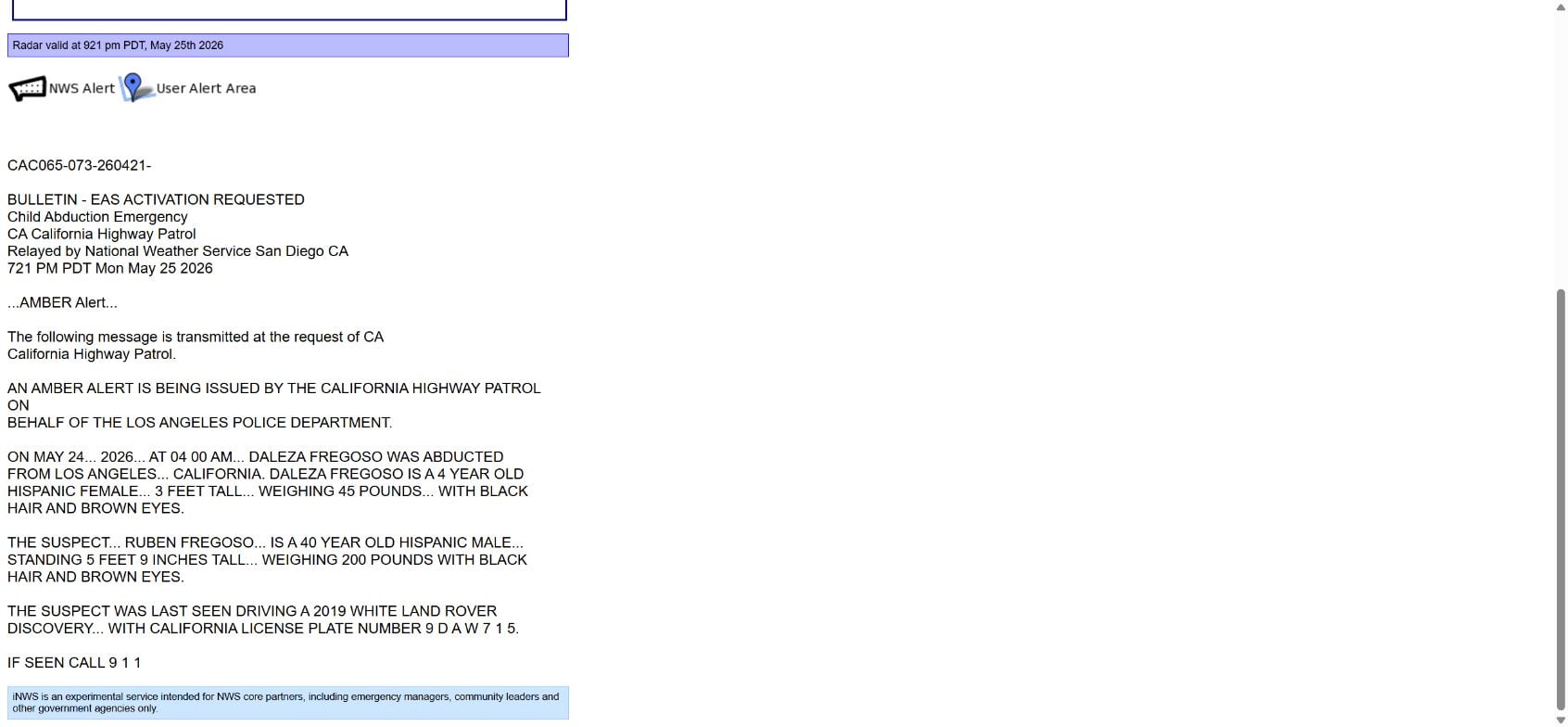
Daleza Fregoso Alert Overview
On May 25, 2026, the California Highway Patrol issued an AMBER Alert on behalf of the Los Angeles Police Department for four-year-old Daleza Fregoso. The alert identified Ruben Fregoso as the suspected abductor and described a white 2019 Land Rover Discovery.
The National Weather Service relay preserved the emergency bulletin, including the issuing agency, time, vehicle description and instruction to call 911 if the child or vehicle was seen. Local news organizations also reported the active alert and the related investigation.
A video circulating afterward described the alert as a scam and suggested that legitimate alerts do not contain links. That rule is too simplistic. The official alert history shows that a shortened link appeared in an authentic version of this case. The correct question is not merely “Does it have a link?” but “Where does the link ultimately lead, and can the alert be confirmed independently?”
- Was the underlying AMBER Alert real? Yes.
- Was it issued through official systems? Yes, by the California Highway Patrol on behalf of LAPD and relayed by NWS.
- Does every reposted message become trustworthy? No. Scammers can copy the text and replace the destination.
- Is a shortened link proof of malware? No, but it hides the destination and deserves verification before opening.
- Safest response: Confirm the case through an official agency or established local news outlet, then use contact information from that source.
Why a Real Alert Can Look Suspicious
Urgency is built into emergency alerts
AMBER Alerts are intentionally brief and urgent. They may arrive with a loud notification, limited context and instructions to act quickly. Scammers use the same emotional pressure, so the format can feel similar even when the message is legitimate.
Short links hide the final web address
A shortened URL saves space, but it prevents the recipient from seeing the destination at a glance. Government agencies sometimes use link shorteners, which means “never click any shortened link” is not a reliable authenticity test.
The safer habit is to avoid opening the link from the message and locate the alert independently. Search the child’s name together with the issuing agency, visit the agency’s known website or check an official emergency-alert archive.
Screenshots remove useful context
A screenshot may omit the sender, timestamp, destination and follow-up notice. It can also be edited. Treat a screenshot as a lead to verify, not as proof that an alert is real or fake.
Real cases are valuable bait
Criminals prefer stories people already recognize. Copying a real child-abduction case gives a malicious post instant credibility and makes recipients more likely to share it before checking the link.
How a Fake AMBER Alert Copy Could Work
Step 1: A scammer copies a real case
The scammer takes the child’s name, photo, vehicle description and official-looking wording from a real bulletin or news report. Because those details are accurate, a quick search appears to validate the message.
Step 2: The original destination is replaced
The criminal adds a different shortened link, QR code or attachment. It may lead to a fake news page, a browser-notification trap, a credential form or a download disguised as additional information.
Step 3: Emotion suppresses caution
Recipients are told a child is in immediate danger and are encouraged to click or share now. Few people want to appear indifferent, so the post spreads faster than an ordinary phishing lure.
Step 4: The fake page introduces a second action
A malicious page may claim that a video, map, security update or special viewer is required. It can ask the visitor to allow notifications, sign in to Facebook, copy a command into Windows or download a file.
Step 5: The attacker monetizes the click
The final objective may be account theft, ad fraud, malicious notification subscriptions, malware installation or collection of personal data. The real child-abduction case serves only as the emotional wrapper.
How to Verify an AMBER Alert Safely
- Do not use the message link as your starting point. Open a new browser tab and find the issuing agency independently.
- Search the exact child’s name. Look for matching reports from the state police, local police or established local news organizations.
- Compare concrete details. Check the date, city, vehicle, license plate and agency—not just the child’s name and photo.
- Inspect the destination. A lookalike domain, unrelated download site or login page is not part of a legitimate alert.
- Use official contact information. If you have relevant information, call 911 or the number displayed on the agency’s own website, not a number added to a repost.
- Check for cancellation updates. Old alerts are frequently reshared after a child has been found, creating confusion and unnecessary calls.
Red Flags That a Copy Has Been Weaponized
- The post says you must download an app, video player or “security update” to see details.
- The page asks for a social-media password, email login or payment information.
- Instructions tell you to press Windows keys, open PowerShell or paste a command.
- The destination is unrelated to a government agency, recognized news outlet or established missing-person organization.
- The message requests donations through gift cards, cryptocurrency or a personal payment account.
- The post pressures you to share it with a fixed number of people before viewing more information.
- Comments are disabled or full of warnings that the link was changed.
What to Do If You Opened the Link
If you only viewed a normal page
Close it and clear any downloads you did not intentionally request. Merely opening a webpage does not automatically mean the device is infected, but do not grant notification permission or enter credentials.
If you allowed browser notifications
Open the browser’s site settings, locate the unfamiliar domain and remove its notification permission. A stream of alarming pop-ups after the visit usually comes from an allowed website permission, not an infection warning generated by your antivirus.
If you entered a password
Change it from the real service immediately and sign out other sessions. If the same password was reused, change it everywhere else. Enable multi-factor authentication and review recovery email addresses, phone numbers and forwarding rules.
If you downloaded or ran a file
Disconnect the device from the network if it begins behaving unexpectedly. Run a full security scan, inspect recently installed applications and browser extensions, and seek professional help if a command was pasted into PowerShell or another terminal.
If you provided payment information
Call the bank or card issuer using the number on the card. Ask it to secure the account, replace exposed credentials where necessary and monitor for unauthorized transactions. Do not call a number displayed on the suspicious page.
Was the Daleza Fregoso Link Malware?
The evidence confirms the official alert, but it does not justify declaring every link bearing Daleza’s name safe. A shortened URL can be redirected or copied incorrectly, and a social-media repost can substitute a different link.
At the same time, no specific malicious URL was identified in the material claiming that the original alert was a malware campaign. Without the exact destination, redirect history or a verified malicious payload, calling the authentic alert “malware” goes beyond the evidence.
A responsible warning should distinguish between two facts: the case and official alert were genuine, while opportunistic copies remain possible and should be checked carefully.
Frequently Asked Questions
Was the Daleza Fregoso AMBER Alert fake?
No. Official emergency-alert records show that the California Highway Patrol issued the alert on behalf of the Los Angeles Police Department.
Do real AMBER Alerts ever include shortened links?
Yes. Although shortened URLs are harder to verify and should be handled cautiously, their presence alone does not prove an alert is fake.
Should I click a link in an emergency alert?
You usually do not need to. Confirm the alert by independently visiting the issuing agency or searching a reputable local news source. If you have relevant information, use official contact details or call 911.
Can scammers copy a real AMBER Alert?
Yes. A criminal can preserve all the genuine details while replacing the destination with a phishing page, notification trap or malware download.
The Bottom Line
The Daleza Fregoso AMBER Alert was not a fabricated scam. Treating the official bulletin as malware can undermine a genuine public-safety message and discourage people from responding to future alerts.
The useful lesson is not to trust every repost. Verify the case independently, avoid hidden destinations and never install software or enter credentials to view emergency information. That approach protects you from malicious copies without spreading misinformation about the real alert.

Join the discussion
0 commentsShare your experience or ask a question about this article.
Discussion
Start the conversation
Have a question or something useful to share? Add the first comment.