

A slick-looking casino app endorsed by a major celebrity? It sounds too good to be true—because it is. If you’ve stumbled upon the “Dana White Casino” app through Facebook, Instagram, or even what looks like a legit app store, you’re not alone. Thousands of UFC fans are being lured into a sophisticated scam that leverages deepfake AI videos, fake testimonials, and fraudulent websites to steal real money. Here’s everything you need to know before you fall victim.
Scam Overview: Unmasking the “Dana White Casino”
The so-called “Dana White Casino” is not affiliated with Dana White, UFC, or any legitimate gaming platform. Instead, it is part of an elaborate scam operated through a fraudulent app called “Dana White Casino” published under the name “Ducky Luck.”
The Illusion of Legitimacy
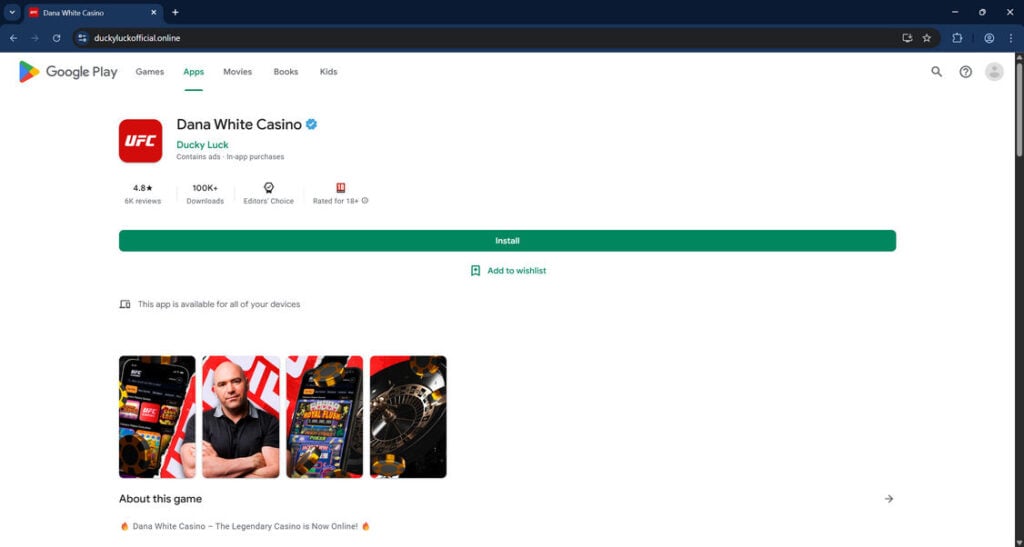
At first glance, the scam appears credible. The fake app displays UFC branding, includes images and deepfake videos of Dana White, and even features fake editor’s choice badges and high ratings. On platforms like duckyluckofficial.online, unsuspecting users are shown what looks like a legitimate Google Play or Apple App Store interface.
The app lists attractive bonuses like $2,500 in free credits and dozens of free spins—offers that are commonly used by real online casinos. But none of these rewards are real. They exist only to trick you into making an initial deposit.
A Trusted Name Exploited
Dana White’s public persona and high trust factor are the linchpins of this scam. By using deepfake AI-generated videos, the scammers create a false sense of endorsement. White appears to speak directly to viewers, promoting the casino and encouraging them to invest.
These videos are widely circulated via social media ad campaigns, and their hyper-realism makes it nearly impossible for the average person to detect the fraud. Once viewers click the ad, they’re redirected to a website that mimics an app store environment and pushes them to download the fake app.
False Reviews and Success Stories
On the fraudulent app page, visitors are greeted with glowing reviews that claim thousands in winnings and quick payouts. These reviews are fabricated. In reality, users report that after making a deposit, all contact is lost, and no winnings are ever paid out. The only consistent result is that victims lose their money.
The Scale of the Scam
The app isn’t available through legitimate app stores. Instead, users are tricked into downloading it directly from scam domains like duckyluckofficial.online or are redirected through sites like duckyluck.ag, which may even block access once the fraud is complete.
This scam has been also investigated by Jordan Liles on his YouTube channel, where he offers a detailed video on the subject. We recommend watching his content for a comprehensive understanding of the scam.
Next, let’s break down exactly how scammers carry out this scam from start to finish.
How The Scam Works:
Step 1: The Bait – Social Media Ads
The journey begins with highly targeted ads on Facebook and Instagram. These ads use AI-generated videos of Dana White claiming he’s launching a new online casino tailored for UFC fans. The production value is high, the messaging seems personal, and the offer feels exclusive.
Step 2: The Redirect – Fake App Store Page
Clicking the ad leads users to a fake landing page mimicking the Google Play or Apple App Store. The domain might read something like duckyluckofficial.online, but the design is nearly indistinguishable from the real thing. Everything from app icons to download buttons and user reviews is carefully faked.

Step 3: The Download Prompt
Once on the site, users are prompted to install the app directly onto their device. A fake install pop-up appears, and clicking “Install” begins the download. Unlike legitimate apps, this one installs a malicious or scam-ridden APK file.
Step 4: False Promises of Bonuses
After installation, the app invites users to create an account and deposit money. It promises massive sign-up bonuses, up to $2,500 in credits, and dozens of free spins. The goal is to get users to make that initial deposit as quickly as possible.
Step 5: Fake Gameplay
The app includes realistic-looking casino games, from slots to roulette, mimicking the experience of a real online casino. Users may even appear to win fake money initially to encourage further deposits.
Step 6: The Exit Scam
Eventually, when users attempt to withdraw winnings or cash out their bonus, they are met with errors, delays, or total silence. Support contacts do not respond, and the app may even block the user entirely. In some cases, the fake app disappears from the user’s device or stops functioning altogether.
Step 7: Website Access Denied
Once the scam is complete, victims may find they can no longer access related domains like duckyluck.ag. This is part of the cover-up phase. By the time users realize they’ve been scammed, the scammers have moved on or changed domains.
What to Do If You Have Fallen Victim to This Scam
If you believe you’ve been scammed by the “Dana White Casino” app or a similar fake casino, act quickly:
- Stop All Payments Immediately
- Contact your bank or credit card provider to halt any further transactions.
- Report the charge as fraudulent and request a chargeback.
- Uninstall the App
- Remove the app from your device to prevent any additional data or financial theft.
- Run a Security Scan
- Use antivirus software to scan for malware or spyware that may have been installed along with the app.
- Report to Authorities
- File a report with the Federal Trade Commission (FTC) or your country’s consumer protection agency.
- Report the fake app to Google Play and Apple.
- Report the website to IC3.gov (the FBI’s Internet Crime Complaint Center).
- Inform Your Network
- Warn friends and family, especially if you shared the app or its promotions.
- Post warnings on social media or relevant forums to alert others.
- Monitor Your Accounts
- Check your bank and credit statements regularly.
- Set up alerts for unusual activity.
- Consider a Credit Freeze or Monitoring Service
- If you shared sensitive personal information, consider using a credit monitoring service or freezing your credit to prevent identity theft.
Frequently Asked Questions (FAQ) About the Dana White Casino Scam
Is the Dana White Casino app real?
No, the Dana White Casino app is not real. It is part of a scam operation that falsely claims to be endorsed by UFC President Dana White. The app is not listed in any legitimate app store and should not be trusted.
Who is behind the Dana White Casino scam?
The exact identities of the scammers are unknown. However, the operation appears to be run by cybercriminals using fake domains like duckyluckofficial.online and duckyluck.ag, combined with deepfake AI videos and spoofed app store pages to defraud users.
How do scammers use Dana White’s image?
Scammers use AI-generated deepfake videos of Dana White to promote the fake casino. These videos are spread through social media platforms like Facebook and Instagram to gain trust and encourage users to download the fake app.
What happens after I install the Dana White Casino app?
After installation, the app prompts you to create an account and make a deposit with promises of huge bonuses. You may see fake winnings, but you will never be able to withdraw real money. Eventually, the app stops working, or you are blocked entirely.
Are the user reviews on the app legit?
No. All user reviews and success stories are fabricated. They are designed to make the app seem credible and lure in more victims.
How do I know if I’ve been scammed?
If you downloaded the app from a non-official source, made a deposit, and are unable to withdraw your winnings—or the app suddenly stops working—you’ve likely been scammed.
What should I do if I sent money to the scam?
Immediately:
- Contact your bank or credit card company to request a chargeback.
- Uninstall the app from your device.
- Run a malware scan using antivirus software.
- Report the scam to the FTC, your local cybercrime unit, and the app stores.
- Monitor your accounts for suspicious activity.
Is there a real Ducky Luck casino?
Yes, there is a real online casino named Ducky Luck. However, scammers have abused its name and created fake clones like duckyluckofficial.online to add a false layer of legitimacy to their scam.
Can I recover my money?
Recovering funds can be difficult, but not impossible. If you act quickly and report the fraud to your bank or credit card company, you may be eligible for a chargeback. Speed is crucial.
How can I avoid scams like this in the future?
- Never download apps from unofficial sources.
- Verify endorsements directly through trusted platforms.
- Be cautious of too-good-to-be-true offers, especially on social media.
- Use browser extensions and antivirus tools that flag suspicious sites.
- Google the app name along with the word “scam” before downloading.
The Bottom Line
The “Dana White Casino” is not just a harmless fake app—it’s part of a broader and more dangerous scam operation that exploits trust, technology, and UFC fandom. With deepfake AI videos, fake reviews, and fabricated promotions, this scheme has successfully fooled thousands. Don’t become the next victim.
Stay informed, stay skeptical, and always verify the source before downloading any app or sending money online. If it seems too good to be true, it probably is.








