


A wallet connection can feel as routine as opening a new tab. That makes it easy to miss when a site starts asking for something else.
The DeFi Protocol Authentication page put several familiar tasks behind one process. Looking closely at that process tells you more than the page’s promises do.
Overview
The DeFi page promised one route to several crypto services
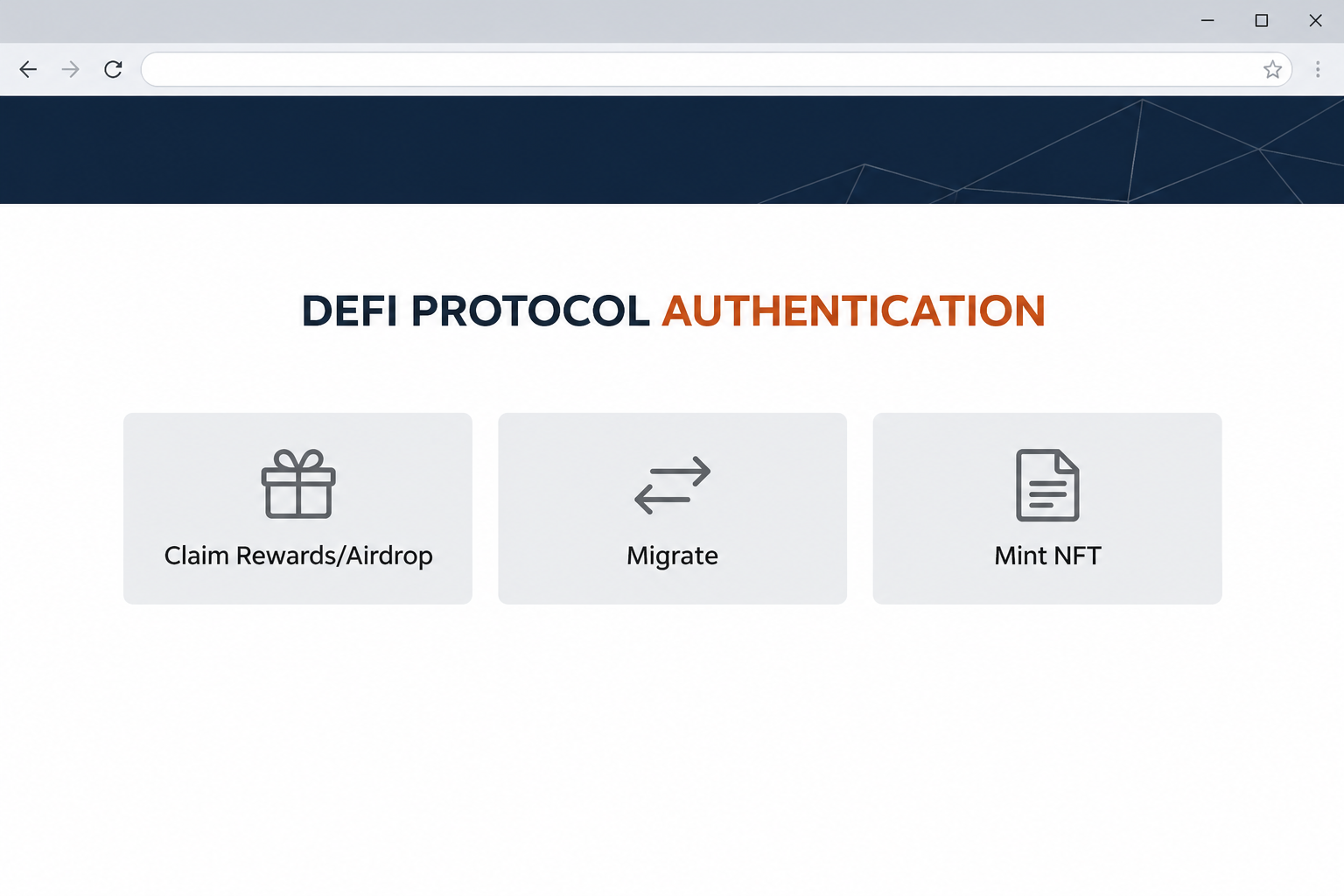
The DeFi Protocol Authentication scam appeared at protocol-authentication.pages[.]dev. It presented itself as a place to claim rewards, migrate assets, mint NFTs, and carry out other common crypto tasks.
There was no specific project behind the “authentication” you were being asked to complete.
The page used broad financial language and offered a selection of actions before narrowing everything to wallet access.
Its landing screen looked like a catalog of services. A visitor trying to fix a migration could start from one tile while somebody interested in an NFT started from another.
Separate entry points did not mean separate providers or services. In the recorded path, the site steered the visitor from a wallet brand to a form requesting wallet secrets.
The wallet form asked for information it had no reason to collect
The captured form offered ways to provide a recovery phrase, a private key, or a keystore file. It described these as options for connecting a wallet.
That description is the heart of the scam. A normal app connection uses your existing wallet.
The website doesn’t need a copy of the information that could restore or control it.
A recovery phrase can restore a wallet and accounts derived from it.
A private key controls the particular account it belongs to and can be just as damaging for that account.
A keystore is an exported key file, often encrypted. Sharing it can still expose sensitive account material, especially if someone also obtains the password that can unlock it.
The captured form shows which secrets it requested. No real phrase or resulting loss appears in the recording.
Connection, permission, and recovery are three different things
A connection lets the app recognize your public address and ask your wallet to do things. It does not hand the app your private keys.
Permission is a separate decision you make from the wallet.
An app may ask you to sign a message or approve a transaction, and it matters what that specific request says.
Recovery is what you do through a trusted wallet when you need to restore access.
A website offering a reward, mint, or repair should never make wallet recovery part of joining it.
- A public address can identify an account without unlocking it.
- Your wallet should show a normal connection request itself.
- A request for a phrase, key, or exported keystore changes the risk entirely.
- Close the page if it asks for a reusable secret rather than issuing a normal wallet prompt.
How the DeFi Protocol Authentication Scam Works
Step 1: A broad directory gives you a reason to start
The page did not depend on one brand or a particular token launch. It advertised familiar reasons to use a wallet, including an airdrop, a migration, and an NFT mint.
That range helps the “authentication” request catch people with very different problems.
A visitor might be looking for a service, following instructions from someone else, or troubleshooting something that failed elsewhere.
The page cannot establish that your actual protocol uses it.
Before proceeding, look up the specific service you intended to use and find out whether it mentions an independent verification site.
The original capture does not tell us which message or search led to the page.
If somebody sent it to you privately, treat that person’s explanation as another claim to check.
Step 2: The page borrows a familiar wallet name
After the first choice, the interface shows a wallet-branded step.
A known wallet name can make an outside site feel as though it has safely handed you off to your provider.
Look at where the request lives. A symbol on a web page is not the same as the wallet application or extension you already installed.
That distinction is easy to miss in an in-app browser.
Your wallet may be the app showing the page, without being the party that wrote the page or needs the information.
Do not give the website extra credibility because the same screen offers several wallet brands. Displaying a brand is much easier than proving a connection to it.
Step 3: “Connect” takes on a different meaning
The recorded form asks for secrets that are used to recover or control wallet access. It labels the exchange as connecting, even though it’s asking for something much more sensitive.
You should never have to explain a secretly stored recovery phrase to a site in order to claim a reward.
The distinction still holds if the page mentions encryption or security.
The location of the request is the red flag. A provider’s genuine recovery workflow is part of its own trusted software, not an eligibility screen run by a third party.
If you are confused about something you already clicked, stop and open your installed wallet independently. Do not accept instructions on the same page to copy information out of it.
Step 4: The scam can outlast the browsing session
A person who obtains a usable wallet secret may control the affected account from somewhere else. They do not need to keep the website open on your computer.
That is why closing the page or changing the wallet’s local password is not the remedy after a phrase leak. That password may protect the app where you installed it.
For recovery information shared online, the priority is helping protect assets that remain and replacing the exposed wallet secret. Signing in again as usual would leave the core problem unchanged.
Do not assume a quiet wallet means nobody saw the information. What matters is whether the secret left your control, not whether a transfer appeared within the first minute.
What to Do if You Have Fallen Victim to This Scam
-
Stop at the first request for a wallet secret. If you didn’t type, upload, or approve anything, leave the page and do not test the other service tiles.
You can report the address as text from your existing history. Avoid sending a live link to people who might open it out of curiosity.
-
Write down exactly what you exposed without copying the secret. A public address, a signed request, a private key, and a recovery phrase lead to different decisions.
If you uploaded a keystore, note whether you also entered the file’s password. Tell official support the type of file and what happened, but do not send the file again.
Treat a phrase or unencrypted private key submitted to the page as compromised. Do not wait for a successful transfer before taking the next steps.
-
Prepare a replacement on a device you trust. Use your provider’s official software to create a new wallet with different recovery information when an old phrase or key has leaked.
An extra account created from the same phrase is not a replacement. Keep the new phrase offline and exclusive to the legitimate setup process.
MetaMask’s compromised-wallet instructions explain how to respond if funds are still in an affected wallet and what to do with the old one afterwards.
-
Work out what remains before doing more with the old account. Check tokens, active positions, and other networks that used the exposed phrase or key.
Follow your provider’s guidance to move assets you actually recognize when it’s safe. Ask about active positions that need a different procedure from an ordinary wallet transfer.
If fresh funds disappear as soon as they arrive, don’t keep sending gas money for another attempt. Seek official assistance rather than paying a private account offering a quick rescue.
-
Review a wallet approval separately from a leak. If you only accepted a connection or signed a request without exposing a secret, inspect your wallet history for the affected network.
Disconnect the unknown site and follow official advice to revoke unrecognized permissions when appropriate. A disconnection alone does not cancel permission a transaction already granted.
An approval issue and a compromised phrase can happen in the same encounter. If both occurred, deal with the exposed phrase rather than treating revocation as the whole fix.
-
Report any loss with facts a provider can use. Keep the sending and receiving addresses, time, network, and transaction identifier, not a copy of the private material.
Notify the exchange if a related deposit or withdrawal went through one. Use the FTC’s cryptocurrency scam guidance for U.S. reporting options.
Confirmed transactions generally cannot be recalled by your wallet provider. A report can still document an incident without obligating you to pay anybody to recover the funds.
Why Changing the Wallet Password Is Not Enough
A device password does not replace the underlying key
A local wallet password is useful when somebody has access to the computer or phone where your wallet is installed. It limits access to that app on that device.
That does not invalidate a copy of your recovery material held somewhere else. Think about which information you gave away before deciding that a password change solved the problem.
The same distinction applies to locking the browser extension. Lock it when appropriate, but don’t mistake a locked interface for an unusable private key.
A hardware wallet helps keep signing keys away from the browser. It can’t protect a recovery phrase that the owner types into a separate web form.
Find out how many accounts share the affected phrase
You might use one account for an old NFT and another for trading. If both depend on the same exposed phrase, protecting only the first one is not enough.
If the exposure was a single private key instead, contact the provider for help identifying that specific account. Do not assume it reveals a whole unrelated wallet.
Check the original setup securely and make a private note of the affected accounts. You do not need to put secret material into a spreadsheet, screenshot, or support chat.
Do not give a second person what the first one asked for
People who see a public report may offer to fix the problem first. A helper demanding the old phrase to verify ownership is repeating the same dangerous request.
Use your provider’s official site and support routes. Share a public transaction identifier when you need help interpreting activity, not the key that controls it.
If somebody offers a guaranteed reversal for a deposit, stop. They have introduced a new payment request when you were trying to limit an existing loss.
Frequently Asked Questions
Is DeFi Protocol Authentication a wallet requirement?
No, the documented page was a fake tool asking for recovery information under the label of authentication. It wasn’t a prerequisite for minting, airdrops, or migrations.
Confirm requirements with the specific project you meant to use. A generic portal does not become legitimate because it offers several unrelated services.
Can WalletConnect ask me to copy my recovery phrase?
A standard connection does not require you to submit a recovery phrase to a website. The appearance of a WalletConnect name or logo doesn’t show who controls the page.
If you want to connect to a verified app, use the connection flow from your real wallet. Don’t switch to “manual” entry of a secret when something fails.
What if I typed my phrase but did not press the button?
Do not rely on the absence of a final click. If you entered a recovery phrase on a suspicious website, treat the exposure seriously and get official recovery guidance.
The page design cannot tell you when text might have been read. Prioritize protecting assets rather than revisiting the form to check.
Is uploading a keystore different from giving away a phrase?
Yes, an encrypted keystore and its password are different from a phrase, and they may affect a different scope of accounts. Both should be handled as sensitive.
If you uploaded one, don’t tell a stranger the decryption password to find out whether your wallet is safe. Ask the real provider which account the file relates to.
Can I protect the old wallet just by disconnecting the page?
Disconnection helps end a website session, but it doesn’t make an exposed private key secret again. A replacement wallet is needed when the underlying recovery information has been compromised.
Review existing approvals separately if you signed something. A clean connected-app list says nothing about where a copied phrase might be stored.
Is it safe to move tokens someone sent after the scam?
Do not interact with unfamiliar tokens or messages added after the incident. Their names or descriptions may lead you to another page trying to obtain access.
Follow the wallet provider’s procedure for assets you recognize. Ask for help with anything you cannot identify without using a link supplied by the unexpected token.
The Bottom Line
Do not use the DeFi Protocol Authentication page. A tool that asks for a recovery phrase, private key, or keystore is asking for far more than a wallet connection.
If you entered a secret, secure the affected assets and move to new recovery information using official wallet guidance. Don’t assume changing a password makes the old secret private again.

Join the discussion
0 commentsShare your experience or ask a question about this article.
Community experiences
Did this happen to you?
Your experience could help someone recognize the same scam. Submit a private report for our team to review.
I experienced this tooReports are reviewed before publication. Sharing publicly is always your choice.
Discussion
Start the conversation
Have a question or something useful to share? Add the first comment.