

A devious scam has been making the rounds targeting Denver drivers with fake parking ticket notices. Out of the blue, locals receive text messages claiming their car has an unpaid parking invoice requiring immediate payment. If ignored, urgent threats of additional fees are made.
While appearing legitimate at first glance, it’s actually a cunning scheme to harvest personal and financial data. The texts direct recipients to an elaborate fake website, Denver-Park.com, which uses stolen city assets and details to trick hurried users into inputting sensitive information.
This in-depth guide will unravel exactly how the Denver-Park.com parking ticket scam works, providing readers with the knowledge needed to spot red flags and avoid being swindled. We’ll outline the deceptive techniques used on the text messages and phony websites, as well as recommend proactive solutions for those unfortunately duped by this fraud.
Let’s take a closer look at the inner workings of this parking violation ruse and equip Denver drivers with the tools to stay two steps ahead.
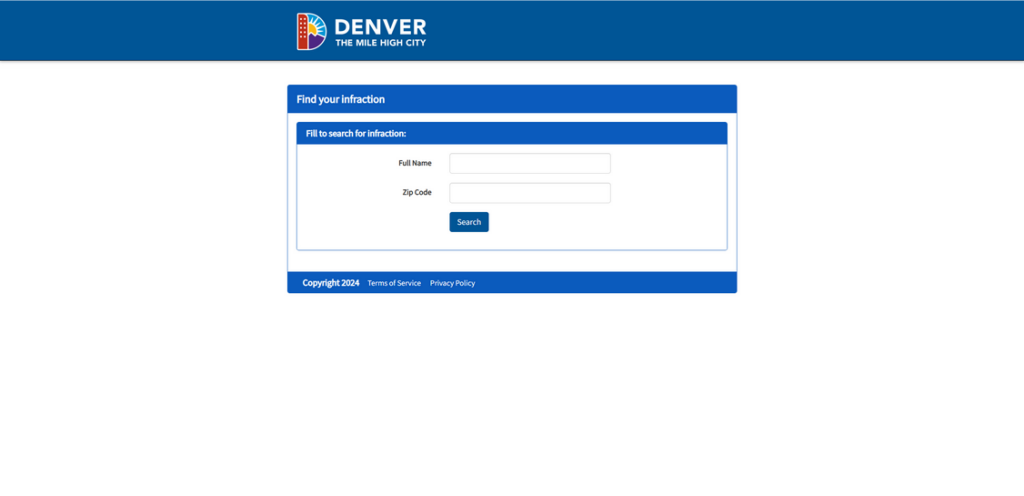
Scam Overview
The scam begins with Denver locals receiving a text message out of the blue regarding an unpaid parking ticket tied to their vehicle. The text appears to come from “City of Denver Parking Violations” and states a $4.35 invoice remains outstanding.
Recipient are then warned immediate payment is required to avoid additional late fees being added. A fraudulent website link, Denver-Park.com, is provided to supposedly allow quick payment of the small balance online.
However, the website is a complete scam designed to steal personal and financial information from tricked users. The site unlawfully uses official city seals and logos to pose as an authorized municipal platform. Duped visitors are asked to input sensitive data to settle the fake parking violation.
In reality, both the initial text and website are orchestrated by cunning scammers aiming to rob victims through identity theft and financial fraud. The ruse is elaborate, from the urgent text threats to the shockingly authentic-looking municipal site.
Once scammers acquire someone’s personal information and credit card details, they can quickly drain bank accounts, make unauthorized purchases, steal tax refunds, and wreak further havoc. Many victims don’t realize the scam until the damage is done.
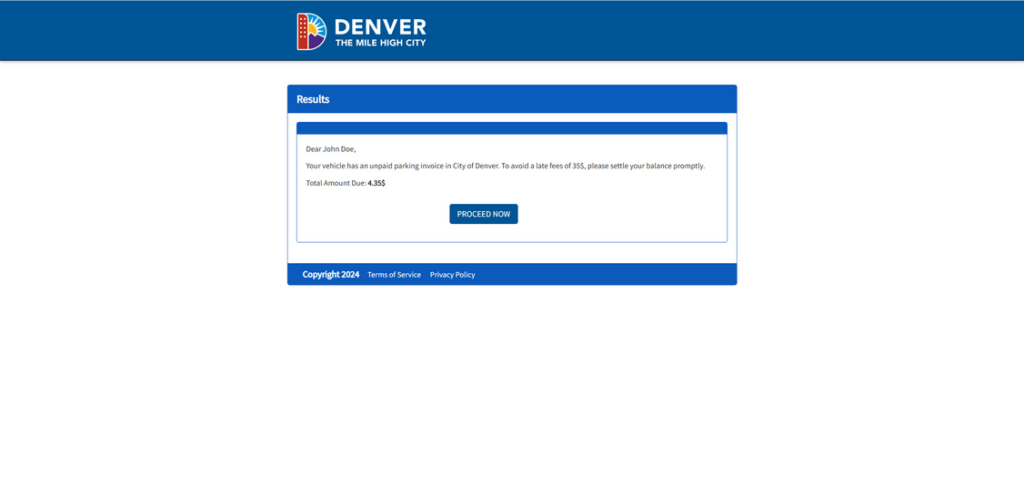
By understanding the deceptive techniques used in this parking ticket ploy, Denver residents can identify red flags immediately and avoid compromised data or emptied accounts. Let’s examine exactly how the scammers carry out this malicious fraud.
How the Scam Works
The Denver-Park.com scam leverages urgency, threats, and an elaborate fake website to steal personal data under the guise of settling a parking violation. Here’s how it works step-by-step:
Step 1: Recipients Get a Text Demanding Payment
The first point of contact is an unsolicited text sent to the victim’s cell phone stating:
“City of Denver Parking Violations: Our records indicate your vehicle has an unpaid parking invoice of $4.35. To avoid late fees of $35, please pay immediately at: Denver-Park.com”
Several deceptive tactics are used here, including:
- Posing as an official city violations department to appear credible
- Making the invoice amount specific ($4.35) but still quite low
- Threatening urgent additional late fees if ignored
- Providing a fake website URL claiming it’s for fast payment
These elements pressure recipients into hastily paying the seemingly real invoice. But it’s merely a ploy to get users to the data harvesting site.
Step 2: The Site Uses City Branding and Urgency to Deceive
Those who click the Denver-Park.com link are taken to an elaborately faked municipal parking site. The website unlawfully displays city seals, logos, images and uses similar branding/text seen on official Denver pages.
- This advanced scam site first reiterates the need to pay the $4.35 ticket immediately to avoid late fees.
- Fields are provided to input personal, contact, and credit card information to “settle” the urgent invoice before penalties occur.
- Official logos and familiar payment portal design make the site seem credible. Few pause to think it may be fraudulent.
In reality, it’s just a front to steal entered data. But the urgency and familiar branding psychologically manipulate visitors into compliance.
Step 3: Victims Enter Personal and Financial Information
Believing the violation notice is real and the website legitimate, many hurried users will input their info without further verification:
- Full legal name, birth date, and physical address
- Contact details like phone number and email address
- Credit/debit card number, expiration date, and CVV code
With these sensitive details captured, the scammers can now commit identity theft or drain the victim’s bank account.
Step 4: Scammers Use the Data for Fraud & Theft
Armed with stolen personal and financial information, the scammers quickly monetize it before victims catch on:
- Selling the data bundles on the dark web to shady buyers
- Depositing stolen funds into crypto wallets untraceable to the scammers
- Applying for new lines of credit in the victim’s name, then maxing them out
- Calling banks while posing as the victim to wire large sums elsewhere
- Rerouting statements/correspondence to hide fraudulent activity from victims
- Filing phony tax returns with the victim’s information to steal refunds
By the time a victim realizes they were scammed, the damage is often already done. Savings emptied, credit ruined, and data compromised. Prevention is truly key with this parking ticket scheme.
Here is a section about the Denver-Park.com website being fake and the real Denver parking website:
Denver-Park.com is a FAKE Website
One key element of this parking ticket scam is the fake website, Denver-Park.com, that is linked in the fraudulent text messages. This site is designed to mimic legitimate City of Denver pages in order to trick users into entering personal and financial information.
However, Denver-Park.com is NOT the official municipal parking website. The real City of Denver website for parking information and services is located at https://www.denvergov.org/Government/Agencies-Departments-Offices/Agencies-Departments-Offices-Directory/Parking-Division.
The phony Denver-Park.com site unlawfully uses city logos and branding to appear credible. But it is a scam operation run by fraudsters aiming to steal data. Legitimate parking invoices or notices from the City of Denver would never direct users to third party websites like Denver-Park.com.
Exercising caution and verifying the actual domain name against the official Denvergov.org address can help residents avoid being deceived by the fake parking website swindle. Remember, anytime a questionable message urges quick action on an unknown site, take time to independently validate the source. Your personal information and money depend on it.
Avoiding the Denver-Park.com Scam
If you receive a suspicious text demanding immediate payment of a parking invoice, exercise extreme caution:
- Never click links in unsolicited messages – Manually visit known official sites instead
- Verify directly with the city by calling an official published number – Do not use contact info provided in the questionable text
- Watch for urgent threats of additional imminent fees – Legitimate notices generally don’t make such claims
- Double check the sender’s number – Scams often spoof legitimate business names and numbers
- Don’t input info on any site you didn’t manually navigate to yourself – Links can direct to imposter sites
- Use unique strong passwords on all accounts – Change them periodically as a precaution
- Monitor accounts closely after any potential scam encounter – Report unauthorized activity immediately
With awareness and vigilance, Denver residents can avoid having their personal or financial data compromised by deceptive parking ticket phishing scams.
What to Do if You Were Scammed
If you entered any sensitive information on Denver-Park.com before realizing it was a scam, take these steps right away:
- Call your bank and credit card companies – Cancel any compromised cards and dispute fraudulent charges
- Change passwords and enable enhanced security options for all your accounts – Make the new passwords unique and complex
- Place a fraud alert and credit freeze with the major credit bureaus to lock your credit reports – This prevents new lines of credit being opened
- File an identity theft report with the FTC at IdentityTheft.gov – This helps with recovery and entitles you to free credit reports
- Monitor all accounts closely for any further unauthorized activity and report it immediately – Scammers often try again believing they still have access
- Consider reporting the scam website to the Internet Crime Complaint Center (IC3) – They notify website hosts to try taking fraudulent sites down
While falling victim to elaborate parking scams is disheartening, take heart knowing the situation can be corrected by taking thorough, proactive measures. Don’t let scammers Do further damage – lock them out of your accounts and work diligently to undo fraudulent activity.
Here is a detailed, SEO-optimized FAQ section about the Denver-Park.com parking ticket scam:
Frequently Asked Questions About the Denver-Park.com Parking Ticket Scam
1. What is the Denver-Park.com parking ticket scam?
The Denver-Park.com scam is a phishing operation where Denver residents receive text messages claiming their vehicle has an unpaid parking invoice that must be handled immediately online. The texts provide a link to the fake Denver-Park.com website, which uses stolen city assets to appear legitimate and tricks users into entering personal and payment information. In reality, it is an elaborate fraud scheme aimed at stealing identities, money, and sensitive data from victims who fall for the scam and input their details.
2. How does the Denver parking ticket scam work?
The scam begins with urgent texts citing a small unpaid invoice for a parking violation tied to your car. Threats of additional fees if not paid quickly are made. A link to the fake Denver-Park.com website is provided to supposedly settle the urgent invoice. The elaborate site uses city branding and logos, mimicking a real municipal parking portal. If users hurriedly enter personal, contact, and credit card information, scammers steal the data to commit financial fraud.
3. What are the signs of the parking violation scam?
Warning signs include:
- Random urgent texts regarding parking tickets for your car
- Threats of imminent late fees or penalties
- Links to unknown third-party websites rather than official city sites
- Requests for sensitive personal and financial data
- Suspicious fake URLs trying to appear as city addresses
- Odd or non-working contact info for city departments
4. How can I avoid becoming a victim?
To avoid falling for this parking scam:
- Never click links in suspicious texts – Manually visit known real websites
- Call official published city numbers to verify questionable texts/notices
- Watch for urgent threats or deadlines demanding immediate action
- Check the sender’s number – Scammers spoof legit names and numbers
- Don’t input information on sites you didn’t manually navigate to
- Use strong unique passwords and change them periodically
5. What should I do if I was already scammed?
If you already entered information on the fake Denver-Park.com site, immediately:
- Contact banks and credit card companies to freeze/cancel accounts
- Change passwords on all accounts and enable enhanced security
- Place fraud alerts and credit freezes with the credit bureaus
- File an identity theft report with the FTC at IdentityTheft.gov
- Monitor accounts closely for any further unauthorized activity
- Report the fraudulent website to the IC3
6. How can I report this parking ticket scam?
To report this scam parking website or text messages:
- Contact the City of Denver parking authorities to notify them of fraud using their assets
- File a complaint with the FCC about illegal spoofing of city numbers
- Report the scam texts to your mobile carrier
- Submit details to the FTC’s complaint assistant
- Contact IC3.gov to notify website hosts of the fake parking domain
7. Where can I learn more about parking in Denver?
For legitimate Denver parking information visit:
This is the only authorized city website for parking services, tickets, street parking, and more – never rely on questionable texts or unknown sites!
The Bottom Line
The Denver-Park.com parking ticket scam uses deceptive urgency, familiar branding and threats of escalating late fees to trick hurried recipients into inputting sensitive personal and financial information. Local awareness of this fraud technique is key, as this scam continues evolving in an effort to steal more peoples’ data and money before being shut down.
With proper skepticism of any random texts demanding immediate payment, as well as taking steps to verify legitimacy before providing details or funds, Denver residents can proactively protect their identities and accounts. Don’t become another victim of this insidious parking violation ploy – master the knowledge needed to confidently identify and shut down these scams for good.

Reviews & discussion
0 commentsShare a firsthand experience, or ask a question.
Community reviews
denver-park.com
Moderated reader experiences, not an editorial verdict.
Start the conversation
Have a question or something useful to share? Add the first comment.