

In recent weeks, Denver residents have reported receiving scam texts claiming their vehicle has an unpaid parking invoice and asking them to pay a balance immediately to avoid additional late fees. This scam takes advantage of unsuspecting people by posing as an official communication from the city and tricking victims into inputting their personal and payment information, which is then used for identity theft and fraudulent charges.
This article will provide an in-depth overview of how this parking invoice scam works, including examples of the text messages sent, the fake payment websites, and what information is stolen. We’ll outline step-by-step how the scammers operate, as well as tips on how to protect yourself from this and similar scams.
Scam Overview
The Denver unpaid parking invoice scam begins with victims receiving an unsolicited text message claiming to be from the “City of Denver” regarding an unpaid parking balance. The message states that there is a past due parking invoice of usually $4.35 associated with the recipient’s vehicle.
To add a sense of urgency and get the victim to act quickly, the text warns that if the invoice is not paid promptly, late fees of around $35 will be added to the balance owed. A link is provided to supposedly allow immediate payment and avoid the additional late fees.
However, the link does not lead to a City of Denver website. Instead, victims who click on the link are taken to a fraudulent website designed solely to steal personal and financial information.
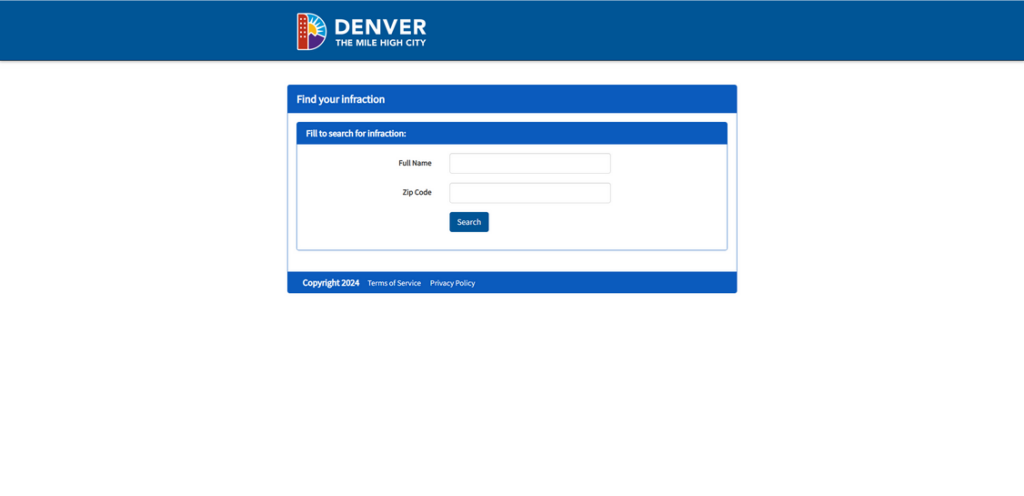
The scam website appears professional at first glance, using Denver imagery and logos to look legitimate. The site reiterates the supposed parking invoice balance owed and provides an online form for victims to input their personal details and credit card information to “pay” the balance.
Unsurprisingly, any money sent is pocketed by the scammers, not the city. And worse, any personal, contact, or payment information entered into the site is harvested by the scammers to commit identity theft and payment fraud.
This parking invoice scam is particularly deceptive because it is specifically tailored to target Denver residents. The texts reference the “City of Denver” by name and the scam websites use Denver branding elements, which adds to the appearance of authenticity.
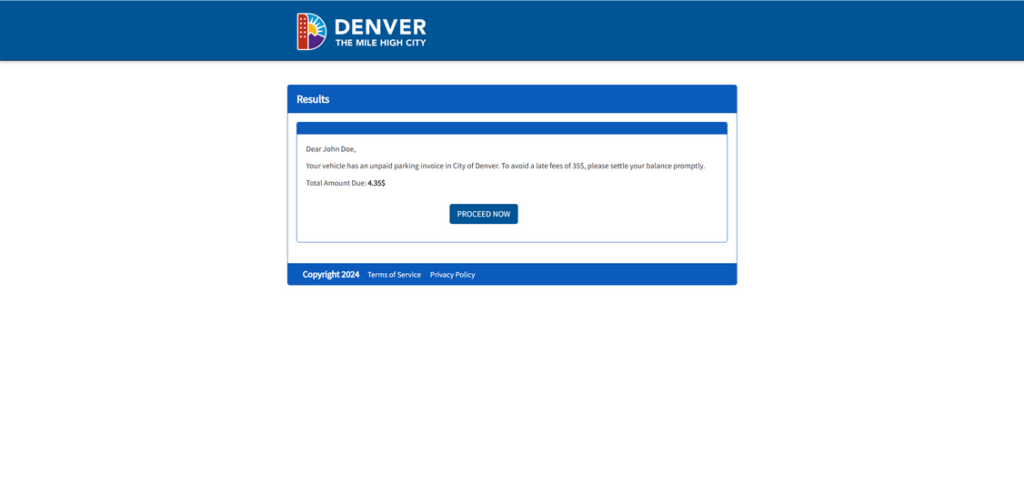
For victims hurriedly checking their phone and seeing what looks like an urgent notice from their city government, the scam can be incredibly effective. The small $4.35 balance makes the unpaid invoice seem plausible, as does the threat of imminent late fees.
In reality, the City of Denver does not contact residents by text message regarding unpaid parking invoices. But many fall prey before realizing the communication is fake.
Once scammers have someone’s personal details, contact info, and credit card number, they can engage in a variety of fraudulent activities:
- Applying for credit cards and loans in the victim’s name
- Accessing and wiping out the victim’s bank accounts
- Using the victim’s credit card for purchases and cash advances
- Committing tax fraud using stolen information
- Providing the stolen info to other criminals to use in scams
Victims often don’t realize their information has been compromised until the damage is done and their accounts emptied. The scammers are skilled at using the stolen data quickly before victims can react.
How the Scam Works
The Denver parking invoice scam operates on a straightforward process designed to steal personal and financial information rapidly:
Step 1: Victims Receive a Text Message
The scam starts with an unsolicited text sent to the victim’s mobile phone number. The message claims to be from “City of Denver” and references an unpaid parking invoice associated with the recipient’s vehicle:
“This is a notice from City of Denver. Your vehicle has an unpaid parking invoice of $4.35. To avoid a late fees of 35$, please settle your balance promptly.”
The text includes no other identifying details about the vehicle, license plate, or location of the supposed infraction. This vagueness allows the scammers to send the same blanket text to thousands of numbers at once.
By claiming to be the “City of Denver,” the sender aims to make the recipient believe the text is legitimate and urgent. The odd invoice amount ($4.35) and late fee amount ($35) add an air of specificity to make the unpaid bill seem plausible.
Step 2: The Text Directs Victims to a Fake Payment Website
The initial scam text will always include instructions to visit a website to immediately pay the parking invoice and avoid late fees:
“To avoid disconnection, please make a payment immediately by typing the link in your browser.”
“denver-park.com”
However, the website URL given will not actually lead to an official City of Denver domain. Instead, victims are sent to elaborately crafted scam websites designed specifically for stealing data.
The scam websites use deceptive techniques to appear legitimate:
- The domain name will typically include “Denver” or reference parking in some way. Examples include sites like denver-park.com and other similar scam websites.
- The site will incorporate official Denver logos or imagery without permission. This creates the illusion of being directed to an authorized city platform.
- The text on the site replicates language used in official government notices and bills. This aims to trick hurried readers into thinking the communication is authentic.
- The option to immediately pay the “invoice” online adds convenience for victims who want to quickly settle the supposed small bill.
In reality, the website exists only to harvest personal and financial information from victims, which it does in the next step.
Step 3: Victims Are Prompted to Enter Personal and Payment Information
The scam website reiterates the premise from the initial text message that the victim’s vehicle has a small unpaid parking invoice that must be paid immediately to avoid late fees.
To supposedly settle the balance, the site provides an online form where victims are prompted to enter various personal and payment details, including:
- Full name
- Birth date
- Street address
- City, state, and zip code
- Home phone number
- Email address
- Credit/debit card number
- Card expiration date
- Card CVV security code
All this data is required for the form to submit properly. For those hurriedly trying to pay a seemingly real bill, filling out the form seems like a reasonable request.
In reality, there is no actual invoice to pay. The scammers instead immediately capture all information entered into the fake payment form. This provides them the major details needed to perpetrate identity theft and payment fraud using the victim’s name and accounts.
Step 4: Scammers Use the Stolen Information for Fraudulent Purposes
With full names, birth dates, contact info, and credit card details successfully harvested from victims, scammers can now put that data to nefarious use. Identity theft and fraudulent purchases are almost always the end goal.
Common ways the scammers leverage stolen personal and financial information include:
- Opening new credit cards or taking out loans in the victim’s name. When combined with a stolen birth date and address info, identity verification is easy to bypass.
- Depositing stolen account funds into crypto wallets, which cannot be reversed once transferred. Bank account numbers are a prime target.
- Selling the stolen info on the dark web for other criminals to use in future scams. Full identity profiles fetch high prices.
- Using stolen credit cards to make purchases online, over the phone, or in stores where chips/PINs are not required. Victims see the fraudulent charges later.
- Adjusting account contact info so the victim doesn’t see fraudulent activity. Emails and phone numbers can be changed.
- Filing tax returns using victims’ names and Social Security numbers to claim refunds. Some texts specifically request SSNs.
By the time victims realize their data has been compromised, the scammers have often already done significant financial damage through fraud. Cleaning up the mess from just a short lapse in judgment can take months.
This is why it is critical that recipients of suspicious texts never click on links, provide information, or pay any funds before verifying a message’s legitimacy first.
What to Do if You Get This Parking Scam Text
If you receive a text out of the blue demanding payment for a small unpaid Denver parking invoice, do NOT click the link or provide any personal or financial information. Instead, take the following recommended steps:
- Remain skeptical of ANY unsolicited text: If you didn’t opt-in to receive parking notices from the city by text, then any surprise message demanding payment for your vehicle is likely a scam.
- Never click on links in suspicious texts: Visiting the scammers’ fraudulent website gives them access to your IP address, location, device info, and more, even if you don’t input data into their forms.
- Double check the sender: Even if the message claims to be from an official source like “City of Denver,” manually look at the actual sender’s number. Scam texts frequently spoof real organizations.
- Watch for urgent demands and threats: Scammers add unrealistic deadlines and threats of consequences like late fees to get victims to act rashly out of fear. Real invoices from legitimate businesses don’t use such forceful language.
- Verify directly with the city: Contact the City of Denver’s actual customer service to inquire about any supposed unpaid parking invoices associated with your vehicle. Do not use contact info provided in the suspicious text.
- Flag the text as spam/fraud: On most smartphones, you can report scam texts to your mobile carrier, which helps identify and block numbers sending phishing attempts.
- Warn others: Alert friends, family, and neighbors in your area about the scam text so they can remain vigilant against this and similar parking invoice phishing attempts. Awareness helps prevent more victims.
- Monitor accounts closely: Keep close watch on your financial accounts for any signs of unauthorized access, just in case you did accidentally click the link or provide some personal information. Promptly report fraud to your providers.
- Change passwords: As a precaution, change the passwords on your financial accounts, email, and other sensitive sites in case they were compromised by the scammers behind the texts. Make the new passwords strong and unique.
With swift, proactive steps taken as soon as you identify the suspicious text as a scam, you can minimize or avoid harm from the parking invoice phishing attempt. But no personal details should ever be provided without verification first.
The Bottom Line
This scam uses urgency, threats, and elaborate fake websites specifically tailored to Denver in order to trick hurried residents into providing personal data and credit card information to scammers under the guise of paying a small, urgent parking invoice.
In reality, the City of Denver does not use text messages for unpaid parking notices, and officials urge extreme caution regarding any random texts demanding payment. No details or money should be provided in response to these scam attempts.
By recognizing the scam signs like odd fake URLs, urgent deadlines, and requests for unnecessary personal data, Denver locals can protect themselves from having their information stolen through this parking invoice phishing method.
When in doubt, or to report any suspicious texts received, directly contact the City of Denver for verification. With vigilance and awareness, this scam can be shut down to prevent more victims from being targeted and defrauded.

Join the discussion
0 commentsShare your experience or ask a question about this article.
Discussion
Start the conversation
Have a question or something useful to share? Add the first comment.