

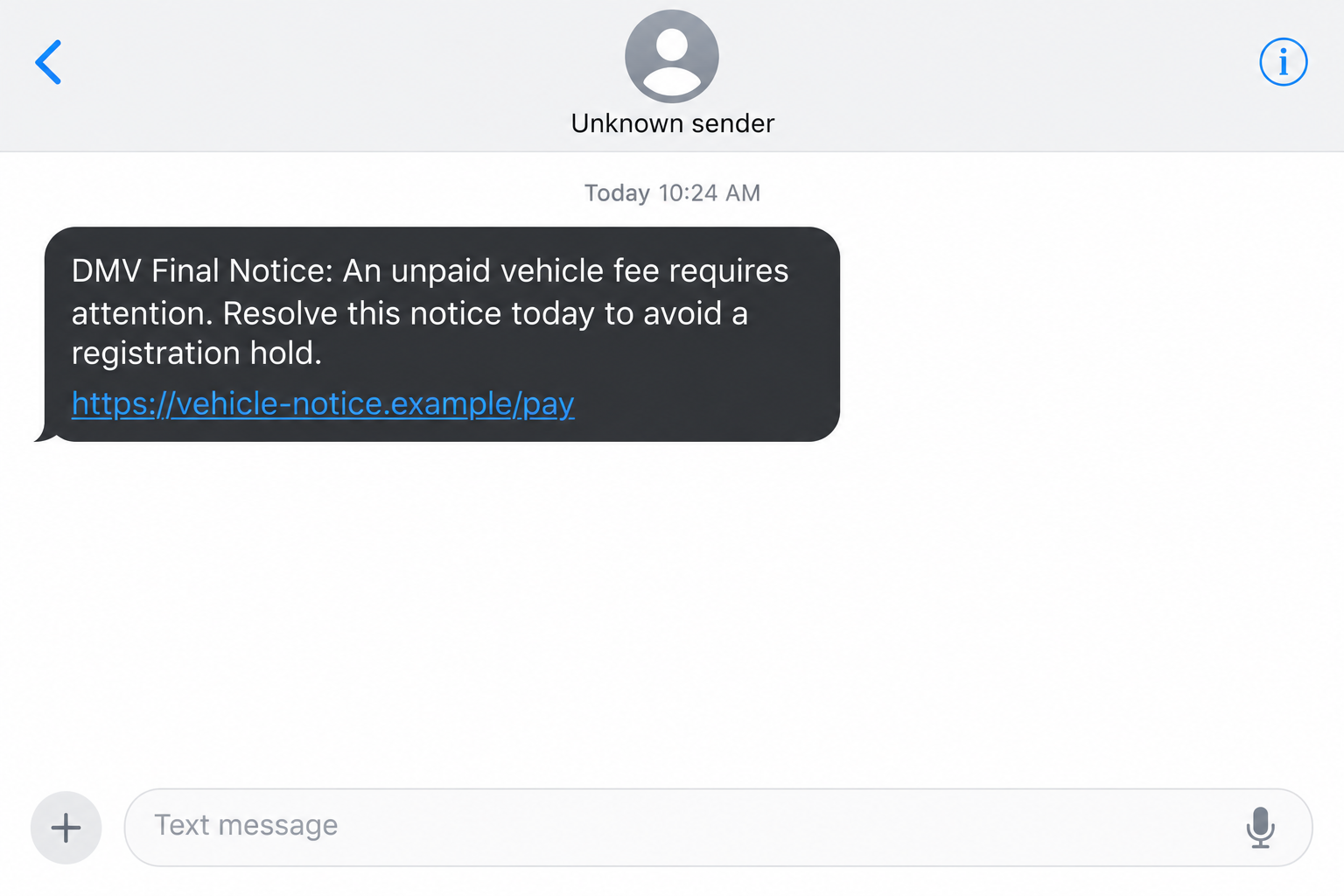
A notice says an unpaid vehicle fee could interfere with your registration. It arrives by text, complete with a deadline that feels uncomfortably close.
If you received a dmvkwt.com DMV text, pause before dealing with the supposed debt. The route behind the message deserves a much closer look.
Overview
The payment demand is the warning, not the deadline
The dmvkwt.com DMV text is a government-impersonation phishing lure. Do not pay through it or provide information to clear its claimed vehicle penalty.
Reports associate the domain with notices pretending to come from a Department of Motor Vehicles. The story can involve fees, tickets, or threatened registration consequences.
An urgent message is not a verified debt. Neither the phrase DMV nor a threatening deadline establishes that an agency has opened a case against you.
Our investigation found a newly registered domain and a misleading intermediate page. Its underlying redirect named Wisconsin’s transportation department inside an unrelated web address.
Wisconsin DMV’s official scam warning says it does not text demands for payment. Verify a supposed balance through the institution itself.
What was visible during the investigation
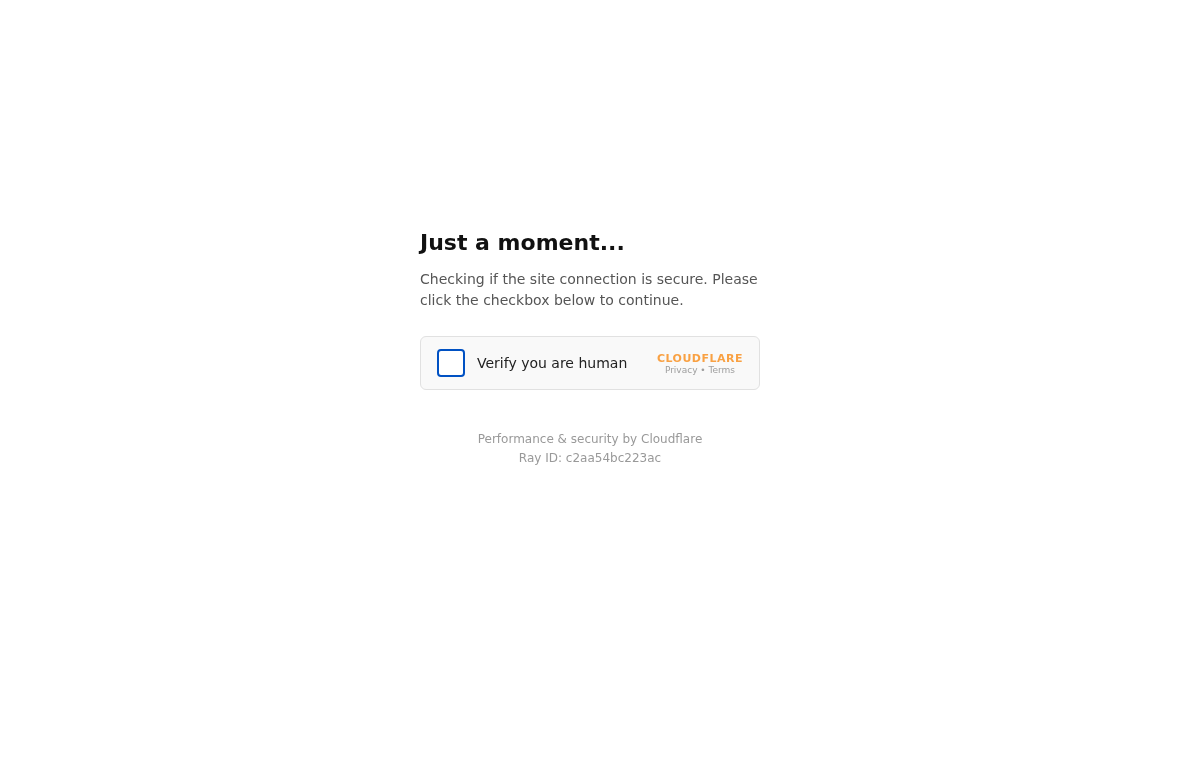
On October 4, 2026, we retrieved a dmvkwt.com page presenting a human-verification box and Cloudflare-style wording.
The page’s public code attached its own redirect to that box. The destination was wisconsindot.tafficrnxaug.cc, not a Wisconsin government website.
That distinction matters: wisconsindot is only a subdomain label here. The controlling registered domain is tafficrnxaug.cc.
A separate browser visit ended at Apple’s public website. Different results do not make the original payment instruction legitimate or establish a relationship with Apple.
We did not complete the verification box, submit information, or make a payment. A direct request to the encoded destination returned an empty 404 response.
- Investigated entry point: dmvkwt.com, cited as an indicator rather than a link to follow.
- Verified registration date: October 2, 2026, at 12:33:36 UTC.
- Captured intermediate screen: a security-check imitation with a checkbox and a redirected destination.
- Important limitation: we did not capture a working final payment form or establish an exact fee for this campaign.
- Recommended action: check any genuine vehicle concern independently, then discard the message’s payment route.
This is an impersonator, not the DMV
The real DMV may hold records, collect legitimate fees, or send reminders under its own procedures. This article concerns someone borrowing that authority.
Do not assume every motor-vehicle notice is fraudulent. Instead, ask whether the particular message matches information available through your actual agency’s verified channels.
Equally, do not assume a real outstanding ticket authenticates this link. A genuine obligation and a fraudulent payment demand can arrive around the same time.
Paying an impersonator does not resolve an authentic ticket. It can leave both the original obligation and an avoidable financial problem.
Why the Threat Feels Personal
A license or registration is not a casual purchase. A warning about losing driving privileges can threaten your commute, work, childcare, or access to appointments.
That emotional pressure is the point. The sender wants the possibility of disruption to outweigh your doubts about an unfamiliar address.
Official-sounding phrases make a generic message seem specific. A reference to enforcement or final notice can resemble paperwork without providing verifiable case information.
Some broader DMV phishing messages cite supposed regulations. We did not verify a particular legal citation in the dmvkwt.com message and do not present one here.
If your version includes a law or case number, verify it through the appropriate agency. Do not let impressive formatting substitute for a record.
The same principle applies to an apparently precise due date. A date typed into a message is easy to manufacture and does not authenticate its sender.
You do not need to settle the whole dispute immediately. You need to move the verification process away from the person demanding payment.
How the Dmvkwt.com DMV Text Scam Works
Step 1: An unsolicited notice claims government authority
The first contact frames itself as DMV business. Its real persuasive asset is the institution’s name, not evidence of an actual obligation.
Read what the message asks you to do. An immediate payment or identity-verification demand deserves scrutiny even if the text uses a recognizable agency name.
A sender label, number, or formal signature can be copied. A phone’s display does not certify the organization behind a message.
If you never requested DMV alerts, that is additional context. If you did request alerts, still compare the demand with your genuine account or agency record.
Do not reply to establish whether the sender is real. That keeps the conversation inside a channel the sender controls.
Step 2: Consequences make the payment feel urgent
The notice ties an alleged unpaid amount to something the reader wants to protect, such as vehicle registration or driving privileges.
Its pressure is practical: resolve this now, or face inconvenience later. That can make even a skeptical reader consider paying a small amount.
But the amount is not the central issue. The message has not proved that it represents the agency, that the debt exists, or that payment goes there.
Threats about arrest, credit damage, or immediate suspension should not override those missing facts. Verify consequences with the authority that supposedly imposed them.
Never send a payment simply to stop a frightening message. A false demand can return with another fee once the sender knows you will respond.
Step 3: The link takes you outside official government channels
Dmvkwt.com has DMV in its name, followed by extra characters. That visual cue creates a connection the domain itself does not establish.
The .com registry records creation on October 2, 2026. We checked that timestamp independently rather than relying on the site’s presentation.
A recent registration alone does not settle a fraud question. Here it accompanies a government-payment pretext and a redirect to another lookalike destination.
Your state agency’s verified website is the appropriate starting point. Reach it through an existing bookmark, official paperwork, or a government directory.
Avoid sponsored search results when investigating the exact suspicious domain. An impersonator can buy prominent placement just as a legitimate organization can.
Step 4: A familiar-looking security check becomes a gateway
Our captured dmvkwt.com screen says the connection is being checked and asks the visitor to verify they are human.
The design resembles a service many readers have seen on legitimate websites. Familiarity can make the extra step feel reassuring rather than suspicious.
However, the page’s code creates the checkbox behavior itself and uses it to initiate a redirect. The label is not proof of government approval.
Nor does it mean Cloudflare endorses the payment request. A third party’s name can appear on an imitation screen without establishing any genuine relationship.
The screenshot below is the intermediate page we captured. We did not click the box to bypass it or complete any subsequent form.
Step 5: The destination borrows another official-looking name
The encoded destination uses wisconsindot before an unrelated domain. Reading only the first part can make the address seem connected to Wisconsin’s transportation department.
Read the registered domain instead. In this address, tafficrnxaug.cc is the decisive ownership boundary, not the recognizable word before it.
We could not retrieve a functioning final form. Therefore, we do not claim to have witnessed this destination collecting a specific document or payment.
In DMV payment phishing generally, the dangerous next request can involve identifying details, card information, or a bank verification code.
Any such request should be rejected until the obligation and payment destination have been checked independently. A convincing page cannot repair an unverified sender.
Step 6: An exposed card or identity can create further problems
If information is supplied, the risk extends beyond the supposed fine. A card’s complete details can be misused without paying any legitimate agency.
A driving-license number or identity image deserves a different response from an ordinary name and phone number. Record exactly what you disclosed.
Later messages may mention the information you supplied to appear credible. That knowledge should make you cautious, not convince you the contact is official.
An impersonator might also claim the first transaction failed and request another method. Do not send a replacement payment through the same unverified conversation.
Once you recognize the lure, act on the exposed information rather than arguing with the sender. Your bank and actual agency are the useful contacts.
How to Verify the Supposed Fee Without Using the Text
Identify which institution would actually hold the record
A DMV, court, toll operator, and local parking authority can be different organizations. A generic DMV demand does not establish which one should receive money.
Check the agency named on authentic paperwork or your existing account. Ask for the underlying notice, reference number, amount, and official payment instructions.
Do not assume a fee is genuine because you recently traveled or renewed a registration. Start with a verifiable record, not a plausible explanation.
Compare the message with the agency’s actual guidance
Wisconsin DMV specifically warns about impersonators demanding payment. Its real web presence uses wisconsindot.gov, not the encoded .cc destination found during our check.
Other states publish their own policies. California DMV’s alert, for example, warns about unsolicited payment links and requests for sensitive data.
Do not turn those state-specific statements into a claim that every agency follows identical messaging procedures. Follow the policy of the institution involved.
Keep the debt question separate from the link question
A legitimate fee, if one exists, should be handled independently. Rejecting this link does not require ignoring authentic notices or avoiding your real agency.
Save your verification result. A screenshot of the genuine account or a written agency response can help if you later dispute a fraudulent charge.
There is no reason to give the sender a photograph of that evidence. Keep legitimate records within channels you have verified yourself.
What to Do if You Have Fallen Victim to This Scam
A rushed response is understandable when a message threatens your ability to drive. Take these actions according to the information or money involved.
- Preserve the demand before removing it.
Save the message, sending number, destination text, and any payment confirmation. Do not publish screenshots containing license numbers, card details, or verification codes.
Then stop interacting with the sender. Repeated explanations or arguments will not authenticate the notice.
- Check whether there is a real underlying obligation.
Contact your agency through official contact information. Ask whether your record shows the claimed balance or registration issue.
If a genuine fee exists, obtain verified payment instructions separately. Do not assume the fraudulent payment settled it.
- Protect the payment account you exposed.
Use your bank’s app or the contact number on your card to report the incident. Explain what information and codes you entered.
Request guidance about replacing the card and challenging unauthorized activity. Keep a record of the bank’s instructions and your report reference.
- Respond to identity exposure, not just the displayed fee.
If you uploaded an identity document or supplied sensitive identifiers, ask the issuing agency about protective measures and replacement procedures.
Consult IdentityTheft.gov for a tailored recovery checklist. Consider credit protections when the exposed information creates that risk.
- Review passwords and device changes.
Replace any password submitted to the linked page using the genuine service. Check whether you installed software or allowed notifications during the visit.
Malwarebytes can help investigate suspicious downloads on supported systems. AdGuard may reduce exposure to malicious advertising, but neither tool reverses a payment or identity disclosure.
- Report through recognized channels.
Use your phone’s spam-reporting feature, or forward the text to 7726 when supported. Include the incident in a report to the real state agency.
The FTC’s fraud-reporting portal also accepts reports. Keep the facts clear: what was demanded, what you provided, and what you lost.
- Reject paid recovery promises.
Someone offering to remove a license suspension or retrieve your money for an upfront fee may be continuing the deception.
Verify any new contact independently. You do not owe a stranger another payment to obtain help from your bank or actual motor-vehicle agency.
Frequently Asked Questions
Is dmvkwt.com the official DMV website?
No official DMV relationship was established. The reported demand and captured redirect support treating it as a phishing route, not a government payment service.
When did the dmvkwt.com domain appear?
Its registry creation date is October 2, 2026, at 12:33:36 UTC. We verified that record during our October 4 investigation.
Why did dmvkwt.com show an Apple page?
One browser visit redirected there while another request retrieved the intermediate screen. A changing destination does not verify a DMV demand or make Apple responsible.
Does the verification checkbox prove the site is secure?
No. The captured page used its own checkbox and redirect code. Its appearance does not authenticate the government identity or requested payment.
What if the text gives a real license or registration number?
Check your record directly with the issuing agency. Accurate personal information can make an impersonation more persuasive without validating the sender’s payment instructions.
Will blocking the sender cancel a real penalty?
No. Blocking stops that contact, not a legitimate obligation. Resolve genuine record issues separately through the agency that actually issued them.
The Bottom Line
Do not pay through the dmvkwt.com DMV text. The newly registered domain and misleading redirect give you concrete reasons to reject that route.
Verify your vehicle record independently. If information or money has already changed hands, protect the affected accounts and preserve the evidence for your report.

Join the discussion
0 commentsShare your experience or ask a question about this article.
Discussion
Start the conversation
Have a question or something useful to share? Add the first comment.