

A delivery alert arrives just when you are waiting for something important. It mentions an address problem, and the link looks familiar enough.
A FedExvq.com delivery text may seem ordinary. Before you try to rescue the package, a few small details deserve a closer look.
Overview
FedExvq.com is not the FedEx website
The FedExvq.com delivery text should be treated as phishing, not as a reliable shipment update. Do not use its link to correct an address.
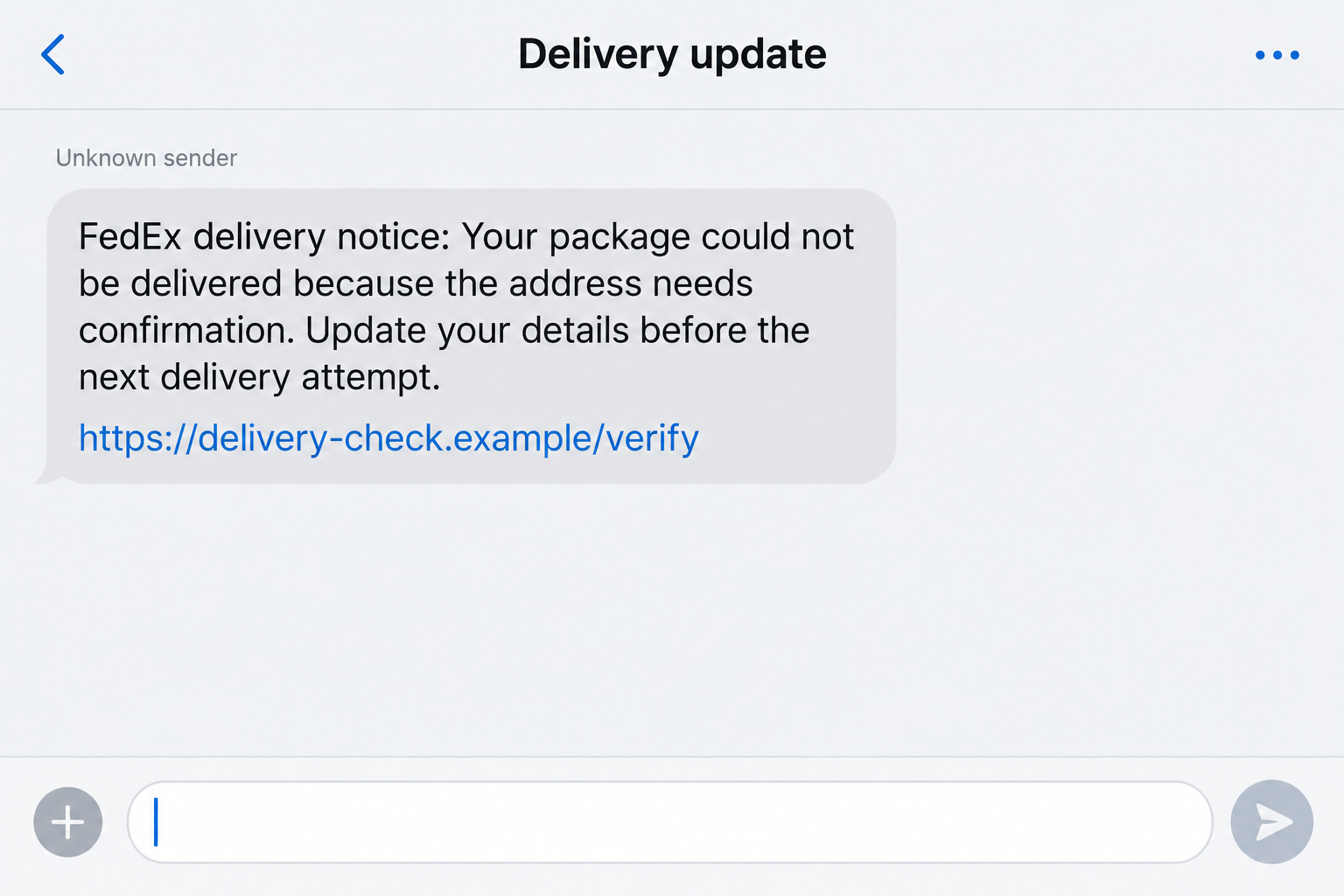
The reported message claims a package has a delivery-address problem. It directs the recipient to a FedEx-looking domain and adds a deadline for verification.
That creates a convincing little emergency. The reader thinks about losing a parcel, rather than checking who actually sent the message.
FedExvq.com is a separate domain from fedex.com. Adding two letters to a familiar company name does not make the resulting website an official service.
FedEx itself warns about altered web addresses and unexpected messages concerning shipment problems. Its fraud guidance recommends verification through legitimate channels.
What our checks established
We checked the domain’s registration record on October 4, 2026. The registry lists its creation as October 1, 2026, at 12:53:09 UTC.
That establishes the domain’s age, not the identity of its operator. A recently registered website is not automatically fraudulent.
Here, however, the fresh domain accompanies an unsolicited delivery story, an altered brand name, and pressure to disclose information through an unfamiliar route.
Our direct HTTPS request did not retrieve a usable delivery page. We therefore did not verify a live checkout, exact fee, or complete data-entry sequence.
The article separates those limits from the broader phishing mechanism. A reported address-verification lure is not evidence that every visitor sees the same page.
- Reported hook: a delivery cannot proceed until the address is verified.
- Domain being investigated: fedexvq.com, written here for identification, not as a clickable recommendation.
- Registration: October 1, 2026, independently checked against the domain registry.
- Immediate decision: ignore the supplied route and inspect the genuine order’s tracking information separately.
- Unconfirmed details: any particular payment amount, malware payload, completed fraud transaction, or operator location.
The real delivery company is being impersonated
This warning concerns a message using FedEx’s identity. It is not an accusation against FedEx, the retailer you ordered from, or your delivery driver.
A real package can exist at the same time as a fake delivery alert. That coincidence is precisely what makes this approach effective.
Start with the order confirmation you already have. If its tracking information shows an issue, handle that issue through the retailer or FedEx’s independently opened website.
If there is no matching shipment, there is no reason to supply your address, card number, or account password to the sender.
Why an Address Problem Is Such an Effective Hook
You do not have to believe an extravagant story to get caught here. You only have to believe that a shipping label needs a small correction.
That sounds ordinary. Apartment numbers get omitted, postal codes get mistyped, and parcels sometimes require another delivery attempt.
The deception borrows that everyday experience. It places a plausible problem in front of you and makes its own link appear to be the easiest solution.
An impatient reader may remember an online purchase but not which carrier is delivering it. The message fills that gap with a recognizable name.
A deadline adds pressure without needing a dramatic threat. You may worry that postponing the correction will send a gift or essential item back.
The safer response is not to decide whether address mistakes ever happen. They do. Decide whether this particular sender has shown a connection to your shipment.
A generic alert with a lookalike link has not made that connection. Even an apparent tracking reference needs checking outside the message.
How the FedExvq.com Delivery Text Scam Works
Step 1: The message interrupts an ordinary day
The opening contact presents itself as a delivery notification. The reported example used a phone number rather than a trusted conversation already associated with an order.
One number associated with the example was +1 (986) 270-3769. Treat it as an identifier from that report, not a permanent signature for this campaign.
Numbers can change, and displayed caller information can be misleading. The important evidence is the request and destination, not whether an area code seems local.
The sender does not need to know that you bought something yesterday. Sending a generic parcel story to many recipients can reach people awaiting deliveries.
Do not infer a breached retailer account merely because the timing feels personal. Coincidence and broad distribution can create the same impression.
Step 2: A routine delay becomes your responsibility
The message moves quickly from notification to instruction. A supposed address issue now requires you to verify information before a stated deadline.
This changes the reader’s role. Instead of asking whether the alert is genuine, you start asking what you must do to avoid a delivery failure.
Watch that shift. A message cannot establish a real problem simply by declaring that immediate action is required.
Look for an order you recognize, a tracking reference you can independently check, and an explanation consistent with the shipment’s actual status.
Do not answer the sender to request those details. Open your retailer account through your usual app or a bookmark, then check the order there.
Step 3: The lookalike domain borrows the carrier’s name
Fedexvq.com starts with familiar letters, which can make a quick glance feel reassuring. The extra characters are easy to miss on a small display.
But a familiar word inside an address is not authentication. The registered domain is fedexvq.com, not a section of fedex.com.
Subdomains belong before the registered domain. A longer address can contain a famous brand while ultimately belonging to someone else.
Read the destination slowly, without opening it. Do not copy the suspicious address into your browser just because your messaging app disables its link.
A secure-connection indicator would not solve the problem either. Encryption can protect a connection to the wrong website just as easily as the right one.
Step 4: The page makes disclosure feel like a correction
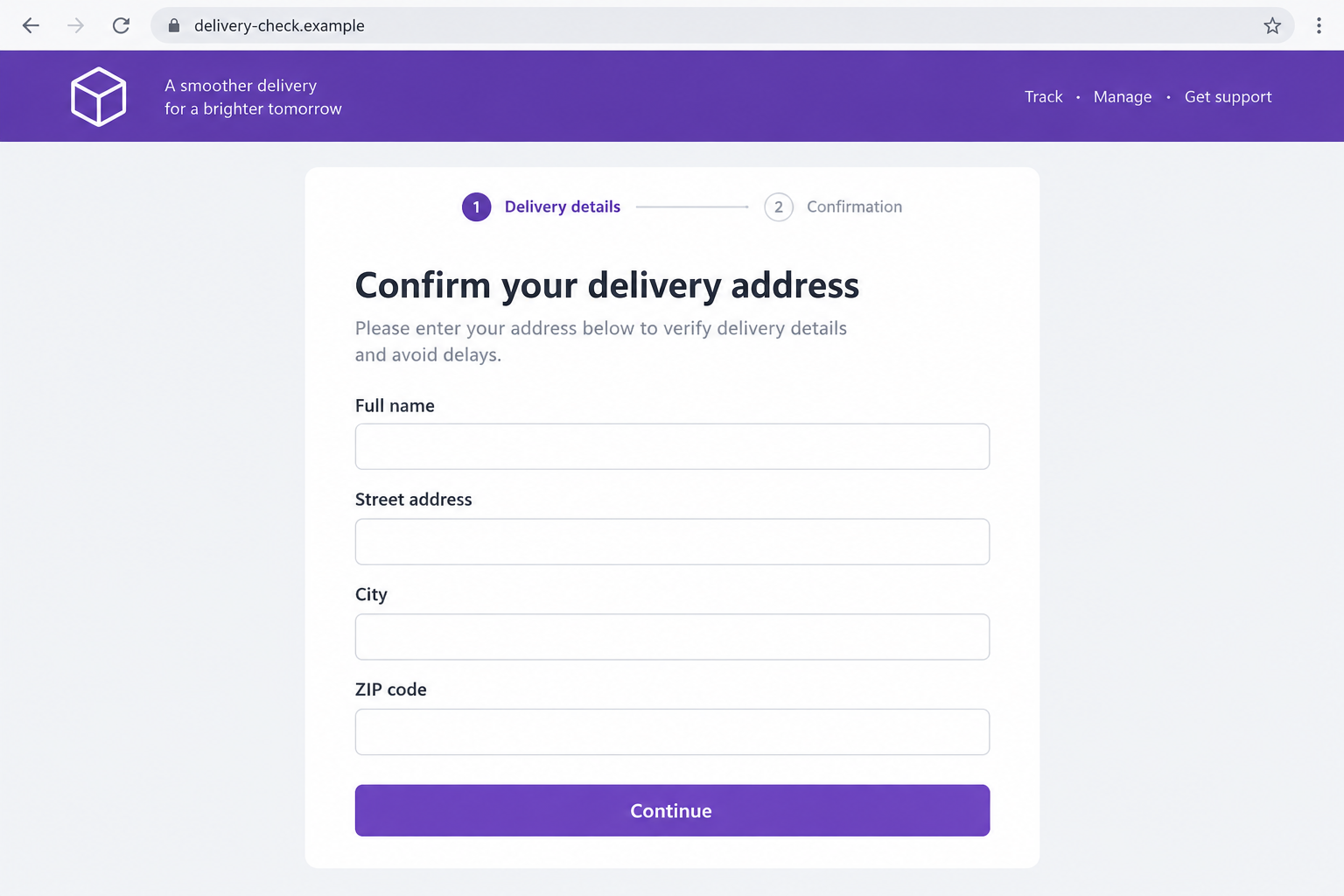
In delivery phishing generally, the next screen may resemble an address-update form. A copied logo and polished layout can make the process feel routine.
The illustration below explains that potential stage. It is not a capture of a working FedExvq.com form, which we could not independently retrieve.
The risk is straightforward: information entered into an unverified form goes to the party running that form, not necessarily to the carrier.
Your name and address may feel harmless because the supposed purpose is delivery. Combined with a phone number or email, they can support more convincing follow-ups.
If the page asks for a shipping-account password, it has moved beyond an address correction. Do not provide credentials to make a generic delivery warning disappear.
Step 5: A small request can open a bigger financial risk
Some parcel phishing schemes add a redelivery or processing fee. We did not establish such a fee for this specific domain.
If a version you receive asks for payment, judge the recipient of that payment before judging whether the amount sounds affordable.
A tiny charge still exposes a complete card number, expiration date, and security code when you type those details into the wrong form.
A subsequent bank verification code can be more consequential than the displayed fee. Read the bank’s message to see what action the code actually authorizes.
Never give a caller a code to cancel a suspicious transaction. Contact your card issuer through the number printed on your card instead.
Step 6: The sender may keep trying after the first contact
An unanswered message can be followed by another deadline or a different delivery pretext. That repetition does not make the original claim more credible.
If you disclosed information, later callers may use those details to sound informed. They might pretend to resolve the shipment or investigate a payment.
That possibility is why preserving the original message matters. It gives your bank or account provider context if another suspicious contact arrives.
Do not pay anyone promising to trace the sender or recover money immediately. Handle recovery through your financial institution and recognized reporting channels.
The practical endpoint is to break the message’s control over your next action. Verification should begin somewhere the sender did not choose.
Sender, Domain, and Delivery Checks That Actually Help
A phone number does not prove the sender’s location
The reported number has a U.S. country code, but that does not establish where the person sending the message operates.
Do not identify a country, call center, or criminal organization from a displayed number alone. The evidence here supports a phishing warning, not that attribution.
Likewise, calling back is not a meaningful authenticity test. Someone answering confidently can repeat the same false delivery story.
The registry gives a date, not a clean bill of health
The creation timestamp came from the .com registry’s registration record. It is a concrete finding you can distinguish from a website’s claims.
Domain age is useful context, but it is only one factor. Established domains can be compromised, and legitimate businesses can launch new domains.
The decision here rests on the combined story: unexpected contact, brand imitation, a verification demand, and no independently established connection to your actual parcel.
Use the shipment record you already control
Check the retailer’s order history first. Match the carrier and tracking number, then open the carrier’s official tracking service separately.
Compare dates and status descriptions. A parcel already delivered last week cannot explain an urgent new address correction for the same shipment.
For international deliveries, genuine duties or taxes can exist. FedEx says those notifications should be verified using its legitimate import tools.
That exception matters. The rule is independent verification, not assuming every delivery-related payment is impossible or every SMS is fake.
What to Do if You Have Fallen Victim to This Scam
You can respond effectively without assuming the worst. Start with what you actually did, because reading a text and supplying card details are different exposures.
- Stop the conversation and save the evidence.
Take a screenshot showing the sender, message, link, and time. Keep it privately, particularly if it contains personal information.
Close any page opened from the alert. Do not reply, call the supplied number, or return to finish an incomplete verification form.
- If you only opened the link, check for further actions.
Recall whether you downloaded a file, installed an app, permitted browser notifications, or entered information. A click alone does not establish a compromised device.
Remove notification permission for the suspicious site if you granted it. Update your operating system and browser before using financial services.
- Secure any password you disclosed.
Visit the genuine account through a clean route and change the exposed password. Replace it elsewhere if you reused the same combination.
Enable available two-step verification. Review active sessions and account contact details for changes you did not make.
- Call your card issuer if payment information was entered.
Explain that you submitted card details to a delivery-impersonation page. Ask about replacing the card, blocking further misuse, and disputing unrecognized transactions.
Mention any verification code you supplied. The bank needs to know whether you authorized an action beyond the small charge shown on the page.
- Handle identity information proportionately.
An address disclosure calls for vigilance against targeted messages. A Social Security number or identity-document disclosure requires a more substantial identity-theft response.
Use IdentityTheft.gov for a recovery plan when sensitive identity details were exposed. Follow the plan appropriate to the information involved.
- Inspect software only if software was involved.
For unexpected downloads or an installed application, a Malwarebytes scan can help check supported devices. Do not install a supposed cleaner offered by the suspicious page.
AdGuard can reduce exposure to some malicious advertisements and tracking. It cannot undo a disclosure or guarantee that every phishing destination will be blocked.
- Report the message, then block the sender.
Forward the text to 7726 where your mobile carrier supports spam reporting. You can also use your phone’s report-junk option.
Send the suspicious message to abuse@fedex.com and file a report through ReportFraud.ftc.gov. Do not expect a report alone to recover funds.
Frequently Asked Questions
Is FedExvq.com an official FedEx delivery portal?
Do not treat it as one. The reported verification message uses a separate lookalike domain, and we established no official connection to FedEx.
When was FedExvq.com registered?
The registry lists October 1, 2026, at 12:53:09 UTC. That date describes the domain record, not when every message associated with it was sent.
What if I really am expecting a package?
Check that order in your retailer account. A real shipment does not authenticate an unrelated text, even when the timing seems perfect.
Did clicking the delivery link automatically infect my phone?
Not necessarily. Consider whether you installed anything, allowed permissions, or supplied data. We did not verify a malware payload on this domain.
Can FedEx send genuine messages about duties or taxes?
Yes, international shipments can involve genuine charges. Verify the shipment and amount through independently accessed FedEx channels rather than relying on this message.
Should I call +1 (986) 270-3769 to cancel the alert?
No. That number was associated with the reported example, not established as a legitimate support channel. Contact the carrier using details obtained independently.
The Bottom Line
The FedExvq.com delivery text turns an ordinary delivery concern into a reason to visit an unverified lookalike website. Do not follow that route.
Check the real order separately. If you already disclosed credentials or card information, secure the affected account now instead of waiting for another delivery notice.

Reviews & discussion
0 commentsShare a firsthand experience, or ask a question.
Community reviews
fedexvq.com
Moderated reader experiences, not an editorial verdict.
Start the conversation
Have a question or something useful to share? Add the first comment.