


A completed agreement lands in your inbox just as you are clearing the day’s paperwork. The message looks routine, right down to its download button.
Before you open it, check what the notification actually tells you. A few small details matter much more than the polished layout.
Overview
A Finished Agreement You May Not Recognize
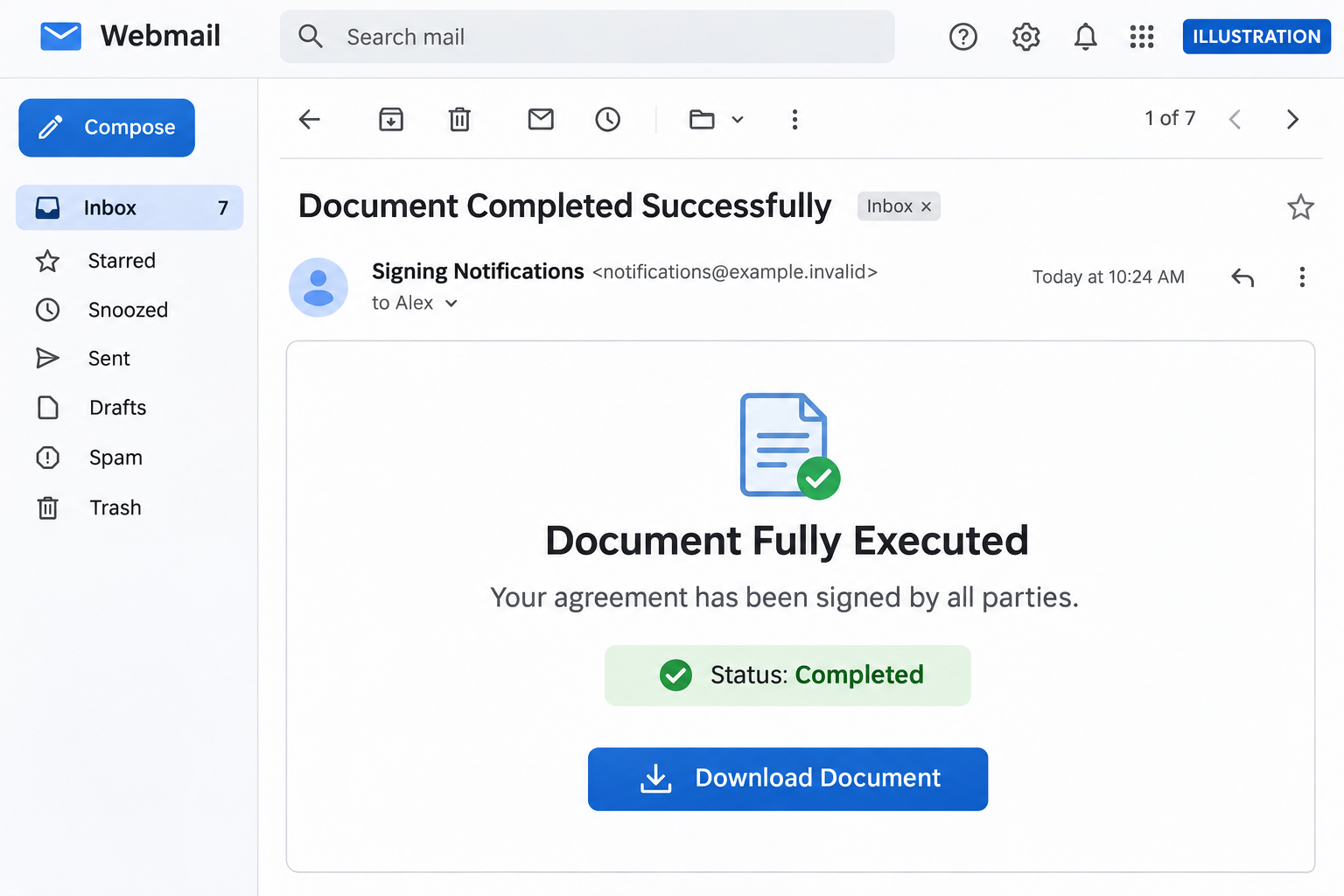
The Document Fully Executed email scam borrows an ordinary business milestone: everyone has signed, and the final agreement is ready.
The reported message uses the subject Document Completed Successfully. It supplies a completion time and offers a download alongside a certificate.
Its most useful omission is the signing provider’s identity. Familiar document language can feel credible without the sender committing to a particular service.
That matters when your inbox contains contracts from several platforms. You may recognize the process before noticing that you cannot identify the transaction.
The Download Changes Into a Mailbox Sign-In
In the documented example, the button leads to a password form hosted under dorjibarifashionhouse[.]com rather than a recognizable signing service.
The form can display the recipient’s email address already filled in. It presents access as restricted, making a password request seem like normal confidentiality.
The sought-after item is your email password, not your signature. Giving it to the counterfeit page can expose much more than the supposed agreement.
The named domain is an indicator from this example, not a complete blocklist. Replacement addresses can carry the same document story.
What Deserves Your Attention First
- A completed contract you cannot connect to a real conversation or signing request.
- A generic notification that does not clearly identify the actual signing provider.
- A download button that takes you to an unrelated web address.
- A mailbox password requested outside your usual account provider.
- A prefilled address used to make an unfamiliar form feel personalized.
This is a credential-phishing case. Receiving it does not mean your account is compromised, and the documented password form does not establish a malware infection.
Why a Completed Document Feels So Believable
An unfinished agreement invites questions. A finished one encourages filing: download it, save it with the project, and move on.
The scam takes advantage of that change in attention. You are not being asked to negotiate terms, only to collect something supposedly settled.
A precise timestamp adds a familiar administrative detail. It looks like a record produced automatically, even though anyone preparing an email can type one.
The promised certificate serves a similar purpose. Real signing platforms issue audit records, so the reference supplies context without proving that any signing occurred.
Busy employees may also assume a colleague handled the earlier steps. The missing history becomes easy to explain away in a shared project.
That is why verification should begin with the agreement, not the appearance of the email. Who arranged it, and where is the earlier correspondence?
How the Document Fully Executed Email Scam Works
Step 1: A Routine Completion Notice Creates a Reason to Click
The message announces an agreement’s completion rather than an emergency. It fits naturally among the documents a business receives every week.
Its button offers a useful next action: collect the final copy. The request can feel productive instead of risky.
For someone expecting several documents, that is enough to create uncertainty. Perhaps this is the contract another department was waiting for.
Pause at that uncertainty. An unexplained agreement is a reason to check the sender through an existing conversation, not to authenticate through a new page.
Step 2: Signing Language Fills the Gaps in the Story
Completion status, signatures, and a certificate give the email the vocabulary of an established workflow.
Those details are easy to reproduce. They do not show who signed, whether the agreement exists, or which organization authorized the notification.
The absence of a named provider can even widen the lure’s appeal. Each recipient may mentally supply the service they normally use.
A real transaction should survive a simple check with the other party. If nobody recognizes it, the polished administrative language has answered nothing.
Step 3: The Button Takes You Outside the Expected Service
The decisive change happens when the document control opens an unrelated destination. The action still sounds like downloading, but the browser is now elsewhere.
A secure connection does not solve that mismatch. HTTPS protects traffic to the site you reached, including a site operated by an attacker.
Read the actual domain, not just words elsewhere in the address. A familiar company name inside a path does not make that company the host.
Do not revisit a suspicious link to investigate it yourself. Your security team can inspect the original email safely without submitting a password.
Step 4: A Prefilled Address Makes the Password Request Feel Familiar
The counterfeit portal can receive your address from the link and display it immediately. That does not require access to your mailbox.
Seeing your own address may suggest that the service knows you. In reality, the sender needed the address simply to deliver the lure.
The restricted-access explanation gives the next request a convenient justification. The page claims the password is needed to release confidential material.
Legitimate documents can require authentication. The important distinction is where it happens: your recognized provider or an unrelated form collecting the same secret.
Step 5: Submitted Credentials Create an Opening Beyond the Document
Once a password is sent to the false form, the operator can try it against the real email account.
Mailbox access may reveal reset messages, business conversations, contact lists, invoices, and shared-file invitations. The consequences depend on the account’s permissions.
An intruder can also impersonate you. A document lure sent from your genuine account may appear more credible to colleagues and customers.
There is no need to wait for visible damage before responding. A submitted password is enough reason to begin account recovery.
How to Check the Agreement Without Using the Button
Start With the Person Who Arranged It
Find the existing conversation with the client, colleague, landlord, recruiter, or vendor involved. Use contact details you already trusted before this message arrived.
Ask whether they sent a completed agreement and which signing service they used. You do not need to forward passwords or private contract contents.
If the message names nobody you recognize, check your own project records first. Do not let the unexplained document create a new business relationship.
Open the Known Signing Service Separately
Use a saved bookmark or navigate independently to the platform you actually used. Look for the agreement in its document history.
Some legitimate recipients can access a document without a permanent account. In that situation, confirm the delivery method directly with the known sender.
Do not create an account at an unfamiliar portal simply because the email calls access restricted. Verify the service before sharing any information.
Check the Sender and the Sign-In Destination Together
Expand the sender details. A familiar display name is only a label, while the underlying address provides something concrete to compare.
Authentication results can help a security team investigate, but passing checks do not make every message safe. A genuine account can also be misused.
The sign-in destination deserves its own check. A password manager refusing to fill a familiar login can be a useful warning about the domain.
Never disable that protection to make an unfamiliar document portal work. Stop and use the independently verified route instead.
When Someone Else Handles Your Contracts
Shared responsibilities can make this lure harder to dismiss. You may receive final copies even when a colleague arranged the signatures.
Use a simple internal handoff: the colleague confirms the agreement’s name, counterpart, and signing platform through your usual workplace channel.
Do not send the suspicious message to a group with a casual instruction to open it. Ask the relevant person to check their records instead.
If your organization uses an assistant or external adviser, confirm through the contact already stored in your directory, not a new address in the notification.
A consistent filing process helps too. When finished agreements belong in a known project location, an unexplained download request becomes easier to question.
The goal is not to inspect every contract’s contents during a security check. It is to establish that the transaction and delivery route are real.
What to Do if You Have Fallen Victim to This Scam
You can still reduce the damage. Begin with what you actually shared, and tell your organization’s security team promptly if a work account was involved.
- Stop using the page and preserve the message.
Close the form. Keep the original email, its headers, the destination address, and the approximate time you interacted with it.
Do not repeatedly test the form, forward a clickable link widely, or send a screenshot containing a password. Use the approved incident-reporting channel.
- Change any password you entered.
Open the genuine account service from a trusted device. Choose a new, unique password and replace it anywhere the exposed password was reused.
If you cannot sign in, use the provider’s official recovery process. For work accounts, contact your administrator through the internal directory.
- Revoke sessions and review recovery access.
Use the account’s security settings to sign out unfamiliar sessions. Review registered devices, recovery addresses, telephone numbers, and newly added authentication methods.
Check connected applications and application passwords too. Removing an unknown authorization can matter as much as changing the main password.
- Inspect the mailbox for changes.
Look for new forwarding addresses, inbox rules, delegates, sent messages, and deleted security notifications. Save evidence of changes before removing them.
Ask recipients to disregard suspicious messages sent from your account. Use a separate trusted channel when the mailbox’s control is still uncertain.
- Protect payments and sensitive information if they were exposed.
Contact the relevant bank or payment provider if account details, invoices, or transfer instructions were accessed or changed. Explain the suspected mailbox compromise.
Independently reconfirm recent payment-detail changes with counterparties. A criminal can exploit an existing invoice conversation without sending another obvious phishing message.
- Check the device if the encounter went beyond the password form.
If you ran a downloaded program or enabled an unexpected extension, disconnect the affected device and obtain an appropriate malware assessment.
Malwarebytes can help inspect suspicious software. AdGuard may reduce some deceptive-site exposure, but neither tool revokes a stolen account session.
A link click without a download or submitted information calls for a different response: close the page, update the browser, and report the message.
- Strengthen authentication and keep watching the account.
Enable a passkey or another strong authentication option supported by your provider. Remove unknown recovery methods before relying on new protection.
Monitor sign-in alerts and business correspondence. Tell the security team about unexpected follow-up contact, especially anyone offering to recover access for a fee.
If You Clicked but Did Not Enter a Password
A click is not the same as surrendering an account. Write down whether you downloaded anything, granted a permission, or approved a sign-in prompt.
Check the browser’s downloads list without opening unknown files. Remove a suspicious download only after preserving whatever evidence your workplace security team requests.
If you granted notification permission, revoke it in the browser’s site settings. A website notification is not an alert generated by your antivirus.
Do not assume a legitimate-looking page shown afterward proves safety. A redirect can end at a harmless destination after another page collected information.
On the other hand, avoid a panicked factory reset simply because the email looked convincing. Match cleanup to the actions and evidence involved.
What Businesses Should Check After a Report
A reported signing lure can reveal a broader targeting attempt. Search for matching subjects, sender addresses, and destination indicators across the mail environment.
Use the original message rather than a screenshot alone. Headers and complete link destinations can help separate a malicious campaign from an ordinary document notification.
Check identity logs around the interaction time. Look for unfamiliar sessions, authentication-method changes, new application grants, and unusual mailbox activity.
Ask whether the employee had access to payment approval, customer records, or shared repositories. Response priorities should follow that actual access.
Review account recovery and mail rules even if a password reset succeeded. A reassuring sign-in does not show what changed during the compromise.
Make reporting easy and blame-free. Someone who clicked and reports immediately gives the organization a better chance than someone afraid to admit a mistake.
Frequently Asked Questions
Is every completed-document email a scam?
No. Legitimate signing platforms send completion notices. Verify the transaction, actual sender, and authentication destination rather than rejecting the wording alone.
Why does the page already know my email address?
The address can be included in the link. Prefilling it is not proof that the page belongs to your mail provider or signing service.
Is this necessarily a DocuSign or Adobe Sign message?
No. This example uses generic e-signature language. Do not assign it to a provider simply because it resembles that provider’s normal workflow.
Does receiving the email mean someone signed a real agreement?
No. A completion time and status line can be fabricated. Confirm the agreement through its known participants or the signing platform you used.
Should I scan my computer after typing the password?
Account recovery comes first. Scanning is relevant if you also ran software or have signs of compromise; it does not replace session revocation.
What if the suspicious page no longer opens?
Keep the original email and report what you submitted. A removed or broken page cannot recall a password already sent to its operator.
The Bottom Line
Do not enter your mailbox password through the Document Fully Executed email. Confirm the agreement separately and use the signing service’s verified route.
If you already submitted credentials, change them now, revoke unfamiliar sessions, and inspect mailbox access. A missing document is secondary to protecting the account.

Join the discussion
0 commentsShare your experience or ask a question about this article.
Discussion
Start the conversation
Have a question or something useful to share? Add the first comment.