


The renewal notice names your website, and the page seems to know when the domain expires. For a small business, that’s enough to demand attention.
There’s a countdown beside a low-priced renewal button. Before treating it like another routine bill, check whose system you’re actually looking at.
Overview
Renovarix turns a domain name into an urgent renewal offer
The Renovarix domain renewal scam presents an unrelated payment journey as the solution to an expiring website address.
The convincing detail is your domain. Seeing it beside technical labels can suggest that the page belongs to a registrar managing your registration.
But knowing which domain you own doesn’t establish authority to renew it. A renewal has to affect the registration held through your actual provider.
The documented page manufactured its own urgency
A technical investigation of Renovarix exposed a renewal page that looked up a domain while inventing important parts of its supposed status.
The button opened an unrelated checkout. The real registration wasn’t shown to have changed, regardless of how official the surrounding page looked.
The original storefront no longer appears at the address checked for this article. A registrar verification page now replaces it; that replacement isn’t the fraudulent offer.
What would prove that your domain was actually renewed
Ignore the sales page’s status and check the account that controls your registration. Look for the following before paying any unexpected renewal demand:
- The domain appears in your genuine registrar account.
- Its actual expiry and renewal options are visible there.
- The invoice identifies a service and provider you recognize.
- Any completed renewal is confirmed in that account, not only by an outside page.
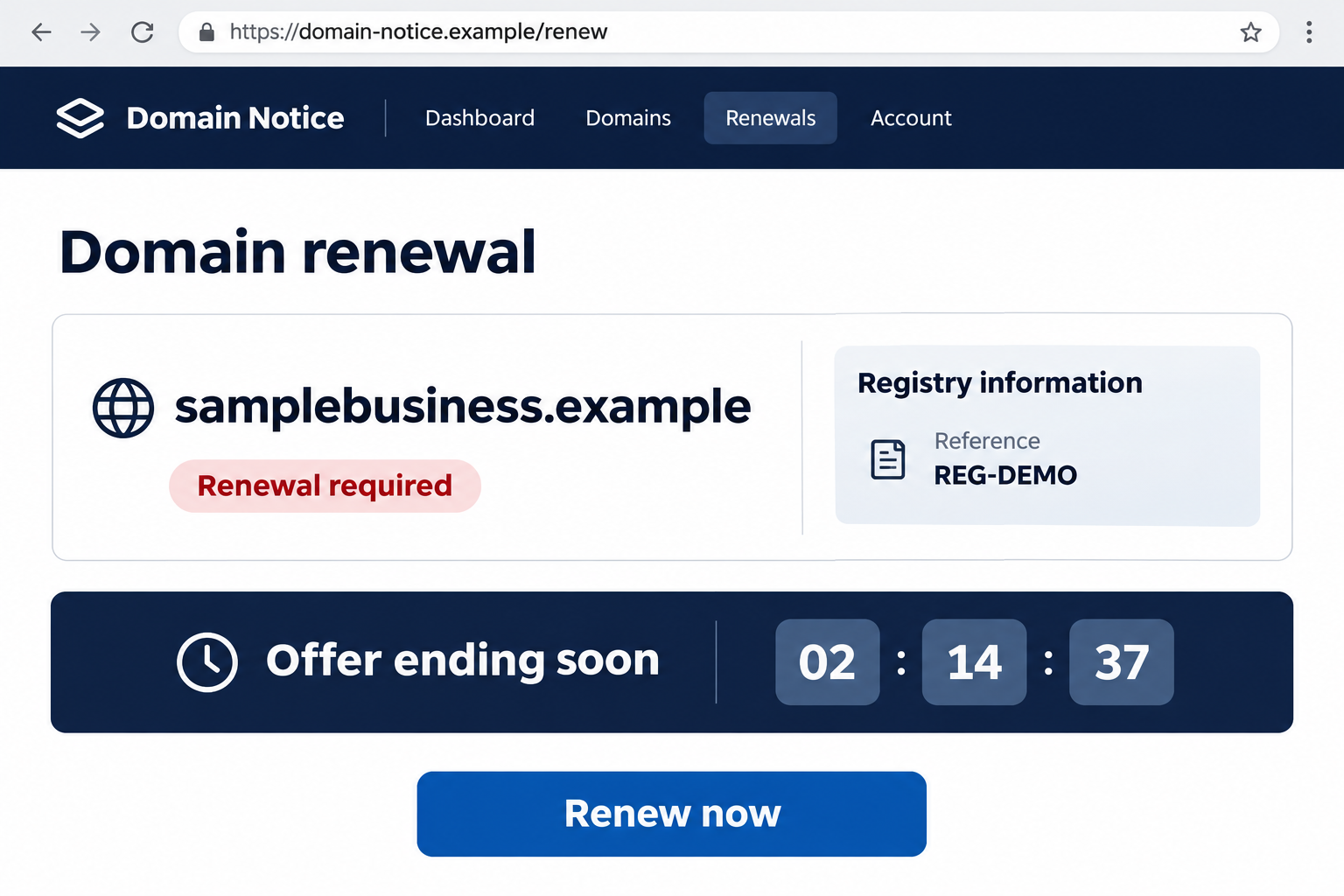
The dashboard illustration above uses a fictional domain and reference. It represents the misleading presentation without pretending to be the original Renovarix interface.
Your Domain Is Public; Your Registrar Relationship Is What Matters
A domain is supposed to be discoverable. It identifies your website, appears in business records, and may be printed throughout your marketing.
That makes the domain name a weak identity check for a billing notice. A stranger can name your site without managing its registration.
Some registration information can also be obtained through public lookup services. The amount available varies; a sender knowing details doesn’t prove a private-account breach.
The meaningful connection is between the domain, your registration account, and the organization authorized to bill you for its renewal.
If an outside notice cannot establish that connection, a technically accurate detail doesn’t repair the missing authority.
This matters for businesses with separate providers. The company hosting the website may differ from the registrar, email provider, designer, or billing contact.
An unfamiliar name isn’t automatically fraudulent, but it needs an explanation from your own records. Look at past genuine invoices before accepting the new demand.
If someone else manages the domain, ask them which account controls it. Don’t pay first to avoid an imagined outage while that person is reachable.
How the Renovarix Domain Renewal Scam Works
Step 1: A renewal message names something you cannot afford to lose
The approach centers on the website address rather than a random prize or investment. Losing a business domain sounds like an immediate operational problem.
A renewal message therefore arrives with a built-in reason to act. Even a busy recipient may interrupt other work to avoid disruption.
Check the sender independently, including the actual address rather than its display name. A billing label cannot establish a registrar relationship on its own.
More importantly, don’t let an email become the only record you consult. Your existing account and previous invoices provide a separate starting point.
Step 2: The landing page blends real details with invented ones
The recorded page generated a registry reference in the visitor’s browser. Technical-looking labels helped the result resemble an authoritative lookup.
A reference number can feel reassuring even when you have no way to check it. Its usefulness depends on who issued it and what it actually identifies.
If your registrar cannot reconcile the outside reference with your account, treat it as unexplained text rather than proof of a debt.
You don’t need to submit additional domains to test the page. The relevant check is the status of your own registration through a trusted account.
Step 3: A manufactured clock makes a cheap payment feel sensible
The reported implementation forced a three-day warning and paired a €2.00 renewal offer with a short sales countdown.
The low advertised price made the request easier to dismiss as a routine expense. That framing reduces the incentive to examine the receiving service.
But paying less doesn’t fix the wrong transaction. Even a small charge is wasted if it doesn’t renew the domain you depend on.
Separate a promotional countdown from your actual expiry date. One belongs to a webpage’s sales pitch; the other belongs to your registration.
Step 4: The renewal button changes into a checkout journey
Its button took visitors through affiliate redirects to a contact-information form.
That changes the question. You are no longer simply reviewing domain information; you are supplying data to the operator of a different offer.
Read the service name and terms at each transition. A button labeled for renewal doesn’t make every page it opens a registrar payment form.
The documented path also contained mismatched prize-style review material. Reviews about winning something don’t establish that a domain-renewal service works.
Step 5: A success screen can appear without a registration change
Some documented versions displayed a locally generated renewal-complete message. A browser can show that text without changing any domain registration.
The real test comes afterward: does the genuine registrar account show the renewal and updated status you purchased?
Don’t use the outside page’s own success message as both the claim and its confirmation. A payment receipt and a registration update are separate records.
If you paid but no renewal appears, contact the payment provider and actual registrar promptly. Don’t wait for the promotional countdown to expire.
Check the Domain Without Returning to the Notice
Use a saved bookmark or independently open the registrar you already use. Sign in through that established route, not the notice’s renewal button.
Locate the exact domain, including its ending. A similar address in a billing message can distract from which registration you actually control.
Review the expiry date, renewal status, account contact, and existing payment arrangements. Record what the account says before making changes.
If automatic renewal is enabled, check whether the payment method remains valid. Don’t assume that an outside request is needed just because a renewal date is approaching.
If the account shows a real upcoming expiry, renew there or ask the registrar for guidance. A genuine deadline doesn’t validate an unrelated collector.
For general background, ICANN explains legitimate renewal reminders. Real registrars do send notices, so deleting every renewal email isn’t a useful policy.
The safer habit is handling the transaction from your established account. You can acknowledge a reminder without trusting the payment link inside it.
If you can’t identify the registrar, look through prior receipts or ask the person who set up the site. Don’t guess based on the latest urgent email.
Domains Seen in the Documented Route
The reported campaign included renovarix[.]org, xe54ghj[.]com, paysuccessful[.]site, molipy8trk[.]com, and topprogressstores[.]online at different stages.
These are historical identifiers for recognizing an old message or receipt. They are deliberately not clickable instructions to revisit the pages.
A different address can carry a similar promise, while an old address can later display unrelated content. Judge the actual message and transaction, not just this list.
At renovarix[.]org, the present page says the domain is pending registrar contact verification. That tells us what is visible there now, not who operated the earlier funnel.
It also doesn’t make the named registrar responsible for the earlier deception. Domain registration and operation of a misleading website are different roles.
Keep the original address from your own notice if it differs. It may help connect the message with the destination on your receipt.
Don’t Confuse ICANN References With a Renewal Invoice
ICANN has a legitimate role in domain-name administration, so its name can make a renewal demand sound more official than it is.
But ICANN’s phishing guidance explains that it doesn’t collect domain-registration or renewal fees directly from registrants.
A message invoking ICANN therefore still needs to establish the actual billing relationship. An official-sounding explanation is not permission to collect money.
The same goes for a copied logo, security icon, or registry label. Those features don’t show access to the registrar account where a renewal must occur.
If a genuine registrar needs contact verification, handle that separately through the registrar’s trusted account or support process.
Don’t reuse an old scam email’s links because the current website mentions verification. The replacement page and the earlier demand may describe entirely different situations.
You should be able to identify the service being purchased before authorizing payment. If the page changes that service during checkout, stop and clarify independently.
What to Do if You Have Fallen Victim to This Scam
- Check whether the domain still needs a genuine renewal. Sign in to your actual registrar and review its current status before assuming the outside payment protected it.
If expiry is close, contact that provider through its established support route. Deal with the real registration separately from recovering the fraudulent payment.
- Contact the payment provider promptly if you paid. Explain that the transaction was represented as domain renewal but didn’t produce the promised registration service.
Ask about a dispute or other recovery option, supplying the merchant details shown on the actual transaction. Don’t describe an approved payment as unauthorized if you approved it.
- Save the complete route and receipt. Keep the email, sender address, link destination, advertised amount, checkout confirmation, and merchant description.
A renewal-success screenshot is worth retaining even if it was false. Pair it with the genuine account’s status to explain the discrepancy.
- Review any enrollment attached to the checkout. Read the receipt and terms for the service actually purchased, including any recurring arrangement.
Don’t assume every version created a subscription. If yours did, request cancellation through a verified route and retain confirmation.
- Secure registrar credentials if you disclosed them. Change an exposed password through the genuine account and review access, contact details, and recent changes.
If you supplied a transfer authorization code or approved a transfer, tell the registrar immediately. Merely entering a public domain name isn’t the same exposure.
- Tell your team which notice was fraudulent. This matters when accounting, a designer, and the business owner can all authorize website-related payments.
Share a redacted copy and the genuine provider’s identity. Don’t circulate a live payment link as the warning itself.
- Report the false renewal offer through legitimate channels. Provide the message and transaction details to the relevant fraud-reporting authority or provider.
If an account or domain was actually changed, include the registrar’s case reference. Keep registration recovery and payment recovery organized as separate issues.
- Decline paid recovery approaches from strangers. Someone promising to restore the domain or refund the charge for another upfront fee needs independent verification.
Use the registrar and provider cases you’ve already opened. Don’t give remote access or approval codes to an unsolicited helper.
Put a Simple Renewal Record Where Your Team Can Find It
A short internal record can prevent the next notice from becoming an emergency. List the genuine registrar, domain, renewal date, responsible person, and support route.
Don’t place account passwords in a shared billing document. Use your normal secure credential process while making the provider’s identity easy to confirm.
Retain a genuine renewal receipt as a reference. Accounting staff can compare future notices with a known transaction instead of judging the new message’s design.
Decide who approves a new vendor for domain services. An unexpected email should not silently create a second billing relationship.
If the domain is managed by an outside designer, clarify who owns the registration account and who receives official notices.
That conversation is useful even without a scam. It helps avoid real expiry problems that make misleading renewal offers more persuasive.
Frequently Asked Questions
Does knowing my domain prove Renovarix is my registrar?
No. A public domain name doesn’t establish a billing relationship. Verify the provider through your genuine registration account and previous records.
Was the three-day warning the actual expiry date?
Use the date in your actual registrar account. The outside sales clock isn’t a reliable record of when your registration expires.
Did the low-priced checkout renew the domain?
Open your registrar account and check the registration itself. An outside receipt records a payment, not necessarily the renewal of your domain.
Are genuine renewal emails always safe to ignore?
No. Real registrars send reminders, and domains can expire. Open your established account independently and deal with any genuine obligation there.
Does a renewal-complete page prove the transaction worked?
No. A webpage can display success text without altering a registration. Look for the renewal in the account that actually controls the domain.
Does the current verification page prove the old offer was legitimate?
No. It is a different page. Its current registrar notice neither authenticates the earlier checkout nor establishes responsibility for that earlier conduct.
The Bottom Line
Do not pay a Renovarix renewal demand through its unrelated checkout route. Renew your domain through the genuine registrar account, where the actual registration can be confirmed.
If you already paid, check the real expiry first, contact your payment provider, and preserve the misleading notice. Protect registrar access separately if you shared credentials or transfer authority.

Join the discussion
0 commentsShare your experience or ask a question about this article.
Discussion
Start the conversation
Have a question or something useful to share? Add the first comment.