


Your computer can look completely ordinary while an unfamiliar sign-in alert lands elsewhere. Working out what happened often begins with the accounts, not the screen.
VOLTA is a name worth understanding if a security report mentions it. The cleanup needs to address more than a suspicious file.
Overview
A Windows Stealer With an Additional Profiling Layer
VOLTA Stealer, also called VOLTA-AUTODOXER, is malicious Windows software built to collect sensitive information from an infected computer.
Cisco Talos’s original analysis describes an optional AI stage that organizes stolen material into a profile useful to the operator.
The theft does not depend on that stage succeeding. Missing AI access or a refused request does not make the underlying information stealer harmless.
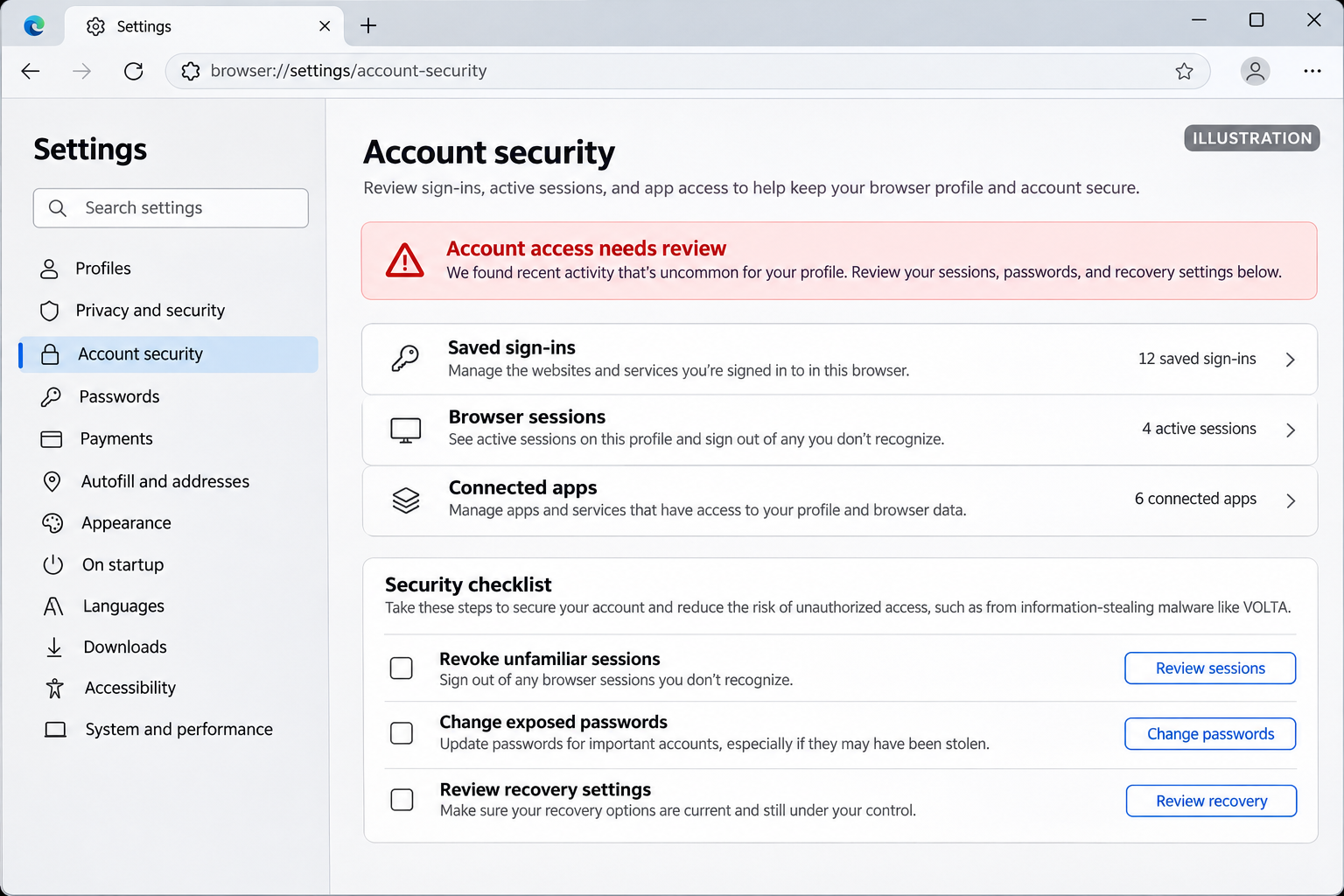
Passwords Are Only Part of the Exposure
The reported collection includes browser credentials, sessions, wallet material, messaging access, cloud credentials, and screenshots.
Think of the difference between a password and a session. A password helps someone sign in; a stolen session may represent access already authenticated.
That is why changing one password cannot be the entire response. Account access, recovery settings, and potentially exposed keys need separate attention.
A Disappearing File Does Not Mean the Incident Is Over
Talos describes VOLTA as self-deleting. Its main executable can disappear after collection, while stolen information remains available to the recipient.
- A quiet desktop does not rule out earlier data theft.
- Session revocation matters alongside password changes.
- An exposed wallet seed needs a new wallet, not just a new application password.
- Work credentials and cloud keys require the organization’s response team.
- Scanning helps assess the computer but cannot recall exported information.
A detection name alone cannot tell you everything that was taken. Preserve the report and investigate the actual accounts and files accessible during execution.
How VOLTA Stealer Works
Step 1: Malicious Software Runs on the Computer
The published analysis does not establish one universal delivery campaign for VOLTA. Do not assume every infection began with the same email or download.
A responder should reconstruct the real sequence: what was downloaded, which installer ran, what the security product detected, and when suspicious activity began.
Keep the download history and original message where available. Deleting everything immediately can remove information needed to identify the entry point.
Do not reopen the suspected program to reproduce the problem. A useful timeline does not require giving malicious software another opportunity to run.
Step 2: Accessible Credentials and Account Material Are Collected
Once malware executes under your account, information available to that account becomes part of the risk assessment.
Saved logins are particularly convenient targets because people often keep many services in one browser profile. One compromised machine can connect several otherwise separate accounts.
Stored sessions deserve the same urgency. Multifactor authentication remains valuable, but it is not a reason to ignore a session that may already be stolen.
Inventory the accounts actually used on the device. Include work tools, password managers, shopping, messaging, gaming, and financial services rather than focusing only on banking.
Step 3: Existing Access Can Supply More Personal Context
Talos reports enrichment using stolen sessions, including receipt searches and account information. That can connect a technical compromise with the person behind it.
Ordinary receipts contain useful context: names, addresses, purchases, and patterns of activity. They can make later impersonation sound unusually convincing.
Someone quoting a recent purchase is not necessarily your merchant, bank, or delivery company. Treat unexpected requests for codes or payments as new verification problems.
Use a contact route you obtained independently. Do not let accurate personal details persuade you to accept the caller’s identity without checking.
Step 4: Optional AI Analysis Helps Sort the Stolen Data
The additional model stage attempts to prioritize victims and assets. It is analysis after theft, not an AI magically bypassing every account’s security.
That distinction makes the threat easier to understand. The model’s output may help an operator decide where to spend time, but it can contain errors.
An estimated financial value is not a verified statement about a victim’s wealth. Nor does mentioning an AI service make that provider the malware operator.
The practical concern is the assembled context. A criminal may combine several small disclosures into a much more tailored follow-up attempt.
Step 5: Data Leaves the Device and the Executable May Delete Itself
The reported malware uses third-party services to deliver collected material. The analysis describes multiple possible delivery stages rather than one final upload only.
Interrupting an infection can limit further activity, but it cannot establish that nothing left beforehand. Response decisions need the timeline and available logs.
Talos identifies a local diagnostic log as potentially useful evidence. Let your responder preserve it securely; such a log may itself contain sensitive information.
Do not upload a complete stealer log to a public forum. Share only the information your trusted helper specifically requests, with secrets removed.
What to Do If VOLTA May Have Run
Separate immediate account protection from device cleanup. Use an unaffected device for sensitive recovery, especially while the suspected computer remains under investigation.
- Isolate the machine and report work exposure.
Disconnect its network connection. If it belongs to an employer or holds business credentials, contact the security team before rebooting or removing evidence.
- Secure your primary email.
Change its password through the real service, revoke unfamiliar sessions, and inspect forwarding, recovery methods, and connected applications.
- Replace other exposed passwords and sessions.
Work through accounts used on the computer, prioritizing finances and accounts that can reset others. Replace reused passwords and review recent activity.
- Treat keys and wallet secrets separately.
Notify administrators about SSH or cloud keys. If wallet seed material was exposed, obtain trusted guidance on moving assets to a newly generated wallet.
- Tell financial providers about suspicious activity.
Use official contact details to report unauthorized transactions or exposed payment information. Do not accept a recovery agent introduced through an unsolicited message.
- Preserve useful records without spreading private data.
Keep detection names, timestamps, file locations, and account alerts. Store potentially sensitive logs privately and follow your responder’s evidence-preservation instructions.
- Clean or rebuild before resuming sensitive work.
Use the Windows procedure below for an unmanaged personal computer. A business responder may instead require forensic assessment and a controlled rebuild.
Remove VOLTA and Related Malware From Windows
Step 1: Prepare a Safe Cleanup Route
Keep the affected computer disconnected while arranging help. Download approved tools using another trusted device if you cannot safely obtain them on the affected machine.
Do not connect your only backup drive to inspect the infection. Preserve important files separately under guidance, avoiding unknown programs and scripts.
The following scan can find active threats and related components. It cannot prove that VOLTA never ran or erase information already stolen.
Step 2: Scan and Quarantine With Malwarebytes
Download the Correct Windows Installer
Use the download below for Malwarebytes for Windows. Obtain the installer on a trusted computer if the affected machine cannot browse safely.
Download MalwarebytesOpens the official free-scanner page. Choose the Windows download.Optional real-time protection: Malwarebytes Premium
On the official page, choose the free scanner download for Windows. Save the installer; manual scanning and quarantine do not require a Premium purchase.
MalwareTips may earn a commission through its product links. Buying ongoing protection is optional and is not a condition for following this cleanup procedure.
Do not run an installer supplied by the suspicious message, a remote caller, or a search advertisement pretending to offer urgent technical help.
Install and Open Malwarebytes
Open Downloads and double-click the MBSetup installer. Approve the Windows permission prompt only after confirming that it belongs to the installer you obtained.
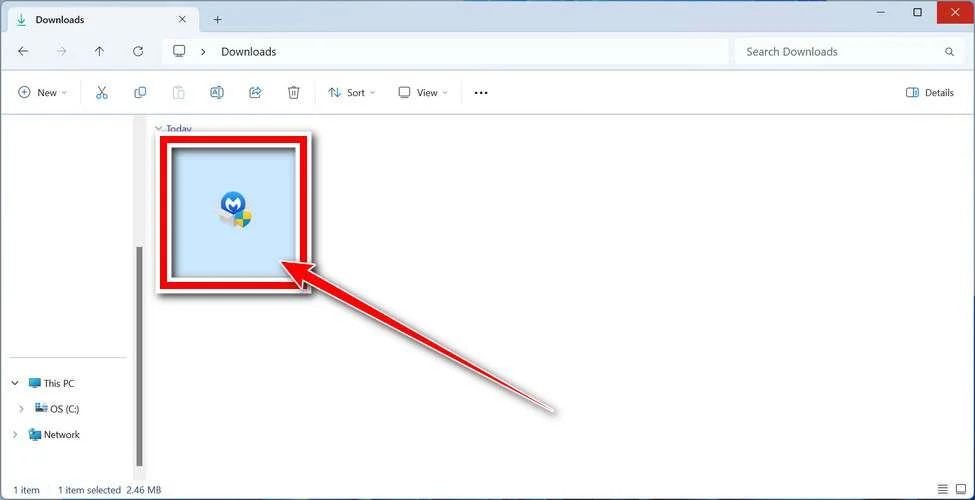
Follow the setup screens and choose the appropriate personal or work option. On a managed computer, obtain your security team’s approval before installing another tool.
Read optional offers carefully. You can skip an unwanted trial, browser add-on, or paid plan without abandoning a normal manual Windows scan.
Open the application when installation finishes. Let its detection information update if safe connectivity is available; do not reconnect an isolated business endpoint without authorization.
Run a Threat Scan, Then Check Other Affected Locations
From the dashboard, select Scan to start a Threat Scan. This checks common infection locations, memory, startup items, and the registry.
A Threat Scan is not a complete inspection of every drive. Use the Scanner tile’s three-dot menu and Advanced Scan for additional scanning choices.
Choose Custom Scan to inspect specific drives or folders. Select the Windows system drive and any other affected location your responder has approved.
Rootkit scanning is an optional Custom Scan setting on supported systems. Its absence on Windows ARM is not a reason to disable Windows protection.
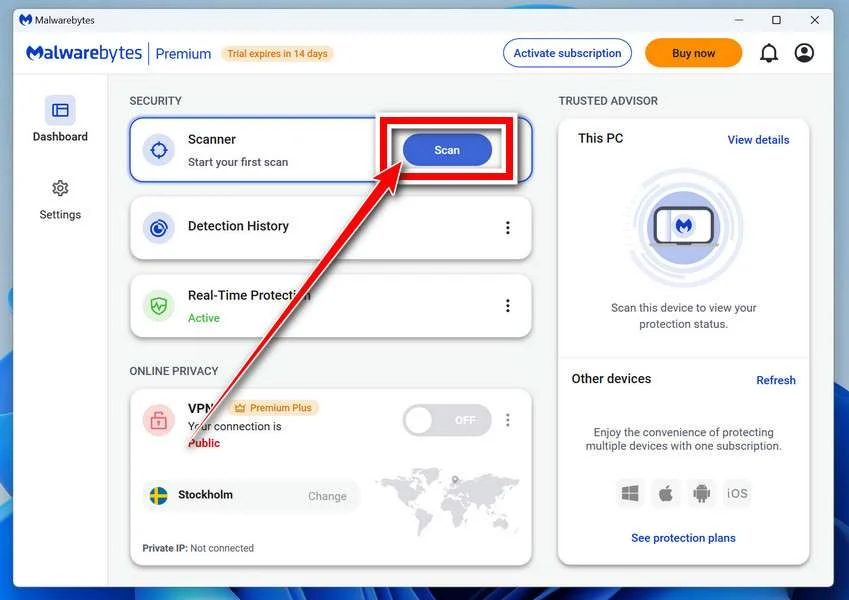
Allow the selected scan to finish. The duration depends on its scope, available storage, and the computer’s condition, so avoid a promised completion time.
If the application cannot update, start, or finish, save its error message. Repeatedly forcing a broken scanner is not a substitute for incident-response help.
When a report becomes available, review the detected names, locations, and actions. Keep a copy for whoever is helping investigate the compromise.
Review Detections and Quarantine Threats
Leave confirmed malicious items selected and choose Quarantine. Do not create an exclusion simply because a familiar program or system-looking filename appears in the report.
If a finding is unclear, record the detection and ask for advice. Do not manually delete random Windows files based only on their names.
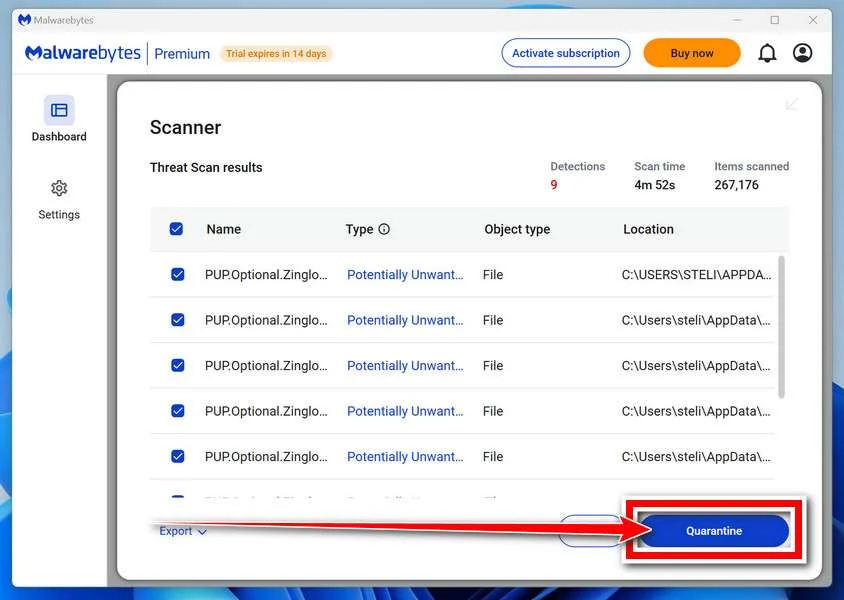
Quarantine isolates the items the tool identifies. Keep them there while the incident is assessed rather than restoring a suspicious file to test it.
Save the scan report after applying the actions. It can show a responder whether the original threat, related components, or potentially unwanted software was found.
A clean result does not undo earlier data theft. Continue the account and recovery actions relevant to this incident even when no active threat remains.
Restart if Requested and Review the Result
Save open work and allow a restart if Malwarebytes requests one. A managed-system responder may need to preserve evidence before approving that restart.
Keep backup storage disconnected during cleanup. Do not interpret a restart as permission to restore files or resume sensitive sign-ins immediately.
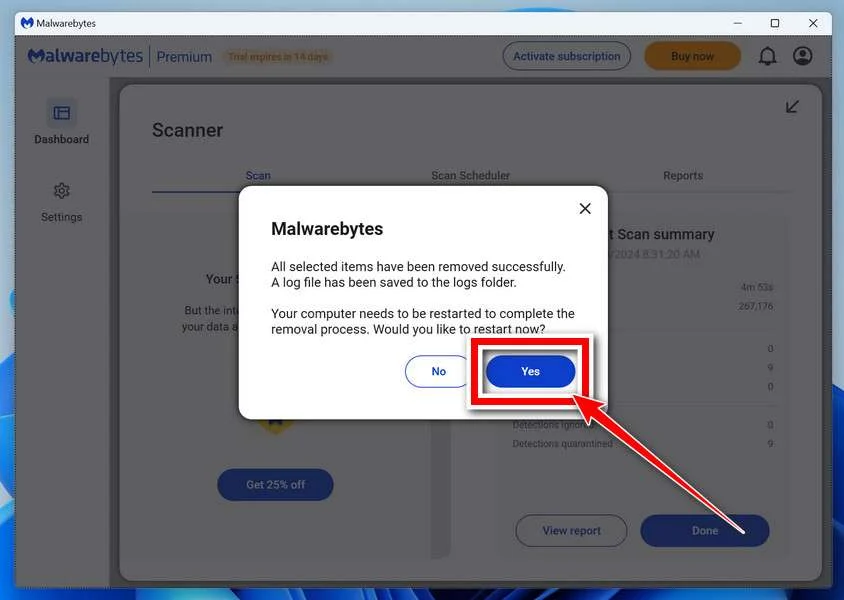
After Windows returns, reopen Malwarebytes and check the report. Run the follow-up scan appropriate to the affected locations and note any recurring detections.
Keep Windows Security and other established protection enabled. If threats return, stop ordinary use and obtain help rather than repeatedly excluding or deleting files.
For unresolved personal-device infections, ask in the MalwareTips malware-removal help forum. Do not post passwords, private logs, or confidential work documents publicly.
Step 3: Investigate Recurring Detections or Missing Evidence
A recurring threat, disabled protection, or unexplained account activity warrants further assessment. Keep the computer away from banking and work sign-ins.
For a personal computer, an additional Microsoft Defender Offline scan may help inspect threats outside the normal Windows session.
First save work and make sure your BitLocker recovery key is available. Do not begin a restart-based procedure if losing access would prevent recovery.
Open Windows Security, select Virus & threat protection, then Scan options. Choose Microsoft Defender Antivirus (offline scan) and confirm Scan now if available.
Review Protection history afterward. If the option is unavailable or scans fail, obtain qualified help rather than changing security settings blindly.
Step 4: Restore Trust Before Using the Computer Normally
Confirm updates and security protection are working. Remove untrusted software through an assessed cleanup plan, not by deleting every unfamiliar startup entry.
Consider a clean rebuild when the extent of compromise cannot be established. Preserve needed data first, and reinstall applications from trusted sources.
Do not restore the suspected installer from a backup. A clean operating system can be compromised again by the same untrusted download.
Why Account Recovery Continues After Removal
The computer and the accounts are two different problems. A scanner acts on the former; a stolen login or token may already exist elsewhere.
Revisit the security settings of affected services, not just their password screens. Check devices, active sessions, recovery factors, delegates, and authorized applications.
For business access, coordinate changes with administrators. Revoking the wrong key without a plan can disrupt legitimate systems while leaving another exposed credential active.
For a password manager, follow its provider’s compromise guidance. Whether a vault was unlocked, copied, or otherwise accessible affects the appropriate recovery steps.
Watch for impersonation that mentions private details. Familiar information can come from stolen correspondence rather than a genuine relationship with the person contacting you.
No universal monitoring period guarantees the risk has ended. Keep reviewing relevant account alerts and statements, and investigate new unauthorized activity promptly.
Frequently Asked Questions
Is VOLTA an AI program or a virus?
It is Windows information-stealing malware with an optional AI analysis stage. The malicious collection can operate without successful model access.
Can VOLTA steal a session protected by multifactor authentication?
Stolen authenticated sessions can undermine account protection. Keep multifactor authentication enabled, but also revoke potentially exposed sessions and review account activity.
Why might the malicious executable be missing?
The analyzed stealer can delete itself. Preserve available detections and logs; absence of its original file does not undo earlier collection.
Does a clean scan mean my passwords are safe?
No. A scan reports what it detects on the computer. Credentials already exported require separate password, session, and access recovery.
Will changing a wallet application’s password secure an exposed seed?
No. A copied recovery phrase can enable independent wallet access. Seek trusted help with a new wallet and safely moving remaining assets.
Should I assume every account was stolen?
Assess accounts and secrets accessible on the device during the suspected infection. Prioritize the most consequential access while your responder investigates the actual exposure.
The Bottom Line
Treat a credible VOLTA detection as a data-theft incident, not merely a file to delete. Isolate the computer and secure important accounts from another device.
Use scanning or a controlled rebuild to address the endpoint, then revoke exposed access. Removing malware cannot recall a password, session, or wallet seed.

Join the discussion
0 commentsShare your experience or ask a question about this article.
Discussion
Start the conversation
Have a question or something useful to share? Add the first comment.